TsgcWSAPIServer_WebAuthn
Only the OpenSSL 3.
Introduction
The TsgcWSAPIServer_WebAuthn component provides a simple but powerful solution to implement the WebAuthn Relying Party server, enabling passwordless authentication in your web application. A WebAuthn application consists of a WebAuthn server that handles the server-side registration and authentication and a client-side application that usually is a javascript application.
WebAuthn requires the use of secure connections (SSL/TLS), so the OpenSSL libraries must be deployed and configured with the server.
Only the OpenSSL 3.0.0+ API is supported, so previous OpenSSL versions may not work.
Configuration
The TsgcWSAPIServer_WebAuthn must be attached to an HTTP server, TsgcWebSocketHTTP_Server or TsgcWebSocketServer_HTTPAPI using the Server property. You can configure the server endpoints that will handle the registration and authentication options, and the WebAuthn options like supported algorithms, origins, and more.
Endpoints Options
Here you can configure the server endpoints that will handle the HTTP/JavaScript requests to use WebAuthn as an authenticator. The component is already configured with default endpoints, but you can change all of them to fit your needs.
- AuthenticationOptions: by default is /sgcWebAuthn/Authentication/Options
- AuthenticationVerify: by default is /sgcWebAuthn/Authentication/Verify
- RegistrationOptions: by default is /sgcWebAuthn/Registration/Options
- RegistrationVerify: by default is /sgcWebAuthn/Registration/Verify
- Webauthn: includes the javascript library used by default. You can disable this property and use your own webauthn library.
- Test: by default is disabled, only use to test the WebAuthn functionality.
Example: if your server is listening on domain www.test.com, the request to authentication options by default will be http://www.test.com/sgcWebAuthn/Authentication/Options
WebAuthn Options
In this property you can configure the main options of the WebAuthn Server Component.
- RelyingParty: a mandatory property where the DNS name of the server must be defined. Example: if the server is running on the domain www.test.com, set this property to "www.test.com".
WebAuthn uses origins to enforce same-origin policy constraints, which are essential for preventing phishing and cross-site attacks. During the WebAuthn registration and authentication processes, the origin is strictly validated by the browser and the authenticator.
- Origins: If the requests can come from different origins, use the property Origin to set the additional origins. Example: if the requests can come from login.test.com and www.test.co.uk, configure the Origins property with the values: https://login.test.com and https://www.test.co.uk
- TopOrigins: Normally, WebAuthn relies on the origin of the calling frame (i.e., the one invoking navigator.credentials.create() or navigator.credentials.get()). However, web pages can be embedded in iframes, which might come from a different origin than the top-level page. This opens up potential for abuse or clickjacking-style attacks. To mitigate this, the WebAuthn Level 2 spec introduces TopOrigin where you can define the TopOrigins.
In WebAuthn, crossOrigin is a boolean parameter that indicates whether the WebAuthn operation is being performed from a cross-origin context, such as an iframe embedded from a different origin than the top-level browsing context.
This parameter was introduced to help browsers and authenticators safely handle authentication requests in embedded environments—a common scenario in modern web applications.
- AllowCrossOrigins: if true, indicates that requests made from a cross-origin iframe (e.g., an iframe at https://auth.example.com embedded in a page at https://app.example.org) are allowed. By default, it is disabled.
WebAuthn supports a variety of cryptographic algorithms for public key credential generation and verification. These algorithms are used during credential registration (with navigator.credentials.create()) and authentication (with navigator.credentials.get()), and they ensure secure signing and validation of challenges using asymmetric key pairs. The server is configured by default with the ES256 and RS256 which are the most common algorithms. You can change at any time which algorithms are supported from the Algorithms property. The following algorithms are supported:
- ES256
- ES384
- ES512
- RS256
- RS384
- RS512
- PS256
- PS384
- PS512
- RS1
- EdDSA
In WebAuthn, attestation is an optional mechanism that allows the authenticator (e.g., device or security key) to provide information about its manufacturer, model, and security characteristics during credential creation. This information helps the Relying Party (RP) decide whether to trust the authenticator.
Different attestation formats define how this data is structured and verified. Three commonly used formats are android-key, packed, and others like fido-u2f, apple, or none. By default, all attestation formats are enabled. You can find below the list of supported attestation formats:
- NoneAttestation: in this case none attestation data is returned. Prioritizes user privacy by avoiding the exposure of device identifiers. Common in applications that don’t care about device provenance.
- PackedAttestation: is a flexible, compact format used by many authenticators. The authenticator returns an attestation certificate and signature. Can be: Full attestation: Signed with a vendor-provided key and cert or Self attestation: Signed using the credential private key. Most widely used across different platforms (e.g., YubiKey, Windows Hello).
- TPMAttestation: Used by devices with a Trusted Platform Module (TPM). Attestation is signed using keys from the TPM and includes a certificate chain. Used by Enterprise desktops/laptops with TPM chips (e.g., Windows machines).
- AndroidKeyAttestation: Used by Android devices with the Android Keystore. The key is generated in hardware, and attestation includes information signed by a certificate chain issued by the device manufacturer. Used by Android phones with hardware-backed keystores (TEE or StrongBox).
- AppleAttestation: Used by Apple platform authenticators, such as Touch ID and Face ID. Attestation is generated by Apple’s internal APIs and includes a special certificate format. Used on Safari using Apple biometrics.
- FidoU2FAttestation: Legacy attestation format used by FIDO U2F authenticators. Returns a U2F-compatible certificate and signature. Used by older security keys (e.g., early YubiKeys) that support FIDO U2F.
In the WebAuthn API, AllowCredentials is an optional field used during the authentication process (via navigator.credentials.get()). It specifies a list of credential IDs that are permitted to authenticate the user for a particular Relying Party (RP). This mechanism lets the RP control which credentials are considered valid for a login attempt. The property credentials has the following fields:
- AllowCredentials: if enabled (false by default) specifies a list of credential IDs that are permitted to authenticate the user
- ExcludeCredentials: given a username, shows all existing credentials already stored in the server component.
- Limit: the max number of credentials that will be sent when ExcludeCredentials is true.
WebAuthn Protocol
- WebAuthn Registration: The server generates a challenge and sends it to the client, which uses an authenticator (e.g. security key or biometric device) to create a key pair. The public key is sent back and stored by the server for future authentication. Find below more info about the registration flow events:
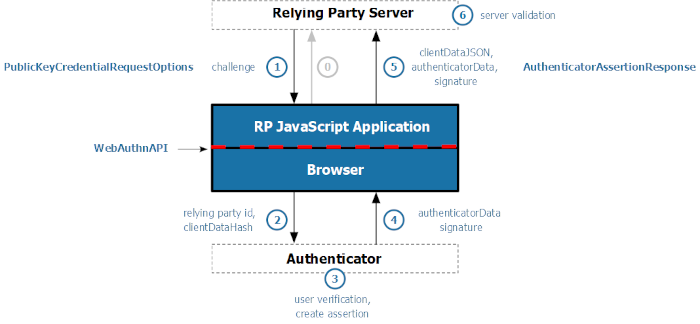
- WebAuthn Authentication: The server sends a challenge to the client, which signs it using the previously registered private key stored in the authenticator. The signed response is verified by the server using the stored public key to confirm the user's identity. Find below more info about the authentication flow events:
- MDS: The FIDO Alliance Metadata Service (MDS) is a centralized repository of Metadata Statements that is used by relying parties to validate authenticator attestation and prove the genuineness of the device model.
- Authorization: The client can request a bearer token from the server during the authentication flow. This token can be used later to open a new WebSocket or HTTP connection without the need to log in using passkeys.
Reference
- Properties — 4 properties available on the component.
- Methods — 8 public methods.
- Events — 16 events you can handle.