Certificate-Based Connection to APNs
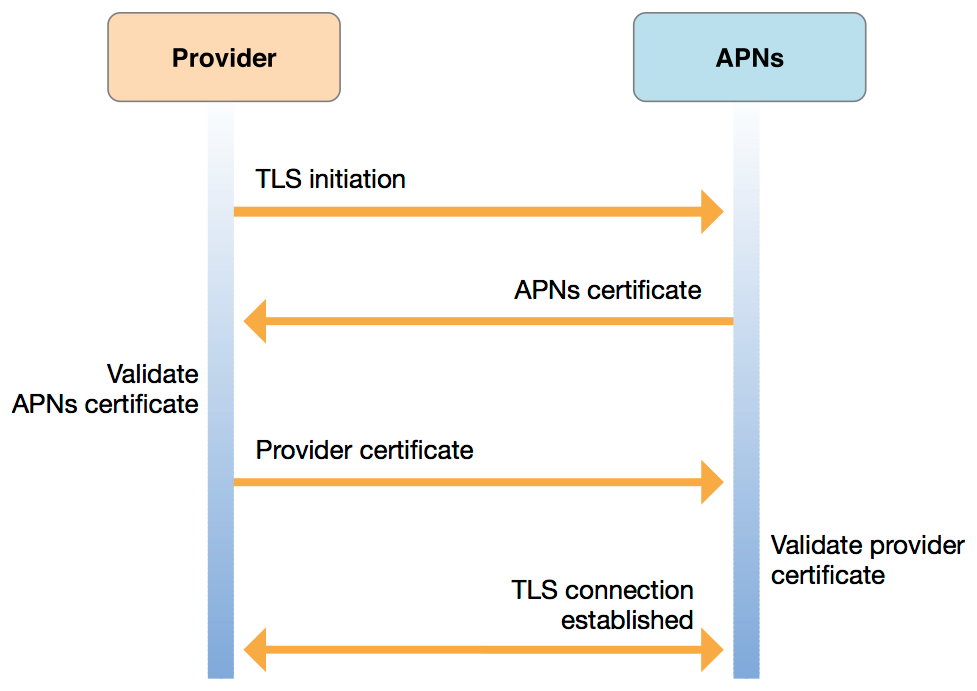
You can secure your communications with Apple Push Notification service (APNs) using a certificate obtained from Apple.
First enter in your developer account and create a new certificate for Apple Push Notification service
Once you have downloaded your certificate, the sgcWebSockets HTTP/2 client allows you to use 2 security IOHandlers (only for windows, for other personalities only openSSL is supported).
- OpenSSL
- SChannel (only for windows)
OpenSSL
If you use OpenSSL, you must deploy the OpenSSL libraries with your application. Before setting the certificate with the TsgcHTTP2Client, this certificate must first be converted to PEM format because OpenSSL doesn't allow importing P12 certificates directly.
Use the following commands to convert a single P12 certificate to a certificate in PEM format and a private key file
create PEM certificate file
openssl pkcs12 -in INFILE.p12 -out OUTFILE.crt -nokeysCreate Private Key file
openssl pkcs12 -in INFILE.p12 -out OUTFILE.key -nodes -nocertsOnce you have your certificate and private key in PEM format, you can configure the TsgcHTTP2Client as follows.
oHTTP := TsgcHTTP2Client.Create(nil);
oHTTP.TLSOptions.IOHandler := iohOpenSSL;
oHTTP.TLSOptions.CertFile := 'certificate_file.pem';
oHTTP.TLSOptions.KeyFile := 'private_key.pem';
oHTTP.TLSOptions.Password := 'certificate password';
oHTTP.TLSOptions.Version := tls1_2;
SChannel
If you use SChannel there is no need to deploy any libraries and the certificate downloaded from Apple can be directly imported without the need of a previous conversion to PEM format.
Set the property UseLegacyCredentials to true when using SChannel as IOHandler.
oHTTP := TsgcHTTP2Client.Create(nil);
oHTTP.TLSOptions.IOHandler := iohSChannel;
oHTTP.TLSOptions.SChannel_Options.UseLegacyCredentials := true;
oHTTP.TLSOptions.CertFile := 'certificate_file.p12';
oHTTP.TLSOptions.Password := 'certificate password';
oHTTP.TLSOptions.Version := tls1_2;
Errors
If you get the error "missing topic" most probably you are using an universal certificate (certificates that can be used for push notifications, voip...) which requires to set the topic name with the value of your app's bundle ID/app id (example: com.example.application). Just set the apns-topic header with the correct value in the Request property of the HTTP/2 client.
oHTTP.Request.CustomHeaders.Clear;
oHTTP.Request.CustomHeaders.Add('apns-topic: com.example.application');