TsgcWebSocketHTTPServer | HTTP/2 Server Push
HTTP usually works with a Request/Response pattern, where the client sends a REQUEST for a resource to the SERVER, and the SERVER sends a RESPONSE with the resource requested or an error. Usually the client, such as a browser, makes a series of requests for assets that are provided by the server.
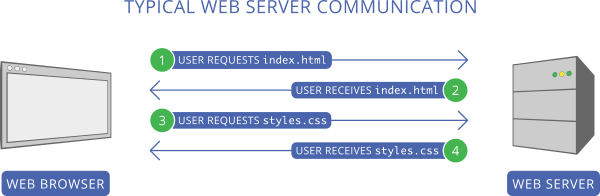
The main problem with this approach is that the client must first send a request to get the resource (for example, index.html), wait until the server sends the response, read the content, and then make all other requests (for example, styles.css).
HTTP/2 server push tries to solve this problem. When the client requests a file, if the server determines that this file requires additional files, those files will be PUSHED to the client automatically.
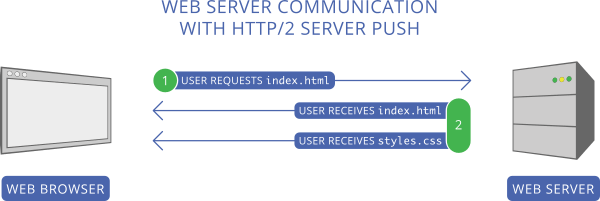
In the screenshot above, the client first requests index.html. The server reads this request and sends 2 files as the response: index.html and styles.css, thus avoiding a second request to get styles.css.
Configure Server Push
Following the screenshots above, you can configure your server so that every time there is a new request for the /index.html file, the server will send index.html and styles.css.
Use the method PushPromiseAddPreLoadLinks to associate each request with a push promise list.
server := TsgcWebSocketHTTPServer.Create(nil);
oLinks := TStringList.Create;
Try
  oLinks.Add('/styles.css');
  server.PushPromiseAddPreLoadLinks('/index.html', oLinks);
Finally
  oLinks.Free;
End;

      procedure OnCommandGet(AContext: TIdContext; ARequestInfo: TIdHTTPRequestInfo; AResponseInfo:
TIdHTTPResponseInfo);
begin
  if ARequestInfo.Document = '/index.html' then
  begin
    AResponseInfo.ContentText := '';
    AResponseInfo.ContentType := 'text/html';
    AResponseInfo.ResponseNo := 200;
  end
  else if ARequestInfo.Document = '/styles.css' then
  begin
    AResponseInfo.ContentText := '';
    AResponseInfo.ContentType := 'text/css';
    AResponseInfo.ResponseNo := 200;
  end;
end;
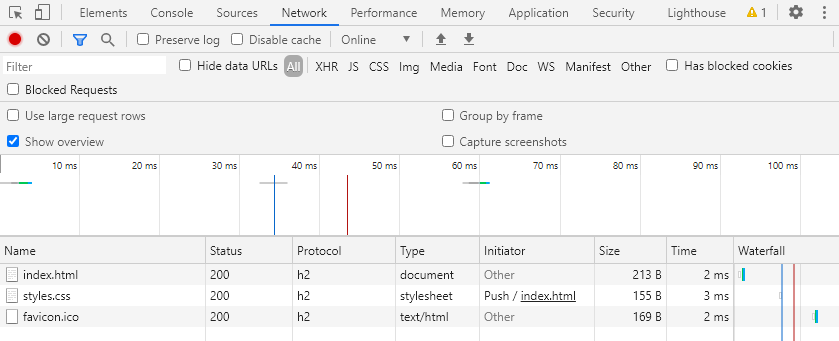
Using the Chrome developer tool, you can view how the styles.css file is pushed to the client.