TsgcWebSocketHTTPServer | HTTP/2 Server Push
HTTP funziona solitamente con un pattern Richiesta/Risposta, in cui il client invia una RICHIESTA per una risorsa al SERVER, e il SERVER invia una RISPOSTA con la risorsa richiesta o un errore. Di solito il client, come un browser, effettua una serie di richieste per risorse fornite dal server.
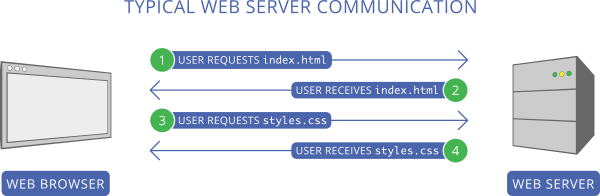
Il problema principale di questo approccio è che il client deve prima inviare una richiesta per ottenere la risorsa (ad esempio, index.html), attendere che il server invii la risposta, leggerne il contenuto e poi effettuare tutte le altre richieste (ad esempio, styles.css).
Il server push HTTP/2 cerca di risolvere questo problema. Quando il client richiede un file, se il server determina che questo file richiede file aggiuntivi, quei file verranno inviati automaticamente al client tramite PUSH.
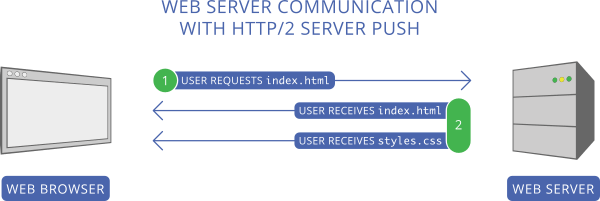
Nello screenshot sopra, il client richiede prima index.html. Il server legge questa richiesta e invia 2 file come risposta: index.html e styles.css, evitando così una seconda richiesta per ottenere styles.css.
Configurare Server Push
In base agli screenshot precedenti, è possibile configurare il server in modo che ogni volta che arriva una nuova richiesta per il file /index.html, il server invii index.html e styles.css.
Utilizzi il metodo PushPromiseAddPreLoadLinks per associare ogni richiesta a un elenco di push promise.
server := TsgcWebSocketHTTPServer.Create(nil);
oLinks := TStringList.Create;
Try
  oLinks.Add('/styles.css');
  server.PushPromiseAddPreLoadLinks('/index.html', oLinks);
Finally
  oLinks.Free;
End;

      procedure OnCommandGet(AContext: TIdContext; ARequestInfo: TIdHTTPRequestInfo; AResponseInfo:
TIdHTTPResponseInfo);
begin
  if ARequestInfo.Document = '/index.html' then
  begin
    AResponseInfo.ContentText := '';
    AResponseInfo.ContentType := 'text/html';
    AResponseInfo.ResponseNo := 200;
  end
  else if ARequestInfo.Document = '/styles.css' then
  begin
    AResponseInfo.ContentText := '';
    AResponseInfo.ContentType := 'text/css';
    AResponseInfo.ResponseNo := 200;
  end;
end;
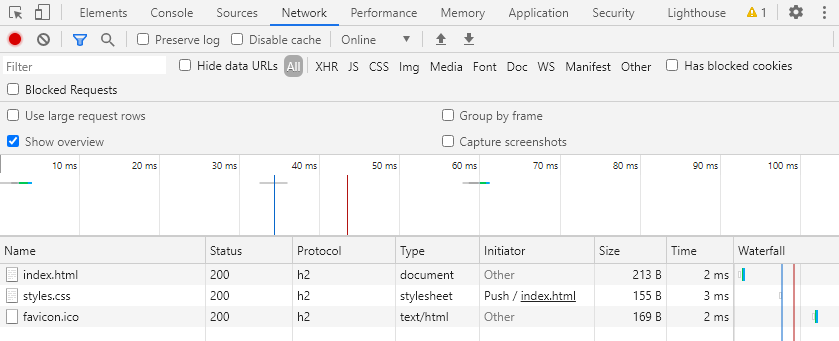
Utilizzando lo strumento per sviluppatori di Chrome, è possibile verificare come il file styles.css viene inviato in push al client.