TsgcWebSocketHTTPServer | HTTP/2 服务器推送
HTTP 通常采用请求/响应模式,客户端向服务器发送资源请求,服务器返回所请求资源或错误响应。通常,客户端(如浏览器)会向服务器发出一系列资源请求,由服务器提供这些资源。
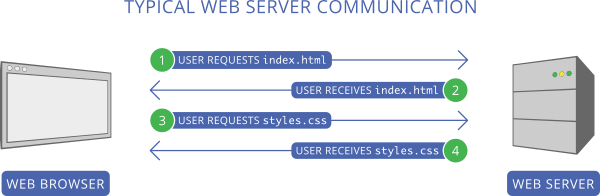
此方法的主要问题是客户端必须先发送请求以获取资源(例如 index.html),等待服务器发送响应,读取内容,然后才能发出所有其他请求(例如 styles.css)。
HTTP/2 服务器推送尝试解决此问题。当客户端请求某个文件时,若服务器判断该文件需要额外的文件,这些文件将被自动推送给客户端。
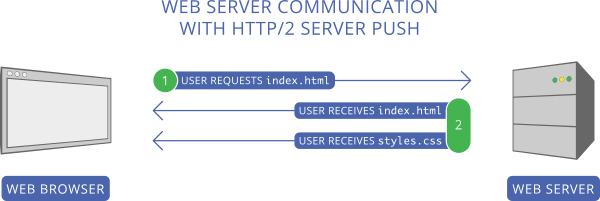
在上方截图中,客户端首先请求 index.html。服务器读取该请求后,将 2 个文件作为响应发送:index.html 和 styles.css,从而避免了再次请求 styles.css 的额外往返。
配置服务器推送
根据上方截图,您可以配置服务器,使其每次收到 /index.html 文件的请求时,都将 index.html 和 styles.css 一并发送。
使用 PushPromiseAddPreLoadLinks 方法将每个请求与推送承诺列表关联。
server := TsgcWebSocketHTTPServer.Create(nil);
oLinks := TStringList.Create;
Try
  oLinks.Add('/styles.css');
  server.PushPromiseAddPreLoadLinks('/index.html', oLinks);
Finally
  oLinks.Free;
End;

      procedure OnCommandGet(AContext: TIdContext; ARequestInfo: TIdHTTPRequestInfo; AResponseInfo:
TIdHTTPResponseInfo);
begin
  if ARequestInfo.Document = '/index.html' then
  begin
    AResponseInfo.ContentText := '';
    AResponseInfo.ContentType := 'text/html';
    AResponseInfo.ResponseNo := 200;
  end
  else if ARequestInfo.Document = '/styles.css' then
  begin
    AResponseInfo.ContentText := '';
    AResponseInfo.ContentType := 'text/css';
    AResponseInfo.ResponseNo := 200;
  end;
end;
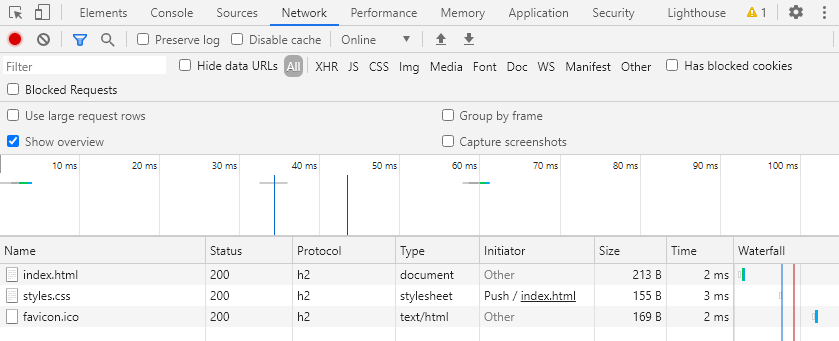
使用 Chrome 开发者工具,您可以查看 styles.css 文件如何被推送到客户端。