OpenAPI Microsoft | OAuth2 Code
Het gebruik van de OAuth2 Code Grant Flow vereist interactie met de gebruiker om in te loggen en de vereiste rechten te verkrijgen.
Zodra u de Tenant Id en de Referenties heeft, kunt u de OAuth2-eigenschappen configureren voor Code Grant.
Om de OpenAPI-client te configureren voor OAuth2 Code Grant, configureert u de eigenschap MicrosoftOptions.Authentication met de volgende waarde:
GetOpenAPIClient->MicrosoftOptions->Authentication = oamaOAuth2Code;
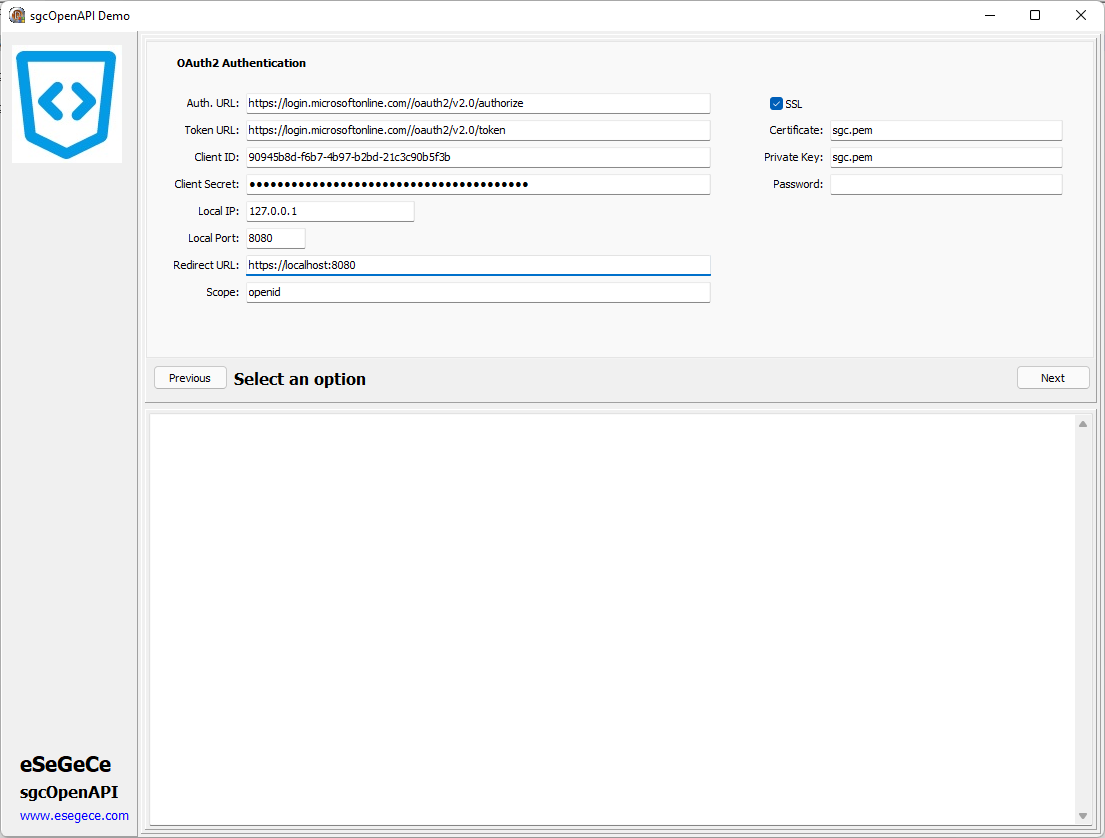
Vervolgens kunt u de OAuth2-parameters configureren
GetOpenAPIClient->MicrosoftOptions->Authentication = oamaOAuth2Code;
GetOpenAPIClient->Authentication->OAuth2->AuthorizationServerOptions->AuthURL = "https://login.microsoftonline.com/tenant_id/oauth2/v2.0/authorize";
GetOpenAPIClient->Authentication->OAuth2->AuthorizationServerOptions->TokenURL = "https://login.microsoftonline.com/tenant_id/oauth2/v2.0/token";
GetOpenAPIClient->Authentication->OAuth2->OAuth2Options->ClientId = "90945b8d-f6b7-4b97-b2bd-21c3c90b5f3b";
GetOpenAPIClient->Authentication->OAuth2->OAuth2Options->ClientSecret = "client_secret";
GetOpenAPIClient->Authentication->OAuth2->LocalServerOptions->IP = "127.0.0.1";
GetOpenAPIClient->Authentication->OAuth2->LocalServerOptions->Port = 8080;
GetOpenAPIClient->Authentication->OAuth2->LocalServerOptions->SSL = True;
GetOpenAPIClient->Authentication->OAuth2->LocalServerOptions->SSLOptions->Port = 8080;
GetOpenAPIClient->Authentication->OAuth2->LocalServerOptions->SSLOptions->CertFile = "sgc.pem";
GetOpenAPIClient->Authentication->OAuth2->LocalServerOptions->SSLOptions->KeyFile = "sgc.pem";
GetOpenAPIClient->Authentication->OAuth2->LocalServerOptions->SSLOptions->Password = "";
GetOpenAPIClient->Authentication->OAuth2->LocalServerOptions->RedirectURL = "https://localhost:8080";
GetOpenAPIClient->Authentication->OAuth2->AuthorizationServerOptions->Scope->Text = "openid";
De Tenant ID moet worden geconfigureerd voor de Authentication- en Token-URL's, vervang gewoon de juiste Tenant Id in de url.
Microsoft staat alleen de URL localhost toe als u luistert op het lokale IP, stel dus de redirect URL in met localhost als DNS-naam in plaats van te configureren met het IP-adres.
De scope-waarde is afhankelijk van de API; raadpleeg de Microsoft-/Azure-documentatie voor elke API.
De eerste keer dat een verzoek wordt gedaan, wordt de webbrowser getoond waarmee de gebruiker kan inloggen op zijn Microsoft-account. Als de gebruiker al eerder is ingelogd, wordt het HTTP-verzoek direct gedaan.