OpenAPI Microsoft | OAuth2 Credentials
Het gebruik van de OAuth2 Code Grant Flow vereist geen interactie met de gebruiker en is daarom geschikt voor services, daemons... of elke applicatie die zonder gebruikersinteractie moet draaien.
Zodra u de Tenant Id en de Referenties heeft, kunt u de OAuth2-eigenschappen configureren voor Code Grant.
Om de OpenAPI-client te configureren voor OAuth2 Code Grant, configureert u de eigenschap MicrosoftOptions.Authentication met de volgende waarde:
GetOpenAPIClient->MicrosoftOptions->Authentication = oamaOAuth2Credentials;
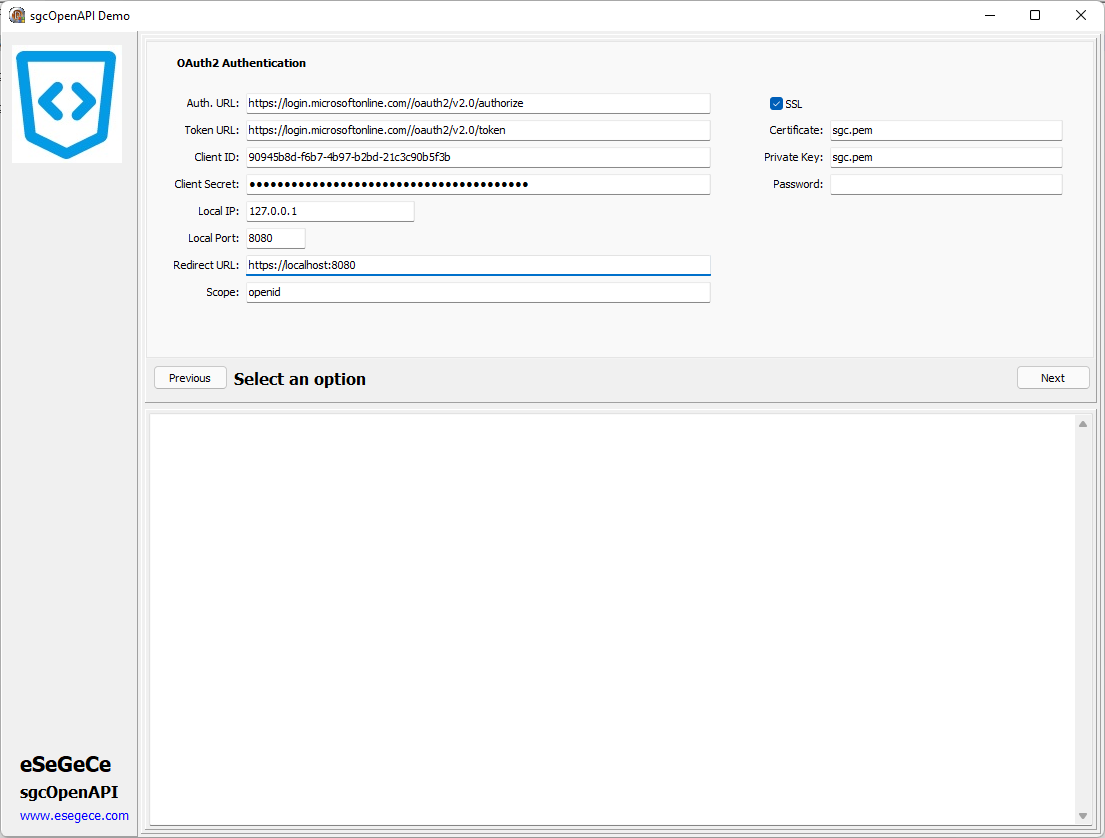
GetOpenAPIClient->MicrosoftOptions->Authentication = oamaOAuth2Credentials;
GetOpenAPIClient->Authentication->OAuth2->AuthorizationServerOptions->AuthURL = "https://login.microsoftonline.com/tenant_id/oauth2/v2.0/authorize";
GetOpenAPIClient->Authentication->OAuth2->AuthorizationServerOptions->TokenURL = "https://login.microsoftonline.com/tenant_id/oauth2/v2.0/token";
GetOpenAPIClient->Authentication->OAuth2->OAuth2Options->ClientId = "90945b8d-f6b7-4b97-b2bd-21c3c90b5f3b";
GetOpenAPIClient->Authentication->OAuth2->OAuth2Options->ClientSecret = "client_secret";
GetOpenAPIClient->Authentication->OAuth2->LocalServerOptions->IP = "127.0.0.1";
GetOpenAPIClient->Authentication->OAuth2->LocalServerOptions->Port = 8080;
GetOpenAPIClient->Authentication->OAuth2->LocalServerOptions->SSL = True;
GetOpenAPIClient->Authentication->OAuth2->LocalServerOptions->SSLOptions->Port = 8080;
GetOpenAPIClient->Authentication->OAuth2->LocalServerOptions->SSLOptions->CertFile = "sgc.pem";
GetOpenAPIClient->Authentication->OAuth2->LocalServerOptions->SSLOptions->KeyFile = "sgc.pem";
GetOpenAPIClient->Authentication->OAuth2->LocalServerOptions->SSLOptions->Password = "";
GetOpenAPIClient->Authentication->OAuth2->LocalServerOptions->RedirectURL = "https://localhost:8080";
GetOpenAPIClient->Authentication->OAuth2->AuthorizationServerOptions->Scope->Text = "https://graph.microsoft.com/.default";
De Tenant ID moet worden geconfigureerd voor de Authentication- en Token-URL's, vervang gewoon de juiste Tenant Id in de url.
Microsoft staat alleen de URL localhost toe als u luistert op het lokale IP, stel dus de redirect URL in met localhost als DNS-naam in plaats van te configureren met het IP-adres.
De scope-waarde is afhankelijk van de API; raadpleeg de Microsoft-/Azure-documentatie voor elke API.
OAuth2-referenties vereisen geen gebruikersinteractie, dus er wordt geen browser geopend bij de eerste HTTP-verzoekoproep.