 eSeGeCe
software
eSeGeCe
software
Associate user to a Fingerprint
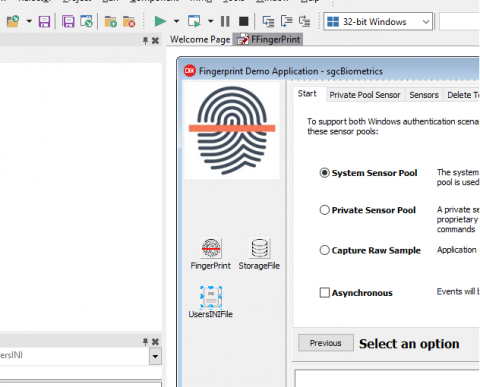
sgcBiometrics 1.4.0 will include a new component called TsgcWinBioUsersINI which allows associate a fingerprint to a user and save data in an INI file.
If you require save user data associated to a fingerprint, example: you can use System Pool Sensor to save fingerprints of different users (until the limit of fingerprints types associated to a single database). You can link this component to a TsgcWinBioFingerPrint component and every time you enroll a new biometric sample, you can save user data like: username, user id...
How Works
1. Drop a TsgcWinBioFingerPrint component.
2. Drop a TsgcWinBioUsersINI component.
3. Link TsgcWinBioFingerPrint.Users property to TsgcWinBioUsersINI object.
4. Handle TsgcWinBioUsersINI events to set (OnEnrollUser) and get (OnIdentifyUser) user data.
2. Drop a TsgcWinBioUsersINI component.
3. Link TsgcWinBioFingerPrint.Users property to TsgcWinBioUsersINI object.
4. Handle TsgcWinBioUsersINI events to set (OnEnrollUser) and get (OnIdentifyUser) user data.
OnEnrollUser
procedure TFRMFingerPrint.sgcWinBioUsersINI1EnrollUser(Sender: TObject; const
  User: TsgcBiometrics_WinBio_User);
begin
  User.UserId := '0001';
User.UserName := 'John';
User.UserData := '<xml><phone>656545644</phone></xml>';
User.UserSubType := WINBIO_ANSI_381_POS_RH_THUMB;
end;
OnIdentifyUser
procedure TFRMFingerPrint.sgcWinBioUsersINI1IdentifyUser(Sender: TObject; const
  aUnitId: Integer; const aIdentity: WINBIO_IDENTITY; const aSubFactor:
  WINBIO_BIOMETRIC_SUBTYPE; const aRejectDetail: WINBIO_REJECT_DETAIL; const
  User: TsgcBiometrics_WinBio_User);
var
  vSubFactor: String;
begin
  case aSubfactor of
    WINBIO_ANSI_381_POS_RH_THUMB: vSubFactor := 'RH_THUMB';
    WINBIO_ANSI_381_POS_RH_INDEX_FINGER: vSubFactor := 'RH_INDEX_FINGER';
    WINBIO_ANSI_381_POS_RH_MIDDLE_FINGER: vSubFactor := 'RH_MIDDLE_FINGER';
    WINBIO_ANSI_381_POS_RH_RING_FINGER: vSubFactor := 'RH_RING_FINGER';
    WINBIO_ANSI_381_POS_RH_LITTLE_FINGER: vSubFactor := 'RH_LITTLE_FINGER';
    WINBIO_ANSI_381_POS_LH_THUMB: vSubFactor := 'LH_THUMB';
    WINBIO_ANSI_381_POS_LH_INDEX_FINGER: vSubFactor := 'LH_INDEX_FINGER';
    WINBIO_ANSI_381_POS_LH_MIDDLE_FINGER: vSubFactor := 'LH_MIDDLE_FINGER';
    WINBIO_ANSI_381_POS_LH_RING_FINGER: vSubFactor := 'LH_RING_FINGER';
    WINBIO_ANSI_381_POS_LH_LITTLE_FINGER: vSubFactor := 'LH_LITTLE_FINGER';
  end;
end;
Stay Informed
When you subscribe to the blog, we will send you an e-mail when there are new updates on the site so you wouldn't miss them.
