 eSeGeCe
software
eSeGeCe
software
DeepSeek Delphi API Client
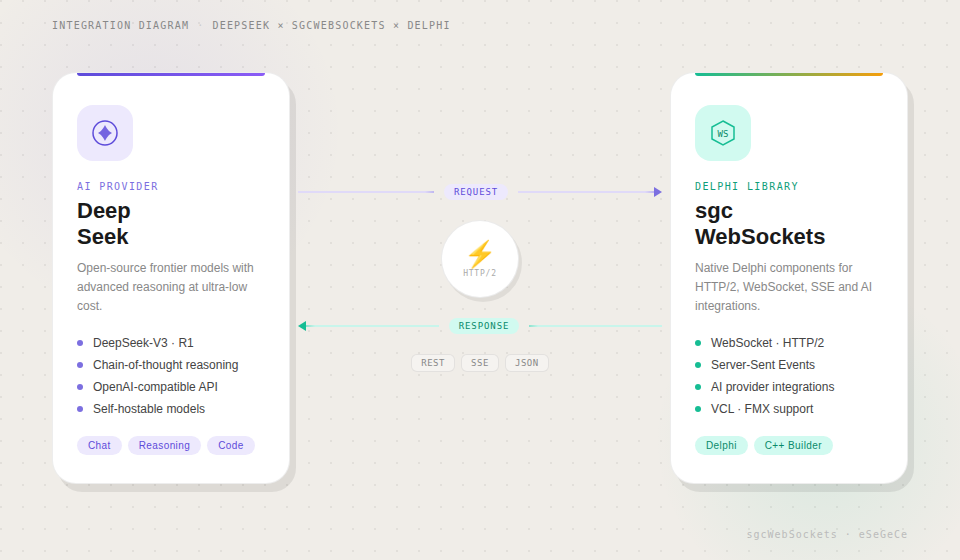
DeepSeek has rapidly emerged as one of the most cost-effective and capable AI model providers, offering powerful reasoning, vision, and tool-calling capabilities at a fraction of the cost of competing services. For Delphi developers looking to leverage DeepSeek's models, sgcWebSockets provides TsgcHTTP_API_DeepSeek — a native component that wraps the entire DeepSeek API with clean, type-safe Delphi code.
Whether you are building intelligent chatbots, processing images, orchestrating function-calling workflows, or streaming real-time responses to your users, this component gives you direct access to every DeepSeek feature. No REST boilerplate. No JSON wrangling. Just drop the component, set your API key, and start building.
Complete API Coverage
Every major feature of the DeepSeek API is supported out of the box.
|
Chat Completions Send messages with system prompts, receive responses synchronously or streamed. Full control over temperature, top-p, frequency and presence penalties. |
Real-Time Streaming Stream responses token-by-token using Server-Sent Events. Build responsive UIs that display answers as they are generated. |
Vision Analyze images by sending base64-encoded data or image URLs alongside text prompts. DeepSeek describes, interprets, and reasons about visual content. |
|
Tool Use — Function Calling Define custom tools with JSON Schema. DeepSeek decides when to invoke them, enabling agentic, multi-step workflows. |
Model Management List all available DeepSeek models programmatically. Query model IDs, owners, and capabilities. |
Built-in Retry & Logging Automatic retry on transient failures with configurable attempts and wait intervals. Full request/response logging for debugging. |
Getting Started
Integrate DeepSeek into your Delphi project in under a minute. Drop the component, configure your API key, and send your first message.
// Create the component and configure the API key
var
  DeepSeek: TsgcHTTP_API_DeepSeek;
  vResponse: string;
begin
  DeepSeek := TsgcHTTP_API_DeepSeek.Create(nil);
  Try
    DeepSeek.DeepSeekOptions.ApiKey := 'YOUR_API_KEY';

    // Send a simple message to DeepSeek
    vResponse := DeepSeek._CreateMessage(
      'deepseek-chat', 'Hello, DeepSeek!');

    ShowMessage(vResponse);
  Finally
    DeepSeek.Free;
  End;
end;
Two API styles. Every feature offers both convenience methods (string-based, minimal code) and typed request/response classes (full control, type safety). Choose the approach that best suits your use case.
Chat Completions & Streaming
The Chat Completions API is the foundation of every DeepSeek interaction. Send text with optional system prompts, and receive responses synchronously or streamed in real-time.
System Prompts
Control DeepSeek's behavior by providing a system prompt that sets the context, personality, or constraints for the conversation.
vResponse := DeepSeek._CreateMessageWithSystem(
  'deepseek-chat',
  'You are a helpful assistant that responds in Spanish.',
  'What is the capital of France?');
// Returns: "La capital de Francia es París."
Real-Time Streaming
For responsive user interfaces, stream DeepSeek's response token-by-token using Server-Sent Events. Assign the OnHTTPAPISSE event handler and call _CreateMessageStream.
// Enable streaming via SSE
DeepSeek.OnHTTPAPISSE := OnSSEEvent;
DeepSeek._CreateMessageStream('deepseek-chat',
  'Explain the theory of relativity.');

procedure TForm1.OnSSEEvent(Sender: TObject;
  const aEvent, aData: string; var Cancel: Boolean);
begin
  // aData: JSON payload with generated content
  Memo1.Lines.Add(aData);
end;
Advanced Typed API
For full control over request parameters — temperature, top-p, frequency penalty, presence penalty, stop sequences — use the typed request and response classes.
var
  oRequest: TsgcDeepSeekClass_Request_ChatCompletion;
  oMessage: TsgcDeepSeekClass_Request_Message;
  oResponse: TsgcDeepSeekClass_Response_ChatCompletion;
begin
  oRequest := TsgcDeepSeekClass_Request_ChatCompletion.Create;
  Try
    oRequest.Model := 'deepseek-chat';
    oRequest.MaxTokens := 2048;
    oRequest.Temperature := 0.7;
    oRequest.TopP := 0.9;
    oRequest.FrequencyPenalty := 0.5;

    oMessage := TsgcDeepSeekClass_Request_Message.Create;
    oMessage.Role := 'user';
    oMessage.Content := 'Explain quantum computing in simple terms.';
    oRequest.Messages.Add(oMessage);

    oResponse := DeepSeek.CreateMessage(oRequest);
    Try
      if Length(oResponse.Choices) > 0 then
        ShowMessage(oResponse.Choices[0].MessageContent);
    Finally
      oResponse.Free;
    End;
  Finally
    oRequest.Free;
  End;
end;
Vision — Image Understanding
DeepSeek can analyze and reason about images. Send photographs, screenshots, diagrams, or documents alongside a text prompt and receive detailed descriptions, data extraction, or visual Q&A.
// Load an image and ask DeepSeek to analyze it
var
  vBase64: string;
begin
  vBase64 := sgcBase64Encode(LoadFileToBytes('invoice.png'));

  ShowMessage(DeepSeek._CreateVisionMessage(
    'deepseek-chat',
    'Extract all line items and totals from this invoice.',
    vBase64, 'image/png'));
end;
Use case. Automate invoice processing, extract text from documents, analyze charts and graphs, or build image classification pipelines — all from native Delphi code with DeepSeek's competitive pricing.
Tool Use — Function Calling
Define custom tools with JSON Schema, and DeepSeek will decide when and how to invoke them. This is the foundation for building agentic, multi-step workflows that connect the AI to your business logic.
// Define a tool with JSON Schema
oTool := TsgcDeepSeekClass_Request_Tool.Create;
oTool.Name := 'get_stock_price';
oTool.Description := 'Get the current stock price for a ticker symbol';
oTool.Parameters :=
  '{"type":"object","properties":{"symbol":{"type":"string",' +
  '"description":"Stock ticker symbol"}},"required":["symbol"]}';
oRequest.Tools.Add(oTool);

oResponse := DeepSeek.CreateMessage(oRequest);

// Check if DeepSeek wants to call a tool
if oResponse.Choices[0].FinishReason = 'tool_calls' then
begin
  for i := 0 to Length(oResponse.Choices[0].ToolCalls) - 1 do
  begin
    vToolId   := oResponse.Choices[0].ToolCalls[i].Id;
    vFuncName := oResponse.Choices[0].ToolCalls[i].FunctionName;
    vFuncArgs := oResponse.Choices[0].ToolCalls[i].FunctionArguments;
    // Execute the tool and return the result
  end;
end;
Model Management
Query available DeepSeek models programmatically. List all models to discover new capabilities as they become available.
// List all available DeepSeek models
vModels := DeepSeek._GetModels;

// Typed API: access model properties directly
var
  oModels: TsgcDeepSeekClass_Response_Models;
  i: Integer;
begin
  oModels := DeepSeek.GetModels;
  Try
    for i := 0 to Length(oModels.Data) - 1 do
      Memo1.Lines.Add(oModels.Data[i].Id);
  Finally
    oModels.Free;
  End;
end;
Configuration & Options
Fine-tune the component behavior with comprehensive configuration options.
| Property | Description |
|---|---|
DeepSeekOptions.ApiKey |
Your DeepSeek API key (required) |
HttpOptions.ReadTimeout |
HTTP read timeout in milliseconds (default: 60000) |
LogOptions.Enabled |
Enable request/response logging |
RetryOptions.Enabled |
Automatic retry on transient failures |
RetryOptions.Retries |
Maximum number of retry attempts (default: 3) |
RetryOptions.Wait |
Wait time between retries in milliseconds (default: 3000) |
Request Parameters
| Parameter | Description |
|---|---|
Temperature |
Sampling temperature (0.0–2.0). Lower values = more deterministic. |
TopP |
Nucleus sampling (0.0–1.0). Controls cumulative probability cutoff. |
MaxTokens |
Maximum number of tokens in the response (default: 4096). |
FrequencyPenalty |
Penalize tokens based on frequency in the text so far. |
PresencePenalty |
Penalize tokens based on whether they appear in the text so far. |
ToolChoice |
Control tool selection: 'auto', 'none', or 'required'. |
Cost advantage. DeepSeek models deliver competitive quality at significantly lower prices than comparable providers. Combined with the sgcWebSockets component's built-in retry logic and logging, you get production-ready AI integration at a fraction of the cost.
DeepSeek Delphi Demo
When you subscribe to the blog, we will send you an e-mail when there are new updates on the site so you wouldn't miss them.
