带弹出提示、收件箱和徽章的 Delphi 通知组件
作为 sgcUI 一部分的 sgcNavigation,为 VCL 和 FireMonkey 应用程序带来一套 Delphi 通知组件,全部由一个通知模型驱动。
该模型不绘制任何内容,且与框架无关,因此同一个应用程序的 VCL 和 FireMonkey 视图可由同一个模型驱动。
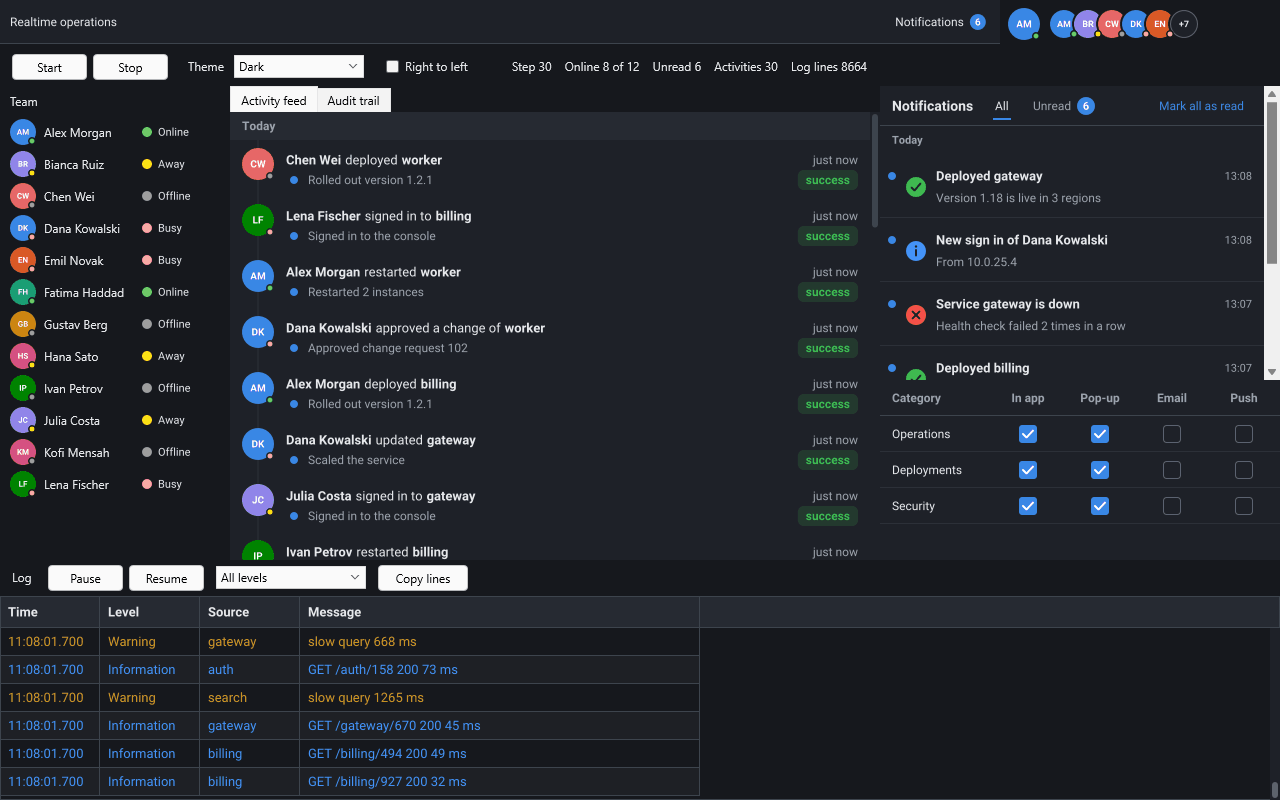
一个通知模型驱动弹出提示通知、按天分组的通知收件箱、未读徽章和按类别设置的偏好,服务器还可以通过 WebSocket、MQTT 或服务器发送事件实时推送新通知。
| 组件 | 单元 | 作用 |
|---|---|---|
TsgcNotificationModel | sgcNavigation_Notification | 非可视。保存通知、统计未读数量、标记为已读、忽略通知,并将其保存为 JSON。 |
TsgcVCLToastManager, TsgcFMXToastManager | sgcNavigation_Toast_VCL, sgcNavigation_Toast_FMX | 非可视。为模型中每条新的未读通知显示一个弹出提示,也可通过代码显示独立的弹出提示。 |
TsgcVCLNotificationInbox, TsgcFMXNotificationInbox | sgcNavigation_Inbox_VCL, sgcNavigation_Inbox_FMX | 按天列出通知的控件,带有 All 和 Unread 选项卡以及 Mark all as read 按钮。 |
TsgcNotificationPreferences | sgcNavigation_NotifyPrefs | 非可视。用户为每个类别选择的渠道(应用内、弹窗、电子邮件、推送)。 |
TsgcVCLNotificationPrefsEditor, TsgcFMXNotificationPrefsEditor | sgcNavigation_NotifyPrefs_VCL, sgcNavigation_NotifyPrefs_FMX | 以复选框表格显示偏好的控件,每个类别一行。 |
TsgcToolbarBadgeLink | sgcToolbar_BadgeLink | 非可视,位于 sgcToolbar 中。将模型的未读数量显示为工具栏或功能区项的徽章,超过 99 时显示 99+。 |
TsgcUILiveSource_WebSocket, TsgcUILiveSource_MQTT, TsgcUILiveSource_SSE | sgcUICoreWS 桥接 | 将服务器通过 sgcWebSockets 连接发送的 JSON 消息交给模型(Registered 版本)。 |
弹出提示是在窗体或屏幕一角弹出的简短卡片,会倒计时并自动关闭。
弹出提示包含严重程度图标或图片、标题、最多三行的正文、关闭按钮和最多两个操作按钮。弹出提示管理器是窗体上的非可视组件:它堆叠弹出提示、倒计时、在指针悬停时暂停、淡入淡出,并将放不下的提示排入队列。
Position 选择角落或边缘,默认为 tpsBottomRight,VCL 管理器的 Anchor 则决定弹出提示堆叠在窗体内还是屏幕工作区内。Duration 默认为 5000 毫秒,StickySeverities 会让错误一直留在屏幕上,直到用户关闭。MaxVisible(3)限制屏幕上的弹出提示数量;后续的提示在队列中等待。uses
Classes, SysUtils, Forms,
sgcNavigation_Notification, sgcNavigation_Toast, sgcNavigation_Toast_VCL;
procedure TMainForm.FormCreate(Sender: TObject);
begin
FToasts := TsgcVCLToastManager.Create(Self);
// the bottom right corner of the form, two toasts at a time
FToasts.Anchor := tanForm;
FToasts.Position := tpsBottomRight;
FToasts.MaxVisible := 2;
// warnings and errors stay until the user closes them
FToasts.StickySeverities := [nsvWarning, nsvError];
end;
procedure TMainForm.ExportFinished(aRows: Integer);
begin
FToasts.Show('Export finished', IntToStr(aRows) + ' rows written.',
nsvSuccess);
end;
在 FireMonkey 中,TsgcFMXToastManager 具有相同的属性,但没有 Anchor。弹出提示位于窗体内的浮层中,可运行于 Windows、macOS、Linux、iOS 和 Android。
模型保存一个用户的通知;弹出提示、收件箱和徽章会随之变化,无需其他代码。
通知包含 Id、标题、纯文本正文、严重程度(info、success、warning 或 error)、UTC 时间、已读状态、类别、触发它的来源以及操作按钮。Add 添加一条新的未读通知。Post 按 Id 执行更新或插入,因此订单、构建或工单的键只会保持一条通知为最新状态,而不会再添加第二条。MarkRead、MarkAllRead 和 Dismiss 会更改状态,SaveToFile 和 LoadFromFile 则以 JSON 形式在会话之间保留通知。
TsgcToolbarBadgeLink 在工具栏按钮上显示未读数量,在 Registered 版本中也可显示在功能区按钮上。OnAction,并附带该操作的 id。uses
Classes, SysUtils, Controls, Forms,
sgcNavigation_Notification, sgcNavigation_NotifyPrefs,
sgcNavigation_Toast_VCL, sgcNavigation_Inbox_VCL,
sgcToolbar_VCL, sgcToolbar_BadgeLink;
procedure TMainForm.SetupNotifications(aToolbar: TsgcVCLToolbar);
var
vFile: string;
begin
// the notifications of the user, kept between sessions
FModel := TsgcNotificationModel.Create(Self);
vFile := ExtractFilePath(Application.ExeName) + 'notifications.json';
if FileExists(vFile) then
FModel.LoadFromFile(vFile);
FModel.OnAction := ModelAction;
// orders pop up, news only go to the inbox
FPrefs := TsgcNotificationPreferences.Create(Self);
FPrefs.Categories.Add('orders', 'Orders');
FPrefs.Categories.Add('news', 'News').Defaults := [nchInApp];
// a toast for every new unread notification its category allows
FToasts := TsgcVCLToastManager.Create(Self);
FToasts.Preferences := FPrefs;
FToasts.Model := FModel;
// every notification, newest first, under a header per day
FInbox := TsgcVCLNotificationInbox.Create(Self);
FInbox.Parent := Self;
FInbox.Align := alRight;
FInbox.Width := 360;
FInbox.Model := FModel;
// the unread count as the badge of the first toolbar button
FBadge := TsgcToolbarBadgeLink.Create(Self);
FBadge.Source := FModel;
FBadge.Target := aToolbar;
FBadge.ItemIndex := 0;
end;
procedure TMainForm.OrderShipped(const aOrderId: string);
var
oItem: TsgcNotificationItem;
begin
FModel.BeginUpdate;
try
// an upsert: the same id updates the notification
oItem := FModel.Post('order-' + aOrderId, 'Order ' + aOrderId +
' shipped', 'The parcel left the warehouse.', nsvSuccess, 'orders');
if oItem.Actions.IndexOf('track') < 0 then
oItem.Actions.Add('track', 'Track');
finally
FModel.EndUpdate;
end;
end;
在 BeginUpdate 和 EndUpdate 之间所做的更改只会传递给视图一次,因此弹出提示显示的是带按钮的完整通知。模型应在主线程中使用。
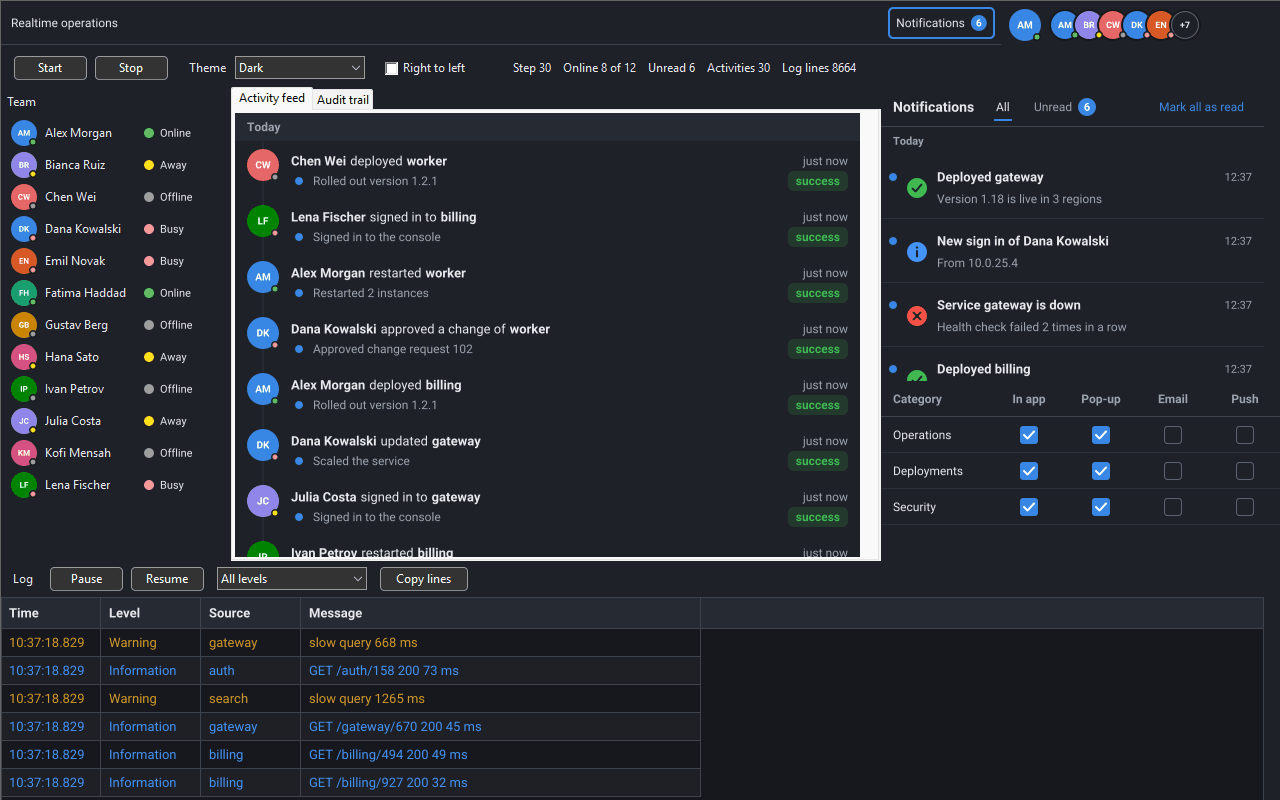
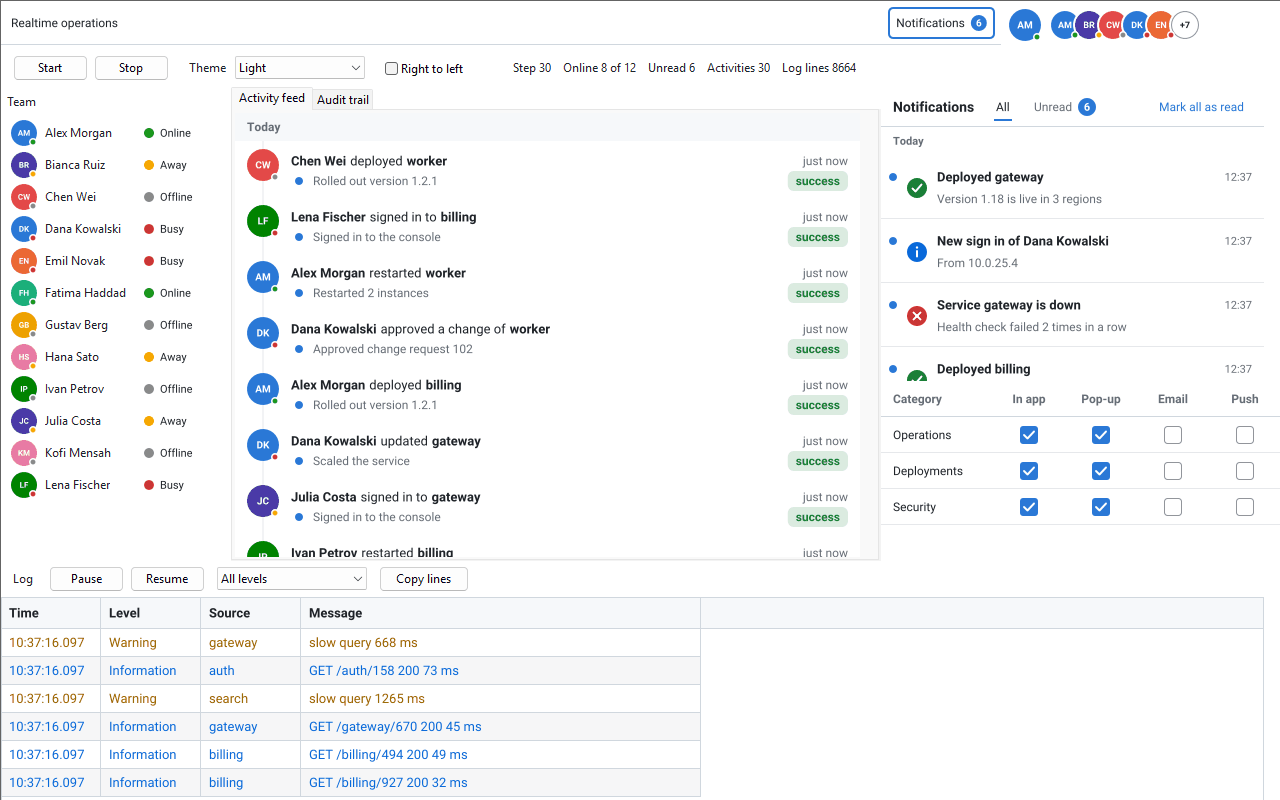
VCL,浅色主题:收件箱位于偏好之上。
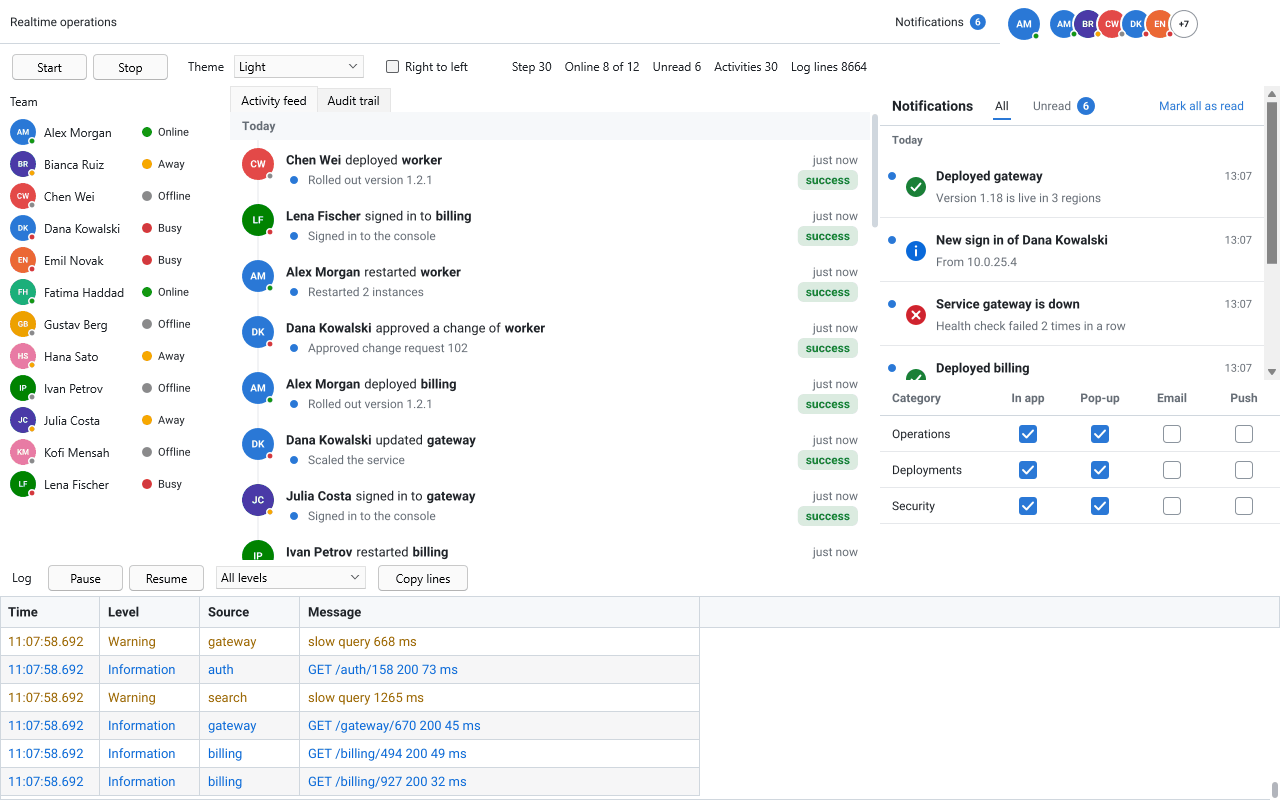
FireMonkey,浅色主题。
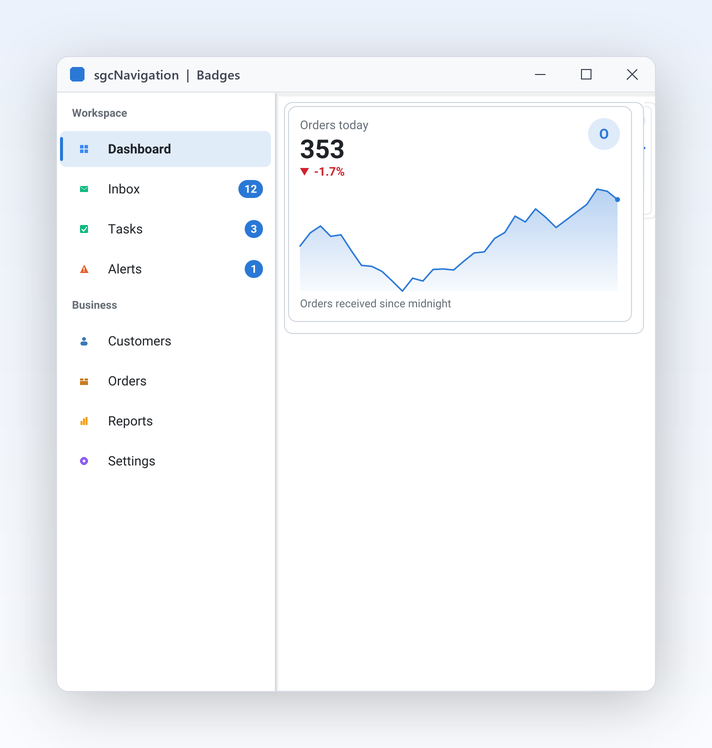
侧边栏中 Inbox、Tasks 和 Alerts 上的数量徽章。
服务器通过实时消息使用户的通知保持最新,每条消息一个 JSON 对象。
ApplyMessage 将消息应用到模型:add、update、remove、read、unread 或 snapshot。弹出提示、收件箱和徽章会随模型变化,因此来自服务器的消息无需其他代码即可显示在屏幕上。ApplyMessage 绝不会抛出异常;当消息不属于它时,它返回 False 并保持模型不变。
{"type":"notification","op":"add","notification":{"id":"n2","title":"Build 812 passed","severity":"success","group":"ci"}}
{"type":"notification","op":"update","notification":{"id":"n2","body":"All 1,204 tests passed"}}
{"type":"notification","op":"read","ids":["n1","n2"]}
{"type":"notification","op":"remove","id":"n1"}
sgcUICoreWS 桥接的实时源会接收 sgcWebSockets 客户端的消息并交给模型:TsgcWebSocketClient 对应 TsgcUILiveSource_WebSocket,TsgcWSPClient_MQTT 对应 TsgcUILiveSource_MQTT,TsgcHTTP1Client 的服务器发送事件对应 TsgcUILiveSource_SSE。到达套接字线程的消息会排队并在主线程中应用。
uses
Classes, SysUtils,
sgcWebSocket, sgcUICoreWS_Live, sgcUICoreWS_Live_WebSocket,
sgcNavigation_Notification;
function BindNotifications(aOwner: TComponent; aClient: TsgcWebSocketClient;
aModel: TsgcNotificationModel): TsgcUILiveSource_WebSocket;
var
oBinding: TsgcUILiveBinding;
begin
Result := TsgcUILiveSource_WebSocket.Create(aOwner);
Result.Client := aClient;
oBinding := Result.Bindings.Add;
oBinding.Target := aModel;
// only the frames of the alerts channel, the live message is in "data":
// {"channel":"alerts","data":{"type":"notification","op":"add",...}}
oBinding.FilterPath := 'channel';
oBinding.FilterValue := 'alerts';
oBinding.MessagePath := 'data';
end;
OnNotification 和 OnAction,并通过同一个客户端发送您自己的帧。实时消息和实时源属于 Registered 版本,且实时源需要 sgcWebSockets。没有服务器时,应用程序调用模型的 Add 和 Post。
Delphi 7 至 Delphi 13 的 VCL,自 Delphi XE6 起的 FireMonkey,C++Builder,以及 .NET WinForms、WPF 和 Avalonia。
TsgcVCLToastManager、TsgcVCLNotificationInbox 和 TsgcVCLNotificationPrefsEditorTsgcFMXToastManager、TsgcFMXNotificationInbox 和 TsgcFMXNotificationPrefsEditorTsgcWinFormsToastManager、TsgcWpfToastManager 和 TsgcAvaloniaToastManager,以及收件箱和偏好编辑器sgcUI 套件的 Realtime 演示构建了一个运营控制台:铃铛的徽章即未读数量,通知收件箱位于偏好之上,支持 VCL、FireMonkey、C++Builder 和 .NET。请参阅 Realtime UI 包。
通知组件遵循其所属产品 sgcNavigation 的版本,徽章链接则遵循 sgcToolbar。
| 部分 | 产品 | .NET Community | Registered |
|---|---|---|---|
| 通知模型、弹出提示、收件箱和偏好 | sgcNavigation | 是 | 是 |
| 与工具栏配合的徽章链接 | sgcToolbar | 是 | 是 |
| 与功能区配合的徽章链接 | sgcToolbar | No | 是 |
| 实时通知消息 | sgcNavigation | No | 是 |
| 通过 WebSocket、MQTT 和 SSE 的实时源(需要 sgcWebSockets) | sgcUICore | No | 是 |
在 Delphi 和 C++Builder 中,通知组件随 sgcUI Standard、Professional、Enterprise、All-Access 和试用版提供,也随单独销售的 sgcNavigation 和 sgcToolbar 提供。免费的 .NET Community 包也包含它们。Delphi Community 版本仅提供 sgcGrid。请参阅 sgcUI 价格。
在窗体上放置 TsgcVCLToastManager(FireMonkey 中为 TsgcFMXToastManager),然后使用标题、正文和严重程度调用 Show。弹出提示会在您选择的角落弹出,默认倒计时五秒,指针悬停时暂停,并且从不抢占焦点。设置了 Model 之后,管理器还会为每条新的未读通知显示弹出提示。
创建一个 TsgcNotificationModel,并将其设为 TsgcVCLNotificationInbox 的 Model,该收件箱按天列出通知,带有 All 和 Unread 选项卡以及 Mark all as read 按钮。然后将模型设为 TsgcToolbarBadgeLink 的 Source,并以工具栏作为其 Target:未读数量会显示在按钮上,超过 99 时显示为 99+。
可以,在 Registered 版本中。服务器每次变化发送一条 JSON 消息,ApplyMessage 将其应用到模型。sgcUICoreWS 桥接的实时源从 sgcWebSockets 的 WebSocket、MQTT 或服务器发送事件客户端读取这些消息,并在主线程中应用,因此弹出提示、收件箱和徽章无需其他代码即可更新。
可以。TsgcFMXToastManager、TsgcFMXNotificationInbox 和 TsgcFMXNotificationPrefsEditor 自 Delphi XE6 起可用。FireMonkey 弹出提示位于窗体内的浮层中,支持 Windows、macOS、Linux、iOS 和 Android。模型与框架无关,因此同一个 TsgcNotificationModel 可以同时驱动 VCL 和 FireMonkey 视图。
可以。TsgcNotificationPreferences 保存用户为每个类别选择的渠道:应用内、弹窗、电子邮件和推送。偏好编辑器以复选框表格显示它们。设置了 Preferences 的弹出提示管理器不会为弹窗渠道已关闭的类别显示弹出提示,而收件箱仍会列出这些通知。
会,只要您保存了它们。模型的 SaveToFile 和 LoadFromFile 以 JSON 文件的形式在会话之间保留通知,MaxCount(默认 500)限制模型的容量,并优先丢弃最旧的已读通知。
免费的 .NET Community 包包含模型、弹出提示、收件箱和偏好。Delphi Community 版本仅提供 sgcGrid,因此在 Delphi 和 C++Builder 中,通知组件随 sgcNavigation 提供,可单独购买,或包含在 sgcUI Standard 及以上版本中。All-Access 试用版包含每个 sgcUI 产品用于评估。