C# 和 Visual Studio
WinForms(.NET)
来自 sgcUI 的 WinForms 控件
适用于 C# 的现代 WinForms 控件:网格、图表、功能区和日程表,带跟随 Windows 的 Fluent 浅色和深色主题。
Fluent 浅色和深色模式Visual Studio 设计器和工具箱.NET Framework 4.7.2、.NET 8 至 10NuGet 上的免费 Community 包
适用于 C# 的现代 WinForms 控件:网格、图表、功能区和日程表,带跟随 Windows 的 Fluent 浅色和深色主题。
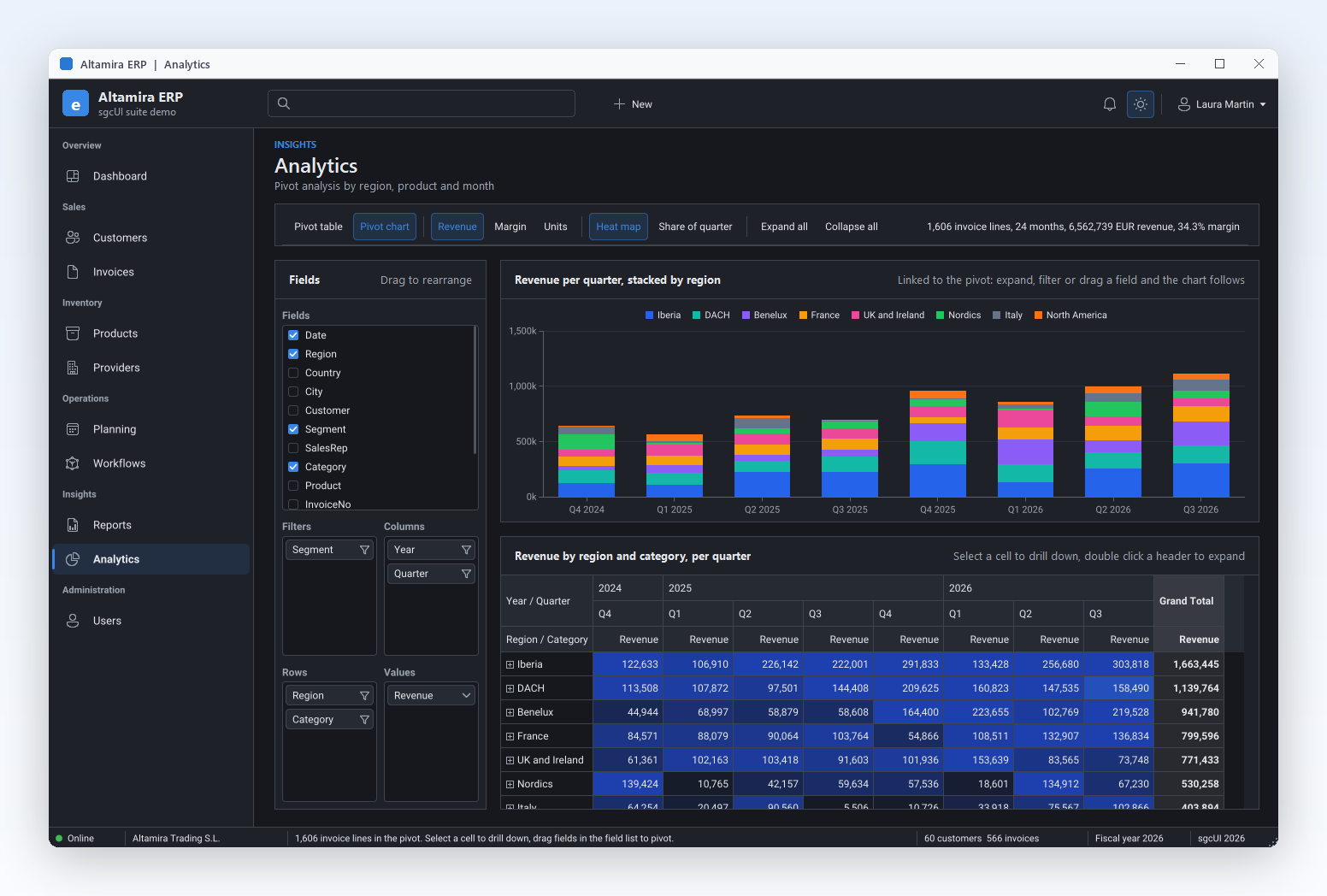
Altamira ERP 是面向 Delphi、C++Builder 和 .NET WinForms 的 sgcUI 套件演示:一个窗口中包含仪表板、客户、发票、计划、工作流、报表和分析。下面的 Realtime、编辑器和报表截图均在 WinForms 上截取。
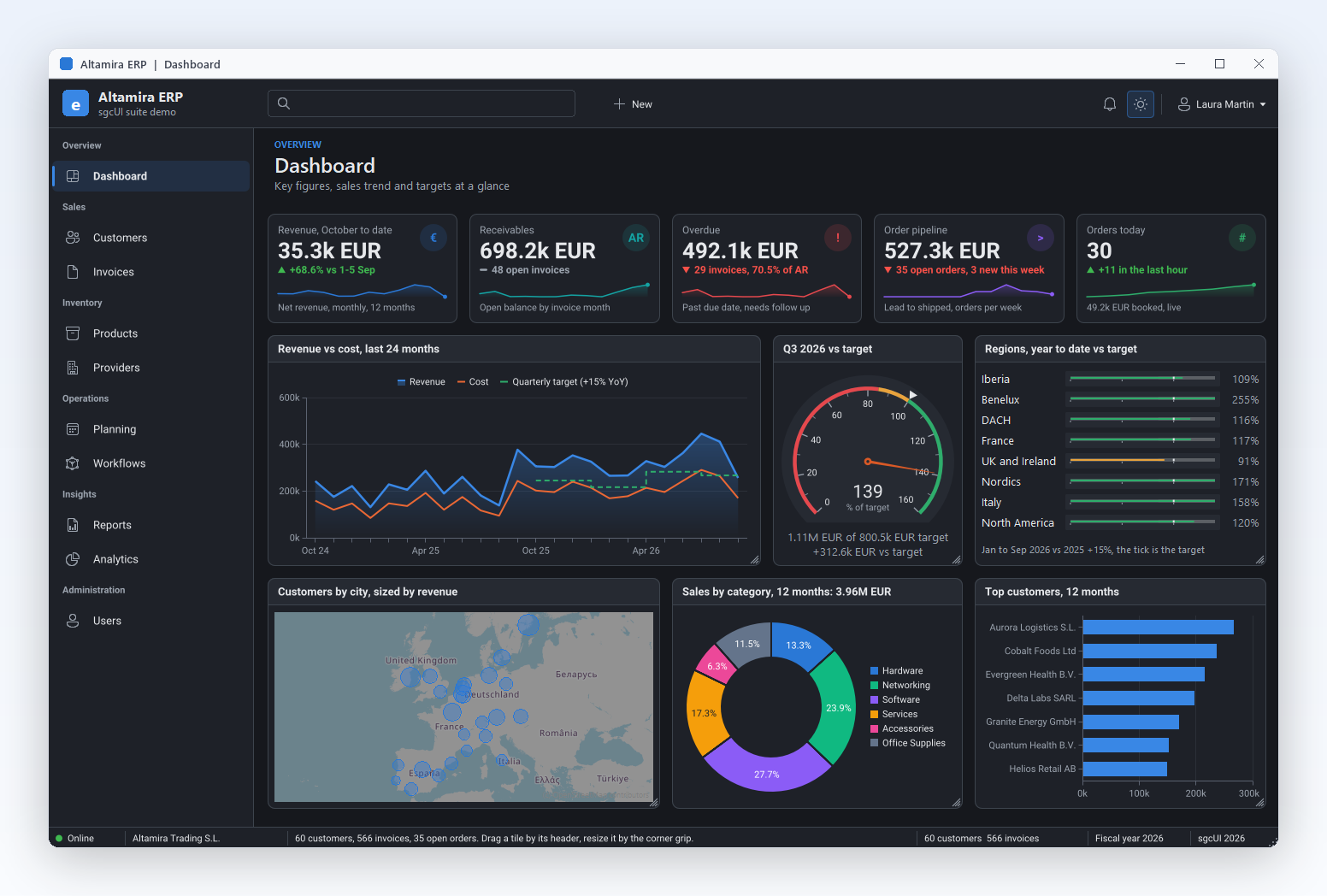
深色模式下的 ERP 仪表板:KPI 卡片、收入图表、目标仪表和客户地图。
sgcDashboard →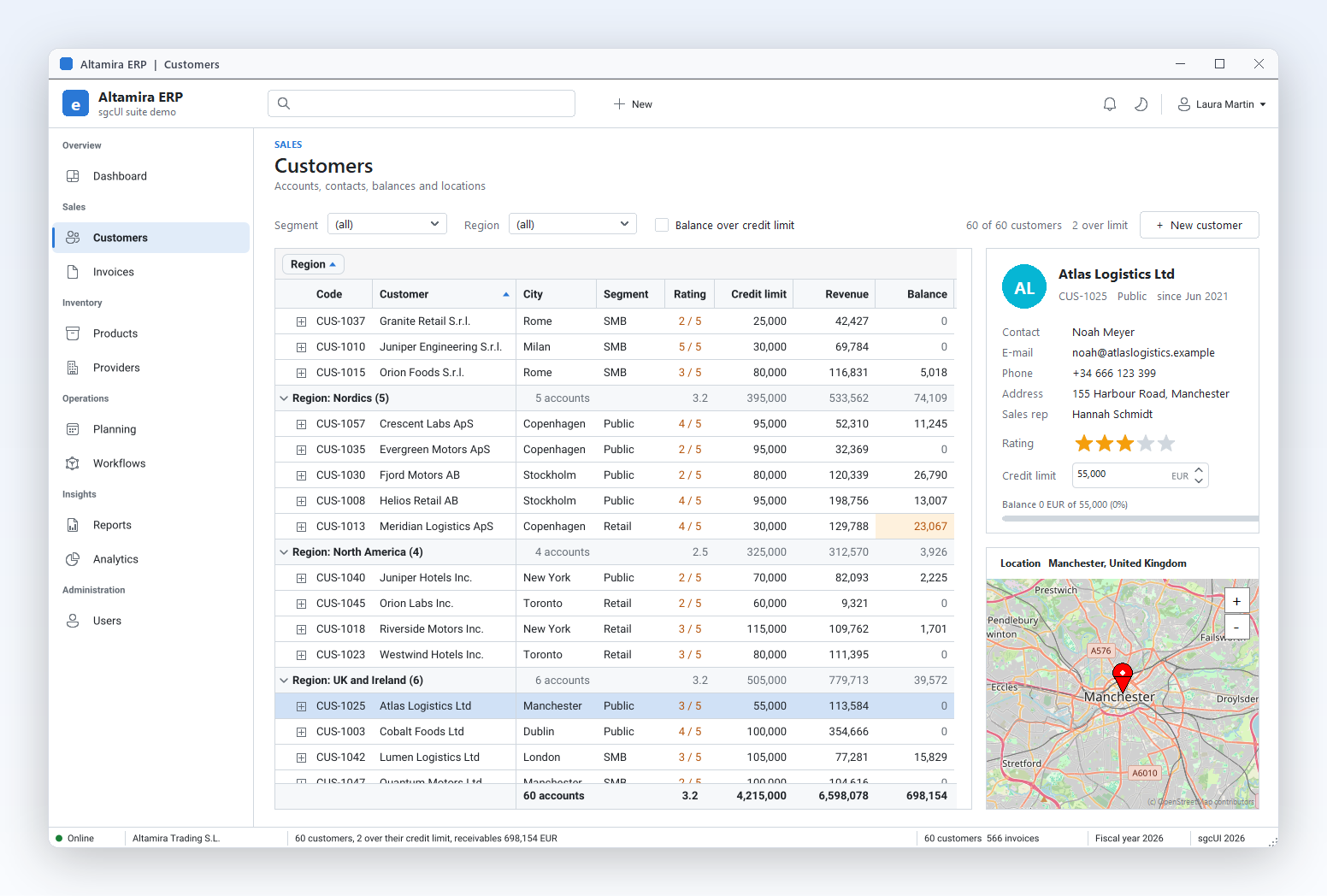
按区域分组的客户网格,带分组汇总、页脚合计和联系人卡片。
sgcGrid →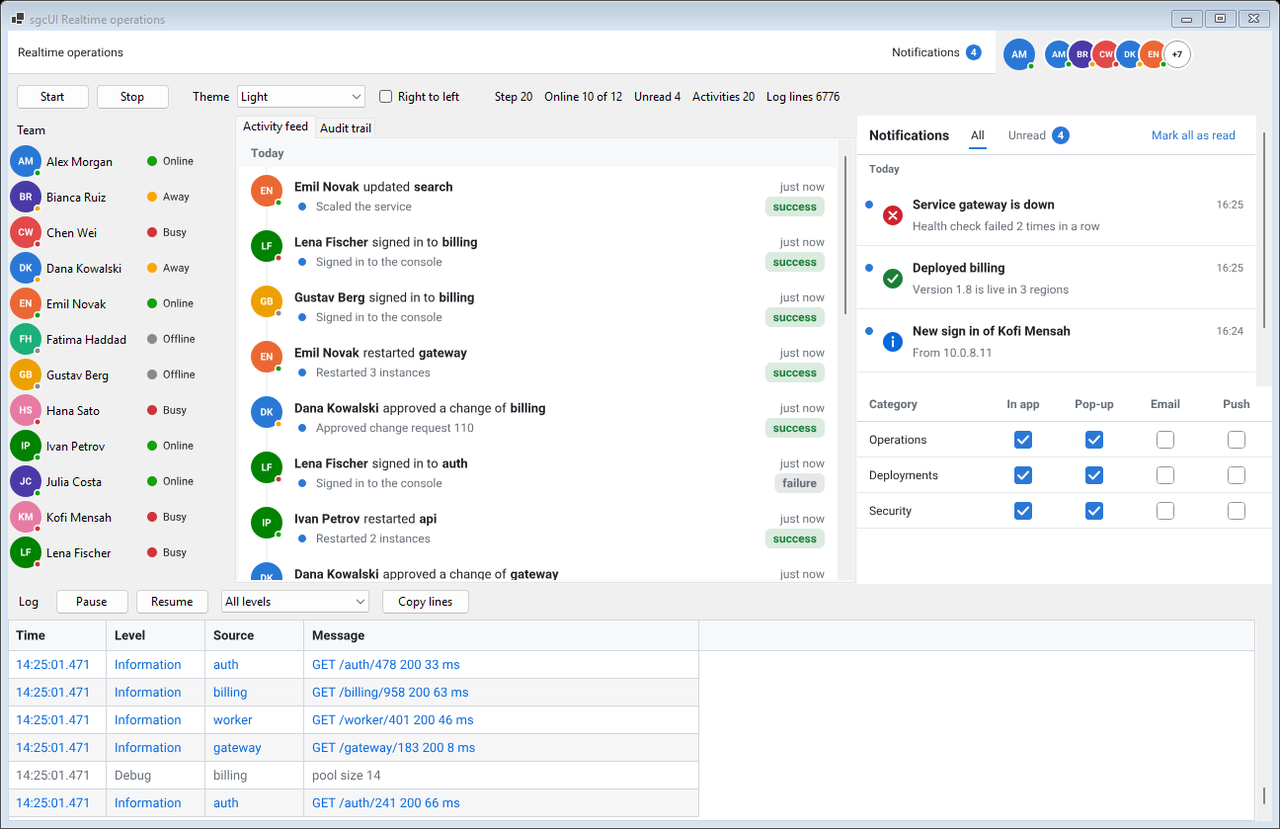
WinForms 上的 Realtime 演示:在线状态、动态流、通知收件箱和实时日志。
实时 UI 包 →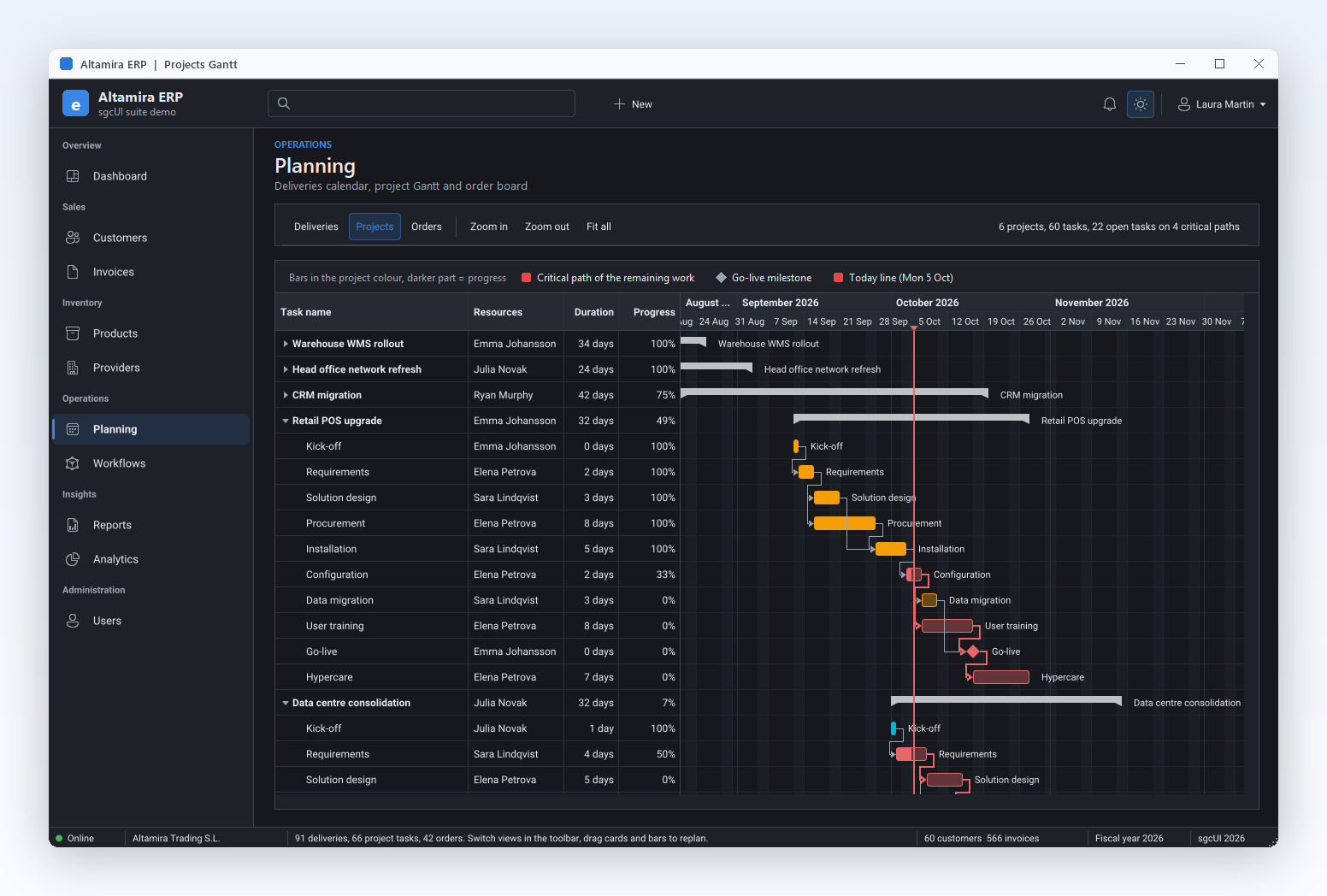
项目计划:带依赖关系和关键路径的甘特图。
sgcPlanner →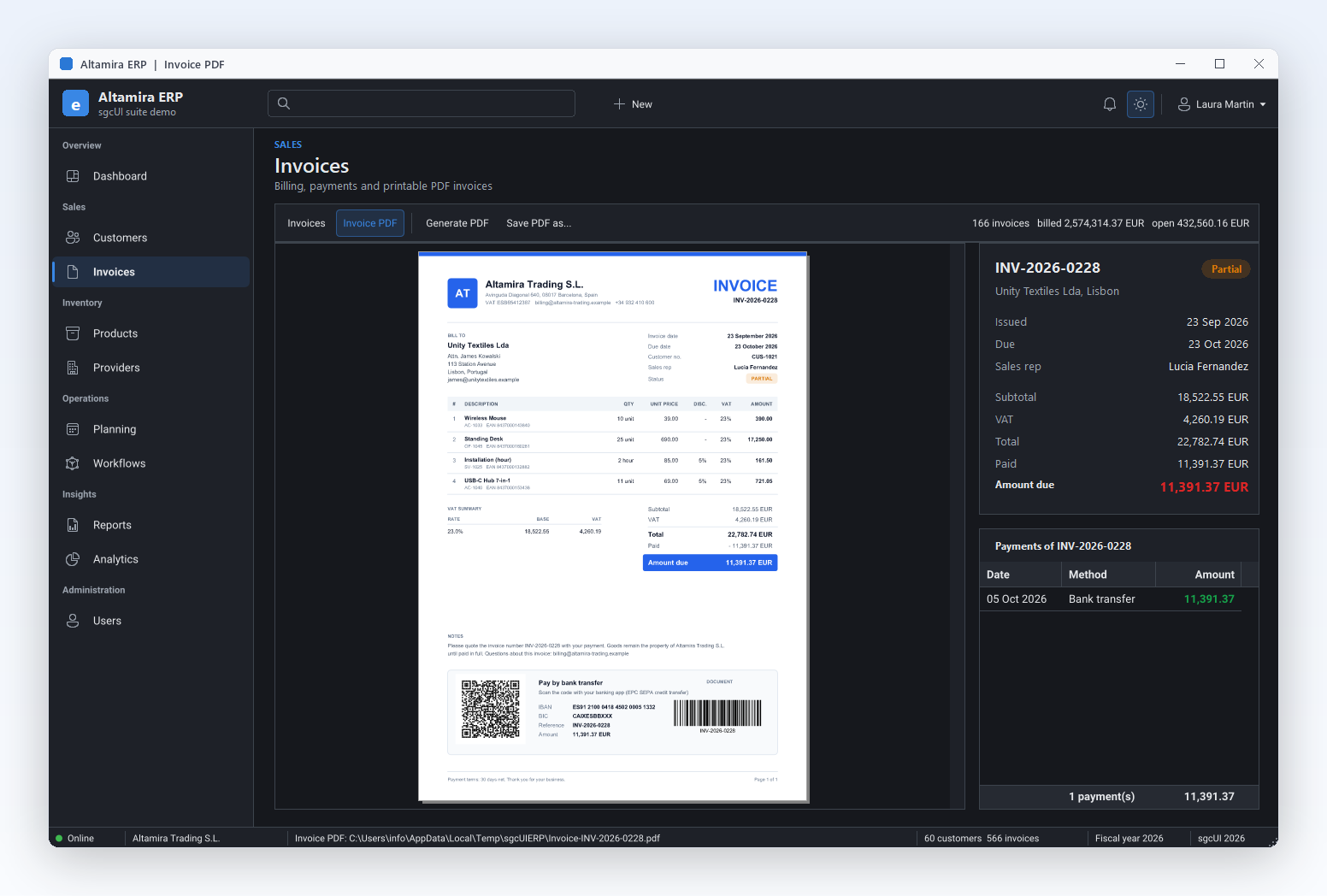
通过代码生成为 PDF 的发票,显示在内置的 PDF 查看器中。
sgcPDF →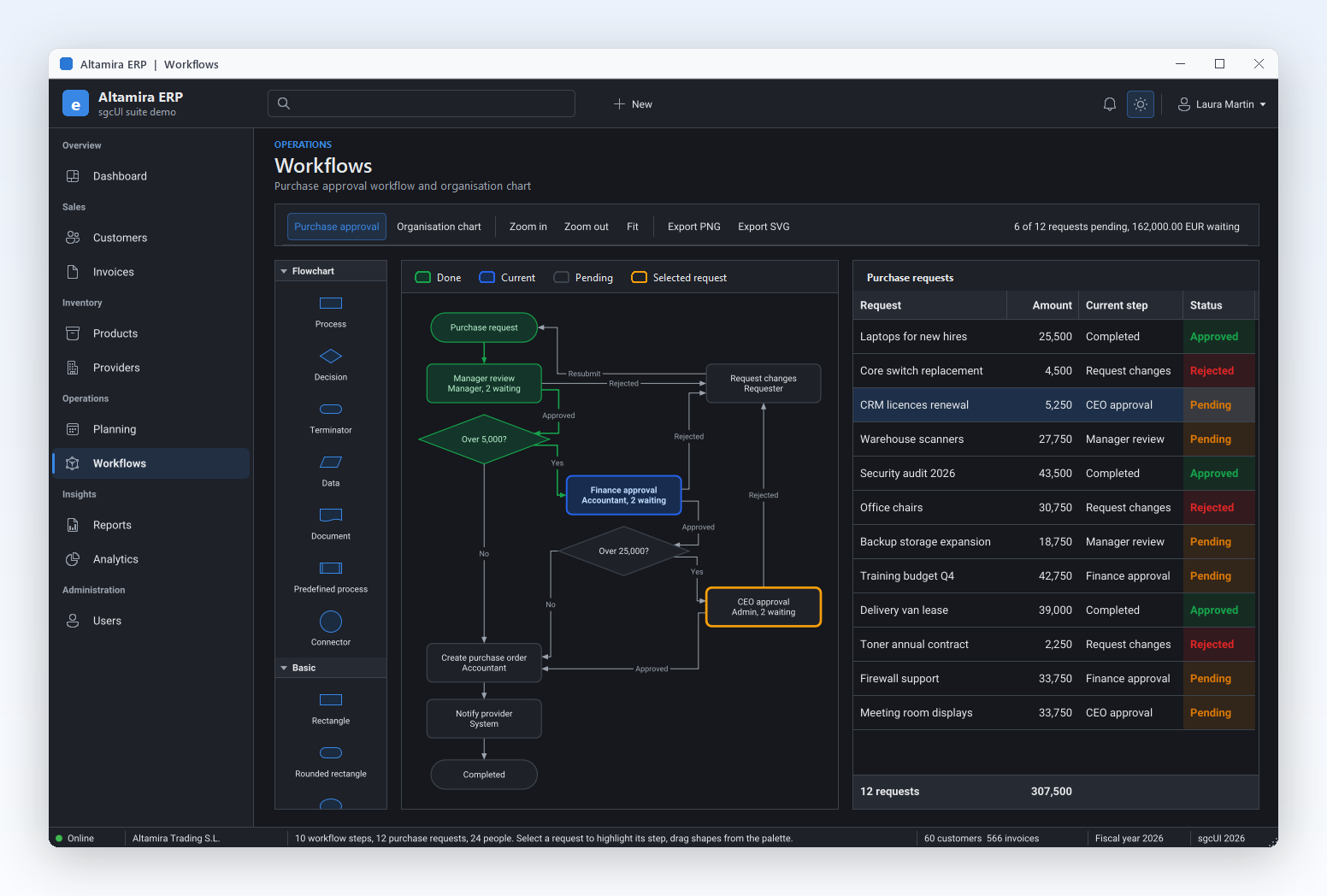
以图表形式绘制并与申请网格关联的审批工作流。
sgcDiagram →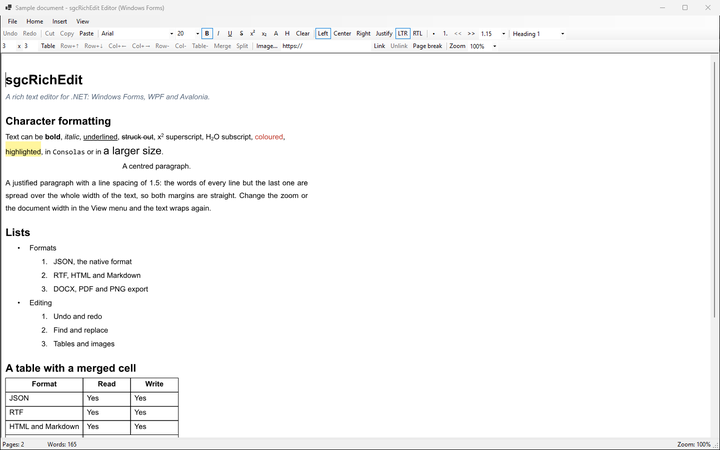
WinForms 上的 sgcRichEdit 编辑器演示:样式、列表、表格和链接。
sgcRichEdit →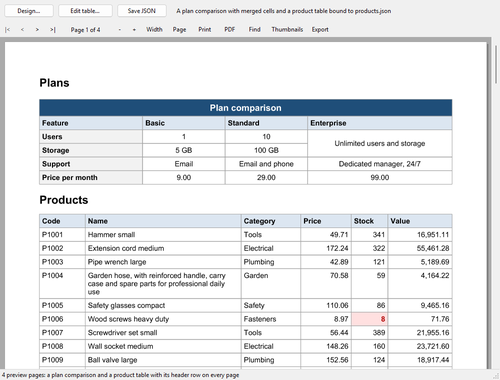
WinForms 上的 ReportTables 演示:带打印、PDF 和导出的报表预览。
.NET 报表 →sgcUI WinForms 控件是用 C# 编写的普通 Windows Forms 控件。添加一个 NuGet 包,从 Visual Studio 工具箱将控件拖到窗体上,并在属性窗口或代码中进行设置。
Fluent 预设让 sgcUI 控件在浅色和深色下具有 Windows 11 的配色、圆角和焦点环,并使用 Windows 中选定的强调色绘制。
在 .NET 9 及更高版本中,控件会跟随通过 Application.SetColorMode 设置的颜色模式,并且在每个目标框架上都可以跟随 Windows 的浅色或深色选择。
带图标的工具箱条目、智能标记、用于列、系列和字段的集合编辑器,以及在绑定任何数据之前设计器中的示例数据。
像绑定 DataGridView 那样,通过窗体的 CurrencyManager 绑定 DataSet、DataTable、DataView、BindingSource、IList 或 IListSource。
网格数据是线程安全的:工作线程按键更新行,网格在 UI 线程上每秒最多重绘 MaxFPS 次。
WinForms、WPF 和 Avalonia 上的模型和类名相同,因此界面可以在不同宿主之间迁移,并且相同的组件也适用于 Delphi 和 C++Builder。
WinForms 控件带有 TsgcWinForms 前缀。每个产品都提供一个 esegece.<Product>.WinForms NuGet 包,且大多数产品在 nuget.org 上还有免费的 .WinForms.Community 构建。
| 产品 | 为 WinForms 窗体增添什么 | 主要 WinForms 控件 | Community |
|---|---|---|---|
| sgcGrid | WinForms 网格:可从任意线程按键更新行,变化时闪烁,支持条件格式、分组、汇总和筛选。 | TsgcWinFormsGrid, TsgcWinFormsFilterBuilder | 是 |
| sgcPivotGrid | 数据透视表,带字段列表,可在行、列、筛选器和值之间拖动字段。 | TsgcWinFormsPivotGrid, TsgcWinFormsPivotFieldList | 是 |
| sgcCharts | WinForms 图表:在一个图表模型上提供折线、柱状、K 线、饼图等更多系列,支持 PNG 和 SVG 输出,并带迷你图。 | TsgcWinFormsChart, TsgcWinFormsSparkline | 是 |
| sgcDashboard | 由磁贴和 KPI 卡片组成的仪表板,磁贴可承载图表、仪表、网格、透视表和地图。 | TsgcWinFormsDashboard, TsgcWinFormsDashboardTile, TsgcWinFormsKPICard | 是 |
| sgcGauges | 径向、线性和 LED 仪表,以及旋钮、滑块和开关输入。 | TsgcWinFormsRadialGauge, TsgcWinFormsLinearGauge, TsgcWinFormsKnobGauge | 是 |
| sgcPlanner | WinForms 日程表、甘特图和看板共用一个数据模型。 | TsgcWinFormsScheduler, TsgcWinFormsGantt, TsgcWinFormsKanban | 是 |
| sgcDiagram | 带形状面板、连接线和小地图的图表编辑器。 | TsgcWinFormsDiagramView, TsgcWinFormsDiagramPalette | 是 |
| sgcMaps | 带瓦片图层、标记和线条的地图控件,在后台线程中加载瓦片。 | SgcMapControl | 是 |
| sgcEditors | 输入控件,如日期选择器、货币、掩码、查找和令牌编辑框,以及数据表单和验证。 | TsgcWinFormsDatePicker, TsgcWinFormsCurrencyEdit, TsgcWinFormsLookupEdit | 是 |
| sgcNavigation | 侧边栏、选项卡、停靠面板、弹出提示和通知收件箱。 | TsgcWinFormsNavigationBar, TsgcWinFormsNavigationTabs, TsgcWinFormsDockManager | 是 |
| sgcToolbar | 工具栏、状态栏和 WinForms 功能区。 | TsgcWinFormsToolbar, TsgcWinFormsStatusBar, TsgcWinFormsRibbon | 是 |
| sgcWizard | 多页向导和步骤条。 | TsgcWinFormsWizard, TsgcWinFormsStepper | 是 |
| sgcPDF | WinForms PDF 查看器,带缩略图、缩放、搜索、打印和批注工具。 | TsgcPDFViewerControl | 是 |
| sgcReports | 报表设计器和报表预览,支持打印、PDF 和导出。 | TsgcWinFormsReportPreview, TsgcWinFormsReportDesigner | 是 |
| sgcRichEdit | 富文本编辑器,支持样式、列表、表格、图片和链接,另有代码编辑器。 | TsgcWinFormsRichEdit, TsgcWinFormsCodeEdit | Registered |
| sgcSpreadsheet | 带公式栏的 Excel 风格 WinForms 电子表格。 | TsgcWinFormsSpreadsheet | Registered |
| sgcChat | 用于 AI 助手或团队的聊天视图,附带 Markdown 查看器。 | TsgcWinFormsChatView, TsgcWinFormsChatPanel, TsgcWinFormsMarkdownViewer | Registered |
确切的包名位于 .NET 下载选项卡,功能矩阵则列出了 Community 构建所包含的内容。
每个 sgcUI 控件都使用同一个应用程序主题绘制。预设决定其配色和圆角:Classic 为默认,Fluent 呈现 Windows 11 的外观。
sgcUIApplication.ThemePreset 会在 Classic 和 Fluent 之间切换所有 Theme 为 utDefault 的 sgcUI 控件,支持浅色和深色,Windows 高对比度仍然优先。Application.SetColorMode 设为深色的窗体,或在深色 Windows 上设为系统模式的窗体,会让 sgcUI 控件一同变为深色。在 .NET Framework 4.7.2 和 .NET 8 上,宿主主题为浅色。sgcUIApplication.ThemeFollow = TsgcUIThemeFollow.utfSystem 会在用户更改 Windows 设置时在浅色和深色之间切换控件,无需重启。sgcUIApplyThemeToForm,或将 aApplyToForms 设为 true 的 SetTheme,会为窗体及其标准子控件设置主题的背景色和字体颜色。sgcUIApplication.AccentColor 设置自己的颜色。创建一个 net8.0-windows WinForms 项目,并从 nuget.org 添加 sgcGrid 和 sgcCharts 的免费 Community 包。此程序基于它们即可直接构建。
dotnet new winforms -n ModernWinForms
cd ModernWinForms
dotnet add package esegece.sgcGrid.WinForms.Community
dotnet add package esegece.sgcCharts.WinForms.Communityusing System;
using System.Drawing;
using System.Windows.Forms;
using esegece.sgcCharts;
using esegece.sgcGrid;
using esegece.sgcUICore;
namespace ModernWinForms
{
internal class MainForm : Form
{
private readonly TsgcWinFormsGrid FGrid = new TsgcWinFormsGrid();
private readonly TsgcWinFormsChart FView = new TsgcWinFormsChart();
private readonly TsgcChart FChart = new TsgcChart();
public MainForm()
{
Text = "Sales";
ClientSize = new Size(960, 540);
// the grid: field name, caption and data type
FGrid.Dock = DockStyle.Fill;
FGrid.Columns.Add("customer", "Customer");
FGrid.Columns.Add("region", "Region");
FGrid.Columns.Add("total", "Total", TsgcGridDataType.gdtFloat).DisplayFormat = "#,##0.00";
// one row per key, the values follow the column order
FGrid.Data.AppendRow("C001", "Aurora Logistics", "Iberia", 12840.5);
FGrid.Data.AppendRow("C002", "Cobalt Foods", "DACH", 9310.0);
// the chart: a model with two axes and a line series
TsgcChartAxis oBottom = FChart.Axes.Add();
oBottom.Name = "bottom";
oBottom.Position = TsgcChartAxisPosition.capBottom;
TsgcChartAxis oLeft = FChart.Axes.Add();
oLeft.Name = "left";
oLeft.Position = TsgcChartAxisPosition.capLeft;
TsgcChartSeries_Line oSeries = new TsgcChartSeries_Line();
oSeries.Chart = FChart;
oSeries.AxisX = "bottom";
oSeries.AxisY = "left";
for (int i = 0; i < 12; i++)
oSeries.AddXY(i, 200 + i * 15);
FView.Chart = FChart;
FView.Dock = DockStyle.Right;
FView.Width = 420;
Controls.Add(FGrid);
Controls.Add(FView);
}
}
internal static class Program
{
[STAThread]
private static void Main()
{
Application.EnableVisualStyles();
Application.SetCompatibleTextRenderingDefault(false);
// Fluent colours and corners, light or dark as chosen in Windows
sgcUIApplication.ThemePreset = sgcUICore_Theme.CS_UI_THEME_FLUENT;
sgcUIApplication.ThemeFollow = TsgcUIThemeFollow.utfSystem;
MainForm oForm = new MainForm();
// the form, its standard controls and its title bar follow the theme
sgcUICore_Theme_WinForms.sgcUIApplyThemeToForm(oForm, sgcUIApplication.Theme);
Application.Run(oForm);
}
}
}之后要更新某一行,可从任意线程使用其键调用 FGrid.Data.UpdateRow;BeginUpdate 和 EndUpdate 会将多次更改合并为一次重绘。若要在应用程序为深色时让某个控件保持浅色,请将其 Theme 设为 TsgcUITheme.utLight。帮助:.NET 包。
WinForms 控件可在 .NET Framework 4.7.2 的 Visual Studio 设计器中打开,在 .NET 8 或更高版本中则通过 Visual Studio 2022 及更高版本的进程外设计器打开。
WinForms NuGet 包会把它们的控件添加到工具箱中,每个控件都有自己的图标,每个产品一个类别,例如 "sgcUI Grid" 或 "sgcUI Planner"。
智能标记用于设置主题、数据源和主要选项。在图表上,它们可将折线、柱状、K 线或饼图系列作为一个撤销步骤添加。
在集合编辑器中编辑网格列、图表系列和透视字段,设计器会将它们保存在 InitializeComponent 中。
空的网格、透视表、图表、规划器或图表绘制控件会显示示例行、示例透视表、示例折线、示例任务或示例流程,因此可以在绑定之前检查布局。
属性窗口会列出所绑定数据的表和成员,因此 DataMember 可以指定表或关系,例如 Customers.CustomerOrders。
全部 69 个 WinForms 工具箱组件的智能标记都已在设计图面上测试:每个属性、集合编辑器、数据源列表、操作和动词。
在 .NET Framework 上,sgcUI 智能标记显示在 Visual Studio 内运行的默认设计器中。帮助:WinForms DataSource 和 DataMember。
基于 sgcUICore 构建的产品的 WinForms 包面向这四个框架。
| 目标框架 | .NET | sgcUI 控件的深色模式 |
|---|---|---|
net472 | .NET Framework 4.7.2 | 使用 utfSystem 跟随 Windows,或在代码中设置主题 |
net8.0-windows | .NET 8 | 使用 utfSystem 跟随 Windows,或在代码中设置主题 |
net9.0-windows | .NET 9 | 默认跟随 Application.SetColorMode |
net10.0-windows | .NET 10 | 默认跟随 Application.SetColorMode |
sgcMaps、sgcPDF 和 sgcReports 保留各自的目标:sgcMaps WinForms 控件需要 .NET 8 或更高版本。每个产品页面都列出了其确切的目标。需要在 Linux 和 macOS 上使用相同的控件?请阅读 从 WinForms 和 WPF 迁移到 Avalonia,并查看 Avalonia 控件。
先从 nuget.org 上的 Community 包开始,然后升级到 Registered 包,获得全部功能、完整的 C# 源代码和商业许可证。价格见 sgcUI .NET 价格。
sgcGrid、sgcNavigation、sgcToolbar 和 sgcEditors,按开发者授权,起价 €380,附带适用于 WinForms、WPF 和 Avalonia 的完整 C# 源代码,并可免费再分发二进制文件。
购买 sgcUI .NET Standard →还要为 Delphi 和 C++Builder 构建?相同的组件也以 Delphi VCL 组件和 FireMonkey 组件的形式提供。
添加 sgcUI WinForms 包,并将其控件,例如网格、图表、仪表板磁贴、功能区或导航栏,放到您的窗体上。然后通过 sgcUIApplication.ThemePreset = sgcUICore_Theme.CS_UI_THEME_FLUENT 选择 Fluent 预设:sgcUI 控件会采用 Windows 11 的配色、圆角和强调色,sgcUIApplyThemeToForm 则为窗体及其标准控件设置匹配的背景色和字体颜色,并在主题为深色时使用深色标题栏。
支持。每个 sgcUI 控件都有浅色和深色主题。在 .NET 9 及更高版本中,Theme 为 utDefault 的控件会默认跟随通过 Application.SetColorMode 设置的颜色模式,无需代码。在任何目标框架上,sgcUIApplication.ThemeFollow = TsgcUIThemeFollow.utfSystem 都会在应用程序运行期间跟随 Windows 的浅色或深色选择,而 sgcUIApplication.SetTheme(TsgcUITheme.utDark) 会为整个应用程序固定为深色。
基于 sgcUICore 构建的产品的 WinForms 包面向 net472、net8.0-windows、net9.0-windows 和 net10.0-windows,因此可运行于 .NET Framework 4.7.2 以及 .NET 8、9 和 10。sgcMaps、sgcPDF 和 sgcReports 保留各自的目标,已在其产品页面中列出。Visual Studio 设计器可用于 .NET Framework 4.7.2 以及 .NET 8 或更高版本。
有。Community 构建的包 ID 带有后缀 .Community,例如 esegece.sgcGrid.WinForms.Community,已在 nuget.org 上发布,涵盖 14 个产品。对个人以及年总收入低于 100 万欧元且开发者不超过 5 人的组织免费。sgcRichEdit、sgcSpreadsheet 和 sgcChat 仅提供 Registered 版本,功能矩阵列出了每个 Community 构建所不包含的内容。
可以。这些包会把控件连同图标一起添加到 Visual Studio 工具箱,Windows Forms 设计器会显示智能标记、集合编辑器以及所绑定数据的成员。在 .NET 8 及更高版本中,设计器程序集会加载到 Visual Studio 2022 及更高版本的进程外设计器中。
可以。WinForms、WPF 和 Avalonia 控件每个产品共用一个模型,除宿主前缀外类名相同,例如 TsgcWinFormsGrid 和 TsgcAvaloniaGrid。从 WinForms 和 WPF 迁移到 Avalonia 套件列出了宿主类型和已知差异。
相关内容:WPF DataGrid、Avalonia 控件、.NET 报表工具和 sgcUI 套件。