WinForms Controls from sgcUI
Modern WinForms controls for C#: a grid, charts, a ribbon and a scheduler, with Fluent light and dark themes that follow Windows.
Altamira ERP is the sgcUI suite demo for Delphi, C++Builder and .NET WinForms: one window with a dashboard, customers, invoices, planning, workflows, reports and analytics. The Realtime, editor and report shots below were captured on WinForms.
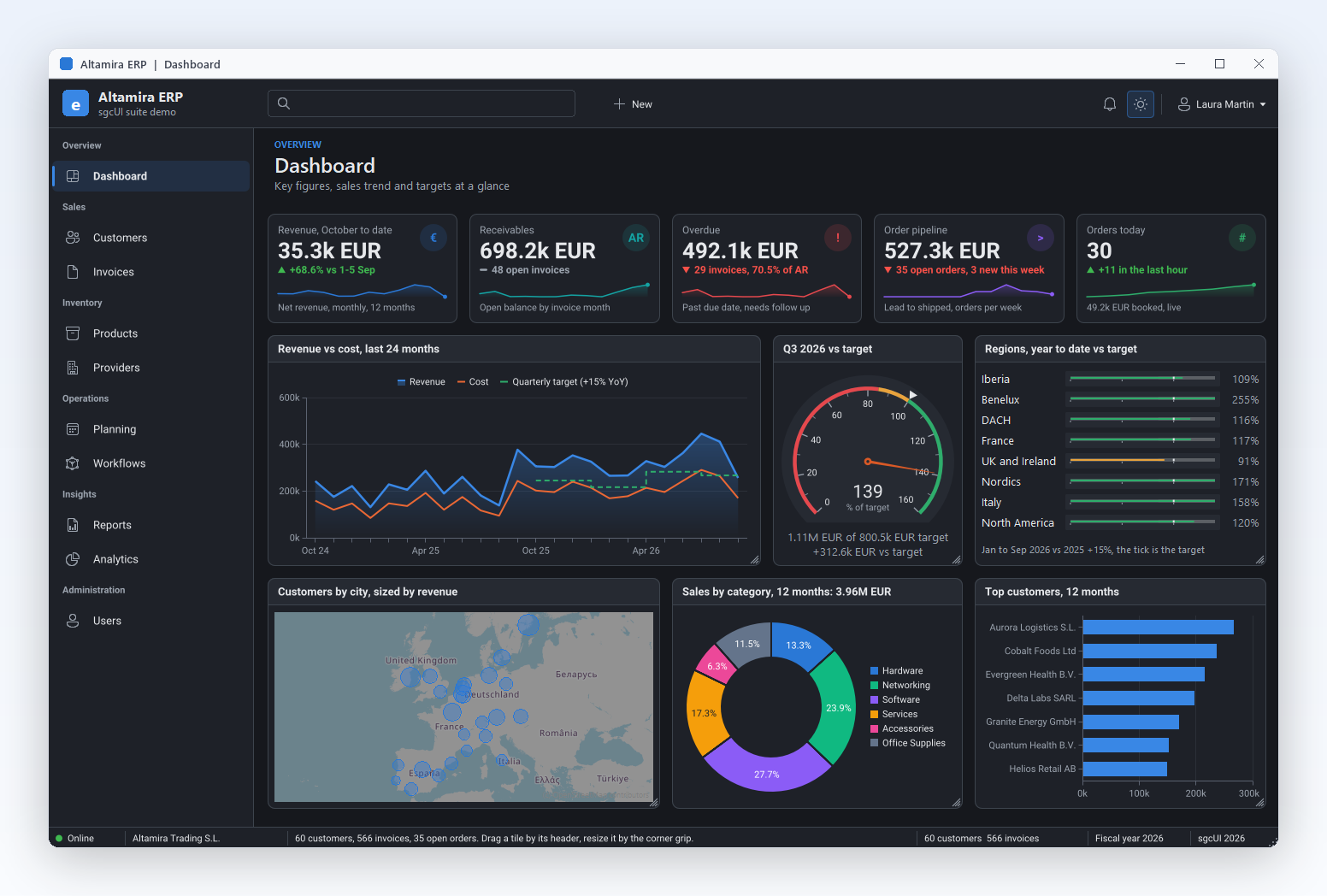
The ERP dashboard in dark mode: KPI cards, a revenue chart, a target gauge and a customer map.
sgcDashboard →
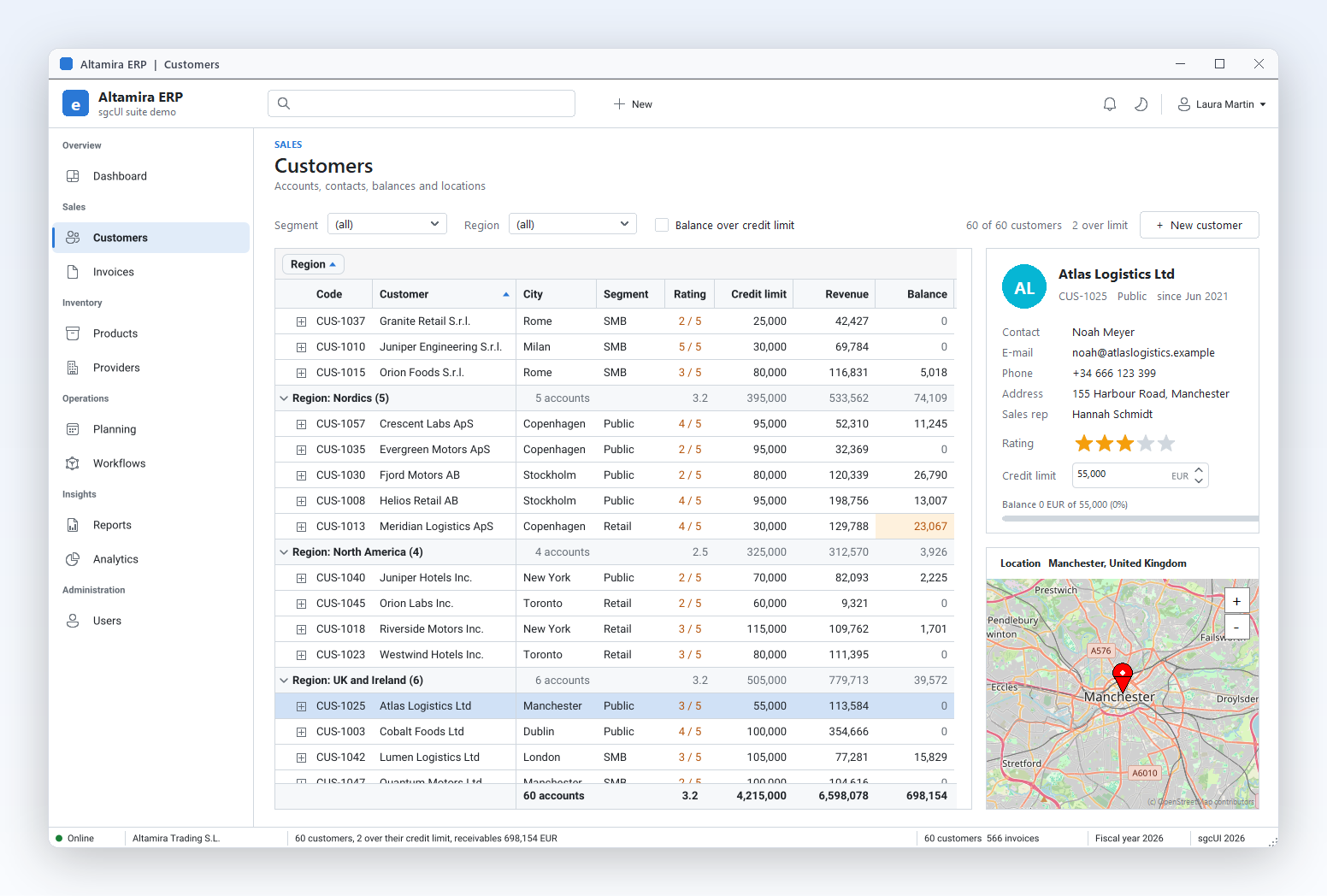
A customer grid grouped by region, with group summaries, footer totals and a contact card.
sgcGrid →
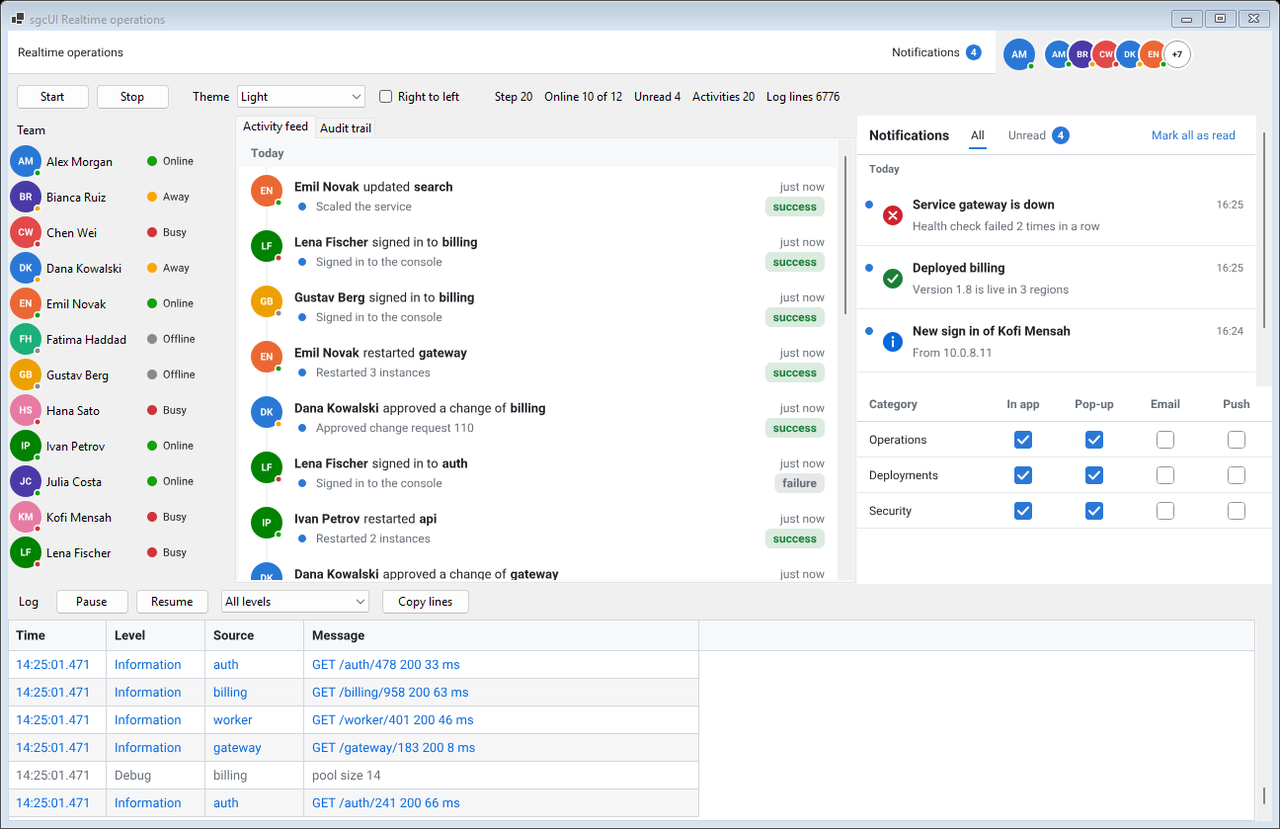
The Realtime demo on WinForms: presence, an activity feed, a notification inbox and a live log.
Realtime UI pack →
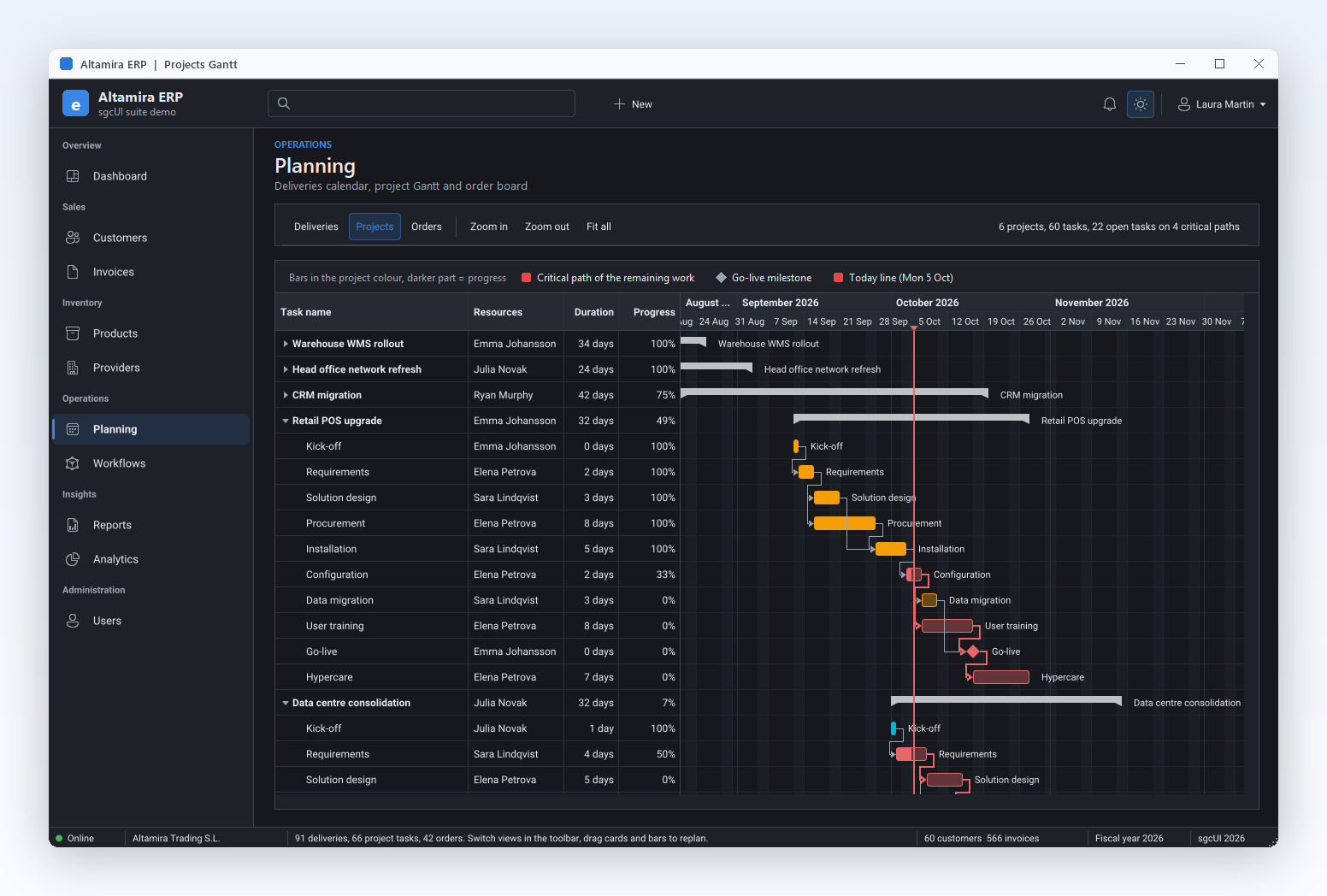
Project planning: a Gantt chart with dependencies and the critical path.
sgcPlanner →
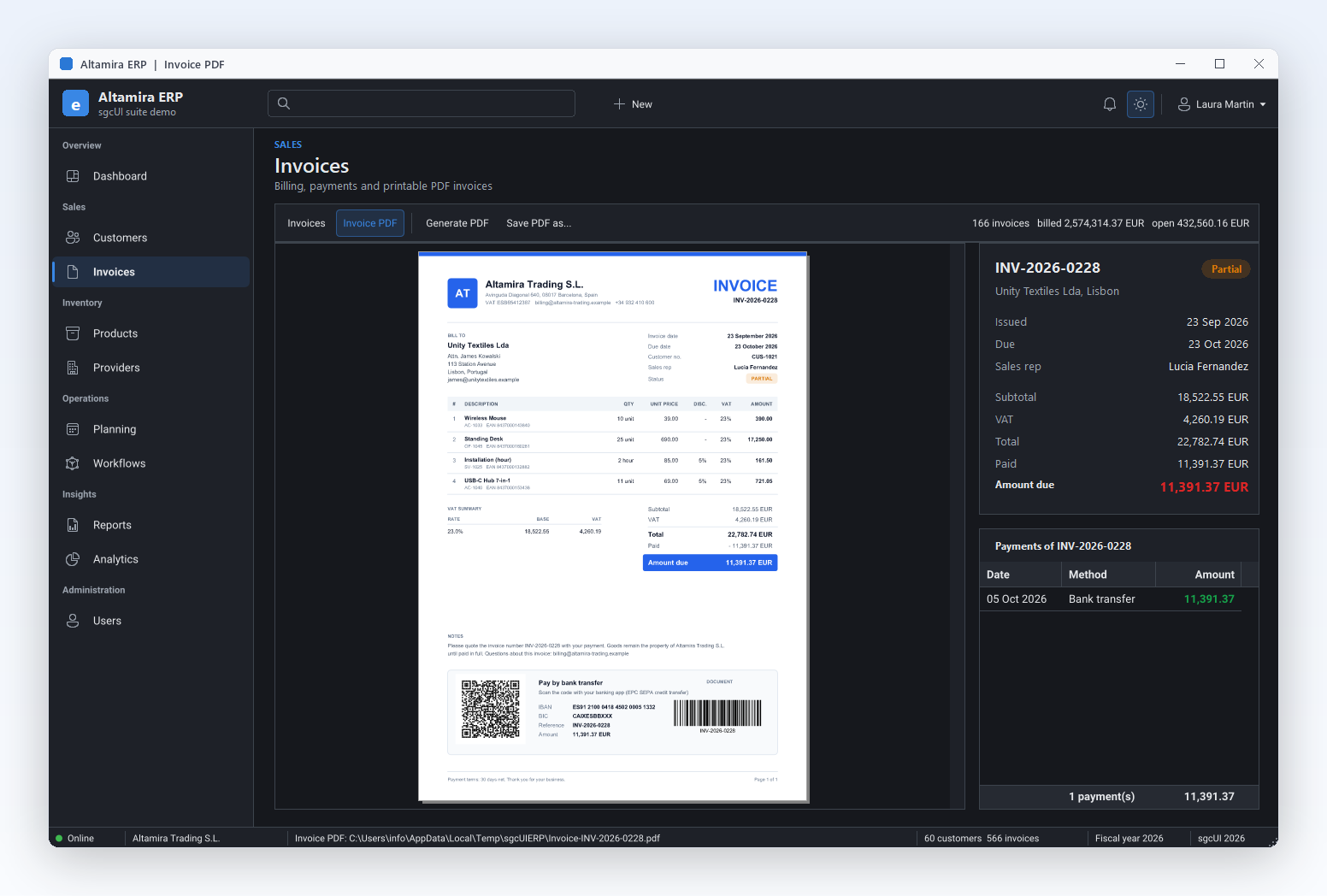
Invoices generated as PDF in code and shown in the built in PDF viewer.
sgcPDF →
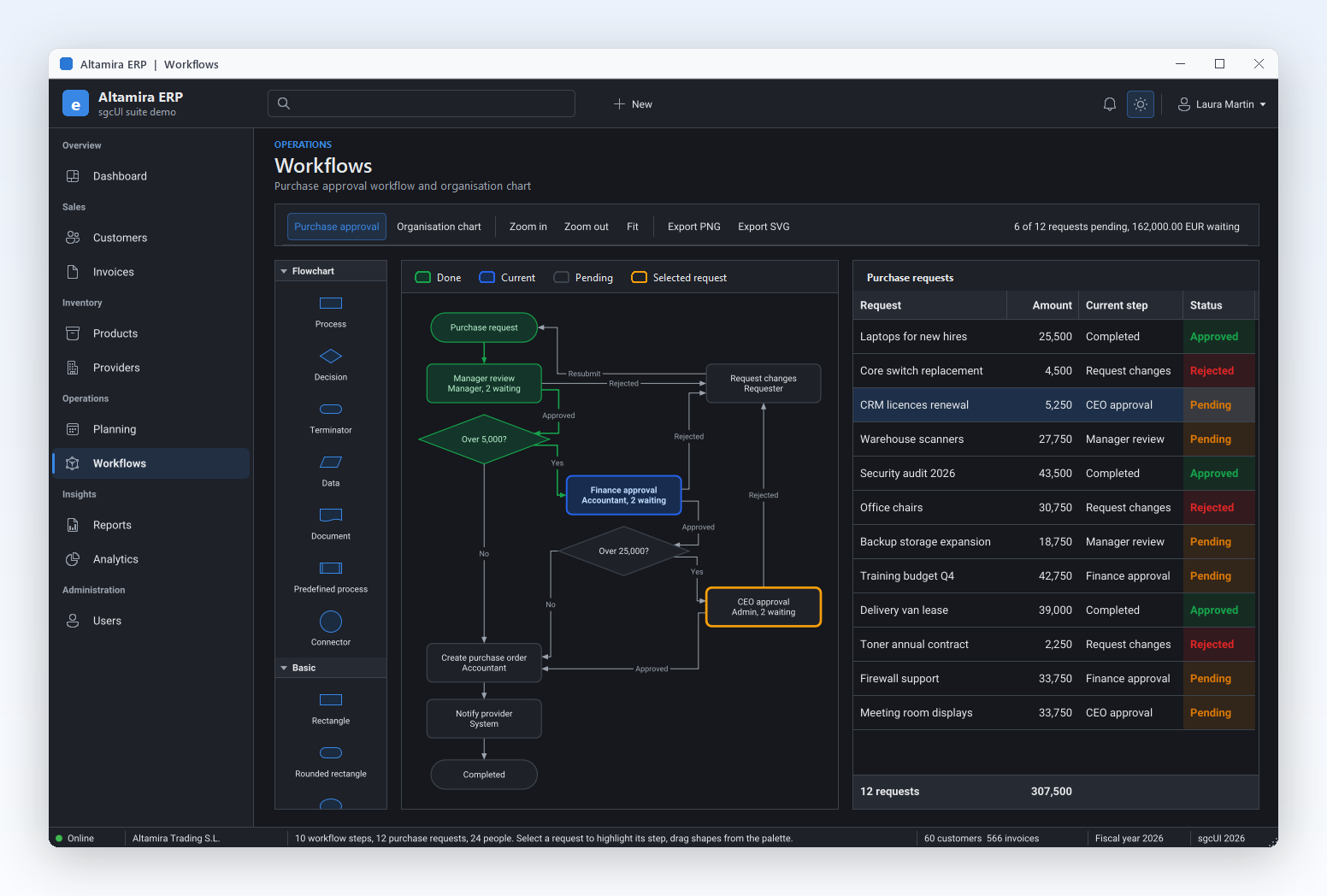
An approval workflow drawn as a diagram and linked to the requests grid.
sgcDiagram →
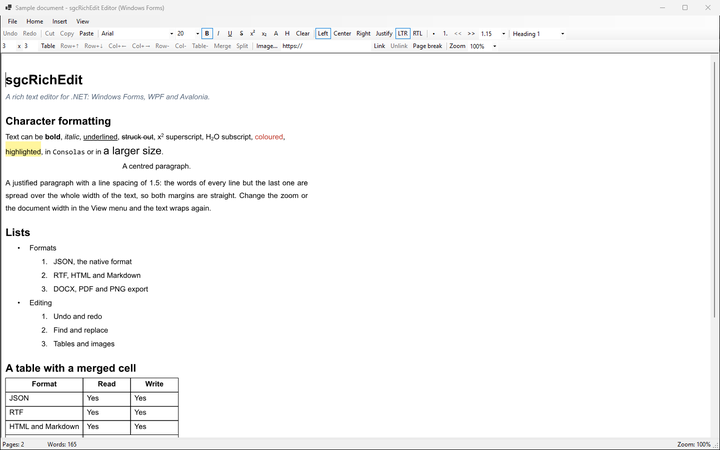
The sgcRichEdit editor demo on WinForms: styles, lists, tables and links.
sgcRichEdit →
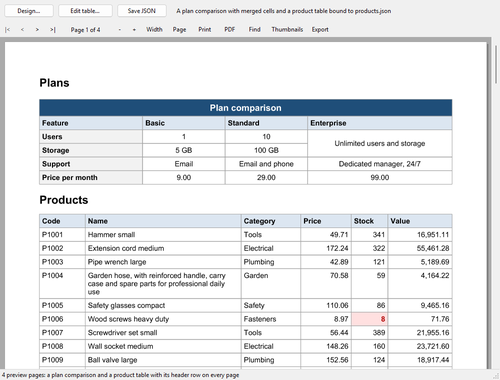
The ReportTables demo on WinForms: a report preview with print, PDF and export.
.NET reporting →The sgcUI WinForms controls are ordinary Windows Forms controls written in C#. Add a NuGet package, drag the control from the Visual Studio toolbox onto a form, and set it up in the Properties window or in code.
The Fluent preset gives the sgcUI controls the Windows 11 colours, corners and focus ring in light and dark, painted with the accent colour chosen in Windows.
On .NET 9 and later the controls follow the colour mode set with Application.SetColorMode, and can follow the light or dark choice of Windows on every target.
Toolbox entries with icons, smart tags, collection editors for columns, series and fields, and sample data in the designer before any data is bound.
Bind a DataSet, DataTable, DataView, BindingSource, IList or IListSource the way you bind a DataGridView, through the CurrencyManager of the form.
The grid data is thread safe: a worker thread updates rows by key, and the grid repaints on the UI thread at most MaxFPS times per second.
The same models and class names on WinForms, WPF and Avalonia, so screens move between hosts, and the same components exist for Delphi and C++Builder.
WinForms controls carry the TsgcWinForms prefix. Each product ships an esegece.<Product>.WinForms NuGet package, and most also have a free .WinForms.Community build on nuget.org.
| Product | What it adds to a WinForms form | Main WinForms controls | Community |
|---|---|---|---|
| sgcGrid | The WinForms grid: rows updated by key from any thread, flashing changes, conditional formatting, grouping, summaries and filters. | TsgcWinFormsGrid, TsgcWinFormsFilterBuilder | Yes |
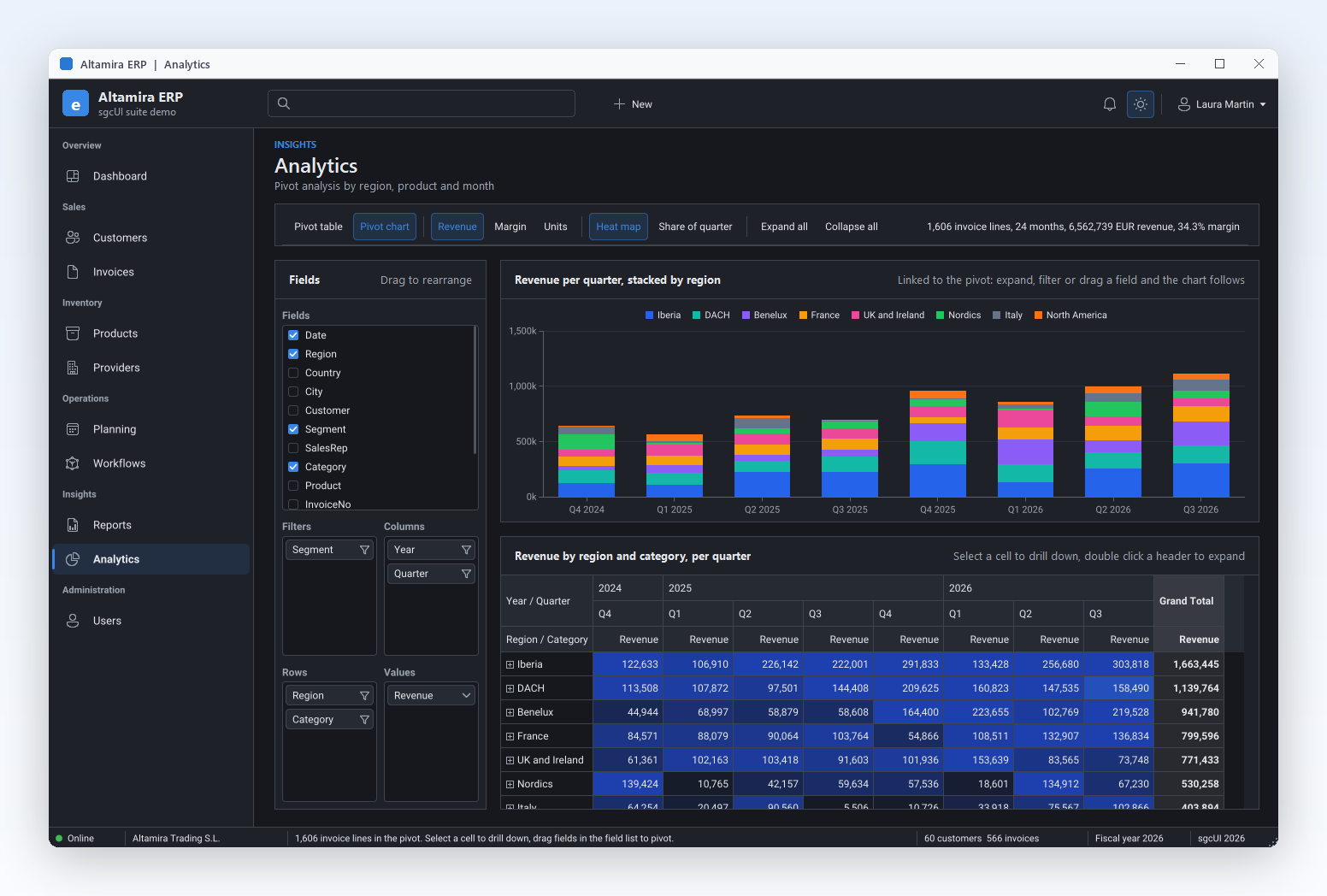
| sgcPivotGrid | Pivot tables with a field list to drag fields between rows, columns, filters and values. | TsgcWinFormsPivotGrid, TsgcWinFormsPivotFieldList | Yes |
| sgcCharts | The WinForms chart: line, bar, candlestick, pie and more series on one chart model, with PNG and SVG output and a sparkline. | TsgcWinFormsChart, TsgcWinFormsSparkline | Yes |
| sgcDashboard | Dashboards of tiles and KPI cards, with tiles for charts, gauges, grids, pivots and maps. | TsgcWinFormsDashboard, TsgcWinFormsDashboardTile, TsgcWinFormsKPICard | Yes |
| sgcGauges | Radial, linear and LED gauges, plus knob, slider and switch inputs. | TsgcWinFormsRadialGauge, TsgcWinFormsLinearGauge, TsgcWinFormsKnobGauge | Yes |
| sgcPlanner | A WinForms scheduler, a Gantt chart and a Kanban board on one data model. | TsgcWinFormsScheduler, TsgcWinFormsGantt, TsgcWinFormsKanban | Yes |
| sgcDiagram | A diagram editor with a shape palette, connectors and a minimap. | TsgcWinFormsDiagramView, TsgcWinFormsDiagramPalette | Yes |
| sgcMaps | A map control with tile layers, markers and lines, which loads tiles in background threads. | SgcMapControl | Yes |
| sgcEditors | Input controls such as date pickers, currency, masked, lookup and token edits, plus a data form and validation. | TsgcWinFormsDatePicker, TsgcWinFormsCurrencyEdit, TsgcWinFormsLookupEdit | Yes |
| sgcNavigation | A sidebar, tabs, docking panels, toasts and a notification inbox. | TsgcWinFormsNavigationBar, TsgcWinFormsNavigationTabs, TsgcWinFormsDockManager | Yes |
| sgcToolbar | A toolbar, a status bar and a WinForms ribbon. | TsgcWinFormsToolbar, TsgcWinFormsStatusBar, TsgcWinFormsRibbon | Yes |
| sgcWizard | Multi page wizards and a stepper. | TsgcWinFormsWizard, TsgcWinFormsStepper | Yes |
| sgcPDF | A WinForms PDF viewer with thumbnails, zoom, search, printing and annotation tools. | TsgcPDFViewerControl | Yes |
| sgcReports | A report designer and a report preview with print, PDF and export. | TsgcWinFormsReportPreview, TsgcWinFormsReportDesigner | Yes |
| sgcRichEdit | A rich text editor with styles, lists, tables, images and links, and a code editor. | TsgcWinFormsRichEdit, TsgcWinFormsCodeEdit | Registered |
| sgcSpreadsheet | An Excel style WinForms spreadsheet with a formula bar. | TsgcWinFormsSpreadsheet | Registered |
| sgcChat | Chat views for an AI assistant or a team, with a Markdown viewer. | TsgcWinFormsChatView, TsgcWinFormsChatPanel, TsgcWinFormsMarkdownViewer | Registered |
The exact package names are on the .NET download tab, and the feature matrix shows what the Community builds include.
Every sgcUI control paints with one application theme. A preset chooses its colours and corners: Classic stays the default, Fluent gives the look of Windows 11.
sgcUIApplication.ThemePreset switches every sgcUI control whose Theme is utDefault between Classic and Fluent, in light and dark, and Windows high contrast keeps priority.Application.SetColorMode, or to the system mode on a dark Windows, turns the sgcUI controls dark with it. On .NET Framework 4.7.2 and .NET 8 the host theme is light.sgcUIApplication.ThemeFollow = TsgcUIThemeFollow.utfSystem switches the controls between light and dark when the user changes the Windows setting, with no restart.sgcUIApplyThemeToForm, or SetTheme with aApplyToForms set to true, gives the form and its standard child controls the background and the font colour of the theme.sgcUIApplication.AccentColor.Help: Application Theme and Theme Presets.
Create a net8.0-windows WinForms project and add the free Community packages of sgcGrid and sgcCharts from nuget.org. This program builds as it is against them.
dotnet new winforms -n ModernWinForms
cd ModernWinForms
dotnet add package esegece.sgcGrid.WinForms.Community
dotnet add package esegece.sgcCharts.WinForms.Community
using System;
using System.Drawing;
using System.Windows.Forms;
using esegece.sgcCharts;
using esegece.sgcGrid;
using esegece.sgcUICore;
namespace ModernWinForms
{
internal class MainForm : Form
{
private readonly TsgcWinFormsGrid FGrid = new TsgcWinFormsGrid();
private readonly TsgcWinFormsChart FView = new TsgcWinFormsChart();
private readonly TsgcChart FChart = new TsgcChart();
public MainForm()
{
Text = "Sales";
ClientSize = new Size(960, 540);
// the grid: field name, caption and data type
FGrid.Dock = DockStyle.Fill;
FGrid.Columns.Add("customer", "Customer");
FGrid.Columns.Add("region", "Region");
FGrid.Columns.Add("total", "Total", TsgcGridDataType.gdtFloat).DisplayFormat = "#,##0.00";
// one row per key, the values follow the column order
FGrid.Data.AppendRow("C001", "Aurora Logistics", "Iberia", 12840.5);
FGrid.Data.AppendRow("C002", "Cobalt Foods", "DACH", 9310.0);
// the chart: a model with two axes and a line series
TsgcChartAxis oBottom = FChart.Axes.Add();
oBottom.Name = "bottom";
oBottom.Position = TsgcChartAxisPosition.capBottom;
TsgcChartAxis oLeft = FChart.Axes.Add();
oLeft.Name = "left";
oLeft.Position = TsgcChartAxisPosition.capLeft;
TsgcChartSeries_Line oSeries = new TsgcChartSeries_Line();
oSeries.Chart = FChart;
oSeries.AxisX = "bottom";
oSeries.AxisY = "left";
for (int i = 0; i < 12; i++)
oSeries.AddXY(i, 200 + i * 15);
FView.Chart = FChart;
FView.Dock = DockStyle.Right;
FView.Width = 420;
Controls.Add(FGrid);
Controls.Add(FView);
}
}
internal static class Program
{
[STAThread]
private static void Main()
{
Application.EnableVisualStyles();
Application.SetCompatibleTextRenderingDefault(false);
// Fluent colours and corners, light or dark as chosen in Windows
sgcUIApplication.ThemePreset = sgcUICore_Theme.CS_UI_THEME_FLUENT;
sgcUIApplication.ThemeFollow = TsgcUIThemeFollow.utfSystem;
MainForm oForm = new MainForm();
// the form, its standard controls and its title bar follow the theme
sgcUICore_Theme_WinForms.sgcUIApplyThemeToForm(oForm, sgcUIApplication.Theme);
Application.Run(oForm);
}
}
}
To update a row later, call FGrid.Data.UpdateRow with its key from any thread; BeginUpdate and EndUpdate group many changes into one repaint. To keep one control light while the application is dark, set its Theme to TsgcUITheme.utLight. Help: .NET Packages.
The WinForms controls open in the Visual Studio designer on .NET Framework 4.7.2, and on .NET 8 or later through the out of process designer of Visual Studio 2022 and later.
The WinForms NuGet packages add their controls to the toolbox, each with its own icon, under one category per product such as "sgcUI Grid" or "sgcUI Planner".
Smart tags set the theme, the data source and the main options. On the chart they add a line, bar, candlestick or pie series as one undo step.
Edit the grid columns, the chart series and the pivot fields in collection editors, and the designer saves them in InitializeComponent.
An empty grid, pivot, chart, planner or diagram shows sample rows, a sample pivot, a sample line, sample tasks or a sample flow, so the layout can be checked before binding.
The Properties window lists the tables and the members of the bound data, so DataMember can name a table or a relation such as Customers.CustomerOrders.
The smart tags of all 69 WinForms toolbox components are tested on a design surface: every property, collection editor, data source list, action and verb.
On .NET Framework the sgcUI smart tags show in the default designer that runs inside Visual Studio. Help: WinForms DataSource and DataMember.
The WinForms packages of the products built on sgcUICore target these four frameworks.
| Target framework | .NET | Dark mode of the sgcUI controls |
|---|---|---|
net472 | .NET Framework 4.7.2 | Follow Windows with utfSystem, or set the theme in code |
net8.0-windows | .NET 8 | Follow Windows with utfSystem, or set the theme in code |
net9.0-windows | .NET 9 | Follows Application.SetColorMode by default |
net10.0-windows | .NET 10 | Follows Application.SetColorMode by default |
sgcMaps, sgcPDF and sgcReports keep their own targets: the sgcMaps WinForms control needs .NET 8 or later. Each product page lists its exact targets. Need the same controls on Linux and macOS? Read WinForms and WPF to Avalonia and see the Avalonia controls.
Start with the Community packages on nuget.org, then move to the Registered packages for every feature, full C# source code and the commercial license. Prices from the sgcUI .NET pricing.
The .Community packages of 14 products, free for individuals and for organizations under EUR 1M annual gross revenue with no more than 5 developers.
sgcGrid, sgcNavigation, sgcToolbar and sgcEditors, from €380 per developer, with full C# source code for WinForms, WPF and Avalonia and free binary redistribution.
Buy sgcUI .NET Standard →Every product is also sold alone as a .NET package, from €149 per developer, with Team and Site licenses.
Compare the .NET editions →Also building for Delphi and C++Builder? The same components exist as Delphi VCL components and FireMonkey components.
Add the sgcUI WinForms packages and place their controls, such as the grid, charts, dashboard tiles, the ribbon or the navigation bar, on your forms. Then select the Fluent preset with sgcUIApplication.ThemePreset = sgcUICore_Theme.CS_UI_THEME_FLUENT: the sgcUI controls take the Windows 11 colours, corners and accent, and sgcUIApplyThemeToForm gives the form and its standard controls the matching background and font colour, plus a dark title bar while the theme is dark.
Yes. Every sgcUI control has a light and a dark theme. On .NET 9 and later the controls whose Theme is utDefault follow the colour mode set with Application.SetColorMode, by default and without code. On any target, sgcUIApplication.ThemeFollow = TsgcUIThemeFollow.utfSystem follows the light or dark choice of Windows while the application runs, and sgcUIApplication.SetTheme(TsgcUITheme.utDark) pins dark for the whole application.
The WinForms packages of the products built on sgcUICore target net472, net8.0-windows, net9.0-windows and net10.0-windows, so they run on .NET Framework 4.7.2 and on .NET 8, 9 and 10. sgcMaps, sgcPDF and sgcReports keep their own targets, listed on their product pages. The Visual Studio designer works on .NET Framework 4.7.2 and on .NET 8 or later.
Yes. TsgcWinFormsGrid from sgcGrid binds a DataSource and DataMember like the DataGridView, and takes live updates by key from any thread, with flashing changes and conditional formatting. TsgcWinFormsChart from sgcCharts paints a chart model with line, bar, candlestick, pie and other series and saves it to PNG or SVG. Both have free Community packages on nuget.org.
Yes. A Community build has the package id with the suffix .Community, for example esegece.sgcGrid.WinForms.Community, and is published on nuget.org for 14 products. It is free for individuals and for organizations under EUR 1M annual gross revenue with no more than 5 developers. sgcRichEdit, sgcSpreadsheet and sgcChat are Registered only, and the feature matrix shows what each Community build leaves out.
Yes. The packages add the controls to the Visual Studio toolbox with their icons, and the Windows Forms designer shows smart tags, collection editors and the members of the bound data. On .NET 8 and later the designer assemblies load in the out of process designer of Visual Studio 2022 and later.
Yes. The WinForms, WPF and Avalonia controls share one model per product and keep the same class names apart from the host prefix, for example TsgcWinFormsGrid and TsgcAvaloniaGrid. The WinForms and WPF to Avalonia kit shows the host types and the known differences.
Related: the WPF DataGrid, the Avalonia controls, the .NET reporting tool and the sgcUI suite.