
Vanaf sgcWebSockets 4.4.3 ondersteunt de Amazon AWS IoT MQTT-component custom-authenticatie, dus vanaf deze versie worden alle MQTT-protocollen ondersteund.
- MQTT over WebSockets
- MQTT over TCP
- X.509-certificaatauthenticatie
- Signature V4-authenticatie
- Custom-authenticatie
Ondersteunde protocollen
De volgende tabel toont de protocollen die de AWS IoT-apparaateindpunten ondersteunen en de authenticatiemethoden en poorten die zij gebruiken.
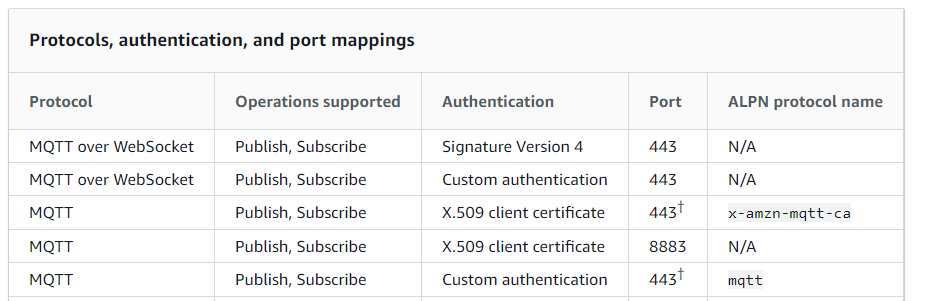
Custom-authenticatie
Met AWS IoT Core kun je custom authorizers definiëren zodat je je eigen clientauthenticatie en -autorisatie kunt beheren. Dit is handig wanneer je authenticatiemechanismen wilt gebruiken die AWS IoT Core niet native ondersteunt. Bijvoorbeeld: als je bestaande apparaten in het veld naar AWS IoT Core migreert en deze apparaten een custom bearer-token of MQTT-gebruikersnaam en -wachtwoord gebruiken om te authenticeren, kun je ze naar AWS IoT Core migreren zonder nieuwe identiteiten te hoeven aanmaken. Je kunt custom-authenticatie gebruiken met elk communicatieprotocol dat AWS IoT Core ondersteunt.
Voorbeeld: als je MQTT-gebruikersnaam en -wachtwoord wilt gebruiken om te authenticeren
oIoT := TsgcIoTAmazon_MQTT_Client.Create(nil);
oIoT.MQTTAuthentication.Enabled := True;
oIoT.MQTTAuthentication.Username := 'user';
oIoT.MQTTAuthentication.Password := 'password';
oIoT.CustomAuthentication.Enabled := True;
oIoT.CustomAuthentication.WebSockets := True;
oIoT.CustomAuthentication.Parameters := '/mqtt';
oIoT.Active := True;
Voorbeeld: als je een bearer-token wilt versturen
oIoT := TsgcIoTAmazon_MQTT_Client.Create(nil);
oIoT.CustomAuthentication.Enabled := True;
oIoT.CustomAuthentication.WebSockets := True;
oIoT.CustomAuthentication.Parameters := '/mqtt';
oIoT.CustomAuthentication.Headers.Text := 'Authorization: Bearer AbCdEf123456';
oIoT.Active := True;