sgcWebSockets supporta SignalR e SignalRCore protocols, ora noi see an esempio di come connetti a un SignalR Server utilizzando a c# sample da CodeProject webpage, puoi access a articolo utilizzando il seguente link:
This articolo shows come creare a simple Server e Client utilizzando SignalR come protocol, completo csharp source è hosted in github
https://github.com/nthdeveloper/SignalRSamples
In il seguente lines, I show how connect a questo SignalR server utilizzando sgcWebSockets library.
Start connection
In order a connetti a un SignalR server, noi utilizzare TsgcWebSocketClient as websocket client and TsgcWSAPI_SignalR as SignalR API. Crea primo websocket client e SignalR API e attach SignalR API a WebSocket client.
WSClient := TsgcWebSocketClient.Create(nil);
SignalRAPI := TsgcWSAPI_SignalR.Create(nil);
SignalRAPI.Client := WSClient;
Then tu deve impostare server dati connection. In questo case, server è listening su url: http://localhost:8080. TsgcWebSocketClient ha a proprietà chiamato URL dove noi può impostare URL of websocket server, come noi utilizzare websocket protocol il nostro url be: ws://localhost:8080
WSClient.URL := 'ws://localhost:8080';
Finally, SignalR richiede a Hub name, in questo demo, hub name è simplehub.
  SignalRAPI.SignalR.Hubs.Clear;
  SignalRAPI.SignalR.Hubs.Add('simplehub');
Then, noi può chiama WSClient.Active := True per iniziare a nuovo connection. Se server è active, noi ricevere a messaggio da server informing a successful connection.
Send Message
Once connected, noi può inviare a messaggio a server, noi utilizzare WriteData metodo from TsgcWSAPI_SignalR component. SignalR utilizza a propietary protocol, basically è un JSON messaggio con alcuni arguments. In questo example, metodo è chiamato Send e argument è text message. Messaggi sono ricevuto OnSignalRMessage event.
SignalRAPI.WriteData(Format('{"H":"simplehub","M":"Send","A":["%s"],"I":1}', [txtMessage.Text]));
procedure OnSignalRSignalRMessage(Sender: TObject; MessageId, aData: string);
begin
  DoLog('[' + MessageId + '] ' + aData);
end;
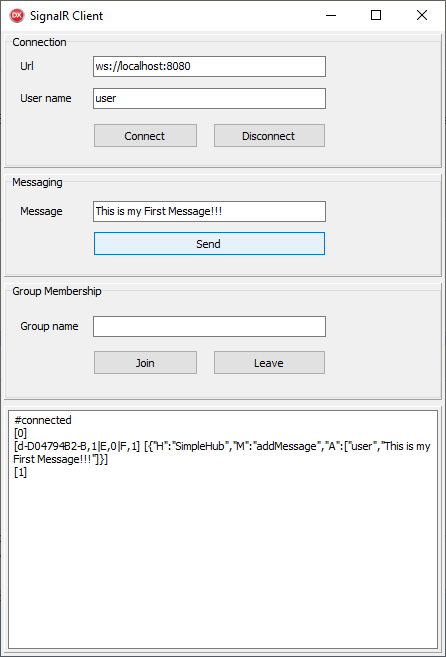
Join / Leave messages
Server esempio ha 2 metodi a join e leave utenti da a group. Messaggio format è molto similar a Invia message, let's see alcuni examples:
// join myGroup
SignalRAPI.WriteData(Format('{"H":"simplehub","M":"JoinGroup","A":["%s"],"I":2}', ['myGroup']));
// leave myGroup
SignalRAPI.WriteData(Format('{"H":"simplehub","M":"LeaveGroup","A":["%s"],"I":3}', ['myGroup']));
Download
You può download compiled progetto per C# e Delphi utilizzando il seguente link: