Transcribing Audio a Text (also known as Speech a Text) è molto easy utilizzando il OpenAI API, solo upload an Audio file in uno di il seguente formats: mp3, mp4, mpeg, mpga, m4a, wav, o webm. E l'API restituisce il string.
Transcription Delphi Example
OpenAI richiede a creare a richiesta erano tu pass il audio file, il model, il temperature (to ottenere a more ore less random output... trovi di seguito a list di il disponibile parametri.
- Filename: (Required) The audio file a transcribe, in uno di questi formats: mp3, mp4, mpeg, mpga, m4a, wav, o webm.
- Model: (Required) ID di il modello a use. Solo whisper-1 è attualmente available.
- Prompt: An facoltativo text a guide il model's style o continue a precedente audio segment. Il prompt dovrebbe match il audio language.
- ResponseFormat: The format di il transcript output, in uno di questi options: json, text, srt, verbose_json, o vtt.
- Temperature: The sampling temperature, tra 0 e 1. Higher values like 0.8 rendere il output more random, mentre lower values like 0.2 rendere it more focused e deterministic. Se impostare a 0, il modello utilizzare log probability a automaticamente increase il temperature fino a certain thresholds sono hit.
- Language: The language di il input audio. Supplying il input language in ISO-639-1 format migliorare accuracy e latency.
Trovi di seguito a simple esempio transcribing an audio file utilizzando whisper-1
procedure DoFileTranscription(const aFilename: string);
var
  oRequest: TsgcOpenAIClass_Request_Transcription;
  oResponse: TsgcOpenAIClass_Response_Transcription;
begin
  oRequest := TsgcOpenAIClass_Request_Transcription.Create;
  Try
    oRequest.Filename := aFilename;
    oRequest.Model := 'whisper-1';
    oResponse := OpenAI.CreateTranscriptionFromFile(oRequest);
    Try
      DoLog(oResponse.Text);
    Finally
      oResponse.Free;
    End;
  Finally
    oRequest.Free;
  End;
end;
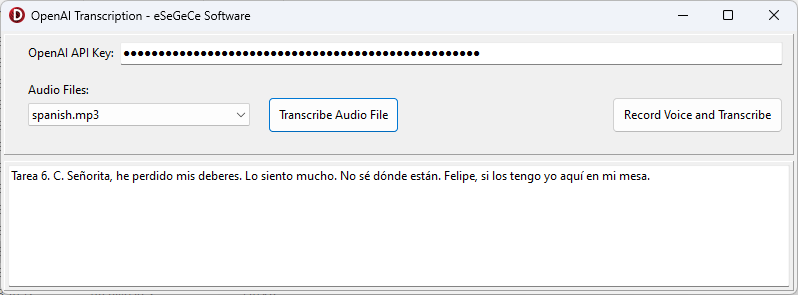
Trovi di seguito il compiled Demo per Windows utilizzando the sgcWebSockets OpenAI Delphi Library.