Delphi, C++ Builder & .NET Part of sgcUI

sgcCharts, Charts for Delphi, C++ Builder & .NET

One chart library for dashboards, analytics and trading screens. Seventeen series types from line to waterfall, SMA, RSI, MACD and Bollinger indicators, live feeds, zoom and drawing tools, and PNG or SVG export. The LiveLine demo streams 1,000,000 points through a ring buffer.

VCL, FireMonkey, WinForms, WPF, Avalonia17 series types in one modelLiveLine demo: 1,000,000 points in a ring bufferIncluded in sgcUI Professional
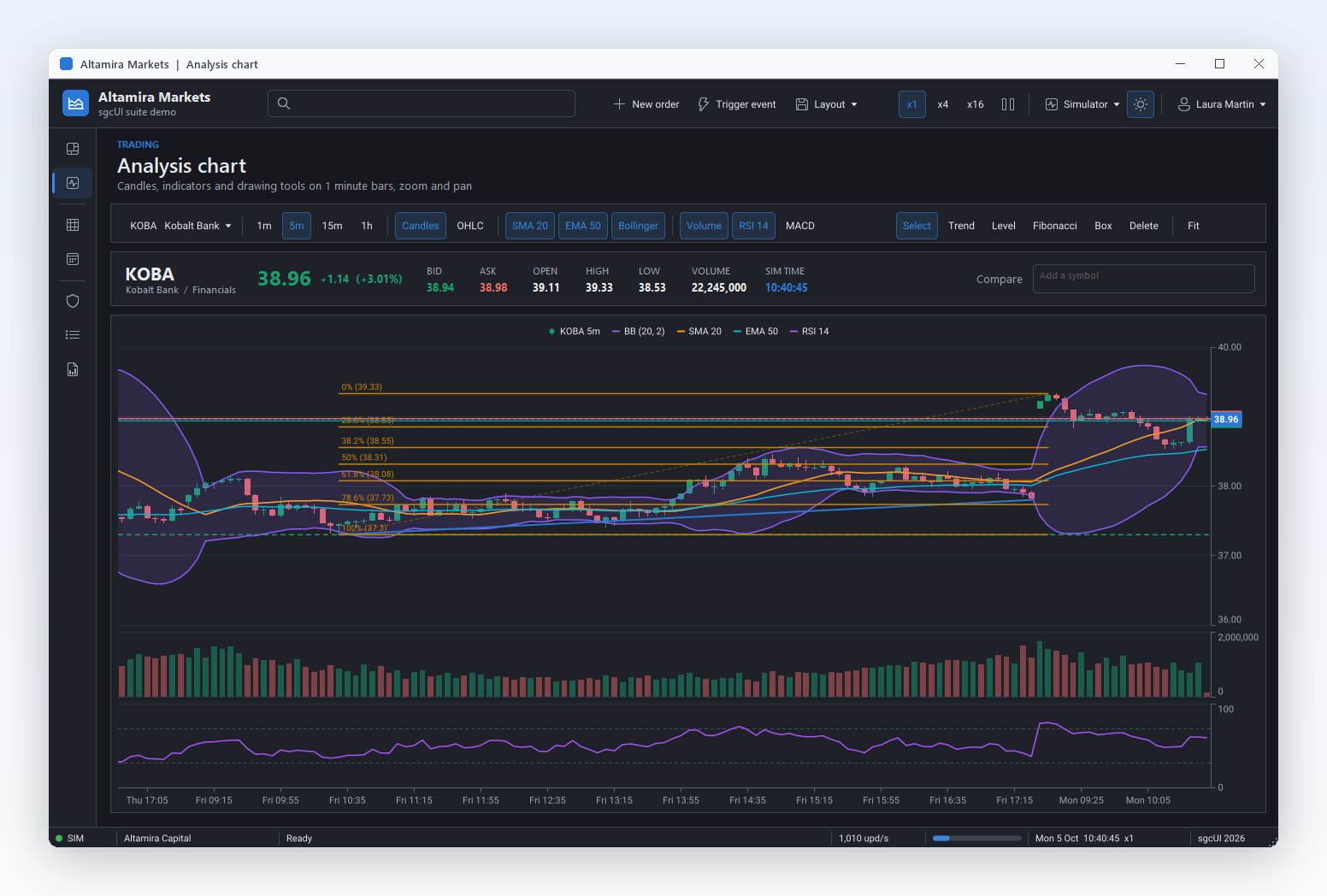
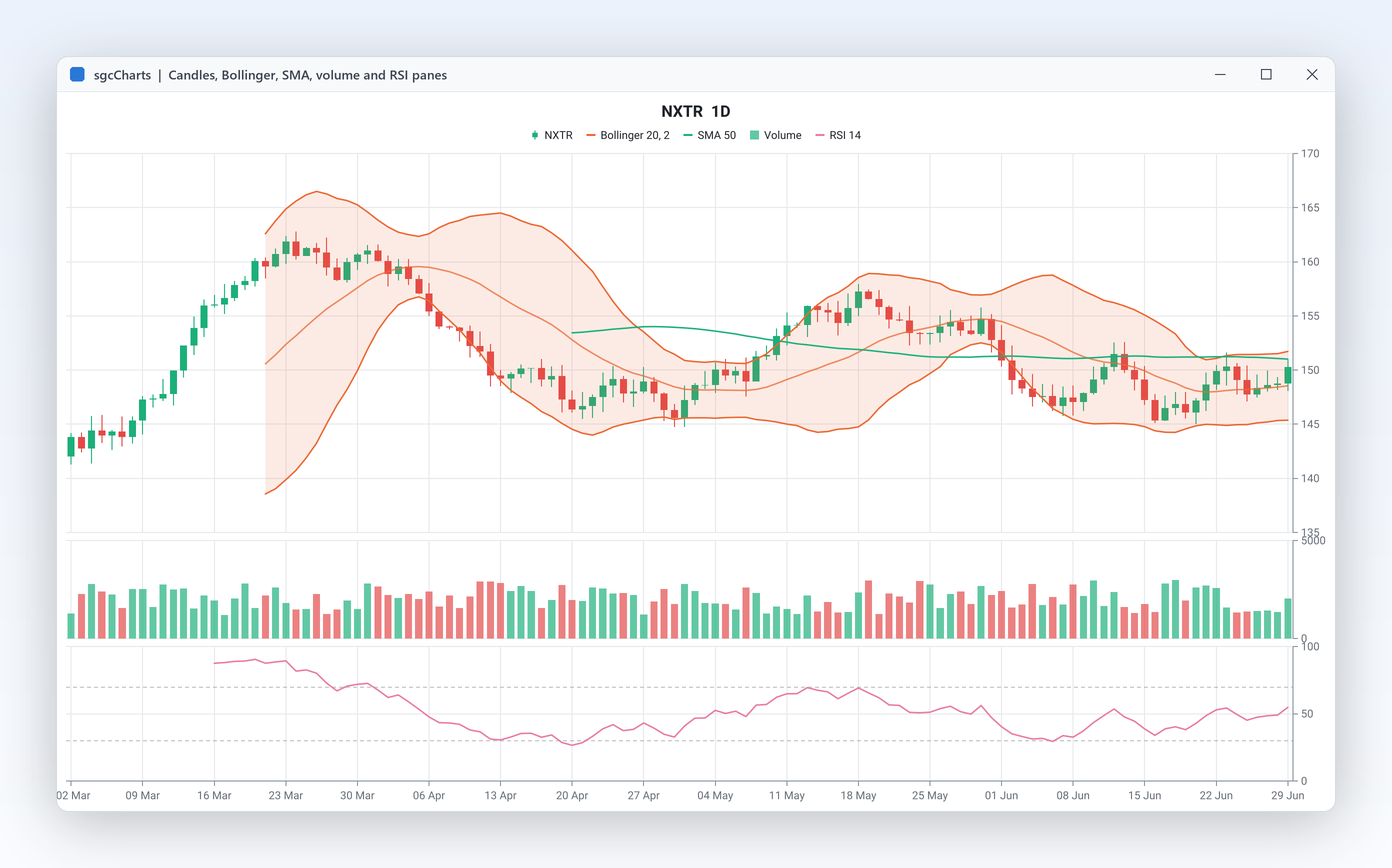
sgcCharts candlestick chart with Bollinger bands, moving averages, volume, RSI and drawing tools

Everything a Chart Library Needs

Eighteen capabilities in seven groups. Each one names the real component or property and links to its help topic. Features marked Registered are not in the free .NET Community build.

Chart types

One model, seventeen series types, as many axes as the data needs.

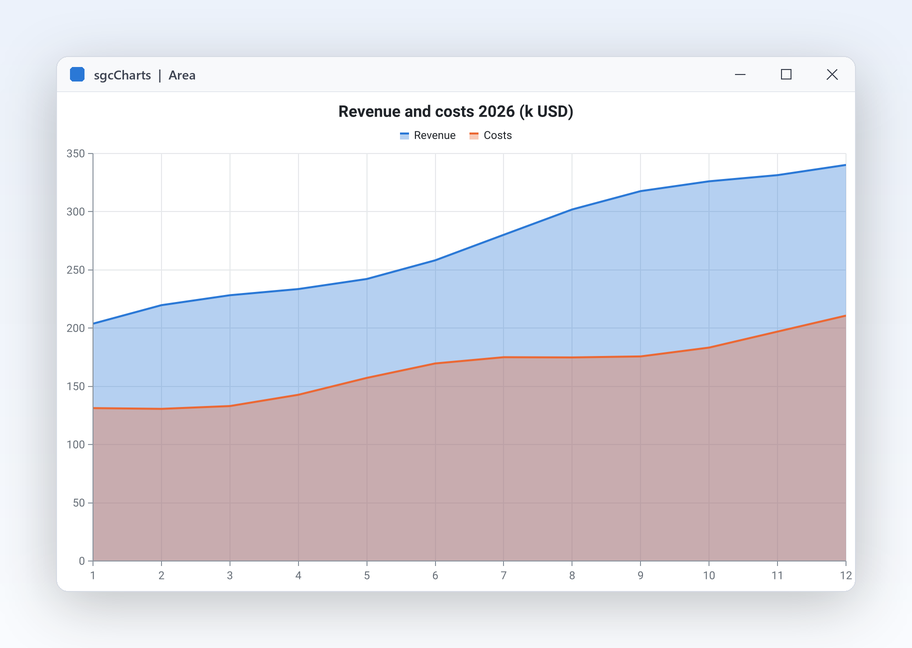
sgcCharts area chart rendered from the series gallery

Chart types

Seventeen chart types on one chart model

A sales screen needs bars and a donut, a lab screen needs scatter and heatmap, a trading screen needs candles. sgcCharts covers all of them with one model: every series is a component you drop on the form or create in code, link to a TsgcChart and mix freely with the others. Learn the API once and reuse it on every screen.

  • Line, fast line, step line, area, range area, bar, scatter, bubble, candlestick and OHLC on numeric, date time, logarithmic or category axes
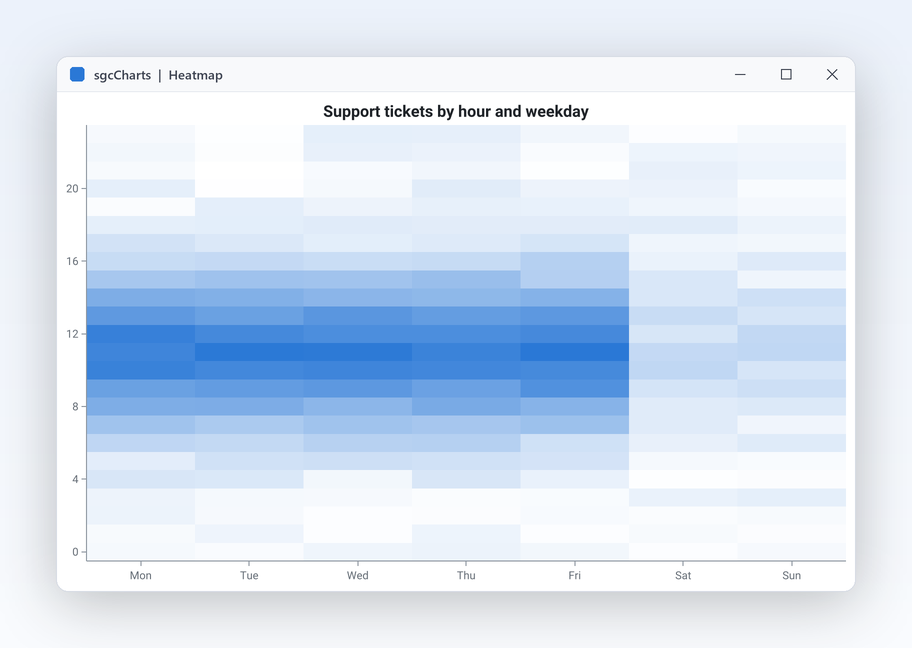
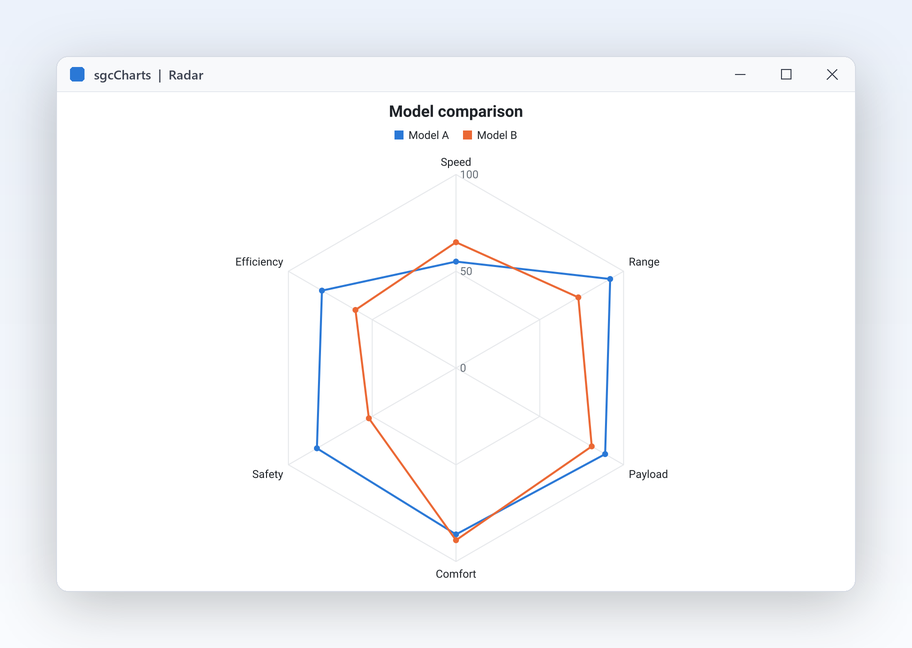
  • Pie and donut, radar, heatmap, treemap, funnel, box plot and waterfall for category data
  • TsgcChartSeries_Bar draws vertical or horizontal bars, grouped or stacked (Grouping)
  • All seventeen are in every edition, the free .NET Community build included
  • Right to left for Arabic and Hebrew: the title, the legend, the tooltips, the toolbar and the range selector are mirrored, and MirrorPlot mirrors the plot and its axes too
Read the help topic
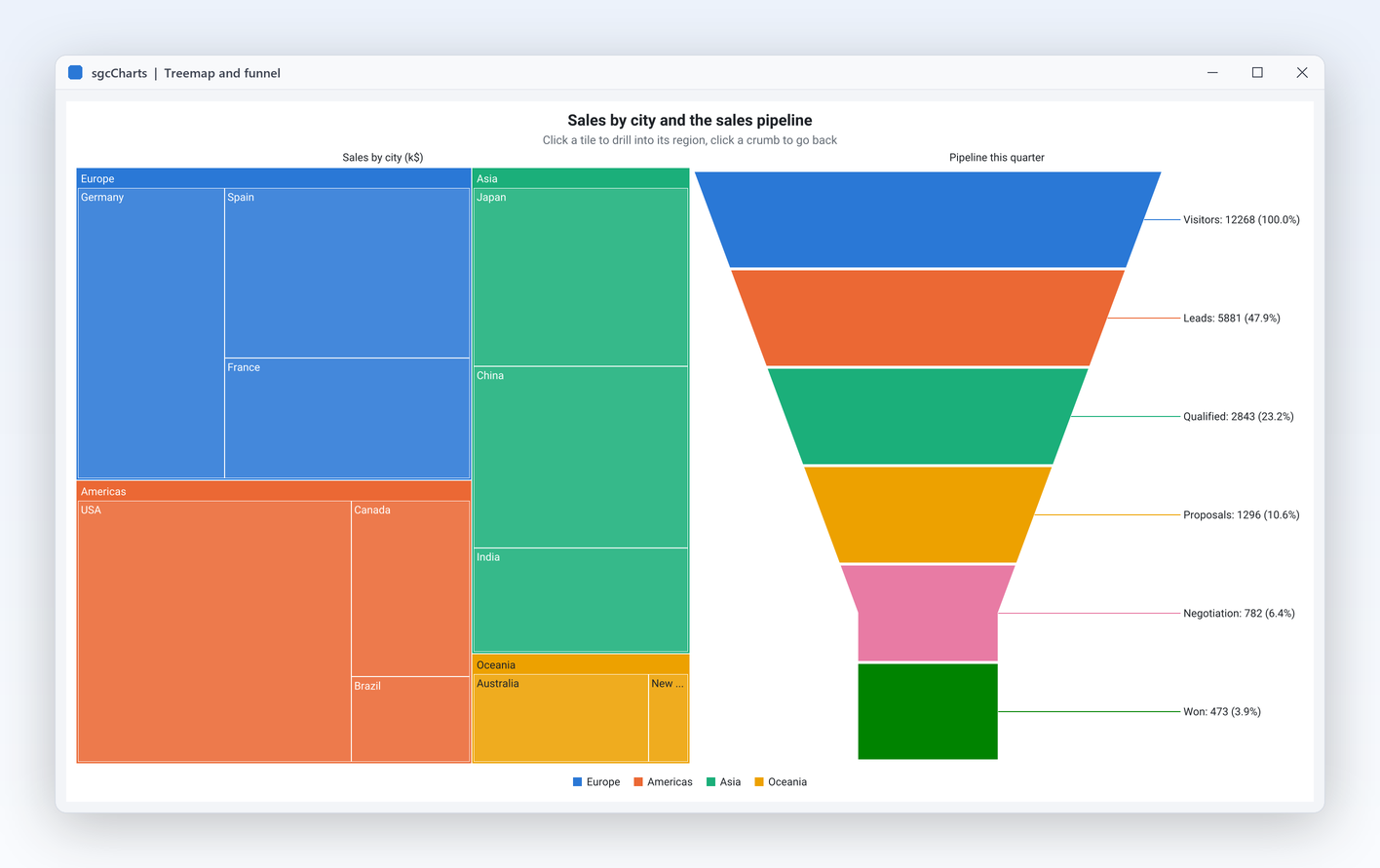
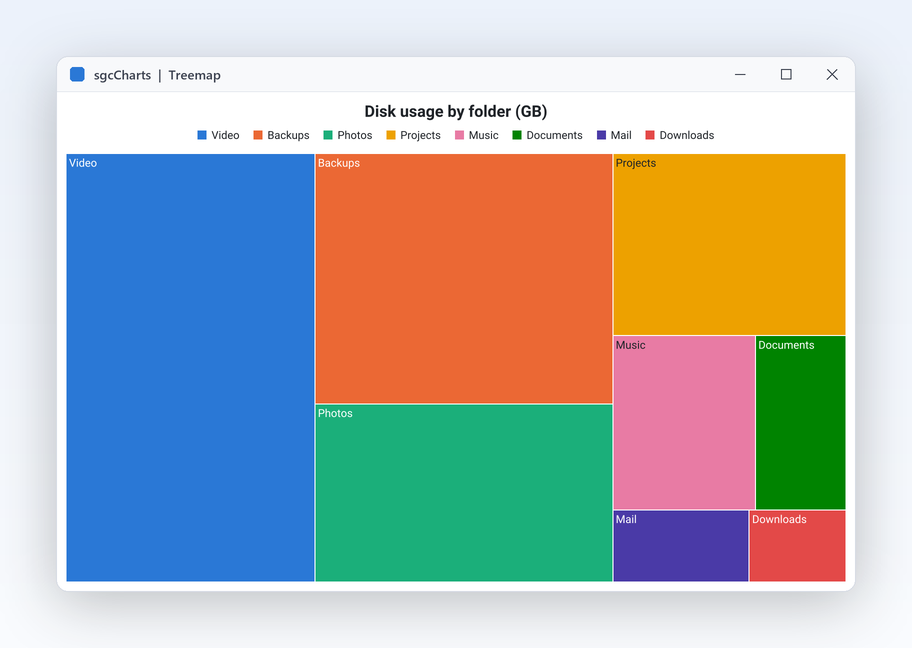
sgcCharts drill down treemap next to a sales funnel

Chart types

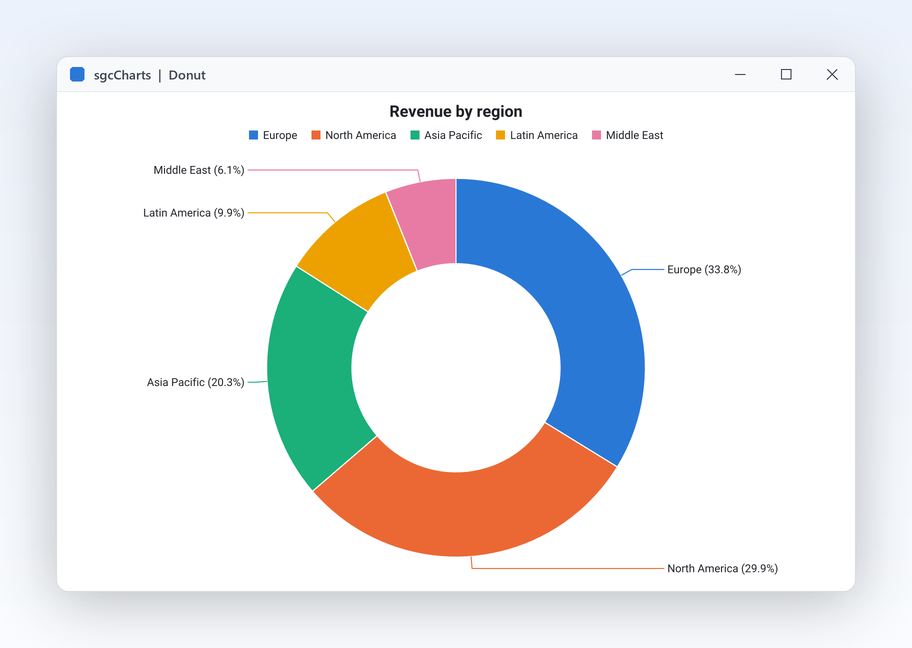
Donut, treemap and funnel for business data

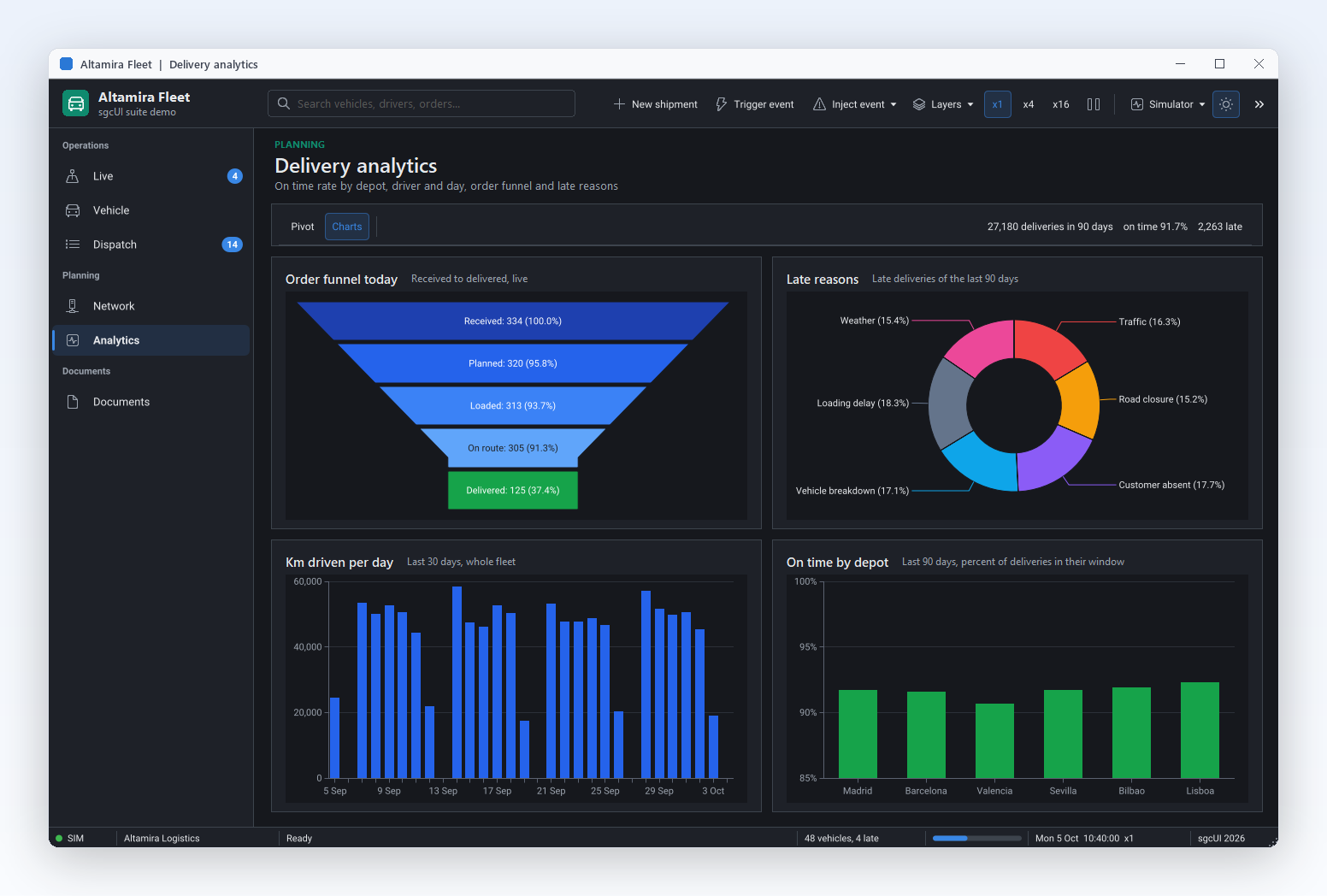
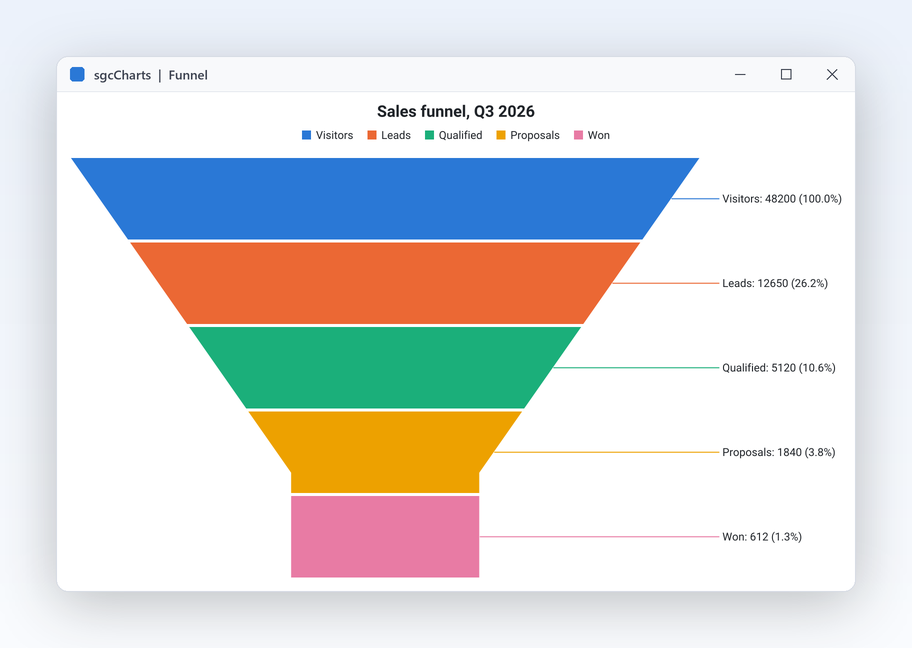
Management reports ask for shares, hierarchies and conversion stages. The pie series turns into a donut with one property and folds the long tail of small slices into a single Others slice, so the chart stays readable. The treemap sizes nested rectangles by value and drills down on click, and the funnel shows each stage of a sales or support process with its percentage. Labels can sit inside or outside the slices, and the treemap colours its rectangles by group or by value with a colour scale. Every series follows the chart theme, so the report matches the rest of the application.

  • InnerRadiusPercent makes the donut, OthersThreshold and OthersText group small slices
  • ExplodeOnClick pulls a slice out when the user clicks it
  • TsgcChartSeries_Treemap with DrillOnClick, DrillUp and the OnDrill event
  • TsgcChartSeries_Funnel with NeckWidthPercent and ProportionalHeight
Read the help topic

Chart types

Bubble, box plot, waterfall and range area

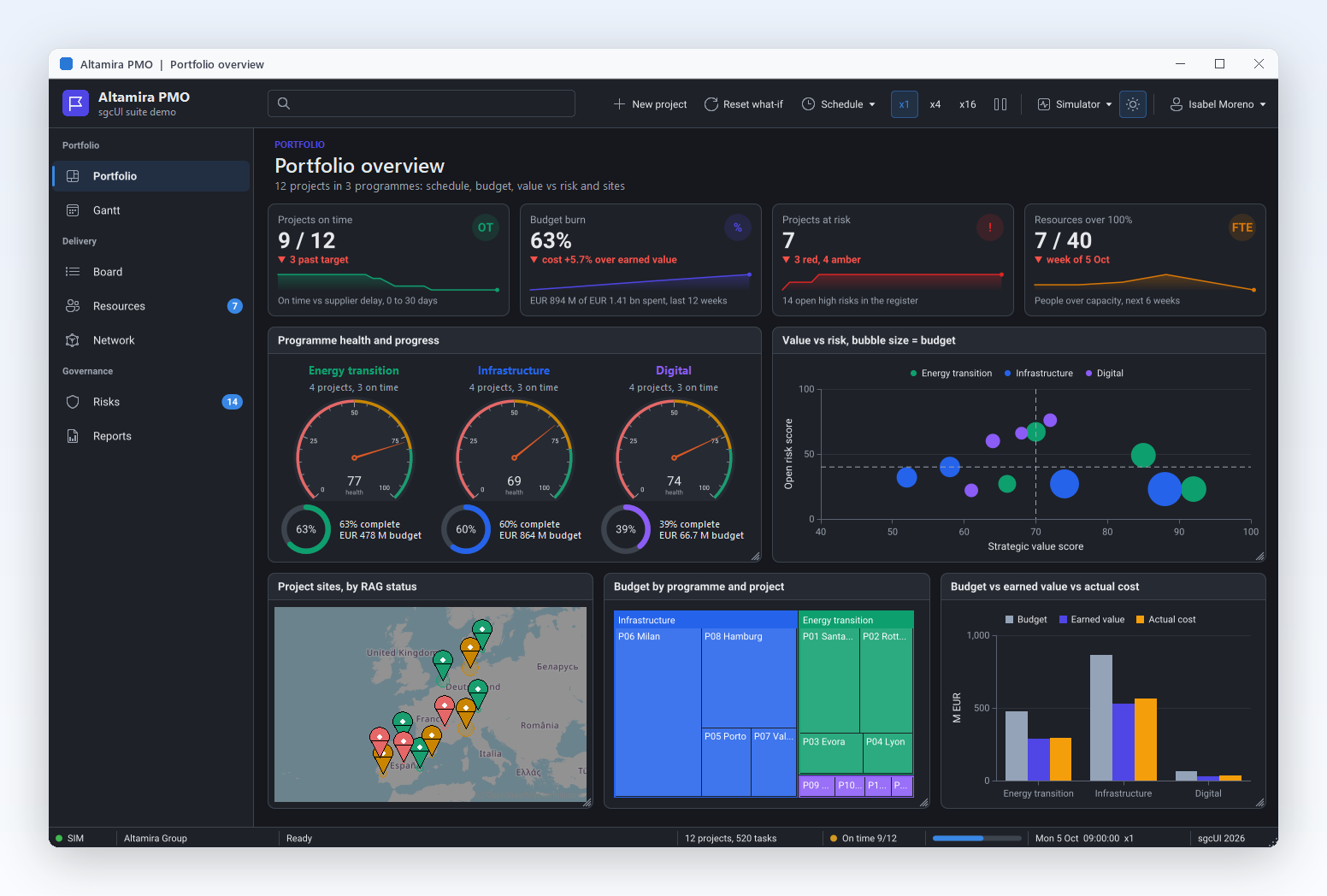
A finance team wants the profit bridge from budget to actual, a quality engineer wants the spread of cycle times per shift, and a product manager wants revenue, margin and headcount on one chart. Four series cover these cases. The bubble series adds a size to X and Y. The box plot summarises a sample with its quartiles, median and outliers. The waterfall builds a total from positive and negative steps, with subtotals and totals along the way. The range area fills the band between a low and a high value, for a forecast interval or a tolerance corridor.

  • TsgcChartSeries_Bubble with AddBubble, MinBubbleSize, MaxBubbleSize and SizeMode, sized by area (cbsArea) or by diameter (cbsDiameter)
  • TsgcChartSeries_BoxPlot draws min, quartiles, median, max and an optional mean; AddValues computes the quartiles from the raw sample like Excel QUARTILE.INC and finds the Tukey outliers
  • TsgcChartSeries_Waterfall with AddStep, AddSubtotal, AddTotal and ShowConnectors
  • TsgcChartSeries_RangeArea with AddRange for the low and high band
  • All four are in every edition, the free Community edition included, on VCL, FireMonkey, WinForms, WPF and Avalonia
Read the help topic

Chart types

Smooth lines and error bars

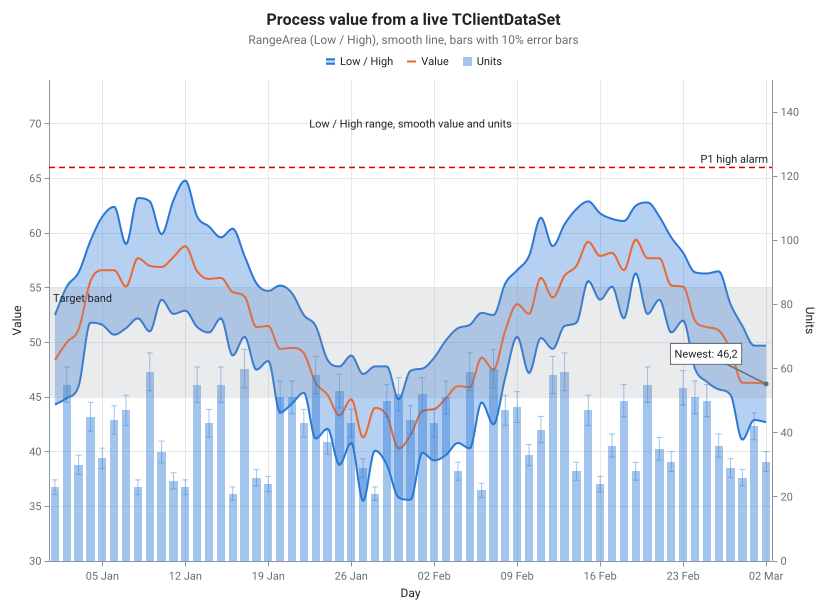
A lab report shows each measurement with its uncertainty, and a dashboard trend reads better as a curve than as a zigzag. Set Smooth on a line, area or range area series and it draws a monotone cubic spline. The curve never overshoots the data, so it shows no peak or dip that the values do not have. Error bars add the uncertainty of each point to line, area, scatter and bar series, from a fixed value, a percent, the standard deviation of the series or your own values per point.

  • Smooth on TsgcChartSeries_Line, TsgcChartSeries_Area and TsgcChartSeries_RangeArea
  • ErrorBars.Kind: cebFixed, cebPercent, cebStdDev or cebCustom with AddCustom
  • Direction: cedBoth, cedPlus or cedMinus, with end caps sized by CapWidth
  • The value axis widens by itself, so no error bar is clipped
  • In every edition, the free Community edition included, on VCL, FireMonkey, WinForms, WPF and Avalonia
Read the help topic
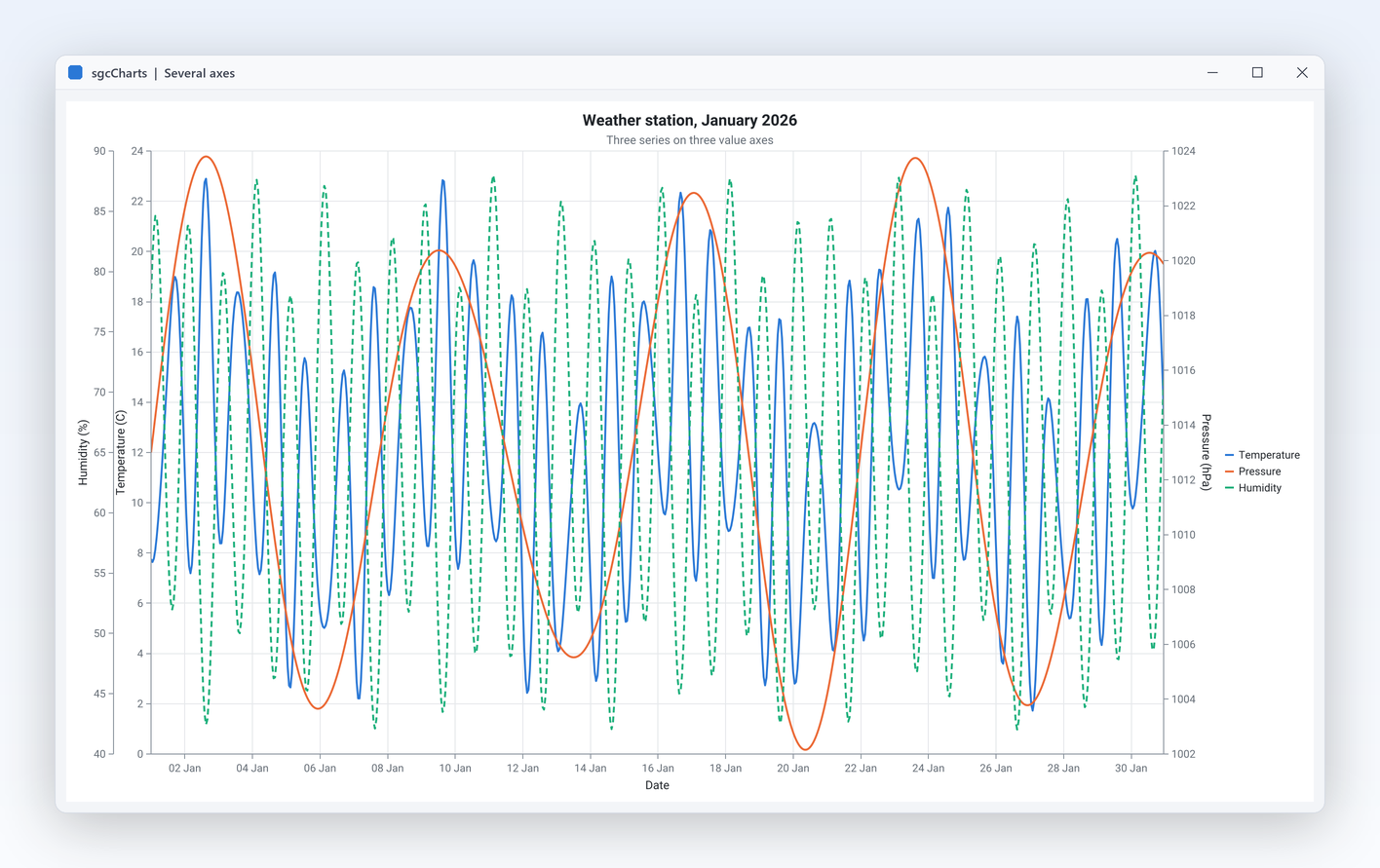
Three series plotted on three separate value axes

Chart types

Several axes on one chart

Temperature and pressure, revenue and units, price and volume: real data rarely shares one scale. Add as many axes as you need, put them left, right, top or bottom, and bind each series to its own pair. Every axis chooses its own type, range and label format, so a date time bottom axis can sit under a numeric left axis and a logarithmic right axis. Each series names the axes it uses, so two lines can share the left axis while a third uses the right one. Axes zoom independently, and ResetZoom returns them to the full range.

  • Axes collection on TsgcChart, one TsgcChartAxis per scale
  • AxisType: catNumeric, catLogarithmic, catDateTime or catCategory
  • Position: capLeft, capRight, capTop or capBottom
  • Minimum, Maximum, Automatic, LabelFormat and Inverted per axis
Read the help topic

Financial charts

Candles in every edition, plus the financial pack: indicators, panes, markers and drawing tools.

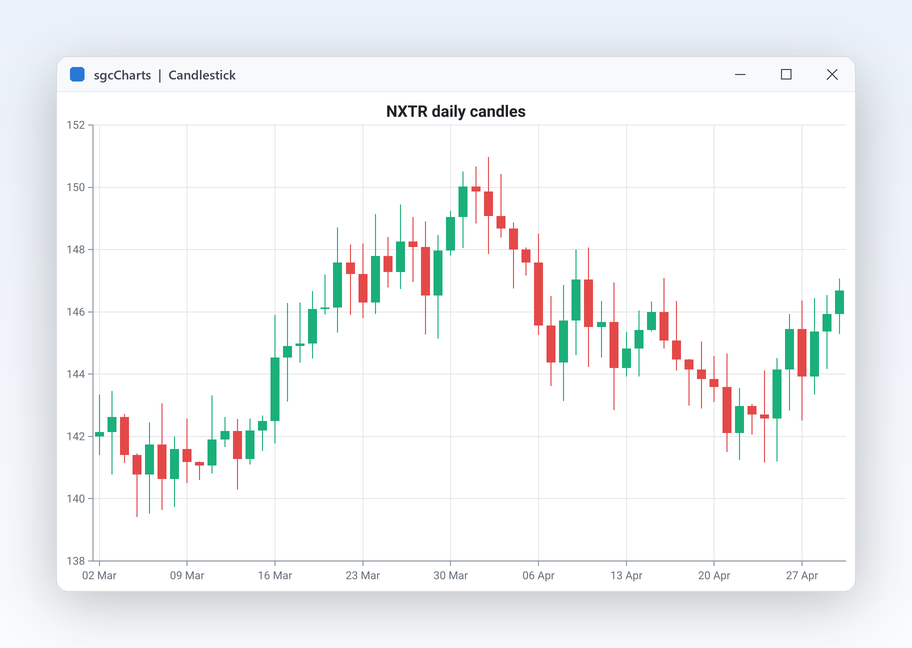
sgcCharts candlestick chart on a date time axis

Financial charts

Candlestick and OHLC charts that stay sharp

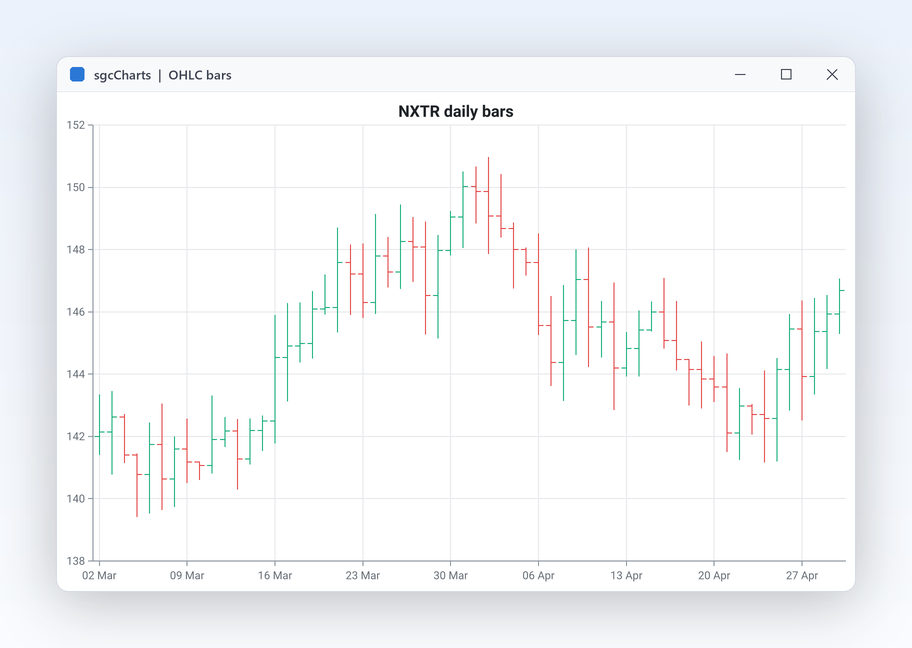
Price history is the core of any trading screen. The candlestick and OHLC series plot open, high, low and close from your own data or from a data set, on a date time axis. When years of bars meet a narrow window, candles that fall in the same pixel column are merged into one correct candle (first open, highest high, lowest low, last close, summed volume) so the chart never shows a misleading spike. The OHLC series draws the same data as bars with open and close ticks, a compact choice for long histories. Both series work with the zoom, pan and crosshair of every chart.

  • TsgcChartSeries_Candlestick and TsgcChartSeries_OHLC share one OHLC buffer
  • TsgcChartDataSource_DataSet maps OpenField, HighField, LowField, CloseField and VolumeField
  • Pixel column merge of candles by sgcChartDecimateOHLC
  • Both series are in every edition, the free .NET Community build included
Read the help topic
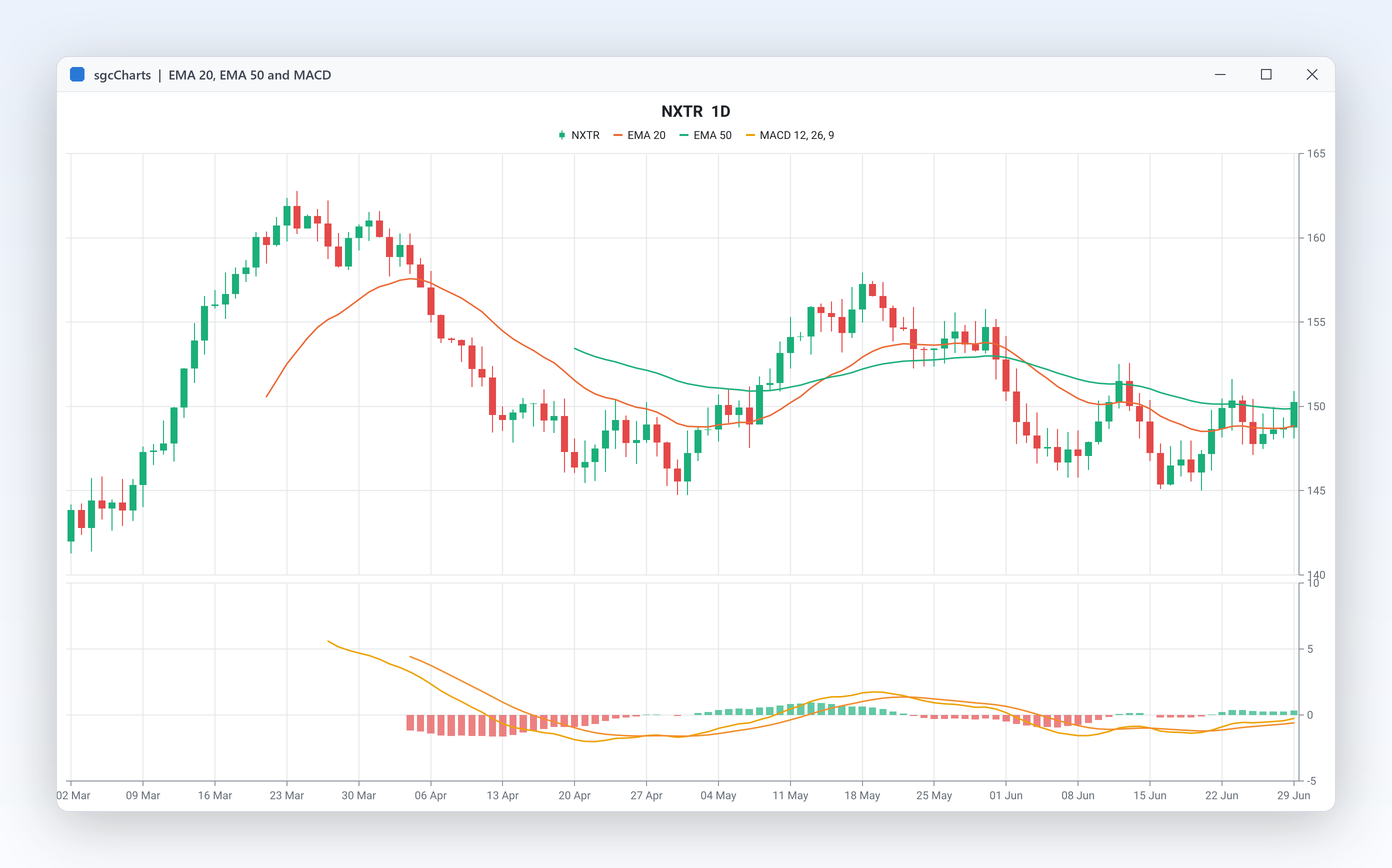
Technical indicators without writing the maths

Financial charts Registered only

Technical indicators without writing the maths

Analysts expect moving averages, Bollinger bands, RSI and MACD on the price chart. Each indicator is a series: point its Source at a candlestick series and it recalculates whenever the candles change. No formulas to code, test or keep in sync with live data. Oscillators such as RSI and Stochastic draw their overbought and oversold guide lines, and every indicator series appears in the legend with its own colour. Put them on the price pane or give each one a pane of its own.

  • Trend: TsgcChartSeries_SMA, TsgcChartSeries_EMA, TsgcChartSeries_WMA, TsgcChartSeries_Bollinger
  • Oscillators: TsgcChartSeries_RSI, TsgcChartSeries_MACD, TsgcChartSeries_Stochastic, with GuideLines
  • Volatility and volume: TsgcChartSeries_ATR, TsgcChartSeries_VWAP, TsgcChartSeries_Volume
  • Recalculate on demand, Values to read the computed output

The .NET Community build includes the candlestick and OHLC series but not the indicator series.

Read the help topic
Panes, a last value marker and the bid and ask band

Financial charts Registered only

Panes, a last value marker and the bid and ask band

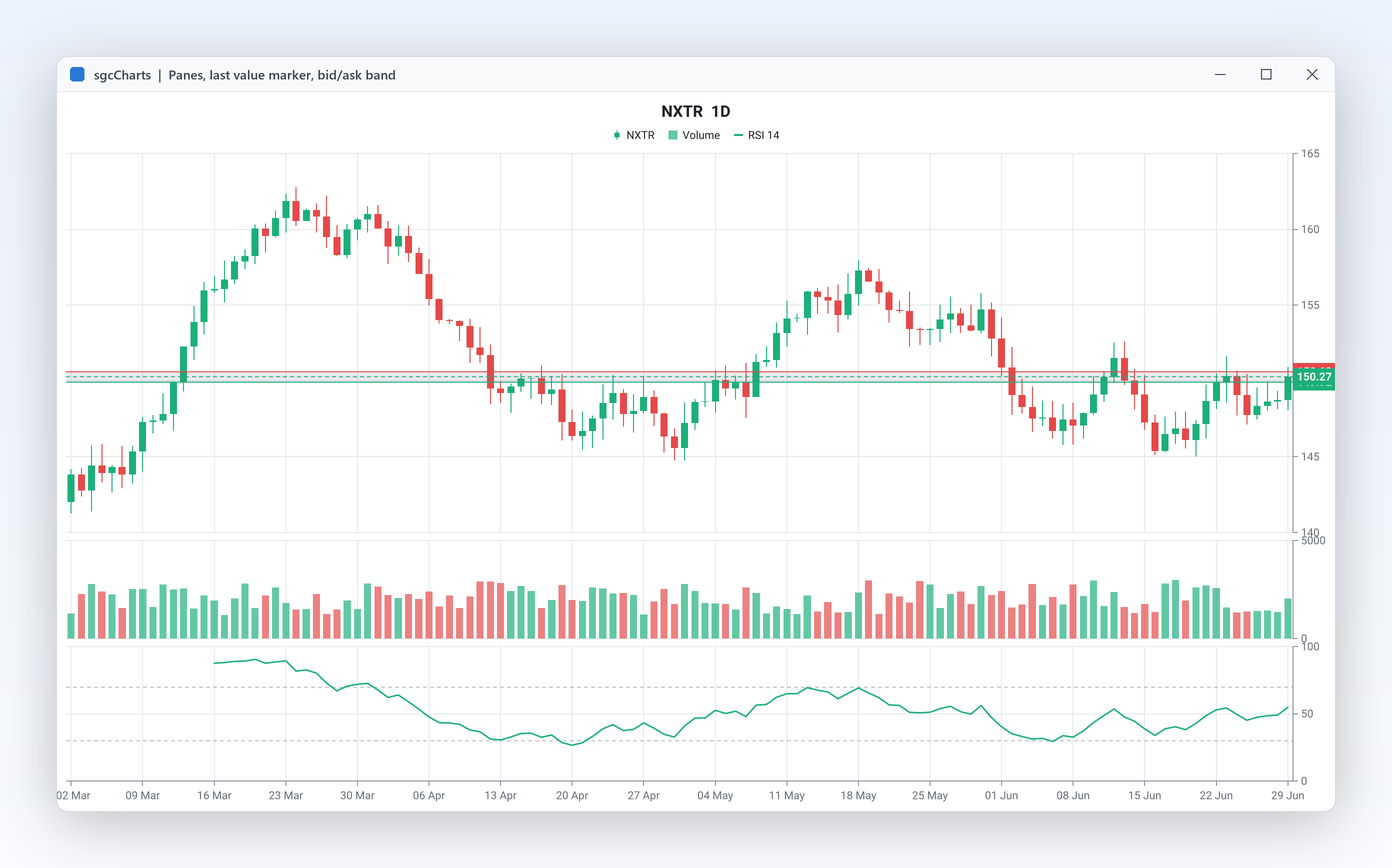
A trading layout stacks price, volume and an oscillator in separate panes that share one time axis, so zooming the price zooms everything below it. A marker on the price axis shows the latest value at a glance, and a shaded band shows the current spread between bid and ask while quotes stream in. Pane heights are percentages, so the layout scales with the window and survives a resize. Each pane also has a Visible property, so a screen can offer an indicator pane only when the user asks for it.

  • Panes collection of TsgcChartPane with HeightPercent; the user drags the splitter between panes
  • Each axis is assigned to a pane with its Pane property
  • LastValueMarker with Color and Visible
  • BidAskBand with Bid, Ask, BidColor and AskColor
Read the help topic

Financial charts Registered only

Drawing tools for analysts

Traders mark support levels, trend channels and retracements directly on the chart. Pick a tool, drag on the plot, and the drawing is anchored to data coordinates, so it stays on the right candles when the user zooms or pans. Drawings are a collection you can also fill from code, lock against editing or remove. Lines can be solid, dashed or dotted with their own colour and width. Because drawings are an ordinary collection with plain coordinates, you can store them with the user's workspace and add them back on the next start.

  • Interaction.DrawingTool: cdtTrendLine, cdtHorizontalLine, cdtVerticalLine, cdtRectangle, cdtFibonacci
  • Drawings collection with X1, Y1, X2, Y2, Color, Dash and Locked
  • DeleteSelectedDrawing removes the drawing the user selected
  • Shown in the DrawingTools demo
Read the help topic

Annotations and editing

Explain the data on the chart and let users adjust the chart at run time.

Annotations and editing

Annotations and ISA-101 displays

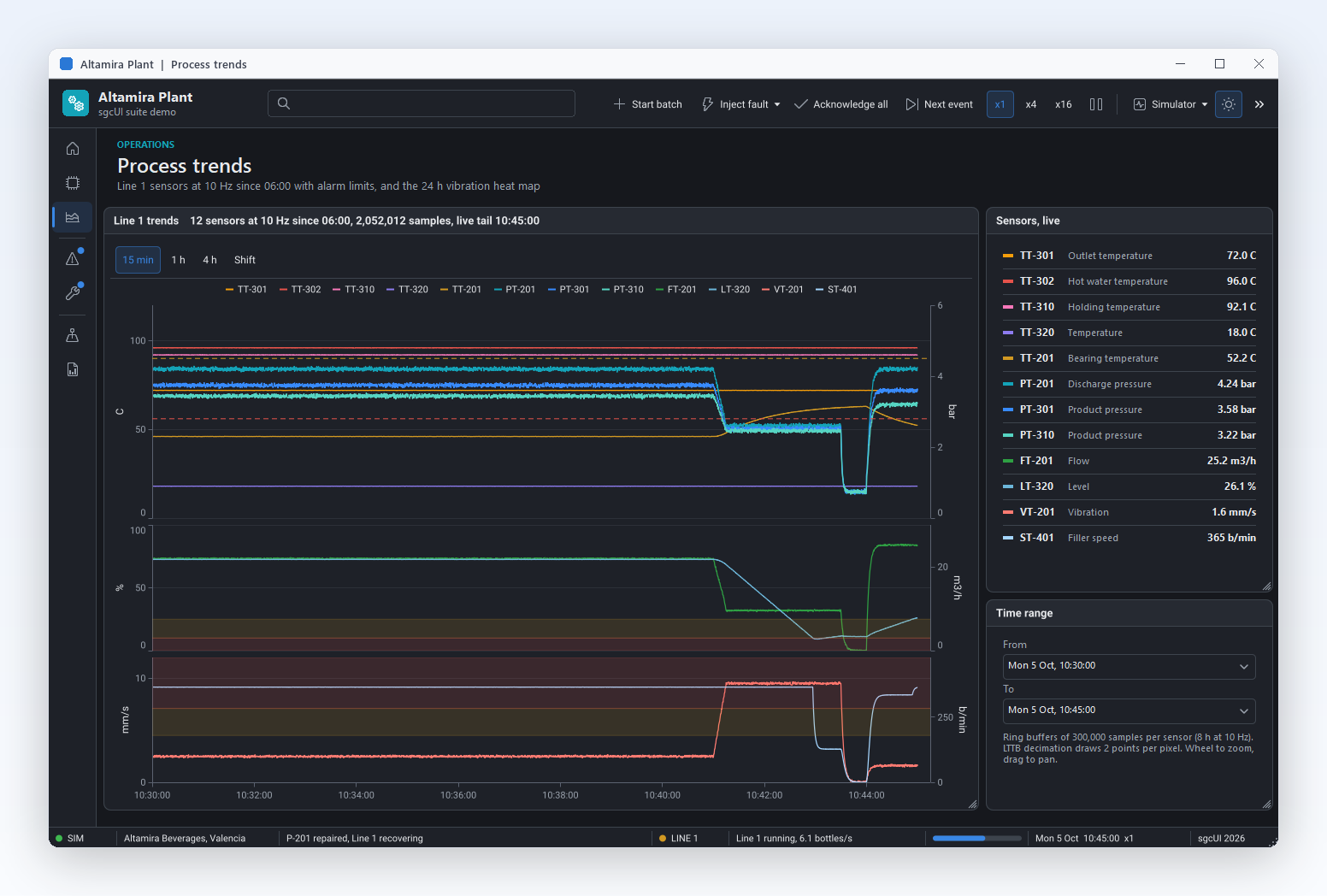
An operator screen needs the alarm limit as a line, the normal operating range as a band and a note at the moment the batch started. Annotations are placed in data values, so they stay on the right spot when the user zooms, pans or new points stream in. A callout can point at a fixed data point or follow the newest point of a live series. For control rooms, ApplyISA101Theme switches the chart to the grey, muted style used in ISA-101 HMI displays. Colour is kept for abnormal states, so the alarm colours for priorities 1 to 4 stand out on a calm screen.

  • Annotations collection on TsgcChart, one TsgcChartAnnotation per item
  • Kind: cakText, cakLine, cakHorizontalLine, cakVerticalLine, cakRectangle, cakHorizontalBand or cakCallout
  • AnchorSeries and AnchorPoint tie a callout to a data point, and the default AnchorPoint of -1 follows the newest point
  • Annotations follow the theme and Windows high contrast, and screen readers read their text
  • ApplyISA101Theme keeps the alarm colours for priorities 1 to 4

Annotations and the ISA-101 preset are in every edition, the free Community edition included, on VCL, FireMonkey, WinForms, WPF and Avalonia. The preset is described in Themes and palette.

Read the help topic
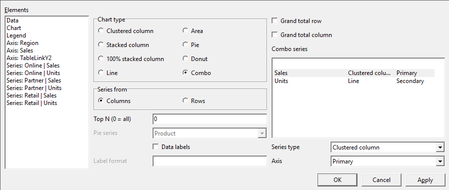
Chart designer, Data page: chart type, series from columns or rows, top N, pie series, data labels, grand totals and the combo series of each measure

Annotations and editing

Let users edit the chart

Before a chart goes into a presentation, a user wants the sales line in the corporate colour, a clearer axis title and the returns series hidden. With the runtime chart editor they do it themselves, with no new build of the application. One call opens a dialog where the user edits the titles, the legend, the axes and every series: its colour, its visibility, the smoothing and its type, changed to another compatible series type.

For a chart bound to a table through TsgcChartTableLink, the chart designer adds a Data page to the same dialog: the chart type (clustered, stacked or 100% stacked column, line, area, pie, donut or combo), series from columns or rows, top N, the pie series, data labels with a format, the grand total row and column of a pivot, and the series type and axis of each measure of a combo chart. It is the designer of the pivot chart of sgcPivotGrid and works with any table the link plots. Registered only

  • ShowEditor on VCL, FireMonkey, WinForms and WPF
  • ShowEditorAsync on Avalonia
  • Titles, legend and axes in one dialog
  • Per series: colour, visibility, Smooth and the series type within compatible types
  • sgcVCLShowChartDesigner and sgcFMXShowChartDesigner in Delphi, ShowDesigner and ShowDesignerAsync in .NET, and a Chart designer... verb in the Delphi IDE

The runtime chart editor is in every edition, the free Community edition included. The chart designer and the 100% stacked, pie, donut and combo types of the table link are not in the Community edition; the table link with bar, stacked bar, line and area is.

Read the help topic Read the chart designer topic
Live data and exploration

Stream large data sets and let users look closer.

Live data and exploration

A million points without stutter

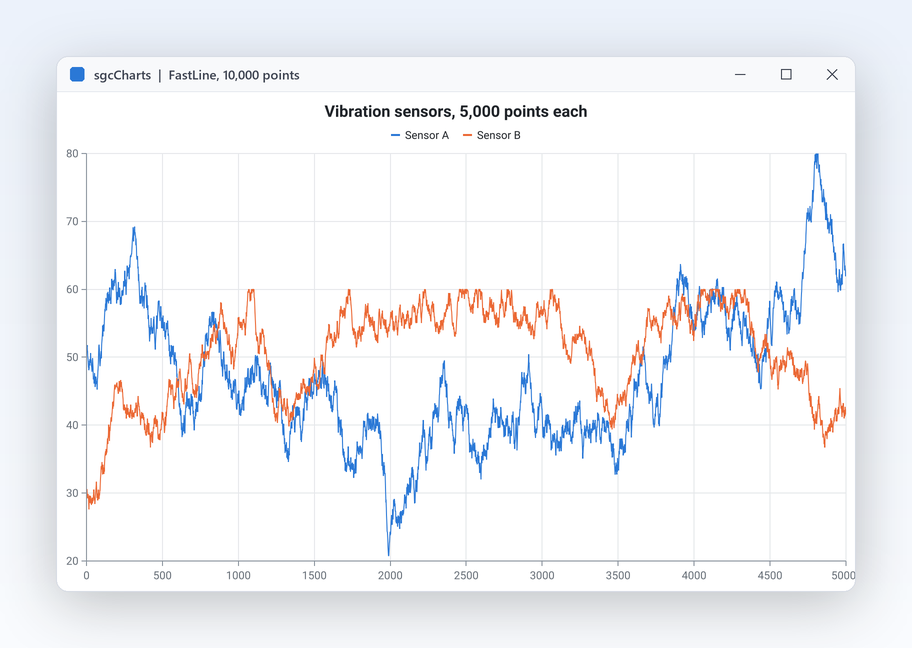
Sensor logs, audio levels and tick data grow without end. The fast line series keeps its points in a ring buffer of fixed Capacity, so memory stays flat and the oldest points roll off. At paint time each series reduces the visible points to about one set per pixel column, and the chart repaints at most MaxFPS times a second however fast data arrives. The LiveLine demo streams into a 1,000,000 point buffer from a background thread. The demo lets you switch the feed rate and the visible window while it runs, so you can judge the behaviour on your own hardware before you write a line of code.

  • TsgcChartSeries_FastLine with Capacity and BufferMode (cbmOverwrite or cbmGrow)
  • Decimation: dmNone, dmMinMax (visually exact) or dmLTTB
  • TimeWindow shows only the last N seconds of a streaming axis
  • AddXY and AddY append points as they arrive
Read the help topic

Live data and exploration

Zoom, pan, crosshair and tooltips built in

Users want to look closer at the interesting part of the data. Every chart already supports wheel zoom, box zoom with the mouse, panning and touch gestures, with a crosshair and a tooltip that snap to the nearest point. On a streaming chart, zooming pauses the auto scroll and it resumes by itself after a delay you choose. Every option is a property, so a kiosk screen can turn interaction off and an analyst screen can restrict zoom to the time axis. The same behaviour works in the VCL, FireMonkey and .NET views.

  • TsgcChartInteraction: WheelZoom, BoxZoom, Pan, ZoomMode (czmX, czmY, czmXY)
  • Crosshair, Tooltip and SnapToPoint
  • AutoScrollResumeDelay and Paused for live charts
  • OnZoom, OnCrosshairMove and OnSeriesClick events, ResetZoom to go back
Read the help topic

Data in, images out

Bind the data you have, feed live streams, and render charts anywhere.

sgcCharts DataSetChart demo with a DB grid on the left and the chart on the right

Data in, images out

Bind CSV, JSON or any TDataSet

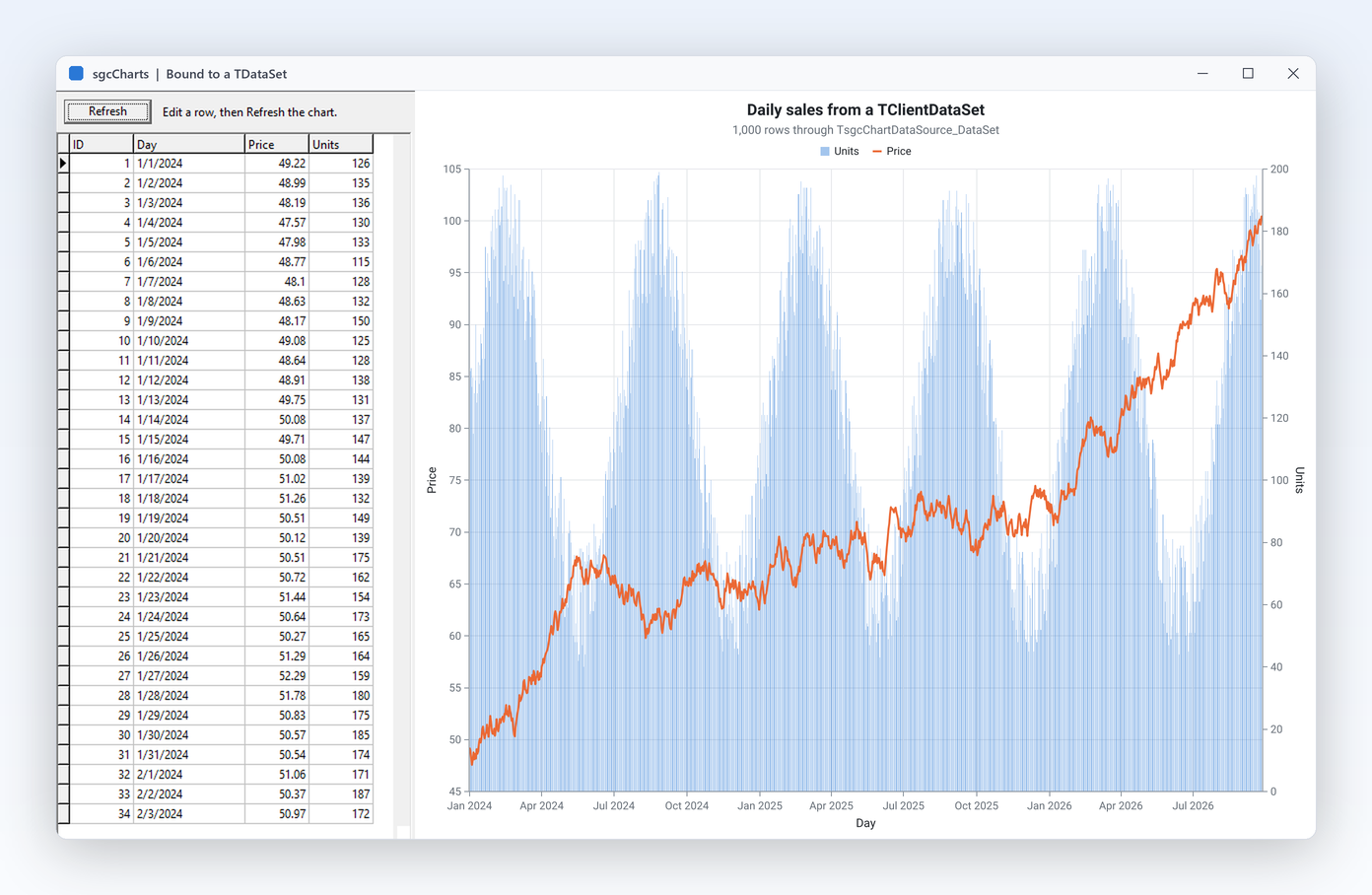
Most charts show data you already have: a query result, an exported file, a REST response or the rows of a grid. Data sources load them into a series without a loop of AddXY calls. Name the fields or columns, call Refresh after the data changes, and the chart follows. The dataset source also maps open, high, low, close and volume fields for candles. Data sources are components, so you set them up at design time in the Object Inspector. Set Live and the chart follows the dataset with no code at all: when a user posts, deletes or inserts a record in a grid, or changes the filter, the chart reloads.

  • TsgcChartDataSource_DataSet reads any TDataSet through XField, YField and LabelField
  • Live follows posts, deletes, inserts and filters through a TDataLink, throttled so a burst of changes costs one reload; in .NET, Live follows the changes of a DataTable
  • FollowCursor moves the focused point as the user scrolls the dataset (Delphi)
  • ExtraFields feeds the size, low, quartile or kind columns of the bubble, range area, box plot and waterfall series
  • TsgcChartDataSource_CSV and TsgcChartDataSource_JSON for files and API responses
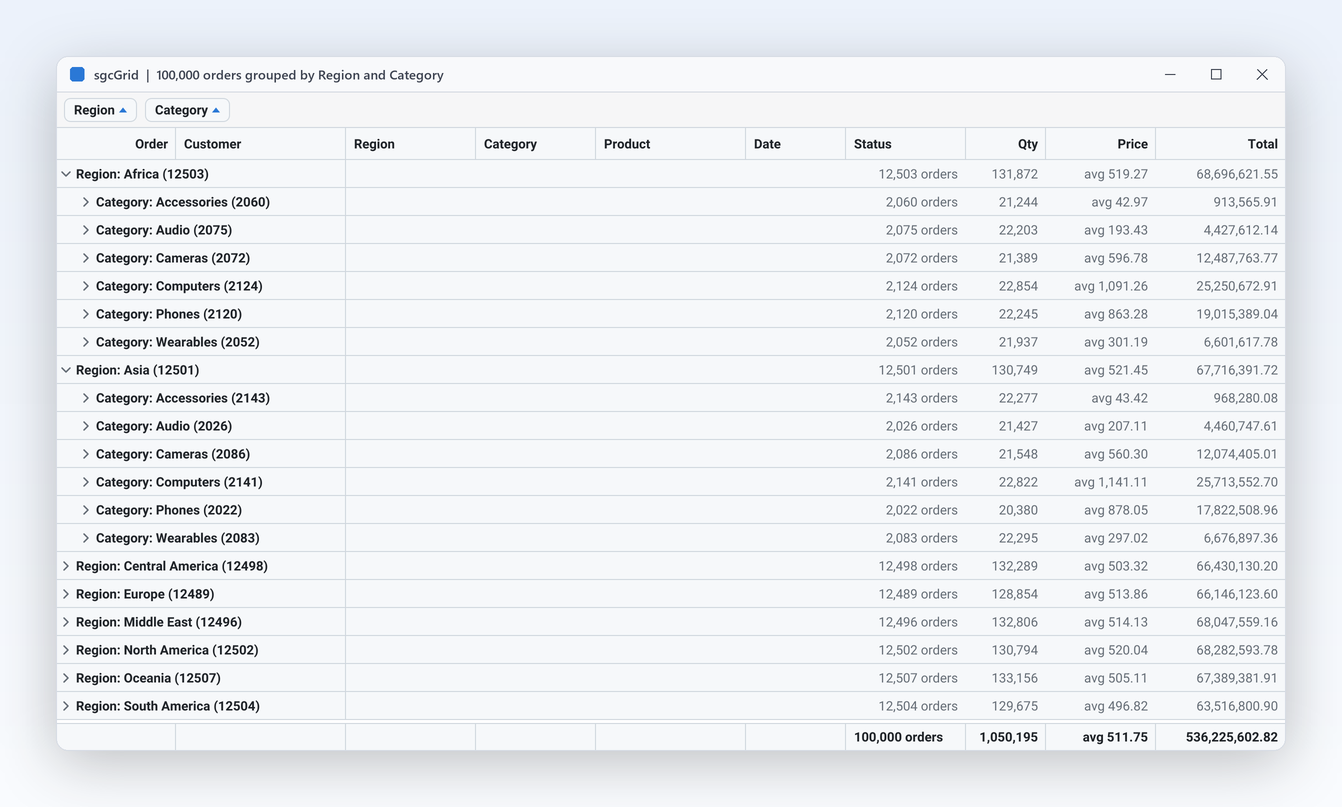
  • TsgcChartDataSource_Table for an in memory table, for example the rows of an sgcGrid
  • TsgcChartDataSource_Manual for points pushed from code or a background thread
Read the help topic

Data in, images out Registered only

Live market and IoT feeds with no glue code

Connect a chart to a broker or a market stream and it plots each message as it arrives. The sgcChartsWS bridge hooks the message event of an sgcWebSockets client and maps the JSON into points or candles. The Binance source can build candles from raw trades with an aggregator on intervals from one second to one month. When a source stops, it restores the client's previous event handler.

  • TsgcChartDataSource_Binance: Symbol, Stream (cbsKLine, cbsTicker, cbsTrade), Interval
  • TsgcChartDataSource_MQTT with TopicFilter and PayloadFormat
  • TsgcChartDataSource_WebSocket and TsgcChartDataSource_SSE for JSON over WebSocket or server sent events
  • TsgcChartAggregator turns trades into candles with AddTrade

The bridge needs sgcWebSockets. In Community, feed the chart from your own code with the manual data source.

Read the help topic

Data in, images out

PNG and SVG on a server, no window needed

Charts often leave the screen: a daily report e-mail, a PDF, a web page or a REST endpoint that returns an image. TsgcChartRenderer draws the same chart model to PNG or SVG with no form and no message loop, in a console application, a Windows service or a Linux64 server built with Delphi 10.2 or later. On screen, the views save what the user sees with one call. The output uses the same theme, fonts and palette as the screen, so a chart in a PDF looks exactly like the one on the dashboard.

  • RenderToPNGFile, RenderToPNGStream, RenderToSVGFile, RenderToSVGStream
  • Width, Height and Scale for high DPI images
  • SaveToPNG and SaveToSVG on TsgcVCLChart
  • Headless and HeadlessService demos; in .NET the esegece.sgcCharts.Rendering package
Read the help topic

Accessibility

UI Automation for screen readers, the keyboard and high contrast, with no setup.

Accessibility

A chart exposed to UI Automation point by point

sgcCharts exposes the chart to Microsoft UI Automation with its title, axes, legend, series and data points. Each point exposes its category and value, and the chart describes itself with the same text alternative it writes into an accessible PDF.

  • Left and Right move to the previous or next data point, Up and Down to the previous or next series, Home and End to the first or last point
  • Page Up and Page Down jump by a tenth of the points, Enter activates the focused point like a click and Esc clears the point focus
  • The chart is a tab stop and shows a visible focus ring
  • Under a Windows high contrast theme the series use the system colours and, where the series type allows it, are told apart by line patterns and markers

Accessibility is on by default in every edition, the free Community edition included, on VCL in every Delphi and C++Builder version from Delphi 7 to Delphi 13, on FireMonkey on Windows, and on WinForms, WPF and Avalonia. In Delphi and C++Builder, AccessibleName and AccessibleDescription set the name and the description exposed to UI Automation, and in .NET the standard accessible name and help text of each framework do the same. See the accessibility conformance reports. Zoom and pan by mouse and the financial drawing tools have no keyboard alternative.

Read the help topic

See sgcCharts in action

sgcCharts inside the sgcUI suite demos: complete applications that run offline with built-in simulated data.

Measured in the demos and the help

Figures from the shipped LiveLine demo and the decimation reference, so you can reproduce them yourself.

MeasurementResultConditions
Points in the LiveLine ring buffer1,000,000TsgcChartSeries_FastLine fed from a background thread through TsgcChartDataSource_Manual
Points kept per pixel columnat most 4dmMinMax decimation: first, minimum, maximum and last point

Source: the help topic that documents these numbers.

Who Builds with sgcCharts

Trading and crypto platforms

A desk application shows candles for the selected symbol, moving averages and Bollinger bands on the price pane, RSI and volume in panes below, and the bid and ask band while quotes stream. Analysts draw trend lines and Fibonacci levels that stay anchored when they zoom. The Binance source builds the candles straight from the exchange stream.

  • Candlestick series
  • Indicators and panes
  • Drawing tools
  • Binance data source
Run the BinanceLive demo

Industrial and IoT monitoring

A control room client plots dozens of sensors at once. Fast line series with ring buffers keep hours of readings in fixed memory, a time window shows the last minutes, and decimation keeps the repaint light. MQTT topics feed the charts directly, and a heatmap shows which machines run hot.

  • Fast line and ring buffer
  • Time window
  • MQTT data source
  • Heatmap
Run the MQTTSensors demo

Business reporting and generated images

A back office service renders the weekly revenue donut, the sales funnel and a twelve month trend as PNG for the management e-mail, and as SVG for the intranet. The same chart code also runs inside the desktop application, bound to the same dataset, so numbers and colours always match.

  • Donut and funnel
  • DataSet data source
  • TsgcChartRenderer
  • Themes
Run the Headless demo

A Donut Chart in a Few Lines

The same API in Delphi, C++ Builder and C#: revenue by region as a donut with an Others slice, on a dark theme, exported to PNG.

Builds the model, a pie series with a 55 percent hole, a VCL view and a renderer that writes a 1200 x 700 PNG.

uses
  Controls, sgcUICore_Theme, sgcCharts_Chart, sgcCharts_Series_Pie,
  sgcCharts_Renderer, sgcCharts_VCL;

// Revenue by region as a donut chart with an "Others" slice,
// on a dark theme, exported to PNG.
procedure BuildDonut(aOwner: TWinControl);
var
  oChart: TsgcChart;
  oView: TsgcVCLChart;
  oPie: TsgcChartSeries_Pie;
  oPNG: TsgcChartRenderer;
begin
  oChart := TsgcChart.Create(aOwner);
  oChart.Theme := utDark;
  oChart.Title.Text := 'Revenue by region';
  oChart.Legend.Position := clpRight;

  oPie := TsgcChartSeries_Pie.Create(aOwner);
  oPie.Chart := oChart;
  oPie.InnerRadiusPercent := 55;
  oPie.OthersThreshold := 4;
  oPie.OthersText := 'Others';
  oPie.ExplodeOnClick := True;
  oPie.AddItem('North America', 420);
  oPie.AddItem('Europe', 310);
  oPie.AddItem('Asia Pacific', 280);
  oPie.AddItem('Latin America', 95);
  oPie.AddItem('Middle East', 12);

  oView := TsgcVCLChart.Create(aOwner);
  oView.Parent := aOwner;
  oView.Align := alClient;
  oView.Chart := oChart;

  oPNG := TsgcChartRenderer.Create(aOwner);
  oPNG.Chart := oChart;
  oPNG.RenderToPNGFile('revenue.png', 1200, 700);
end;

Read the help topic →

The same donut in C++ Builder, using the generated sgcCharts_*.hpp headers.

#include <vcl.h>
#include "sgcUICore_Theme.hpp"
#include "sgcCharts_Chart.hpp"
#include "sgcCharts_Series_Pie.hpp"
#include "sgcCharts_Renderer.hpp"
#include "sgcCharts_VCL.hpp"

// Revenue by region as a donut chart with an "Others" slice,
// on a dark theme, exported to PNG.
void BuildDonut(TWinControl *aOwner)
{
  TsgcChart *oChart = new TsgcChart(aOwner);
  oChart->Theme = utDark;
  oChart->Title->Text = "Revenue by region";
  oChart->Legend->Position = clpRight;

  TsgcChartSeries_Pie *oPie = new TsgcChartSeries_Pie(aOwner);
  oPie->Chart = oChart;
  oPie->InnerRadiusPercent = 55;
  oPie->OthersThreshold = 4;
  oPie->OthersText = "Others";
  oPie->ExplodeOnClick = true;
  oPie->AddItem("North America", 420, 0);
  oPie->AddItem("Europe", 310, 0);
  oPie->AddItem("Asia Pacific", 280, 0);
  oPie->AddItem("Latin America", 95, 0);
  oPie->AddItem("Middle East", 12, 0);

  TsgcVCLChart *oView = new TsgcVCLChart(aOwner);
  oView->Parent = aOwner;
  oView->Align = alClient;
  oView->Chart = oChart;

  TsgcChartRenderer *oPNG = new TsgcChartRenderer(aOwner);
  oPNG->Chart = oChart;
  oPNG->RenderToPNGFile("revenue.png", 1200, 700);
}

Read the help topic →

Headless in C#: the same model rendered to PNG with no window, from the Rendering package.

using esegece.sgcCharts;
using esegece.sgcUICore;

// Revenue by region as a donut chart with an "Others" slice,
// on a dark theme, rendered headless to PNG (no window needed).
public static class RevenueDonut
{
    public static void Render()
    {
        var oChart = new TsgcChart();
        oChart.Theme = TsgcUITheme.utDark;
        oChart.Title.Text = "Revenue by region";
        oChart.Legend.Position = TsgcChartLegendPosition.clpRight;

        var oPie = new TsgcChartSeries_Pie();
        oPie.Chart = oChart;
        oPie.InnerRadiusPercent = 55;
        oPie.OthersThreshold = 4;
        oPie.OthersText = "Others";
        oPie.ExplodeOnClick = true;
        oPie.AddItem("North America", 420);
        oPie.AddItem("Europe", 310);
        oPie.AddItem("Asia Pacific", 280);
        oPie.AddItem("Latin America", 95);
        oPie.AddItem("Middle East", 12);

        var oPNG = new TsgcChartRenderer();
        oPNG.Chart = oChart;
        oPNG.RenderToPNGFile("revenue.png", 1200, 700);
    }
}
dotnet add package esegece.sgcCharts.Rendering

Read the help topic →

Run the sgcCharts Demos

19 demos for Delphi, the same 19 for C++ Builder and 12 for .NET, all in the compiled demos download. These are the ones that show the features above.

LiveLine

LiveLine

A fast line series with a 1,000,000 point ring buffer fed from a background thread, a 10 s, 60 s or whole buffer time window, a theme switch, and a crosshair over the whole stream.

Candlestick

Daily candles on a date time axis with a volume axis. Zoom and pan with the mouse; where many candles share a pixel column they merge into one correct candle.

Registered only DrawingTools

Trend lines, horizontal and vertical lines, rectangles and Fibonacci retracements drawn with the mouse on a candlestick chart, then selected, locked or deleted.

DataSetChart

DataSetChart

A client dataset of 1,000 rows shown in a DB grid and read by two dataset sources into a line and a bar series. Edit a row, reload, and the chart follows.

BusinessCharts

BusinessCharts

Bubble, box plot, waterfall and smooth range area series with error bars, annotations and an ISA-101 alarm line, the ISA-101 theme and the runtime chart editor, over a live dataset that the chart follows. Also in .NET as BusinessCharts, BusinessChartsWpf and BusinessChartsAvalonia. Also for FireMonkey as BusinessChartsFMX.

Registered only BinanceLive

Live candles from a Binance market stream through the sgcChartsWS bridge, on a financial chart with panes and indicators. Needs sgcWebSockets.

Registered only MQTTSensors

Sensor readings fed by MQTT topics through the sgcChartsWS bridge and plotted as they arrive. Needs sgcWebSockets and an MQTT broker.

Headless

A console program that builds a chart and writes PNG and SVG files with no window. HeadlessService does the same from a Windows service.

Compiled demos

Ready to run executables of every sgcUI product, nothing to install.

Download sgcUI_bin.zip →

Where sgcCharts Is Included

sgcCharts is in sgcUI Professional and Enterprise, and it is also sold on its own. sgcCharts is also included in the All-Access bundle.

sgcCharts single package

€199 / developer, full source code, 1 year of updates.

Buy sgcCharts → See pricing →

sgcUI Professional

Standard plus sgcCharts, sgcDashboard and sgcGauges, from €529.

See Professional →

sgcUI Enterprise

All 15 sgcUI products, from €699.

See Enterprise →

The free Community edition (esegece.sgcCharts.Community on NuGet) has all seventeen series, the annotations, the error bars, the ISA-101 preset, the runtime editor, the views, the buffers, the manual, CSV, JSON and dataset sources, interaction and headless output. It leaves out the financial pack (indicator and volume series, panes, aggregator, drawing tools, last value marker, bid and ask band), the chart designer with the advanced table link types, and the sgcChartsWS bridge.

FeatureCommunity (free)Registered
17 series types, candlestick and OHLC included✓✓
Fast line, ring buffers and decimation✓✓
Zoom, pan, crosshair and tooltips✓✓
Manual, CSV, JSON and live dataset data sources✓✓
Themes, PNG and SVG export, headless renderer✓✓
Annotations, error bars, ISA-101 preset and runtime chart editor✓✓
Indicator and volume series−✓
Panes, last value marker, bid and ask band−✓
Drawing tools and the trade aggregator−✓
sgcChartsWS live feeds (Binance, MQTT, WebSocket, SSE)−✓
Chart designer for table links, with 100% stacked, pie, donut and combo types−✓

Supported Frameworks and Platforms

Components in sgcCharts

ComponentWhat it is
TsgcChartThe chart model: axes, series, legend, theme and interaction.
TsgcVCLChart, TsgcFMXChartThe views for VCL and FireMonkey.
TsgcChartRendererHeadless PNG and SVG rendering, also in a service and on Linux64.
TsgcChartSeries_*The 17 series types and the financial indicator series.
TsgcChartDataSource_Manual, _CSV, _JSON, _DataSet, _TableData sources for points, files, datasets and tables.
TsgcChartDataSource_WebSocket, _MQTT, _SSE, _BinanceLive feed sources of the sgcChartsWS bridge (Registered only).
TargetComponentPlatforms
Delphi 7 to 13, VCLTsgcVCLChartWin32 and Win64
Delphi XE6 to 13, FireMonkeyTsgcFMXChartWindows, macOS, iOS and Android
C++ Builder 2007 to 13TsgcVCLChart, TsgcFMXChartGenerated .hpp headers and static libraries
Delphi 10.2 to 13, headlessModel and TsgcChartRendererLinux64, PNG and SVG on a server
.NET Framework 4.7.2, .NET 8, 9 and 10TsgcWinFormsChart, TsgcWpfChart, TsgcAvaloniaChartWinForms, WPF, Avalonia 12 and headless rendering

Frequently Asked Questions

The LiveLine demo streams into a fast line series with a 1,000,000 point ring buffer from a background thread. Memory stays fixed because the buffer has a set Capacity, decimation reduces the visible points to a few per pixel column, and MaxFPS caps the repaint rate. Run the compiled demo to see it on your own machine.

Seventeen: line, fast line, step line, area, range area, bar, scatter, bubble, candlestick, OHLC, pie and donut, radar, heatmap, treemap, funnel, box plot and waterfall. Each is a component, so you can combine several on one chart, with as many axes as you need.

No. Community includes candlestick and OHLC series but not the indicator and volume series, panes, aggregator, drawing tools, last value marker or bid and ask band. Those, and the sgcChartsWS live feeds, need the Registered edition. See Editions in the help.

Yes. SaveToPNG and SaveToSVG save what a view shows, and TsgcChartRenderer renders a chart model to PNG or SVG files or streams with no window, at the width, height and scale you choose. That is the usual route into a PDF or an e-mail body.

Yes, headless. From Delphi 10.2, the chart model and TsgcChartRenderer compile for Linux64 and write PNG and SVG. There is no Linux view control. In .NET, the esegece.sgcCharts.Rendering package targets .NET Standard 2.0, .NET Framework 4.7.2 and .NET 6, 8, 9 and 10.

Manual points, CSV, JSON, any TDataSet and an in memory table in every product licence. With the Registered edition and sgcWebSockets, the sgcChartsWS bridge adds Binance market streams, MQTT topics, JSON over WebSocket and server sent events.

sgcCharts Help

3,000+Developers
20+Years
761+Components
30+API Integrations
5Platforms
30-Day Money-Back GuaranteeNot satisfied? Request a full refund within 30 days of purchase. See refund policy

Try sgcCharts Today

The sgcUI trial includes sgcCharts and every other sgcUI product.