Delphi, C++ Builder & .NET Part of sgcUI

sgcRichEdit, the Rich Text Document Editor for Delphi, C++ Builder & .NET

Give your users a word processor inside your own application. sgcRichEdit edits documents with styles, lists, tables, images and links, reads and writes JSON, HTML, Markdown and RTF, and exports DOCX, PDF and PNG pages. One document model drives the VCL, FireMonkey, WinForms, WPF and Avalonia controls, and it renders without a window, on Linux64 too.

JSON, HTML, Markdown and RTF in and outDOCX, PDF and PNG exportVCL, FMX, WinForms, WPF and AvaloniaIncluded in sgcUI Enterprise
// open a Word RTF file, save it in every format
sgcVCLRichEdit1.LoadFromFile('contract.rtf');
sgcVCLRichEdit1.SaveToFile('contract.html', refHTML);
sgcVCLRichEdit1.SaveToFile('contract.md', refMarkdown);
sgcVCLRichEdit1.SaveToFile('contract.docx', refDOCX);
sgcVCLRichEdit1.ExportToPDF('contract.pdf');
sgcVCLRichEdit1.ExportToPNG('page1.png', 0, 150);

Everything a Document Editor Needs

The highlights below. The feature matrix lists every feature and compares sgcRichEdit with other rich text editors.

Write the document

A structured document model with the parts users expect from a word processor.

Write the document

A rich text box is not enough when users write contracts, reports or letters that must look the same every time. sgcRichEdit keeps a real document: paragraphs with named styles, multilevel lists, tables, inline images and hyperlinks. Formatting comes from a style chain plus direct formatting, so changing the Heading 1 style changes every heading at once.

  • Built in styles: Normal, Heading 1 to 6, Title, Subtitle, Quote, Code, List Paragraph, Hyperlink and Table Grid
  • Lists with 9 levels: bullets, numbers, letters and roman numerals
  • Tables with merged cells across columns and rows, header rows, borders, backgrounds and nested tables
  • Inline images and hyperlinks, with Ctrl+click and an OnLinkClick event

Write the document

Editing that feels familiar

Users bring their word processor habits with them. The editor answers the usual shortcuts, keeps a full undo and redo history, and finds and replaces text across paragraphs and table cells. Every command is available from code through ExecuteCommand and CommandState, and through VCL and FireMonkey actions, so a toolbar or a ribbon stays in sync with the selection.

  • Undo and redo, with typing grouped into words
  • Ctrl+B, Ctrl+I, Ctrl+U, alignment, headings, bullets, Ctrl+K for links
  • Find and replace, including regular expressions, with Replace All as one undo step
  • FireMonkey touch mode: tap, double tap a word, long press with selection handles

Every language

Input methods, bidirectional text and a translated user interface.

Every language

IME, right to left and mixed text

Japanese, Chinese and Korean users type through an input method editor, and Arabic and Hebrew users write from right to left, often with English words in the same sentence. sgcRichEdit shows the IME composition inline at the caret and commits it as one undo step. Bidirectional paragraphs keep the caret and the selection where the reader expects them, and each paragraph has its own direction.

  • Inline IME composition for Japanese, Chinese and Korean
  • Right to left paragraphs and mixed Arabic and English text in one line
  • Ctrl+Right Shift and Ctrl+Left Shift set the paragraph direction
  • The editor texts in 12 languages: English, Spanish, German, French, Italian, Portuguese (Brazil), Dutch, Polish, Turkish, Japanese, Korean and Chinese

Exchange documents

Read and write the formats your users already have.

Exchange documents

JSON, HTML, Markdown and RTF in and out

Documents arrive as RTF from Word, as HTML from a browser or an email, or as Markdown from a developer tool. sgcRichEdit reads and writes all of them, and keeps its own native JSON format that stores every detail of the document. LoadFromFile detects the format, SaveToFile takes the format you ask for, and properties such as AsHTML, AsRTF and AsMarkdown read and write the document as a string.

  • RTF from Word keeps text, fonts, colours, paragraph formatting, styles, lists, merged tables, hyperlinks and PNG and JPEG images
  • HTML reader with CSS, tables and the list hints of Word and Outlook
  • Markdown with headings, emphasis, code, quotes, lists, links, images, tables and strikethrough
  • DOCX export for Word, and plain text in and out

Exchange documents

Copy and paste with Word and the browser

Copy puts the selection on the clipboard as RTF, HTML and plain text, so it pastes with its formatting into Word, an email or a web form. Paste takes RTF and HTML from Word and from browsers, and Ctrl+Shift+V pastes plain text when the formatting is not wanted.

  • RTF, HTML and plain text on the clipboard
  • Paste from Word, browsers and other sgcRichEdit controls
  • Plain text paste with Ctrl+Shift+V

Paper, PDF, images and screen readers from the same document.

Print, export and accessibility

The editor paginates the document with the page settings of the document: paragraphs split by lines, header rows repeat on each page of a table, and page breaks are kept. Print and PrintPreview work on the desktop, ExportToPDF writes a tagged PDF through the sgcPDF engine, which is installed with sgcRichEdit, and ExportToPNG renders any page at the resolution you choose.

  • Print and print preview on VCL, FireMonkey, WinForms, WPF and Avalonia
  • Tagged PDF with headings, lists, tables, images with alternative text and links
  • PNG page export at any DPI, also without a window

Print, export and accessibility

Accessible to screen reader users

An editor that a screen reader cannot read is a barrier for some of your users. On Windows, the controls expose the UI Automation text pattern, so a screen reader can read by character, word, line and paragraph, announce formatting and follow the caret. Images are named by their alternative text, links are reported as links, and every command can be reached from the keyboard.

  • UI Automation text pattern for the VCL, FireMonkey on Windows, WinForms and WPF controls
  • Images with alternative text, links with the hyperlink role
  • A keyboard shortcut or a command for every action

Data and platforms

Store documents in your database and render them anywhere.

Data and platforms

Data-aware controls and data binding

Notes, letters and templates usually live in a database field. TsgcVCLDBRichEdit and TsgcFMXDBRichEdit connect to a TDataSource, read memo and BLOB fields, put the dataset in edit mode on the first change and write the document back when the user leaves the control. On .NET, the DocumentText property binds to your data in WinForms, WPF and Avalonia.

  • DataSource, DataField, FieldFormat (Auto, JSON, HTML, RTF, Markdown or Text) and FieldEncoding
  • AutoDisplay loads large documents on demand
  • Escape restores the field value
  • WinForms DataSource, DataMember and DataField, WPF and Avalonia two way bindings

Data and platforms

Headless rendering, also on Linux64

Documents often have to be converted on a server: RTF to HTML for a portal, JSON to PDF for an archive, a page to PNG for a thumbnail. The document model, the formats, the layout and the exports do not depend on VCL or FireMonkey, so a Windows service or a Linux64 daemon can load, change, render and export documents without a window.

  • Framework neutral units on Windows and on Linux64 from Delphi 10.2
  • The same formats and page layout as the visual controls
  • On .NET, the core library targets .NET Standard 2.0, .NET Framework 4.7.2 and .NET 6, 8, 9 and 10

Who Builds with sgcRichEdit

Letters, notes and templates in business applications

CRM, ERP and practice management applications let users write letters, case notes and document templates next to their data. A data-aware control stores each document in a database field as JSON, HTML or RTF, prints it with the page settings of the document and exports it to PDF or DOCX for the customer.

  • Data-aware controls
  • Styles and tables
  • PDF and DOCX export
Run the DataAware demo

Content for the web and email

Help desks, content tools and mail clients write text that ends up in a browser. Users edit in a familiar editor, and your application saves HTML or Markdown for the web, pastes content from Word or a browser, and converts documents on a server without a window.

  • HTML and Markdown
  • Clipboard with Word and browsers
  • Headless conversion
Run the Editor demo

Multilingual and accessible documents

Applications sold in Asia and the Middle East, and in the public sector, must accept every script and work with assistive technology. sgcRichEdit takes IME input, mixes Arabic and English text, exposes the document to screen readers on Windows and writes tagged PDF files.

  • IME
  • Right to left
  • UI Automation
  • Tagged PDF
See the language features

Convert a Document in a Few Lines

Load an RTF file from Word and save it as HTML, Markdown, DOCX, PDF and PNG.

Each format unit in the uses clause registers its reader or writer. sgcUIPDF_Export connects the PDF export to sgcPDF.

uses
  sgcRichEdit_Formats, sgcRichEdit_VCL,
  sgcRichEdit_RTF_Reader, sgcRichEdit_HTML_Writer, sgcRichEdit_Markdown,
  sgcRichEdit_DOCX, sgcUIPDF_Export;

procedure TForm1.ConvertContract;
begin
  sgcVCLRichEdit1.LoadFromFile('contract.rtf');
  sgcVCLRichEdit1.SaveToFile('contract.html', refHTML);
  sgcVCLRichEdit1.SaveToFile('contract.md', refMarkdown);
  sgcVCLRichEdit1.SaveToFile('contract.docx', refDOCX);
  sgcVCLRichEdit1.ExportToPDF('contract.pdf');
  sgcVCLRichEdit1.ExportToPNG('page1.png', 0, 150);
end;

The .NET controls use the same names. richEdit is a TsgcWinFormsRichEdit; the WPF and Avalonia controls work the same way.

using esegece.sgcRichEdit;
using esegece.sgcUICore;

// once at startup: PDF export through the esegece.sgcUICore.sgcPDF package
TsgcUIPDFExporter.Register();

richEdit.LoadFromFile("contract.rtf");
richEdit.SaveToFile("contract.html", TsgcRichEditFormat.refHTML);
richEdit.SaveToFile("contract.md", TsgcRichEditFormat.refMarkdown);
richEdit.SaveToFile("contract.docx", TsgcRichEditFormat.refDOCX);
richEdit.ExportToPDF("contract.pdf");
richEdit.ExportToPNG("page1.png", 0, 150);

Run the sgcRichEdit Demos

The demo projects install with the sgcUI trial for Delphi. The .NET demos ship with the Registered .NET download.

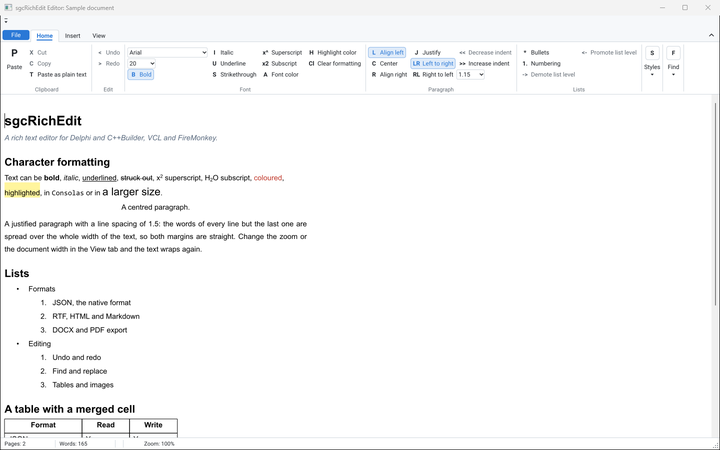
The VCL Editor demo with its ribbon and the sample document

Editor

A complete VCL word processor with a ribbon built with sgcToolbar: open and save JSON, RTF, HTML, Markdown and text, export DOCX and tagged PDF, print and preview, find and replace.

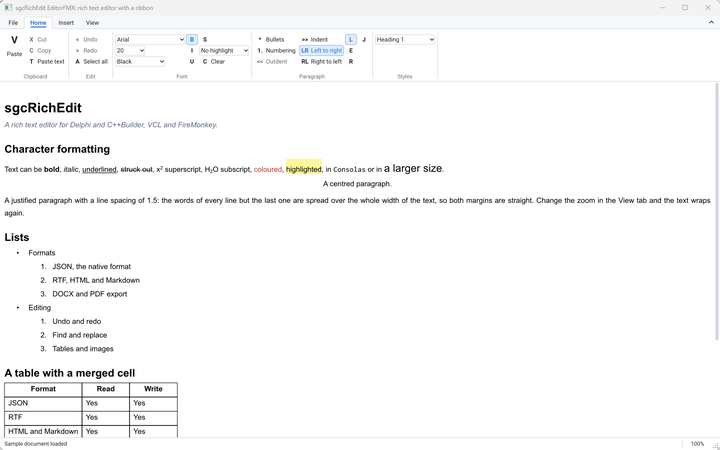
The EditorFMX demo, the same editor on FireMonkey

EditorFMX

The same editor on FireMonkey, with touch mode and PDF export.

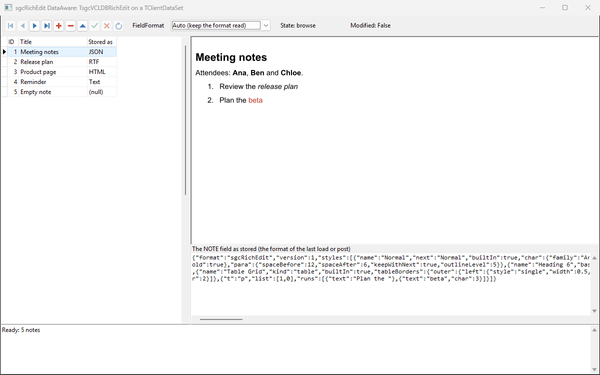
The DataAware demo with the note list and the document of the selected record

DataAware

A TsgcVCLDBRichEdit bound to a dataset: browse records, edit the document of each one and save it to the field.

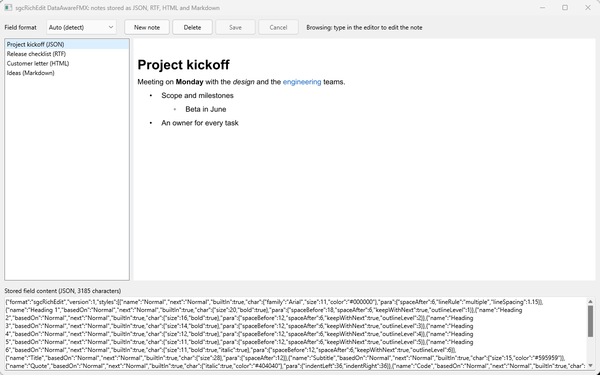
The DataAwareFMX demo with notes stored as JSON, RTF, HTML and Markdown

DataAwareFMX

The data-aware demo with TsgcFMXDBRichEdit.

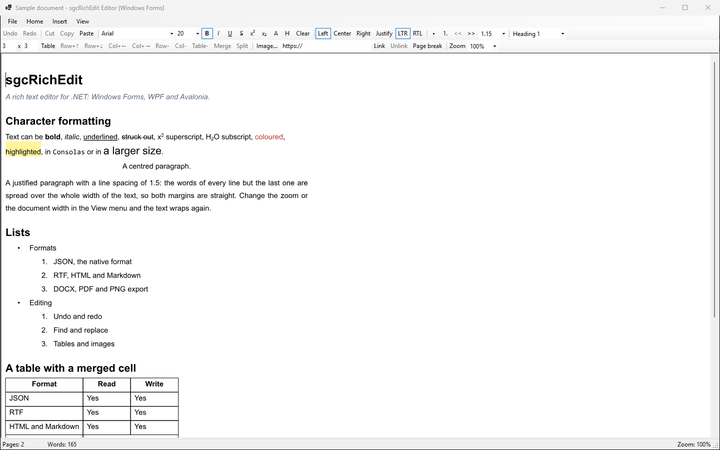
The .NET Editor demo for Windows Forms

.NET demos

Editor for WinForms, EditorWpf, EditorAvalonia and DataBinding, which binds DocumentText to a data source.

Where sgcRichEdit Is Included

sgcRichEdit is sold on its own for Delphi and C++ Builder and for .NET, and it is included in sgcUI Enterprise and in the All-Access bundle. There is no free Community edition.

sgcRichEdit single package

€299 / developer, full source code, 1 year of updates. sgcPDF is installed with it for PDF export.

Buy sgcRichEdit → See pricing →

sgcRichEdit .NET

€299 / developer, the WinForms, WPF and Avalonia controls as Registered NuGet packages.

Buy sgcRichEdit .NET →

sgcUI Enterprise

Every sgcUI product, sgcRichEdit and sgcPDF included, from €699.

See Enterprise →

Supported Frameworks and Platforms

Components in sgcRichEdit

VCL

TsgcVCLRichEdit and the data-aware TsgcVCLDBRichEdit.

FireMonkey

TsgcFMXRichEdit and the data-aware TsgcFMXDBRichEdit.

.NET

TsgcWinFormsRichEdit with data binding and a Visual Studio designer, TsgcWpfRichEdit and TsgcAvaloniaRichEdit.

Document model

TsgcRichDocument with the formats, layout, printing and exports, usable without a control.

TargetComponentVersions and platforms
Delphi 7 to 13VCL controls and the document modelWindows
C++ Builder 2007 to 13The same classesGenerated .hpp headers and static libraries
FireMonkeyTsgcFMXRichEdit and TsgcFMXDBRichEditDelphi XE6 and later
Linux64Document model, formats, layout and exportsDelphi 10.2 and later, headless
.NET core libraryesegece.sgcRichEdit.NET Standard 2.0, .NET Framework 4.7.2, .NET 6, 8, 9 and 10
WinForms and WPFTsgcWinFormsRichEdit, TsgcWpfRichEdit.NET Framework 4.7.2, .NET 8, 9 and 10 on Windows
AvaloniaTsgcAvaloniaRichEditAvalonia 12 on .NET 8, 9 and 10

Frequently Asked Questions

Yes. The PDF export uses the sgcPDF engine, and sgcRichEdit installs sgcPDF with it, so PDF export always works. In Delphi and C++ Builder, add sgcUIPDF_Export to the uses clause. In .NET, reference esegece.sgcUICore.sgcPDF and call TsgcUIPDFExporter.Register() once.

sgcRichEdit reads RTF, which Word saves and puts on the clipboard, and HTML from Word and Outlook. DOCX is an export format: sgcRichEdit writes DOCX files but does not read them.

No. sgcRichEdit is available as a single package for Delphi and C++ Builder or for .NET, in sgcUI Enterprise and in All-Access. The .NET packages are Registered only and are not published on nuget.org. Evaluate it with the sgcUI trial.

Use TsgcVCLDBRichEdit or TsgcFMXDBRichEdit with a TDataSource and choose the stored format with FieldFormat: JSON keeps every detail, HTML and RTF are readable by other tools. In .NET, bind DocumentText and set DocumentFormat.

The document model, the formats, the layout and the exports compile for Linux64 from Delphi 10.2, so a daemon can load, change and export documents as HTML, Markdown, RTF, DOCX, PDF or PNG without a window.

Yes. Every sgcRichEdit license includes the full source code and 1 year of updates. See the pricing page.

sgcRichEdit Help

Online help

The sgcUI help for Delphi, C++ Builder and .NET.

PDF manuals

Delphi, C++ Builder and .NET, covering every sgcUI product.

3,000+Developers
20+Years
761+Components
30+API Integrations
5Platforms
30-Day Money-Back GuaranteeNot satisfied? Request a full refund within 30 days of purchase. See refund policy

Try sgcRichEdit Today

The sgcUI trial includes sgcRichEdit, sgcPDF and every other sgcUI product.