Download sgcGauges

sgcGauges ships in the sgcUI All-Access trial, one installer for Delphi and one for C++ Builder with all 17 sgcUI products. Download the fully functional trial, run the compiled demos with no IDE, or add the NuGet packages to a .NET project. Licenses are available on the pricing page.
Free Trial Downloads

One sgcUI trial installs every sgcUI product, sgcGauges included, with full functionality for evaluation.

New to sgcGauges? Start with the five QuickStart demos for Delphi (VCL) in Demos\Gauges\Delphi\00.QuickStart and read the Getting Started guide (PDF), which walks through them step by step.

sgcUI Trial for Delphi

Fully functional evaluation for Delphi 7 through RAD Studio 13 with all 17 sgcUI products, sgcGauges included, and the demo projects.

Download Delphi Trial →

sgcUI Trial for C++ Builder

Fully functional evaluation for C++ Builder 10.1 through 13. The same components with C++ header files and demo projects.

Download CBuilder Trial →

Compiled Demos

Ready to run executables of every sgcUI product. The sgcGauges demos are Gallery, GalleryFMX, Headless, HMIPanel, DashboardGauges and MQTTLive.

Download Demos →

sgcUI Trial for Delphi

Delphi 13 Florence Download ↓
Delphi 12 Athens Download ↓
Delphi 11 Alexandria Download ↓
Delphi 10.4 Sydney Download ↓
Delphi 10.3 Rio Download ↓
Delphi 10.2 Tokyo Download ↓
Delphi 10.1 Berlin Download ↓
Delphi 10 Seattle Download ↓
Delphi XE8 Download ↓
Delphi XE7 Download ↓
Delphi XE6 Download ↓
Delphi XE5 Download ↓
Delphi XE4 Download ↓
Delphi XE3 Download ↓
Delphi XE2 Download ↓
Delphi XE Download ↓
Delphi 2010 Download ↓
Delphi 2009 Download ↓
Delphi 2007 Download ↓
Delphi 7 Download ↓

sgcUI Trial for C++ Builder

C++ Builder 13 Download ↓
C++ Builder 12 Download ↓
C++ Builder 11 Download ↓
C++ Builder 10.4 Download ↓
C++ Builder 10.3 Download ↓
C++ Builder 10.2 Download ↓
C++ Builder 10.1 Download ↓

Three Steps to a Running sgcGauges

Install the trial, run a demo, then drop sgcGauges on your own form.

Step 1

Download and run the installer for the IDE version you use.

Step 2

Open Demos\Gauges\Delphi\Gallery, compile and run it, then try HMIPanel and DashboardGauges.

Step 3

In a new VCL application, drop a TsgcVCLRadialGauge, add a range to Scales[0] and set Value.

Run the sgcGauges Demos

HMIPanel

HMIPanel

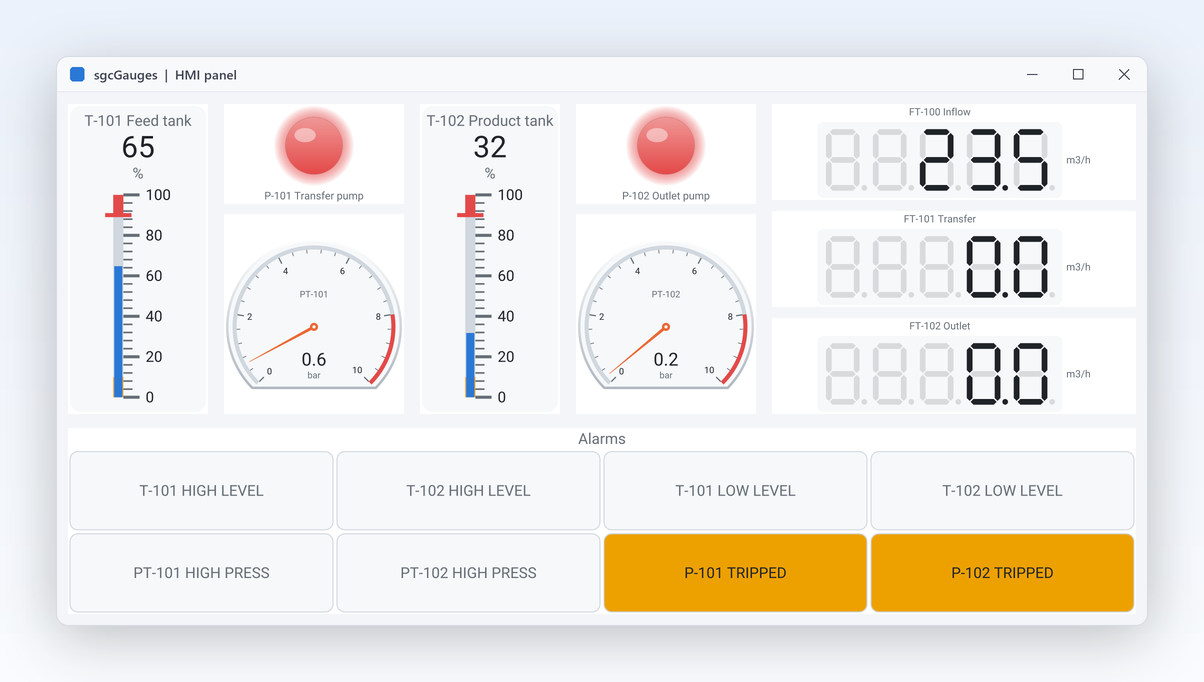
Two tanks with pumps, levels, pressures and annunciator alarms, the layout of a typical process screen.

DashboardGauges

Six gauges in sgcDashboard tiles, following the dashboard theme. Builds with the Community edition.

Headless

A console program that writes PNG and SVG on Win32, Win64 and Linux64.

GalleryFMX

The gallery on FireMonkey, for Windows and Android.

Registered only MQTTLive

Six gauges fed by MQTT through the sgcGaugesWS bridge. Needs sgcWebSockets and a broker.

Supported IDEs and Platforms

ItemSupport
Delphi (VCL)Delphi 7, 2007, 2009, 2010, XE to XE8, 10 to 10.4, 11, 12 and 13, Win32 and Win64.
FireMonkeyFrom Delphi XE6.
C++ BuilderC++ Builder 2007 to 13.
Linux64From Delphi 10.2, headless only: models and PNG and SVG output. No Linux controls.
.NETWinForms, WPF and Avalonia on .NET Framework 4.7.2, .NET 8, .NET 9 and .NET 10.
BridgesThe sgcGaugesWS bridge (MQTT, WebSocket, SSE) needs sgcWebSockets and the Registered edition.

sgcGauges for .NET

sgcGauges also ships as a managed C# port with the same class names for WinForms, WPF and Avalonia, delivered as NuGet packages.

NuGet Packages

Install the free Community edition with dotnet add package esegece.sgcGauges.Community, or the Registered edition with dotnet add package esegece.sgcGauges. The controls for your UI framework are in esegece.sgcGauges.WinForms, esegece.sgcGauges.Wpf and esegece.sgcGauges.Avalonia. The bridge packages esegece.sgcGauges.sgcWebSockets are Registered only.

View on NuGet →

.NET Demos

Demo projects: Gallery, GalleryWpf, GalleryAvalonia, ConsoleRender, HMIPanel, MQTTLive.

Read the .NET overview →

Community vs. Registered

The free Community edition of sgcGauges can be used by individuals and organizations under EUR 1M annual gross revenue with no more than 5 developers. The Registered edition has every feature, full source code and the commercial license. The Community edition has the radial, linear, 7 segment digital, LED, LED bar and progress ring gauges with ranges, thresholds, animation, themes and headless output, but no VU meter, clock, compass or annunciator, no extra scales or pointers and no bridge.

sgcGauges NuGet Packages

The Community packages are free. The Registered packages need a .NET license.

EditionInstallNotes
Communitydotnet add package esegece.sgcGauges.Communityfree Community core
Communitydotnet add package esegece.sgcGauges.WinForms.Communityfree Community WinForms controls
Communitydotnet add package esegece.sgcGauges.Wpf.Communityfree Community WPF controls
Communitydotnet add package esegece.sgcGauges.Avalonia.Communityfree Community Avalonia controls
Communitydotnet add package esegece.sgcGauges.Rendering.Communityfree Community headless PNG and SVG
Registereddotnet add package esegece.sgcGaugesplus esegece.sgcGauges.WinForms, .Wpf or .Avalonia (Registered)
Registereddotnet add package esegece.sgcGauges.Renderingheadless PNG and SVG
Registereddotnet add package esegece.sgcGauges.sgcWebSocketssgcGaugesWS bridge, Registered
Registereddotnet add package esegece.sgcGauges.WinFormsWinForms controls
Registereddotnet add package esegece.sgcGauges.WpfWPF controls
Registereddotnet add package esegece.sgcGauges.AvaloniaAvalonia controls

Need a License?

View pricing options for sgcGauges, or get it as part of an sgcUI edition.