Download sgcToolbar

sgcToolbar ships in the sgcUI All-Access trial, one installer for Delphi and one for C++ Builder with all 14 sgcUI products. Download the fully functional trial, run the compiled demos with no IDE, or add the NuGet packages to a .NET project. Licenses are available on the pricing page.

Free Trial Downloads

One sgcUI trial installs every sgcUI product, sgcToolbar included, with full functionality for evaluation.

sgcUI Trial for Delphi

Fully functional evaluation for Delphi 7 through RAD Studio 13 with all 14 sgcUI products, sgcToolbar included, and the demo projects.

Download Delphi Trial →

sgcUI Trial for C++ Builder

Fully functional evaluation for C++ Builder 2007 through 13. The same components with C++ header files and demo projects.

Download CBuilder Trial →

Compiled Demos

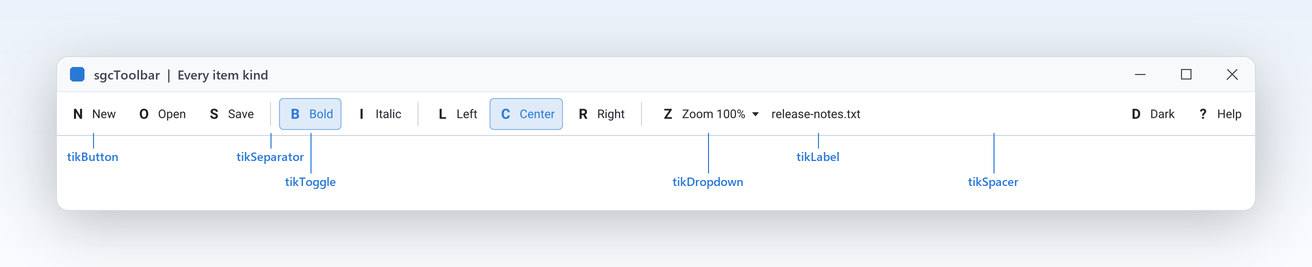
Ready to run executables of every sgcUI product. The sgcToolbar demos are EditorShell (editor shell with toggles, radio group, zoom dropdown, overflow and status bar) and LiveStatus (worker thread feeding progress, indicator and text panels), plus EditorShellFMX for FireMonkey.

Download Demos →

What You Get in the Trial

  • sgcToolbar with every feature, including the overflow menu and the Action links
  • Every other sgcUI product, from sgcGrid to sgcReports
  • The VCL and FireMonkey packages for Delphi 7 to 13, and C++ Builder headers and libraries
  • A notice that it is a trial version after the trial period, nothing else changes

Three Steps to a Running sgcToolbar

Install the trial, run a demo, then drop sgcToolbar on your own form.

Install

Run the sgcUI trial installer. It registers the packages, and the components appear on the SGC Toolbar page of the tool palette.

Open a demo

Open LiveStatus from the Demos\Toolbar folder and run it: press Start and watch the progress and indicator panels update from the worker thread.

Drop the components

Drop a TsgcVCLToolbar and a TsgcVCLStatusBar on your form, add items and panels in their collection editors and handle OnItemClick.

Run the sgcToolbar Demos

EditorShell

Registered only EditorShell

A TMemo editor shell with toggles, a Left, Center and Right radio group, a Zoom dropdown, TActionList links, the overflow menu, line and column panels and a Dark toggle. It uses overflow and actions, so it needs the Registered or Trial edition.

LiveStatus

A worker thread simulates a download and feeds a text panel, a progress panel and an indicator that turns green, amber or red, with Start and Stop buttons. It builds with the Community edition.

Registered only EditorShellFMX

The EditorShell demo with a TsgcFMXToolbar and a TsgcFMXStatusBar around a FireMonkey TMemo, for Delphi only: the same items, action links, overflow menu and status panels.

Supported IDEs and Platforms

ItemSupport
Delphi (VCL)Delphi 7, 2007, 2009, 2010, XE to XE8, 10 to 10.4, 11, 12 and 13, Win32 and Win64.
FireMonkeyFrom Delphi XE6: Win32, Win64, macOS, iOS, Android and Linux (FMXLinux).
C++ BuilderC++ Builder 2007 to 13.
Linux64From Delphi 10.2 for the models and the headless PNG and SVG output.
.NETWinForms, WPF and Avalonia on .NET Framework 4.7.2, .NET 8, .NET 9 and .NET 10 as applicable.

sgcToolbar for .NET

sgcToolbar also ships as a managed C# port with the same class names for WinForms, WPF and Avalonia, delivered as NuGet packages.

NuGet Packages

Install the free Community edition with dotnet add package esegece.sgcToolbar.Community, or the Registered edition with dotnet add package esegece.sgcToolbar. The controls for your UI framework are in esegece.sgcToolbar.WinForms, esegece.sgcToolbar.Wpf and esegece.sgcToolbar.Avalonia.

View on NuGet →

.NET Demos

Demo projects: EditorShell, LiveStatus.

Read the .NET overview →

Community vs. Registered

The free Community edition of sgcToolbar can be used by individuals and organizations under EUR 1M annual gross revenue with no more than 5 developers. The Registered edition has every feature, full source code and the commercial license. The Community edition leaves out the overflow menu and the Action links.

sgcToolbar NuGet Packages

The Community packages are free. The Registered packages need a .NET license.

EditionInstallNotes
Communitydotnet add package esegece.sgcToolbar.CommunityFree Community edition: every feature except overflow and Command links.
Registereddotnet add package esegece.sgcToolbarRegistered: the framework neutral models and the shared types.
Registereddotnet add package esegece.sgcToolbar.WinFormsRegistered: the WinForms toolbar and status bar.
Registereddotnet add package esegece.sgcToolbar.WpfRegistered: the WPF toolbar and status bar.
Registereddotnet add package esegece.sgcToolbar.AvaloniaRegistered: the Avalonia toolbar and status bar.
Registereddotnet add package esegece.sgcToolbar.RenderingRegistered: headless PNG and SVG output.

Need a License?

View pricing options for sgcToolbar, or get it as part of an sgcUI edition.