Delphi 7 to 13, C++ Builder & .NET 14 products, one suite

sgcUI: 14 Native UI Products for Delphi, C++ Builder & .NET

Everything a business application shows on screen, from one vendor and one design: grids, pivot tables, charts, dashboards, gauges, planners, diagrams, maps, PDF and reports, plus the editors, navigation, toolbars and wizards around them. Every control is drawn natively, shares one theme and renders headless to PNG and SVG on a server. Buy the edition that fits, or only the product you need.

VCLFireMonkeyWinFormsWPFAvaloniaLinux64 headless
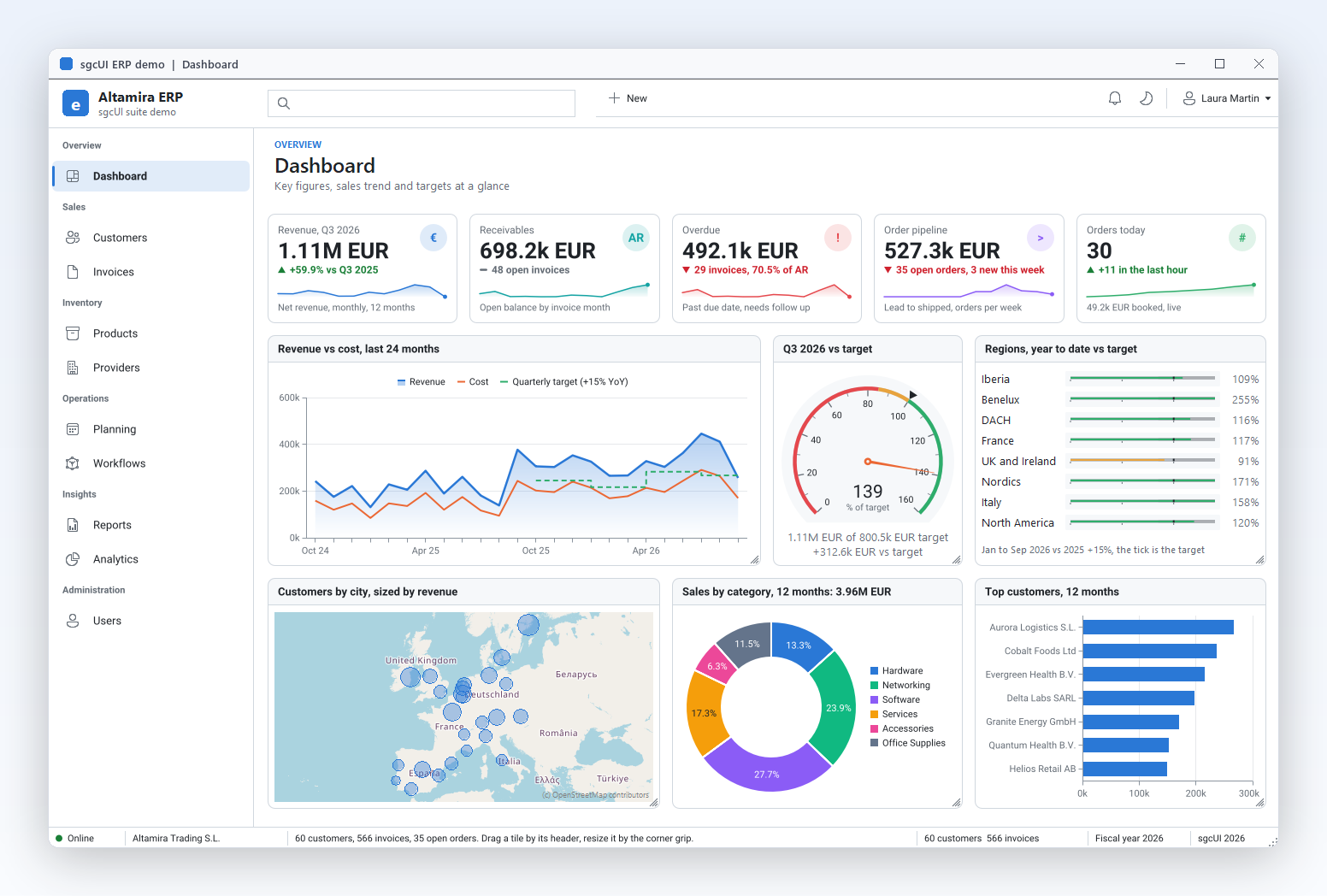
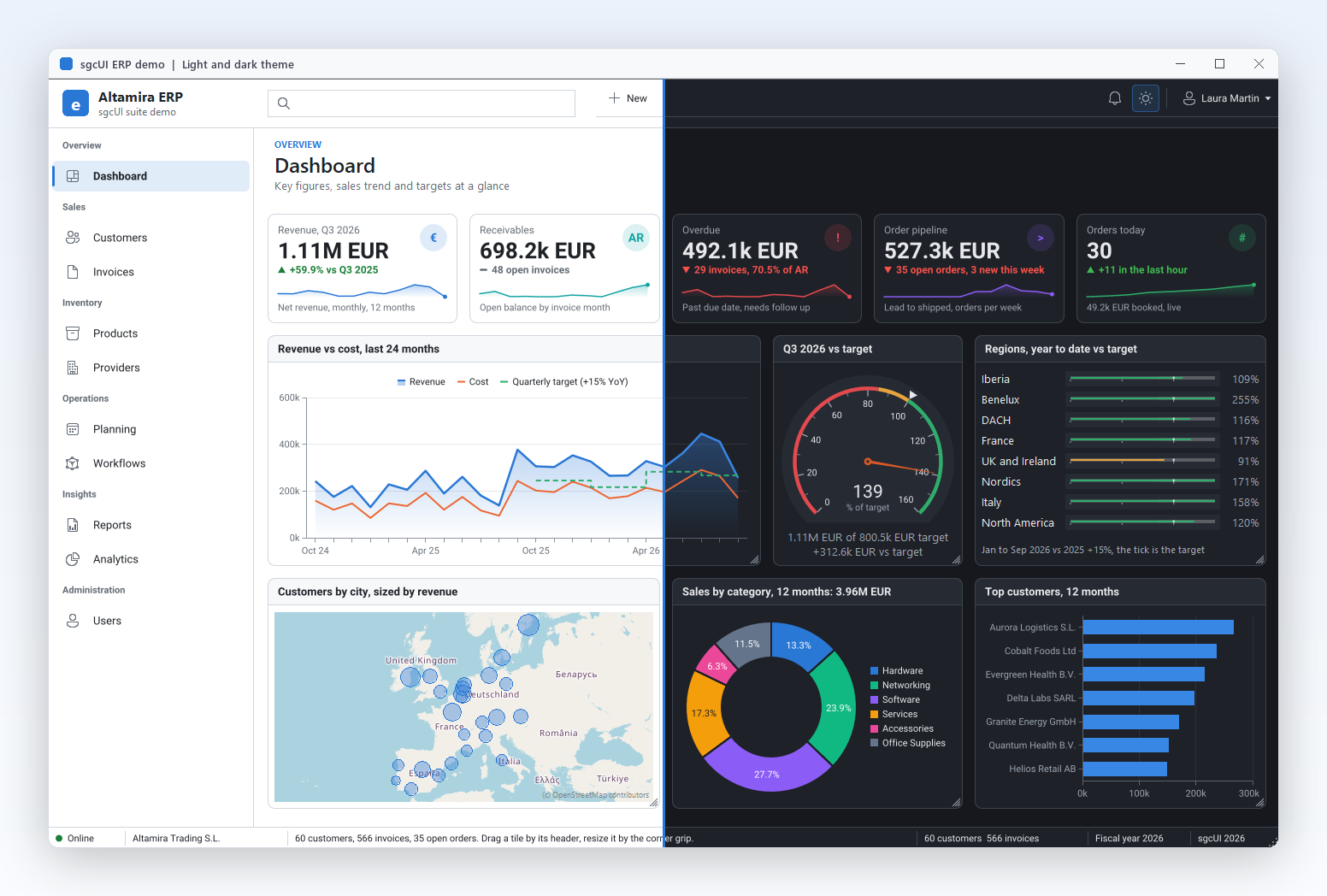
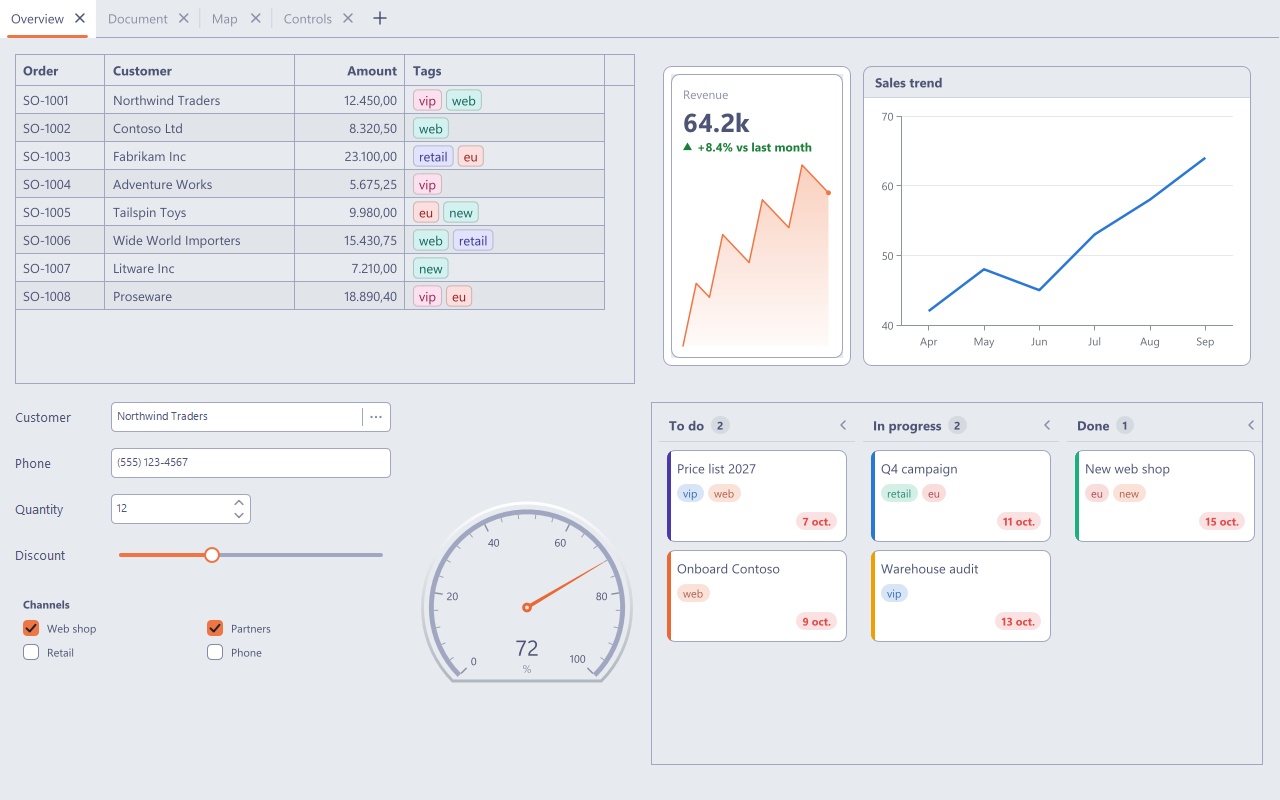
The sgcUI ERP demo dashboard: navigation sidebar, toolbar, KPI cards, revenue chart, radial and linear gauges, customer map, donut and bar charts in dashboard tiles

Getting Started →

One Application, Built Only from sgcUI

This is the dashboard of the sgcUI ERP demo, a compiled Delphi VCL application. Every visible control on the screen comes from the suite. Select a number to open the product behind it.

  1. sgcNavigation draws the sidebar with groups, icons and the selected module.
  2. sgcToolbar draws the top bar with search, New and the theme switch, and the status bar at the bottom.
  3. sgcDashboard lays out the tiles and the KPI cards with trend, sparkline and drill down; users drag and resize tiles.
  4. sgcCharts plots revenue against cost for 24 months with a target line, plus the donut and the bar chart.
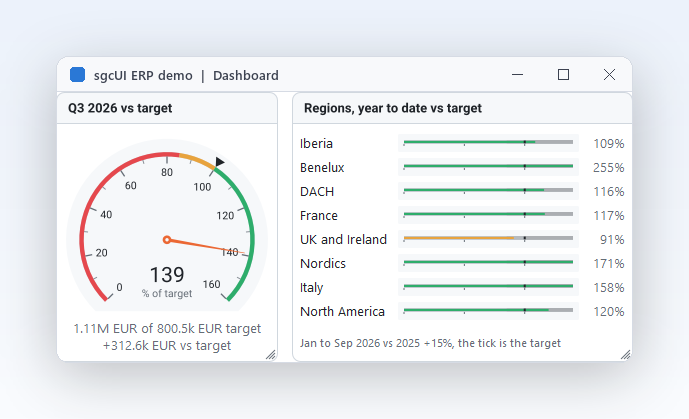
  5. sgcGauges shows the quarter against its target on a radial gauge and each region on a linear gauge.
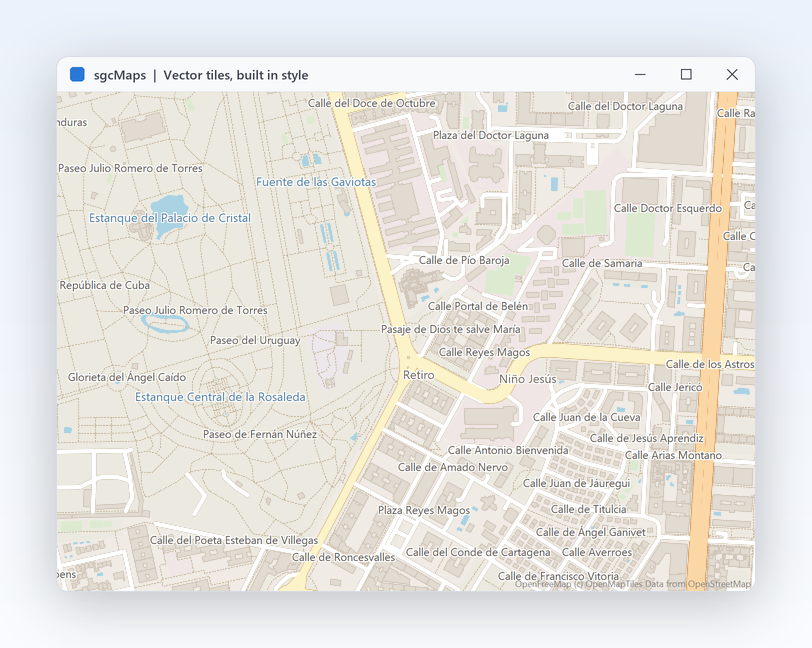
  6. sgcMaps places every customer city on the map, with the circle sized by revenue.

The sgcUI ERP Demo: All 14 Products in One App

A complete business application to run, read and copy from, for Delphi, C++ Builder and .NET WinForms.

Altamira ERP is the demo we use to prove the suite works as one. It is a real application, not a gallery: a sidebar with ten modules, a top bar and a status bar, a light and a dark theme, and a data layer with 60 customers, 18 providers, 48 products and more than 500 invoices over 24 months. The data is generated from a fixed seed, so every run shows the same numbers. In Delphi the modules bind to in memory datasets, which is the same code you write against your own database.

The demo ships for Delphi (VCL, Win32 and Win64), C++ Builder (VCL) and .NET WinForms (.NET 8). Each module is a separate unit, so you can lift a screen into your own project: the dashboard, the invoice PDF, the Gantt chart or the approval workflow. Beyond the modules below, the demo has Products (catalogue grid with EAN-13 and QR codes, stock gauges and a PDF sheet of labels), Providers (rating and lead time filters, a chart and a map), Users (role tokens and an org tree) and a New customer wizard with per step validation and a map to pick the city.

Customers

Customers

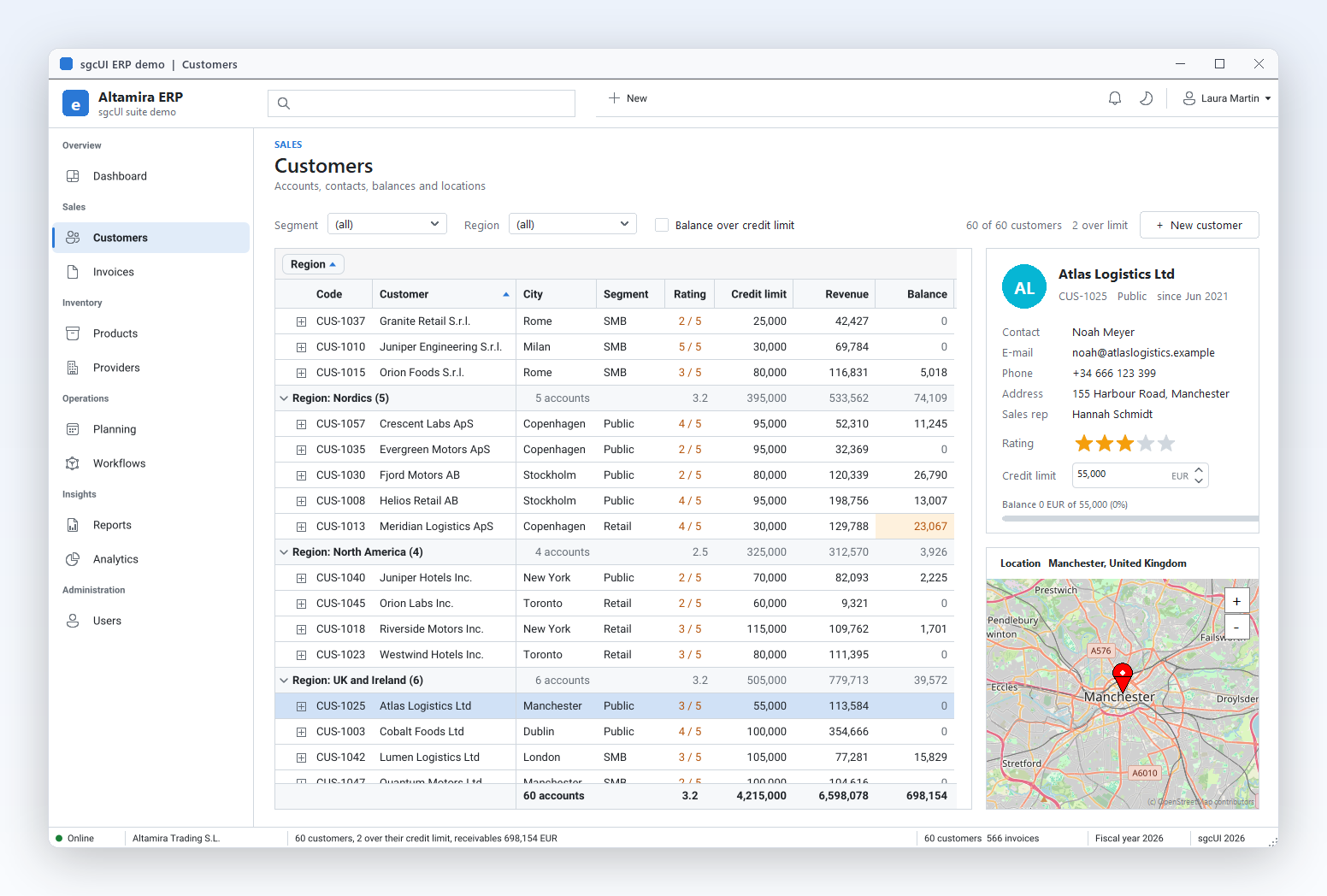
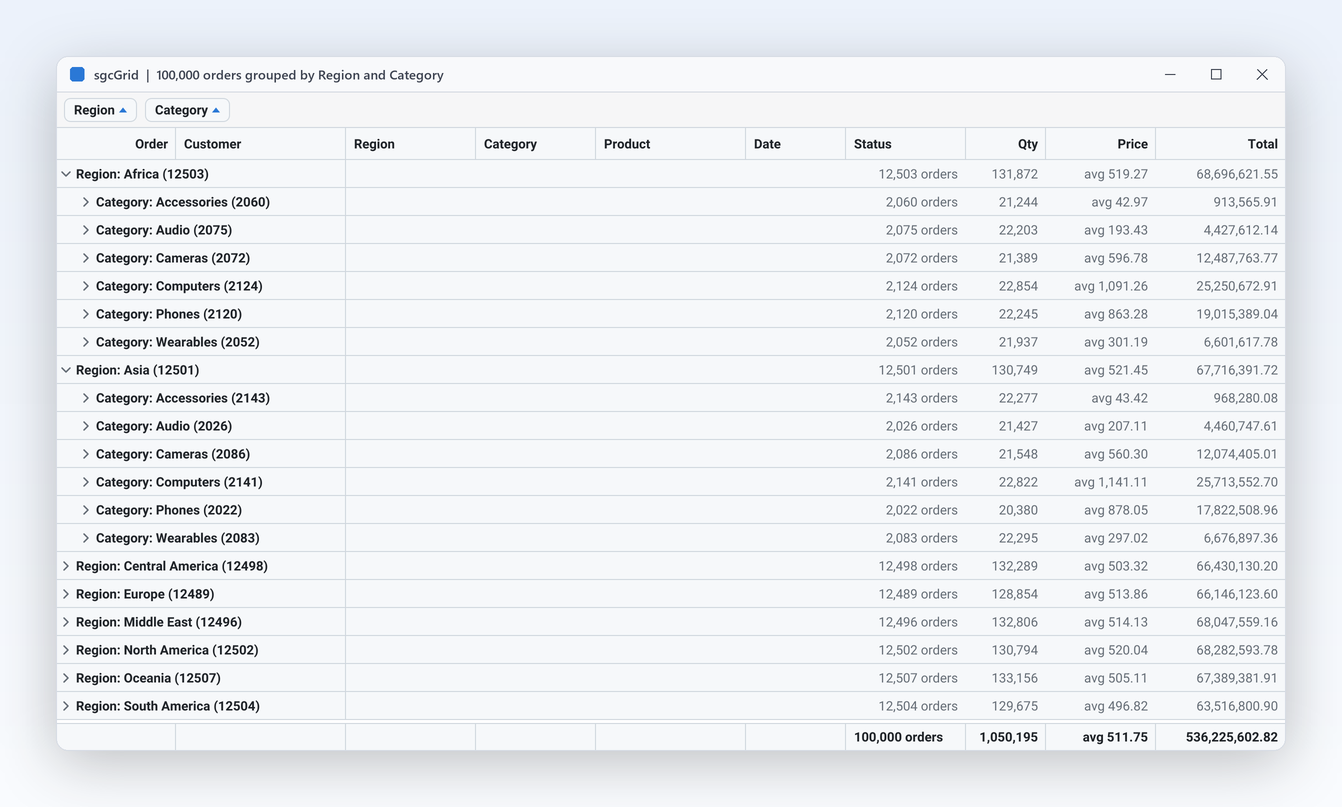
A grid grouped by region with counts and totals per group, sorting, filters and a highlight when the balance passes the credit limit. The side card edits the rating and the credit limit in place and centres a map on the customer. New opens the wizard.

Built with sgcGrid, sgcEditors, sgcMaps, sgcWizard.

Invoices with PDF

Invoices with PDF

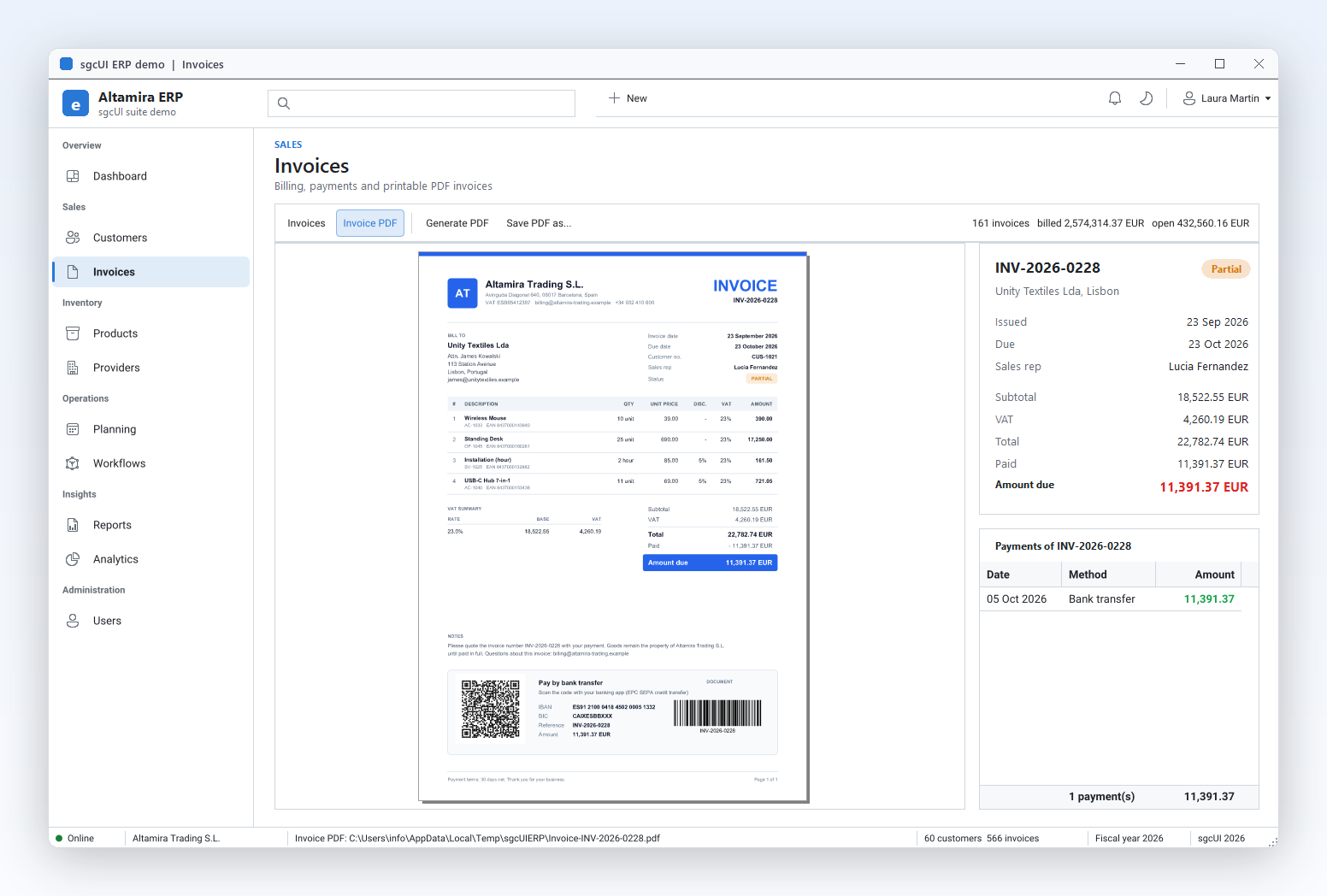
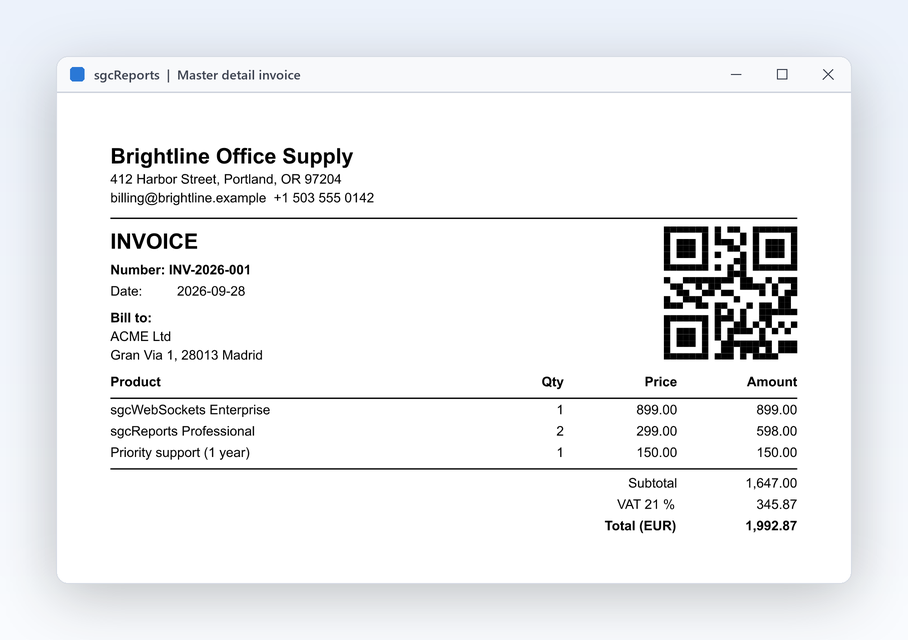
The invoice list with status, totals and payments. One click builds an A4 invoice in code, with the lines table, the VAT summary, a SEPA payment QR code and a Code128 barcode, and shows it in the PDF viewer inside the module.

Built with sgcGrid, sgcPDF.

Projects Gantt

Projects Gantt

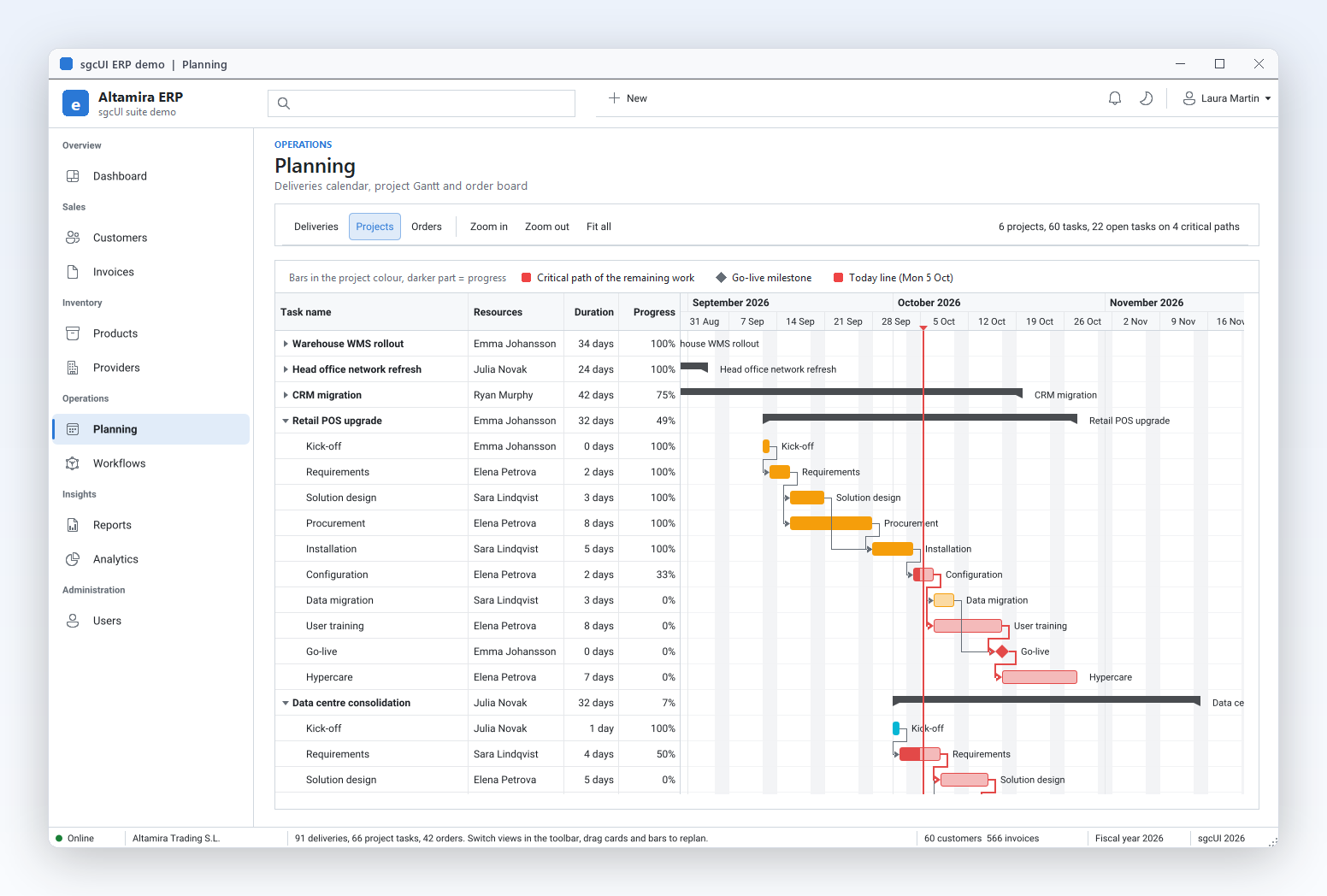
Six projects with summary rows, finish to start dependencies, progress, a Go-live milestone and the today line. The critical path of the remaining work is drawn in red, and bars can be dragged to replan.

Built with sgcPlanner, sgcToolbar.

Orders Kanban

Orders Kanban

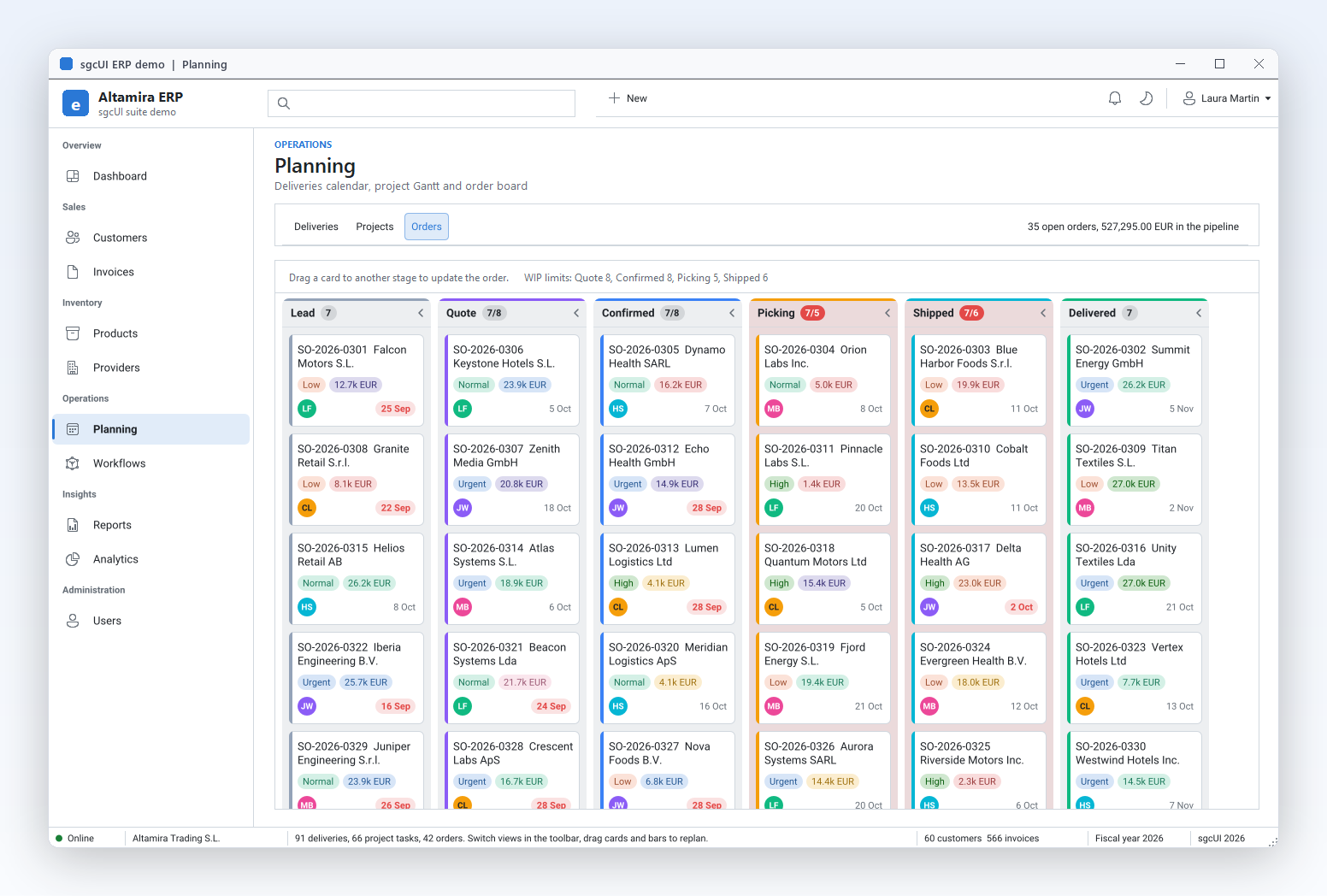
The sales pipeline as a board with six stages, from Lead to Delivered. Cards show amount, priority and owner, columns show their WIP limit, and dragging a card to another stage updates the order.

Built with sgcPlanner.

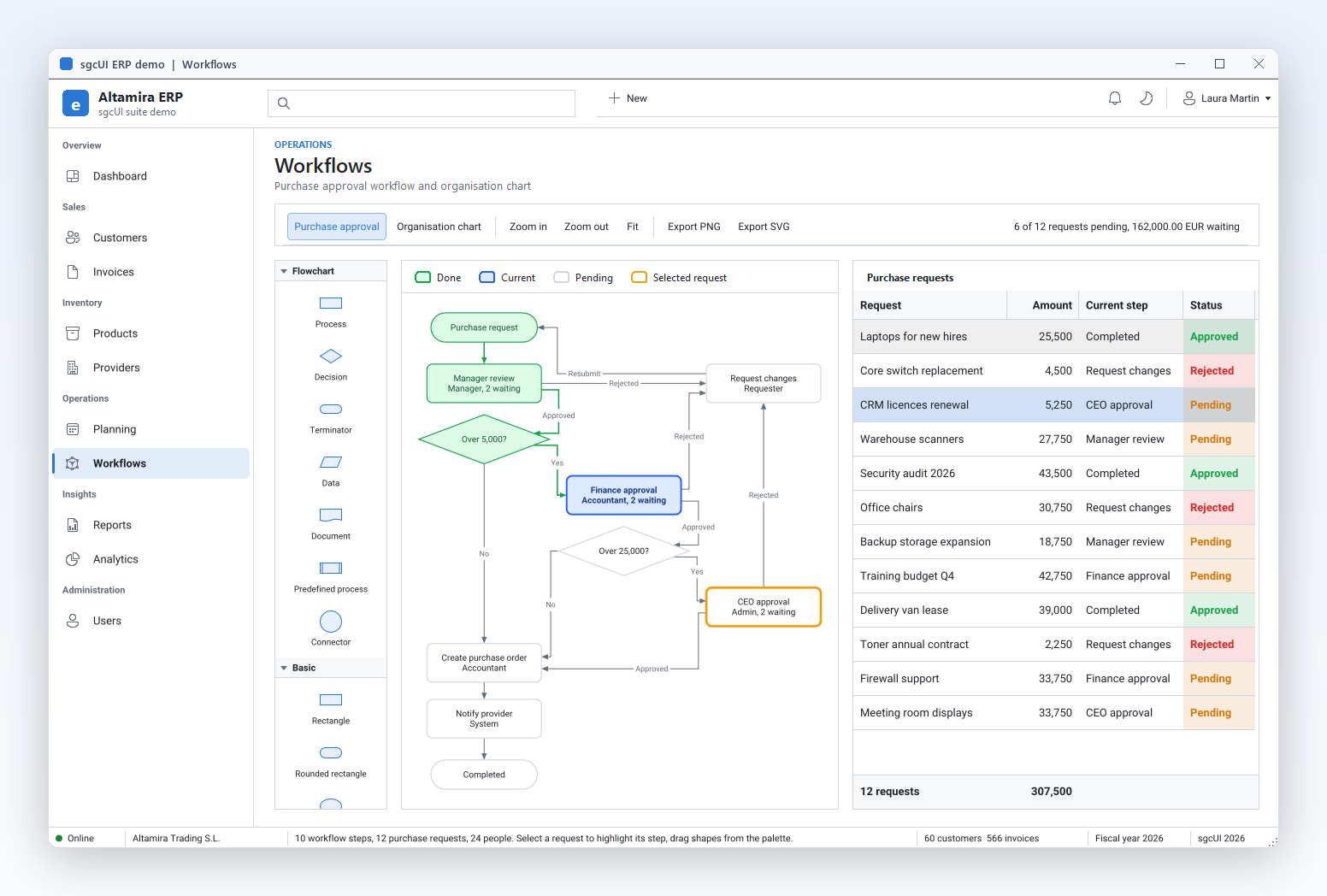
Approval workflow

Approval workflow

A purchase approval flowchart built from data, with done, current and pending steps, decisions and captions on the links. Selecting a request in the grid highlights its step. A second view draws the organisation chart with an automatic tree layout.

Built with sgcDiagram, sgcGrid.

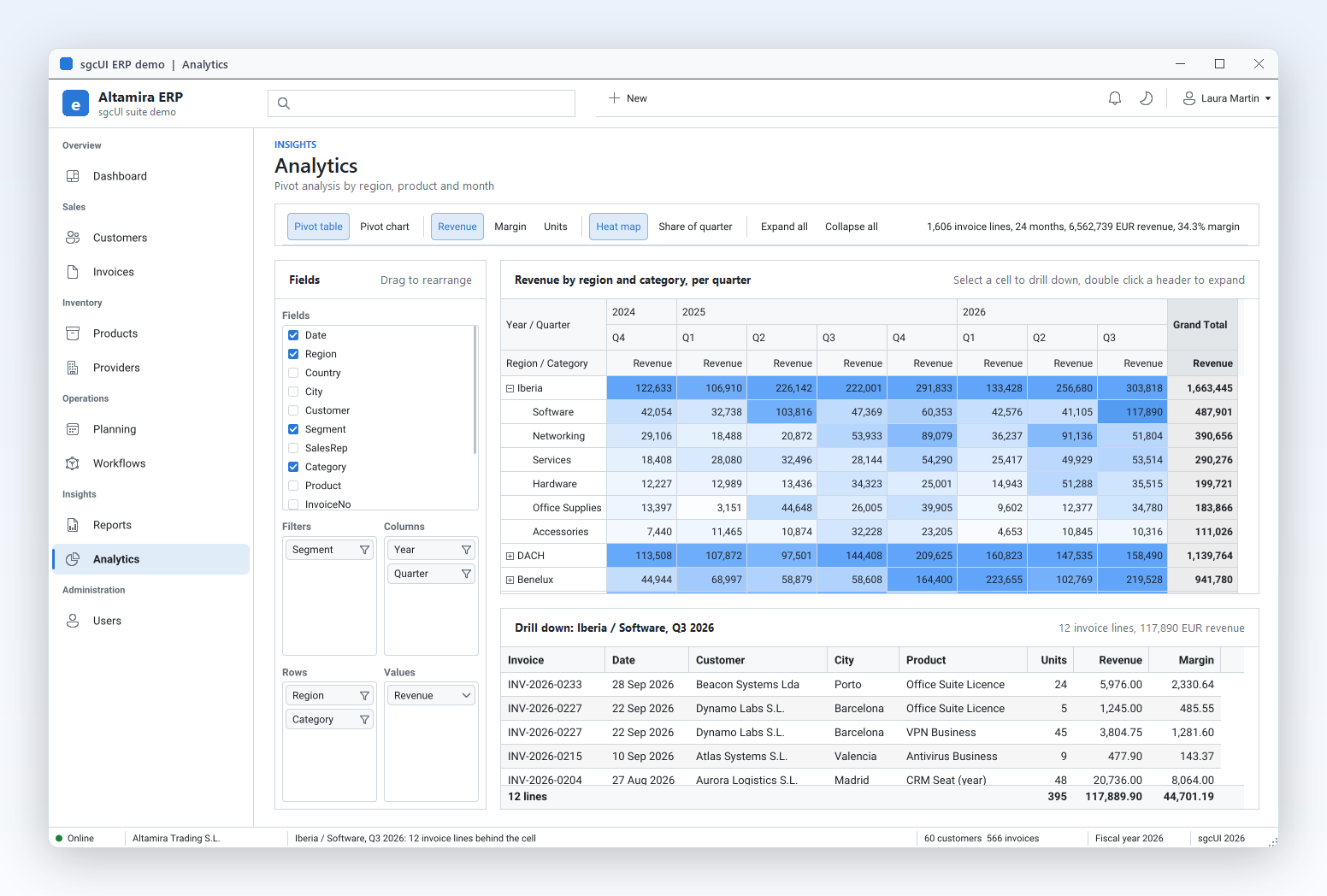
Analytics

Analytics

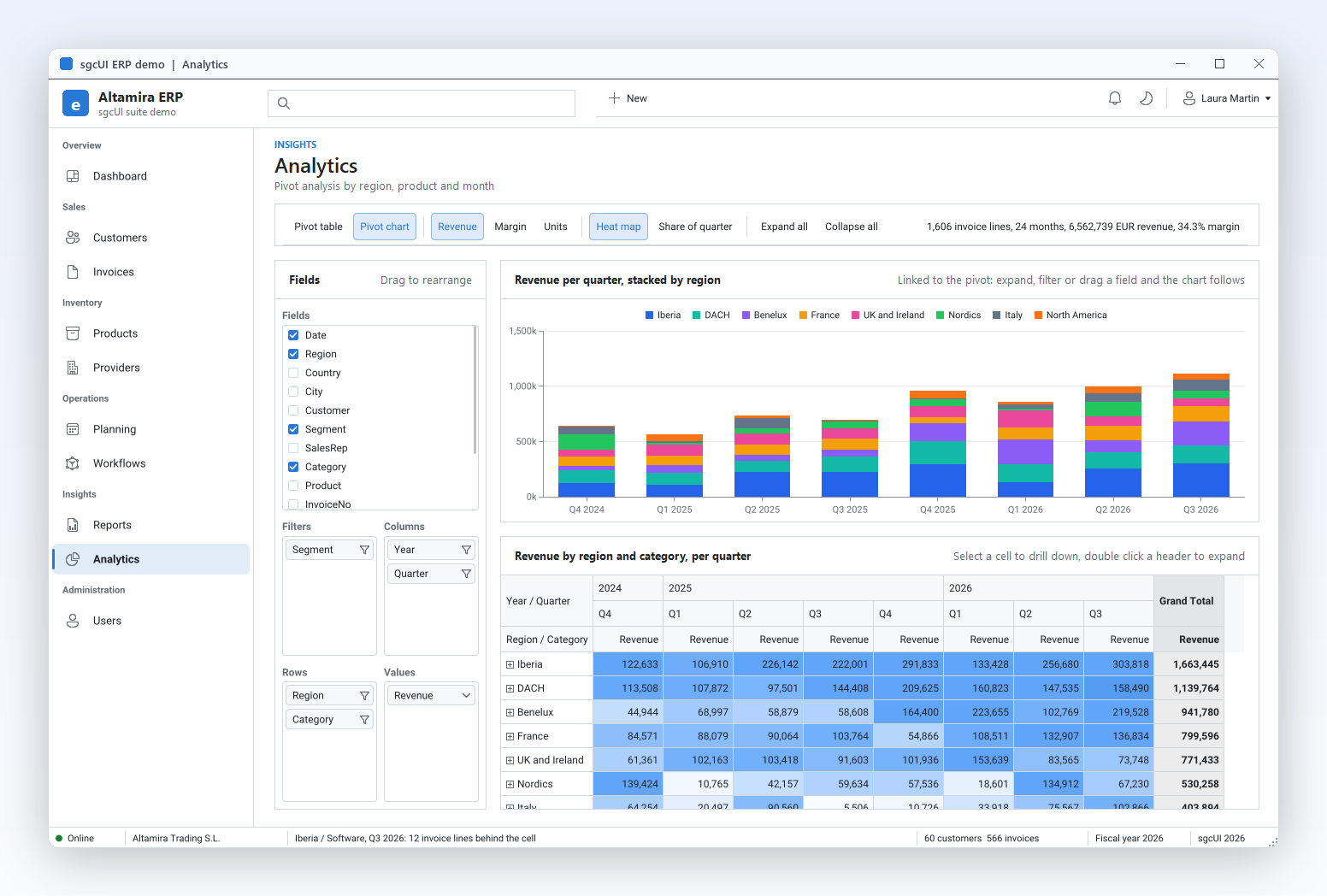
A pivot of every invoice line by region, category, year and quarter, with a field list to drag fields, a heat map and a drill down grid that lists the invoice lines behind the selected cell.

Built with sgcPivotGrid, sgcCharts, sgcGrid.

Find the source under Demos\Suite (Delphi and C++ Builder) and in the .NET demos (Suite\ERP).

Fourteen Products, Three Editions

Standard covers data entry and the application shell, Professional adds visualization, and Enterprise includes every product. Each product is also sold on its own, from €149.

sgcUI Standard

sgcGrid

sgcGrid

The data grid for live feeds, datasets and large tables.

  • Rows update by key from any thread; repaints are paced by MaxFPS.
  • Memory, any TDataSet or DataTable, JSON, CSV, virtual rows, or WebSocket, MQTT and SSE feeds.
  • VCL and FireMonkey for Delphi and C++ Builder, WinForms, WPF and Avalonia for .NET.

From €199

Explore sgcGrid →
sgcNavigation

sgcNavigation

The sidebar and accordion that hold an application together.

  • A sidebar or an accordion with the same items and events, switched by one property.
  • VCL, FireMonkey, WinForms, WPF and Avalonia, with the same model and names.
  • Light and dark themes and an accent colour shared with every sgcUI product.

From €149

Explore sgcNavigation →
sgcToolbar

sgcToolbar

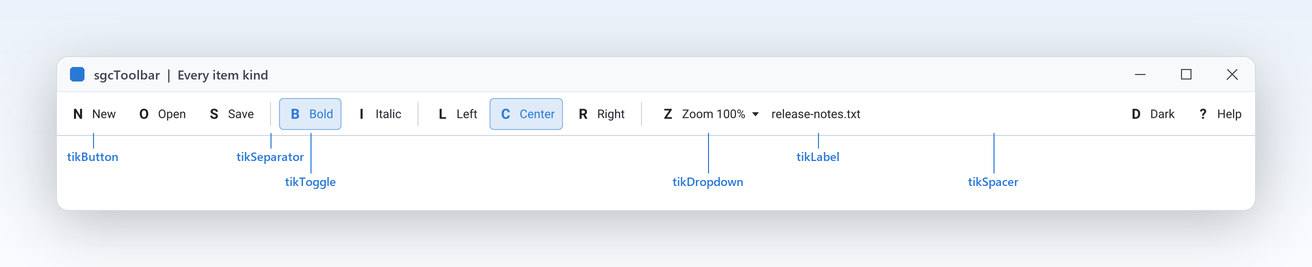
Toolbars and status bars with six item kinds and thread safe panels.

  • Six item kinds on top, text, progress and indicator panels at the bottom.
  • Set panel text, progress and indicators from worker threads, no Synchronize.
  • VCL, FireMonkey, WinForms, WPF and Avalonia with the same item model.

From €149

Explore sgcToolbar →
sgcEditors

sgcEditors

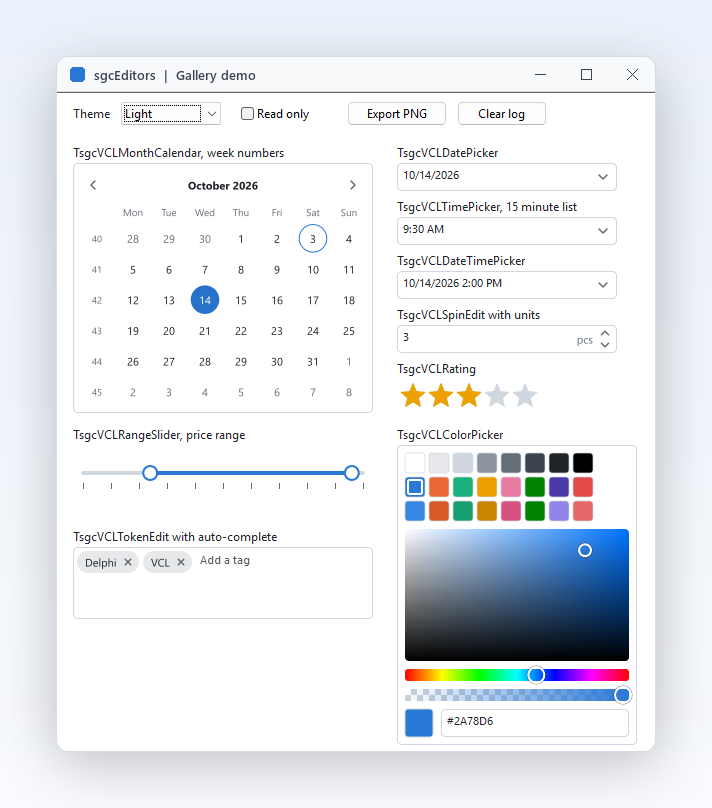
Nine input controls for dates, ranges, colours, tokens and ratings.

  • Calendar, date, time and date time pickers, range slider, colour, tokens, rating, spin edit.
  • Native edits inside, so IME, clipboard, undo and screen readers just work.
  • Five DB editors for TDataSet forms in Delphi, two way binding in WPF.

From €199

Explore sgcEditors →

sgcUI Professional

sgcCharts

sgcCharts

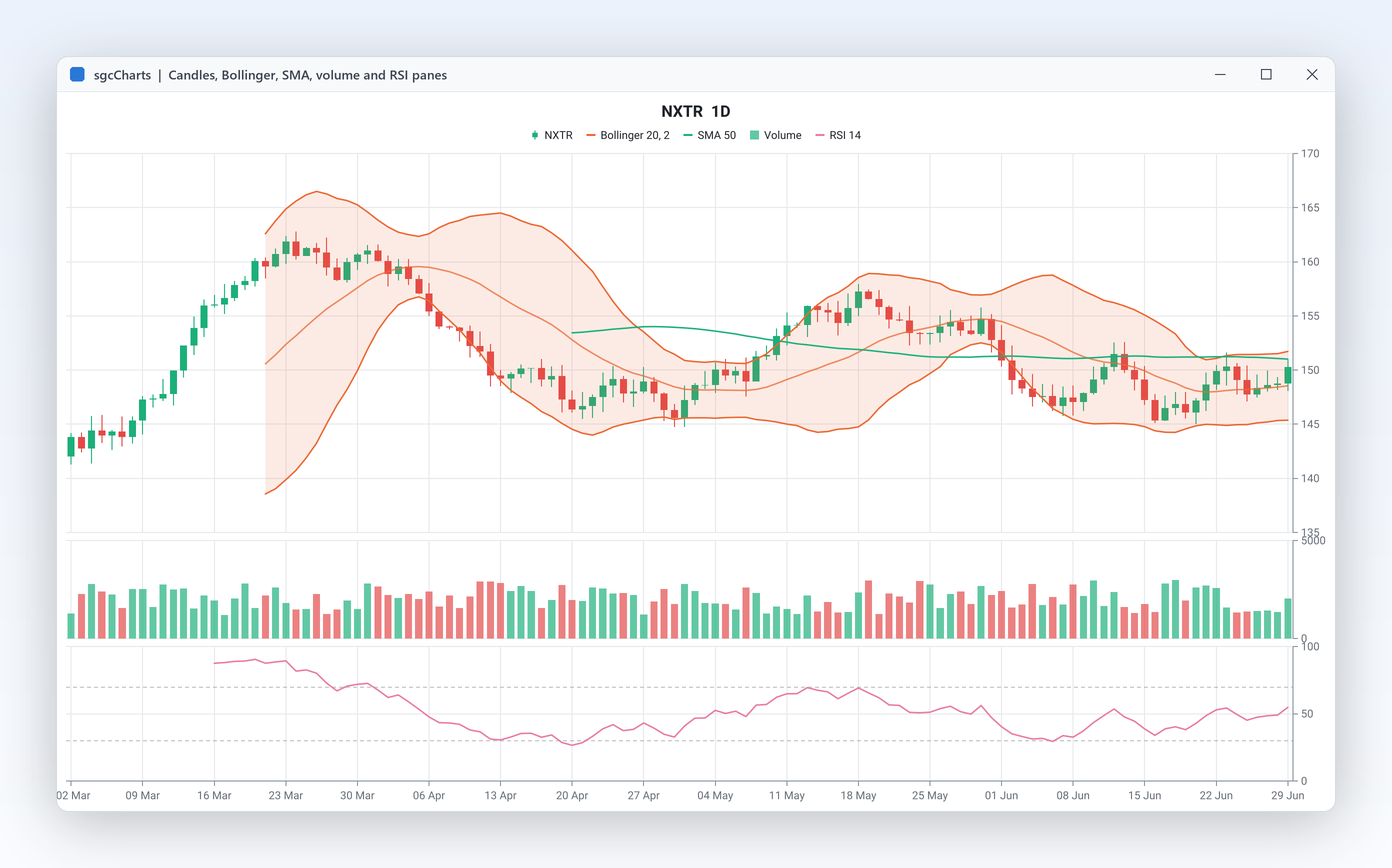
Thirteen series types for business charts and live streams.

  • Line to funnel, candlestick to treemap, all components on one chart model.
  • Ring buffers, a time window and per series decimation keep live charts smooth.
  • Manual points, CSV, JSON, any TDataSet, an in memory table, or live feeds.

From €199

Explore sgcCharts →
sgcDashboard

sgcDashboard

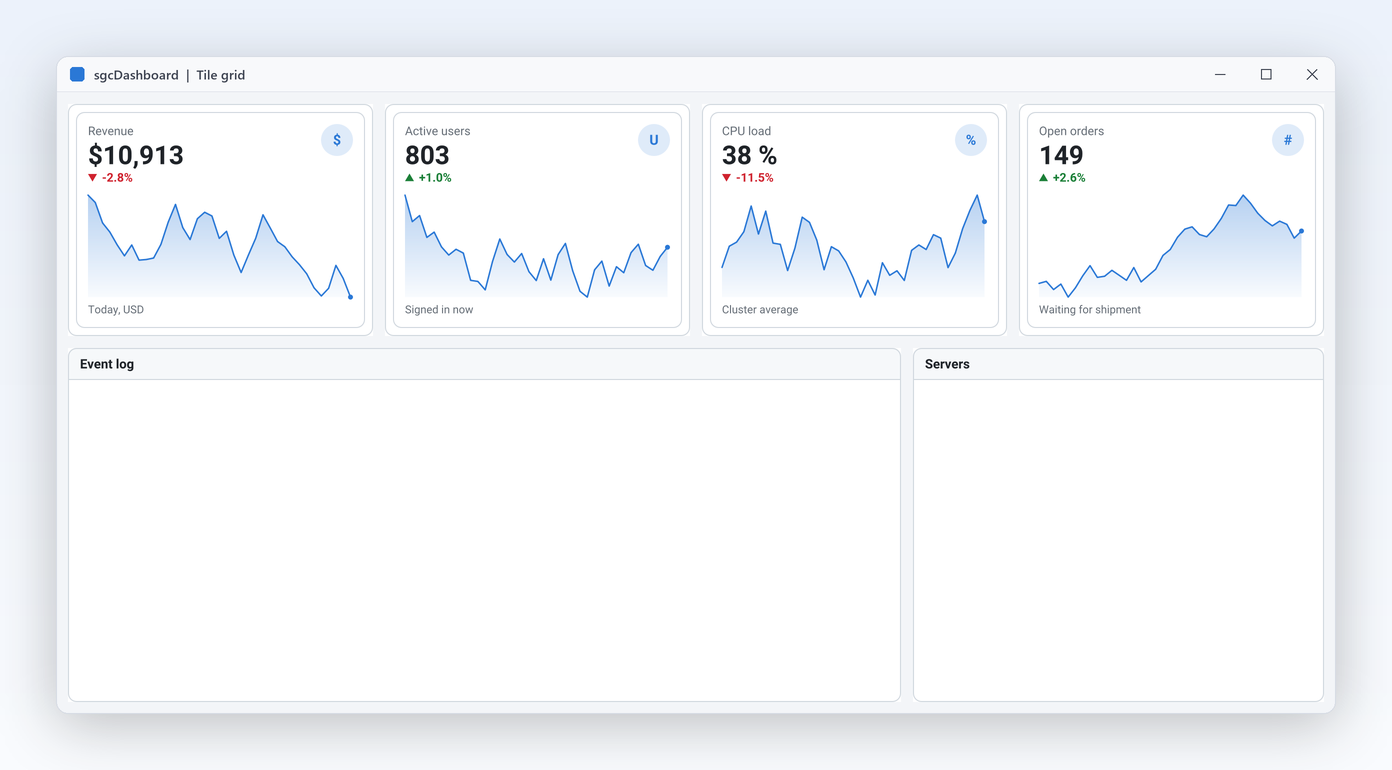
Tiles and KPI cards that turn numbers into a screen.

  • Twelve columns, spans and auto-flow place every tile without a line of layout code.
  • Value, trend arrow, trend text and a sparkline in one component.
  • Feed cards from code, or from WebSocket, MQTT and SSE with the bridge.

From €199

Explore sgcDashboard →
sgcGauges

sgcGauges

Ten instruments for targets, machines and control rooms.

  • Radial, linear, digital, LED, LED bar, ring, VU meter, clock, compass, annunciator.
  • Thresholds with hysteresis fire one event per crossing, in the main thread.
  • Set Value from any thread, or bind MQTT, WebSocket and SSE with the bridge.

From €199

Explore sgcGauges →

sgcUI Enterprise

sgcPivotGrid

sgcPivotGrid

Pivot tables with a field list, for analysts inside your app.

  • A pivot grid plus a drag and drop field list for VCL, FireMonkey and .NET.
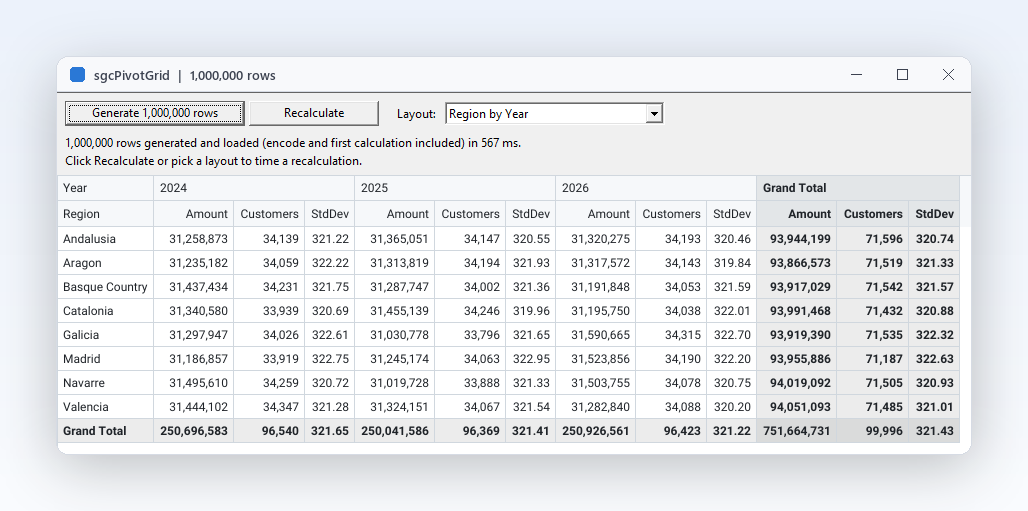
  • Typed column store and one pass per recalculation, budgeted for a million rows.
  • A TDataSet, an sgcGrid table, a .NET DataTable or rows appended from code.

From €249

Explore sgcPivotGrid →
sgcPlanner

sgcPlanner

Scheduler, Gantt and Kanban on one data model.

  • Scheduler, Gantt and Kanban bound to one TsgcPlannerData, always in sync.
  • TDataSet binding, JSON, iCalendar and Microsoft Project XML, in and out.
  • VCL, FireMonkey, C++ Builder, WinForms, WPF, Avalonia and Linux64 headless.

From €249

Explore sgcPlanner →
sgcDiagram

sgcDiagram

A diagram editor and layouts that draw your data.

  • Palette, shapes, glued connectors, in place text and undo, ready for your users.
  • Layered and tree layouts and dataset binding turn your records into tidy charts.
  • VCL, FireMonkey, WinForms, WPF and Avalonia, with the same class names and one JSON format.

From €249

Explore sgcDiagram →
sgcWizard

sgcWizard

Multi step forms with a stepper and validation.

  • Every page you add appears in the stepper, with Back, Next, Finish and Cancel built in.
  • One event stops the move until the page is valid, whatever the user pressed.
  • VCL, FireMonkey, WinForms, WPF and Avalonia, with the same names and events.

From €149

Explore sgcWizard →
sgcMaps

sgcMaps

Native maps with markers, routes and offline tiles.

  • VCL, FireMonkey, Lazarus and WinForms controls that draw the map themselves.
  • Clustered markers, routes, zones, circles, labels and heatmaps from code or files.
  • Tiles from disk, an offline router and an offline geocoder, no API key needed.

From €149

Explore sgcMaps →
sgcPDF

sgcPDF

Create, view and process PDF documents in code.

  • Create documents from code with text, images, vector graphics and Unicode fonts.
  • Viewer controls for VCL, FireMonkey, WinForms, WPF and Avalonia, plus barcode and QR code controls.
  • Forms, encryption, redaction, prepress, PDF/A (up to PDF/A-4), PDF/UA-2 and tagged PDF.

From €249

Explore sgcPDF →
sgcReports

sgcReports

Reports defined in code, exported to PDF, XLSX and more.

  • A fluent builder or a JSON definition, both versioned with your project.
  • Datasets with master detail, JSON arrays or rows from your own events.
  • Tagged PDF, PDF/A-3, XLSX, CSV and PNG from one prepared report.

From €199

Explore sgcReports →

Why the Suite Looks and Works as One

Why the Suite Looks and Works as One

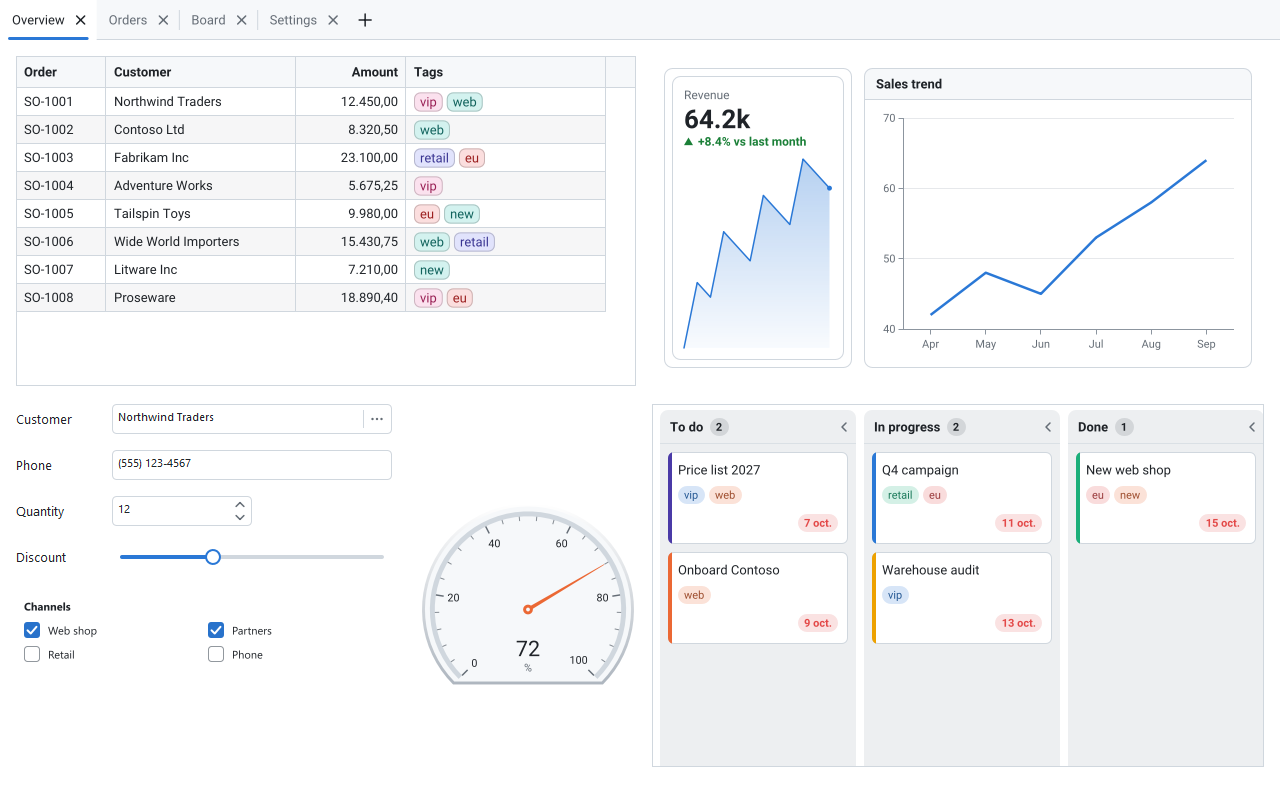
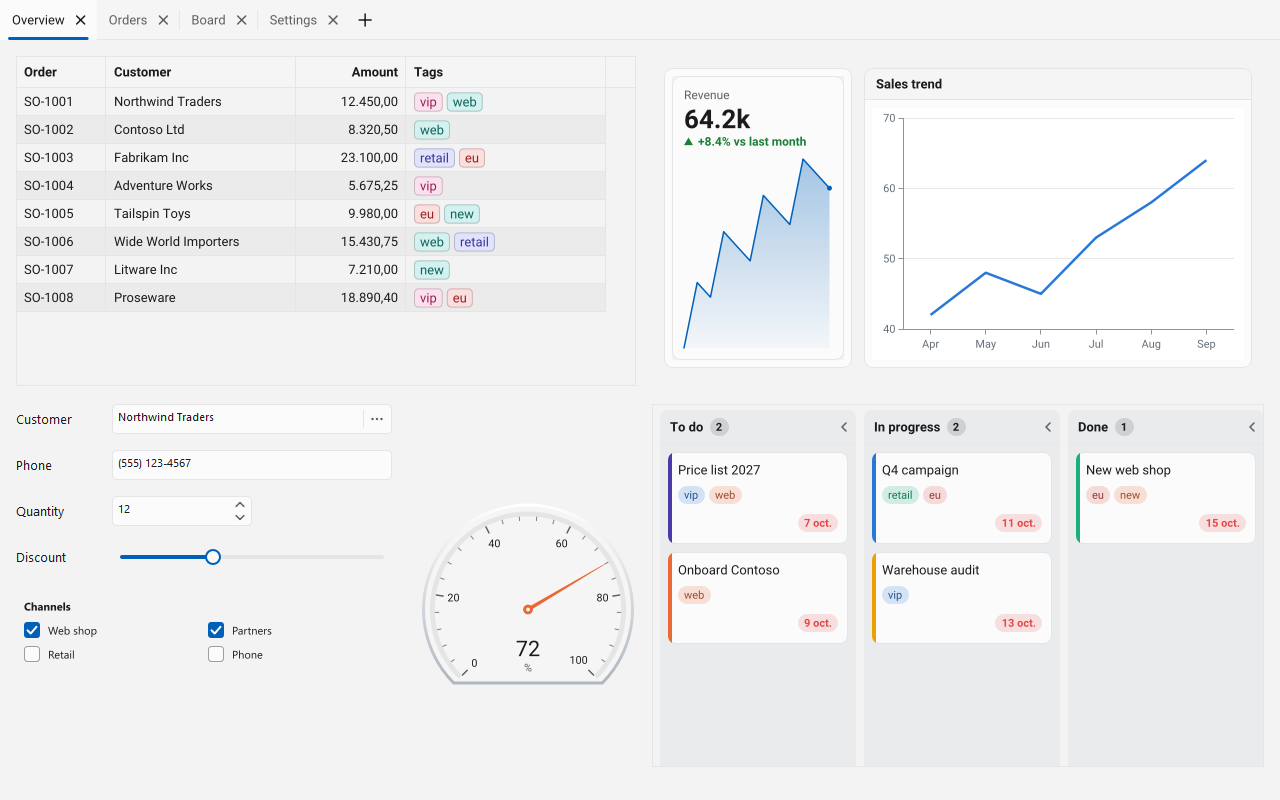
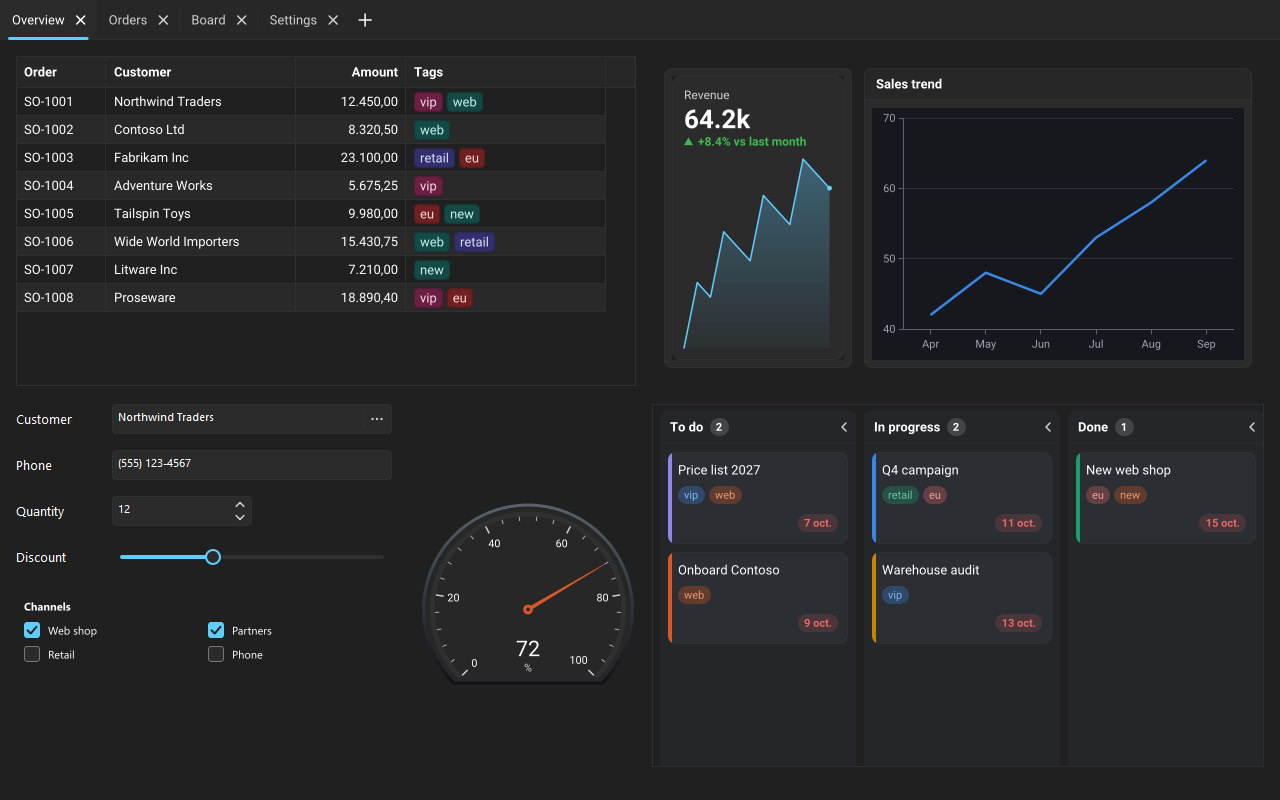
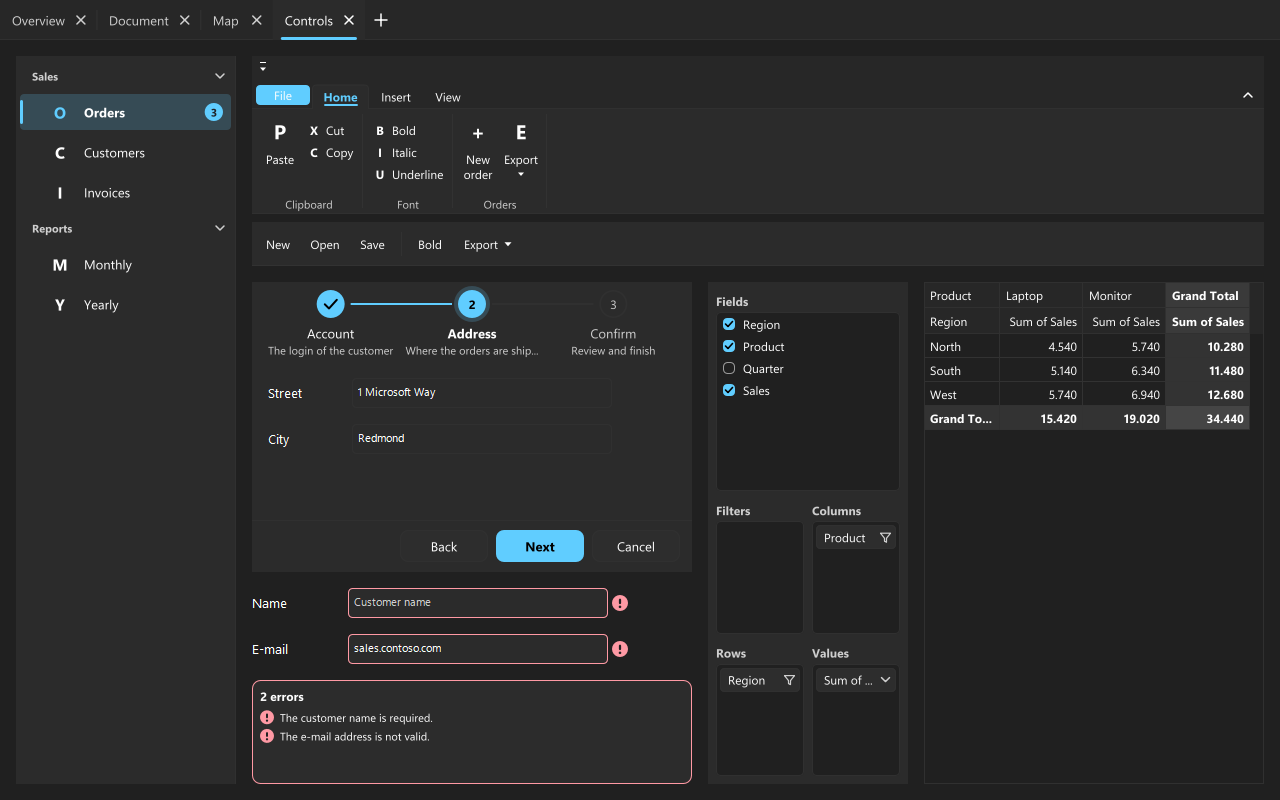
Every sgcUI product is built on the same runtime, sgcUICore. It owns the canvas, the rasterizer, the colours and the themes, so a grid, a gauge and a Gantt chart placed side by side share fonts, spacing, accent colour and focus style. The picture shows the same ERP dashboard twice: the left half in the light theme, the right half in the dark theme, switched with one call at run time.

  • One call themes the whole application: sgcUISetApplicationTheme(utDark), or sgcUISystemTheme to follow the system. Each control's Theme defaults to utDefault (follow the application) and still takes utLight, utDark or utCustom.
  • One drawing engine, so the screen, a PNG file and an SVG file show the same pixels.
  • Headless rendering on every product: build images on a server or in a service, Linux64 from Delphi 10.2.
  • The same names in .NET: the C# port keeps the class, property and event names, so code and help carry over.
  • One help system for every product, with Delphi, C++ Builder and .NET versions of each topic.

Right to Left Languages: Arabic and Hebrew

Every sgcUI product runs right to left user interfaces on VCL, FireMonkey, WinForms, WPF and Avalonia, driven by the direction property each framework already has.

Set BiDiMode in VCL and FireMonkey, RightToLeft in WinForms or FlowDirection in WPF and Avalonia on a form or window, and every sgcUI control on it follows. Left to right applications draw exactly as before.

  • Real shaping: Arabic letters are joined, ligatures and marks are applied, and text is never drawn mirror written.
  • Bidirectional text: mixed Arabic, Hebrew and Latin runs are ordered with the Unicode bidirectional algorithm (UAX #9), and each text takes its direction from its first strong character.
  • Mirrored layout: grid columns, sidebars, toolbars, legends, steppers and editor buttons move to the opposite side, while time axes, dials and maps keep their meaning, as in Excel and Outlook.
  • Numbers stay readable: values formatted from numbers, dates, times and currency, such as 12:30 or 1,234.50, are drawn as left to right runs and never reorder.
  • Automatic font fallback: when the font of a control has no Arabic or Hebrew glyphs, sgcUI adds a platform font such as Segoe UI or Tahoma the first time such a text is drawn.
  • Mirror the content too where it makes sense: MirrorPlot for charts, MirrorTimeline for the Gantt time axis and MirrorGlyph for directional toolbar icons. sgcReports and the sgcPDF writer shape Arabic and Hebrew text in their documents as well.

Read the right to left help topic

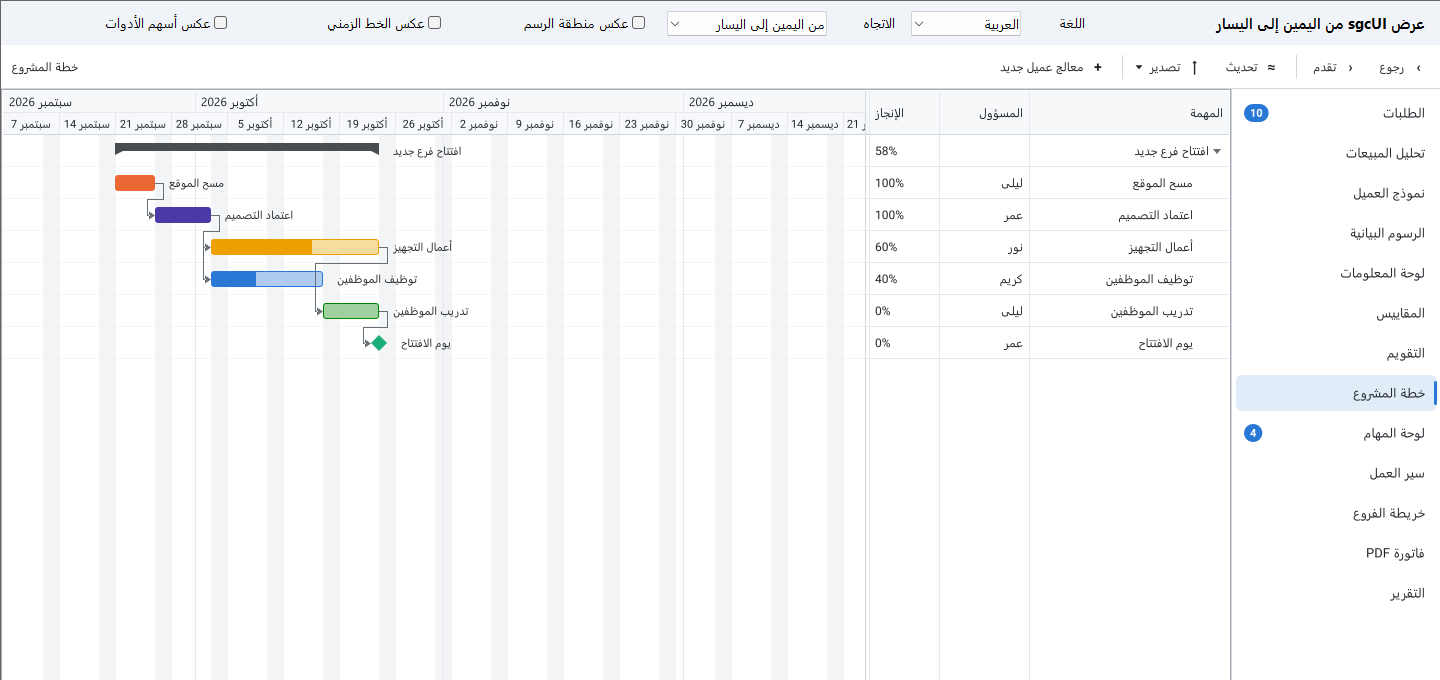
The sgcUI right to left demo on Delphi VCL in Arabic, with the navigation sidebar and the Gantt task grid on the right

Arabic on VCL: the sidebar, the toolbar and the Gantt task grid are mirrored, the time axis keeps running left to right.

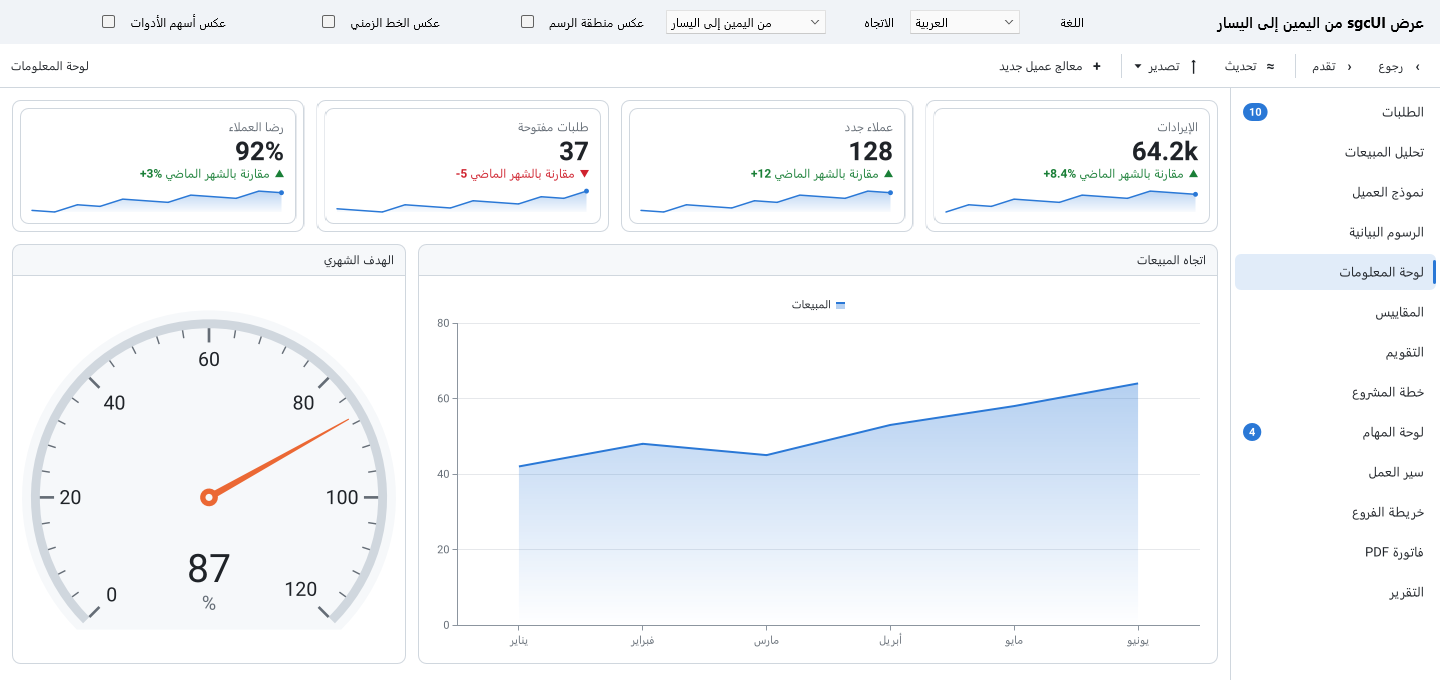
The sgcUI right to left demo on Delphi FireMonkey in Arabic, with KPI cards, a gauge and an area chart

Arabic on FireMonkey: KPI cards flow from the right, and numbers such as 64.2k and +8.4% stay readable.

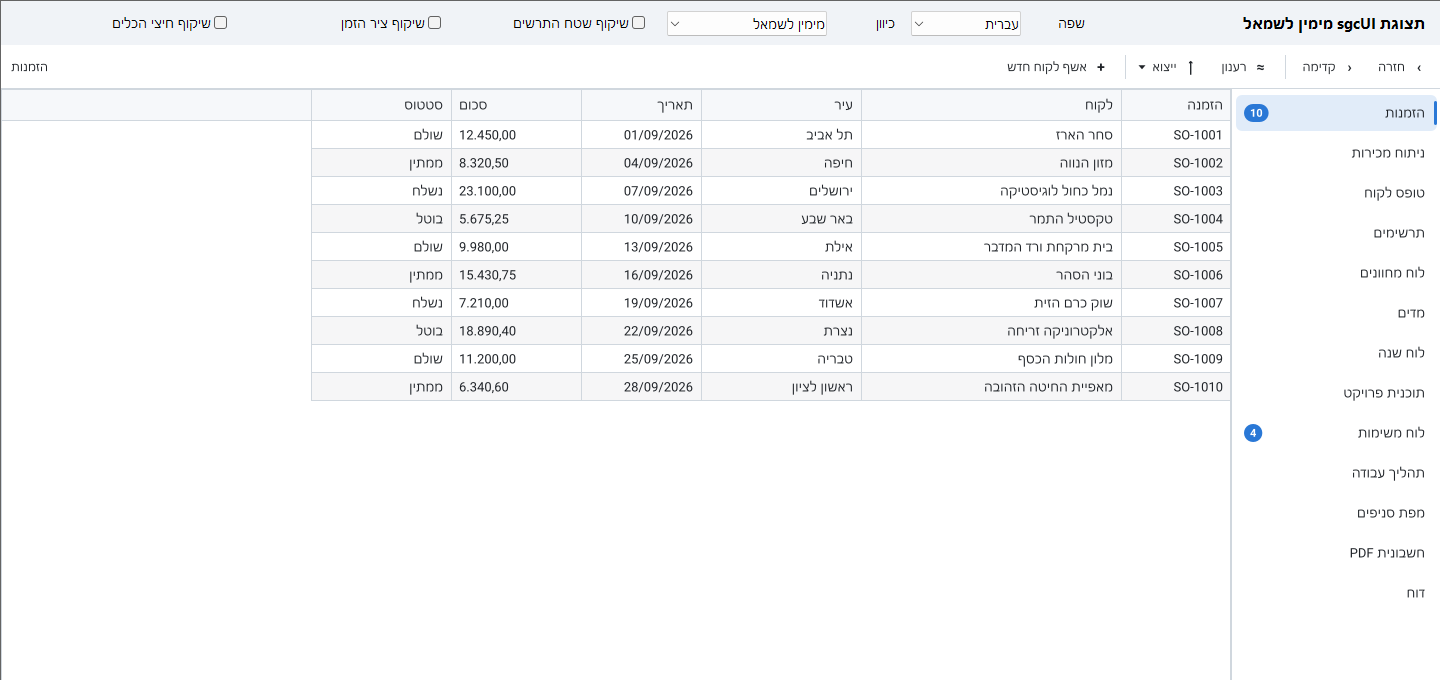
The sgcUI right to left demo on Delphi VCL in Hebrew, with an orders grid whose first column is at the right

Hebrew on VCL: the grid columns flow from the right, while order numbers, dates and amounts stay left to right.

sgcGrid, sgcCharts, sgcPivotGrid, sgcPlanner, sgcDiagram, sgcGauges, sgcDashboard and sgcMaps print, show a print preview and export to PDF with the same members on VCL, FireMonkey, WinForms, WPF and Avalonia (sgcMaps on VCL, FireMonkey and WinForms).

Call Print, ShowPrintPreview or ExportToPDF on the control. One set of page settings, PrintSettings, drives the printer, the preview and the PDF, so the preview shows exactly what the printer and the PDF get. A page shows the content of the control, not the screen: the scroll position, the selection and an open editor are not printed.

  • Printing and the print preview are part of sgcUICore and are in every edition, Community included. In FireMonkey, printing works on Windows and macOS, and the preview and the PDF export on every platform.
  • The preview has page navigation, zoom, page setup, printing and PDF export, as a dialog or as a control on your own form or window.
  • Paper, orientation, margins and scaling, plus header and footer text with the title, the date, the page number and the page count.
  • Real text in the PDF: the fonts are embedded as subsets, so the text can be searched and copied. Grid, pivot grid, chart, planner, diagram and gauge pages are vector drawings, and dashboard and map pages are pictures at 192 dpi by default.
  • Accessible by default: the PDF is a tagged PDF/UA document. Grids and pivot grids become real tables with header cells, and charts, gauges, diagrams, planner views, dashboards and maps get an alternative text built from their content.
  • PDF/A-2a and PDF/A-3a for archiving, alone or together with PDF/UA. In Delphi and .NET, also PDF/A-4 and PDF/UA-2.
  • The PDF export comes through the sgcUIPDF bridge with a licensed sgcPDF: add the unit sgcUIPDF_Export in Delphi and C++ Builder, or the NuGet package esegece.sgcUICore.sgcPDF in .NET. It is not in the Community edition.

Read the printing help topic

Accessible by Default

Every sgcUI product exposes its content to Microsoft UI Automation, the API that screen readers such as Narrator and NVDA use, works with the keyboard and follows the Windows high contrast themes, on VCL, FireMonkey, WinForms, WPF and Avalonia, with no setup and in every edition.

The components expose their content to Microsoft UI Automation, the accessibility interface of Windows that screen readers such as Narrator and NVDA and the testing tools of Microsoft use: a grid is exposed as a table with rows, cells and headers, a chart as a list of series and points, a planner as a list of items, and so on. Drop a control on a form and it is accessible. While no accessibility client is running the support costs nothing, and one global switch turns it off for the whole application.

  • VCL: UI Automation in every supported Delphi and C++Builder version, from Delphi 7 to Delphi 13, with the same behaviour in every version.
  • FireMonkey: UI Automation on Windows. macOS, iOS and Android are not covered yet.
  • WinForms: every control serves its own UI Automation provider, so a grid has the Grid and Table patterns. WPF and Avalonia: every control returns an automation peer, and one peer per item it draws.
  • Keyboard: moving tiles, cards, appointments and shapes, drawing links and moving pivot fields and grid columns all have keyboard alternatives, and every interactive control shows a visible focus ring. A few operations still need a mouse: sgcGrid column width resizing, sgcCharts zoom and pan by mouse and the financial drawing tools, and sgcDiagram connector bend points.
  • High contrast: under a Windows high contrast theme the controls paint with the colours the user chose in Windows, without a restart and without code.
  • Right to left layouts and high DPI are supported, and the position of every element reported to UI Automation follows the layout and the monitor DPI.
  • Every edition has the full accessibility support, the free Community edition included, and it is on by default.
  • The sgcPDF viewer and the sgcReports preview are not covered. The PDF files they produce can be accessible themselves.

eSeGeCe publishes an accessibility conformance report (VPAT 2.5, international edition) for each platform, covering WCAG 2.1, the Revised Section 508 standards and EN 301 549, as a web page and as a PDF.

Read the accessibility statement and the conformance reports

Read the accessibility help topic

Ask the Data, Paste into Forms

Users ask sgcGrid, sgcPivotGrid and sgcDashboard a question in plain language and fill forms and planner items from a pasted text, on VCL, FireMonkey, WinForms, WPF and Avalonia, with the LLM you choose and in every edition.

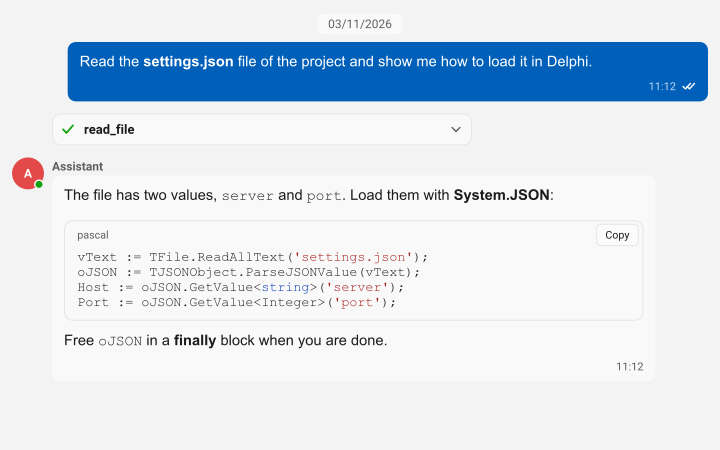
The AI features of sgcUI are not tied to one AI service. They talk to a provider component, so any LLM works: TsgcUIAIEventProvider hands each request to your own code in one event, whatever service, model or on premises server you call, and the sgcUICoreWS bridge adds TsgcUIAIChatProvider, which uses the TsgcAIChat component of sgcWebSockets on every platform.

  • The AI query bar: TsgcVCLAIQueryBar, TsgcFMXAIQueryBar on Windows, macOS, iOS and Android, TsgcWinFormsAIQueryBar, TsgcWpfAIQueryBar and TsgcAvaloniaAIQueryBar. Type a question, press Enter, read what was applied, Cancel a running question and Undo the last answer, with recent questions and suggestions. It works with the keyboard, screen readers, high contrast and right to left layouts.
  • Ask the grid: TsgcGridAI turns a question into filters, sorts and row highlights. With no provider, a rule based parser answers locally with no network and no API key.
  • Ask the pivot: TsgcPivotGridAI turns a question such as top 3 countries by sales per quarter into a pivot layout.
  • Ask the dashboard: TsgcVCLDashboardAI and its FireMonkey and .NET twins send a question to the grid or pivot tile that can answer it, bring that tile into view, and explain a KPI card from its title, value and trend.
  • Smart Paste: TsgcVCLSmartPaste, TsgcFMXSmartPaste and the WinForms, WPF and Avalonia components turn a pasted text, such as an e-mail or an address block, into values for the controls of a form, sgcEditors controls and the standard edit, combo, check box and date controls alike, with a Smart Paste button and Undo.
  • Smart Paste in sgcPlanner: Ctrl+Shift+V on the Scheduler, Gantt or Kanban view creates an item from the pasted text or fills the selected one, with Undo.
  • Privacy: a question sends only the field catalog, the names, captions, types and a few sample values of the fields, never the row data. Smart Paste sends only the pasted text and the field descriptions. KPI values never leave the application, and OnBeforeAsk can edit or cancel every request.
  • Every edition, the free Community edition included. The ready sgcWebSockets provider is in the Registered editions and needs a registered sgcWebSockets: sgcUICoreWS in Delphi and C++ Builder, the esegece.sgcUICore.sgcWebSockets package in .NET.

Read the AI query bar help topic

Read the Smart Paste help topic

Read the AI providers help topic

Products That Plug into Each Other

The products share data sources, themes and rendering, so the common combinations take a few lines instead of glue code.

Grid, pivot, chart

Grid, pivot, chart

The invoice lines feed an sgcPivotGrid, and the sgcCharts stacked bars follow the pivot layout: expand a region, filter a segment or drag a field, and the chart redraws.

Run the sgcUIERP demo

Gauges inside dashboard tiles

Gauges inside dashboard tiles

Any sgcUI control can live in an sgcDashboard tile. Here a radial gauge tracks the quarter against its target and linear gauges compare each region with last year.

Run the sgcUIERP demo

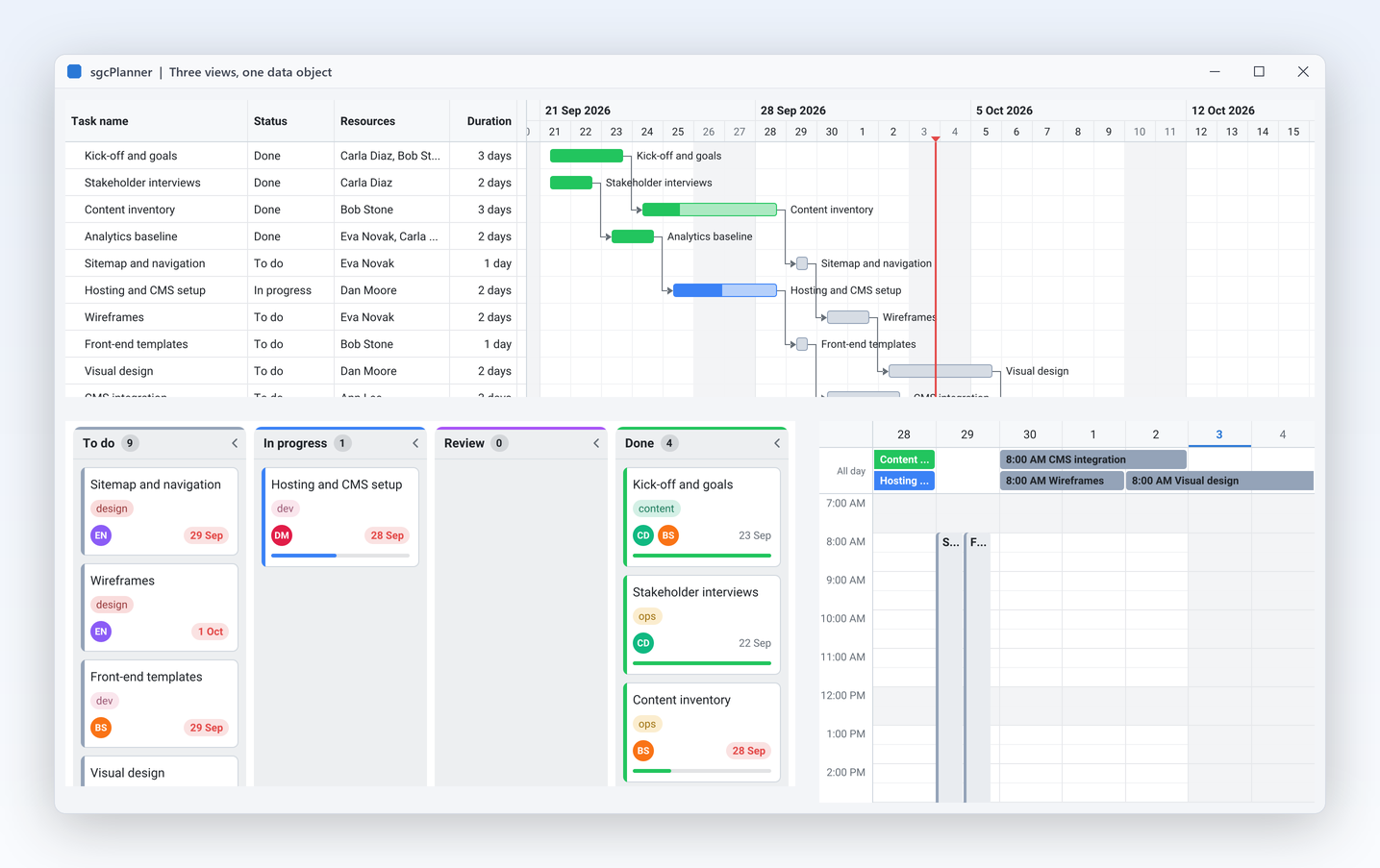
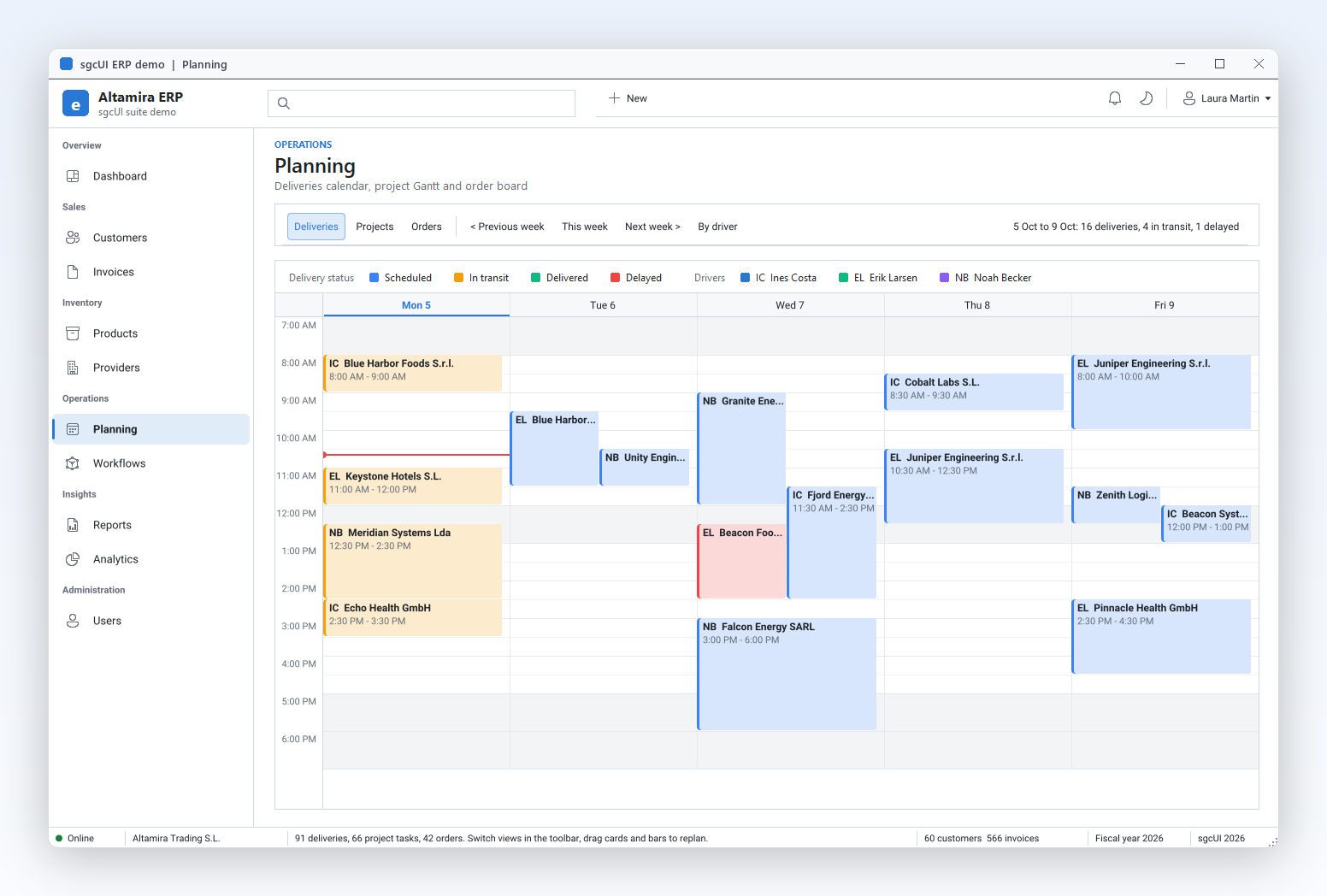
Three planner views, one data object

Three planner views, one data object

Scheduler, Gantt and Kanban read the same planner data. The ERP Planning module switches between the deliveries calendar, the projects Gantt and the orders board with one toolbar.

Run the sgcUIERP demo

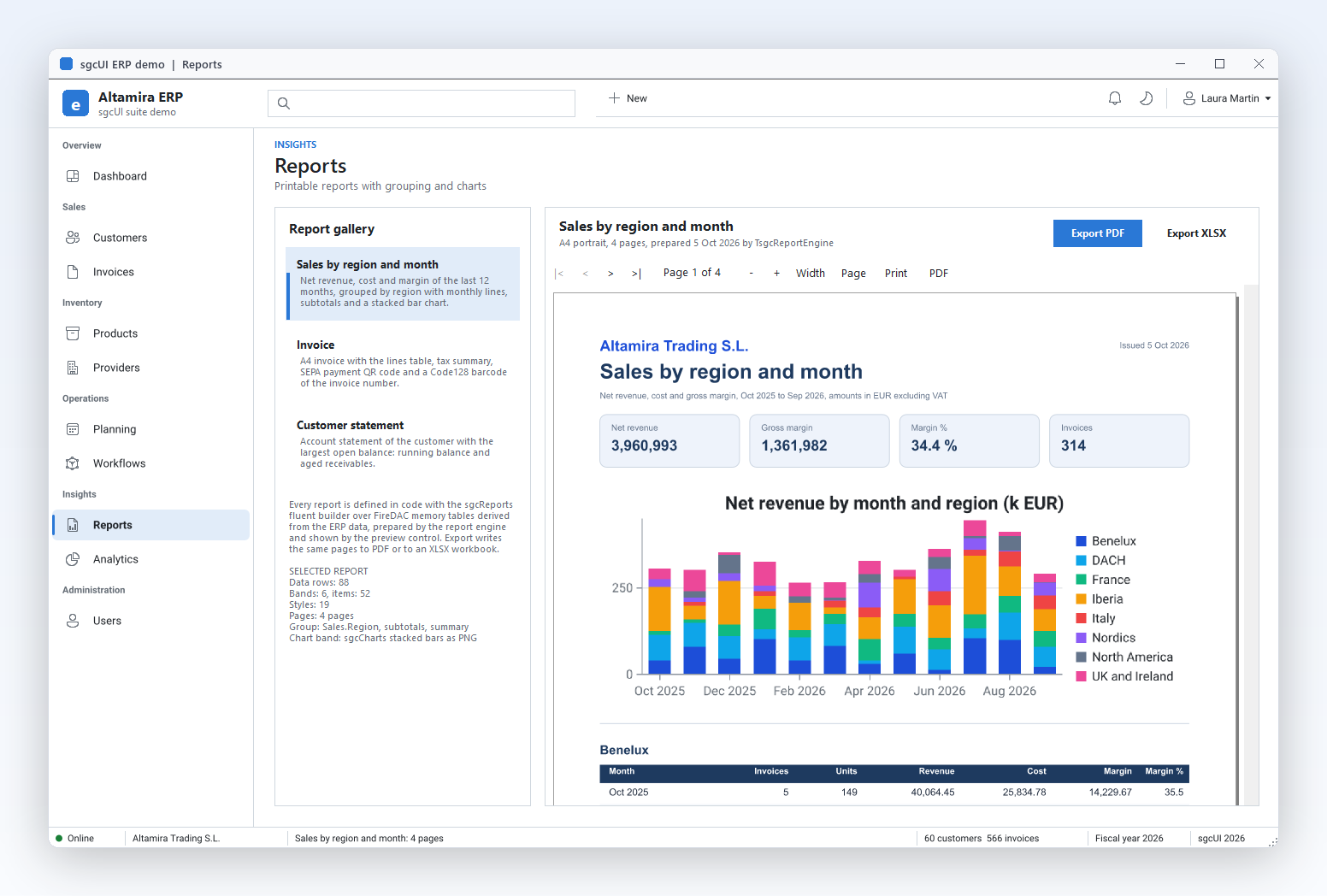
Reports with charts, out to PDF

Reports with charts, out to PDF

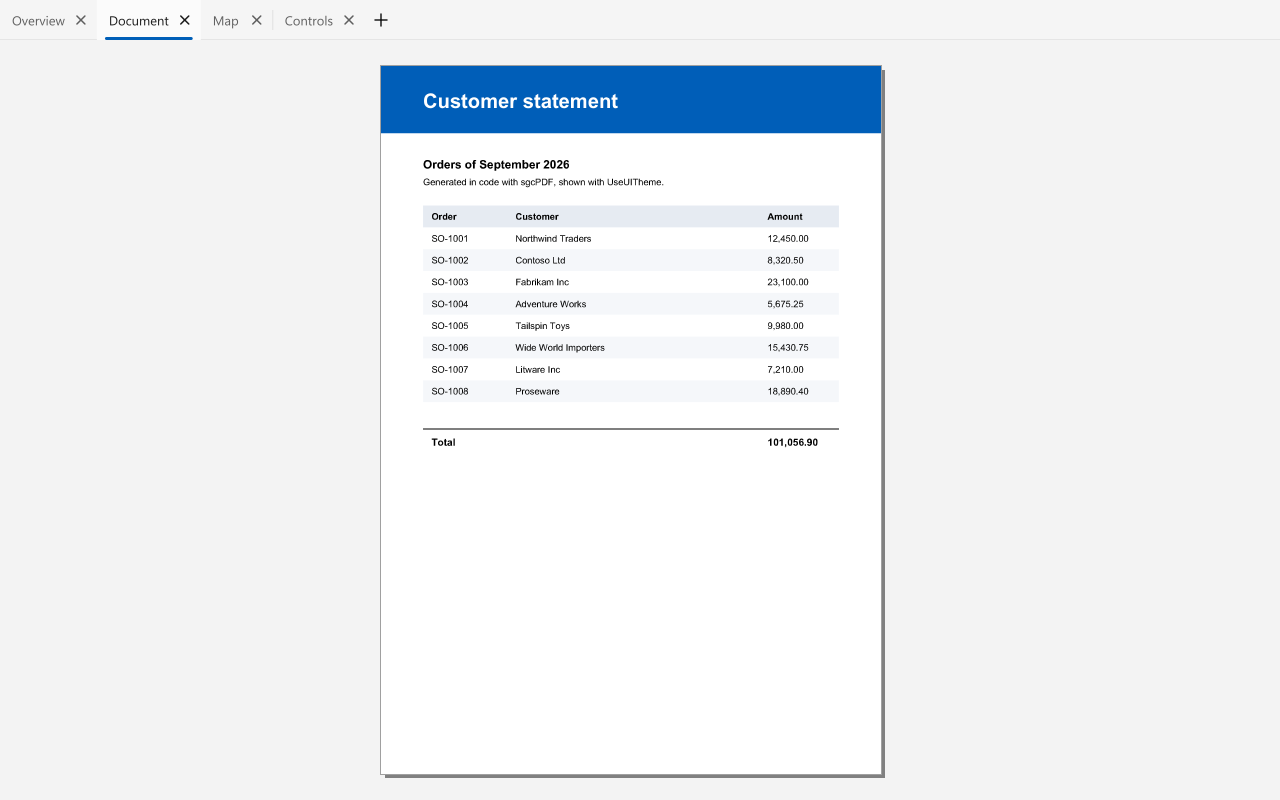
sgcReports prepares a grouped sales report with KPI boxes and an sgcCharts band, previews it in the app and exports the same pages to PDF through sgcPDF, or to an XLSX workbook.

Run the sgcUIERP demo

One Suite, Every Toolkit

sgcUI shares one runtime, sgcUICore, with the canvas, the rasterizer and the light and dark themes, so every product looks and behaves the same in every framework.

Delphi and C++ Builder

VCL controls with the TsgcVCL prefix and FireMonkey controls with the TsgcFMX prefix, from Delphi 7 to Delphi 13 and C++ Builder 2007 to 13. Full source code in the Source editions.

.NET

A C# port with the same class names for WinForms, WPF and Avalonia 12, on .NET Framework 4.7.2 and .NET 8, 9 and 10, with MVVM binding, Visual Studio designer support and the light or dark theme of the host followed by default. Free Community packages on NuGet, paid packages with source code.

Headless rendering

The framework neutral units render grids, charts, gauges and dashboards to PNG and SVG with no window, for reports, e-mails and web endpoints. They also compile for Linux64.

Built for live data

Grids and charts take updates from any thread and coalesce them into timed repaints, so a feed of thousands of updates a second still renders at a steady frame rate.

Live Data from sgcWebSockets, Straight into the UI

Bridge packages connect sgcUI to sgcWebSockets. They ship with the registered editions and need the sgcWebSockets package of the same Delphi or C++ Builder version.

sgcGridWS

Grid feed sources for WebSocket, MQTT and SSE, and an AI query that answers questions about the rows.

sgcChartsWS

Chart data sources fed by sgcWebSockets connections.

sgcDashboardWS

Dashboard tiles bound to live sgcWebSockets feeds.

sgcGaugesWS

Gauge values driven by live sgcWebSockets messages.

sgcPivotGridWS

TsgcPivotGridAIQuery: AI pivot layouts through a TsgcAIChat of sgcWebSockets.

sgcUICoreWS

The ready AI provider: the TsgcAIChat of sgcWebSockets answers the AI query bars, Ask the grid, the pivot and the dashboard, and Smart Paste.

sgcPlannerWS

Two way sync with Google Calendar, Outlook and Microsoft 365 and CalDAV servers, and iCal subscriptions for the planner.

sgcReportsHTML

Reports served as HTML through the sgcHTML and sgcWebSockets stack.

Standard, Professional and Enterprise

For Delphi and C++ Builder, with full source code and 1 year of updates. Each edition includes the one before it. The All-Access bundle includes all 14 sgcUI products, sgcPDF among them, for Delphi, C++ Builder and .NET.

Standard

Data entry and the application shell

€380 / developer

1 year of updates included

Single — €380 Team (2 devs) — €635 Site (unlimited) — €1,059

Professional

Standard plus visualization

€529 / developer

1 year of updates included

Single — €529 Team (2 devs) — €822 Site (unlimited) — €1,379
ProductStandardProfessionalEnterpriseSingle package
sgcGrid✓✓✓€199
sgcNavigation✓✓✓€149
sgcToolbar✓✓✓€149
sgcEditors✓✓✓€199
sgcCharts–✓✓€199
sgcDashboard–✓✓€199
sgcGauges–✓✓€199
sgcPivotGrid––✓€249
sgcPlanner––✓€249
sgcDiagram––✓€249
sgcWizard––✓€149
sgcMaps––✓€149
sgcPDF––✓€249
sgcReports––✓€199

Full feature matrix →

sgcUI for .NET: Community and Registered

The same components as a fully managed C# port for WinForms, WPF and Avalonia, delivered as NuGet packages. Start free with the Community packages, and move to the registered packages, with full source code, at the same prices as the Delphi editions.

Community (free)

Each product with a Community build has the same package id with the .Community suffix, for example dotnet add package esegece.sgcGrid.Community. The Community builds leave out a few advanced features per product, such as in place editing in sgcGrid or the financial series in sgcCharts.

View on NuGet →

Registered

Every feature, full source code and 1 year of updates, as editions (Standard, Professional, Enterprise) or as single packages. Install with dotnet add package esegece.sgcGrid.WinForms (or .Wpf, .Avalonia).

.NET prices →

MVVM binding and designer

Grid, pivot grid, charts, planner and diagram bind ItemsSource in WPF and Avalonia or DataSource and DataMember in WinForms, with columns, fields and series declared in XAML under one xmlns:sgc namespace. The WinForms controls have smart tags and collection editors in the Visual Studio designer, and the controls follow the light or dark theme of WPF, WinForms or Avalonia.

Data binding in .NET →
ProductFree packageCommunityRegistered
sgcGridesegece.sgcGrid.Community✓✓
sgcNavigationesegece.sgcNavigation.Community✓✓
sgcToolbaresegece.sgcToolbar.Community✓✓
sgcEditorsesegece.sgcEditors.Community✓✓
sgcChartsesegece.sgcCharts.Community✓✓
sgcDashboardesegece.sgcDashboard.Community✓✓
sgcGaugesesegece.sgcGauges.Community✓✓
sgcPivotGridesegece.sgcPivotGrid.Community✓✓
sgcPlanneresegece.sgcPlanner.Community✓✓
sgcDiagramesegece.sgcDiagram.Community✓✓
sgcWizardesegece.sgcWizard.Community✓✓
sgcMapsesegece.sgcMaps.Community✓✓
sgcPDFesegece.sgcPDF.Community✓✓
sgcReportsesegece.sgcReports.Community✓✓

Each Community build leaves out some advanced features, listed on its product page. The .NET packages help topic lists every package id.

Where sgcUI Runs

TargetFrameworksPlatforms
Delphi 7 to 13VCLWin32, and Win64 from XE2
Delphi XE6 to 13FireMonkeyWindows, macOS, iOS and Android (as each Delphi version supports them)
C++ Builder 2007 to 13VCL and FireMonkeyGenerated .hpp headers and static libraries
Delphi 10.2 to 13Framework neutral unitsLinux64 for the non visual parts: models, formatting, headless rendering, import and export
.NET Framework 4.7.2, .NET 8, 9 and 10WinForms, WPF, Avalonia 12 (12.0 or later), with MVVM data binding and the light or dark theme of the hostWindows for WinForms and WPF, Windows, Linux and macOS for Avalonia and the headless renderers
Each product page lists its exact frameworks and platforms; not every product ships every .NET toolkit.

Fourteen Products, Fourteen Ready Demos

Every product ships demos for Delphi and .NET, and all of them except sgcMaps for C++ Builder too. Here is one per product; each product page lists the rest.

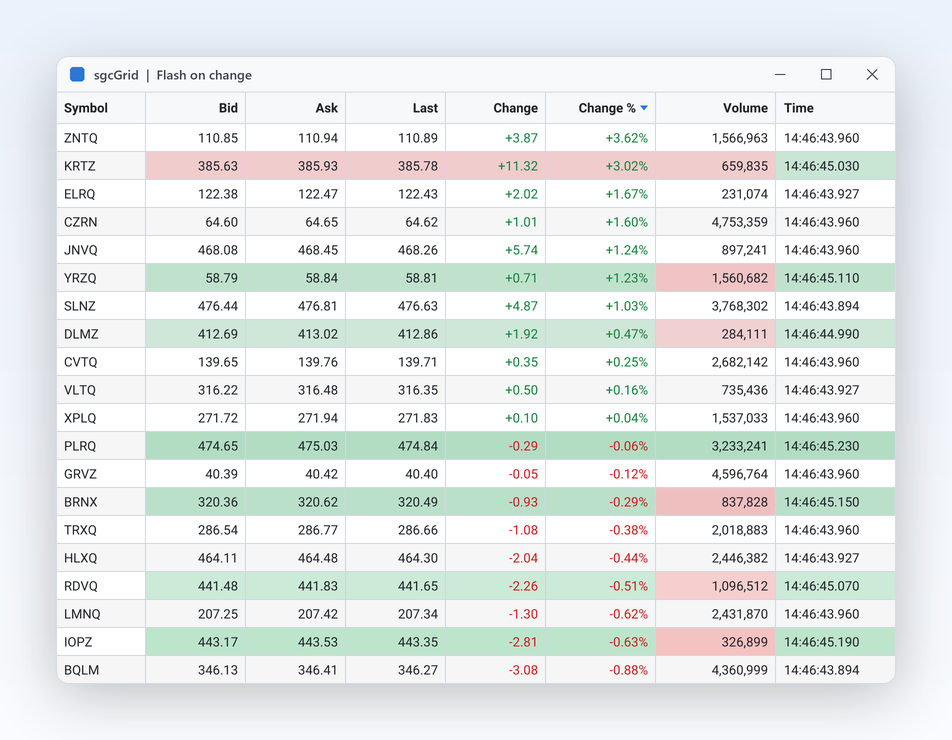
sgcGrid LiveTicker

sgcGrid: LiveTicker

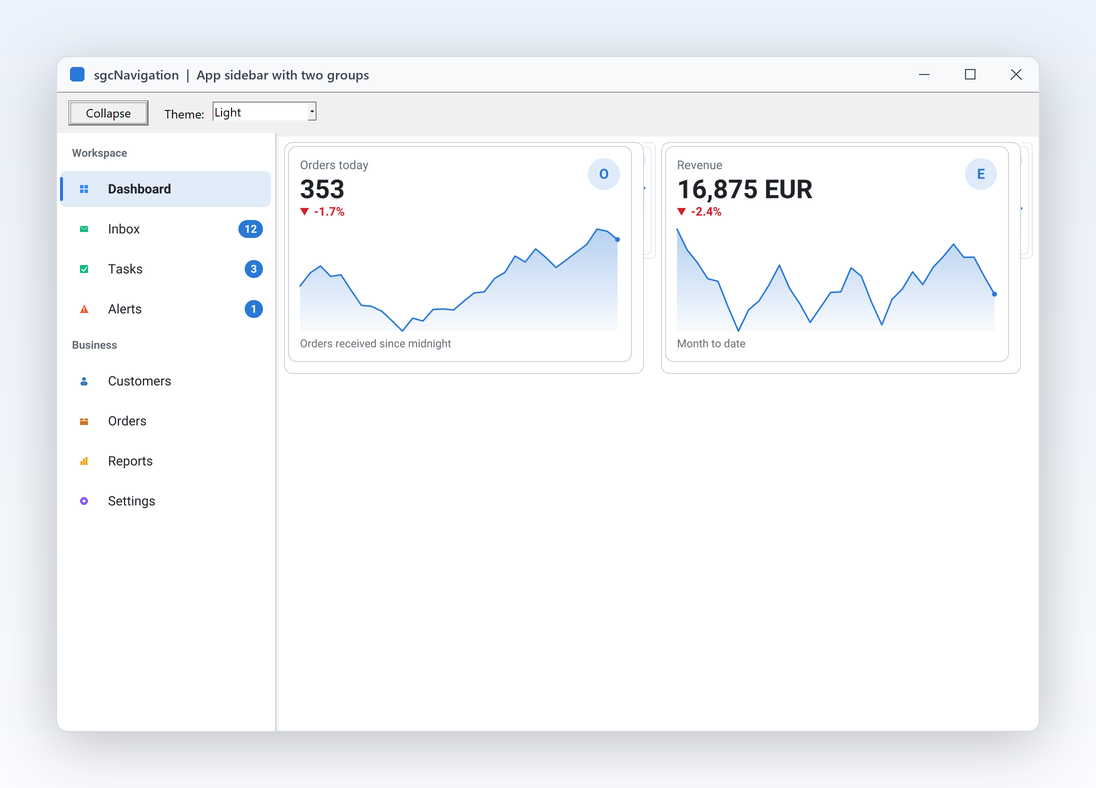
sgcNavigation SidebarApp

sgcNavigation: SidebarApp

sgcToolbar EditorShell

sgcToolbar: EditorShell

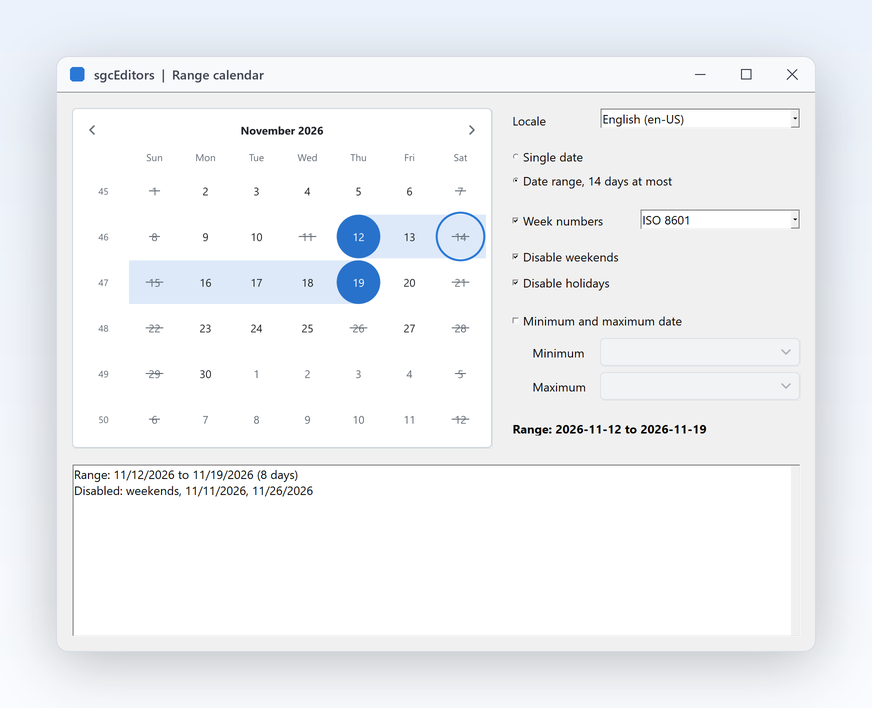
sgcEditors Calendar

sgcEditors: Calendar

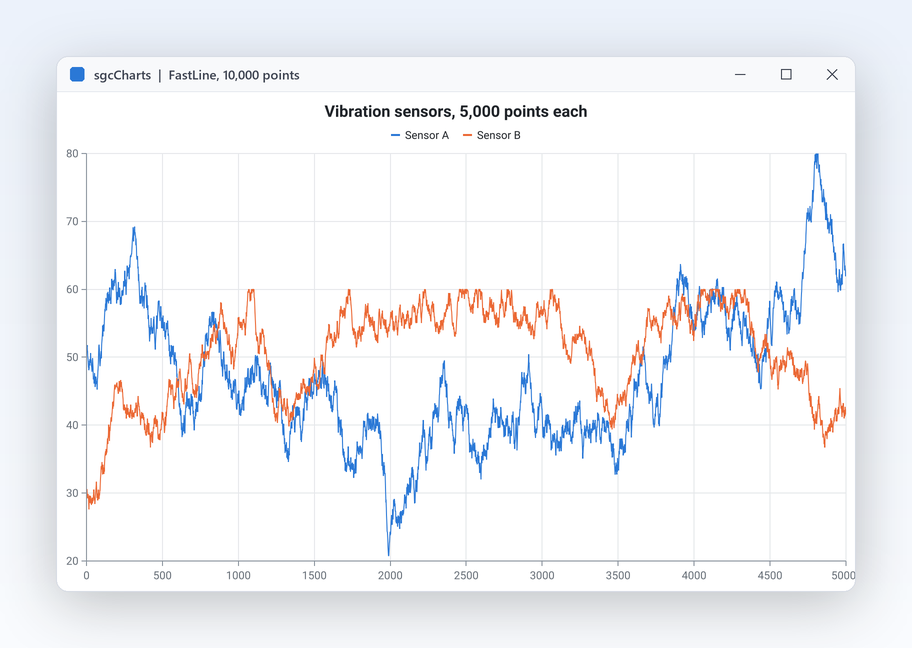
sgcCharts LiveLine

sgcCharts: LiveLine

sgcDashboard Basic

sgcDashboard: Basic

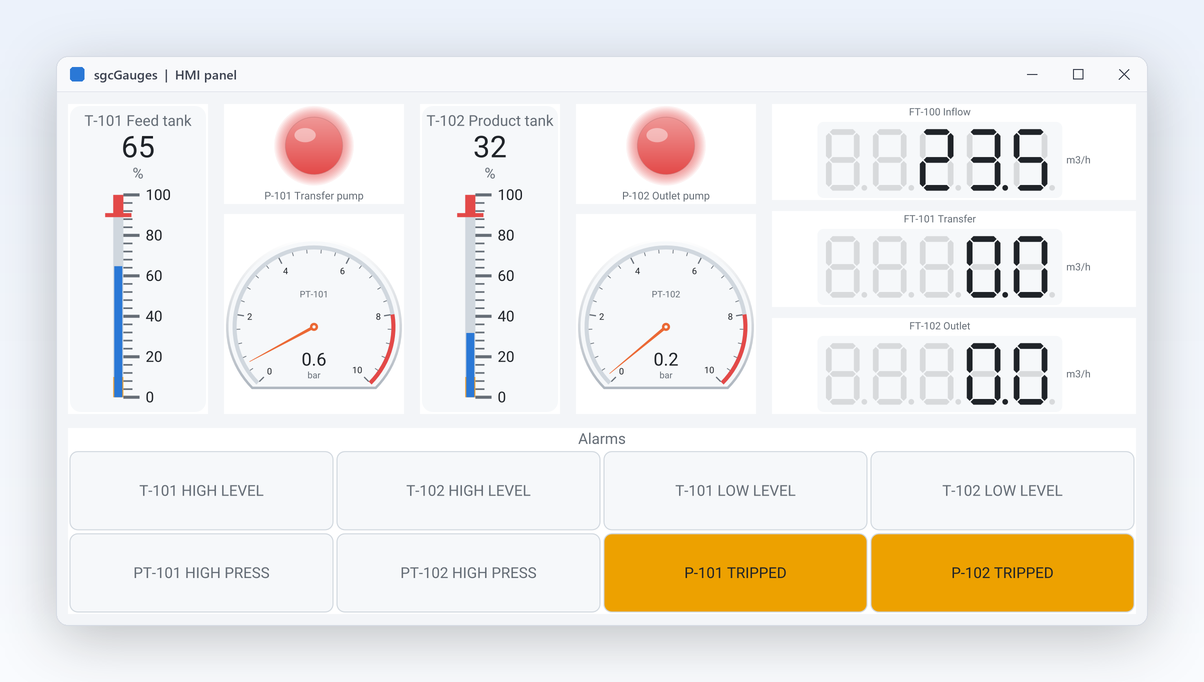
sgcGauges HMIPanel

sgcGauges: HMIPanel

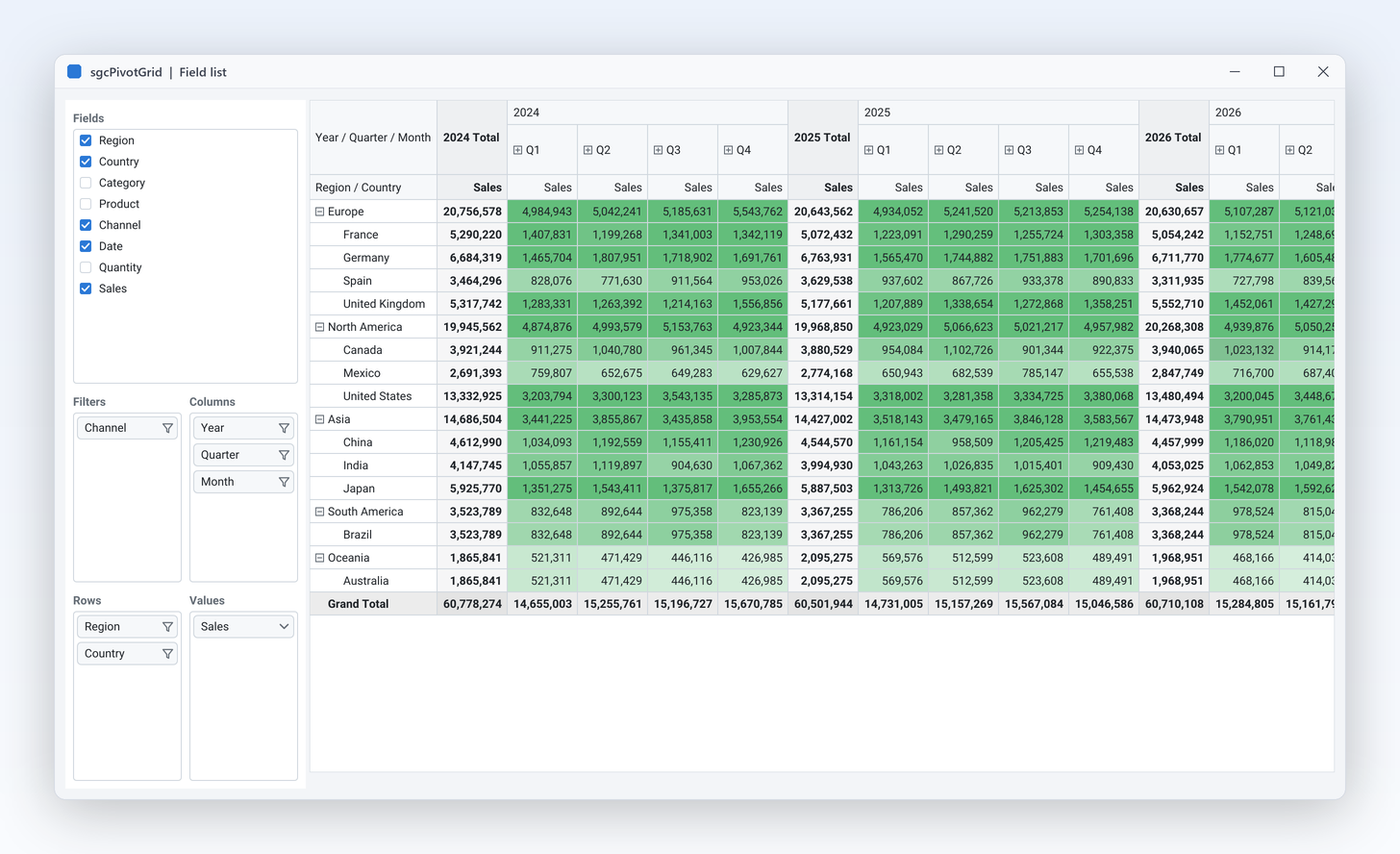
sgcPivotGrid MillionRows

sgcPivotGrid: MillionRows

sgcPlanner ProjectPlanner

sgcPlanner: ProjectPlanner

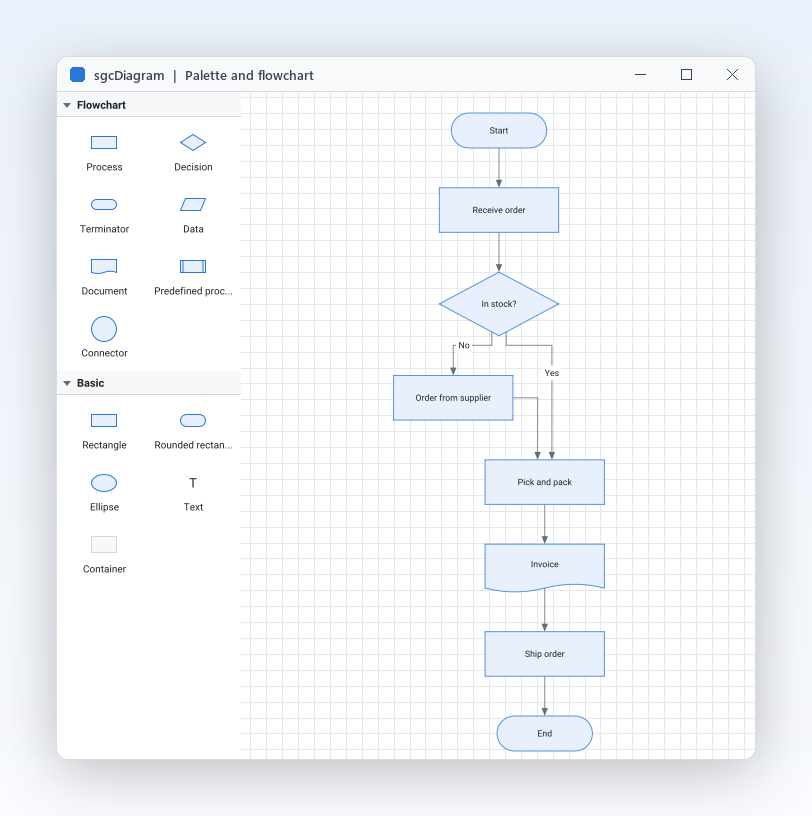
sgcDiagram FlowchartEditor

sgcDiagram: FlowchartEditor

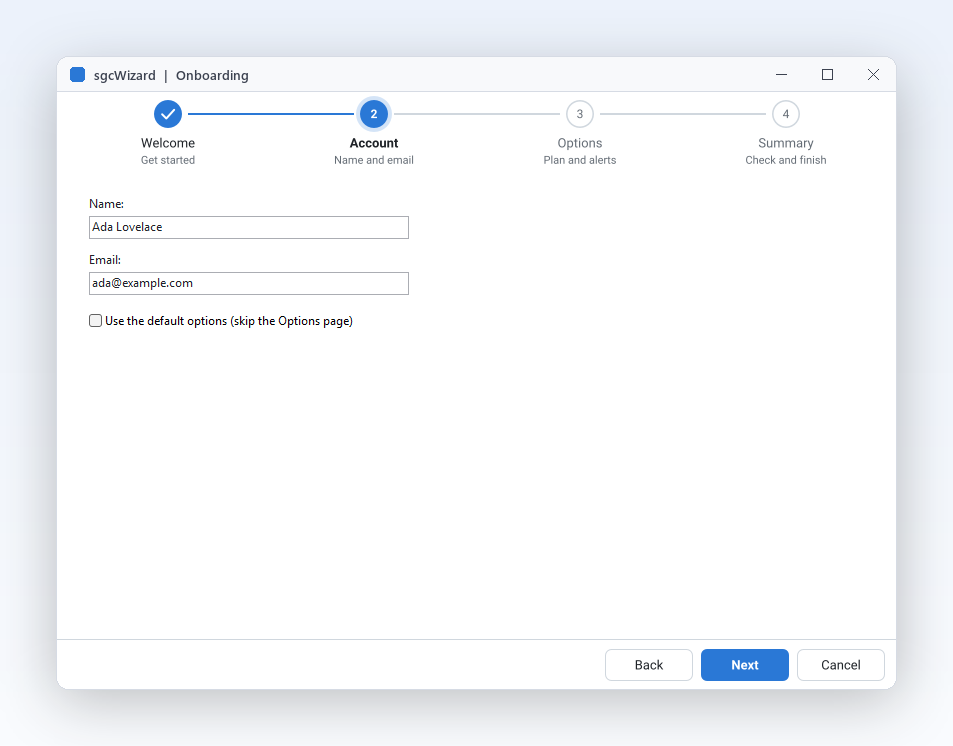
sgcWizard Onboarding

sgcWizard: Onboarding

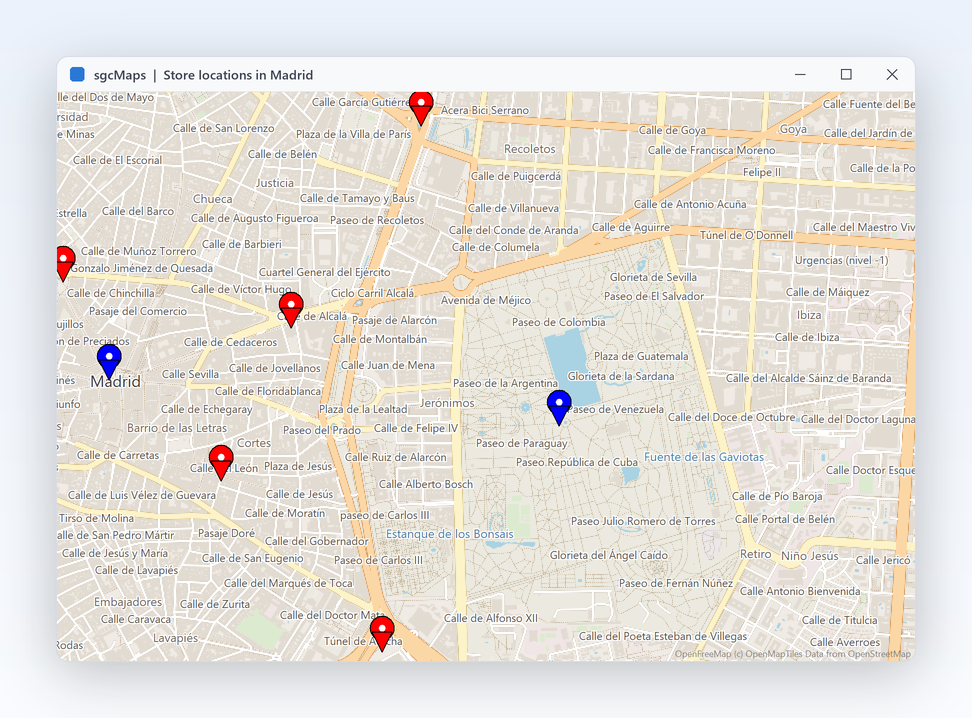
sgcMaps VectorTiles

sgcMaps: VectorTiles

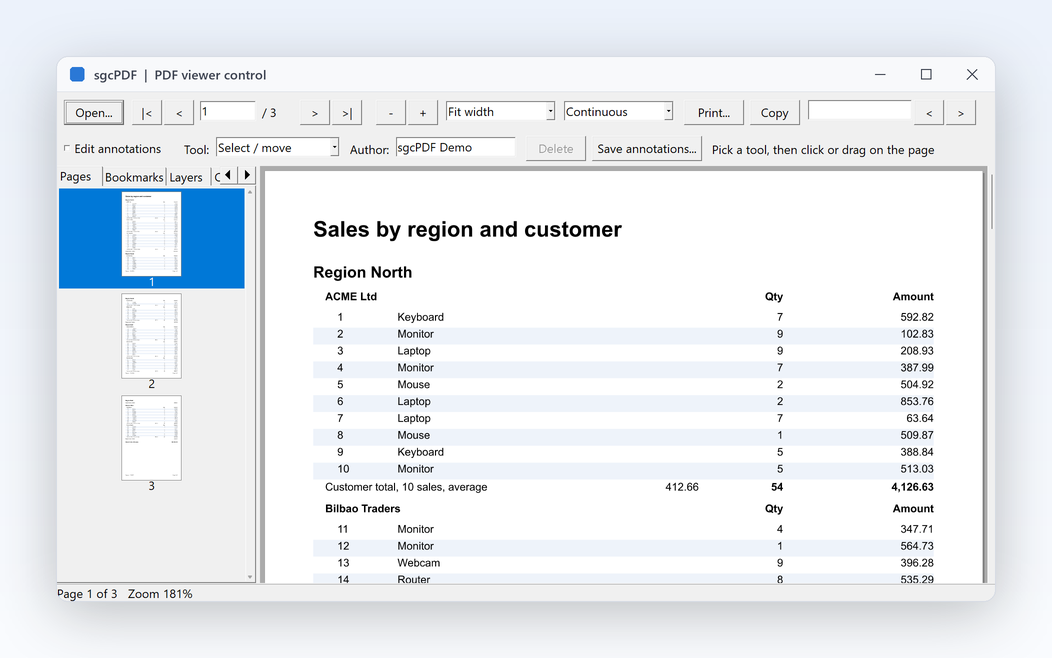
sgcPDF PDFViewerControl

sgcPDF: PDFViewerControl

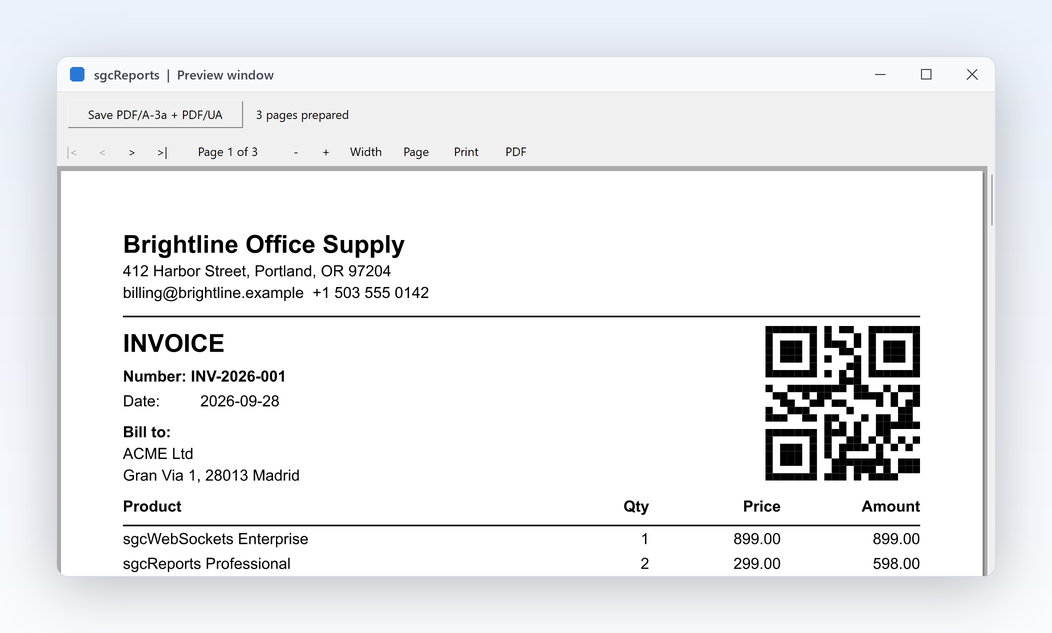
sgcReports ReportInvoice

sgcReports: ReportInvoice

Try Every sgcUI Product

One All-Access trial installs all 14 products, so you can test any edition or single package before you buy.

Delphi Trial

The full sgcUI suite for Delphi 7 to 13, VCL and FireMonkey.

Download sgcUI_Trial.exe →

C++ Builder Trial

The same suite with the headers and libraries for C++ Builder.

Download sgcUI_Trial_CBuilder.exe →

Compiled Demos

Ready to run demo executables of every product, nothing to install.

Download sgcUI_bin.zip →

.NET

Start with the free Community packages on NuGet, no installer needed.

.NET packages →

Frequently Asked Questions

Pick by the products you use. Standard has sgcGrid, sgcNavigation, sgcToolbar and sgcEditors for data entry and the application shell. Professional adds sgcCharts, sgcDashboard and sgcGauges. Enterprise has all 14 products, including sgcPivotGrid, sgcPlanner, sgcDiagram, sgcWizard, sgcMaps, sgcPDF and sgcReports. See the edition matrix.

If you need one or two products, a single package is cheaper: they start at €149. From three products on, compare with the edition that contains them, which also gives you the rest of its products for later. Every option includes full source code and 1 year of updates.

Yes. The Standard, Professional and Enterprise editions include full source code, Delphi and C++ Builder, and 1 year of updates.

Each product with a Community package leaves out a few advanced features, listed in the .NET table and in the FAQ of each product page. sgcWizard has no limits in Community, and the sgcMaps Community packages leave out the offline pack (tile downloader, MBTiles, offline geocoder and router).

Yes. The source editions support C++ Builder 2007 to 13 with generated .hpp headers, and every product has C++ Builder demos except sgcMaps. The ERP demo is available for C++ Builder too.

FireMonkey controls are available from Delphi XE6 to 13 for Windows, macOS, iOS and Android, as each Delphi version supports them. Each product page lists its exact frameworks; the sgcReports FireMonkey preview runs on Windows.

The framework neutral units compile for Linux64 from Delphi 10.2: data models, formatting, import and export, and headless rendering to PNG and SVG, for example to build charts or reports in a service. In .NET, Avalonia and the headless renderers run on Windows, Linux and macOS.
Every licence includes 1 year of updates. After that the components keep working; renew to receive new versions, with a discount that depends on the edition. See pricing for the current renewal percentages.

Help for Every Product

Delphi

Online help for all 14 products.

Online help →
PDF manual →

C++ Builder

The same help with C++ Builder code.

Online help →
PDF manual →

.NET

Packages, quick starts and the C# API.

Online help →
PDF manual →
3,000+Developers
20+Years
761+Components
30+API Integrations
5Platforms
30-Day Money-Back GuaranteeNot satisfied? Request a full refund within 30 days of purchase. See refund policy

Build Your Next Application with sgcUI

Download the trial with all 14 products, or pick the single product you need.