Delphi, C++ Builder & .NET Part of sgcUI

sgcGrid, the Live Data Grid for Delphi, C++ Builder & .NET

A grid built for data that never sits still. Write rows by key from any thread, watch changed cells flash green or red, then group, filter, edit and export the same rows. A 1080p frame of a 100,000 row grid takes 3.0 ms on Win32.

VCL, FireMonkey, WinForms, WPF, Avalonia3.0 ms per 1080p frame (Win32)Free .NET Community buildIncluded in sgcUI Standard
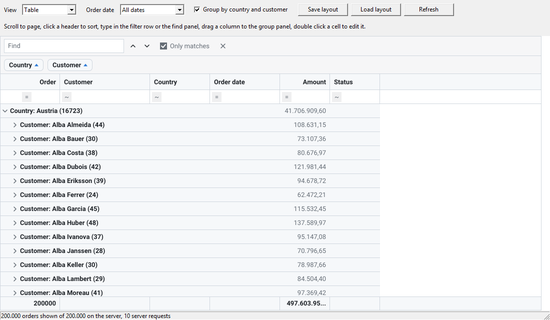
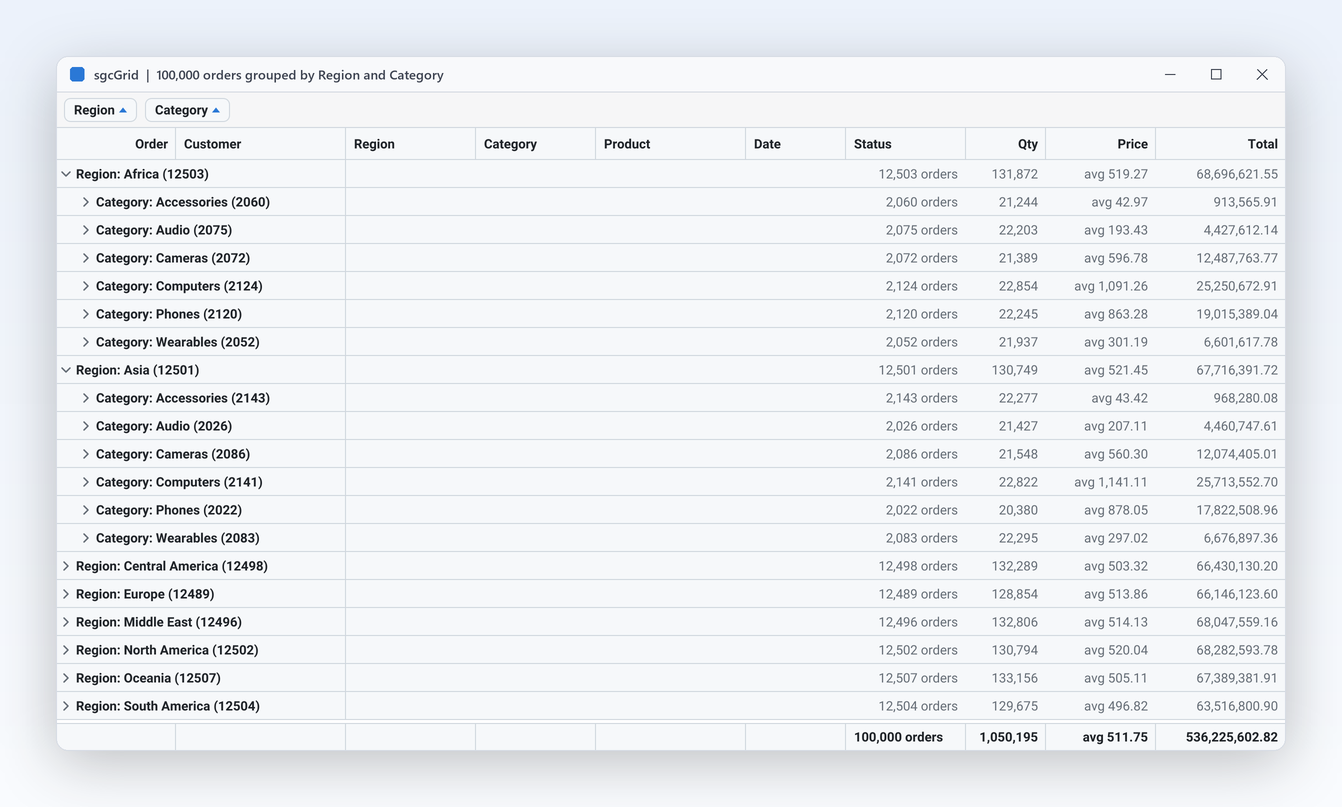
sgcGrid with 100,000 orders grouped by Region then Category, group panel chips and footer totals

Everything a Live Grid Needs

Eighteen features in five groups, each linked to its help topic.

Live Data

Feeds that never stop: prices, telemetry, queues and logs.

Live Data

Update thousands of rows a second from any thread

A market feed, a sensor bus or a job queue can write straight into the grid. Every row has a key, and a worker thread updates the row of a key by field name with no Synchronize call and no locking code of your own. The grid only marks itself dirty on the writer thread and repaints on the main thread at most MaxFPS times per second.

  • UpdateRow sets the named fields of a key and inserts the row when the key is new; UpdateCell changes one field
  • AppendRow and DeleteRow add and remove rows by key, from any thread
  • BeginUpdate and EndUpdate turn a batch into a single notification
  • The selected row is found again by its key after every re-sort, so it never jumps away
Read the help topic
See every change at a glance

Live Data

See every change at a glance

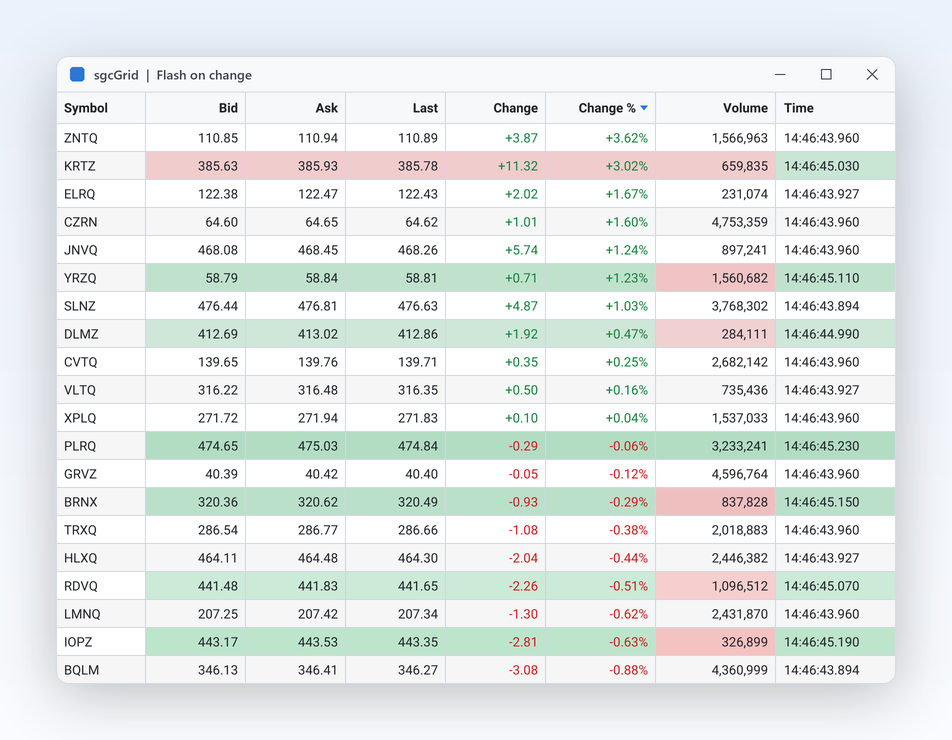
Traders and operators need to see what moved without reading every number. With FlashChanges on, which is the default, a changed cell is tinted green when its value went up and red when it went down, then fades out over FlashDuration milliseconds, 800 by default. For logs and growing feeds, tail mode keeps the newest row in view and stops following as soon as the user scrolls up to read.

  • FlashUpColor, FlashDownColor and FlashChangedColor; a colour 0 uses the theme default
  • FlashMode tints the background (fmBackground) or the text (fmText)
  • TailMode follows the newest row, MaxRows drops the oldest rows of an endless log
  • The selection paints over the flash, and the flash over the format rules
Read the help topic
Colour the rows that need attention

Live Data

Colour the rows that need attention

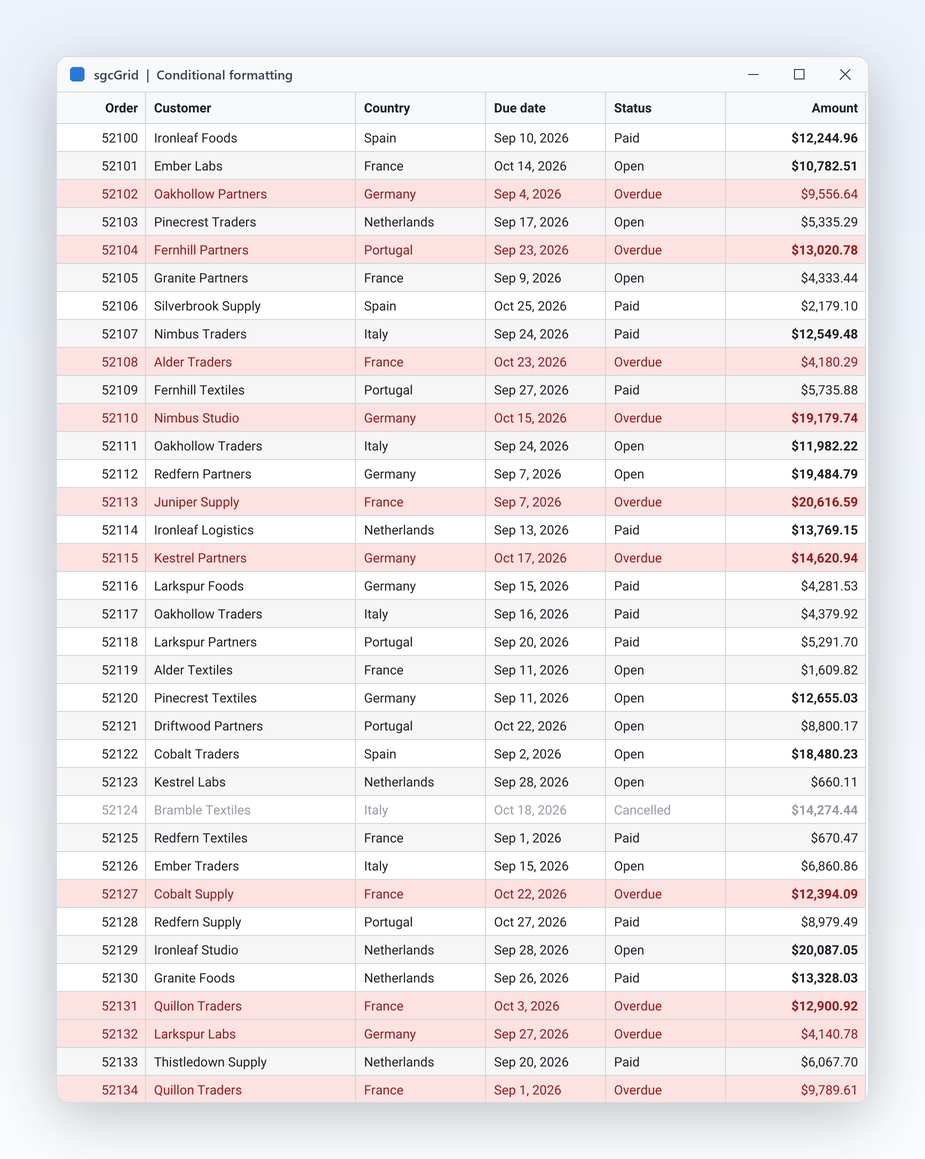
An overdue invoice, a negative balance or a failed job should stand out before anyone asks. Format rules compare a column with a value using the data type of that column: numbers numerically, dates as dates, text case insensitive. A matching rule sets the back colour, the text colour or bold on the cell or on the whole row, and it keeps working while live updates change the values underneath.

  • TsgcGridFormatRules evaluates its rules in collection order, a later match overriding an earlier one
  • Operators such as gfoLess, gfoBetween, gfoContains and gfoIsEmpty
  • ApplyToRow styles every cell of the row, StopOnMatch ends the evaluation for a cell
  • Translucent colours tint the cell over its background, and OnGetCellStyle has the last word
Read the help topic

Shape the Data

Sort, filter, group and nest large row sets.

Group and total 100,000 rows in one call

Shape the Data

Group and total 100,000 rows in one call

Sales by region, orders by month, tickets by status: users want totals, not raw rows. GroupBy groups the grid by one or more columns, and every group row shows its member, its row count and the summaries of its rows. Users regroup on their own by dragging a header onto the group panel. Grouping is view state only, so a chart bound to the grid still sees the flat, sorted rows.

  • GroupBy and ClearGrouping from code, or GroupIndex per column
  • ShowGroupPanel adds drag and drop chips; a click on a chip flips the group order
  • SummaryType gsuSum, gsuCount, gsuAverage, gsuMin or gsuMax, formatted with SummaryFormat
  • GroupSummaries in every group row and ShowFooter for the grand totals
  • A DisplayFormat of yyyy-mm groups dates by month
Read the help topic
Sort, filter and find in big data

Shape the Data

Sort, filter and find in big data

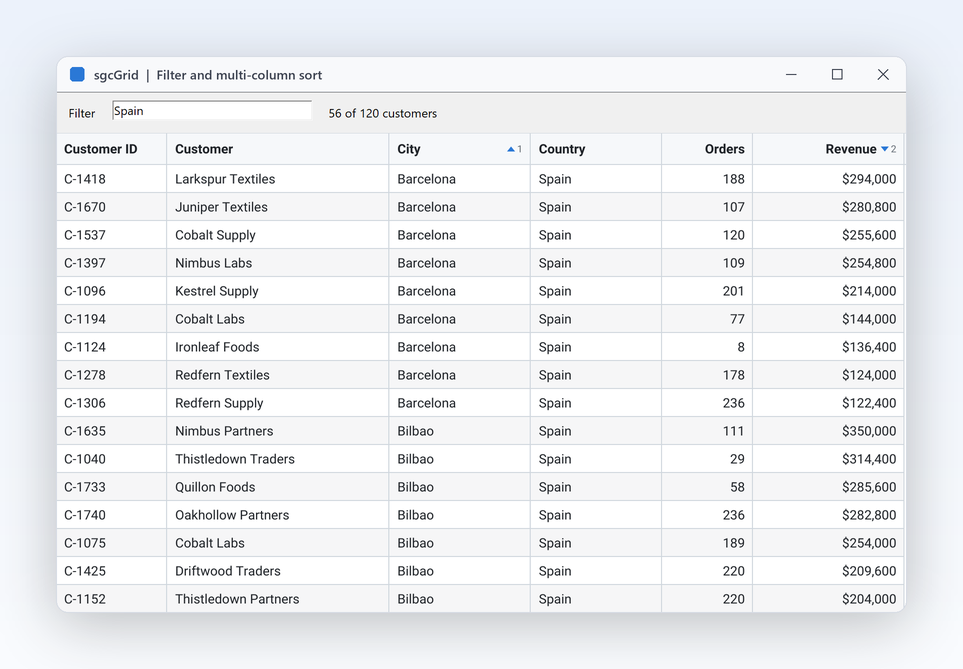
Finding one customer among thousands should take a few keystrokes. FilterText keeps the rows whose formatted text contains the typed words in any visible column, and an OnFilterRow handler adds your own rules on top. A click on a header sorts, Ctrl and click adds a column to a multi column sort, and the sort is stable. A ticking column that is neither sorted nor filtered costs no re-sort at all.

  • SortOrder and SortIndex per column, OnSortChange after every change
  • FilterText is case insensitive and reads the text as the user sees it
  • OnFilterRow for custom logic, InvalidateView when that logic changes
  • SelectionMode selects rows or cells, and Ctrl+C copies them as tab separated text
  • Null, empty and unconvertible values always sort first
Read the help topic
Show hierarchies with tree rows and detail bands

Shape the Data Registered only

Show hierarchies with tree rows and detail bands

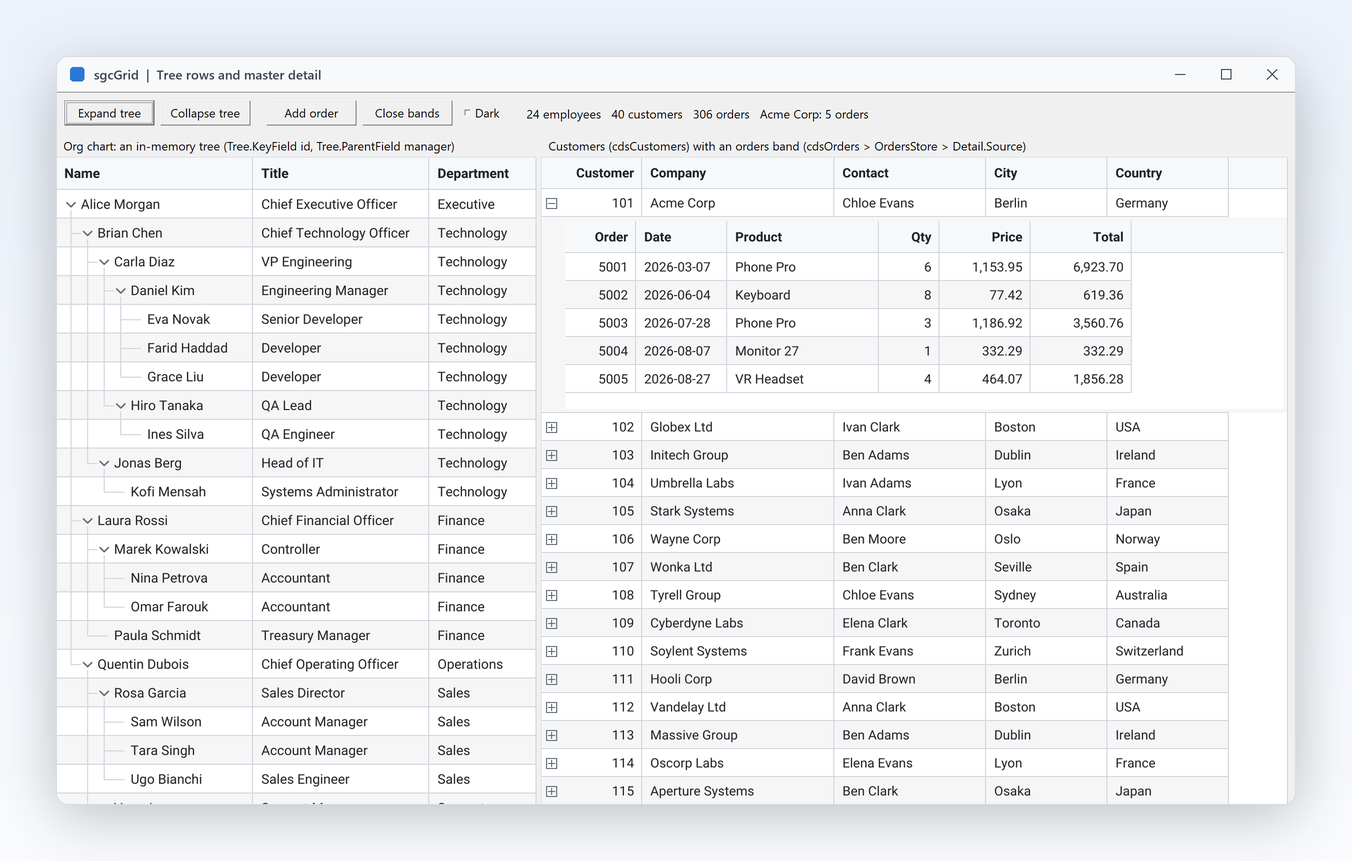
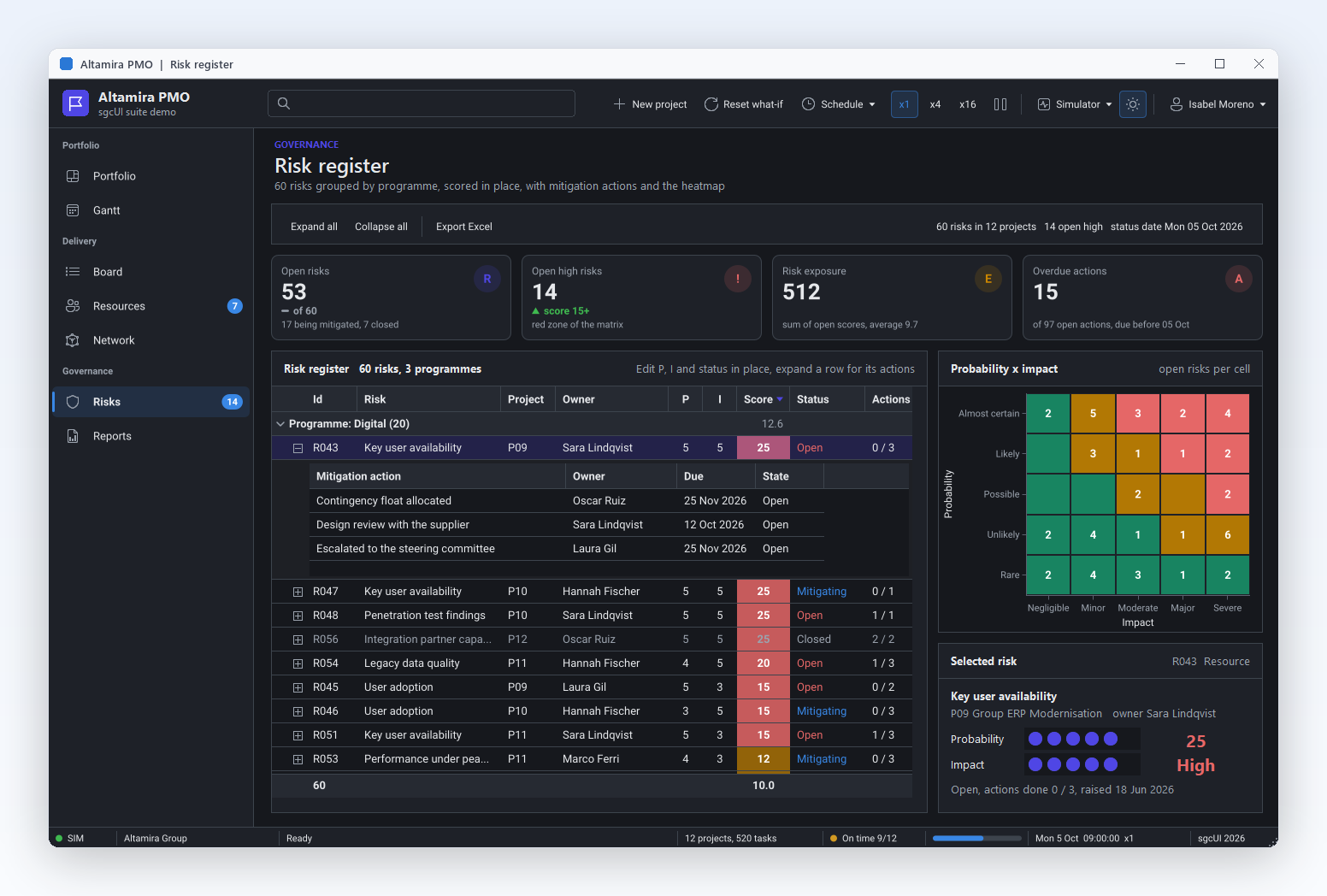
An org chart or a bill of materials reads best as a tree, and the orders of a customer best right under the customer. Tree rows lay out rows depth first from a key column and a parent column. Detail bands open a small grid of related rows under any master row, with its own header, scrolling and sort, filled from a TsgcGridDataStore, another grid or an event.

  • Tree.KeyField and Tree.ParentField switch the tree on; ExpandNode and CollapseNode work from code
  • The expanded state is kept per key, so it survives sorting, filtering and live updates
  • Detail.MasterKeyField and Detail.DetailKeyField link a band to its source, OnGetDetailData fills it on demand
  • Bands work in flat, grouped and tree mode, and changed detail cells flash like the master grid

Not in the .NET Community build, which keeps grouping.

Read the help topic
Keep key columns in view while the rest scroll

Shape the Data

Keep key columns in view while the rest scroll

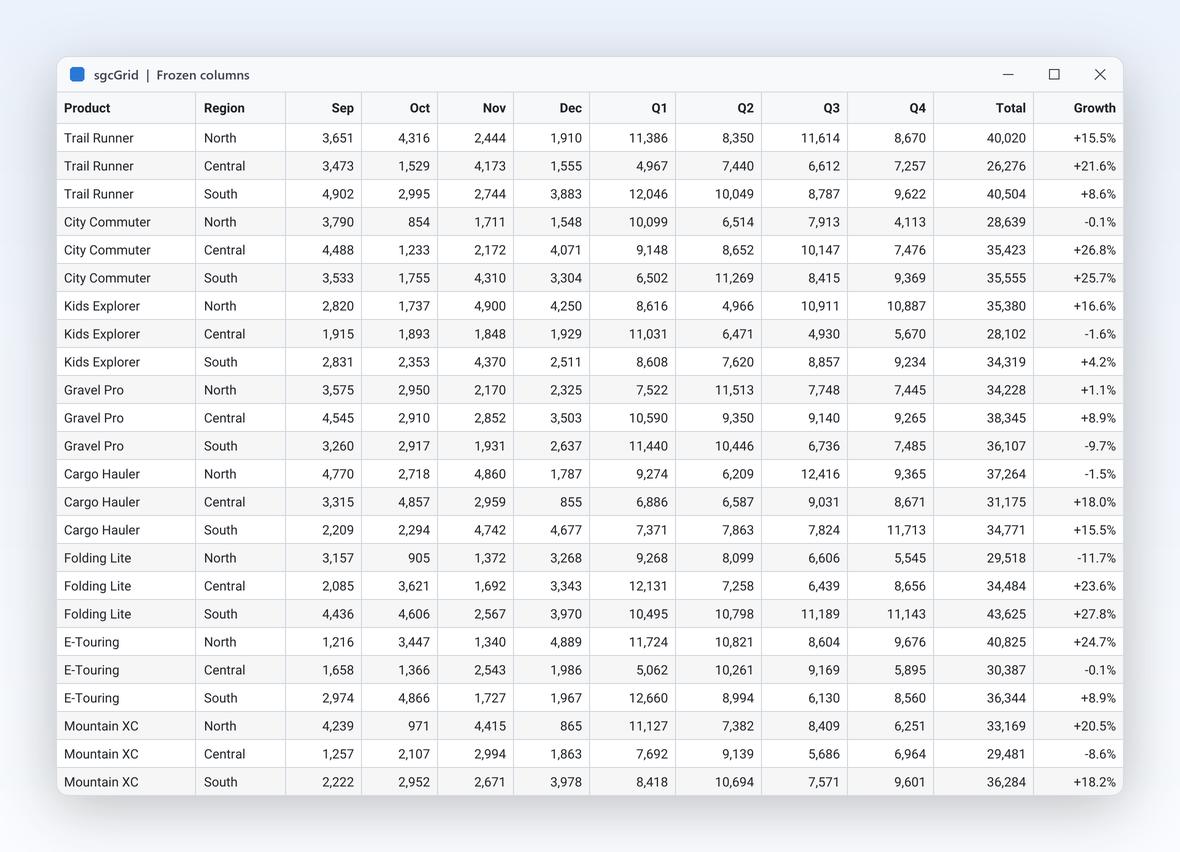
Wide grids lose their context when the symbol or the customer name scrolls away. FrozenColumns keeps the first visible columns in place while the others scroll horizontally, and the header, the footer and the group summaries follow the same split. Users resize columns by dragging the header edge, and the headless renderer uses the same setting, so exported images match the screen. The group chevrons on the left never scroll either.

  • FrozenColumns counts visible columns, and a one pixel line marks the frozen edge
  • Keyboard moves bring a scrolled column into view right of the frozen edge
  • FrozenWidth of the renderer returns the width that does not scroll
  • MinWidth limits a resize, OnColumnResized reports the new width
  • Part of every edition, the free .NET Community build included
  • Right to left for Arabic and Hebrew: the first column sits at the right, frozen columns stay at the right edge, and the XLSX export of a right to left grid writes a right to left sheet
Read the help topic
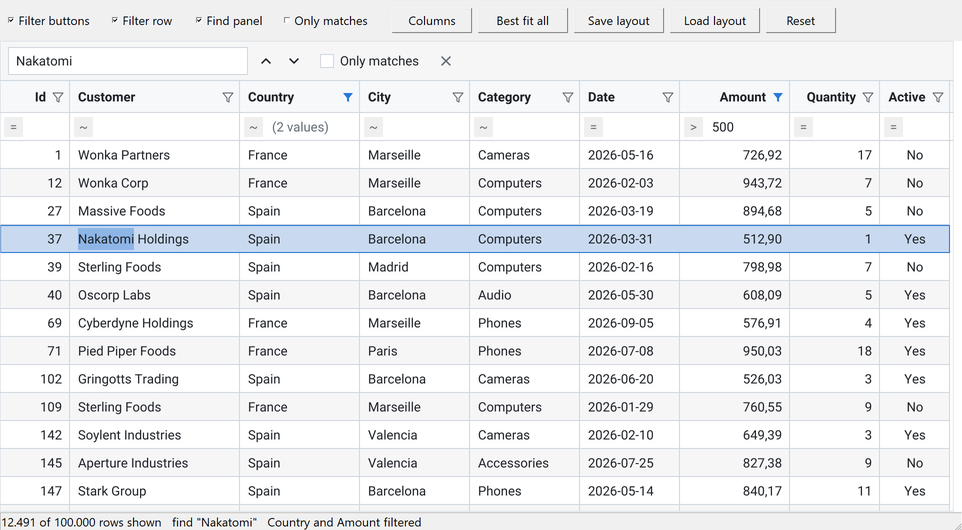
FilterAndFind demo: funnel buttons, a filter row with (2 values) and > 500, and the find panel highlighting Nakatomi

Shape the Data

Filter like a spreadsheet and find any value

Users expect the funnel they know from Excel. ShowFilterButtons puts one in every column header: it opens a popup with the distinct values of the column and their row counts, a search box, and up to two typed conditions joined by And or Or. ShowFilterRow adds a row under the header that filters a column while the user types, and Ctrl+F opens the find panel, which highlights the text in every cell and jumps from match to match.

  • Each column has one filter, edited by the popup, by the filter row and by Column.Filter in code, so the three always agree
  • The value lists of two filtered columns narrow each other, and a filled funnel shows which columns filter
  • FilterRowOperator per column: equals, greater than, contains, begins with, is blank and more
  • FindText, FindNext and FindPrevious work from code, and FindOnlyMatches hides the rows without a match
  • Column filters apply together with FilterText and OnFilterRow, and OnFilterChange reports every change

In the VCL, FireMonkey, WinForms, WPF and Avalonia grids, the free .NET Community build included.

Read the help topic

Shape the Data

Let users arrange the columns and keep it that way

A right click on a column header opens a menu that sorts, groups, fits widths, filters and opens the column chooser, a popup with one check box per column. Users drag a header to move its column, and a double click on the header edge fits the width to the caption and the cells. SaveLayoutToString and LoadLayoutFromString keep all of it as a short JSON text, so the grid opens the way the user left it.

  • HeaderMenu, ColumnMoving and BestFitOnDblClick are on by default, and an assigned PopupMenu still wins
  • ShowColumnChooser opens the chooser from a button or a menu item of your own
  • A moved column stays on its side of the frozen columns and inside its band, and OnColumnMoved reports the move
  • BestFitColumn and BestFitColumns measure the header and up to 1,000 sampled rows, so a million rows cost about the same as a thousand
  • The layout keeps column order, widths, visibility, sorting, grouping, column filters, bands and the panel options; SaveLayoutToFile and LoadLayoutFromFile use a file

In the VCL, FireMonkey, WinForms, WPF and Avalonia grids, the free .NET Community build included.

Read the help topic
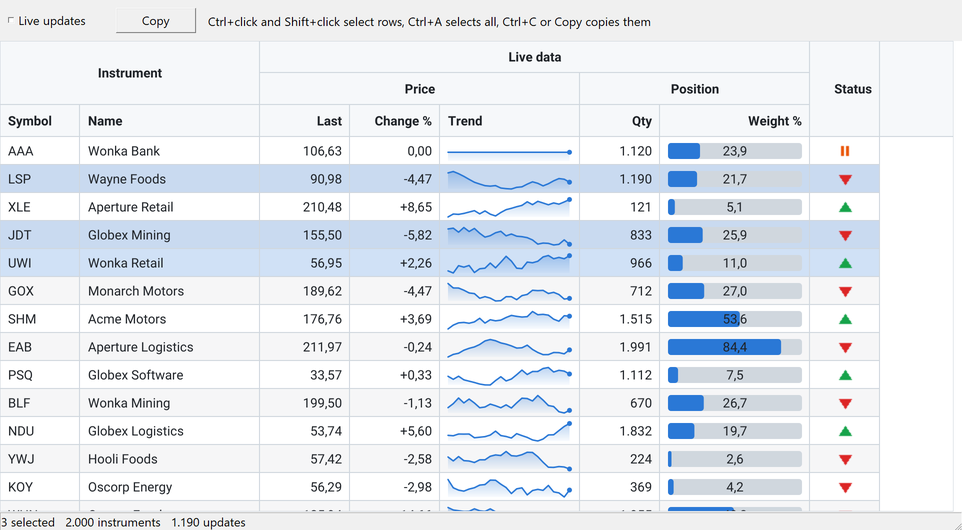
BandsAndCells demo: Instrument, Live data, Price and Position bands, area sparklines, progress bars, status icons and three selected rows

Shape the Data

Band headers, rich cells and multi-row selection

A trading screen reads better when Last, Change and Trend sit under one Price caption. Bands adds captions over groups of columns, on as many levels as you need, and each column names its band in Band. CellKind paints a cell as an image, a progress bar or a sparkline, while the cell keeps its plain value, so sorting, grouping and export still see the number.

  • Bands.Add takes a caption and a parent band, and the band rows stack above the column header
  • gcdProgress uses ProgressMin and ProgressMax; gcdSparkline draws a line, area or bar chart from a list of numbers
  • gcdImage draws an image of CellImages, which the grid fills from any image list assigned to Images
  • SelectionMode gsmMultiRow selects any set of rows with Ctrl and Shift, gsmCellRange one range of cells, and Ctrl+A selects all
  • The selection is kept by row key, so it survives sorting, filtering and live updates, and Ctrl+C copies it as tab separated text

In the VCL, FireMonkey, WinForms, WPF and Avalonia grids, the free .NET Community build included.

Read the help topic

Edit and Export

Change the data, sync it with your database, hand it on.

Edit and Export Registered only

Edit in place with validation

Back office users expect to fix a quantity or a status right in the grid. Set ReadOnly to False and F2, Enter, a typed character or a double click opens an editor over the cell, or a combo box when the column has a PickList. Typed text is converted to the data type of the column, OnValidate can change or reject the value, and the result is written with UpdateCell, so sorting and flashing still apply.

  • Editable per column, and OnBeforeEdit can refuse an edit
  • Enter commits, Tab moves to the next editable cell, Escape cancels; StartEdit, CommitEdit and CancelEdit do the same from code
  • OnEditError keeps the editor open on bad input, OnEdited reports the old and the new value

Not in the .NET Community build.

Read the help topic
Bind any TDataSet in a few lines

Edit and Export

Bind any TDataSet in a few lines

Existing database code keeps working: a TsgcGridSource_DataSet fills the grid from a FireDAC query, a TClientDataSet or any other TDataSet. Set its Grid and DataSet, make it Active, and the rows appear. With a KeyField the grid is synchronised rather than reloaded, so changed rows update in place and flash. With LiveUpdates on, every posted Append, Edit and Delete reaches the grid with no extra code.

  • AutoColumns creates the columns from the dataset fields
  • With a KeyField, new keys are appended and missing keys deleted
  • The dataset is walked with DisableControls and its current record is restored
  • JSON and CSV too: GridLoadFromJSONFile, GridSaveToCSVFile and the rest of sgcGrid_IO
  • In .NET the same class reads a DataTable
Read the help topic

Edit and Export Registered only

Hand users a real Excel file

Accounting wants the numbers in Excel, not a screenshot. SaveToXLSX writes the grid as an Office Open XML workbook to a file or a stream with no external library. The sheet keeps what the user sees: the visible columns in display order with their widths and number formats, the frozen header, groups and tree levels as a collapsible outline, and group totals as SUBTOTAL formulas.

  • SaveToXLSX takes a file name or a stream and an optional sheet name
  • Numbers stay numbers, dates become Excel dates, and a DisplayFormat becomes the cell number format
  • Collapsed groups open collapsed in Excel, as the grid showed them
  • Call it on the UI thread; detail bands are not exported
  • Every group row and view row is written, whatever is collapsed

Not in the .NET Community build, which keeps JSON and CSV export.

Read the help topic
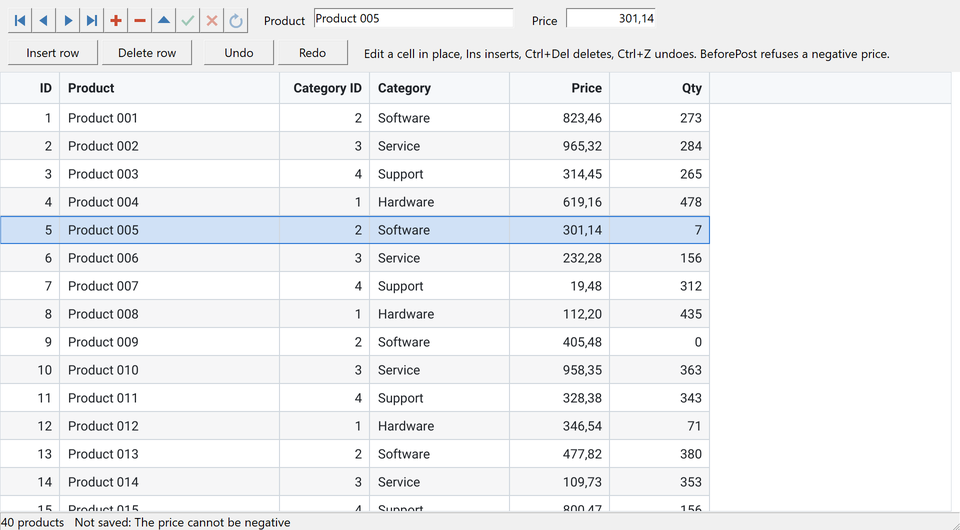
DataSetEditing demo: a TDBNavigator and two TDBEdits on the same records as the grid, with a category lookup column

Edit and Export Registered only

Edit the DataSet through the grid

With WriteBack on, a TsgcGridSource_DataSet writes every grid edit to the record of its row. It locates the record by KeyField and posts the value. When the post fails, for example in a BeforePost check, the record is cancelled and the cell keeps its old value. SyncCursor keeps the current record and the focused row together, so a TDBNavigator and TDBEdit controls on the same dataset follow the grid, and the grid follows them.

  • AllowInsert: Ins appends and posts a record, and OnNewRecord of the dataset fills the defaults
  • AllowDelete: Ctrl+Del deletes the selected rows and their records once OnBeforeDelete agrees
  • Lookup fields are edited as a pick list of the lookup results, and the matching key is written
  • OnEditError shows the message of the dataset; pasted values and undo use the same write path

In the VCL, FireMonkey, WinForms, WPF and Avalonia grids; not in the .NET Community build. In .NET the source writes back to a DataTable, AddLookup adds the lookup columns, and SyncCursor is Delphi only.

Read the help topic
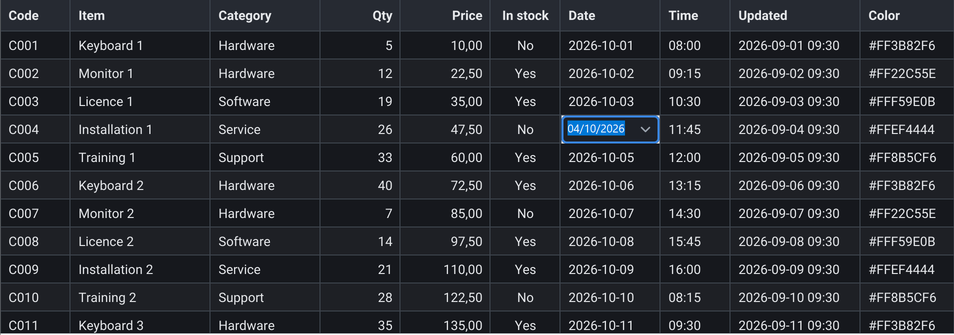
Editing demo in the dark theme with a date picker open in the Date column

Edit and Export Registered only

Date pickers, paste from Excel, undo and redo

Each column picks the control that edits it. EditorKind chooses a date, time or date and time picker, a spin edit, a colour picker or a token edit from sgcEditors, and the default chooses from the data type of the column. Ctrl+V pastes a block copied from Excel: every value is converted and validated before anything is written, and the whole paste is one undo step. Ctrl+Z and Ctrl+Y undo and redo edits and pastes.

  • OnCreateEditor puts any control of your own in a cell, for example a TTrackBar
  • PasteText and PasteFromClipboard work from code, and OnBeforePaste can change or refuse the text
  • One value that does not convert, or that OnValidate rejects, stops the paste before anything is written
  • Undo works by row key and field, so it finds its rows after sorting and filtering, and it keeps a value that a live update changed since
  • UndoLimit keeps the last 100 steps; Undo, Redo and CanUndo work from code

In the VCL, FireMonkey, WinForms, WPF and Avalonia grids; not in the .NET Community build.

Read the help topic

Scale and Connect

Millions of rows, live feeds and plain language.

Browse millions of rows without loading them

Scale and Connect

Browse millions of rows without loading them

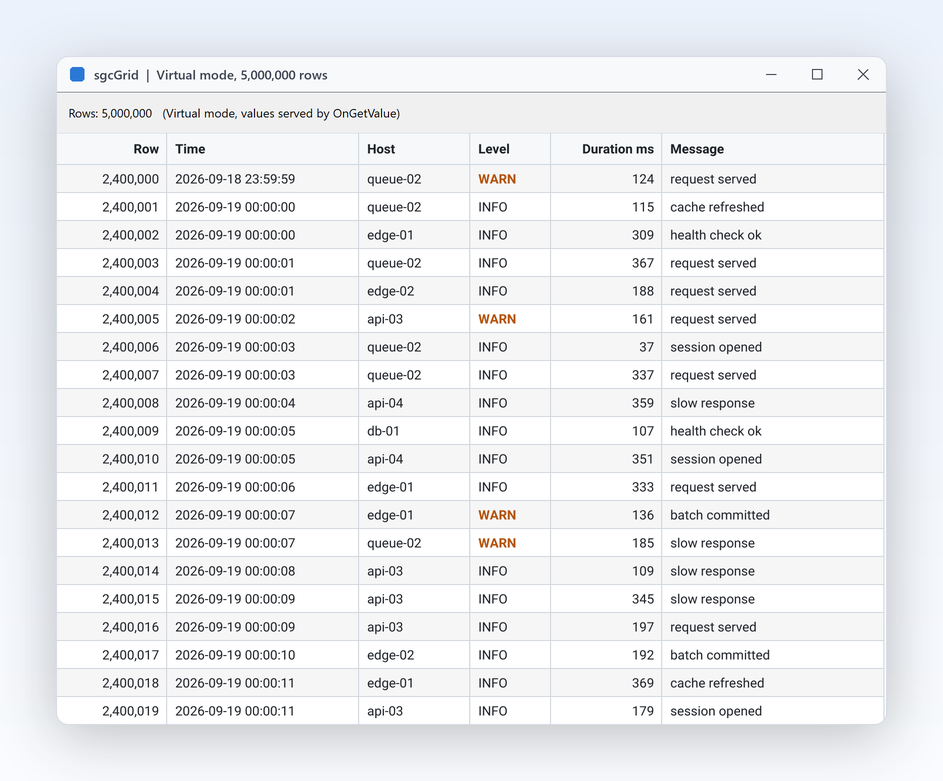
Log archives, sensor histories and query results that already live elsewhere do not need to be copied into memory. In virtual mode the grid stores no rows: VirtualRowCount says how many there are, and OnGetValue returns a value when its row scrolls into view. Only visible rows are painted, so a grid of a million rows costs as much as one of fifty. Change the count as the source grows.

  • Virtual and VirtualRowCount on the grid data, OnGetValue supplies the cells
  • Footer summaries read their values through OnGetValue too
  • Virtual rows have no keys, so they keep the source order, with no sorting, filtering or flash
  • For feeds that grow without end, MaxRows with TailMode is the keyed alternative
Read the help topic

Scale and Connect

Let users ask the grid in plain language

Not every user wants to build filters. TsgcGridAI turns a question such as price greater than 100 sort by volume descending highlight change less than 0 into filters, sorts and row highlights on the grid, and the AI query bar gives users a place to type it. With no provider assigned, a rule based parser answers locally, with no network and no API key. Assign a provider and any LLM answers instead: TsgcUIAIEventProvider hands each request to your own code, and TsgcUIAIChatProvider uses the TsgcAIChat component of sgcWebSockets. Only the field catalog is sent, the names, captions, types and a few sample values of the columns, never the rows.

  • The query bar: TsgcVCLAIQueryBar, TsgcFMXAIQueryBar, TsgcWinFormsAIQueryBar, TsgcWpfAIQueryBar and TsgcAvaloniaAIQueryBar, with recent questions, suggestions, Cancel and Undo
  • Filters go through OnFilterRow, highlights become ApplyToRow format rules
  • Each answer replaces the previous one, and Undo goes back one step
  • LastExplanation tells what was applied, and when the provider fails the rule based parser answers
  • The sgcGridWS bridge keeps TsgcGridAIQuery with TsgcHTMLAIAssistant, and brings TsgcGridFeedSource_WebSocket, TsgcGridFeedSource_MQTT and TsgcGridFeedSource_SSE, which write JSON messages into the grid by key

Every edition, Community included, on VCL, FireMonkey, WinForms, WPF and Avalonia. The sgcWebSockets provider and the sgcGridWS bridge need sgcWebSockets and a Registered edition.

Read the help topic

Accessibility

UI Automation for screen readers, the keyboard and high contrast, with no setup.

Accessibility

A grid exposed as a real table

sgcGrid exposes its content to Microsoft UI Automation as a table with column headers, rows and cells, the API that screen readers such as Narrator and NVDA use. Only the visible rows are built, and the row and column counts are always the full ones, so a grid with a million rows costs nothing more.

  • The focused cell, the selection, sorting, filtering, grouping and tree rows are exposed through the Grid, Table and Selection patterns
  • Arrows, Home, End, Page Up and Page Down move the focused cell, Shift extends the selection, Ctrl+Space toggles the row or cell and F2 or Enter edits
  • Alt+Down opens the filter popup, Alt+Shift+Left and Alt+Shift+Right move the column, Ctrl+Shift+G groups by the focused column and Ctrl+Shift+U removes that grouping
  • A visible focus ring, and under a Windows high contrast theme the grid paints with the system colours

Accessibility is on by default in every edition, the free Community edition included, on VCL in every Delphi and C++Builder version from Delphi 7 to Delphi 13, on FireMonkey on Windows, and on WinForms, WPF and Avalonia. In Delphi and C++Builder, AccessibleName and AccessibleDescription set the name and the description exposed to UI Automation, and in .NET the standard accessible name and help text of each framework do the same. See the accessibility conformance reports. On Avalonia, which has no table patterns, each cell carries its column and position in its name and help text. Column widths are resized with the mouse only.

Read the help topic

See sgcGrid in action

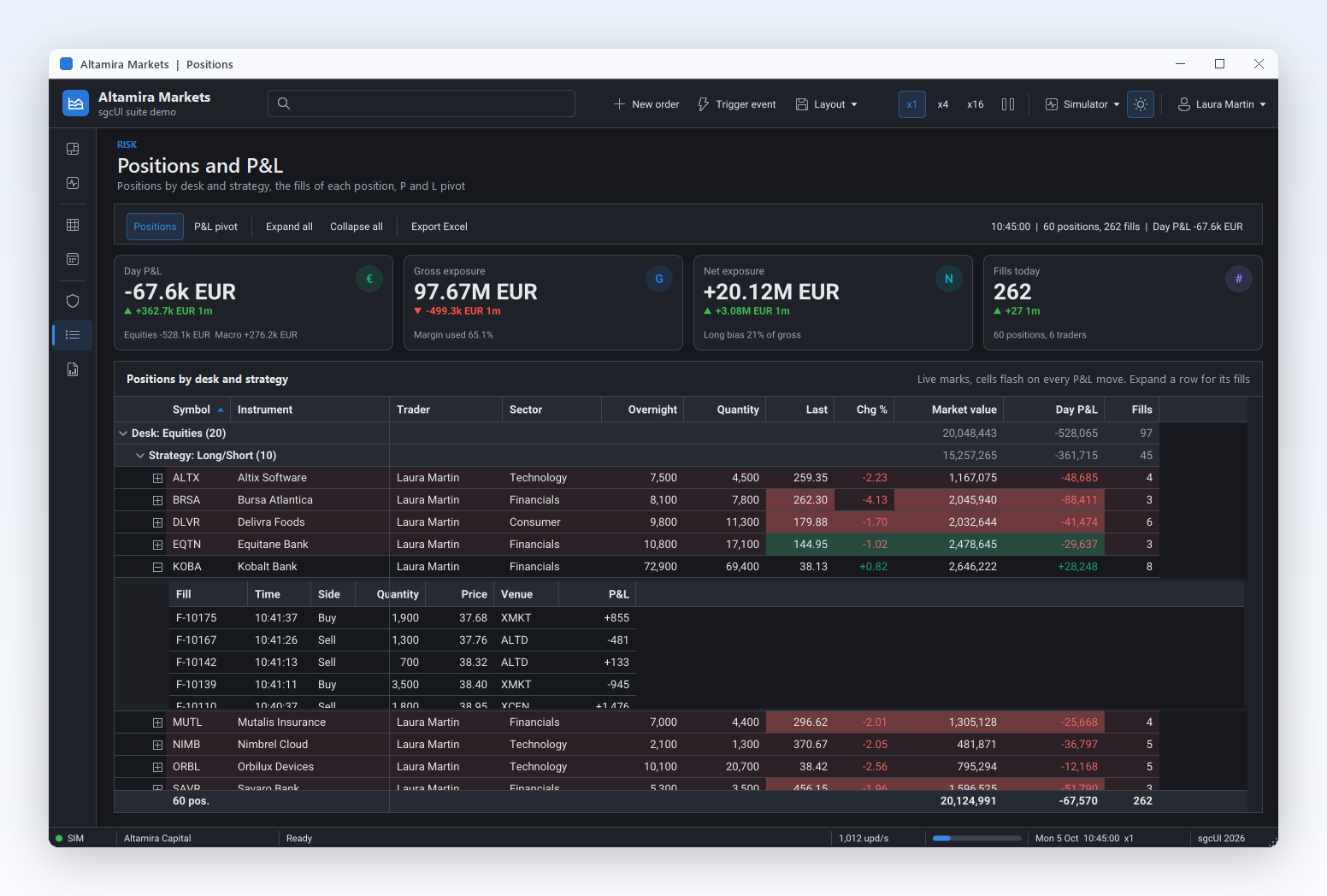
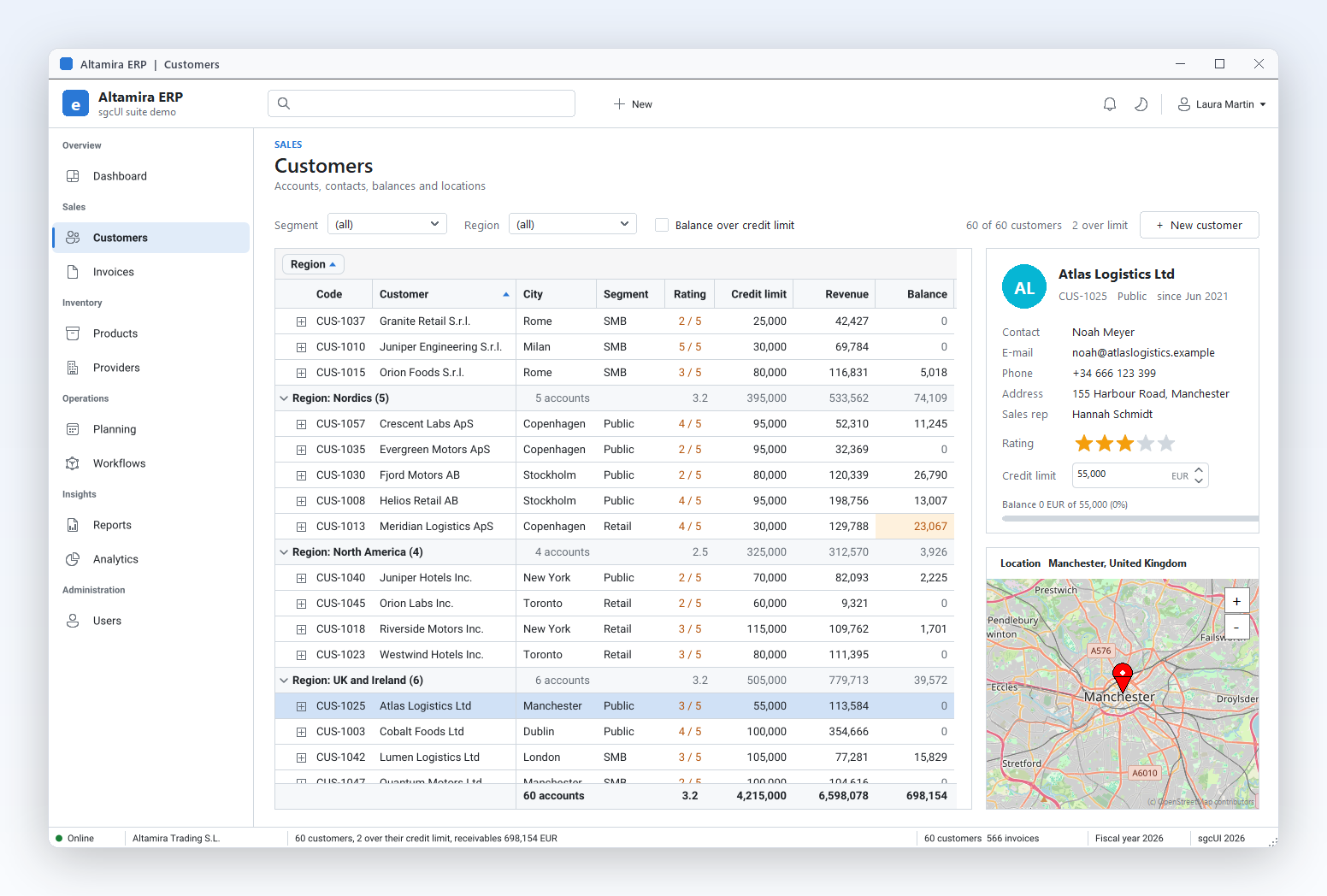
sgcGrid inside the sgcUI suite demos: complete applications that run offline with built-in simulated data.

A 1080p Frame in a Few Milliseconds

Last measured averages of the sgcGrid QA performance gate: a 1920 x 1080 frame with 12 columns, 100,000 rows and 45 visible rows, rendered 60 times on the raster canvas. The gate fails above 16 ms per frame on Win64 and 25 ms on Win32.

MeasurementResultConditions
Plain frame3.0 msWin32
Plain frame4.6 msWin64
Plain frame3.7 msLinux64
Flash and 3 format rules3.2 msWin32
Flash and 3 format rules6.8 msWin64
LiveTicker demo, worker thread writesAbout 1,000 updates per secondSorted, flashing grid at 60 fps

Source: the help topic that documents these numbers.

Who Builds with sgcGrid

Trading and market data desks

A quote board has to stay readable while hundreds of prices change every second. Feed threads write with UpdateRow and never wait on the UI, flash on change shows the direction of every move, and tail mode keeps the trade log on its newest fill. The sgcGridWS bridge can read the quotes from WebSocket, MQTT or SSE.

  • Live updates
  • Flash on change
  • Tail mode
  • Live feeds
Run the LiveTicker demo

Back office and line of business

Order entry, stock lists and invoicing screens live on a database. Bind the existing TDataSet, let users group by customer or month with totals in every group row, correct values in place with validation, and export a workbook that accounting opens with its groups and SUBTOTAL formulas intact.

  • DataSet binding
  • Grouping and summaries
  • In-place editing
  • Excel export
Run the DataSetGrid demo

Monitoring, logs and alerts

Operations screens show event streams that never end. MaxRows caps the log, format rules paint errors red, and virtual mode browses an archive of millions of lines on demand. On a Linux64 server the renderer writes the same grid to a PNG or SVG file for an alert e-mail.

  • Format rules
  • MaxRows and tail mode
  • Virtual mode
  • Headless PNG and SVG
Run the LiveFeed demo

A Live Grid in a Few Lines

The same API in Delphi, C++ Builder and C#: add columns, append rows by key, and update them later from any thread.

A VCL grid in code: typed columns, rows appended by key, and an update by field name from any thread.

uses
  Forms, Classes, Controls,
  sgcGrid_Columns, sgcGrid_Data, sgcGrid_VCL;

procedure CreateGrid(aForm: TForm);
var
  oGrid: TsgcVCLGrid;
begin
  oGrid := TsgcVCLGrid.Create(aForm);
  oGrid.Parent := aForm;
  oGrid.Align := alClient;
  // the columns: FieldName, Caption and DataType
  oGrid.Columns.Add('Symbol', 'Symbol');
  oGrid.Columns.Add('Price', 'Price', gdtFloat).DisplayFormat := '0.00';
  oGrid.Columns.Add('Volume', 'Volume', gdtInteger);
  // one row per key, the values in column order
  oGrid.Data.AppendRow('MSFT', ['MSFT', 412.5, 1200]);
  oGrid.Data.AppendRow('AAPL', ['AAPL', 228.1, 3400]);
  // later, from any thread: update the row of a key by field name
  oGrid.Data.UpdateRow('MSFT', ['Price', 'Volume'], [413.1, 1350]);
end;

Read the help topic →

The same grid in C++ Builder with the generated sgcGrid headers.

#include "sgcGrid_Columns.hpp"
#include "sgcGrid_Data.hpp"
#include "sgcGrid_VCL.hpp"

void __fastcall CreateGrid(TForm *Form)
{
  TsgcVCLGrid *Grid = new TsgcVCLGrid(Form);
  Grid->Parent = Form;
  Grid->Align = alClient;
  // the columns: FieldName, Caption and DataType
  Grid->Columns->Add("Symbol", "Symbol", gdtText);
  Grid->Columns->Add("Price", "Price", gdtFloat)->DisplayFormat = "0.00";
  Grid->Columns->Add("Volume", "Volume", gdtInteger);
  // one row per key, the values in column order
  Grid->Data->AppendRow("MSFT", OPENARRAY(Variant,
    (Variant("MSFT"), Variant(412.5), Variant(1200))));
  Grid->Data->AppendRow("AAPL", OPENARRAY(Variant,
    (Variant("AAPL"), Variant(228.1), Variant(3400))));
  // later, from any thread: update the row of a key by field name
  Grid->Data->UpdateRow("MSFT",
    OPENARRAY(String, (String("Price"), String("Volume"))),
    OPENARRAY(Variant, (Variant(413.1), Variant(1350))));
}

Read the help topic →

A WinForms grid with flashing cells, a negative change rule and the dark theme.

using System.Windows.Forms;
using esegece.sgcGrid;
using esegece.sgcUICore;

internal class MainForm : Form
{
    private readonly TsgcWinFormsGrid Grid = new TsgcWinFormsGrid();

    public MainForm()
    {
        Grid.Dock = DockStyle.Fill;
        // the columns: field name, caption and data type
        Grid.Columns.Add("symbol", "Symbol");
        Grid.Columns.Add("price", "Price", TsgcGridDataType.gdtFloat).DisplayFormat = "#,##0.00";
        Grid.Columns.Add("change", "Change", TsgcGridDataType.gdtFloat).DisplayFormat = "+0.00;-0.00;0.00";
        Grid.Columns.Add("volume", "Volume", TsgcGridDataType.gdtInteger).DisplayFormat = "#,##0";
        // changed cells flash and fade, negative rows are tinted red
        Grid.FlashChanges = true;
        Grid.FormatRules.Add("change", TsgcGridFormatOperator.gfoLess, "0", 0x30E53935).ApplyToRow = true;
        Grid.Theme = TsgcUITheme.utDark;
        // one row per key, the values follow the column order
        Grid.Data.AppendRow("MSFT", "MSFT", 412.5, 0.0, 1200);
        Grid.Data.AppendRow("AAPL", "AAPL", 228.1, 0.0, 3400);
        Controls.Add(Grid);
    }

    // call it from any thread: TsgcGridData is thread safe
    public void OnQuote(string aSymbol, double aPrice, double aChange, int aVolume)
    {
        Grid.Data.UpdateRow(aSymbol, new[] { "price", "change", "volume" },
            new object[] { aPrice, aChange, aVolume });
    }
}
dotnet add package esegece.sgcGrid.WinForms

Read the help topic →

Run the sgcGrid Demos

15 demos for Delphi, three of them FireMonkey, 11 for C++ Builder and 18 for .NET on WinForms, WPF and Avalonia.

LiveTicker

LiveTicker

About 1,000 price updates per second from a worker thread with UpdateRow, a sorted view, flashing cells and a format rule for negative changes. VCL, FireMonkey, C++ Builder, WinForms, WPF and Avalonia.

DataSetGrid

DataSetGrid

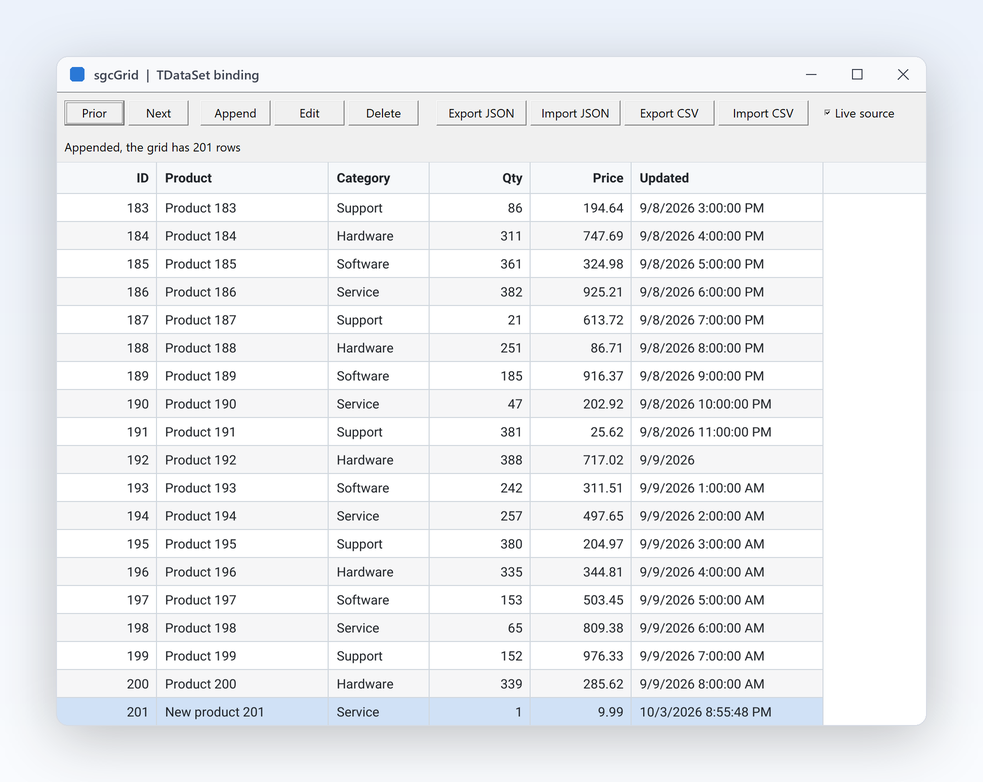
A TsgcGridSource_DataSet bound to a TClientDataSet of 200 records with KeyField, AutoColumns and LiveUpdates, plus JSON and CSV export and import.

GroupAndSummary

GroupAndSummary

100,000 orders grouped by Region and Category with the group panel, Count, Sum and Average summaries, a footer and two frozen columns. .NET calls it Grouping.

FilterAndFind

FilterAndFind

100,000 sales rows with the funnel popups, the filter row and the find panel, plus the column chooser, best fit, and a layout saved to a file and loaded back. VCL, FireMonkey, C++ Builder, WinForms, WPF and Avalonia.

BandsAndCells

BandsAndCells

2,000 instruments under Instrument, Live data, Price and Position bands, with sparkline, progress and image cells, multi-row selection and a Copy button. VCL, C++ Builder and WinForms.

Registered only Editing

A pick list column, a boolean column toggled with Space, OnValidate rejecting negative quantities, OnEditError and an OnEdited log, plus date, time, spin, colour and token editors from sgcEditors, a TTrackBar through OnCreateEditor, paste, undo and redo.

DataSetEditing

Registered only DataSetEditing

Products and categories in two TClientDataSets, with a TDBNavigator and two TDBEdits on the same records: WriteBack, SyncCursor, a lookup column, insert, delete and undo. VCL, C++ Builder and WinForms (a DataTable with AddLookup).

TreeAndDetail

Registered only TreeAndDetail

An org chart tree, and customers with an orders detail band filled through a TsgcGridDataStore.

Registered only ExcelExport

A grouped grid and a tree grid saved with SaveToXLSX and opened in the spreadsheet application, outline and summaries kept.

GridAndChart

A grid tile and a chart tile on a dashboard: a TsgcChartDataSource_Table plots the grid rows. Needs sgcCharts and sgcDashboard.

Registered only AskYourGrid

TsgcGridAI and the AI query bar filter, sort and highlight 200 stocks from plain language questions, with no network and no API key, next to the TsgcGridAIQuery bridge. Needs sgcWebSockets.

Registered only LiveFeed

An in process WebSocket server broadcasts JSON batches of 50 symbols, and a TsgcGridFeedSource_WebSocket writes them into the grid by key. Delphi and .NET.

Compiled demos

Ready to run executables of every sgcUI product, nothing to install.

Download sgcUI_bin.zip →

Where sgcGrid Is Included

sgcGrid is sold on its own, is part of every sgcUI edition from Standard up, and is in the All-Access bundle.

sgcGrid single package

€199 / developer, full source code, 1 year of updates.

Buy sgcGrid → See pricing →

sgcUI Standard

sgcGrid, sgcNavigation, sgcToolbar and sgcEditors, from €380.

See Standard →

sgcUI Professional

Standard plus sgcCharts, sgcDashboard and sgcGauges, from €529.

See Professional →

sgcUI Enterprise

All 14 sgcUI products, from €699.

See Enterprise →

The free Community edition is esegece.sgcGrid.Community on NuGet. A project references either the Community or the Registered packages, never both.

FeatureCommunity (free)Registered
Live updates from any thread, flash on change, tail mode✓✓
Format rules and themes✓✓
Sorting, filtering and selection✓✓
Grouping, group panel and summaries✓✓
Frozen columns and column resizing✓✓
Virtual mode✓✓
DataTable binding, JSON and CSV✓✓
Headless PNG and SVG✓✓
Column filters, filter row and find panel✓✓
Column chooser, column reordering, best fit and layouts✓✓
Bands, image, progress and sparkline cells, multi-selection✓✓
Ask your grid: TsgcGridAI, the AI query bar and any LLM provider✓✓
In-place editing−✓
Two-way DataTable editing, paste, undo and redo, sgcEditors cell editors−✓
Tree rows and master detail−✓
Excel export−✓
Live feeds, TsgcGridAIQuery and the sgcWebSockets AI provider (sgcGridWS and sgcUICoreWS bridges)−✓

Supported Frameworks and Platforms

Components in sgcGrid

ComponentTarget
TsgcVCLGridDelphi and C++ Builder, VCL (sgcGrid_VCL)
TsgcFMXGridDelphi FireMonkey from XE6, on Windows, macOS, iOS and Android (sgcGrid_FMX)
TsgcGridData, TsgcGridColumns, TsgcGridFormatRules, TsgcGridLineView, TsgcGridRendererFramework neutral row store, columns, format rules and renderer, also on Linux64
TsgcGridAIFramework neutral natural language query engine, in every edition and also on Linux64 (sgcGrid_AI)
TsgcVCLAIQueryBar, TsgcFMXAIQueryBar, TsgcUIAIEventProviderAI query bar and AI provider of sgcUICore, in every edition
TsgcUIAIChatProvidersgcUICoreWS bridge: the TsgcAIChat of sgcWebSockets as the AI provider (Registered edition)
TsgcGridSource_DataSet, TsgcGridDataStoreTDataSet binding and the row store of master detail bands
TsgcGridFeedSource_WebSocket, TsgcGridFeedSource_MQTT, TsgcGridFeedSource_SSE, TsgcGridAIQuerysgcGridWS bridge with sgcWebSockets (Registered edition)
TsgcWinFormsGrid, TsgcWpfGrid, TsgcAvaloniaGrid.NET, WinForms, WPF and Avalonia
TsgcGridAI, TsgcWinFormsAIQueryBar, TsgcWpfAIQueryBar, TsgcAvaloniaAIQueryBar.NET, natural language queries and the AI query bar for WinForms, WPF and Avalonia
TargetComponentPlatforms
Delphi 7 to 13, VCLTsgcVCLGridWin32, and Win64 from XE2
Delphi XE6 to 13, FireMonkeyTsgcFMXGridWindows, macOS, iOS and Android
C++ Builder 2007 to 13TsgcVCLGrid, TsgcFMXGridGenerated .hpp headers and static libraries
Delphi 10.2 to 13, framework neutralModel, formatting, renderer, JSON and CSVLinux64, for example to render grid images on a server
.NET Framework 4.7.2, .NET 8, 9 and 10TsgcWinFormsGrid, WPF and Avalonia gridsWinForms, WPF, Avalonia, headless PNG and SVG

Frequently Asked Questions

Yes. AppendRow, UpdateRow, UpdateCell and DeleteRow of the grid data are thread safe, so a worker thread writes rows by key directly. The grid repaints on the main thread at most MaxFPS times per second. See Live updates.

Only the visible rows are painted, so the cost of a frame depends on the window, not on the row count. The QA gate measures a 1080p frame of a 100,000 row grid at 3.0 ms on Win32 and 4.6 ms on Win64. For data that lives elsewhere, virtual mode stores no rows and asks for values as they scroll into view. See Performance.

Yes. TsgcGridSource_DataSet fills a grid from any TDataSet, creates the columns with AutoColumns and, with LiveUpdates, follows every Append, Edit and Delete of the dataset. With a KeyField changed rows are updated in place instead of reloaded. In .NET the same source reads a DataTable. See DataSet binding.

Yes. TsgcVCLGrid is an ordinary VCL control, so it can sit on a form next to an existing TStringGrid or TDBGrid. A TDBGrid screen keeps its dataset and adds a TsgcGridSource_DataSet; a TStringGrid screen writes its rows with AppendRow and UpdateRow by key. There is no automatic conversion of existing forms.

In-place editing, two-way DataTable editing, paste, undo and redo, the sgcEditors cell editors, tree rows, master detail rows, Excel export and the sgcGridWS bridge. Sorting, filtering, the filter row and the find panel, grouping, summaries, frozen columns, the column chooser, layouts, bands, image, progress and sparkline cells, multi-selection, format rules, virtual mode, JSON and CSV, the headless output and Ask your grid with TsgcGridAI are in every edition. See Editions.
Yes. Sizes such as GroupIndent and GroupPanelHeight are device independent pixels, and the VCL grid scales them to the DPI of its monitor, per monitor from Delphi 10.3. Theme switches between utLight and utDark, AccentColor sets the selection and flash accent.

sgcGrid Help

3,000+Developers
20+Years
761+Components
30+API Integrations
5Platforms
30-Day Money-Back GuaranteeNot satisfied? Request a full refund within 30 days of purchase. See refund policy

Try sgcGrid Today

The sgcUI trial includes sgcGrid with every feature unlocked, the other 13 sgcUI products and all the demo projects.