sgcEditors ships in the sgcUI All-Access trial, one installer for Delphi and one for C++ Builder with all 17 sgcUI products. Download the fully functional trial, run the compiled demos with no IDE, or add the NuGet packages to a .NET project. Licenses are available on the pricing page.
TRIAL
Free Trial Downloads
One sgcUI trial installs every sgcUI product, sgcEditors included, with full functionality for evaluation.
New to sgcEditors? Start with the five QuickStart demos for Delphi (VCL) in Demos\Editors\Delphi\00.QuickStart and read the Getting Started guide (PDF), which walks through them step by step.
sgcUI Trial for Delphi
Fully functional evaluation for Delphi 7 through RAD Studio 13 with all 17 sgcUI products, sgcEditors included, and the demo projects.
sgcEditors with every feature, including the data aware editors and the advanced colour, token and slider features
Every other sgcUI product, from sgcGrid to sgcSpreadsheet
The VCL and FireMonkey packages for Delphi 7 to 13, and C++ Builder headers and libraries
A notice that it is a trial version after the trial period, nothing else changes
FIRST RUN
Three Steps to a Running sgcEditors
Install the trial, run a demo, then drop sgcEditors on your own form.
1
Install
Run the sgcUI trial installer. It registers the packages, and the editors appear on the SGC Editors page of the tool palette.
2
Open a demo
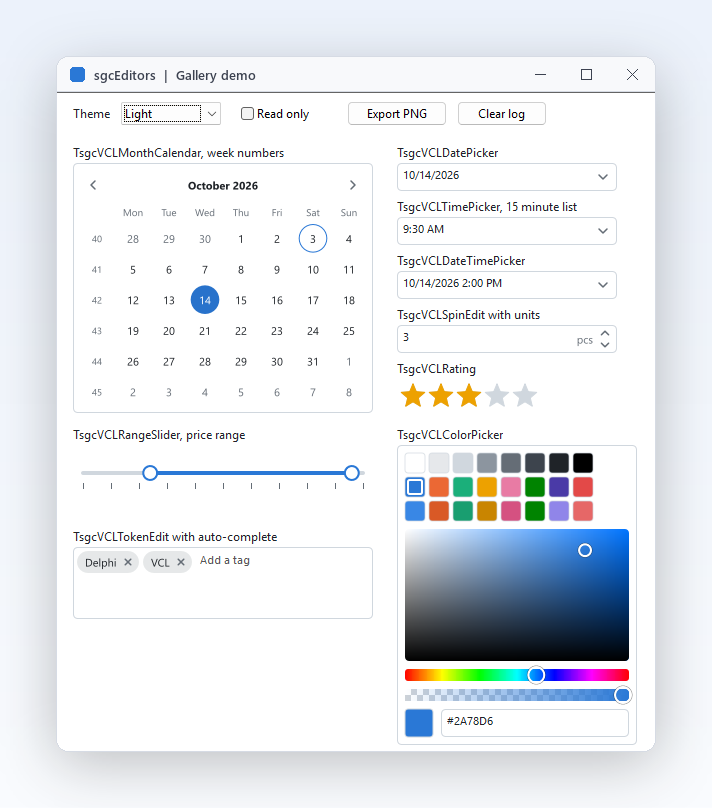
Open Gallery from the Demos\Editors folder and run it: type dates, drag the slider thumbs and switch the theme.
3
Drop a component
Drop a TsgcVCLDatePicker on your form, set MinDate and MaxDate in the Object Inspector and read the value in OnChange.
DEMOS
Run the sgcEditors Demos
Gallery
All fifteen editors on one form with a theme switch, a read only switch, an event log and PNG export. The fastest way to try every control and its keyboard behaviour.
Calendar
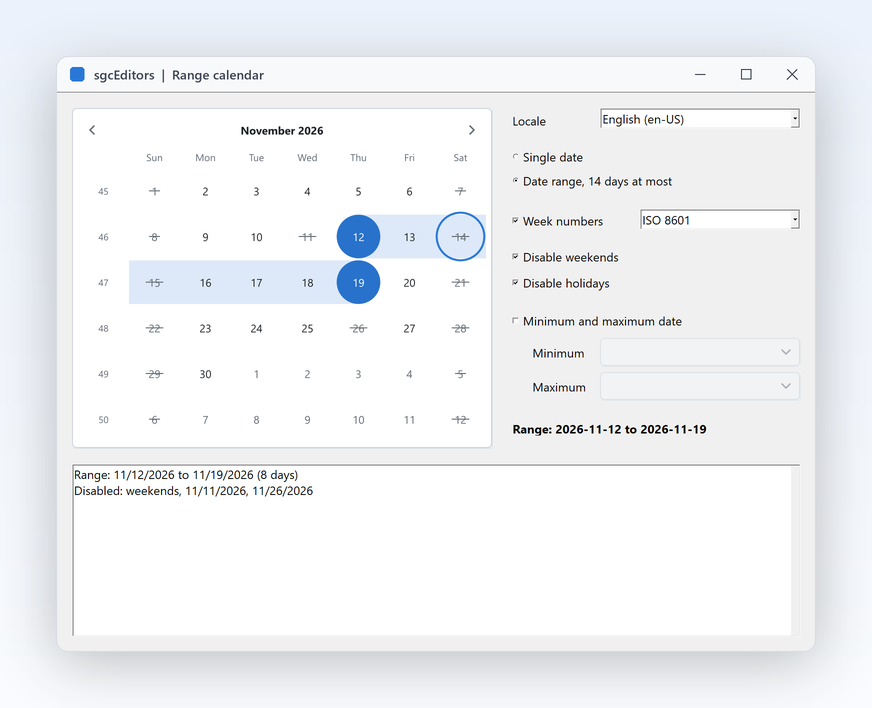
A range of up to 14 days, week numbers, disabled weekends and holidays, and a locale switch between English, German, Spanish, French and Italian.
BookingForm
A hotel booking with a live summary of the stay, guests and arrival time, a country lookup, a masked phone number and a validator that checks the guest fields before the booking. It shows how the controls work together on a real form.
Registered only DataAware
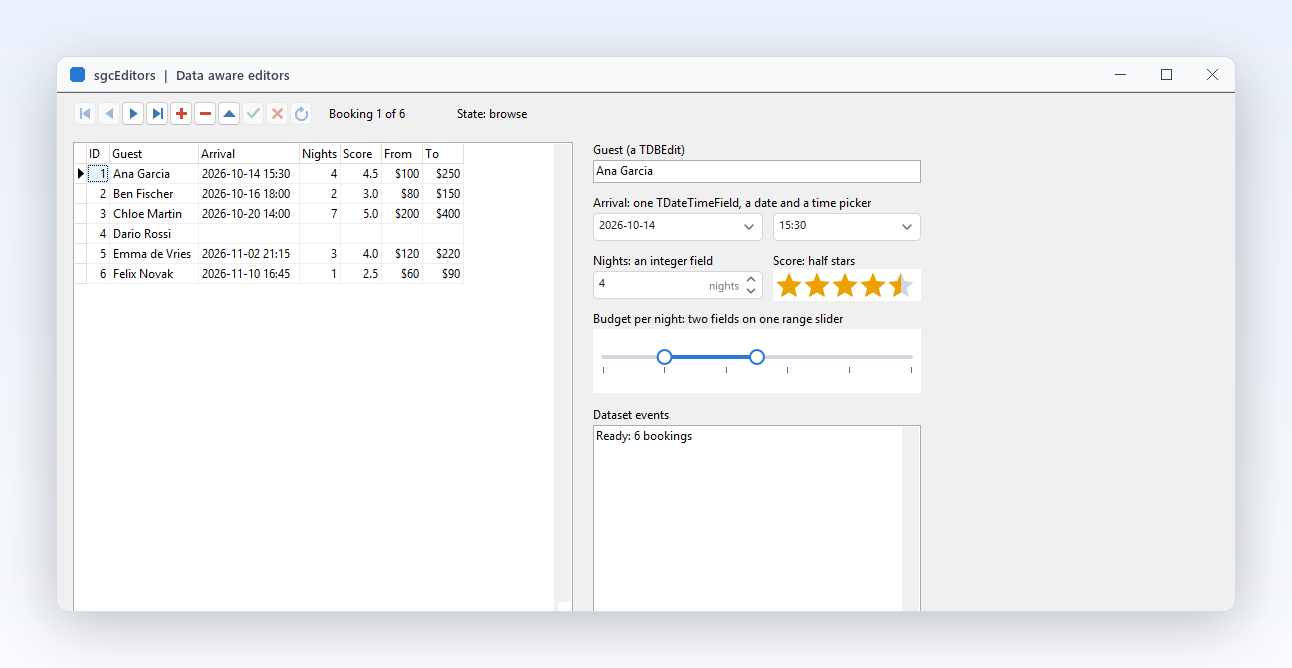
The ten data aware editors on a TClientDataSet with a TDBGrid and a TDBNavigator, with a lookup edit filled from a second dataset and a validator for the required fields. The data aware controls need the Registered or Trial edition.
GalleryFMX
The gallery built with the FireMonkey editors, for Windows and Android, with the same properties and events as the VCL controls.
Validation
Every rule kind on standard and sgcEditors controls, the three triggers, the border and icon display and the summary list. ValidationFMX does the same in FireMonkey, and the .NET edition has Validation, ValidationWpf and ValidationAvalonia.
Keyboard
A kiosk style form with a docked on-screen keyboard that follows the focus between the fields and a drop-down keyboard that opens under any edit, the ten built-in layouts, a layout key that cycles through four of them and a theme switch. KeyboardFMX does the same in FireMonkey.
ToggleSwitch
A settings page of toggle switches with the caption on the right or on the left of the track, the On and Off text inside the track, custom colours, a read only and a disabled switch, a rule in OnChanging that refuses a change, a switch that turns the slide animation on and off, and a theme selector. ToggleSwitchFMX does the same in FireMonkey, both have C++ Builder twins, and the .NET edition has ToggleSwitch, ToggleSwitchWpf and ToggleSwitchAvalonia.
IPAddress
The settings of a network adapter: an IPv4 address that is Required, so the error frame shows while it is incomplete, a subnet mask, a gateway and two DNS servers, plus an IPv6 address written in the canonical form when the focus leaves, with a status line that shows IsValid and the committed text. IPAddressFMX does the same in FireMonkey, both have C++ Builder twins, and the .NET edition has IPAddress, IPAddressWpf and IPAddressAvalonia.
TimeSpan
A task timer in the clock format, an SLA response target in the units format kept between a minimum and a maximum, and a clock adjustment that can be negative, with settings for the display format, the segments, AllowNegative and ShowButtons. TimeSpanFMX does the same in FireMonkey, both have C++ Builder twins, and the .NET edition has TimeSpan, TimeSpanWpf and TimeSpanAvalonia.
FontPicker
A text formatting panel driven by a font picker: the families of the system drawn in their own faces, type-ahead filtering, the recently picked families first, a fixed pitch filter and a sample memo that takes the picked face. FontPickerFMX does the same in FireMonkey, both have C++ Builder twins, and the .NET edition has FontPicker, FontPickerWpf and FontPickerAvalonia.
CheckList
A picker for the 300 columns of a sales dataset to export, with options for ShowCheckAll, ShowFilter and AllowGrayed, a key column that is always checked and cannot be toggled, buttons that check or uncheck every column and load 10000 items, and a status line with CheckedCount. CheckListFMX does the same in FireMonkey, both have C++ Builder twins, and the .NET edition has CheckList, CheckListWpf and CheckListAvalonia.
DualList
The columns of a sales report picked from 30 available columns and put in the order the report prints them, with switches for ShowReorderButtons, SortAvailable, ShowFilter and ReadOnly, and an OnMoving rule that keeps the locked key column in the report. DualListFMX does the same in FireMonkey, both have C++ Builder twins, and the .NET edition has DualList, DualListWpf and DualListAvalonia.
Delphi 7, 2007, 2009, 2010, XE to XE8, 10 to 10.4, 11, 12 and 13, Win32 and Win64.
FireMonkey
From Delphi XE6.
C++ Builder
C++ Builder 2007, 2010, XE to XE8, 10 to 10.4, 11, 12 and 13.
Linux64
From Delphi 10.2 for the framework neutral models and the headless PNG and SVG output. No Linux controls.
.NET
WinForms, WPF and Avalonia on .NET Framework 4.7.2, .NET 8, .NET 9 and .NET 10.
.NET
sgcEditors for .NET
sgcEditors also ships as a managed C# port with the same class names for WinForms, WPF and Avalonia, delivered as NuGet packages.
NuGet Packages
Install the free Community edition with dotnet add package esegece.sgcEditors.Community, or the Registered edition with dotnet add package esegece.sgcEditors. The controls for your UI framework are in esegece.sgcEditors.WinForms, esegece.sgcEditors.Wpf and esegece.sgcEditors.Avalonia.
The free Community edition of sgcEditors can be used by individuals and organizations under EUR 1M annual gross revenue with no more than 5 developers. The Registered edition has every feature, full source code and the commercial license. The Community edition has all fifteen controls and the validation framework, but no HSV square and alpha bar in the colour picker, no auto-complete list in the token edit, one slider thumb and no data-aware controls.
NUGET
sgcEditors NuGet Packages
The Community packages are free. The Registered packages need a .NET license.
Edition
Install
Notes
Community
dotnet add package esegece.sgcEditors.Community
Free Community edition: all fifteen controls and validation, without the advanced features.