Delphi, C++ Builder & .NET Part of sgcUI

sgcPlanner, Scheduler, Gantt & Kanban for Delphi, C++ Builder & .NET

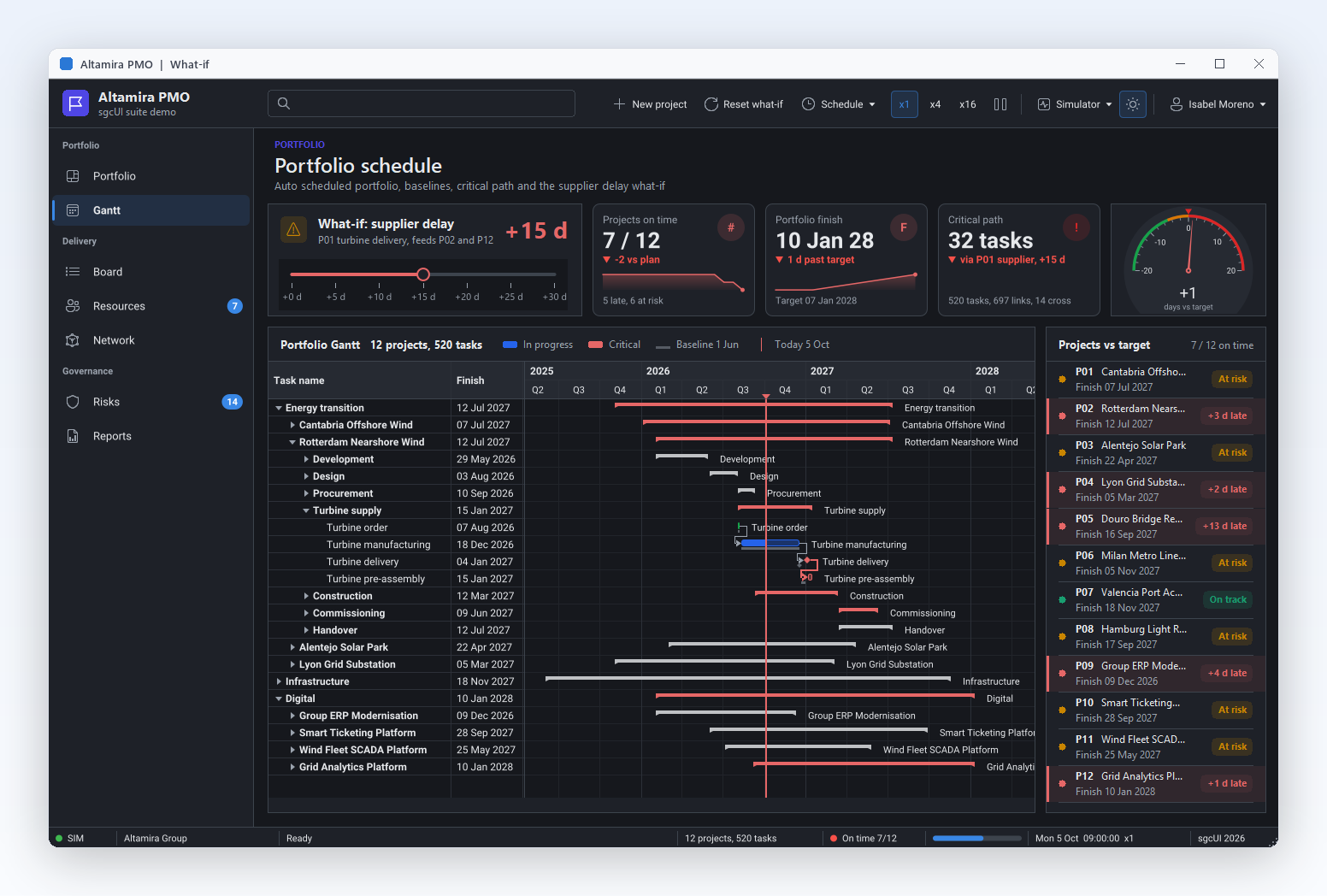
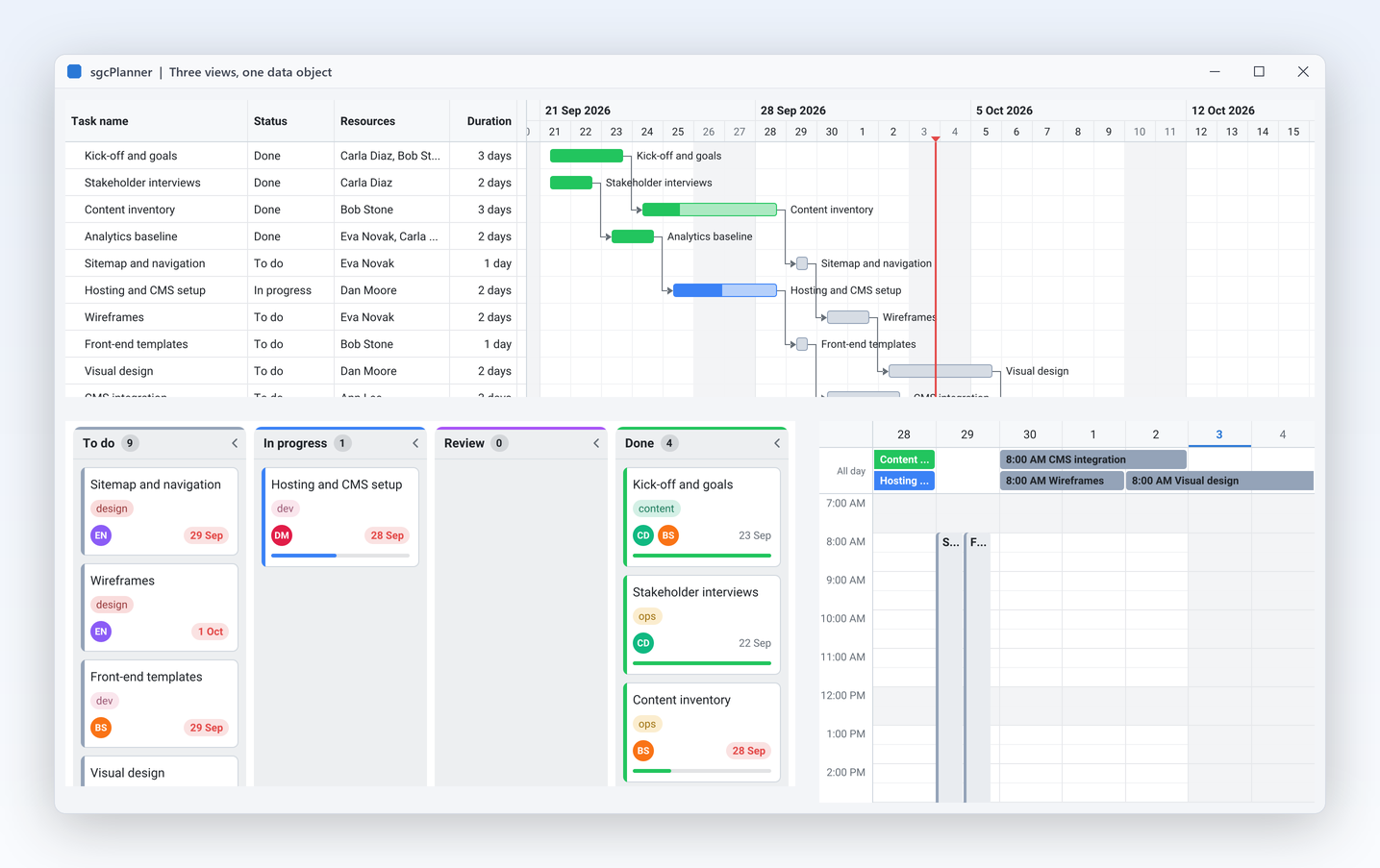
Three views of the same plan. Show it as a calendar for the team, as a Gantt chart for the project manager and as a Kanban board for the people doing the work, all bound to one data object. Drag a card to Done and the Gantt bar and the calendar colour follow at once.

VCL, FireMonkey, WinForms, WPF, Avalonia10,000 tasks auto scheduled in 11 ms on Win64Free .NET Community editionIncluded in sgcUI Enterprise
ProjectPlanner demo: the same tasks on a Kanban board, a Gantt chart and a Scheduler

One Plan, Three Views

Thirteen features for the team, the project manager and the people doing the work. Features marked Registered are not in the free .NET Community edition.

One Data Model

Every view reads and writes the same TsgcPlannerData.

One Data Model

Three views, one data object, always in sync

A calendar, a project chart and a task board should never disagree. sgcPlanner binds any number of views to one data object, so a card dragged to Done on the board is drawn in the Done colour in the Gantt and the Scheduler at once, a bar moved in the Gantt moves the event in the calendar, and an event created in the Scheduler becomes a card. Each edit is one update, so every view repaints once per drop.

  • TsgcPlannerData holds the plan, and each view points to it through Data
  • BarColorMode pbcStatus colours the Gantt bars by status, as the board does
  • SyncSelection shares the selected item through SelectedId
  • The same model works without any view, in a service or a unit test
  • Right to left for Arabic and Hebrew: Scheduler and Kanban columns flow from the right, the Gantt task grid moves to the right, and MirrorTimeline runs the Gantt time axis from the right too
Read the help topic
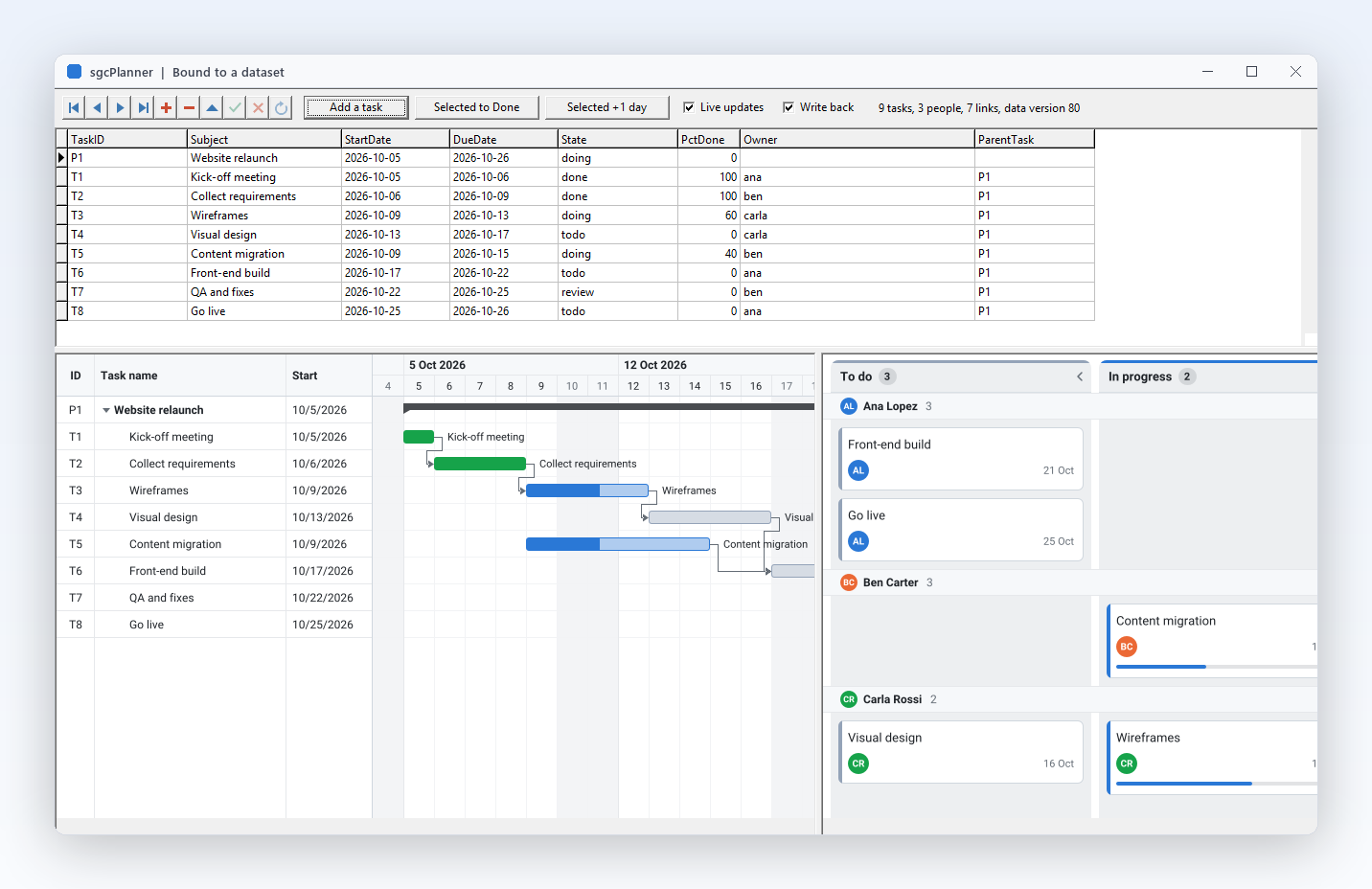
DataSetPlanner demo: dataset rows and the plan views bound to them

One Data Model

Bind a TDataSet, save JSON, render PNG

Your plan already lives in a database, and sgcPlanner meets it there. A dataset source binds the data object to any TDataSet, such as FireDAC, TClientDataSet or dbExpress, loads items, resources and dependencies, follows the changes of the datasets and writes the edits made in the views back. JSON persistence works in every edition and on every platform, and the headless renderer draws any view to PNG or SVG on a server, Linux64 included.

  • TsgcPlannerSource_DataSet maps your field names through ItemFields
  • SaveToFile and LoadFromFile write and read the documented JSON format
  • TsgcPlannerRenderer draws the Scheduler, the Gantt or the Kanban without a window
  • Uses only the DB unit, so it works in VCL, FireMonkey and console applications
Read the help topic

One Data Model

Undo and redo every change to the plan

A wrong drop should never cost a planner their afternoon. The data object records every add, delete, property change and move of an item, a resource, a status or a dependency, whoever makes it: a drag in a view, an in place edit, Smart Paste, the scheduling engine or your own code. All the views bound to the data share one history, and a group of changes, such as a whole rescheduling pass, is undone in one step.

  • Data.Undo with Undo, Redo, CanUndo and CanRedo
  • BeginGroup and EndGroup make many changes one step
  • UndoCaption and RedoCaption name the next step for a menu item or a hint
  • Limit caps the history, and OnChange updates the buttons
Read the help topic

One Data Model

Type the title right on the view

Opening a dialog to rename an item slows people down. With in place editing, F2 edits the title of the selected item in a small editor placed over it, and an appointment created by dragging on empty space in the Scheduler opens its title editor at once, so the user drags and types. It works the same way in the Scheduler, the Gantt and the Kanban board, and every edit is recorded by the undo history.

  • InplaceEdit turns it on, it is off by default
  • F2 edits the selected item, Enter accepts and Escape cancels
  • BeginEdit opens the editor from your own menu item
  • IsEditing tells the form keys, such as Ctrl+Z, to wait while the user types
Read the help topic

Scheduler: Meetings, People and Rooms

TsgcVCLScheduler and TsgcFMXScheduler, and the same views in .NET.

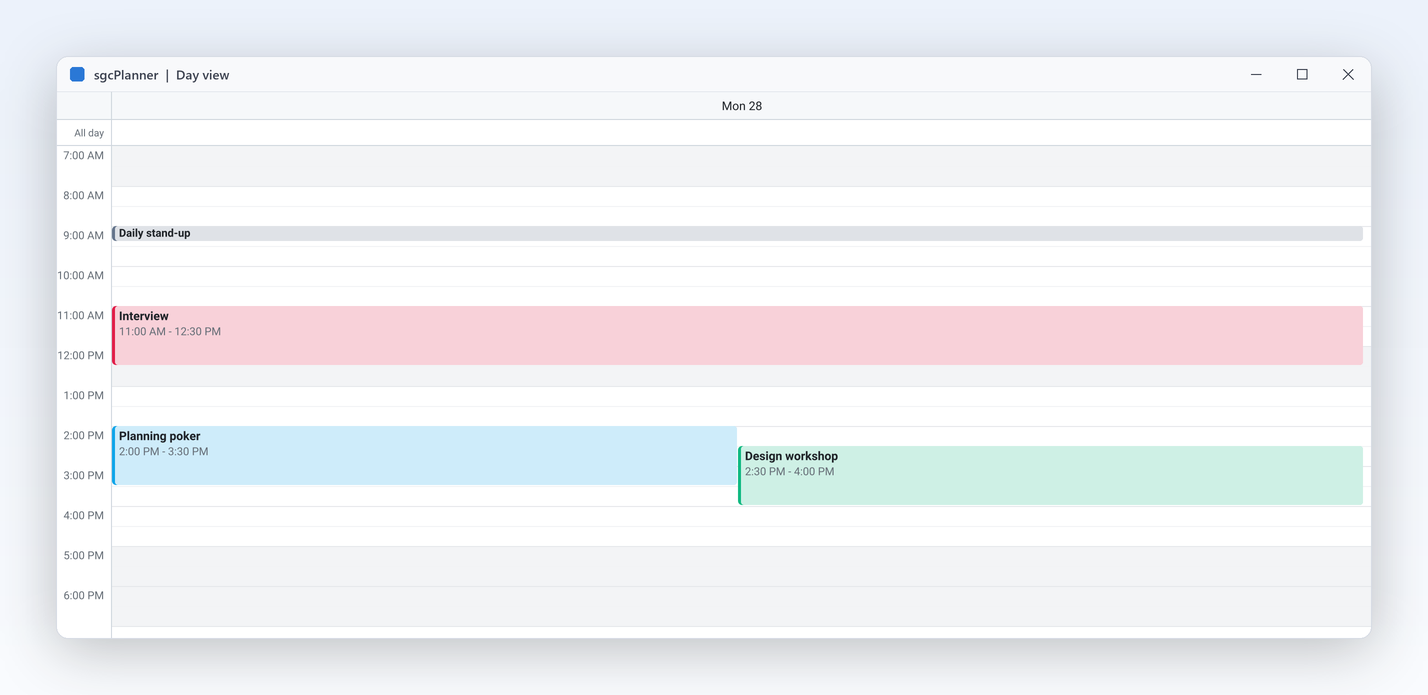
TsgcVCLScheduler day view
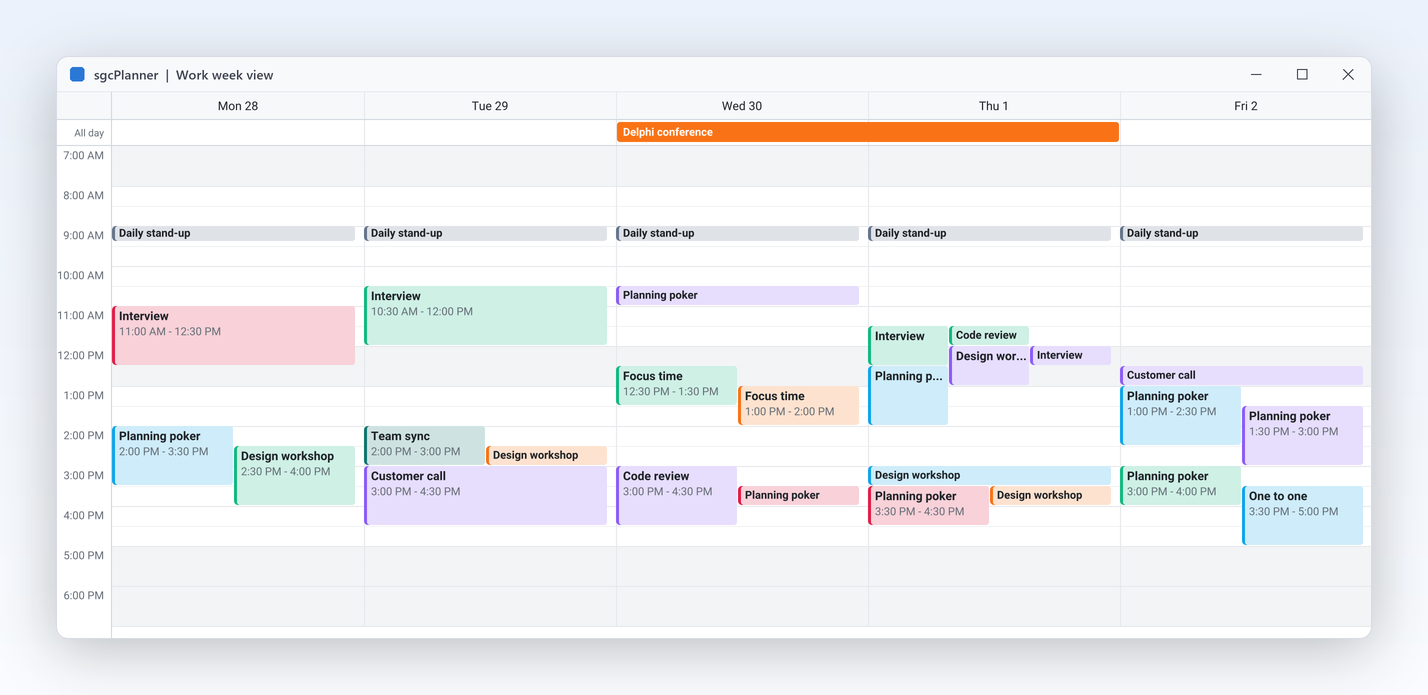
TsgcVCLScheduler work week view
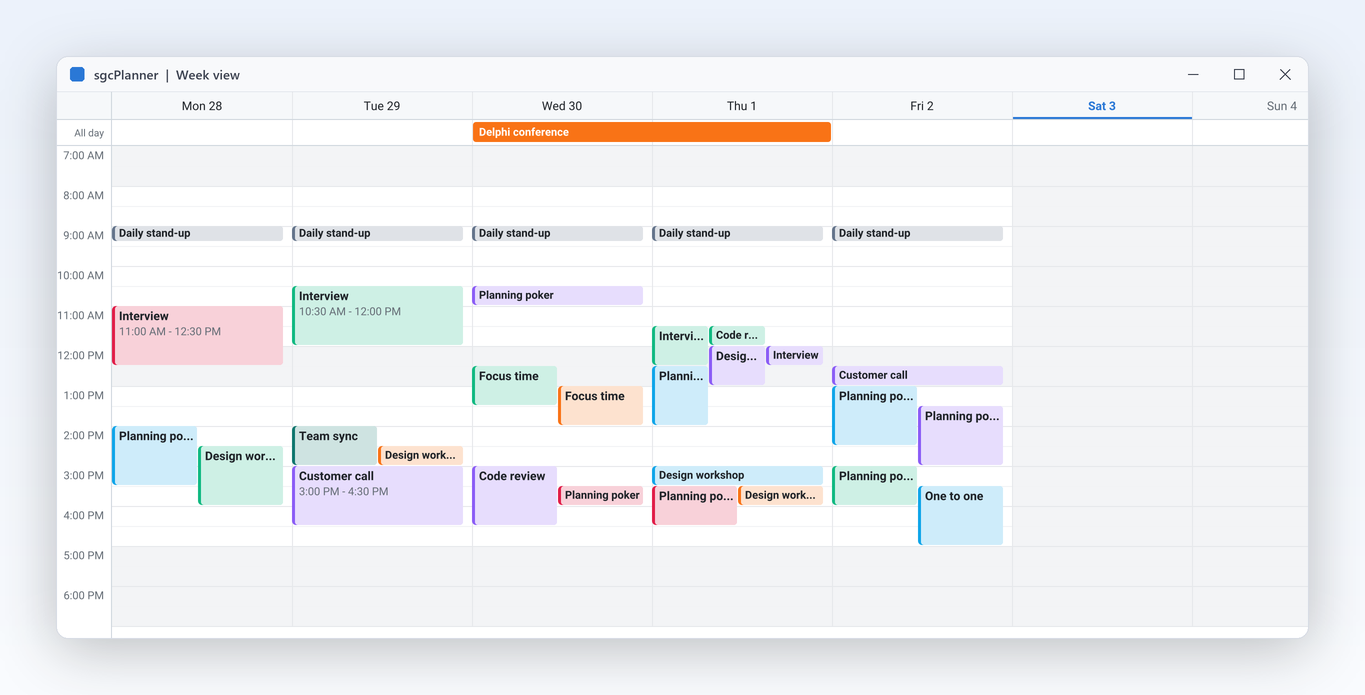
TsgcVCLScheduler week view
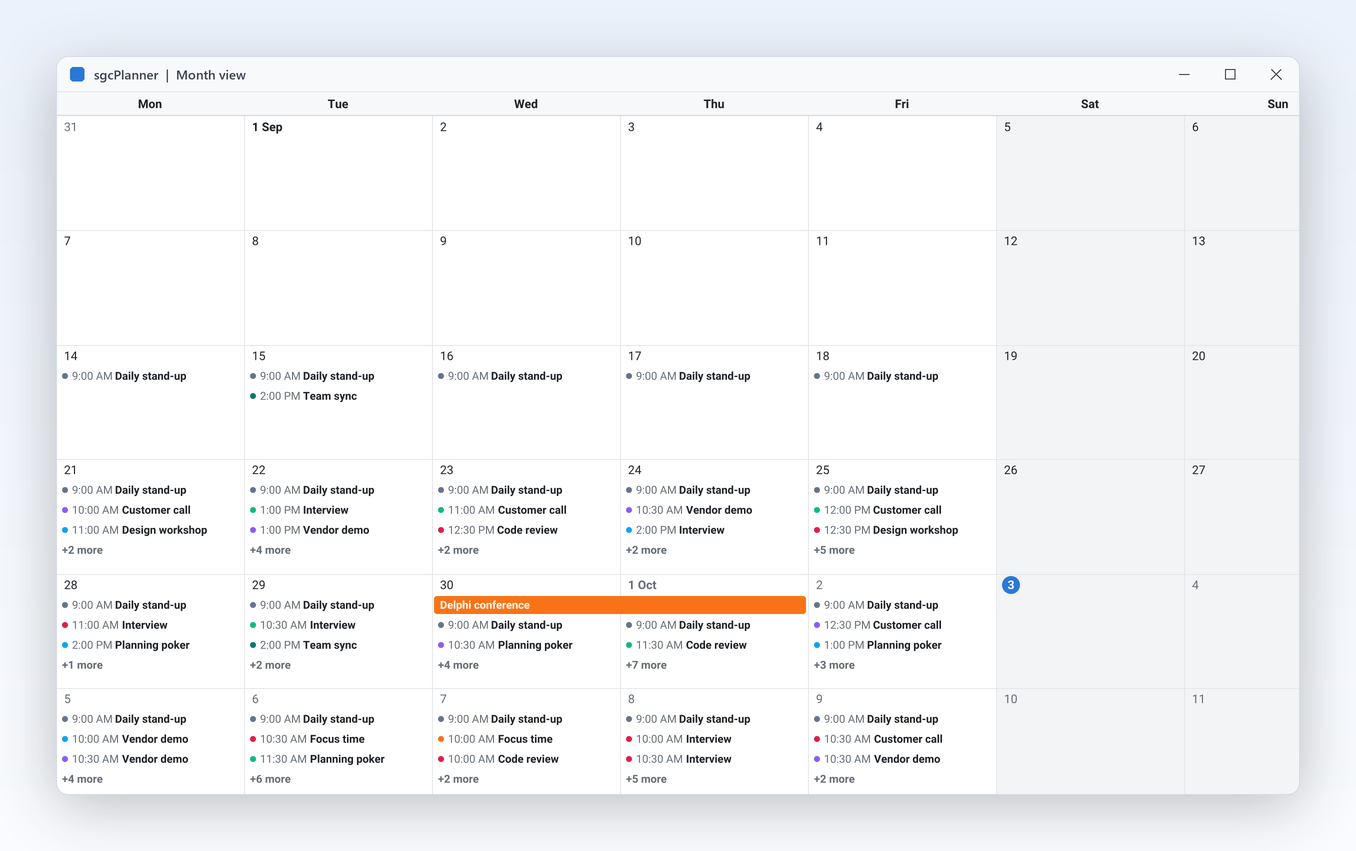
TsgcVCLScheduler month view
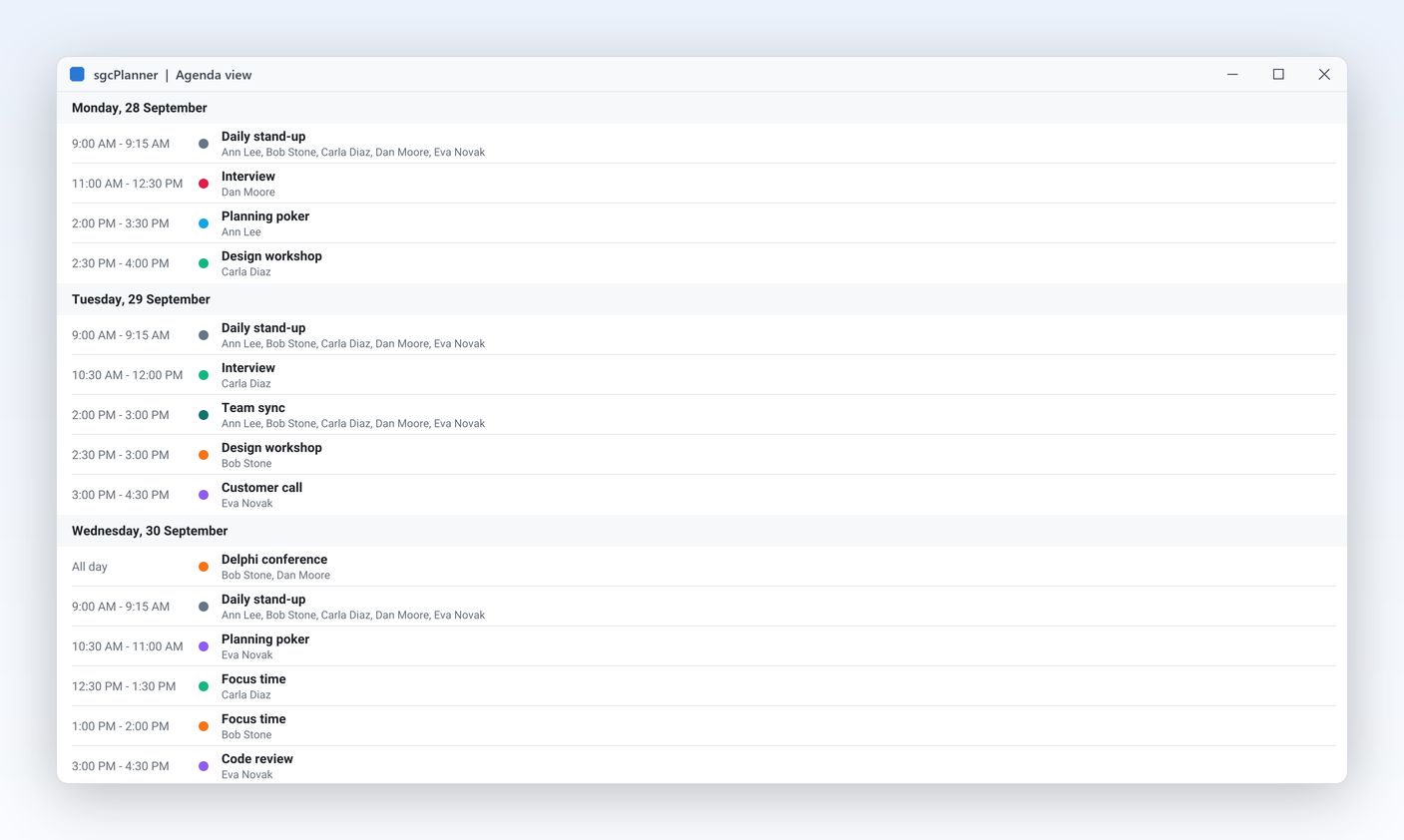
TsgcVCLScheduler agenda view
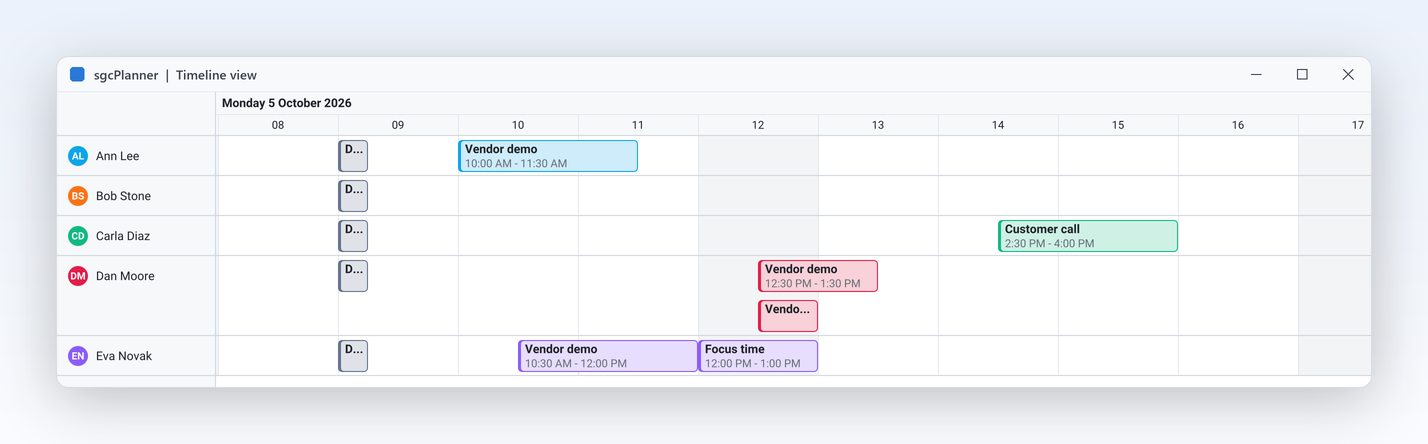
TsgcVCLScheduler resource timeline view

Scheduler: Meetings, People and Rooms

Seven calendar views, people and rooms side by side

Users already know how a calendar should behave, so the Scheduler gives them the views they expect: day, work week, week, month, year, agenda and a resource timeline. The year view shows twelve mini months with each day shaded by how busy it is, and a double click opens that day. Add people, rooms or machines as resources with their own colour and group the day or week by resource, so a clinic sees each doctor in a column and a workshop sees each bay. Working hours, the visible day range and navigation are properties and one line calls.

  • View: psvDay, psvWorkWeek, psvWeek, psvMonth, psvYear, psvAgenda, psvTimeline
  • AddResource with a colour, and Options.GroupByResource for a column each
  • DayStartHour, DayEndHour and SlotMinutes shape the time grid
  • GoToday, Prior, Next and ScrollToTime move around

The resource Timeline view is Registered; in Community that view shows a notice.

Read the help topic

Scheduler: Meetings, People and Rooms

Drag to create, move and resize

Booking a meeting should feel like drawing it. Drag across empty slots and the Scheduler creates an event, and your OnItemCreate handler sets its title or refuses the slot. Drag an event to another time, day or resource column, or pull an edge to change its length, and every move snaps to the slot size. The same gestures work in the other views: bars move and resize in the Gantt, and cards move between columns on the board.

  • OnItemCreate names or refuses a new event
  • Moves and resizes snap to Options.SlotMinutes
  • A preview follows the pointer, the view scrolls at its edges and Escape cancels
  • Mouse, pen and touch; OnCardMoving can veto a move on the board
Read the help topic
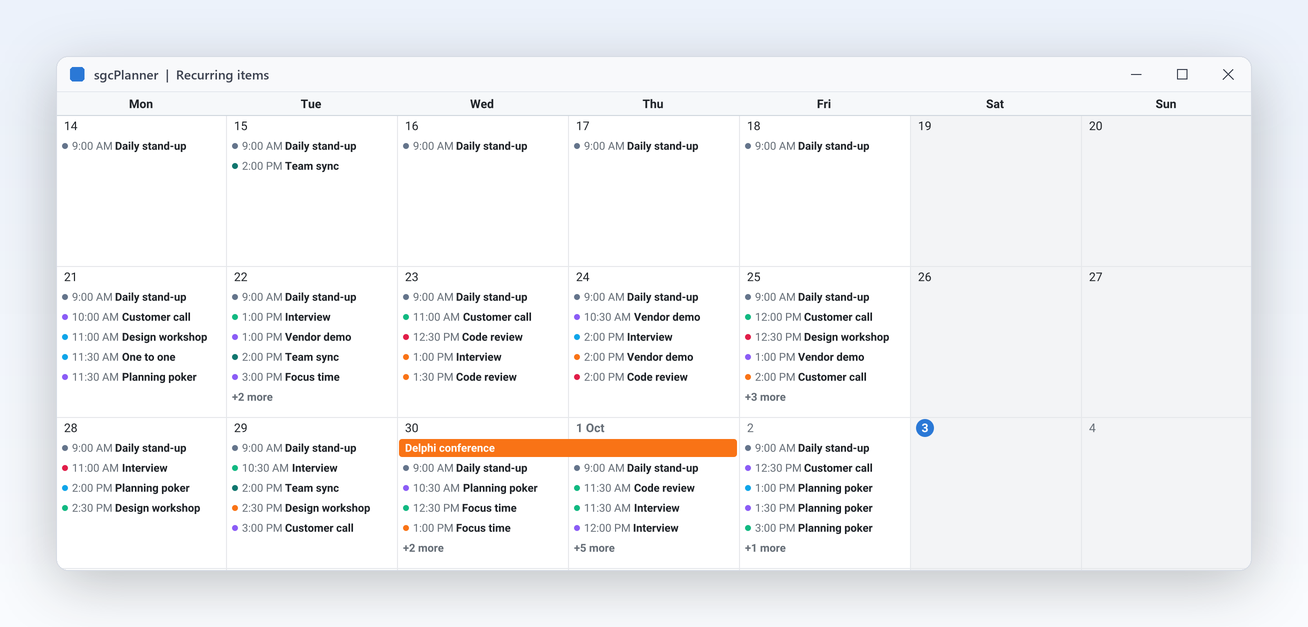
Month view with a weekly Tuesday stand up on every Tuesday

Scheduler: Meetings, People and Rooms Registered only

Recurring meetings from standard rules

A weekly stand up or a monthly review should be entered once. Give an item an iCalendar RRULE and the Scheduler shows every occurrence in any view and any period. The rule is the RFC 5545 format that Google Calendar, Outlook and Apple Calendar use, so recurring events keep their rule through an import or export of .ics files, and your code can ask the data object for the occurrences of any date range, for example to check a room for conflicts.

  • RecurrenceRule := 'FREQ=WEEKLY;BYDAY=TU' repeats every Tuesday
  • The Start and Finish of the item are the first occurrence
  • GetOccurrences returns the occurrences of any period
  • Imported and exported with iCalendar files

Community shows a recurring item once and keeps its rule.

Read the help topic
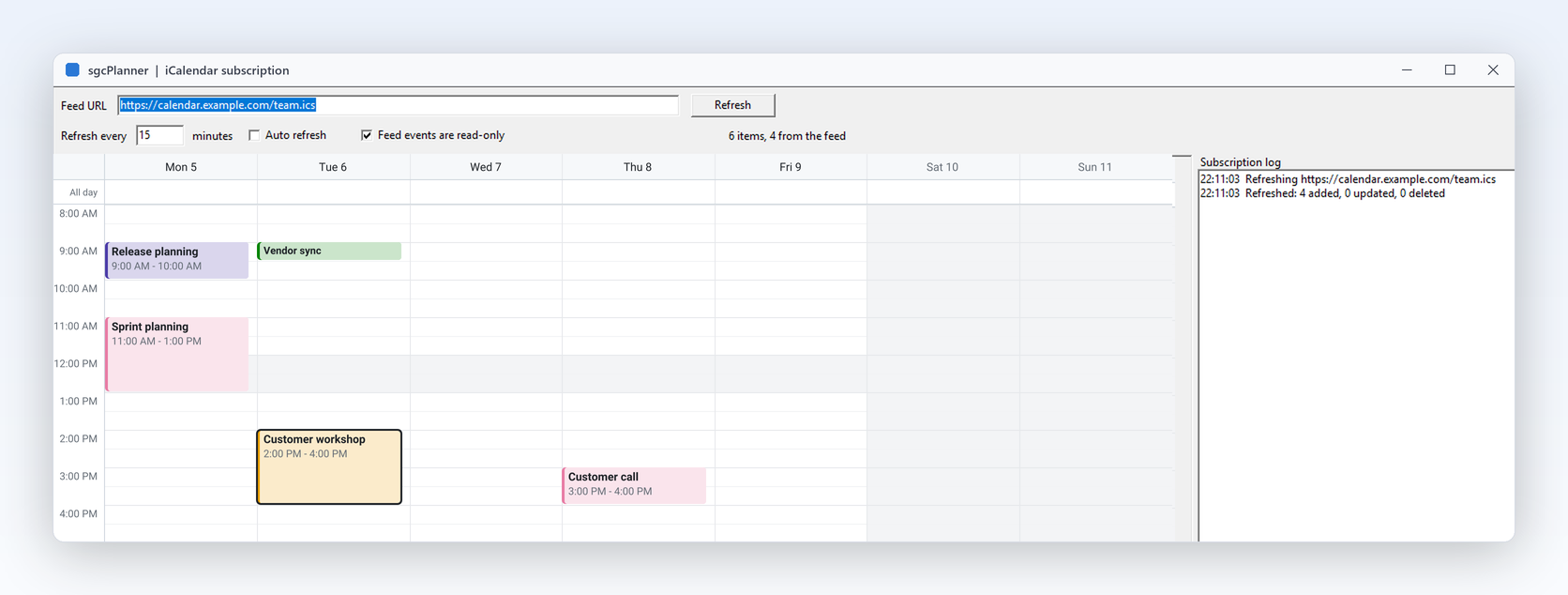
ICalSubscription demo with a holiday calendar merged into the Scheduler

Scheduler: Meetings, People and Rooms Registered only

Google Calendar, Outlook, CalDAV and .ics in and out

Your users' appointments already live in other calendars. TsgcPlannerICalendar imports and exports .ics files, the format of Google Calendar, Outlook and Apple Calendar. With the sgcPlannerWS bridge, a subscription follows any read only .ics URL, such as a public holiday list or a shared calendar, and three sync components keep a plan in step both ways with one Google Calendar, one Outlook calendar of Microsoft 365 or Outlook.com through Microsoft Graph, or one CalDAV calendar of Nextcloud, iCloud, Fastmail, Radicale or any other CalDAV server. Each one reads only the changes since the last sync and has a clear conflict rule.

  • TsgcPlannerICalendar with ImportFromFile and ExportToFile
  • TsgcPlannerICalSubscription with URL and RefreshInterval, using ETag and If-Modified-Since
  • TsgcPlannerGoogleSync with CalendarId, Direction and AutoSyncInterval
  • TsgcPlannerGraphSync with CalendarId and an OAuth2 AccessToken, using the Graph delta query
  • TsgcPlannerCalDAVSync with CalendarURL, UserName and Password, using sync tokens and ETags
  • The later change wins a conflict, and OnConflict can decide otherwise

Registered edition. The bridge components also need a registered sgcWebSockets; in .NET they are in esegece.sgcPlanner.sgcWebSockets.

Read the help topic

Scheduler: Meetings, People and Rooms

Reminders with snooze and dismiss

A meeting nobody remembers is a meeting nobody attends. Give an item a reminder in minutes before its start, and TsgcPlannerReminders finds the reminders that are due and raises an event for each one. Your application calls it from its own timer and decides how the reminder is shown, a popup, a toast or a sound. A recurring item reminds again at every occurrence, and a reminder can be snoozed or dismissed.

  • ReminderMinutes of the item: -1 for none, 0 at the start
  • Check raises OnReminder for every reminder due
  • Snooze and Dismiss for the current or next occurrence
  • Saved to JSON and recorded by the undo history
Read the help topic

Scheduler: Meetings, People and Rooms

Time zones per item

Teams spread across offices book meetings in their own local time. Each item can carry its own time zone, so a call scheduled at 10:00 in New York stays at 10:00 New York time, while the views show every item in one display zone. Change the display zone and the items move to their wall clock in the new zone, while floating and all day items stay where they are.

  • Item.TimeZone is the zone of Start and Finish, empty for a floating item
  • Data.DisplayTimeZone is the zone the views show, empty for the local zone
  • The conversion happens only when the items are shown
  • Reminders run in the display zone too
Read the help topic

Gantt: Plan Projects and Follow the Critical Path

TsgcVCLGantt and TsgcFMXGantt: tasks, links, a time scale and a scheduling engine.

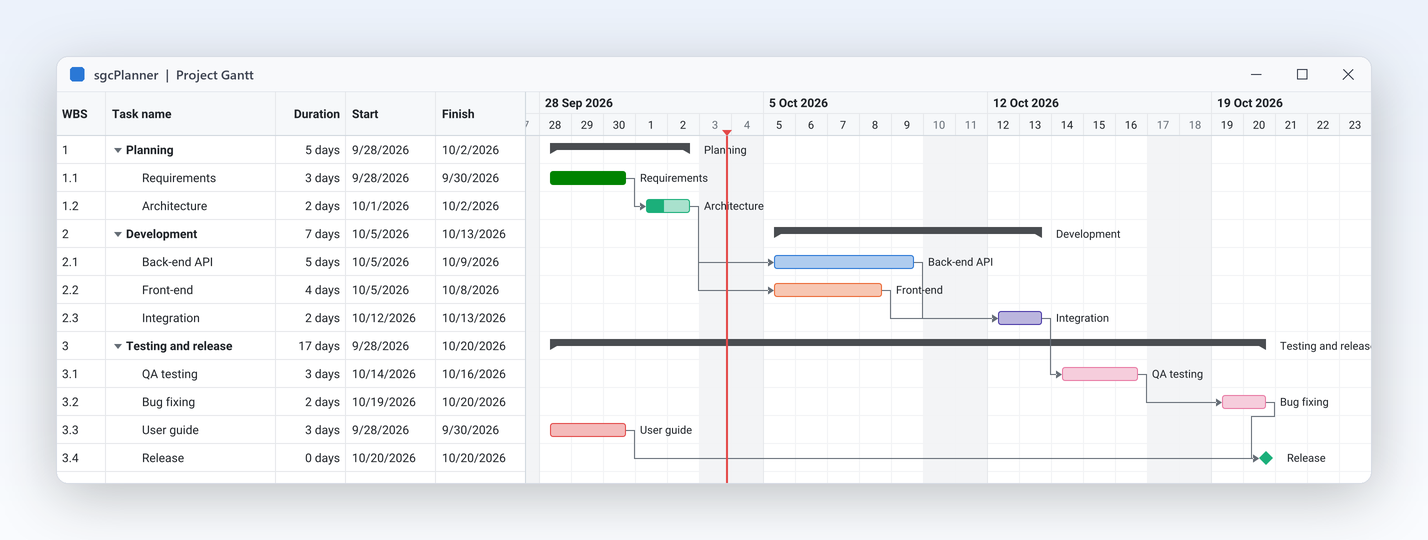
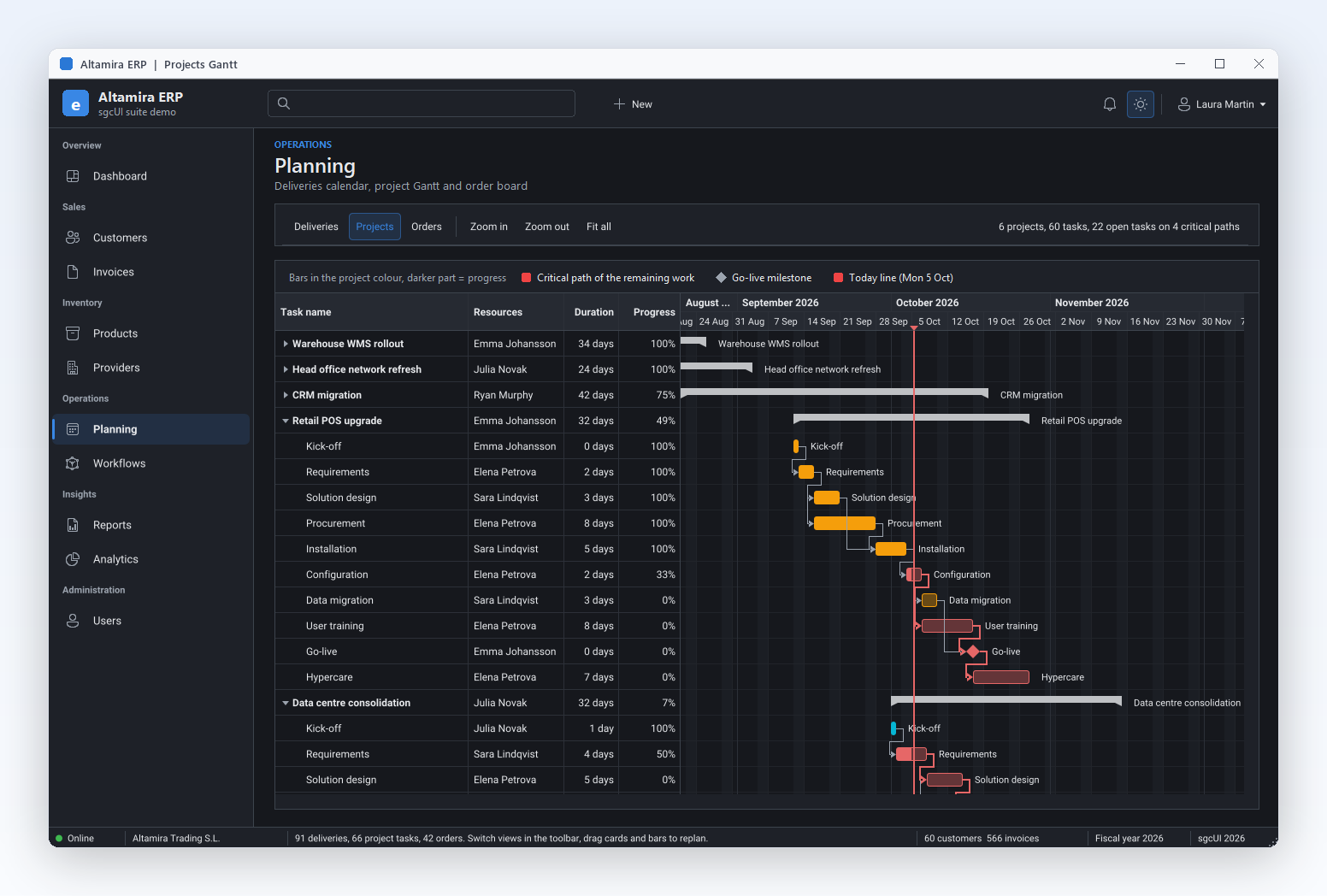
ProjectGantt demo: WBS tree with finish to start and start to start links

Gantt: Plan Projects and Follow the Critical Path Registered only

Gantt charts with dependencies and lag

The Gantt shows a work breakdown tree with summary rows, milestones and progress on every bar, and draws the links between tasks as arrows. Link tasks in code or by dragging from the end of one bar to another, choose finish to start, start to start, finish to finish or start to finish, and add a lag in working time. The time scale zooms from 5 minutes to years.

  • Work breakdown through ParentId, rolled up with UpdateSummaries
  • AddDependency with TsgcPlannerDependencyKind: pdkFS, pdkSS, pdkFF, pdkSF
  • Lag counted on the working calendar
  • Milestone and Progress on every item, TimeScale for the zoom

Community stores and saves the links but does not draw them, and drag to link is Registered.

Read the help topic
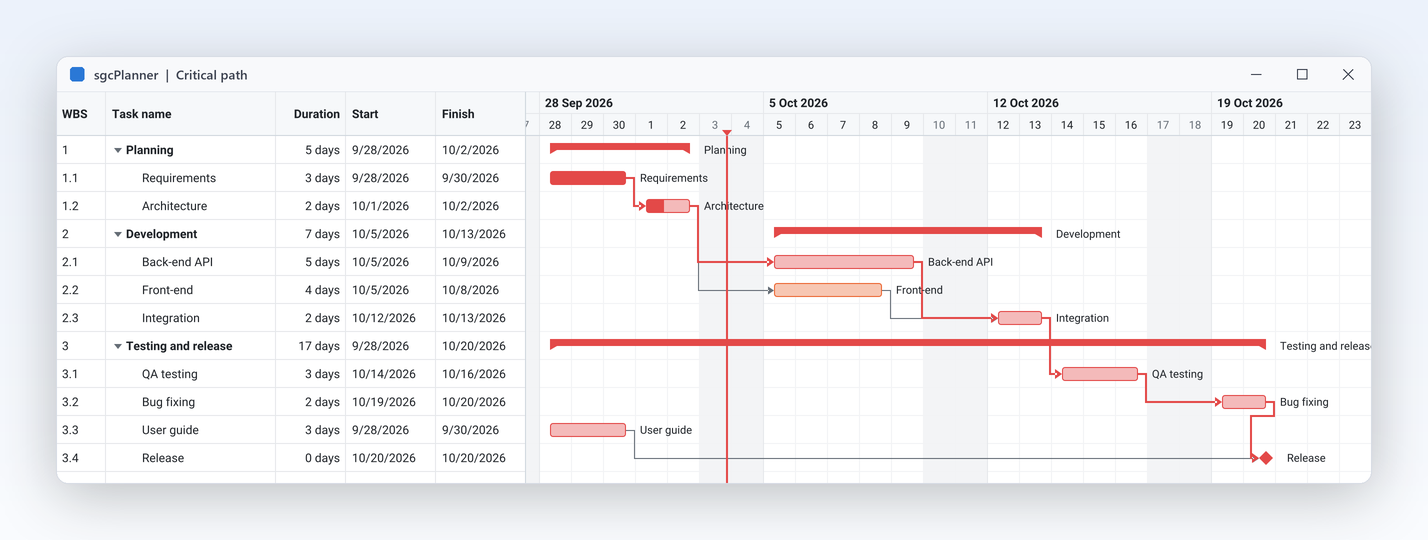
Gantt with the critical path highlighted and holidays shaded from the working calendar

Gantt: Plan Projects and Follow the Critical Path Registered only

Auto schedule and see the critical path

When one task slips, the project manager needs the new finish date now, not after an afternoon of moving bars. The scheduling engine places every task as soon as possible after its predecessors on the working calendar, skipping non working days and holidays, computes the slack of each task and marks the critical path, the chain of tasks that sets the project end. Run it on demand, after every edit, or on a data object without any view.

  • Schedule runs the engine, AutoSchedule runs it after every edit
  • ShowCriticalPath highlights the tasks that drive the finish date
  • TotalSlack gives the working minutes a task can slip
  • The working calendar sets WorkDays, WorkTime and Holidays

In Community, Schedule raises EsgcPlannerError and ShowCriticalPath has no effect.

Read the help topic
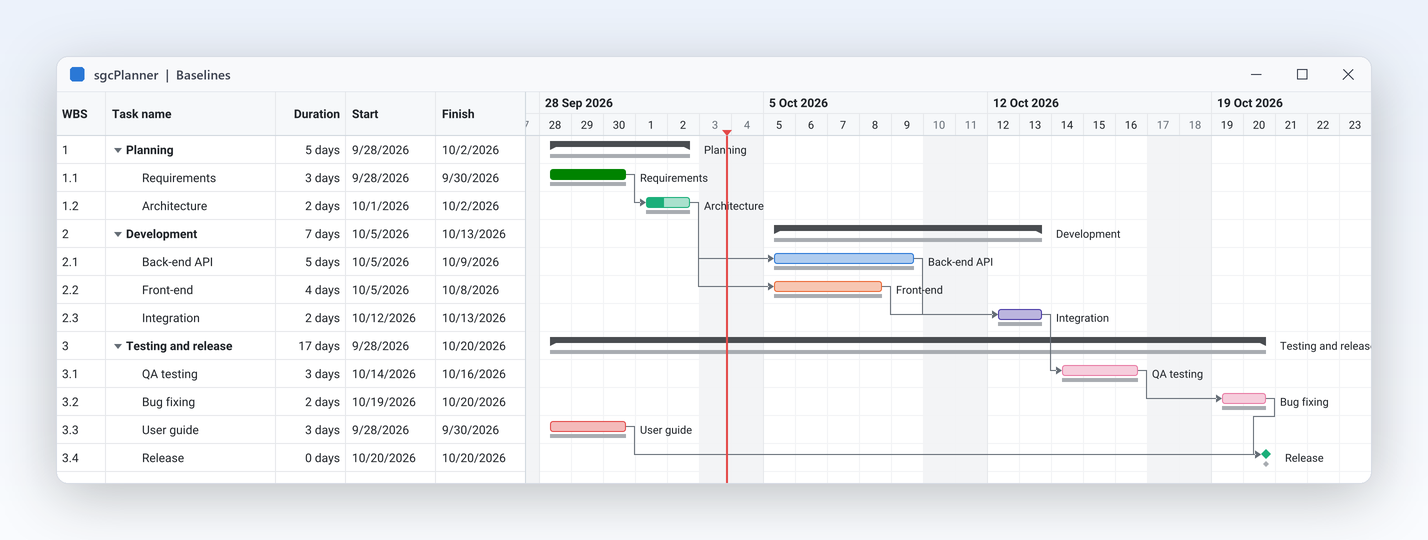
Gantt with grey baseline bars under the current bars and two tasks running late

Gantt: Plan Projects and Follow the Critical Path Registered only

Baselines show the slip at a glance

Stakeholders rarely ask what the plan is; they ask how far it has moved. Save a baseline when the plan is approved and the Gantt draws it as a thin bar under each current bar, so a late task is visible without reading a single date. The baseline dates are stored with the items, saved in JSON and exchanged with Microsoft Project XML, and your code can read them to build its own variance report.

  • SetBaseline copies Start and Finish of every item in one update
  • ShowBaseline draws the baseline bars
  • BaselineStart and BaselineFinish on every item
  • Saved in JSON and read from Microsoft Project XML

Community stores and saves the baseline dates but does not draw them; SetBaseline raises EsgcPlannerError.

Read the help topic

Gantt: Plan Projects and Follow the Critical Path Registered only

Exchange plans with Microsoft Project

Project offices receive plans from Microsoft Project and send them back. TsgcPlannerMSProject imports and exports Microsoft Project XML (MSPDI), the XML format that Project opens and saves, with tasks, links, the calendar, resources, assignments and baselines. An import can replace the plan or merge into it, and a document that is not well formed raises an error with its line number. Importing 10,000 tasks with 15,000 links took 264 ms in a Win64 development measurement. Resources and assignments come across with the tasks.

  • ImportFromFile, ImportFromStream and ImportFromString
  • ExportToFile writes the XML that Microsoft Project opens
  • ImportMode: pmiReplace (default) or pmiMerge
  • Malformed XML raises EsgcPlannerError with the line number

Not in the Community edition, where JSON is the file format.

Read the help topic

Gantt: Plan Projects and Follow the Critical Path

A three tier time scale and a resource histogram

Long plans read better with more context on the header, and overbooked people should be visible before the plan is published. The Gantt time scale can show a third tier, for example the month above the weeks above the days. A histogram pane at the bottom of the chart draws, for every tick, how much work each resource has against its working time, and the part over 100% is painted in the critical colour.

  • TimeScale.TierCount 3 adds a top tier, with TopFormat for its labels
  • ShowHistogram and HistogramHeight show the pane
  • HistogramResourceId shows one resource, or every resource stacked in its own colour
  • The pane follows the scroll and the zoom of the chart
Read the help topic

Kanban: Boards That Follow the Plan

TsgcVCLKanban and TsgcFMXKanban: one column per status, on the same data as the Gantt.

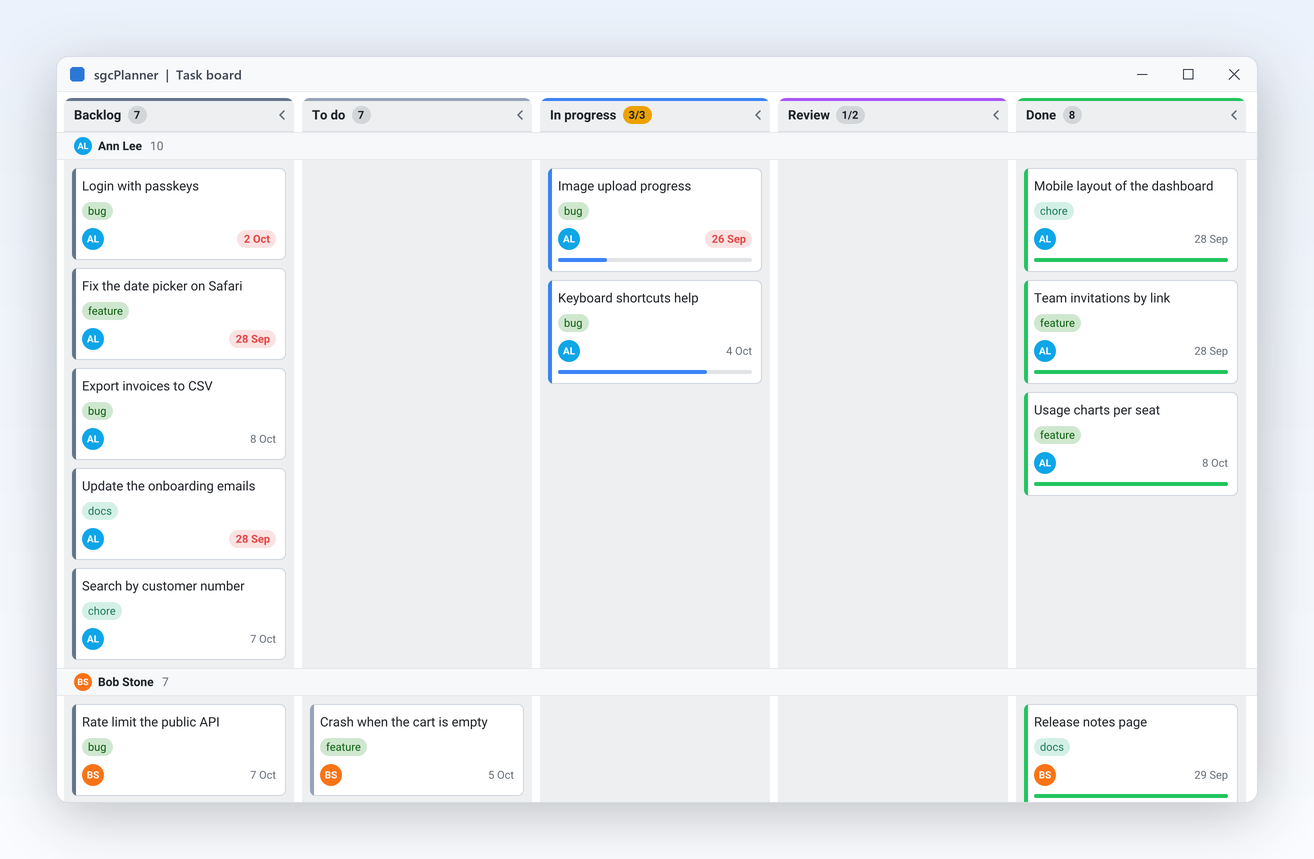
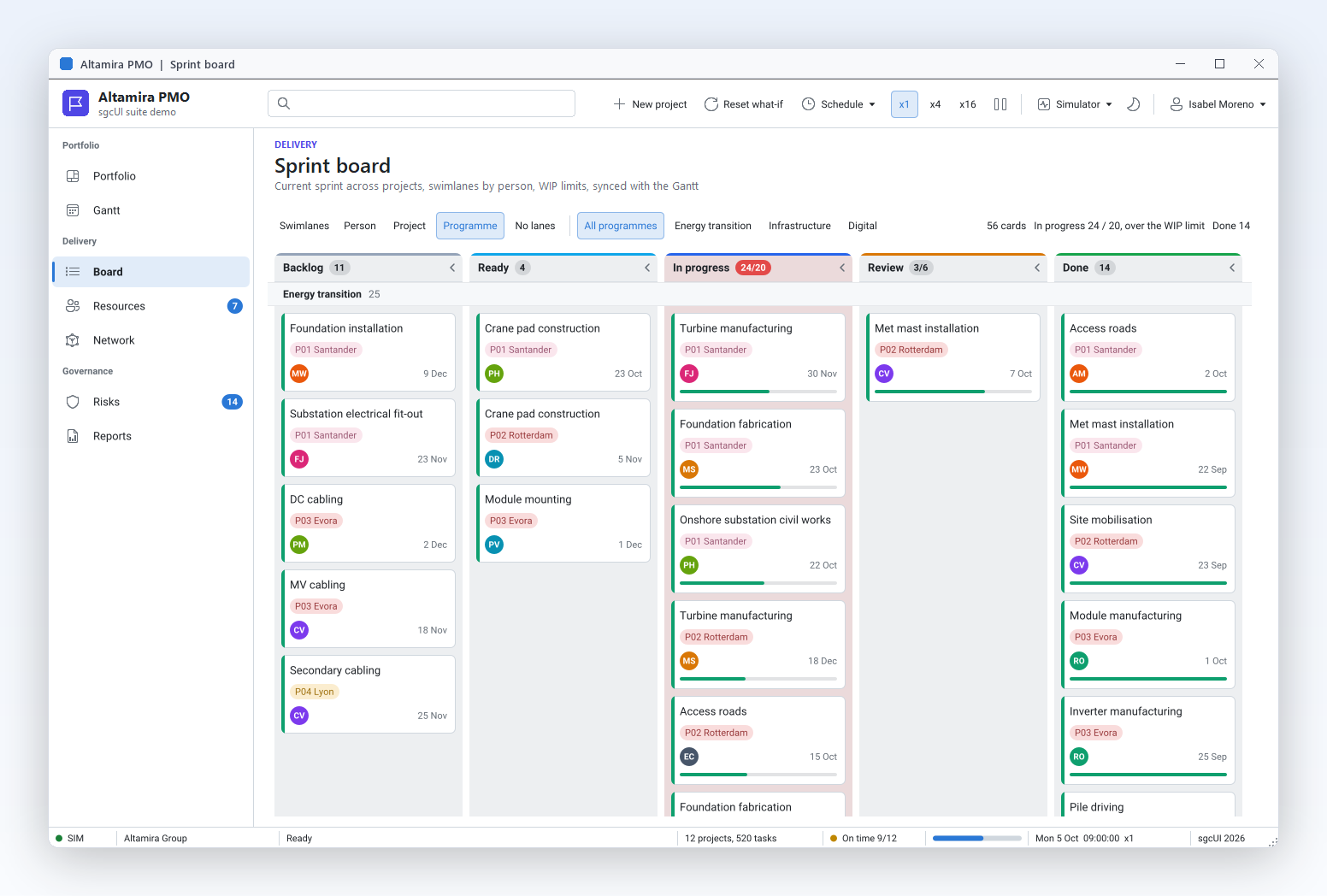
Kanban board with five status columns, tags, owner initials, due dates and progress bars

Kanban: Boards That Follow the Plan

A task board your team can work from

The people doing the work want a board, not a chart. The Kanban view builds one column per status, with a count badge and a collapse arrow, and each card shows its title, tags, resource initials, due date and progress. Dropping a card on another column changes its status and rank in the shared data, so the Gantt and the Scheduler update at once, and your code can veto any move before it happens. The board follows the same light or dark theme as the other views.

  • ColumnSource builds the columns from the statuses, or from your own Columns
  • CardOptions choose what a card shows
  • OnCardMoving accepts or refuses a drop
  • Column widths and collapsing work in every edition
Read the help topic
TaskBoard demo: five columns, three swimlanes by resource and one column over its limit

Kanban: Boards That Follow the Plan Registered only

Swimlanes and WIP limits keep work flowing

Swimlanes split it into horizontal bands by resource, parent task or tag, so each person or epic gets a row, and work in progress limits cap each column, counted across all lanes. In warn mode a column over its limit is marked; in block mode a card that would break the limit cannot be dropped. Laying out 5,000 cards in 8 columns and 6 lanes took 5 ms on Win64.

  • SwimlaneBy: pslResource, pslParent or pslTag
  • WIPLimit per column entry, 0 for no limit
  • WIPMode: pwmWarn marks the column, pwmBlock refuses the drop
  • Lanes and limits work on the same data as the other views

Community ignores SwimlaneBy and the WIP limits; columns, widths and collapsing work.

Read the help topic

Accessibility

UI Automation for screen readers, the keyboard and high contrast, with no setup.

Accessibility

Every view of the planner, readable and operable without a mouse

sgcPlanner exposes the Scheduler, Timeline, Gantt and Kanban views to Microsoft UI Automation: days, lanes and columns, the items with their times, and the Gantt dependencies. Everything that is dragged with the mouse can also be done with the keyboard.

  • Scheduler and Timeline: Ins adds an item at the focused slot, Del deletes it, Ctrl+Arrows move the item and Ctrl+Shift+Arrows change its end
  • Gantt: Ctrl+Left and Ctrl+Right move the task one tick, Ctrl+K starts a dependency, Ctrl+Shift+K cycles through the dependencies of the focused task
  • Kanban: Ctrl+Left and Ctrl+Right move the card to the adjacent column, Ctrl+Up and Ctrl+Down reorder it
  • Under a Windows high contrast theme the item colours of the application are replaced by system colours with outlines, so no information depends on colour alone

Accessibility is on by default in every edition, the free Community edition included, on VCL in every Delphi and C++Builder version from Delphi 7 to Delphi 13, on FireMonkey on Windows, and on WinForms, WPF and Avalonia. In Delphi and C++Builder, AccessibleName and AccessibleDescription set the name and the description exposed to UI Automation, and in .NET the standard accessible name and help text of each framework do the same. See the accessibility conformance reports.

Read the help topic

See sgcPlanner in action

sgcPlanner inside the sgcUI suite demos: complete applications that run offline with built-in simulated data.

Measured on Real Workloads

Development measurements of Win64 release builds at 1920 x 1080. Win32 is about 1.5 to 1.7 times slower.

MeasurementResultConditions
Auto schedule 10,000 tasks (1,000 summaries, 3 levels) with 15,000 links and 30 holidays, critical path included11 msWin64 release build
Gantt frame while scrolling 10,000 tasks with 15,000 links11 msWin64 release build, 1920 x 1080
Kanban layout of 5,000 cards in 8 columns and 6 lanes5 msWin64 release build
Scheduler week view with 2,000 timed items, layout1 msWin64 release build
Import 10,000 tasks with 15,000 links from MS Project XML264 msWin64 release build

Source: the help topic that documents these numbers.

Who Builds with sgcPlanner

Project and engineering software

Project offices and engineering firms

Plan a project as a work breakdown, link the tasks and let the engine schedule them on the company calendar while the critical path shows what drives the finish date. Save a baseline at approval and the slip shows under every bar. Plans arrive from Microsoft Project and go back to it as XML, and the same tasks appear on a board for the team.

  • Gantt with dependencies
  • Auto scheduling and critical path
  • Baselines
  • MS Project XML
Run the ProjectGantt demo

Booking and appointment systems

Clinics, workshops and room booking

Show each doctor, bay or meeting room as its own column and let staff book by dragging across free slots. Recurring appointments come from standard rules, public holidays arrive through an .ics subscription, and the Google Calendar bridge keeps a practitioner's own calendar in step. The dataset source writes every booking straight back to your tables. Staff see the same bookings in every view.

  • Scheduler views and resources
  • Recurrence
  • DataSet binding
  • Google Calendar sync
Run the TeamScheduler demo

Task tracking and help desk tools

Agile teams and service desks

Give the team a Kanban board with a swimlane per person and work in progress limits per column, and give the manager a Gantt of the same tickets. Moving a card to Done recolours the bar and the calendar event at once, because all three views share one data object. Status images for a nightly email can be rendered headless on a server.

  • Kanban
  • Swimlanes and WIP limits
  • Synchronised views
  • Headless rendering
Run the TaskBoard demo

A Team Scheduler in a Few Lines

The same API in Delphi, C++ Builder and C#: two people, a daily stand-up from a recurrence rule, and a week view that lets users drag new meetings.

A VCL week Scheduler: two people as resources, a daily stand up from a recurrence rule, drag to create.

unit frmTeam;

interface

uses
  Classes, Controls, Forms, SysUtils,
  sgcUICore_Theme, sgcPlanner_Data, sgcPlanner_Scheduler,
  sgcPlanner_Scheduler_VCL;

type
  TFormTeam = class(TForm)
    procedure FormCreate(Sender: TObject);
  private
    FData: TsgcPlannerData;
    FScheduler: TsgcVCLScheduler;
    procedure DoItemCreate(Sender: TObject; const aStart, aFinish: TDateTime;
      const aResourceId: string; var aTitle: string; var aAccept: Boolean);
  end;

implementation

procedure TFormTeam.FormCreate(Sender: TObject);
var
  vItem: TsgcPlannerItem;
  vMonday: TDateTime;
begin
  vMonday := Date - DayOfWeek(Date) + 2;
  FData := TsgcPlannerData.Create(Self);
  FData.Resources.AddResource('ana', 'Ana').Color := $FF2563EB;
  FData.Resources.AddResource('luis', 'Luis').Color := $FF0F766E;
  // a daily stand-up from an iCalendar recurrence rule
  vItem := FData.AddItem('standup');
  vItem.Title := 'Daily stand-up';
  vItem.Start := vMonday + EncodeTime(9, 0, 0, 0);
  vItem.Finish := vMonday + EncodeTime(9, 15, 0, 0);
  vItem.RecurrenceRule := 'FREQ=DAILY;BYDAY=MO,TU,WE,TH,FR';
  vItem.Resources := 'ana,luis';
  vItem := FData.AddItem('review');
  vItem.Title := 'Design review';
  vItem.Start := vMonday + 1 + EncodeTime(14, 0, 0, 0);
  vItem.Finish := vMonday + 1 + EncodeTime(15, 30, 0, 0);
  vItem.Resources := 'ana';

  FScheduler := TsgcVCLScheduler.Create(Self);
  FScheduler.Parent := Self;
  FScheduler.Align := alClient;
  FScheduler.Data := FData;
  FScheduler.Theme := utDark;
  FScheduler.View := psvWeek;
  FScheduler.Options.DayStartHour := 8;
  FScheduler.Options.DayEndHour := 18;
  FScheduler.Options.GroupByResource := True;
  FScheduler.OnItemCreate := DoItemCreate;
  FScheduler.ScrollToTime(vMonday + EncodeTime(8, 0, 0, 0));
end;

procedure TFormTeam.DoItemCreate(Sender: TObject; const aStart,
  aFinish: TDateTime; const aResourceId: string; var aTitle: string;
  var aAccept: Boolean);
begin
  // the user dragged an empty slot: name the new meeting
  aTitle := 'New meeting';
  aAccept := True;
end;

end.

Read the help topic →

The same scheduler in C++ Builder.

#include <vcl.h>
#pragma hdrstop
#include <System.DateUtils.hpp>
#include "sgcUICore_Theme.hpp"
#include "sgcPlanner_Data.hpp"
#include "sgcPlanner_Scheduler.hpp"
#include "sgcPlanner_Scheduler_VCL.hpp"

class TTeamHandlers : public TObject
{
public:
	// the user dragged an empty slot: name the new meeting
	void __fastcall ItemCreate(TObject *Sender, const TDateTime aStart,
		const TDateTime aFinish, const UnicodeString aResourceId,
		UnicodeString &aTitle, bool &aAccept)
	{
		aTitle = "New meeting";
		aAccept = true;
	}
};

void __fastcall BuildTeamScheduler(TForm *Form)
{
	static TTeamHandlers *vHandlers = new TTeamHandlers();
	TDateTime vMonday = Date() - DayOfWeek(Date()) + 2;
	TsgcPlannerData *vData = new TsgcPlannerData(Form);
	vData->Resources->AddResource("ana", "Ana")->Color = 0xFF2563EB;
	vData->Resources->AddResource("luis", "Luis")->Color = 0xFF0F766E;
	// a daily stand-up from an iCalendar recurrence rule
	TsgcPlannerItem *vItem = vData->AddItem("standup");
	vItem->Title = "Daily stand-up";
	vItem->Start = vMonday + EncodeTime(9, 0, 0, 0);
	vItem->Finish = vMonday + EncodeTime(9, 15, 0, 0);
	vItem->RecurrenceRule = "FREQ=DAILY;BYDAY=MO,TU,WE,TH,FR";
	vItem->Resources = "ana,luis";
	vItem = vData->AddItem("review");
	vItem->Title = "Design review";
	vItem->Start = vMonday + 1 + EncodeTime(14, 0, 0, 0);
	vItem->Finish = vMonday + 1 + EncodeTime(15, 30, 0, 0);
	vItem->Resources = "ana";

	TsgcVCLScheduler *vScheduler = new TsgcVCLScheduler(Form);
	vScheduler->Parent = Form;
	vScheduler->Align = alClient;
	vScheduler->Data = vData;
	vScheduler->Theme = utDark;
	vScheduler->View = psvWeek;
	vScheduler->Options->DayStartHour = 8;
	vScheduler->Options->DayEndHour = 18;
	vScheduler->Options->GroupByResource = true;
	vScheduler->OnItemCreate = vHandlers->ItemCreate;
	vScheduler->ScrollToTime(vMonday + EncodeTime(8, 0, 0, 0));
}

Read the help topic →

The C# version for WinForms.

using System;
using System.Windows.Forms;
using esegece.sgcPlanner;
using esegece.sgcUICore;

namespace TeamPlanner
{
    internal class MainForm : Form
    {
        public MainForm()
        {
            Text = "Team scheduler";
            DateTime monday = DateTime.Today.AddDays(-(((int)DateTime.Today.DayOfWeek + 6) % 7));

            var data = new TsgcPlannerData();
            data.Resources.AddResource("ana", "Ana").Color = 0xFF2563EB;
            data.Resources.AddResource("luis", "Luis").Color = 0xFF0F766E;

            // a daily stand-up from an iCalendar recurrence rule
            var item = data.AddItem("standup");
            item.Title = "Daily stand-up";
            item.Start = monday.AddHours(9);
            item.Finish = monday.AddHours(9).AddMinutes(15);
            item.RecurrenceRule = "FREQ=DAILY;BYDAY=MO,TU,WE,TH,FR";
            item.Resources = "ana,luis";

            item = data.AddItem("review");
            item.Title = "Design review";
            item.Start = monday.AddDays(1).AddHours(14);
            item.Finish = monday.AddDays(1).AddHours(15.5);
            item.Resources = "ana";

            var scheduler = new TsgcWinFormsScheduler { Dock = DockStyle.Fill, Data = data, Theme = TsgcUITheme.utDark };
            scheduler.View = TsgcPlannerSchedulerViewKind.psvWeek;
            scheduler.Options.DayStartHour = 8;
            scheduler.Options.DayEndHour = 18;
            scheduler.Options.GroupByResource = true;
            // the user dragged an empty slot: name the new meeting
            scheduler.OnItemCreate = (object sender, DateTime start, DateTime finish, string resourceId,
                ref string title, ref bool accept) => { title = "New meeting"; accept = true; };
            Controls.Add(scheduler);
            scheduler.ScrollToTime(monday.AddHours(8));
        }

        [STAThread]
        static void Main() { Application.EnableVisualStyles(); Application.Run(new MainForm()); }
    }
}
dotnet add package esegece.sgcPlanner.WinForms

Read the help topic →

Gantt in Delphi

Three tasks, two links, a baseline, the critical path and the schedule engine (the Gantt features here are Registered edition features).

unit frmGantt;

interface

uses
  Classes, Controls, Forms, SysUtils,
  sgcUICore_Theme, sgcPlanner_Data, sgcPlanner_Gantt, sgcPlanner_Gantt_VCL;

type
  TFormGantt = class(TForm)
    procedure FormCreate(Sender: TObject);
  end;

implementation

procedure TFormGantt.FormCreate(Sender: TObject);
var
  vData: TsgcPlannerData;
  vGantt: TsgcVCLGantt;
  vItem: TsgcPlannerItem;
  vStart: TDateTime;
begin
  vStart := Date + EncodeTime(8, 0, 0, 0);
  vData := TsgcPlannerData.Create(Self);
  vData.ProjectStart := vStart;
  vItem := vData.AddItem('1');
  vItem.Title := 'Design';
  vItem.Start := vStart;
  vItem.Finish := vStart + 3 + EncodeTime(9, 0, 0, 0);
  vItem.Progress := 100;
  vItem := vData.AddItem('2');
  vItem.Title := 'Build';
  vItem.Start := vStart;
  vItem.Finish := vStart + 6 + EncodeTime(9, 0, 0, 0);
  vItem.Progress := 40;
  vItem := vData.AddItem('3');
  vItem.Title := 'Release';
  vItem.Start := vStart;
  vItem.Finish := vStart;
  vItem.Milestone := True;
  // Build starts when Design finishes, Release when Build finishes
  vData.Dependencies.AddDependency('1', '2');
  vData.Dependencies.AddDependency('2', '3');

  vGantt := TsgcVCLGantt.Create(Self);
  vGantt.Parent := Self;
  vGantt.Align := alClient;
  vGantt.Data := vData;
  vGantt.Theme := utDark;
  vGantt.ShowCriticalPath := True;
  vGantt.SetBaseline;
  // the schedule engine moves the tasks to honour the links
  vGantt.Schedule;
end;

end.

Recurrence rules and the Gantt Schedule and SetBaseline calls are Registered edition features. The free Community edition shows a recurring item once.
Run the sgcPlanner Demos

Compiled demo executables are in sgcUI_bin.zip, nothing to install. The source of every demo ships with the package, for Delphi, C++ Builder and .NET.

ProjectPlanner

ProjectPlanner

Gantt, Kanban and Scheduler on one data object, always in sync.

TeamScheduler

TeamScheduler

Seven views with the year view, resource groups, recurring meetings, reminders, time zones, undo and redo and in place editing.

Registered only ProjectGantt

Links, auto scheduling, critical path, baselines, Microsoft Project XML, a three tier time scale and the resource histogram.

Registered only TaskBoard

Status columns, swimlanes by resource and WIP limits on a Kanban board.

DataSetPlanner

DataSetPlanner

Items, resources and dependencies bound to TDataSets, with edits written back.

Registered only ICalendarSync

Import and export .ics files.

ICalSubscription

Registered only ICalSubscription

Follow a read only .ics URL, such as a holiday list.

Registered only GoogleCalendarSync

Two way sync with one Google Calendar through sgcWebSockets.

Registered only OutlookCalendarSync

Two way sync with one Outlook calendar of Microsoft 365 or Outlook.com through Microsoft Graph.

Registered only CalDAVSync

Two way sync with one CalDAV calendar, such as Nextcloud, iCloud, Fastmail or Radicale.

HeadlessReport

Renders the views to image files without a window.

PlannerFMX

The three views in a FireMonkey application.

Compiled demos

Ready to run executables of every sgcUI product, nothing to install.

Download sgcUI_bin.zip →

Where sgcPlanner Is Included

sgcPlanner is part of sgcUI Enterprise, and it is also sold on its own. sgcPlanner is also included in the All-Access bundle.

sgcPlanner single package

€249 / developer, full source code, 1 year of updates.

Buy sgcPlanner → See pricing →

sgcUI Enterprise

All 14 sgcUI products, from €699.

See Enterprise →

.NET

The .NET edition has the same price. A free Community edition is on NuGet as esegece.sgcPlanner.Community.

See pricing →

The free Community edition is esegece.sgcPlanner.Community on NuGet. The table shows what it includes.

FeatureCommunity (free)Registered
Scheduler day, work week, week, month and agenda views✓✓
Gantt task tree, summaries, milestones and progress✓✓
Kanban columns, collapsing and card options✓✓
Drag and drop in every view✓✓
DataSet binding, JSON, themes and headless PNG and SVG✓✓
Scheduler Year view✓✓
Reminders and per item time zones✓✓
Undo and redo, in place editing✓✓
Three tier Gantt time scale and resource histogram✓✓
Recurrence−✓
Scheduler resource Timeline view−✓
Dependency arrows and drag to link−✓
Auto scheduling, critical path and baselines−✓
Swimlanes and WIP limits−✓
iCalendar and Microsoft Project XML−✓
Google Calendar, Outlook and CalDAV sync and iCal subscription (sgcPlannerWS)−✓

Supported Frameworks and Platforms

Components in sgcPlanner

ComponentWhat it does
TsgcPlannerDataThe shared model: items, resources, statuses, dependencies and working calendar.
TsgcVCLScheduler, TsgcFMXSchedulerDay, work week, week, month, year, agenda and timeline views.
TsgcVCLGantt, TsgcFMXGanttTask tree, bars, links, schedule engine, critical path and baselines.
TsgcVCLKanban, TsgcFMXKanbanStatus columns, cards, swimlanes and WIP limits.
TsgcPlannerSource_DataSetPlan from a TDataSet.
TsgcPlannerICalendar, TsgcPlannerMSProjectRead and write iCalendar .ics files and Microsoft Project XML (Registered).
TsgcPlannerRendererHeadless PNG and SVG output.
TsgcPlannerGoogleSync, TsgcPlannerGraphSync, TsgcPlannerCalDAVSync, TsgcPlannerICalSubscription (sgcPlannerWS)Two way sync with Google Calendar, with Outlook and Microsoft 365 through Microsoft Graph and with CalDAV servers, and iCal subscriptions, through sgcWebSockets. Registered only.
TargetComponentPlatforms
Delphi 7 to 13, VCLScheduler, Gantt, KanbanWin32 and Win64
Delphi XE6 to 13, FireMonkeyTsgcFMXScheduler, TsgcFMXGantt, TsgcFMXKanbanWindows, macOS, iOS and Android
C++ Builder 2007 to 13VCL and FMX viewsGenerated .hpp headers and static libraries
Delphi 10.2 to 13, framework neutralData, engines, JSON, iCalendar, Microsoft Project, rendererLinux64, for example to render plans on a server
.NET Framework 4.7.2, .NET 8, 9 and 10TsgcWinFormsScheduler, Gantt and Kanban, and the WPF and Avalonia twinsWinForms, WPF, Avalonia, headless PNG and SVG

Frequently Asked Questions

Yes, in the Registered edition. TsgcPlannerMSProject reads and writes Microsoft Project XML (MSPDI) with tasks, links, the calendar, resources, assignments and baselines. The XML format is the one supported, so save the plan as XML in Project.

Yes, both ways. Google Calendar syncs through TsgcPlannerGoogleSync, Outlook calendars of Microsoft 365 and Outlook.com sync through Microsoft Graph with TsgcPlannerGraphSync, and CalDAV calendars, such as Nextcloud, iCloud, Fastmail or Radicale, sync with TsgcPlannerCalDAVSync. Any other calendar that publishes an .ics URL can be followed read only with TsgcPlannerICalSubscription, and .ics files import and export with TsgcPlannerICalendar. The bridges need the Registered edition and sgcWebSockets.

The help publishes development measurements of Win64 release builds: auto scheduling 10,000 tasks with 15,000 links took 11 ms, and a frame while scrolling the same 10,000 tasks took 11 ms. A Kanban layout of 5,000 cards took 5 ms. Win32 is about 1.5 to 1.7 times slower.

The three views with drag and drop, summaries, milestones, progress, the working calendar, DataSet binding, JSON and headless output. Recurrence, auto scheduling, drawn dependencies, critical path, baselines, the Timeline view, swimlanes, WIP limits, iCalendar, Microsoft Project XML and the bridges are Registered.

Yes. TsgcPlannerSource_DataSet binds the data object to any TDataSet, such as FireDAC, TClientDataSet or dbExpress. It loads items, resources and dependencies through field maps, follows the changes of the datasets and writes the edits made in the views back.

Yes, through FireMonkey: TsgcFMXScheduler, TsgcFMXGantt and TsgcFMXKanban run from Delphi XE6 on Windows, macOS, iOS and Android. On Linux64 the data model, the engines, JSON, iCalendar, Microsoft Project XML and the renderer compile from Delphi 10.2.

Yes. TsgcPlannerRenderer draws the Scheduler, the Gantt or the Kanban of a data object to PNG or SVG without a window, on Windows or Linux64, in the light or the dark theme.

sgcPlanner Help

3,000+Developers
20+Years
761+Components
30+API Integrations
5Platforms
30-Day Money-Back GuaranteeNot satisfied? Request a full refund within 30 days of purchase. See refund policy

Try sgcPlanner Today

The sgcUI trial includes sgcPlanner and every other sgcUI product.