sgcMaps ships in the sgcUI All-Access trial, one installer for Delphi and one for C++ Builder with all 17 sgcUI products. Download the fully functional trial, run the compiled demos with no IDE, or add the NuGet packages to a .NET project. Licenses are available on the pricing page.
TRIAL
Free Trial Downloads
One sgcUI trial installs every sgcUI product, sgcMaps included, with full functionality for evaluation.
New to sgcMaps? Start with the five QuickStart demos for Delphi (VCL) in Demos\Maps\00.QuickStart and read the Getting Started guide (PDF), which walks through them step by step.
sgcUI Trial for Delphi
Fully functional evaluation for Delphi 7 through RAD Studio 13 with all 17 sgcUI products, sgcMaps included, and the demo projects.
Ready to run executables of every sgcUI product. The sgcMaps demos are OfflineMap, MapFeatures, Services, OfflineServices, StaticRender (console), FMX, VectorTiles, FMXMobile, OGCServices, PMTiles and ShapefileWKT.
sgcMaps with every feature, the offline pack included, plus the other 16 sgcUI products
The core, VCL and FireMonkey packages (sgcMaps, sgcMapsVCL and sgcMapsFMX) for Delphi 7 to 13, FireMonkey from XE6, and C++ Builder 2007 to 13 in the C++ Builder trial
The eleven Delphi demo projects for sgcMaps and the help
A build compiled with the trial shows a notice once the release window named in the build has passed; nothing else changes
FIRST RUN
Three Steps to a Running sgcMaps
Install the trial, run a demo, then drop sgcMaps on your own form.
1
Install
Run the sgcUI trial installer. It installs sgcUICore with sgcMaps and registers TsgcVCLMap, TsgcFMXMap and the service components in the IDE.
2
Open a demo
Open 02 MapFeatures from Demos\Maps in the installation folder and run it: OpenStreetMap tiles load, and the tabs show clustering, drawing and heatmaps.
3
Drop the map
On a new VCL form, drop a TsgcVCLMap, add a layer with Provider set to mtpOpenStreetMap, call sgcMapApplyProvider and add a marker with AddMarker.
DEMOS
Run the sgcMaps Demos
Registered only OfflineMap
Folder, MBTiles and online tiles, markers and shapes, plus GeoJSON, GPX and KML import.
MapFeatures
Providers and API keys, marker clustering, shape editing, heatmaps and image export.
Services
Place search, geocoding, directions, elevation, time zones and device location with the online providers. Delphi XE8 and later.
Registered only OfflineServices
Build a GeoNames index and an OpenStreetMap route graph, then search places and route a car, bike or walk with no network.
StaticRender
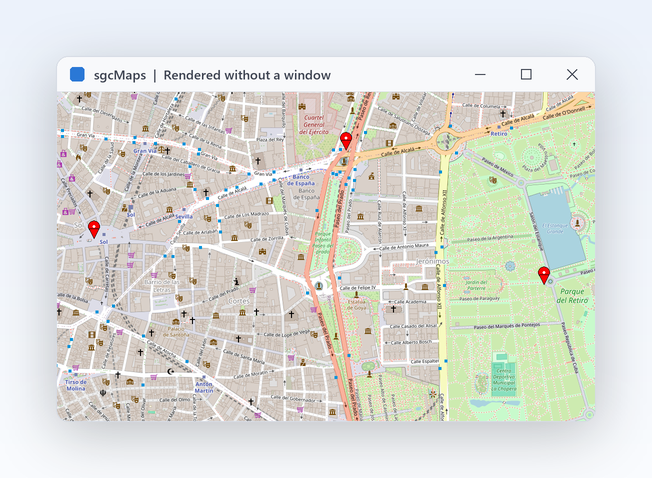
A console program that renders a map to a PNG or BMP file with no window.
FMX
The FireMonkey map with tiles, markers and device location, for Windows, macOS, iOS and Android. Delphi XE6 and later.
VectorTiles
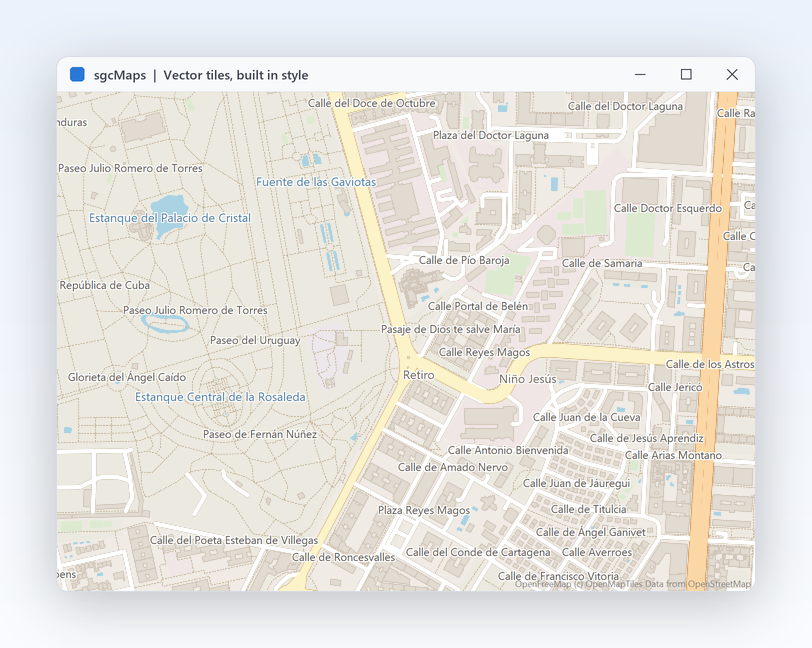
A vector tile server drawn with the built in style or a style file of your own, with crisp labels at every zoom.
FMXMobile
The FireMonkey map made for phones and tablets: one finger pan, pinch zoom, big zoom buttons, your position with an accuracy circle and a list of places. Delphi 10.4 and later.
OGCServices
Loads a WMS or WMTS capabilities document from a URL or a file, lists the layers and adds the one you pick as an overlay on OpenStreetMap, with an opacity slider. Delphi 2009 and later.
Registered only PMTiles
Opens a raster or vector PMTiles archive from a file or a URL, shows its header and metadata, and adds it as a layer centred on the archive. Delphi XE2 and later.
ShapefileWKT
Imports a shapefile with its attribute table, shows the record of a clicked marker, and imports and exports WKT.
WinFormsDemo
The .NET SgcMapControl in a WinForms window with providers, markers and shapes.
WpfDemo
The WPF map declared in XAML: base layers and markers in markup, stores bound as markers with ItemsSource, zoom and bearing sliders, printing and PDF export.
AvaloniaDemo
The same window with the Avalonia 12 map control and compiled bindings.
OgcServicesDemo
The WinForms map control with an OpenStreetMap base layer and one overlay from a WMS or WMTS service: loads a capabilities document from a URL or a file, lists the layers, adds the one you pick with an opacity slider and shows tile errors.
Registered only PMTilesDemo
The WinForms map control with a layer from a raster or vector PMTiles archive, opened from a file or a URL, with its header and metadata and the map centred on the archive.
ShapefileWktDemo
The WinForms map control importing a shapefile with its attribute table and the record of a clicked marker, plus WKT import and export of the overlays.
Registered only OfflineDemo
The .NET offline package: offline tiles, routing and geocoding from local data files.
ConsoleRenderDemo
A .NET console that renders a map to PNG with the headless MapView, on Windows or Linux.
Delphi 7 to 13 and C++ Builder 2007 to 13 for the model, the VCL control, shapefiles and WKT, with minimums per feature: PNG output, tiles from a server, WMS, WMTS and the downloader from Delphi 2009; route calculator, offline router, vector tiles from a server and PMTiles from XE2; FireMonkey control, device location and GeoJSON from XE6; MBTiles and offline geocoder from XE7 (FireDAC SQLite); online services from XE8.
FireMonkey
Windows from XE6; macOS, iOS and Android from Delphi 10.4 (macOS ARM from Delphi 11). Device location on Windows, Android, iOS and macOS. In C++ Builder, Windows only.
Linux 64 bit
The framework neutral core units from Delphi 10.4, with no map control.
Lazarus
A Lazarus LCL control that reads tiles from disk only.
.NET
.NET 8, .NET 9 and .NET 10 (WinForms and WPF on net8.0-windows, net9.0-windows and net10.0-windows, Avalonia 12 on net8.0, net9.0 and net10.0). The headless MapView also renders PNG on Linux.
.NET
sgcMaps for .NET
sgcMaps also ships as a managed C# port with the same class names for WinForms, WPF and Avalonia, delivered as NuGet packages.
NuGet Packages
Install the free Community edition with dotnet add package esegece.sgcMaps.Community, or the Registered edition with dotnet add package esegece.sgcMaps. The controls for your UI framework are in esegece.sgcMaps.WinForms, esegece.sgcMaps.Wpf and esegece.sgcMaps.Avalonia.
The free Community edition of sgcMaps can be used by individuals and organizations under EUR 1M annual gross revenue with no more than 5 developers. The Registered edition has every feature, full source code and the commercial license. The Community edition leaves out the offline pack (tile downloader, MBTiles and PMTiles tile sources, offline geocoder and offline router) and the esegece.sgcMaps.Offline package.
NUGET
sgcMaps NuGet Packages
The Community packages are free. The Registered packages need a .NET license.