Delphi, C++ Builder & .NET Part of sgcUI

sgcReports, the Report Engine for Delphi, C++ Builder & .NET

Design a report once and deliver it as an accessible PDF, an Excel file, a CSV or PNG pages. Build it in code with a fluent chain or load a JSON definition at run time, with groups, subtotals, master detail and barcodes. The engine needs no window and no external DLL, so it runs in services and Linux64 daemons.

PDF/UA-1 tagged PDF by defaultPDF, XLSX, CSV and PNGWindows services and Linux64Included in sgcUI Enterprise
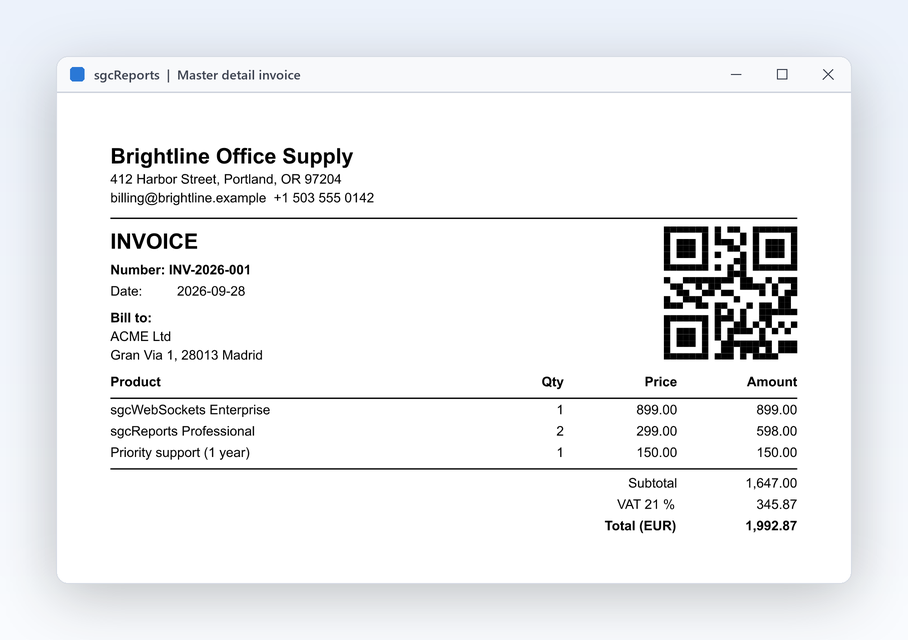
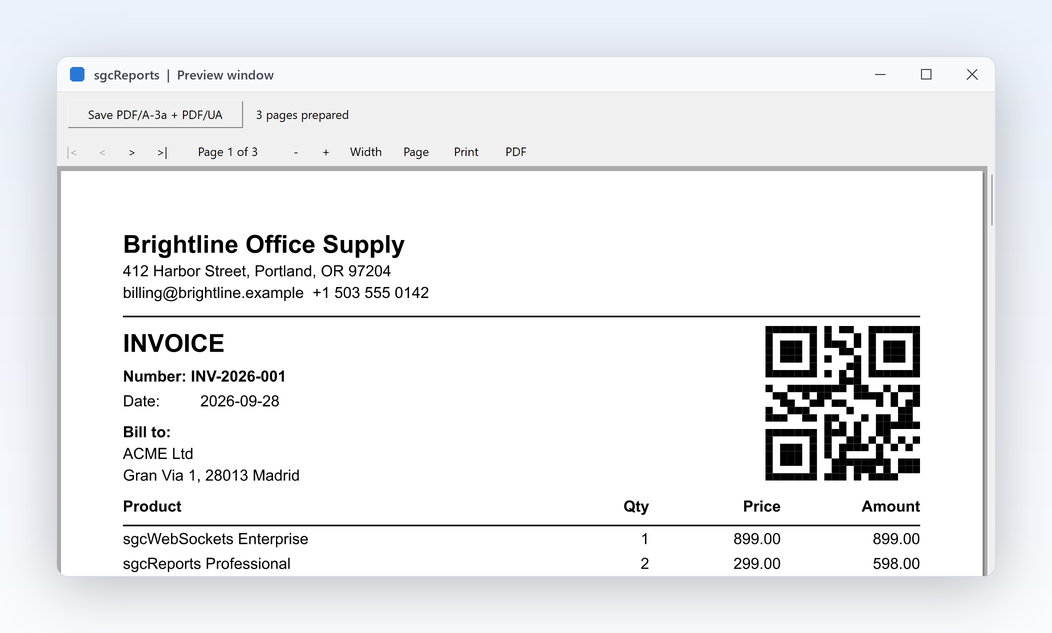
sgcReports preview window with an invoice page and a QR code

Everything a Report Engine Needs

Eleven features, each with the real API and the help topic behind it.

Design the report

Describe a report in code or in JSON, with real bands, groups and expressions.

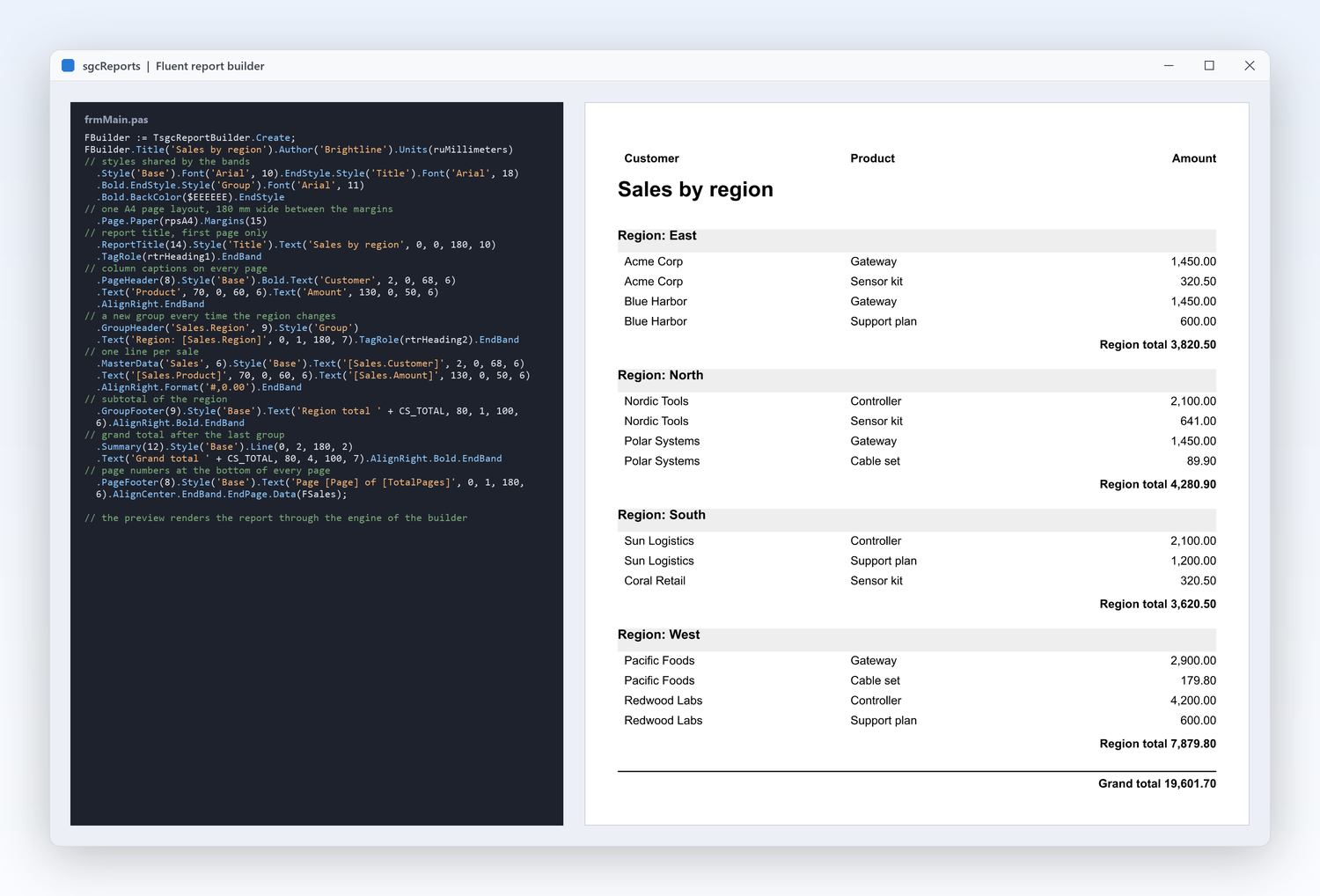
Write a complete report in a few readable lines

Design the report

Write a complete report in a few readable lines

Report designers are great until the layout has to live in version control, be reviewed in a pull request or be generated from your own metadata. TsgcReportBuilder describes styles, pages, bands and items as one fluent chain, so a report is plain code that compiles, diffs and refactors with the rest of your project. The same chain prepares the report and saves it to every output format. Reports built this way can be generated in a loop, shared as functions and covered by unit tests like any other code.

  • Style, Page, GroupHeader, MasterData, GroupFooter and PageFooter read like the layout
  • SaveToPDF, SaveToXLSX, SaveToCSV and SaveToPNG straight from the builder
  • Stream variants such as SaveToPDFStream for web responses
  • The builder fills a normal TsgcReport model you can still adjust in code
  • Right to left for Arabic and Hebrew: RightToLeft on the report and BiDiMode on bands and items mirror the layout, with shaped Arabic and Hebrew text in the PDF, XLSX and HTML outputs
Read the help topic
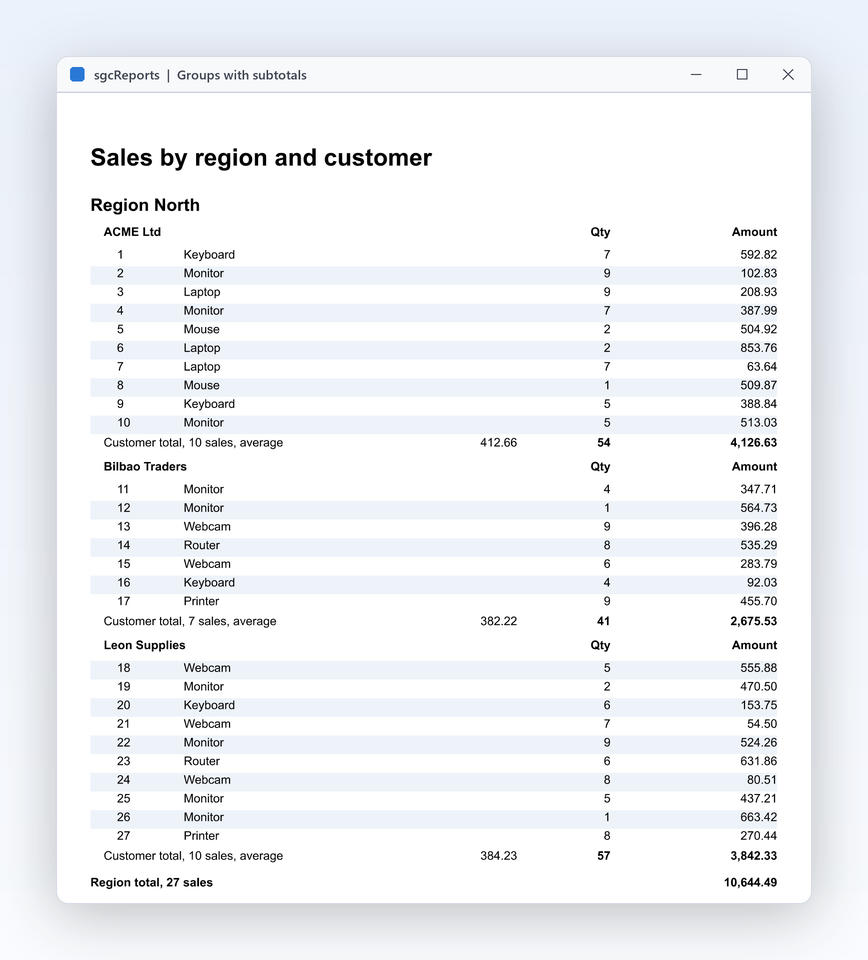
Groups, subtotals and page numbers that just work

Design the report

Groups, subtotals and page numbers that just work

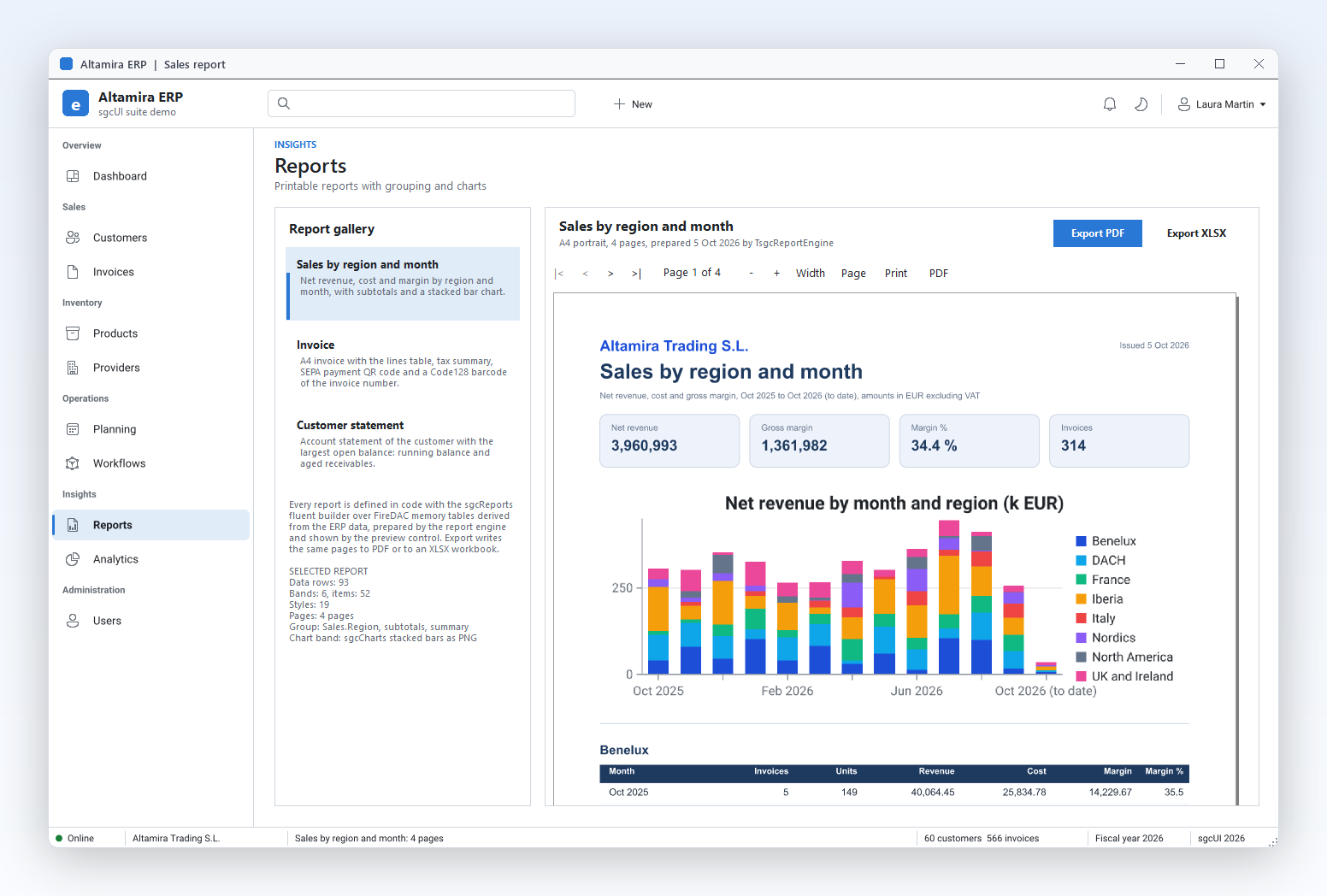
Business reports are rarely a flat list: sales by region, invoices by customer, stock by warehouse. sgcReports has a real banded layout with report title, page header, group header, data, group footer, page footer and summary bands. A group breaks when its expression changes, prints its own totals and can start a new page or repeat its header on every page, so long reports stay readable. Subreports let one page include the layout of another, for summaries and appendices.

  • GroupExpression on a group header band, nested groups for two or more levels
  • StartNewPage, RepeatOnEveryPage and KeepTogether control the page flow
  • Band types from rbtReportTitle to rbtReportSummary, plus column headers and footers
  • TotalPages in expressions for "Page 2 of 7" footers
  • PrintOnFirstPage and PrintOnLastPage decide where page bands appear; SubreportPageName embeds another page
Read the help topic
Invoices straight from your database

Design the report

Invoices straight from your database

An invoice is a master record with its lines, and every line needs the right product, quantity and price. A dataset source binds any TDataSet, FireDAC included, and links a detail source to its master by key fields, so each invoice prints its own lines and totals. JSON arrays and your own event driven sources work the same way when the data does not live in a database. The detail band repeats for each line of the current master record, and the footer prints the invoice total with an aggregate expression over the lines.

  • TsgcReportDataSetSource with MasterSource, MasterFields and DetailFields
  • TsgcReportJSONSource reads a JSON string or file, RecordsPath picks the array
  • TsgcReportEventSource pulls rows from your code through OnFirst, OnNext and OnGetValue
  • Sources are registered on the engine with AddDataSource
Read the help topic
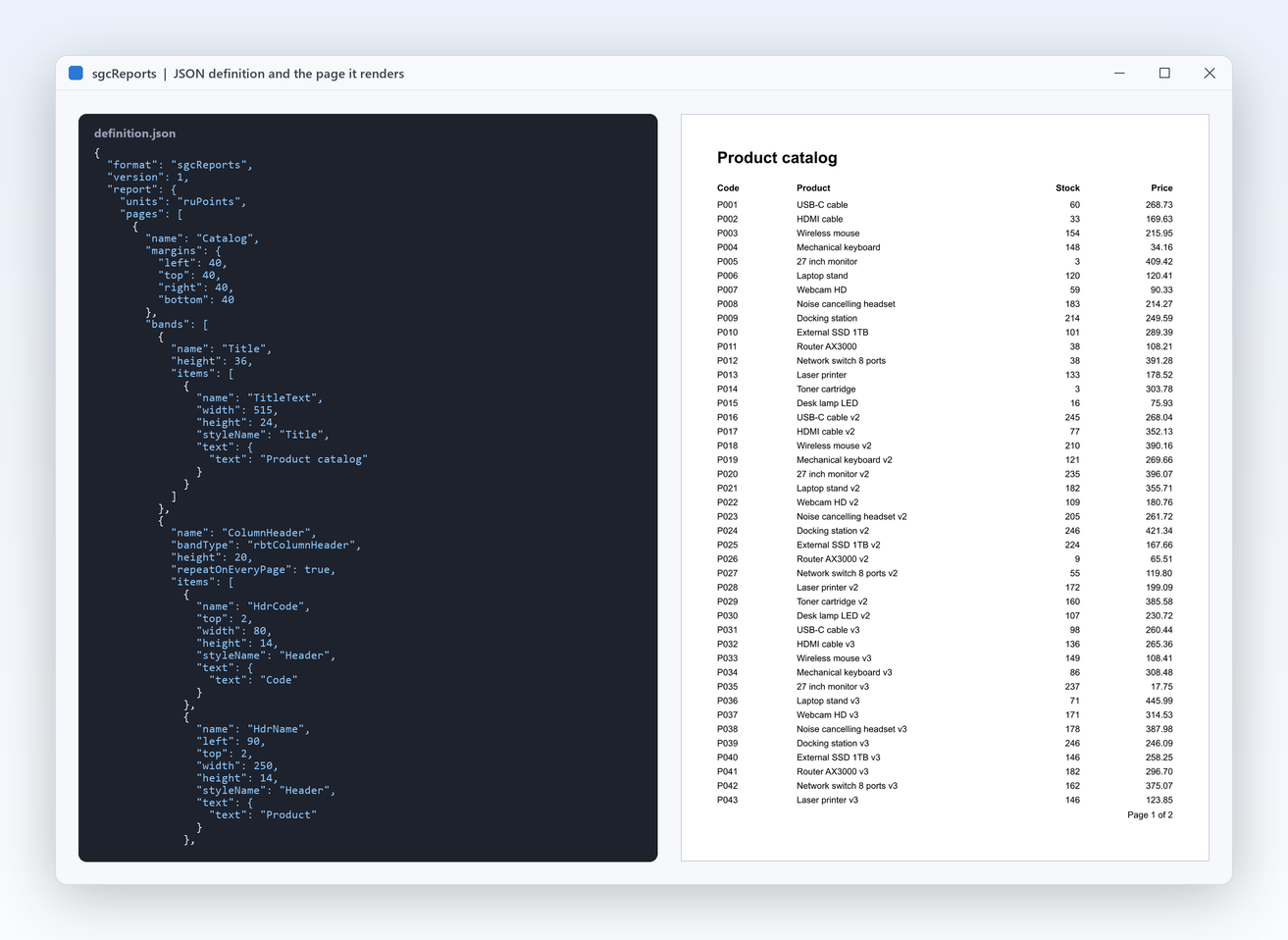
Change a report without recompiling

Design the report

Change a report without recompiling

A new column on the monthly statement should not need a new release of your application. Report definitions can be saved to and loaded from JSON, so layouts can live in a database, a configuration folder or a customer specific directory. The application loads the definition at run time, binds the data and renders it, and the same file feeds the web designer. Definitions are plain text, so they diff cleanly in version control and can be generated by your own tools or migrated with a script.

  • sgcReportLoadFromJSON and sgcReportSaveToJSON, plus file and stream variants
  • sgcReportGenerateSchema writes a JSON schema for editors and validation
  • Errors name the JSON path of the offending member
  • The ReportJSONDefinition demo edits a definition and its data side by side
Read the help topic
Expressions and barcodes in any band

Design the report

Expressions and barcodes in any band

Totals, formatted dates, conditional text and shipping labels all come down to expressions and barcodes. Any text item can hold expressions in brackets, such as a formatted sum of a field, with string, number and date functions built in. Barcodes are items too, drawn as vectors by the sgcPDF engine, so labels and delivery notes print sharp at any size. Expressions are evaluated by the engine for every row, so a footer total always matches the lines printed above it.

  • Aggregates and functions: Sum, FormatFloat, FormatDateTime, Upper, Round, IsNull
  • OnGetVariable supplies your own variables at run time
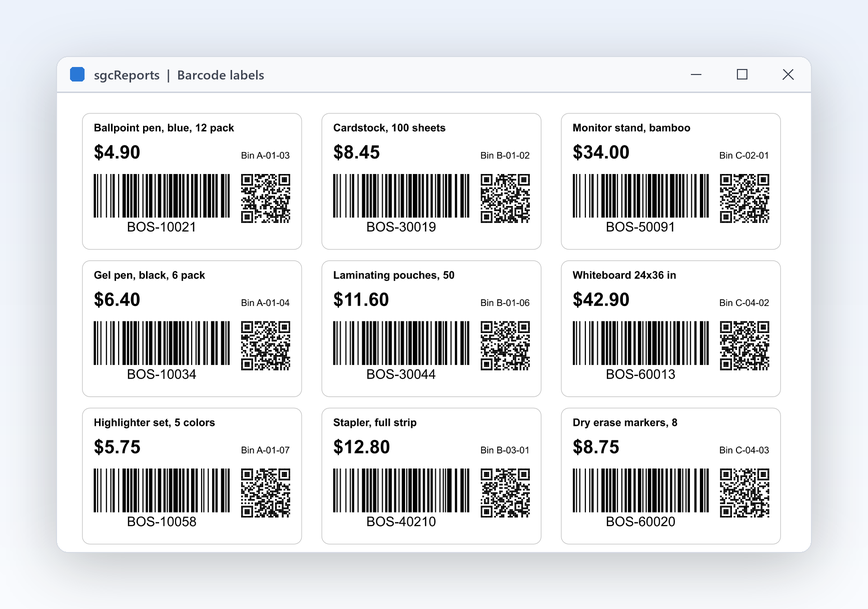
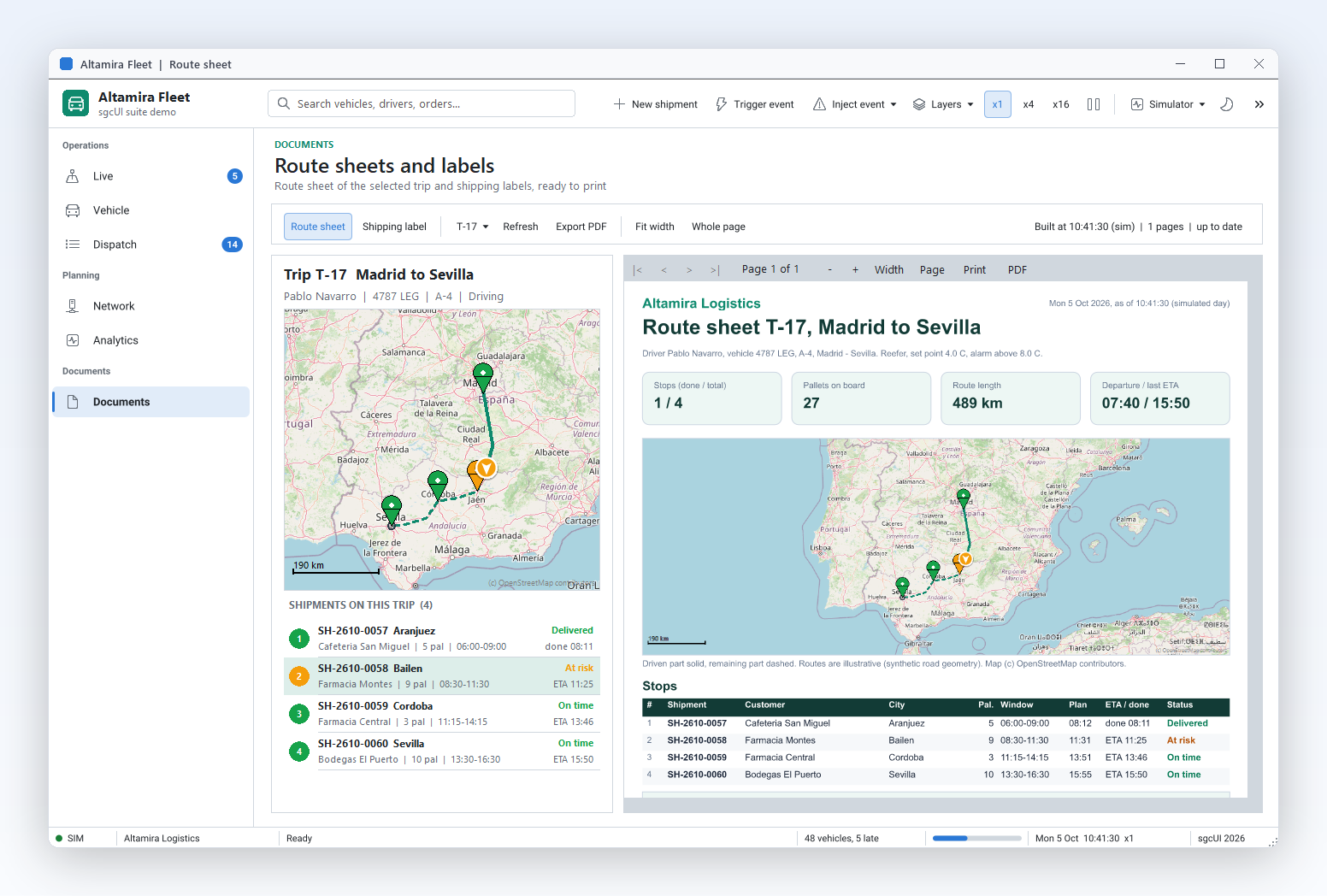
  • Barcode in the builder with rbsCode128, rbsEAN13, rbsQRCode, rbsDataMatrix, rbsPDF417 and more
  • GS1-128, ITF, Codabar, UPC-A and Code 39 for logistics labels
Read the help topic

Deliver it anywhere

Prepare once, then export to the formats your users and regulators ask for.

Accessible PDF by default, PDF/A on request

Deliver it anywhere

Accessible PDF by default, PDF/A on request

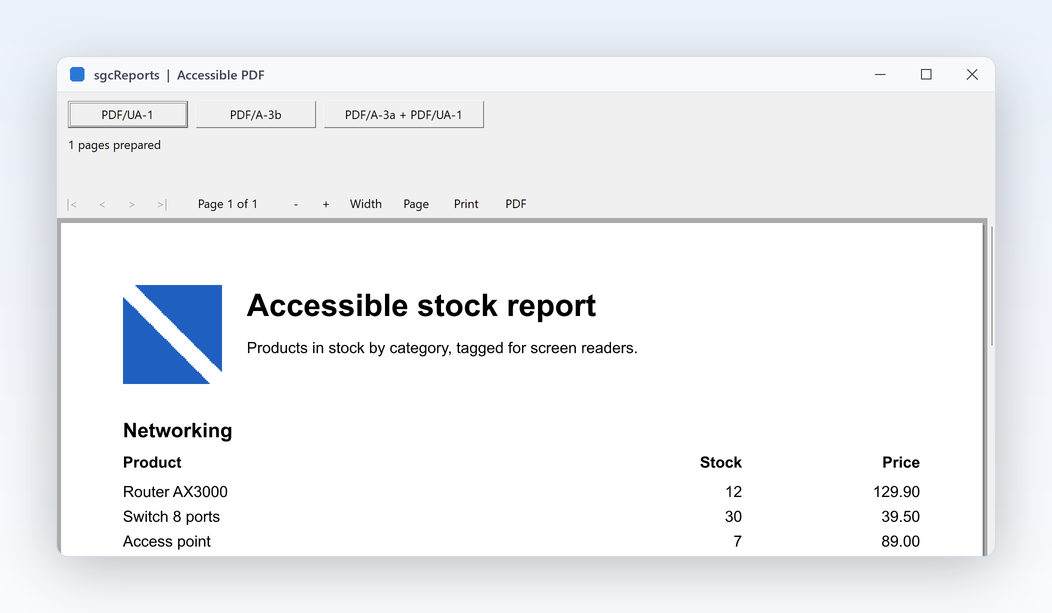
Public bodies and many companies now have to publish documents that screen readers can follow, and archives need files that still open in twenty years. The PDF export writes tagged PDF/UA-1 by default, with a logical reading order, alternative text for images and marked headings. Switch on PDF/A-3 when the document goes to a long term archive. In Delphi and .NET, the export also writes PDF/A-4 and PDF/UA-2. Fonts are embedded through the same font manager the preview uses, and the help walks through validating a file with the free veraPDF tool.

  • PDFUA is True by default on TsgcReportPDFExport
  • AltText and TagRole on items describe images and headings
  • PDFA set to rpaA3b or rpaA3a for archival output
  • FixedDocumentID and FixedCreationDate make output byte for byte reproducible for tests
Read the help topic
One report, every format your users ask for

Deliver it anywhere

One report, every format your users ask for

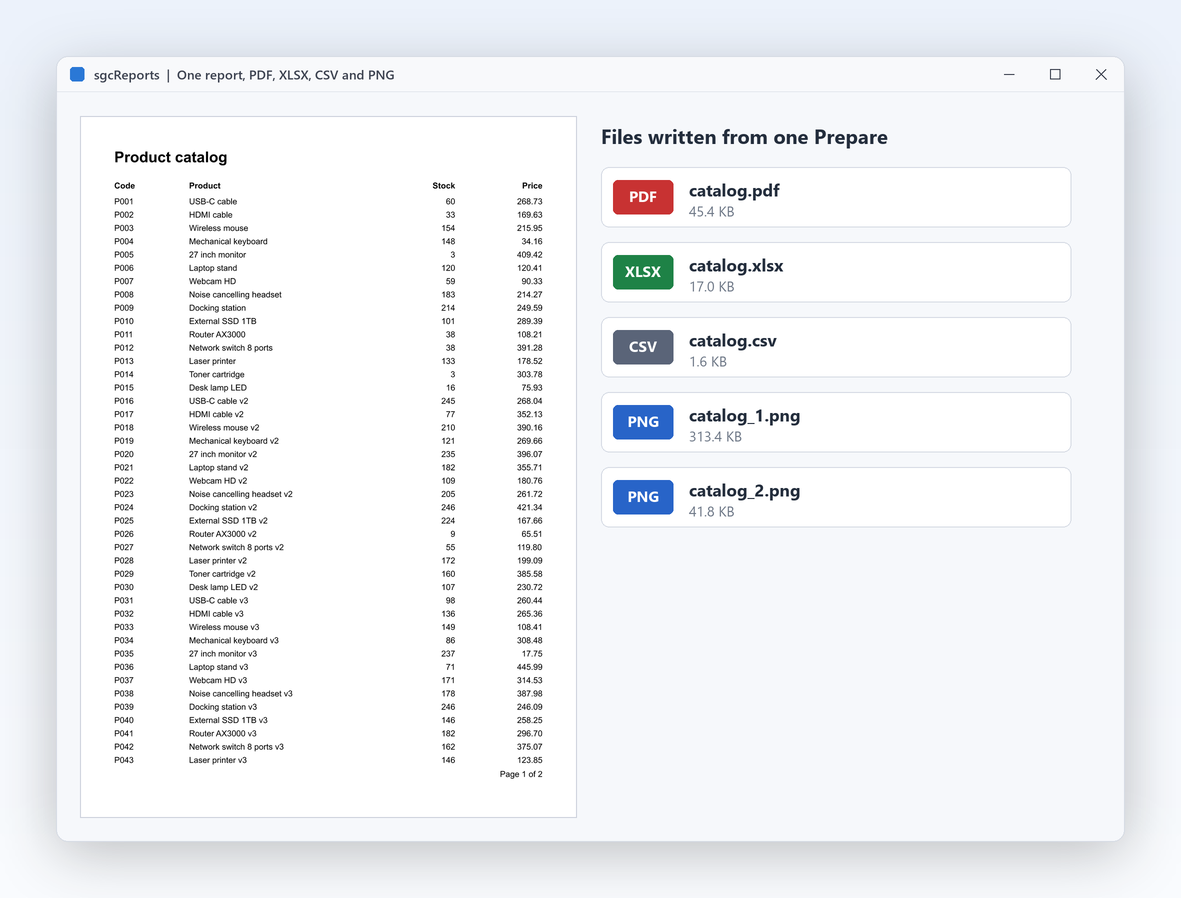
Finance wants the statement in Excel, the customer wants a PDF, the integration wants a CSV and the web page wants a thumbnail. The engine prepares the pages once and every export works from the same prepared result, so the numbers are identical in every file. XLSX output keeps numbers as numbers, so the spreadsheet can sum them without cleanup. Every export can also write to a stream, which is what a web response or a mail attachment needs, and SaveToFiles writes several formats in one call.

  • TsgcReportPDFExport, TsgcReportXLSXExport, TsgcReportCSVExport, TsgcReportImageExport
  • TsgcReportPreparedPages with LoadPrepared feeds several exports from one run
  • DetectNumbers, SheetName and ExcludePageBands shape the spreadsheet
  • PNG pages at the DPI you pass to SaveToPNG
Read the help topic
A preview window for desktop applications

Deliver it anywhere

A preview window for desktop applications

Users want to page through a report before they print or save it. The preview control shows the prepared pages with the same rendering as the PDF, with page navigation, zoom and fit modes and a toolbar you can hide when you build your own. The VCL preview runs on Windows; the FireMonkey preview runs on Windows. The preview draws through the sgcPDF viewer control, so what users see on screen is what the PDF export writes, and SaveToPDF on the preview saves the pages they are looking at.

  • TsgcReportPreviewVCL with FirstPage, NextPage, PriorPage and LastPage
  • ZoomIn, ZoomOut, FitWidth and FitPage
  • ShowToolbar, CurrentPage and OnPageChange for your own navigation
  • TsgcReportPreviewFMX: FireMonkey preview on Windows
Read the help topic

Deliver it anywhere

Runs headless in services and Linux daemons

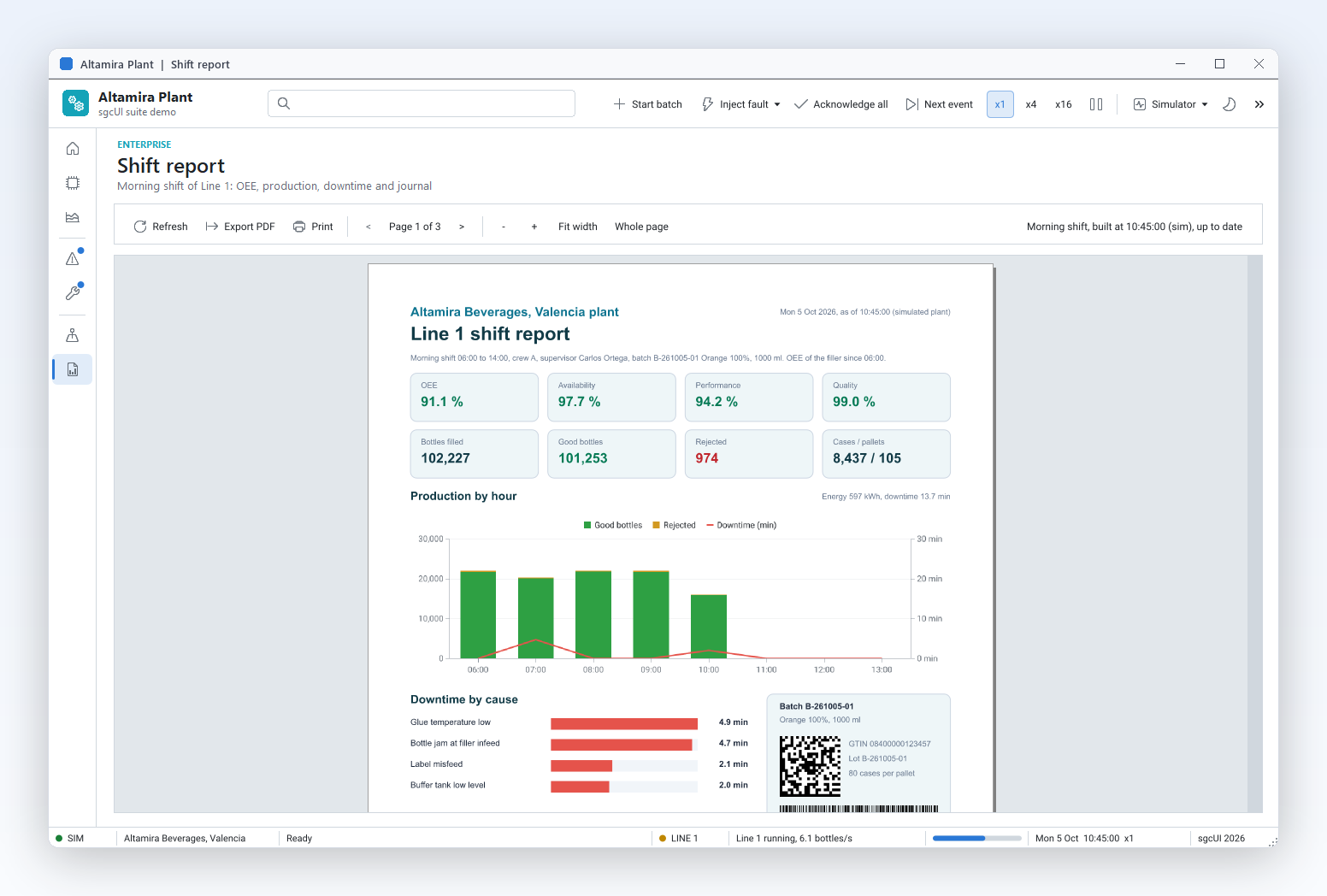
Most reports today are generated on a server: nightly statements, invoices after checkout, exports behind an API. The sgcReports core has no VCL or FireMonkey dependency and needs no external DLL or printer driver, so the same code runs in a Windows service or a Linux64 daemon. The help documents a worker pool pattern where each thread owns its own engine. Jobs, data and report definitions can arrive as JSON files, so a daemon can be fed by any system that can write a file.

  • TsgcReportEngine prepares reports with no window
  • The ReportLinuxDaemon demo watches a jobs folder and renders PDF, XLSX, CSV or PNG with 4 worker threads
  • sgcReportsConfigureForServer tunes the memory manager for many threads on Windows
  • A shared, read only TsgcReportFontManager serves every thread
Read the help topic

Reports on the web

The sgcReportsHTML bridge serves reports over HTTP and lets users edit layouts in the browser.

Reports on the web Registered only

Serve reports over HTTP

A web portal, an intranet or a mobile app often just needs a URL that returns the report. The HTTP endpoint registers reports by name on an sgcWebSockets HTTP server and serves them as PDF, XLSX, CSV or PNG, with an HTML viewer that asks for the parameters, pages through the result and offers the downloads. Your code fills the data in an event before each run. The endpoint uses the same report definitions and data sources as your desktop code, so a report written once serves both the application and the browser.

  • TsgcReportHTTPEndpoint with RegisterReport and BasePath
  • OnBeforePrepare sets parameters and data per request
  • TsgcReportHTMLViewer with ShowParameters for a parameter form
  • Runs on TsgcWebSocketHTTPServer; the ReportHTTPServer demo is a complete server

Delphi and C++ Builder: needs sgcWebSockets Professional or higher and sgcHTML. .NET: the esegece.sgcReports.HTML and AspNetCore packages host the same routes.

Read the help topic

Reports on the web Registered only

A web report designer for your users

Power users always want one more column or a different grouping, and every change used to be a ticket for the developers. The browser designer edits the JSON definition of a report with a band canvas, a property inspector and a live preview, served by the same endpoint as the finished report. You decide who may edit, and saved definitions load in every other part of sgcReports. A Download JSON button hands the definition to anyone who wants to keep it.

  • TsgcReportHTMLDesigner on an endpoint with DesignerEnabled
  • Page, band and item tree, drag, resize and snap in millimeters, undo and redo
  • Property inspector generated from the report JSON schema; server side validation points at the field
  • Saved definitions load with sgcReportLoadFromJSON anywhere, including the Linux daemon

Leave DesignerEnabled off on production endpoints and put it behind your own authentication.

Read the help topic

See sgcReports in action

sgcReports inside the sgcUI suite demos: complete applications that run offline with built-in simulated data.

Who Builds with sgcReports

Invoices, delivery notes and statements

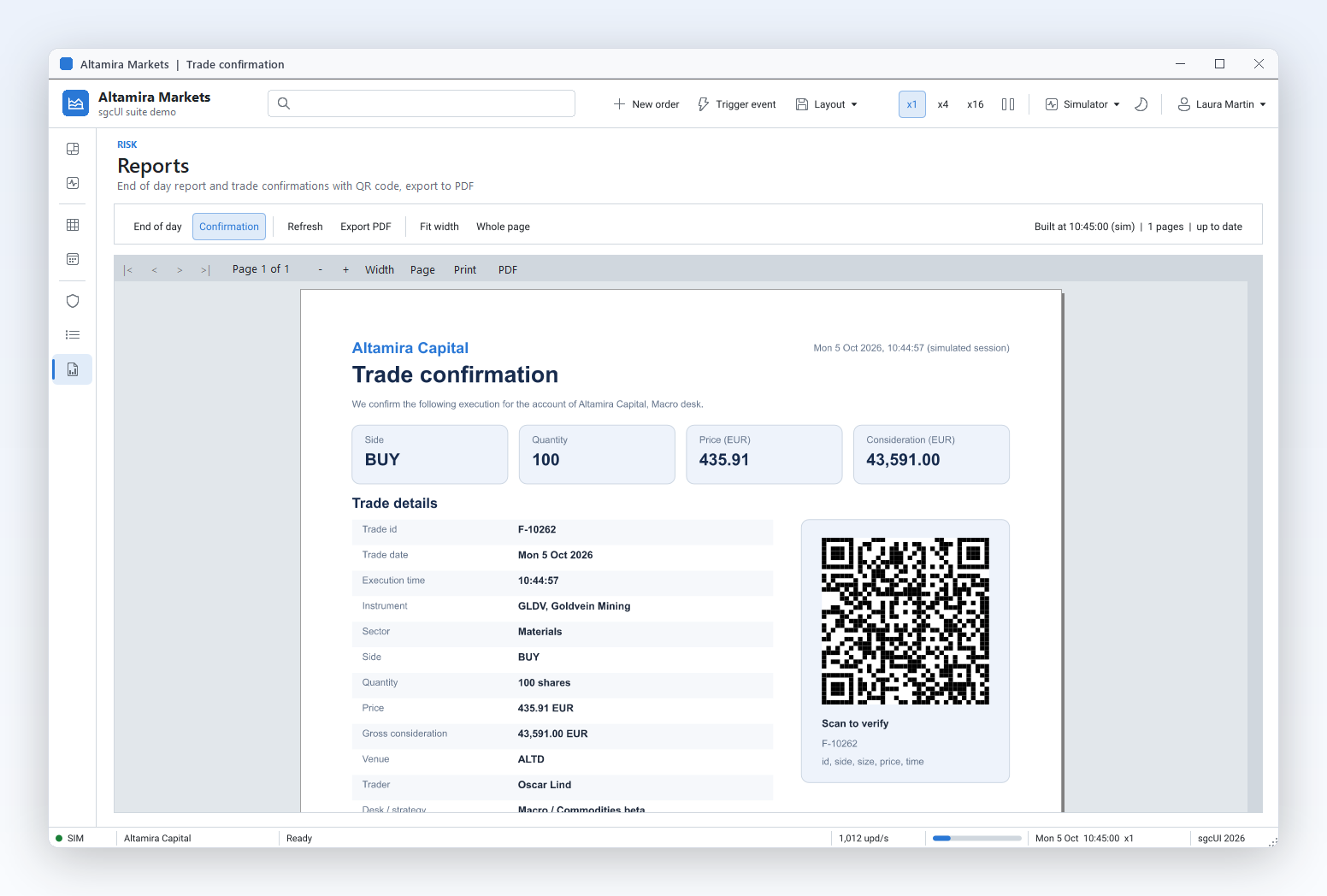
Line of business applications print documents from their database every day. A dataset source with master detail links each invoice to its lines, groups and footers print the totals, a QR code or GS1-128 barcode goes on the label, and the PDF export writes an accessible file ready to email. The same report saves to XLSX for the accounting team.

  • Master detail
  • Groups and subtotals
  • Barcodes
  • Accessible PDF
Run the ReportInvoice demo

Server side reports for web portals

Customer portals and internal APIs need reports on demand. Register the reports on the HTTP endpoint and the browser gets a viewer with parameters and downloads, or run the engine in a Linux64 daemon that renders queued jobs with a worker pool. No printer driver, no window and no external DLL are involved. The same JSON definitions serve the viewer and the daemon.

  • Serve reports over HTTP
  • Linux daemon
  • JSON definitions
Run the ReportHTTPServer demo

Accessibility and archiving obligations

Public sector suppliers and regulated companies must publish documents that screen readers can follow and archive them for years. Tagged PDF/UA-1 output is the default, alternative text and heading roles live on the report items, and PDF/A-3 is one property away. The help shows how to check the result with the free veraPDF validator. Reproducible output helps automated tests compare files.

  • Accessible PDF
  • PDF/A-3
  • Reproducible output
Run the ReportPDFUA demo

A Grouped Sales Report in a Few Lines

The same API in Delphi, C++ Builder and C#: a header per region, a line per sale and a subtotal per region, saved as PDF, XLSX and CSV.

A fluent report over a JSON source: one group per region with a subtotal, saved as PDF, XLSX and CSV.

uses
  Classes, SysUtils,
  sgcReports_Types, sgcReports_Model, sgcReports_Data, sgcReports_Fluent;

const
  CS_SALES = '[' +
    '{"Region":"East","Customer":"Acme Corp","Amount":1450.00},' +
    '{"Region":"East","Customer":"Blue Harbor","Amount":600.00},' +
    '{"Region":"North","Customer":"Nordic Labs","Amount":2100.75},' +
    '{"Region":"North","Customer":"Fjord Ltd","Amount":880.20}]';
  CS_TOTAL = '[FormatFloat(''#,0.00'', Sum(Sales.Amount))]';

procedure ExportSalesReport(const aFolder: string);
var
  oSales: TsgcReportJSONSource;
  oBuilder: TsgcReportBuilder;
begin
  oSales := TsgcReportJSONSource.Create(nil);
  oBuilder := TsgcReportBuilder.Create;
  try
    oSales.SourceName := 'Sales';
    oSales.JSON := CS_SALES;
    oBuilder.Title('Sales by region').Author('eSeGeCe').Units(ruMillimeters)
      .Style('Base').Font('Arial', 10).EndStyle
      .Style('Group').Font('Arial', 11).Bold.BackColor($EEEEEE).EndStyle
      .Page.Paper(rpsA4).Margins(15)
      // one header per region, one line per sale, a subtotal per region
      .GroupHeader('Sales.Region', 9).Style('Group')
      .Text('Region: [Sales.Region]', 0, 1, 180, 7).TagRole(rtrHeading2).EndBand
      .MasterData('Sales', 6).Style('Base')
      .Text('[Sales.Customer]', 2, 0, 120, 6)
      .Text('[Sales.Amount]', 130, 0, 50, 6).AlignRight.Format('#,0.00').EndBand
      .GroupFooter(9).Style('Base')
      .Text('Region total ' + CS_TOTAL, 80, 1, 100, 6).AlignRight.Bold.EndBand
      .PageFooter(8).Style('Base')
      .Text('Page [Page] of [TotalPages]', 0, 1, 180, 6).AlignCenter.EndBand
      .EndPage.Data(oSales);
    // accessible PDF (PDF/UA is on by default), plus the same data as Excel
    oBuilder.SaveToPDF(IncludeTrailingPathDelimiter(aFolder) + 'sales.pdf');
    oBuilder.SaveToXLSX(IncludeTrailingPathDelimiter(aFolder) + 'sales.xlsx');
    oBuilder.SaveToCSV(IncludeTrailingPathDelimiter(aFolder) + 'sales.csv');
  finally
    oBuilder.Free;
    oSales.Free;
  end;
end;

Read the help topic →

The same report in C++ Builder with the generated sgcReports headers.

#include <vcl.h>
#include "sgcReports_Types.hpp"
#include "sgcReports_Model.hpp"
#include "sgcReports_Data.hpp"
#include "sgcReports_Fluent.hpp"

void ExportSalesReport(const String Folder)
{
  const String Total = "[FormatFloat('#,0.00', Sum(Sales.Amount))]";
  TsgcReportJSONSource *Sales = new TsgcReportJSONSource(NULL);
  TsgcReportBuilder *Builder = new TsgcReportBuilder();
  try
  {
    Sales->SourceName = "Sales";
    Sales->JSON = "[{\"Region\":\"East\",\"Customer\":\"Acme Corp\",\"Amount\":1450.00},"
                  "{\"Region\":\"East\",\"Customer\":\"Blue Harbor\",\"Amount\":600.00},"
                  "{\"Region\":\"North\",\"Customer\":\"Nordic Labs\",\"Amount\":2100.75}]";
    Builder->Title("Sales by region")->Author("eSeGeCe")->Units(ruMillimeters)
      ->Style("Base")->Font("Arial", 10)->EndStyle()
      ->Style("Group")->Font("Arial", 11)->Bold()->BackColor(0xEEEEEE)->EndStyle()
      ->Page("")->Paper(rpsA4, roPortrait)->Margins(15)
      // one header per region, one line per sale, a subtotal per region
      ->GroupHeader("Sales.Region", 9)->Style("Group")
      ->Text("Region: [Sales.Region]", 0, 1, 180, 7)->TagRole(rtrHeading2)->EndBand()
      ->MasterData("Sales", 6)->Style("Base")
      ->Text("[Sales.Customer]", 2, 0, 120, 6)
      ->Text("[Sales.Amount]", 130, 0, 50, 6)->AlignRight()->Format("#,0.00")->EndBand()
      ->GroupFooter(9)->Style("Base")
      ->Text("Region total " + Total, 80, 1, 100, 6)->AlignRight()->Bold()->EndBand()
      ->EndPage()->Data(Sales);
    // accessible PDF (PDF/UA is on by default), plus the same data as Excel
    Builder->SaveToPDF(IncludeTrailingPathDelimiter(Folder) + "sales.pdf");
    Builder->SaveToXLSX(IncludeTrailingPathDelimiter(Folder) + "sales.xlsx");
    Builder->SaveToCSV(IncludeTrailingPathDelimiter(Folder) + "sales.csv");
  }
  __finally
  {
    delete Builder;
    delete Sales;
  }
}

Read the help topic →

The same builder chain in C#, with the same class names as Delphi.

using System.IO;
using esegece.sgcReports;

public static class SalesReport
{
    const string Sales = "[" +
        "{\"Region\":\"East\",\"Customer\":\"Acme Corp\",\"Amount\":1450.00}," +
        "{\"Region\":\"East\",\"Customer\":\"Blue Harbor\",\"Amount\":600.00}," +
        "{\"Region\":\"North\",\"Customer\":\"Nordic Labs\",\"Amount\":2100.75}," +
        "{\"Region\":\"North\",\"Customer\":\"Fjord Ltd\",\"Amount\":880.20}]";
    const string Total = "[FormatFloat('#,0.00', Sum(Sales.Amount))]";

    public static void Export(string aFolder)
    {
        using (TsgcReportJSONSource oSales = new TsgcReportJSONSource())
        using (TsgcReportBuilder oBuilder = new TsgcReportBuilder())
        {
            oSales.SourceName = "Sales";
            oSales.JSON = Sales;
            oBuilder.Title("Sales by region").Author("eSeGeCe").Units(TsgcReportUnits.ruMillimeters)
                .Style("Base").Font("Arial", 10).EndStyle()
                .Style("Group").Font("Arial", 11).Bold().BackColor(0xEEEEEE).EndStyle()
                .Page().Paper(TsgcReportPaperSize.rpsA4).Margins(15)
                // one header per region, one line per sale, a subtotal per region
                .GroupHeader("Sales.Region", 9).Style("Group")
                .Text("Region: [Sales.Region]", 0, 1, 180, 7)
                .TagRole(TsgcReportTagRole.rtrHeading2).EndBand()
                .MasterData("Sales", 6).Style("Base")
                .Text("[Sales.Customer]", 2, 0, 120, 6)
                .Text("[Sales.Amount]", 130, 0, 50, 6).AlignRight().Format("#,0.00").EndBand()
                .GroupFooter(9).Style("Base")
                .Text("Region total " + Total, 80, 1, 100, 6).AlignRight().Bold().EndBand()
                .EndPage().Data(oSales);
            // accessible PDF (PDF/UA is on by default), plus the same data as Excel
            oBuilder.SaveToPDF(Path.Combine(aFolder, "sales.pdf"));
            oBuilder.SaveToXLSX(Path.Combine(aFolder, "sales.xlsx"));
            oBuilder.SaveToCSV(Path.Combine(aFolder, "sales.csv"));
        }
    }
}
dotnet add package esegece.sgcReports

Read the help topic →
Run the sgcReports Demos

Ten Delphi demos, eight C++ Builder demos and ten .NET demos ship with sgcReports. The cards below are the Delphi projects; most have a C++ Builder and a .NET twin with the same name.

ReportInvoice

ReportInvoice

A master detail invoice from datasets: header, lines, totals and a QR code, in the preview and as PDF.

ReportGroups

ReportGroups

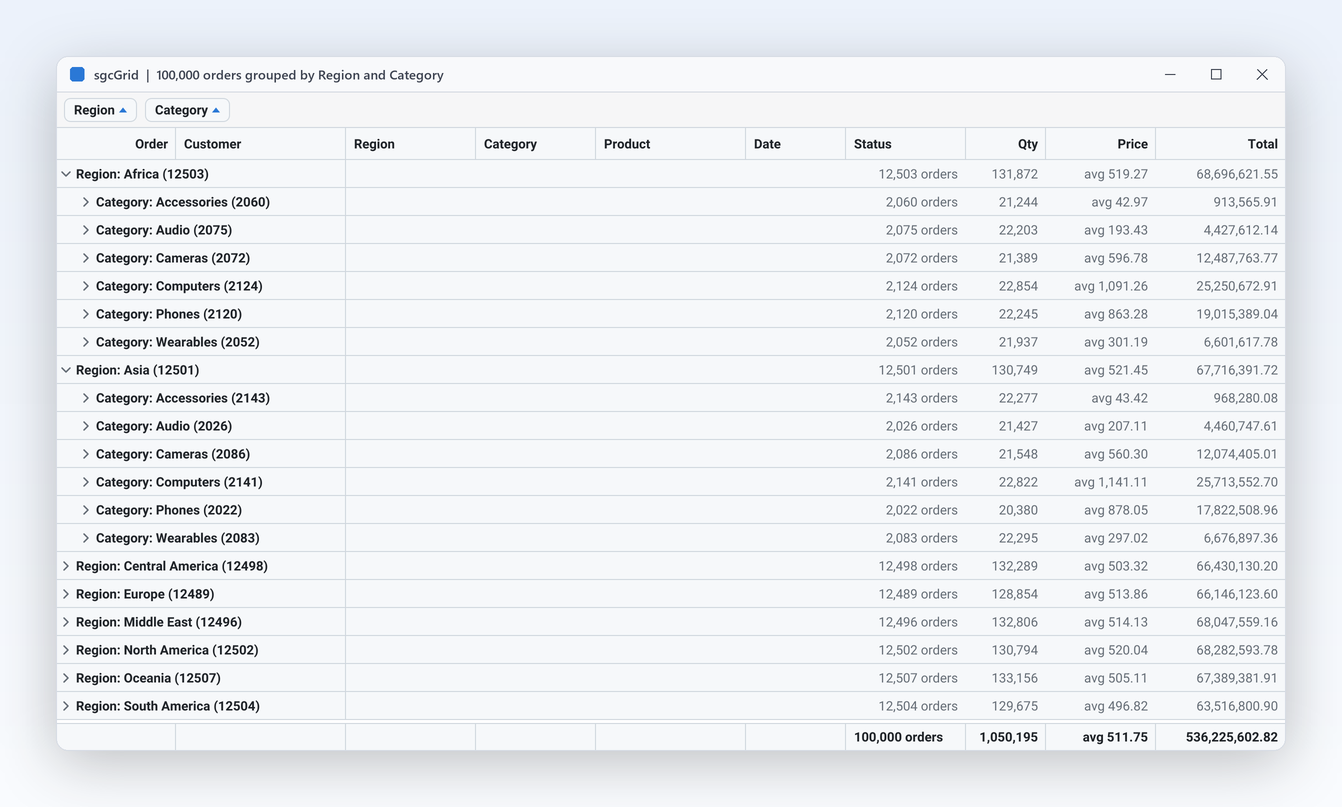
Sales grouped by region with group headers, subtotals and a grand total in the summary band.

ReportFluent

ReportFluent

A complete report written with the fluent builder, then exported to every format.

ReportJSONDefinition

ReportJSONDefinition

Edit a JSON definition and its data in two memos and render it, with errors pointing at the JSON path.

ReportPDFUA

ReportPDFUA

Tagged PDF/UA-1 output with alternative text and heading roles, ready for a veraPDF check.

ReportExports

ReportExports

One prepared report written as PDF, XLSX, CSV and PNG files.

ReportDatabaseSQL

ReportDatabaseSQL

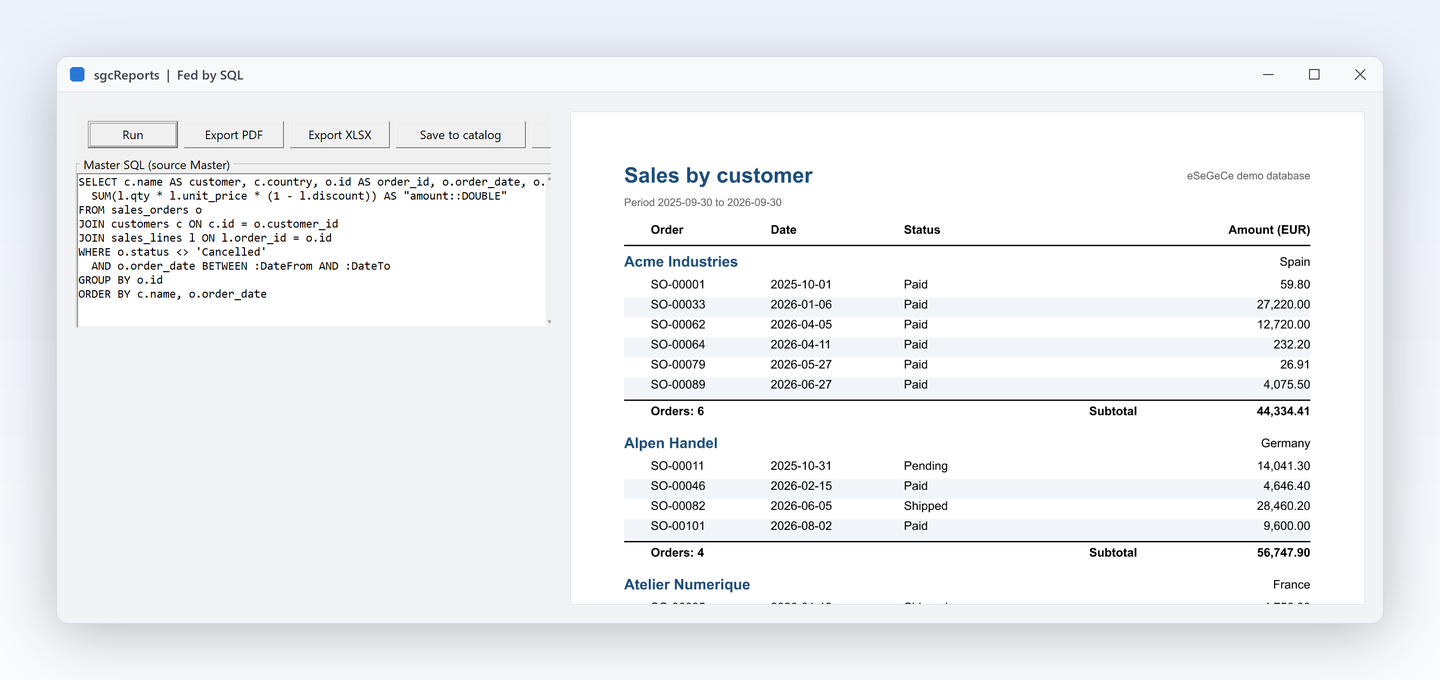
A report fed by SQL queries through dataset sources.

ReportMobileFMX

The FireMonkey preview with page navigation. The FireMonkey preview runs on Windows.

ReportLinuxDaemon

A console daemon for Windows and Linux64 that renders queued JSON jobs with a pool of worker threads.

Registered only ReportHTTPServer

Reports served over HTTP with the browser viewer, parameters and downloads. Needs sgcWebSockets and sgcHTML.

Compiled demos

Ready to run executables of every sgcUI product, nothing to install.

Download sgcUI_bin.zip →

Where sgcReports Is Included

sgcReports is in sgcUI Enterprise, and it is also sold on its own. It uses the sgcPDF engine for PDF output and barcodes, so sgcPDF is required in every configuration. sgcReports is also included in the All-Access bundle.

sgcReports single package

€199 / developer, full source code, 1 year of updates.

Buy sgcReports → See pricing →

sgcUI Enterprise

All 14 sgcUI products, from €699.

See Enterprise →

The free .NET Community packages (esegece.sgcReports.Community, .WinForms.Community, .HTML.Community, .AspNetCore.Community) include the engine, the exports and the preview. In Delphi, the Community installer offers sgcReports only when a licensed sgcPDF is installed. The sgcReportsHTML bridge for Delphi and C++ Builder is Registered only.

FeatureCommunity (free)Registered
Fluent builder, report model and JSON definitions✓✓
Bands, groups, master detail and expressions✓✓
Barcodes✓✓
PDF/UA and PDF/A-3 export✓✓
XLSX, CSV and PNG export✓✓
WinForms preview✓✓
Headless engine for services and Linux✓✓
sgcReportsHTML bridge for Delphi and C++ Builder (HTTP endpoint, viewer, web designer)−✓

Supported Frameworks and Platforms

Components in sgcReports

Engine and model

TsgcReport, TsgcReportEngine and the fluent TsgcReportBuilder.

Data sources

TsgcReportDataSetSource, TsgcReportJSONSource and TsgcReportEventSource.

Exports

TsgcReportPDFExport, TsgcReportXLSXExport, TsgcReportCSVExport and TsgcReportImageExport.

Preview

TsgcReportPreviewVCL and TsgcReportPreviewFMX, the FireMonkey preview running on Windows.

sgcReportsHTML bridge

TsgcReportHTTPEndpoint, TsgcReportHTMLViewer and TsgcReportHTMLDesigner. It needs sgcWebSockets Professional or higher and sgcHTML. Registered

.NET

The same class names in the namespace esegece.sgcReports: the builder, the sources, the engine and the exports.

TargetComponentPlatforms
Delphi 7 to 13Model, expressions, data, layout, engine and exportsWindows, Linux64, macOS, iOS and Android
C++ Builder 2007 to 13The same classesGenerated .hpp headers and static libraries
VCL previewTsgcReportPreviewVCLWindows
FireMonkey previewTsgcReportPreviewFMXWindows
.NETBuilder, sources, engine, exports and the WinForms previewWindows, plus headless use on Linux

Frequently Asked Questions

Yes, always. sgcReports writes PDF and draws barcodes with the sgcPDF engine. sgcUI Enterprise includes both. In the Delphi Community installer sgcReports is offered only when a licensed sgcPDF is installed. The PDF engine is also what draws the tagged structure of accessible PDF files.

Yes, in the browser. TsgcReportHTMLDesigner from the sgcReportsHTML bridge edits JSON report definitions with a band canvas, a property inspector and a live preview. In code, the fluent builder and JSON definitions cover the same model. Saved definitions load in desktop applications, services and daemons alike.

Yes. The core has no VCL or FireMonkey dependency and no external DLL, so the engine and the exports run in Linux64 console applications and daemons. The ReportLinuxDaemon demo and the Linux daemon topic include a systemd unit. The same code also runs in Windows services.

PDF (tagged PDF/UA-1 by default, PDF/A-3 on request), XLSX, CSV and PNG pages. All of them work from the same prepared pages, so a report is prepared once and exported as many times as you need. Each export can write to a file or to a stream, for web responses and mail attachments.

Yes, with one engine per thread. Each worker creates its own report, engine, data sources and exports, while a font manager and a read only JSON definition can be shared. The Thread Safety topic shows the worker pool pattern. A Windows server can also call sgcReportsConfigureForServer once at start up for many threads.

Yes. Store the report definitions as JSON and load them at run time with sgcReportLoadFromJSON, so a new layout needs no new build. Users can edit them in the web designer, or your application can generate them. Errors while loading name the JSON path of the offending member, which makes customer specific layouts easy to support.

Yes. TsgcReportPreviewVCL shows the prepared pages with navigation, zoom and fit modes. TsgcReportPreviewFMX is the FireMonkey preview on Windows, and .NET has a WinForms preview. The preview draws through the sgcPDF viewer control, so the screen matches the PDF export.

sgcReports Help

3,000+Developers
20+Years
761+Components
30+API Integrations
5Platforms
30-Day Money-Back GuaranteeNot satisfied? Request a full refund within 30 days of purchase. See refund policy

Try sgcReports Today

The sgcUI trial includes sgcReports, sgcPDF and every other sgcUI product.