Delphi 7 to 13 & C++ Builder No DLLs

sgcPDF, the Delphi PDF Component and Library for VCL, FireMonkey & C++ Builder

sgcPDF is a Delphi PDF component and library written entirely in Object Pascal: create PDF files from code, HTML or a canvas, then view, edit, sign, redact and validate them. No DLLs, full source code, and the core runs on Windows, Linux, macOS, iOS and Android.

Create PDF from code, HTML or a canvas Delphi PDF viewer component PAdES digital signatures PDF/A and PDF/UA validation

See pricing →   Browse features →

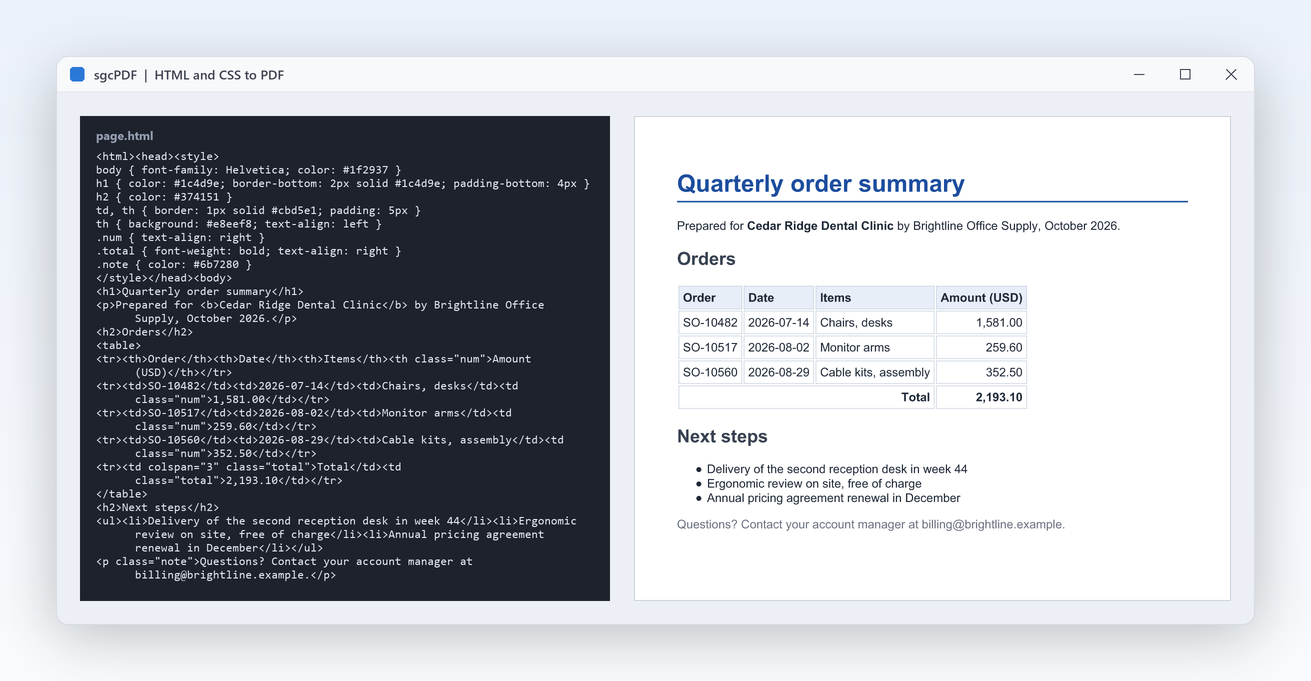
sgcPDF turning an HTML page with CSS styles into a PDF in Delphi: the HTML source on the left and the rendered quarterly order summary PDF with headings, an orders table and a list on the right
20 Palette components Document, editor, viewers, extractors, signing
0 DLLs to deploy Parser, renderer, fonts and crypto in Pascal
5 Operating systems Windows, Linux, macOS, iOS, Android
8 PDF/A conformance levels PDF/A-1, 2 and 3 (levels a and b), PDF/A-4 and 4f, plus PDF/UA-1 and PDF/UA-2

Three Things Worth Knowing First

Nothing to install on the target machine

sgcPDF does not wrap PDFium, Ghostscript, a COM server or any other native library. Parsing, writing, font embedding and subsetting, image decoding, rendering, encryption and signing are implemented in the sgcPDF_*.pas units, so your executable is the whole deployment.

The core units have no VCL or FMX dependency, so the same code runs in a console tool, a Windows service, a Linux daemon or a web server.

Platform scope

Which parts run where

Creation, editing, text and image extraction, forms, encryption, signatures, redaction, PDF/A and the raster renderer compile for Windows and Linux64, and for macOS, iOS and Android. The GDI renderer, the exporter and the VCL viewer controls are Windows only, and TsgcPDFViewerFMX targets Windows, macOS, iOS and Android. In .NET, the viewer controls are available for WinForms, WPF and Avalonia.

Advanced signatures

PAdES through sgcSign, basic signing built in

sgcPDF signs and verifies PDF files on its own with a PFX certificate. For PAdES baseline levels B-B, B-T, B-LT and B-LTA, and for keys held in smart cards, the Windows certificate store or cloud HSMs, the optional TsgcPDFPAdESSigner bridge uses the key providers of sgcSign, which is licensed separately.

One Library for the Whole PDF Lifecycle

From the first page you write to the signed, archived and redacted file you hand over, every step runs in the same Object Pascal code base.

Create: Documents from code, HTML or a canvas

Pages, text in the 14 standard fonts or embedded and subset TrueType and OpenType fonts, images (JPEG, PNG, BMP, TIFF), lines, curves, gradients, tables that flow across pages, barcodes and QR codes, annotations and comments with threaded replies, bookmarks and optional content layers. End users can also add, edit and reply to annotations with the mouse, right in the viewers. TsgcPDFHTMLRenderer turns HTML with CSS into paginated PDF, and TsgcPDFCanvas and EMF playback convert existing drawing code.

See the features →

Edit: Change files you did not write

Watermarks, headers, footers, page numbers and stamps, merge and split, extract, insert, delete, rotate and reorder pages. Incremental save appends a new revision to the original file, which keeps earlier signatures valid.

See the features →

View & render: VCL, FMX, WinForms, WPF and Avalonia viewers, plus a server renderer

A VCL viewer control with thumbnails, outline, comments panel, text selection, search, form filling and printing, a FireMonkey viewer for Windows, macOS, iOS and Android with marquee zoom and text search with highlighted matches, .NET viewers for WinForms, WPF and Avalonia, and a pure Pascal raster renderer that turns pages into PNG on Windows and Linux servers with no GDI.

See the features → Delphi PDF viewer component →

Extract: Text, positions and images

Plain text per page or for the whole document, text fragments with coordinates, font and size, and the images of a page decoded to PNG, JPEG or BMP. Decoders cover Flate, LZW, ASCII85, RunLength, JPEG (baseline and progressive), JPEG 2000, CCITT G3/G4 and JBIG2.

See the features →

Secure & sign: Encryption, signatures, redaction

RC4 40/128, AES-128 and AES-256 password encryption, certificate (public key) encryption, digital signatures with visible fields and timestamps, PAdES B-B, B-T, B-LT and B-LTA through the sgcSign bridge, signature verification, and true redaction that removes content instead of covering it.

See the features →

Capture: Handwritten signatures and annotated images

A signature pad records a signature with the mouse, a finger or a pen, with pen pressure, a width that follows the speed, smoothed strokes and undo, and saves it as PNG, SVG or JSON. ApplyToSignature puts it into the visible field of a digital signature. An image viewer and editor zooms, rotates, flips and crops photos and scans, draws arrows, boxes, text notes and highlights on them, and exports the result to a PDF page with vector annotations. On VCL, FireMonkey, WinForms, WPF and Avalonia, in every sgcPDF edition.

See the features →

Comply: PDF/A, PDF/UA, tagged PDF, Factur-X

PDF/A-1, PDF/A-2 and PDF/A-3 output in levels a and b, PDF/A-4 and PDF/A-4f, with a built in validator, tagged PDF with a structure tree and alternate text, PDF/UA-1 and PDF/UA-2 output and checks, embedded files with PDF/A-3 and PDF/A-4f relationships, and Factur-X, ZUGFeRD and XRechnung e-invoice embedding.

See the features →

Media, crop, bleed, trim and art boxes, pages of other documents placed as forms for imposition, crop, bleed and registration marks, Separation and DeviceN colours, overprint preview and a PDF/X output intent, in Delphi and .NET.

See the features →
How to Create a PDF in Delphi

Create a TsgcPDFDocument, add a page with AddPage, draw text and lines on it and call SaveToFile: that is a complete PDF file, with no DLL and no PDF engine to install. Every sample on this page is taken from a program that was compiled against the sgcPDF sources and run. Coordinates are in PDF points (1/72 inch) with the origin at the bottom left corner of the page.

procedure CreateHelloPDF(const AFileName: string);
var
  oPDF: TsgcPDFDocument;
  oPage: TsgcPDFPage;
begin
  oPDF := TsgcPDFDocument.Create;
  try
    oPDF.Info.Title := 'Hello sgcPDF';
    // A4 portrait: 595 x 842 points, origin at the bottom left corner
    oPage := oPDF.AddPage(595, 842);
    oPage.DrawTextColor('Hello sgcPDF', 50, 780, sfHelveticaBold, 24, 0, 0.2, 0.6);
    oPage.DrawLine(50, 770, 545, 770, 1.5);
    oPage.DrawText('A PDF written in pure Pascal.', 50, 740, sfHelvetica, 12);
    oPDF.SaveToFile(AFileName);
  finally
    oPDF.Free;
  end;
end;
procedure StampExistingPDF(const AInput, AOutput: string);
var
  oEditor: TsgcPDFEditor;
  oWatermark: TsgcPDFWatermarkOptions;
begin
  oEditor := TsgcPDFEditor.Create;
  try
    oEditor.LoadFromFile(AInput);
    oWatermark.Text := 'CONFIDENTIAL';
    oWatermark.Font := sfHelveticaBold;
    oWatermark.FontSize := 48;
    oWatermark.Rotation := 45;
    oWatermark.Opacity := 0.3;
    oWatermark.R := 0.5;
    oWatermark.G := 0.5;
    oWatermark.B := 0.5;
    oEditor.AddWatermarkAllPages(oWatermark);
    oEditor.AddPageNumbers(sfHelvetica, 10, 'Page %d of %d');
    oEditor.SaveToFile(AOutput);
  finally
    oEditor.Free;
  end;
end;
procedure PrintAllText(const AFileName: string);
var
  oPDF: TsgcPDFDocument;
  i: Integer;
begin
  oPDF := TsgcPDFDocument.Create;
  try
    oPDF.LoadFromFile(AFileName);
    for i := 0 to oPDF.PageCount - 1 do
      WriteLn(string(oPDF.ExtractTextW(i)));
  finally
    oPDF.Free;
  end;
end;
procedure RenderPageToPNG(const APDFFile, APNGFile: string; ADPI: Integer);
var
  oPDF: TsgcPDFDocument;
  oRenderer: TsgcPDFRendererRaster;
  oPage: TsgcPDFPage;
begin
  oPDF := TsgcPDFDocument.Create;
  try
    oPDF.LoadFromFile(APDFFile);
    oPage := oPDF.Pages[0];
    // pure Pascal rasterizer: no GDI, runs on Windows and Linux servers
    oRenderer := TsgcPDFRendererRaster.Create;
    try
      oRenderer.RenderPageToPNG(oPDF.Parser, oPage.PageDict,
        Round(oPage.Width * ADPI / 72), Round(oPage.Height * ADPI / 72),
        APNGFile);
    finally
      oRenderer.Free;
    end;
  finally
    oPDF.Free;
  end;
end;
procedure CreateTicketPDF(const aFileName: string);
var
  oPDF: TsgcPDFDocument;
  oPage: TsgcPDFPage;
  oSymbol: TsgcPDFBarcodeSymbol;
begin
  oPDF := TsgcPDFDocument.Create(nil);
  oSymbol := TsgcPDFBarcodeSymbol.Create;
  try
    oPDF.Info.Title := 'Ticket';
    oPage := oPDF.AddPage(595, 842);
    oPage.DrawText('Ticket 2026-001', 50, 780, sfHelveticaBold, 24);
    oPage.DrawLine(50, 770, 545, 770, 1.5);
    // Code 128 barcode in a 250 x 60 point box, black on white
    oSymbol.Symbology := bcCode128;
    oSymbol.Text := 'TKT-2026-001';
    oSymbol.DrawToPDF(oPage, 50, 680, 250, 60, $000000, $FFFFFF);
    // QR Code in a 120 x 120 point box
    oSymbol.Symbology := bcQRCode;
    oSymbol.QRErrorLevel := qrecQ;
    oSymbol.Text := 'https://www.esegece.com';
    oSymbol.DrawToPDF(oPage, 50, 540, 120, 120, $000000, $FFFFFF);
    oPDF.SaveToFile(aFileName);
  finally
    oSymbol.Free;
    oPDF.Free;
  end;
end;

Draws the barcode as vector graphics straight onto the page. Units: sgcPDF_Document, sgcPDF_Barcodes, sgcPDF_Barcode_Symbol. See TsgcPDFBarcodeSymbol and the barcodes guide.

#include <System.hpp>
#include "sgcPDF_Document.hpp"
#include "sgcPDF_Barcodes.hpp"
#include "sgcPDF_Barcode_Symbol.hpp"

void __fastcall CreateTicketPDF(const String aFileName)
{
  TsgcPDFDocument *oPDF = new TsgcPDFDocument(NULL);
  TsgcPDFBarcodeSymbol *oSymbol = new TsgcPDFBarcodeSymbol();
  try
  {
    oPDF->Info->Title = "Ticket";
    TsgcPDFPage *oPage = oPDF->AddPage(595, 842);
    oPage->DrawText("Ticket 2026-001", 50, 780, sfHelveticaBold, 24);
    oPage->DrawLine(50, 770, 545, 770, 1.5);
    // Code 128 barcode in a 250 x 60 point box, black on white
    oSymbol->Symbology = bcCode128;
    oSymbol->Text = "TKT-2026-001";
    oSymbol->DrawToPDF(oPage, 50, 680, 250, 60, 0x000000, 0xFFFFFF);
    // QR Code in a 120 x 120 point box
    oSymbol->Symbology = bcQRCode;
    oSymbol->QRErrorLevel = qrecQ;
    oSymbol->Text = "https://www.esegece.com";
    oSymbol->DrawToPDF(oPage, 50, 540, 120, 120, 0x000000, 0xFFFFFF);
    oPDF->SaveToFile(aFileName);
  }
  __finally
  {
    delete oSymbol;
    delete oPDF;
  }
}

Compiled with the C++ Builder headers generated from the sgcPDF sources. See the TsgcPDFBarcodeSymbol topic and the C++ Builder notes.

using System;
using esegece.sgcPDF;

class Program
{
    static void Main()
    {
        using (TsgcPDFDocument oDoc = new TsgcPDFDocument())
        {
            oDoc.Info.Title = "Ticket";
            TsgcPDFPage oPage = oDoc.AddPage(595, 842);
            oPage.DrawText("Ticket 2026-001", 50, 780, TsgcPDFStandardFont.sfHelveticaBold, 24);
            oPage.DrawLine(50, 770, 545, 770, 1.5);

            // Code 128 barcode in a 250 x 60 point box, black on white
            TsgcPDFBarcodeSymbol oSymbol = new TsgcPDFBarcodeSymbol();
            oSymbol.Symbology = TsgcPDFBarcodeType.bcCode128;
            oSymbol.Text = "TKT-2026-001";
            oSymbol.DrawToPDF(oPage, 50, 680, 250, 60, 0x000000, 0xFFFFFF);

            // QR Code in a 120 x 120 point box
            oSymbol.Symbology = TsgcPDFBarcodeType.bcQRCode;
            oSymbol.QRErrorLevel = TsgcPDFQRErrorLevel.qrecQ;
            oSymbol.Text = "https://www.esegece.com";
            oSymbol.DrawToPDF(oPage, 50, 540, 120, 120, 0x000000, 0xFFFFFF);

            oDoc.SaveToFile("ticket.pdf");
        }
    }
}

The .NET class has no WinForms or GDI dependency, so it also runs on servers and in console tools. See the .NET API differences.

procedure SignWithPad(aPad: TsgcPDFSignaturePad; const aInput, aOutput: string);
var
  oSigner: TsgcPDFSignatureHandler;
begin
  oSigner := TsgcPDFSignatureHandler.Create;
  try
    oSigner.LoadCertificateFromPFX('signer.pfx', 'test123');
    oSigner.Reason := 'Contract approval';
    oSigner.Location := 'Barcelona';
    // visible signature field on page 1: Left, Bottom, Right, Top
    oSigner.SetField('Signature1', 0, 50, 50, 300, 120);
    // the ink in the left half of the field, the text lines in the right half
    aPad.ApplyToSignature(oSigner);
    oSigner.SignDocument(aInput, aOutput);
  finally
    oSigner.Free;
  end;
end;

Signs with the signature the user drew on a TsgcPDFSignaturePad: the field shows the vector ink in its left half and the signer name and the date in the right half. Units: sgcPDF_Signatures, sgcPDF_SignaturePad_VCL. See TsgcPDFSignaturePad and the digital signatures guide.

using System;
using esegece.sgcPDF;

class Program
{
    static void Main()
    {
        // Create a one page A4 document and save it
        using (TsgcPDFDocument oDoc = new TsgcPDFDocument())
        {
            TsgcPDFPage oPage = oDoc.AddPage(595, 842);
            oPage.DrawText("Hello from sgcPDF", 50, 780, TsgcPDFStandardFont.sfHelveticaBold, 24);
            oPage.DrawLine(50, 770, 545, 770, 1.0);
            oPage.DrawText("Created with sgcPDF .NET.", 50, 740, TsgcPDFStandardFont.sfHelvetica, 12);
            oDoc.SaveToFile("hello.pdf");
        }

        // Load it again and extract the text of every page
        using (TsgcPDFDocument oDoc = new TsgcPDFDocument())
        {
            oDoc.LoadFromFile("hello.pdf");
            for (int i = 0; i < oDoc.PageCount(); i++)
                Console.WriteLine(oDoc.ExtractTextW(i));
        }
    }
}
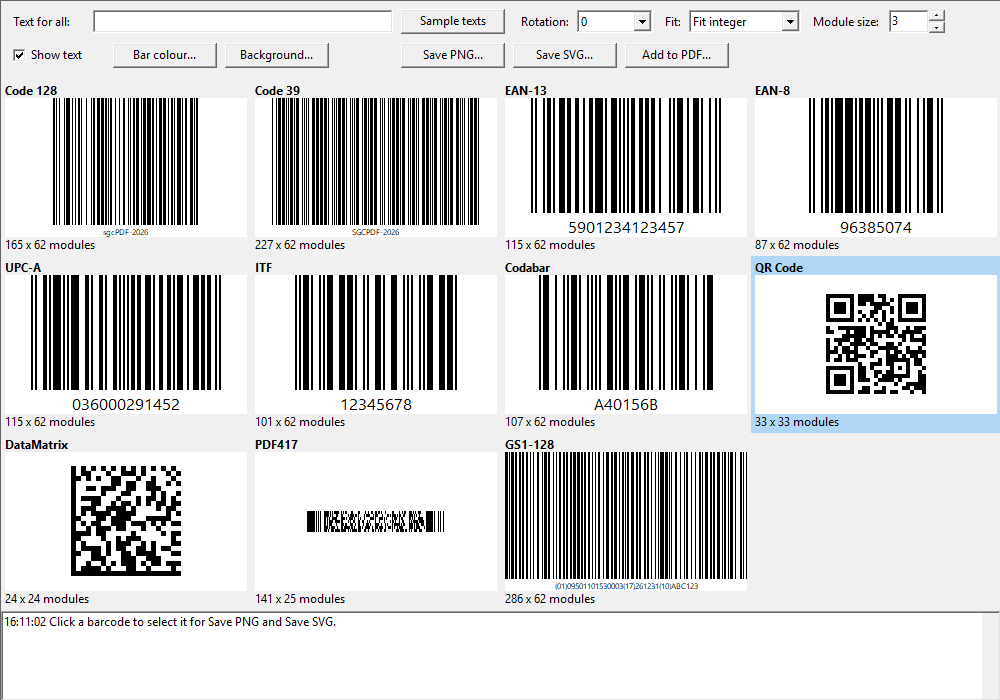
TsgcPDFBarcodeControl showing Code 128, Code 39, EAN-13, EAN-8, UPC-A, ITF, Codabar, QR Code, DataMatrix, PDF417 and GS1-128 symbols
One barcode control, eleven symbologies including QR Code, DataMatrix and PDF417

24 Components on the sgcPDF Palette

Drop them on a form or a data module, or create them in code. Every component is also usable without a form, from console applications and services.

All components

Trial and Licensing

sgcPDF is sold on its own, starting at €249 for a single developer. Every license includes full source code, 1 year of updates and a 50% to 70% renewal discount. To evaluate it first, download the free trial. sgcPDF is also part of sgcUI Enterprise and of the All-Access bundle.

sgcPDF

€249

Single, Team and Site licenses available.

  • All 20 components and the sgcPDF_*.pas units
  • Delphi 7 to 13 and C++ Builder
  • Windows, Linux, macOS, iOS and Android
  • Full source code
  • 1 year of updates

sgcPDF .NET

€249

Single, Team and Site licenses available.

  • NuGet: esegece.sgcPDF
  • .NET Standard 2.0, .NET Framework 4.7.2, .NET 6, .NET 8, .NET 9, .NET 10
  • Full source code
  • 1 year of updates

sgcPDF for .NET

sgcPDF is also available for .NET as a fully managed C# port, with the same class names as the Delphi library. It ships as NuGet packages for .NET Standard 2.0, .NET Framework 4.7.2, .NET 6, .NET 8, .NET 9 and .NET 10, with no native DLL. The C# PDF library for .NET page shows C# samples that create, view, render and sign PDF files.

esegece.sgcPDF

The library: document model, parser, writer, editor, renderer core, fonts, images, forms, signatures, encryption, text and image extraction, prepress, PDF/A (including PDF/A-4) and PDF/UA-2.

esegece.sgcPDF.WinForms

Windows Forms add-on: GDI renderer and canvas, EMF playback, page export to images, and the TsgcPDFViewerControl (with interactive annotations and comment replies), TsgcPDFThumbnailView and TsgcPDFOutlineView controls, with page boxes and a measure tool, plus the TsgcPDFSignaturePad and TsgcPDFImageEditor controls.

esegece.sgcPDF.Wpf

WPF viewer: TsgcWpfPDFViewer, TsgcWpfPDFThumbnailView and TsgcWpfPDFOutlineView, with zoom modes, marquee zoom, text selection, search, links, page boxes and the measure tool. Users edit annotations and fill form fields, as in the WinForms viewer. TsgcWpfPDFSignaturePad reads the pen pressure from the stylus, TsgcWpfPDFImageEditor edits and annotates images, and TsgcWpfPDFBarcodeControl shows barcodes and QR codes as sharp vector modules.

esegece.sgcPDF.Avalonia

Avalonia viewer: TsgcAvaloniaPDFViewer, TsgcAvaloniaPDFThumbnailView and TsgcAvaloniaPDFOutlineView, with the same viewing and editing features as the WPF viewer plus pinch zoom, and the TsgcAvaloniaPDFBarcodeControl, TsgcAvaloniaPDFSignaturePad and TsgcAvaloniaPDFImageEditor controls on Windows, Linux and macOS.

esegece.sgcPDF.sgcSign

Optional bridge to sgcSign .NET: TsgcPDFPAdESSigner signs to PAdES B-B, B-T, B-LT and B-LTA with any sgcSign key provider.

dotnet add package esegece.sgcPDF
dotnet add package esegece.sgcPDF.WinForms
dotnet add package esegece.sgcPDF.Wpf
dotnet add package esegece.sgcPDF.Avalonia
dotnet add package esegece.sgcPDF.sgcSign

Every package also ships as a free Community edition with the .Community suffix, for example dotnet add package esegece.sgcPDF.Community. Both editions have the same features. The Community edition is free for individuals and organizations under EUR 1M annual gross revenue with no more than 5 developers, and shows a brief startup notice. The Registered edition removes the notice and carries the commercial license.

View on NuGet .NET downloads

Migrating?

Coming from Quick PDF Library or PdfiumViewer?

A migration kit maps the Quick PDF Library functions of a Delphi application and the PdfiumViewer classes of a WinForms application to sgcPDF, with code from compiled demos, numbered migration steps and the known differences.

Migrate from Quick PDF Library and PdfiumViewer →
All sgcUI migration kits →

Learn sgcPDF Step by Step

Getting Started guide

Five QuickStart demos for Delphi (VCL) ship in Demos\PDF\Delphi\00.QuickStart. The PDF guide walks through them step by step: a first one page PDF, drawing with fonts, shapes and images, a table over several pages, a PDF viewer, and an invoice generator.

Download the guide (PDF) →

sgcPDF is Part of sgcUI Enterprise

sgcPDF belongs to the sgcUI suite of Delphi and C++ Builder components and is included in the sgcUI Enterprise edition, together with every other sgcUI product. It is also available as a single package. Prices are on the sgcUI pricing page and the sgcPDF pricing page. The Delphi components by eSeGeCe page lists every library.

sgcReports

Report designer and engine that exports finished reports to PDF through sgcPDF.

Explore sgcReports →
Build PDF reports with the Delphi report builder →

sgcRichEdit

Rich text document editor that exports documents to PDF through sgcPDF.

Explore sgcRichEdit →

sgcGrid

High performance data grid for Delphi and C++ Builder.

Explore sgcGrid →

sgcCharts

Charts for dashboards and reports.

Explore sgcCharts →

sgcDashboard

Tiles, KPIs and layouts for dashboards.

Explore sgcDashboard →

Online help: introduction, quick start, installation and .NET installation.

Other Products by eSeGeCe

Pair sgcPDF with our other Delphi and C++ Builder component libraries.

sgcSign

Enterprise digital signatures. XAdES, PAdES, CAdES and ASiC with 10 key providers and 21 EU country profiles.

Learn more →

sgcWebSockets

Enterprise WebSocket, HTTP/2, MQTT, AMQP and WebRTC components for Delphi, C++ Builder and .NET.

Learn more →

sgcHTML

Server-side HTML and UI components for Delphi and C++ Builder, built on Bootstrap and htmx.

Learn more →

sgcCrypto

Modern cryptography in pure Object Pascal: AES-GCM, SHA-3, Ed25519, X.509 and post-quantum ML-KEM and ML-DSA.

Learn more →

Delphi PDF Questions

It depends on where the content comes from. For documents built in code, create a TsgcPDFDocument, add pages with AddPage, draw text, lines, images, tables and barcodes on them and call SaveToFile, as in the create a PDF sample. TsgcPDFHTMLRenderer turns HTML with CSS into paginated PDF, and TsgcPDFCanvas and EMF playback convert drawing code you already have. For data driven documents such as invoices and statements, with bands, groups and totals, the sgcReports report builder for Delphi prepares the report and writes the PDF through sgcPDF.

Yes. TsgcPDFViewerControl is a VCL viewer control for Windows with scrolling, zoom modes, page navigation, text selection, search with highlighted matches, form filling, links and printing, and TsgcPDFThumbnailView, TsgcPDFOutlineView and TsgcPDFCommentsView add thumbnails, bookmarks and a comments panel. TsgcPDFViewerFMX is the FireMonkey viewer for Windows, macOS, iOS and Android. See the component list for every viewer.

No. sgcPDF is compiled into your executable. The parser, writer, fonts, image decoders, renderers and cryptography are Object Pascal units, and on Windows it only uses libraries that are part of the operating system: GDI for rendering and font loading, and the CryptoAPI for digital signatures. In .NET, sgcPDF is a managed assembly on NuGet with no native DLL.

Yes. sgcPDF signs and verifies PDF files on its own with a PFX certificate, with visible signature fields and timestamps, through TsgcPDFSignatureHandler and TsgcPDFSignatureVerifier. A signature pad can put a handwritten signature into the visible field. For PAdES B-B, B-T, B-LT and B-LTA with keys held in smart cards, the Windows certificate store or cloud HSMs, the optional TsgcPDFPAdESSigner bridge uses the key providers of sgcSign, which is licensed separately.

Delphi 7 to Delphi 13 and C++ Builder 2007 to 13, on Windows 32-bit and 64-bit. The core, the raster renderer and the FireMonkey viewer also run on Linux 64-bit, macOS, iOS and Android. The .NET edition targets .NET Standard 2.0, .NET Framework 4.7.2, .NET 6, .NET 8, .NET 9 and .NET 10.

Yes. The core units have no VCL or FMX dependency and compile with the Delphi Linux 64-bit compiler, so a console application, a daemon or a web server can create and edit PDF files, encrypt them with passwords, extract text and render pages to PNG with the pure Pascal raster renderer. Fonts are loaded from files with AddTrueTypeFontFromFile.

Yes. Download the free trial for Delphi and C++ Builder, and see the sgcPDF pricing for Single, Team and Site licenses with full source code. sgcPDF is also part of sgcUI Enterprise. For .NET, every NuGet package also ships as a free Community edition with the same features, for individuals and organizations under EUR 1M annual gross revenue with no more than 5 developers.

3,000+Developers
20+Years
761+Components
30+API Integrations
5Platforms
30-Day Money-Back GuaranteeNot satisfied? Request a full refund within 30 days of purchase. See refund policy

PDF Without the DLL

Create, view, sign and archive PDF files from the Delphi and C++ Builder code you already have.