Delphi, C++ Builder & .NET Part of sgcUI

sgcSpreadsheet, the Excel Style Spreadsheet for Delphi, C++ Builder & .NET

Give your users a spreadsheet inside your own application. sgcSpreadsheet types values and formulas the way Excel does, computes 211 worksheet functions with dynamic arrays that spill, keeps several sheets with defined names and frozen panes, draws charts from cell ranges, and loads and saves XLSX files that Excel opens. It is built on sgcGrid and a formula engine shared with sgcUICore, for VCL, FireMonkey, WinForms, WPF and Avalonia.

211 worksheet functionsDynamic arrays and XLOOKUPXLSX load and save with chartsIncluded in sgcUI Enterprise
sgcSpreadsheet with a sales table and column, line and pie charts drawn from its cell ranges

Everything a Spreadsheet Needs

The highlights below. The feature matrix lists every feature.

Formulas

A formula engine that computes the way your users expect from Excel.

Formulas

211 worksheet functions

Users who work with numbers think in Excel formulas. sgcSpreadsheet understands them: a text that starts with = is a formula, and the engine computes 211 worksheet functions, from SUM and AVERAGE to XLOOKUP, TEXT and the date functions. The same engine lives in sgcUICore, so sgcGrid formulas give the same results.

  • Math and statistics, text, date and time, logical and information functions
  • Lookup functions, XLOOKUP included
  • References to other sheets, such as =Sheet2!A1 or =SUM('Sales 2026'!B:B)
  • Defined names that formulas use instead of cell addresses

Formulas

Dynamic arrays and incremental recalculation

A formula such as =SORT(A2:A20) returns a whole list, and the list spills into the cells below it, as it does in Excel. A dependency graph knows which cells read which, so a change recalculates only the cells that depend on it, also in large sheets.

  • SEQUENCE, SORT, FILTER, UNIQUE and the other dynamic array functions
  • #SPILL! when the spill range is blocked, and A1# references to a spilled range
  • Incremental recalculation through the dependency graph
  • Custom functions registered by your application, used like the built in ones

Workbooks and files

Several sheets, frozen panes and the file format Excel reads.

Workbooks and files

Sheets, frozen panes and forced text

A spreadsheet is a workbook with one or more sheets. The tabs under the grid switch the sheet, and the + tab adds one. A renamed sheet is renamed in every formula that refers to it. Frozen panes keep the header rows and columns in place while the rest of the sheet scrolls.

  • AddSheet, ActiveSheet and SheetCount from code
  • FreezePanes and UnfreezePanes for header rows and columns
  • A leading apostrophe stores the text as typed, so '007 stays a text
  • A formula bar with a name box: TsgcVCLSpreadsheetFormulaBar and TsgcFMXSpreadsheetFormulaBar

Workbooks and files

XLSX load and save

Workbooks come from Excel and go back to Excel. LoadFromXLSX reads every sheet of a workbook, and SaveToXLSX writes every sheet, so a file round trips between your application and Excel.

  • Values, formulas and cell formats
  • Defined names and dynamic arrays
  • Frozen panes and column widths
  • Charts, saved as charts that Excel opens

Charts

Charts that float over the sheet and follow its values.

Charts

Charts from cell ranges

A chart shows the values of a range of cells. It floats over the sheet, like a chart in Excel, and it is drawn by sgcCharts. When a cell of the range changes, or a formula of the range gives a new value, the chart is built again. Users move and resize charts with the mouse.

  • 7 chart types: column, bar, line, area, pie, doughnut and scatter
  • AddChart with a range such as 'A1:D10' or 'Sheet1!A1:D10'
  • Series names and categories read from the header row and column
  • TsgcSpreadsheetCharts, and charts saved to XLSX

Who Builds with sgcSpreadsheet

Budgets, quotes and calculation sheets

Business applications let users plan budgets, price quotes and calculate costs in a familiar grid. Your application fills the sheet from its data, the users change values and formulas, and the results recalculate at once.

  • 211 functions
  • Defined names
  • Frozen panes
Run the Basic demo

Exchange workbooks with Excel

Customers send XLSX files and expect XLSX files back. sgcSpreadsheet loads the workbook with its sheets, formulas and charts, lets the user work on it inside your application, and saves a file that Excel opens.

  • XLSX load and save
  • Several sheets
  • Charts in the file
Run the Charts demo

Domain formulas for your users

Engineering, finance and laboratory applications need their own calculations. Register a function such as MARKUP or TAX from your code, and your users call it in their formulas like a built in function.

  • Custom functions
  • Dynamic arrays
See the Functions demo

Build a Sheet in a Few Lines

Write values and formulas, spill a dynamic array, freeze the header row, add a chart and save the workbook as XLSX.

sgcVCLSpreadsheet1 is a TsgcVCLSpreadsheet on the form. The chart types and enumerations are declared in sgcSpreadsheet_Charts.

uses
  sgcSpreadsheet_Charts, sgcSpreadsheet_VCL;

procedure TForm1.BuildBudget;
var
  oChart: TsgcSpreadsheetChart;
begin
  // row and column are 0-based: (0, 0) is A1
  sgcVCLSpreadsheet1.SetCellInput(0, 0, 'Month');
  sgcVCLSpreadsheet1.SetCellInput(0, 1, 'Revenue');
  sgcVCLSpreadsheet1.SetCellInput(1, 0, 'Jan');
  sgcVCLSpreadsheet1.SetCellInput(1, 1, '42000');
  sgcVCLSpreadsheet1.SetCellInput(2, 0, 'Feb');
  sgcVCLSpreadsheet1.SetCellInput(2, 1, '45500');
  sgcVCLSpreadsheet1.SetCellInput(3, 0, 'Total');
  sgcVCLSpreadsheet1.SetCellInput(3, 1, '=SUM(B2:B3)');
  // a dynamic array: the sorted revenues spill into D1:D2
  sgcVCLSpreadsheet1.SetCellInput(0, 3, '=SORT(B2:B3,1,-1)');
  // keep the header row visible while the sheet scrolls
  sgcVCLSpreadsheet1.FreezePanes(1, 0);
  // a column chart of the range, drawn by sgcCharts
  oChart := sgcVCLSpreadsheet1.AddChart(sctColumn, 'A1:B3');
  oChart.Title := 'Revenue';
  oChart.Legend := sclRight;
  sgcVCLSpreadsheet1.SaveToXLSX('budget.xlsx');
end;

The .NET controls use the same names. sheet is a TsgcWinFormsSpreadsheet; the WPF and Avalonia controls work the same way.

using esegece.sgcSpreadsheet;

// row and column are 0-based: (0, 0) is A1
sheet.SetCellInput(0, 0, "Month");
sheet.SetCellInput(0, 1, "Revenue");
sheet.SetCellInput(1, 0, "Jan");
sheet.SetCellInput(1, 1, "42000");
sheet.SetCellInput(2, 0, "Feb");
sheet.SetCellInput(2, 1, "45500");
sheet.SetCellInput(3, 0, "Total");
sheet.SetCellInput(3, 1, "=SUM(B2:B3)");
// a dynamic array: the sorted revenues spill into D1:D2
sheet.SetCellInput(0, 3, "=SORT(B2:B3,1,-1)");
// keep the header row visible while the sheet scrolls
sheet.FreezePanes(1, 0);
// a column chart of the range, drawn by sgcCharts
TsgcSpreadsheetChart chart = sheet.AddChart(TsgcSpreadsheetChartType.sctColumn, "A1:B3");
chart.Title = "Revenue";
chart.Legend = TsgcSpreadsheetChartLegend.sclRight;
sheet.SaveToXLSX("budget.xlsx");
Run the sgcSpreadsheet Demos

The demo projects install with the sgcUI trial for Delphi. The .NET demos ship with the Registered .NET download.

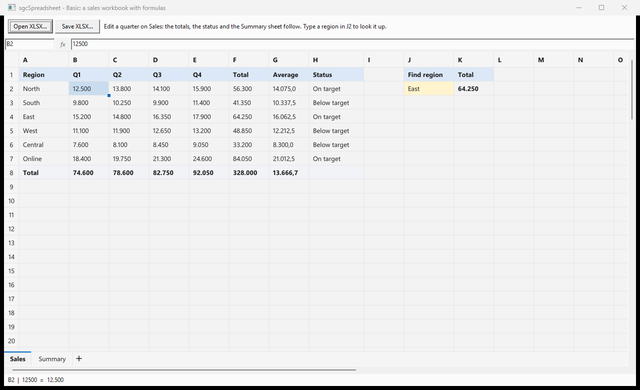
The VCL Basic demo with a sales workbook and the formula bar

Basic

A sales workbook built in code with SUM, AVERAGE, IF and XLOOKUP, a summary sheet that reads it, a frozen header row, the formula bar, and Open and Save as XLSX.

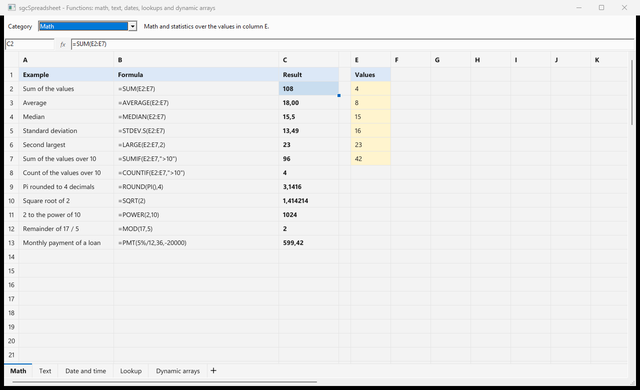
The Functions demo with math formulas and their results, one sheet per category

Functions

Math, text, date and time, lookup and dynamic array functions, one sheet per category, with each formula next to its result.

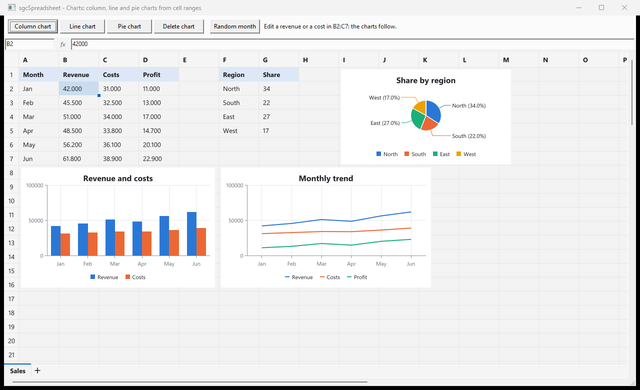
The Charts demo with column, line and pie charts over the sheet

Charts

Column, line and pie charts from cell ranges. Edit a revenue or a cost and the charts follow.

CustomFunction, BasicFMX and ChartsFMX

Functions registered by the application and used in formulas, and the Basic and Charts demos with TsgcFMXSpreadsheet on FireMonkey. Basic and Charts also ship as C++ Builder projects.

.NET demos

SpreadsheetBasic for WinForms, SpreadsheetBasicWpf, SpreadsheetBasicAvalonia, SpreadsheetFunctions, SpreadsheetCharts and SpreadsheetCustomFunction.

Where sgcSpreadsheet Is Included

sgcSpreadsheet is sold on its own for Delphi and C++ Builder and for .NET, and it is included in sgcUI Enterprise and in the All-Access bundle. There is no free Community edition.

sgcSpreadsheet single package

€299 / developer, full source code, 1 year of updates. sgcGrid and sgcCharts are installed with it.

Buy sgcSpreadsheet → See pricing →

sgcSpreadsheet .NET

€299 / developer, the WinForms, WPF and Avalonia controls as Registered NuGet packages.

Buy sgcSpreadsheet .NET →

sgcUI Enterprise

Every sgcUI product, sgcSpreadsheet, sgcGrid and sgcCharts included, from €699.

See Enterprise →

Supported Frameworks and Platforms

Components in sgcSpreadsheet

VCL

TsgcVCLSpreadsheet and its formula bar TsgcVCLSpreadsheetFormulaBar.

FireMonkey

TsgcFMXSpreadsheet and its formula bar TsgcFMXSpreadsheetFormulaBar.

.NET

TsgcWinFormsSpreadsheet, TsgcWpfSpreadsheet and TsgcAvaloniaSpreadsheet, each with a formula bar.

Charts

TsgcSpreadsheetCharts, the charts of each sheet, drawn with sgcCharts.

TargetComponentVersions and platforms
Delphi 7 to 13TsgcVCLSpreadsheet and TsgcVCLSpreadsheetFormulaBarWindows
C++ Builder 2007 to 13The same classesGenerated .hpp headers and static libraries
FireMonkeyTsgcFMXSpreadsheet and TsgcFMXSpreadsheetFormulaBarDelphi XE6 and later
.NET core libraryesegece.sgcSpreadsheet.NET Standard 2.0, .NET Framework 4.7.2, .NET 6, 8, 9 and 10
WinForms and WPFTsgcWinFormsSpreadsheet, TsgcWpfSpreadsheet.NET Framework 4.7.2, .NET 8, 9 and 10 on Windows
AvaloniaTsgcAvaloniaSpreadsheet.NET 8, 9 and 10

Frequently Asked Questions

sgcSpreadsheet is built on sgcGrid and draws its charts with sgcCharts. A single sgcSpreadsheet license installs both with it, so the spreadsheet always works. sgcUI Enterprise and All-Access include them too.

Yes. LoadFromXLSX reads every sheet of an XLSX workbook with its formulas, formats, defined names, dynamic arrays, column widths, frozen panes and charts, and SaveToXLSX writes a file that Excel opens.

Yes. The formula engine has a function registry. In Delphi and C++ Builder, call sgcCalcRegisterFunction from the initialization section of a unit, and the function works in every formula of the spreadsheet like a built in one. The CustomFunction demos show it for Delphi and .NET.

No. sgcSpreadsheet is available as a single package for Delphi and C++ Builder or for .NET, in sgcUI Enterprise and in All-Access. The .NET packages are Registered only and are not published on nuget.org. Evaluate it with the sgcUI trial.

Yes. Every sgcSpreadsheet license includes the full source code and 1 year of updates. See the pricing page.

sgcSpreadsheet Help

Online help

The sgcUI help for Delphi, C++ Builder and .NET.

PDF manuals

Delphi, C++ Builder and .NET, covering every sgcUI product.

3,000+Developers
20+Years
761+Components
30+API Integrations
5Platforms
30-Day Money-Back GuaranteeNot satisfied? Request a full refund within 30 days of purchase. See refund policy

Try sgcSpreadsheet Today

The sgcUI trial includes sgcSpreadsheet, sgcGrid, sgcCharts and every other sgcUI product.