Delphi, C++ Builder & .NET Part of sgcUI

sgcChat, AI Assistant and Team Chat Controls for Delphi, C++ Builder & .NET

Put a chat inside your own application. sgcChat shows the answers of an AI assistant as they stream in, with Markdown, code blocks and tool calls, and connects your users to each other with presence, typing, read receipts and reactions. The same controls run on VCL, FireMonkey, WinForms, WPF and Avalonia, and the Markdown viewer also works on its own.

AI assistant with streaming answersTeam chat over WebSocketsVCL, FMX, WinForms, WPF and AvaloniaIncluded in sgcUI Enterprise
Result.AI := TsgcChatAI.Create(Result);
Result.AI.Conversation := Result.Conversation;
Result.AI.AssistantUserId := 'bot';
Result.AI.SystemPrompt := 'You are a helpful assistant.';
Result.AI.Provider := Result.Provider;
// the panel sends, stops, regenerates and edits through the binding
Result.Panel.AI := Result.AI;

Everything a Chat Needs

The highlights below. The feature matrix lists every feature.

AI assistant

A chat with any language model, with the controls users know from AI chat applications.

AI assistant

Streaming answers, stop and regenerate

An AI answer arrives in small pieces, and users expect to read it while it is written. TsgcChatAI binds a conversation to a provider, sends the history and the system prompt, and shows each piece as formatted Markdown as soon as it arrives. The provider runs on a worker thread, so the window stays responsive, and the chat panel offers stop, regenerate, and edit and resend for every answer.

  • Streaming Markdown with a caret while the answer is written
  • Stop, regenerate, and edit and resend from the message actions
  • Tool call cards with the tool name, the arguments, the result and a running, done or error state
  • The conversation history saved to and loaded from JSON

AI assistant

Any provider

sgcChat does not tie you to one AI vendor. TsgcChatAIProvider_AIChat connects to TsgcAIChat of sgcWebSockets, which talks to OpenAI, Anthropic, Gemini, DeepSeek, Ollama, Grok and Mistral. TsgcChatAIProvider_UICore uses the AI provider layer that every sgcUI product shares, and TsgcChatAIEventProvider lets you stream from your own backend in an event.

  • sgcWebSockets AI providers through TsgcChatAIProvider_AIChat
  • The sgcUI AI provider layer through TsgcChatAIProvider_UICore
  • Your own backend through the OnStream event

Team chat

A chat between the users of your application, on your own server.

Team chat

Presence, typing, receipts and reactions

Support desks, field teams and internal tools need a chat that their users already know how to use. The chat view groups the messages of each author with an avatar and a name, shows who is online, away or busy, shows who is typing, and marks each message as sent, delivered or read. Users reply to a message, react to it, edit or delete their own messages and send attachments.

  • Avatars with initials or an image, and a presence dot
  • Typing indicator and read receipts, also for group conversations
  • Reactions, replies, edited and deleted messages
  • Attachments with image thumbnails and file chips

Team chat

A transport for any backend, and a WebSocket bridge

The chat does not depend on one server. TsgcChatEventTransport hands every message, typing change, receipt and reaction to your code as a documented JSON frame. With sgcWebSockets, TsgcChatTransport_WebSocket connects a client and TsgcChatServer_WebSocket relays the messages between the clients of a channel, keeps the presence of each user and sends the last messages to users who join later.

  • Event transport with a JSON wire format for your own backend
  • WebSocket client and relay server built on sgcWebSockets
  • Messages delivered on the main thread, with acknowledgement and retry

Markdown viewer

The engine behind the chat bubbles, also as a control of its own.

Markdown viewer

Markdown with code blocks and a copy button

Release notes, help texts and AI answers are often written in Markdown. TsgcVCLMarkdownViewer and TsgcFMXMarkdownViewer show headings, emphasis, quotes, lists, task lists, tables, links and images, and highlight the code blocks of Pascal, C#, C++, JavaScript, Python, JSON, SQL and other languages. AppendMarkdown adds text as it arrives, and users select and copy the text or a whole code block.

  • Code blocks with syntax highlight and a copy button
  • Task lists, tables, quotes and images
  • Streaming with AppendMarkdown and Flush
  • Selection, Ctrl+C and an OnLinkClick event

Look and reach

Themes, languages, assistive technology and output without a window.

Look and reach

Themes, right to left and 12 languages

The chat follows the light, dark and Fluent themes of sgcUI, so it fits the rest of your application. A conversation in Arabic or Hebrew is mirrored, with the own messages on the left. The texts of the controls are translated into English, Spanish, German, French, Italian, Portuguese (Brazil), Dutch, Polish, Turkish, Japanese, Korean and Chinese.

  • Light, dark and Fluent themes
  • Right to left conversations
  • The control texts in 12 languages

Look and reach

Accessibility and headless output

On Windows, the chat view is a list of messages for screen readers, with the author and the time of each message, and the Markdown viewer exposes its text. The conversation model, the Markdown document and the view do not depend on VCL or FireMonkey, so a service can render a conversation or a Markdown document to SVG or PNG without a window, on Linux64 too.

  • UI Automation for the chat view, the Markdown viewer and the input
  • SVG and PNG output of a conversation or a Markdown document
  • Framework neutral units on Windows and on Linux64 from Delphi 10.2

Who Builds with sgcChat

An AI assistant inside a business application

ERP, CRM and engineering applications add an assistant that answers questions about the data on the screen. The assistant streams its answer with code and tables, calls the tools of your application and shows each call as a card, and the user stops or regenerates an answer at any time.

  • Streaming Markdown
  • Tool call cards
  • Any AI provider
Run the AIAssistant demo

Team chat on your own server

Support desks, dispatch and field service applications let their users talk to each other without a third party service. The WebSocket relay runs in your own service, and the clients show presence, typing, read receipts and reactions.

  • WebSocket relay server
  • Presence and receipts
  • Attachments
Run the TeamChat demo

Markdown content in the desktop application

Release notes, help pages and messages written in Markdown are shown with the same look as the rest of the application, with highlighted code that users copy with one click.

  • Markdown viewer
  • Code highlight
  • Themes
Run the MarkdownViewer demo

Connect the Chat to an AI Provider

Answer with OpenAI through sgcWebSockets, or run your own team chat server.

TsgcChatAIProvider_AIChat connects a TsgcChatAI binding to TsgcAIChat of sgcWebSockets. Change Provider to use Anthropic, Gemini, DeepSeek, Ollama, Grok or Mistral.

uses
  SysUtils, Classes,
  // sgcWebSockets
  sgcAI, sgcAI_Chat,
  // sgc
  sgcChat_AI, sgcChatWS_AI;

procedure UseOpenAI(aAI: TsgcChatAI; const aApiKey: string);
var
  oChat: TsgcAIChat;
  oProvider: TsgcChatAIProvider_AIChat;
begin
  oChat := TsgcAIChat.Create(aAI.Owner);
  oChat.Provider := aicpOpenAI;
  oChat.ChatOptions.ApiKey := aApiKey;
  oChat.ChatOptions.Model := 'gpt-4o-mini';

  oProvider := TsgcChatAIProvider_AIChat.Create(aAI.Owner);
  oProvider.Chat := oChat;

  aAI.Model := oChat.ChatOptions.Model;
  aAI.Provider := oProvider;
end;

The relay server runs in a service or a console program. Every client connects with TsgcChatTransport_WebSocket to a channel.

// the relay, in a service or a console program
function CreateRelay(aOwner: TComponent; aPort: Integer)
  : TsgcChatServer_WebSocket;
var
  oServer: TsgcWebSocketServer;
begin
  oServer := TsgcWebSocketServer.Create(aOwner);
  oServer.Port := aPort;
  // the relay needs no main thread
  oServer.NotifyEvents := neNoSync;

  Result := TsgcChatServer_WebSocket.Create(aOwner);
  Result.Server := oServer;
  // the last 100 messages of every channel go to late joiners
  Result.HistoryCount := 100;

  oServer.Active := True;
end;

The .NET controls use the same names. This form hosts a TsgcWinFormsChatPanel; the WPF and Avalonia panels work the same way.

FConversation = new TsgcChatConversation();
FConversation.Users.Add("me", "You");
FConversation.Users.Add("bot", "Assistant");
FConversation.CurrentUserId = "me";

FPanel = new TsgcWinFormsChatPanel();
FPanel.Dock = DockStyle.Fill;
FPanel.Conversation = FConversation;
FPanel.Title = "Assistant";
FPanel.HeaderUserId = "bot";
Controls.Add(FPanel);

FProvider = new TsgcChatAIEventProvider();
FProvider.OnStream += DoStream;

FAI = new TsgcChatAI();
FAI.Conversation = FConversation;
FAI.AssistantUserId = "bot";
FAI.SystemPrompt = "You are a helpful assistant.";
FAI.Provider = FProvider;
// the panel sends, stops, regenerates and edits through the binding
FPanel.AI = FAI;

Run the sgcChat Demos

The demo projects install with the sgcUI trial for Delphi and C++ Builder. The .NET demos ship with the Registered .NET download. The pictures below are rendered by the sgcChat headless output.

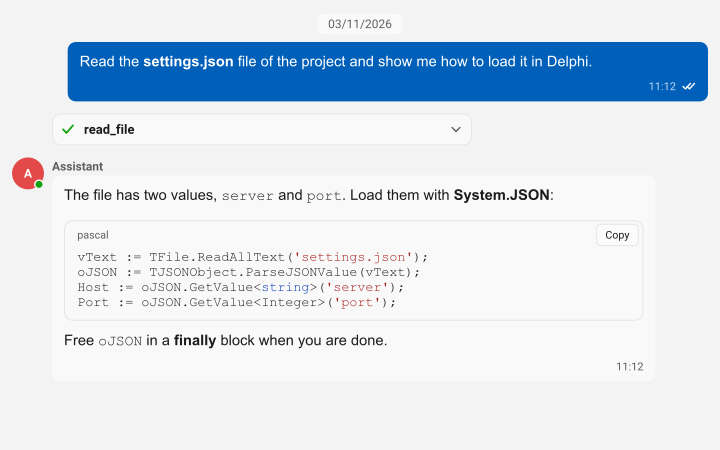
An AI assistant conversation with a tool call card and a highlighted Pascal code block

AIAssistant

A chat panel bound to an AI provider: streaming answers, stop, regenerate, edit and resend, and tool call cards. VCL and FireMonkey, and a C++ Builder version.

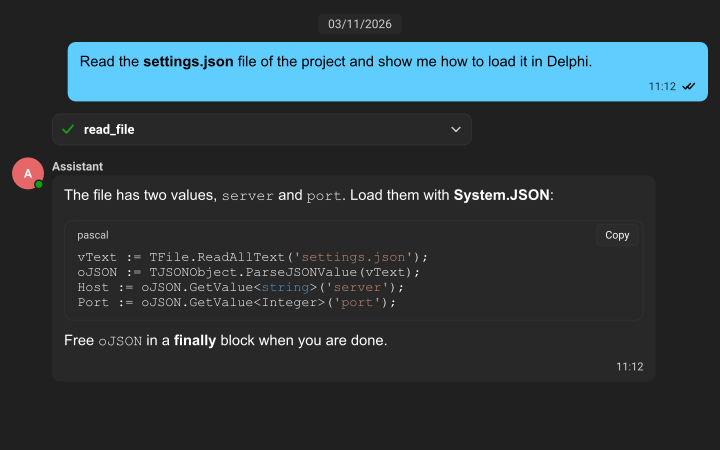
The same AI assistant conversation in the dark Fluent theme

Dark theme

The same conversation in the dark Fluent theme. The chat follows the light, dark and Fluent themes of sgcUI.

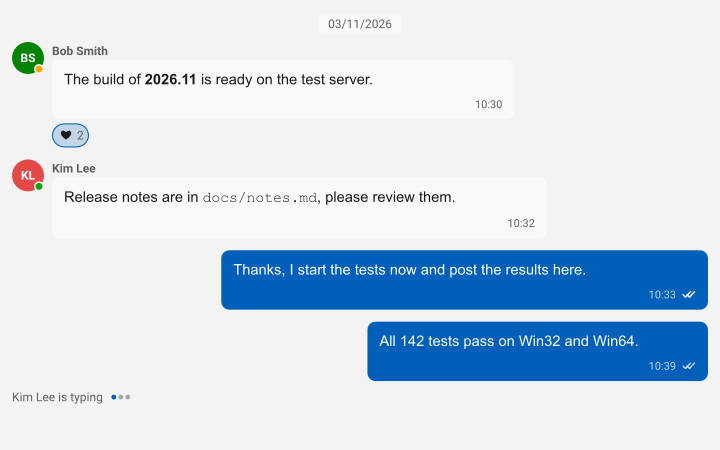
A team chat with avatars, presence, a reaction, read receipts and a typing indicator

TeamChat and TeamChatServer

A VCL client and a console relay server on sgcWebSockets: presence, typing, read receipts, reactions, replies and attachments.

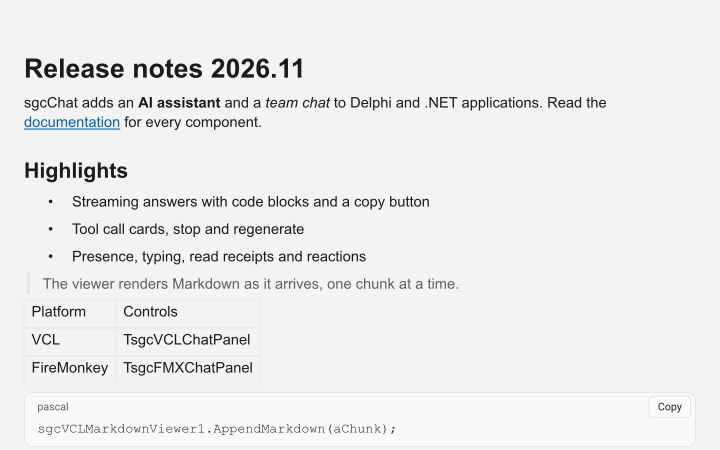
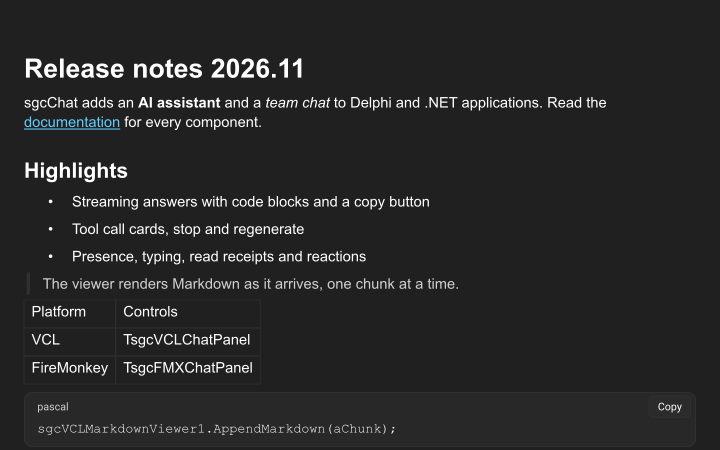
The Markdown viewer with headings, a list, a quote, a table and a code block

MarkdownViewer

The Markdown viewer on its own, with a simulated streaming answer. VCL and FireMonkey, and a C++ Builder version.

The Markdown viewer in the dark Fluent theme

.NET demos

MarkdownViewer, AIAssistant and TeamChat for WinForms, WPF and Avalonia, and the TeamChatServer relay.

Where sgcChat Is Included

sgcChat is included in sgcUI Enterprise and in the All-Access bundle. It requires sgcUICore and sgcRichEdit, which are included, and the installer adds sgcRichEdit and sgcPDF with it. There is no free Community edition.

sgcUI Enterprise

Every sgcUI product, sgcChat, sgcRichEdit and sgcPDF included, from €699.

See Enterprise →

All-Access

Every eSeGeCe product, sgcUI Enterprise and sgcWebSockets included, so the AI provider and the WebSocket bridge of sgcChat work out of the box.

See All-Access →

Supported Frameworks and Platforms

Components in sgcChat

VCL

TsgcVCLChatPanel, TsgcVCLChatView, TsgcVCLChatInput and TsgcVCLMarkdownViewer.

FireMonkey

TsgcFMXChatPanel, TsgcFMXChatView, TsgcFMXChatInput and TsgcFMXMarkdownViewer.

.NET

The same controls for WinForms, WPF and Avalonia, such as TsgcWinFormsChatPanel, TsgcWpfChatPanel and TsgcAvaloniaChatPanel.

AI and transports

TsgcChatAI with its providers, TsgcChatEventTransport, and the sgcWebSockets bridge with TsgcChatTransport_WebSocket and TsgcChatServer_WebSocket.

TargetComponentVersions and platforms
Delphi 7 to 13VCL controls, the model, AI and transport unitsWin32, and Win64 from Delphi XE2
C++ Builder 2007 to 13The same classesGenerated .hpp headers and static libraries
FireMonkeyTsgcFMXChatPanel and the other FireMonkey controlsDelphi XE6 and later
Linux64Model, Markdown document, view, AI and transport cores, SVG and PNG outputDelphi 10.2 and later, headless
.NET core libraryesegece.sgcChat.NET Standard 2.0, .NET Framework 4.7.2, .NET 6, 8, 9 and 10
WinForms and WPFTsgcWinFormsChatPanel, TsgcWpfChatPanel.NET Framework 4.7.2, .NET 8, 9 and 10 on Windows
AvaloniaTsgcAvaloniaChatPanel.NET 8, 9 and 10

Frequently Asked Questions

With sgcWebSockets, TsgcChatAIProvider_AIChat uses TsgcAIChat, which supports OpenAI, Anthropic, Gemini, DeepSeek, Ollama, Grok and Mistral. Without it, use the sgcUI AI provider layer through TsgcChatAIProvider_UICore, or stream from any backend in the OnStream event of TsgcChatAIEventProvider.

Only for the bridge. The WebSocket transport and the relay server need sgcWebSockets, and TsgcChatAIProvider_AIChat needs its AI components (Enterprise edition or the AI pack). The Markdown viewer, the chat controls, the AI binding and the event transport work without it.

No. sgcChat is part of sgcUI Enterprise and All-Access. The .NET packages are Registered only and are not published on nuget.org. Evaluate it with the sgcUI trial.

Yes. TsgcVCLMarkdownViewer and TsgcFMXMarkdownViewer are controls of their own. Set Markdown to show a text, or call AppendMarkdown to add text as it arrives.

The framework neutral units compile for Linux64 from Delphi 10.2: the conversation model, the Markdown document, the view, AI and transport cores, with SVG and PNG output. There are no Linux controls.

Yes. Every sgcUI Enterprise license includes the full source code and 1 year of updates. See the sgcUI pricing page.

sgcChat Help

Online help

The sgcUI help for Delphi, C++ Builder and .NET.

PDF manuals

Delphi, C++ Builder and .NET, covering every sgcUI product.

3,000+Developers
20+Years
761+Components
30+API Integrations
5Platforms
30-Day Money-Back GuaranteeNot satisfied? Request a full refund within 30 days of purchase. See refund policy

Try sgcChat Today

The sgcUI trial includes sgcChat, sgcRichEdit and every other sgcUI product.