Delphi, C++ Builder & .NET Part of sgcUI

sgcDocs, a Headless Office File API for Delphi, C++ Builder & .NET

Create, read and convert Word documents and spreadsheets in a desktop application, a Windows service or a Linux server. sgcDocs runs mail merges, prints workbooks to PDF, merges, splits, fills, encrypts and signs PDF files, renders barcodes and builds ZIP64 archives. It needs no Office installation and no UI framework, because every reader, writer and renderer is Pascal or C# code.

No Office installationNo UI frameworkWindows and Linux64Included in sgcUI Enterprise
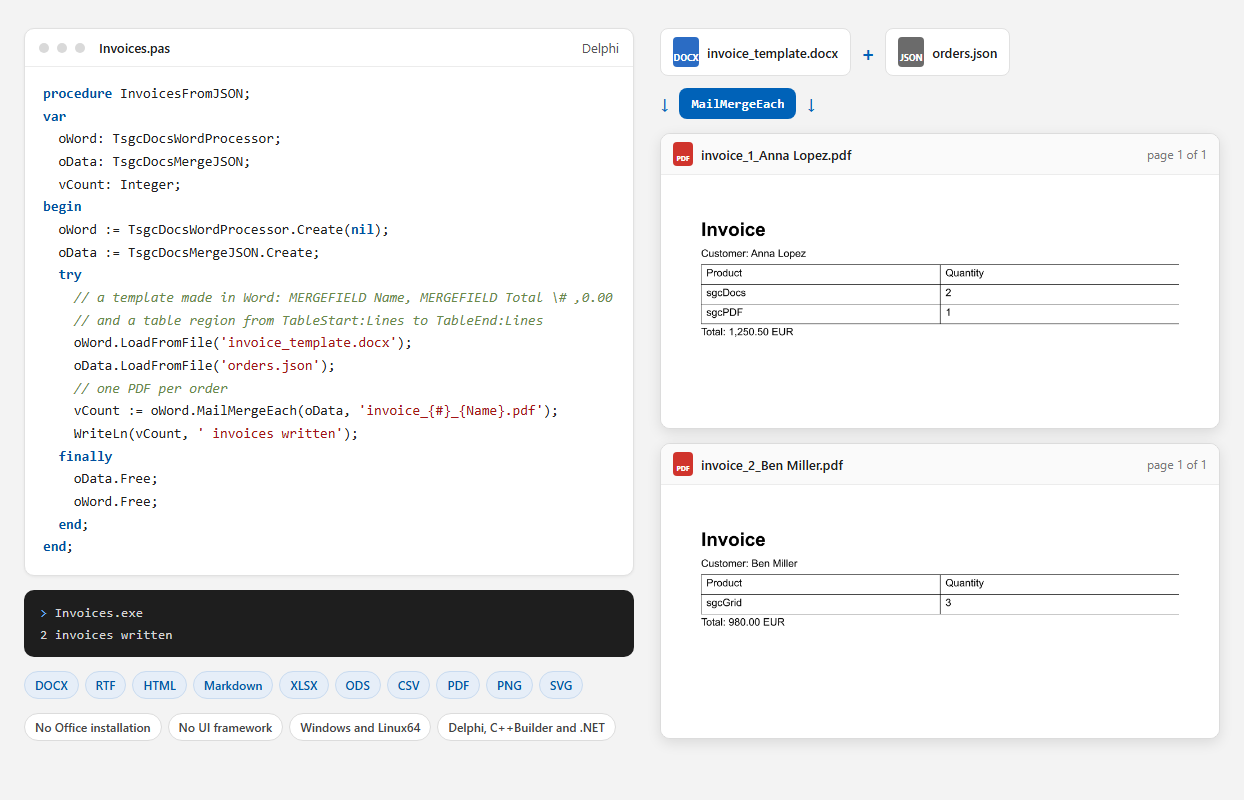
The sgcDocs mail merge code next to the two invoice PDF files it wrote, rendered to PNG by sgcDocs

Office Files Without Office

Seven non visual components on the sgcDocs palette page. The highlights below, and the feature matrix lists every feature.

Word documents

Read, edit and write documents, then merge them with your data.

Word documents

Read, edit and write DOCX, RTF, HTML and Markdown

Contracts, reports and letters often start as a DOCX made in Word. TsgcDocsWordProcessor loads DOCX, RTF, HTML, Markdown and text, keeps sections, headers, footers, fields, footnotes and bookmarks, and saves the document in any of these formats. It searches and replaces text in the body, the tables, the headers and the footers, and exports the laid out pages to PDF, PNG or SVG.

  • Tagged PDF with the structure of headings, lists and tables, and PDF/A
  • PNG pages from 1 to 2400 dpi, and SVG pages
  • SearchText and ReplaceAll in every part of the document
  • Read only, comments, tracked changes and forms protection with a salted password hash

Word documents

Mail merge from JSON, CSV, a dataset or events

Invoices, letters and certificates come from a template and a list of records. MailMerge writes every record into one document, and MailMergeEach writes one file per record, PDF included, with the record number and any field value in the file name. The template is an ordinary DOCX made in Word with MERGEFIELD and IF fields.

  • Number, date and case switches, such as \# ,0.00 and \@ "MMMM d, yyyy"
  • IF fields with nested fields, and regions that repeat table rows per child record
  • TsgcDocsMergeJSON, TsgcDocsMergeCSV, TsgcDocsMergeDataSet and TsgcDocsMergeEvents

Spreadsheets

Workbooks with formulas, formats and charts, calculated and printed on the server.

Spreadsheets

XLSX, ODS and CSV with 320 Excel functions

TsgcDocsSpreadsheet loads, creates, calculates and saves workbooks with no user interface. Cells are addressed as in Excel, a text that starts with = is a formula, and the formula engine calculates 320 Excel functions, LET, LAMBDA and named LAMBDA functions included. Formats, merged cells, charts and conditional formats are kept when an XLSX file is loaded and saved again.

  • Values, Formulas and Text by cell address, Evaluate for any formula
  • Fonts, fills, alignment, number formats, column widths and row heights
  • ImportDataSet copies the rows of a dataset into a sheet
  • Sheet and workbook protection

Spreadsheets

Workbooks printed to PDF, HTML and PNG

A sheet is paginated the way Excel prints it, with the page setup stored in the workbook: orientation, paper size, scale or fit to pages, margins, print areas, print titles, grid lines, and header and footer codes. The charts of the sheet are printed with it, and ExportToHTML writes an HTML table per sheet with the charts as inline SVG.

  • ExportToPDFFile for one sheet or every visible sheet
  • ExportSheetPageToPNG for one printed page
  • Print areas, print titles and fit to one page wide

PDF, barcodes and ZIP

The file work around the documents, in the same package.

PDF processing

Merge, split, fill, encrypt and sign PDF files

TsgcDocsPDFProcessor opens a PDF, encrypted ones too, and changes it: merge files, split them by page ranges, extract, delete, move and rotate pages, read and search the text, and render pages to PNG. It fills and flattens AcroForm fields, encrypts with AES-256, converts to PDF/A and validates the result, and turns HTML with CSS or images into PDF.

  • RC4 and AES encryption with print, copy and modify permissions
  • PDF/A-1, PDF/A-2, PDF/A-3 and PDF/A-4 conversion and validation
  • Digital signatures through OnExternalSign on every platform, and with a PFX file or a certificate of the store on Windows

Barcodes and ZIP

Barcodes and ZIP64 archives

TsgcDocsBarcode encodes 11 linear and 2D symbols, such as Code 128, EAN-13, QR Code, Data Matrix and PDF417, validates the data and writes PNG, SVG or PDF, or draws the symbol as vectors on a PDF page. TsgcDocsZipArchive creates and reads ZIP archives with ZIP64, UTF-8 names and entry times, and refuses an archive with a path traversal name before anything is written.

  • 11 barcode kinds with check digits and GS1 validation
  • ZIP64 for archives over 4 GB or with more than 65,535 entries
  • Size, compressed size, CRC32 and time of every entry

Conversion and deployment

One call conversions, and the same code on a desktop and on a server.

Conversion

63 format pairs in one call

TsgcDocsConverter converts files and streams between documents, spreadsheets, PDF files and images. The formats come from the file extensions, or are detected from the content of a stream, and CanConvert tells in advance whether a pair is supported. ConvertToImages writes one PNG or SVG per page, and ConvertImagesToPDF makes one PDF page per image.

  • DOCX, RTF, HTML, Markdown and text to each other, to PDF, PNG and SVG
  • XLSX, ODS and CSV to each other, to HTML, PDF and PNG
  • PDF to text and PNG, and every PDF output as PDF/A when you ask for it

Deployment

The same code on Windows and Linux64

The sgcDocs units use no VCL, FireMonkey or GDI code and need no Office, so the same code runs in a console program, a Windows service, a Linux64 daemon or a web server. The components are not thread safe: create the ones a request needs in the thread that serves it, and separate instances run in parallel. On Linux, add the TrueType fonts your documents use with AddFontFolder or the Fonts list of the converter.

  • Delphi 7 to 13 and C++ Builder 2007 to 13
  • Win32, Win64 and Linux64
  • The .NET package esegece.sgcDocs for .NET Framework 4.7.2, .NET Standard 2.0 and .NET 6 to 10

Who Builds with sgcDocs

Invoices, letters and contracts from your data

Business applications fill DOCX templates made in Word with the records of a database or a JSON document, and write one PDF per customer. The users keep editing the templates in Word, and the application never needs Office on the machine.

  • Mail merge
  • One file per record
  • PDF output
Run the MailMerge demo

A conversion service on your own server

Portals and back offices convert uploaded documents to PDF, text or page images on a Linux or Windows server, without sending them to a third party service. Each request gets its own converter, and the requests run in parallel.

  • 63 format pairs
  • Linux64
  • REST endpoints
Run the ConversionServer demo

Reports and exports without Excel

Reporting and accounting applications create workbooks with formulas, formats and charts, calculate them and print them to PDF with the page setup of the workbook, in a service with no user session.

  • 320 Excel functions
  • Charts
  • Print to PDF
Run the SpreadsheetCreate demo

Fill, Merge and Convert in a Few Lines

The components need no form and no parent: create them with a nil owner, call their methods and free them.

TsgcDocsWordProcessor fills a DOCX template and exports it to PDF. TsgcDocsConverter converts any supported pair in one call and writes one PNG per page.

uses
  SysUtils, Classes,
  sgcDocs_Types, sgcDocs_Word, sgcDocs_Converter;

procedure ContractToPDF;
var
  oWord: TsgcDocsWordProcessor;
  oConverter: TsgcDocsConverter;
begin
  // fill a DOCX template made in Word, save it and export it to PDF
  oWord := TsgcDocsWordProcessor.Create(nil);
  try
    oWord.LoadFromFile('contract_template.docx');
    oWord.ReplaceAll('[CUSTOMER]', 'Anna Lopez');
    oWord.ReplaceAll('[DATE]', FormatDateTime('mmmm d, yyyy', Date));
    oWord.SaveToFile('contract.docx');
    oWord.ExportToPDFFile('contract.pdf');
    WriteLn('Pages: ', oWord.PageCount);
  finally
    oWord.Free;
  end;

  // one call conversions, the formats come from the file extensions
  oConverter := TsgcDocsConverter.Create(nil);
  try
    oConverter.Convert('contract.docx', 'contract.html');
    oConverter.Convert('contract.pdf', 'contract.txt');
    // one PNG per page, at 96 dpi
    oConverter.ConvertToImages('contract.pdf', 'pages', 96);
  finally
    oConverter.Free;
  end;
end;

MailMergeEach writes one PDF per order of a JSON array. {#} is the record number and {Name} a field value.

uses
  SysUtils, Classes,
  sgcDocs_Types, sgcDocs_MailMerge, sgcDocs_Word;

procedure InvoicesFromJSON;
var
  oWord: TsgcDocsWordProcessor;
  oData: TsgcDocsMergeJSON;
  vCount: Integer;
begin
  oWord := TsgcDocsWordProcessor.Create(nil);
  oData := TsgcDocsMergeJSON.Create;
  try
    // a template made in Word: MERGEFIELD Name, MERGEFIELD Total \# ,0.00
    // and a table region from TableStart:Lines to TableEnd:Lines
    oWord.LoadFromFile('invoice_template.docx');
    // [{"Name": "Anna Lopez", "Total": 1250.5, "Lines": [...]}, ...]
    oData.LoadFromFile('orders.json');
    // one PDF per order: invoice_1_Anna Lopez.pdf, invoice_2_Ben Miller.pdf
    vCount := oWord.MailMergeEach(oData, 'invoice_{#}_{Name}.pdf');
    WriteLn(vCount, ' invoices written');
  finally
    oData.Free;
    oWord.Free;
  end;
end;

Values, a formula with LET, the calculated result, and the workbook saved as XLSX and ODS and printed to PDF.

uses
  SysUtils, Classes,
  sgcDocs_Types, sgcDocs_Spreadsheet;

procedure CreateSales;
var
  oSheet: TsgcDocsSpreadsheet;
begin
  oSheet := TsgcDocsSpreadsheet.Create(nil);
  try
    oSheet.New;
    oSheet.Values['A1'] := 'Product';
    oSheet.Values['B1'] := 'Units';
    oSheet.Values['C1'] := 'Price';
    oSheet.Values['A2'] := 'Paper';
    oSheet.Values['B2'] := 12;
    oSheet.Values['C2'] := 4.5;
    oSheet.Values['A3'] := 'Toner';
    oSheet.Values['B3'] := 3;
    oSheet.Values['C3'] := 39.9;
    oSheet.Values['A4'] := 'Total';
    // a text that starts with = is a formula, LET and LAMBDA included
    oSheet.Values['C4'] := '=LET(t, SUMPRODUCT(B2:B3, C2:C3), ROUND(t, 2))';
    oSheet.Calculate;
    WriteLn('Total: ', oSheet.Text['C4']);
    oSheet.SaveToFile('sales.xlsx');
    oSheet.SaveToFile('sales.ods');
    WriteLn(oSheet.ExportToPDFFile('sales.pdf'), ' PDF page(s)');
  finally
    oSheet.Free;
  end;
end;

The .NET package esegece.sgcDocs keeps the Delphi class names. A console program that fills a template, creates a workbook, merges the two PDF files into a PDF/A-2b file and converts the sources.

using System;
using esegece.sgcDocs;
using esegece.sgcPDF;

static class Program
{
    static void Main()
    {
        // fill a DOCX template made in Word and export it to PDF
        using (var word = new TsgcDocsWordProcessor())
        {
            word.LoadFromFile("contract_template.docx");
            word.ReplaceAll("[CUSTOMER]", "Anna Lopez");
            word.SaveToFile("contract.docx");
            word.ExportToPDFFile("contract.pdf");
        }

        // a spreadsheet with a formula, saved as XLSX and printed to PDF
        using (var sheet = new TsgcDocsSpreadsheet())
        {
            sheet.New();
            sheet.SetValues("A1", "Units");
            sheet.SetValues("A2", 12);
            sheet.SetValues("A3", 30);
            sheet.SetFormulas("A4", "=SUM(A2:A3)");
            sheet.Calculate();
            Console.WriteLine("Total: " + sheet.Text("A4"));
            sheet.SaveToFile("units.xlsx");
            sheet.ExportToPDFFile("units.pdf");
        }

        // merge both PDF files and convert the result to PDF/A-2b
        using (var pdf = new TsgcDocsPDFProcessor())
        {
            pdf.LoadFromFile("contract.pdf");
            pdf.Merge("units.pdf");
            pdf.ConvertToPDFA(TsgcPDFALevel.paA2b);
            pdf.SaveToFile("contract_pack.pdf");
            Console.WriteLine(pdf.PageCount + " pages");
        }

        // one call conversions, the formats come from the file extensions
        using (var converter = new TsgcDocsConverter())
        {
            converter.Convert("contract.docx", "contract.md");
            converter.Convert("units.xlsx", "units.csv");
        }
    }
}

Run the sgcDocs Demos

The Delphi and C++ Builder demos install with the sgcUI trial in Demos\Docs. The .NET demos ship with the Registered .NET download. The Delphi console demos use only the RTL and the sgc units, so they build and run unchanged on Windows and Linux64.

WordCreate and WordConvert

A document with headings, a styled table, lists, an image, a header, a footer with page numbers and a footnote, saved as DOCX, PDF and PNG. WordConvert loads any document and saves it in every other format.

MailMerge

Merge fields with switches, an IF field and a table region: letters from CSV and orders from JSON, in one document and one file per record.

WordFindReplace

Search and replace in the body, a table, the header and the footer, then a read only protection with a password.

SpreadsheetCreate and SpreadsheetConvert

A sales sheet and a loan sheet with LET, LAMBDA, XLOOKUP and financial functions, formats, a column chart and a page setup, saved as XLSX, ODS, CSV, PDF and HTML.

PDFTools

HTML to PDF, merge, split, rotate, text extraction and search, PNG pages, AES-256 encryption, form fill and flatten, and PDF/A conversion and validation.

Barcodes and ZipArchive

All 11 barcode kinds as PNG, SVG and on a PDF page. A ZIP archive with entry metadata, a refused path traversal archive and a ZIP64 archive of 70,000 entries.

DocumentConverter

The CanConvert matrix of the 14 formats and their 63 pairs, and the conversion of any file to a target format, with page images for PNG and SVG.

ConversionServer

A REST conversion service with POST /convert, POST /merge, GET /formats and GET /health, one converter per request and a maximum upload size.

C++ Builder and .NET demos

DocumentConverter, MailMerge, PDFTools and WordCreate for C++ Builder 13. The 11 C# projects for .NET 8 are ports of the Delphi demos, and ConversionServer is an ASP.NET Core minimal API.

Where sgcDocs Is Included

sgcDocs is included in sgcUI Enterprise and All-Access. It is not sold on its own. It builds on sgcUICore, sgcRichEdit, sgcGrid, sgcSpreadsheet, sgcCharts and sgcPDF, which are part of sgcUI Enterprise, and the installer adds them with it. There is no free Community edition, and the .NET package esegece.sgcDocs is Registered only.

sgcUI Enterprise

Every sgcUI product, sgcDocs and the engines it builds on included, from €699.

See Enterprise →

All-Access

Every eSeGeCe product, sgcUI Enterprise and sgcDocs included.

See All-Access →

Supported Compilers and Platforms

Components in sgcDocs

Documents

TsgcDocsWordProcessor and TsgcDocsMailMerge.

Spreadsheets

TsgcDocsSpreadsheet.

PDF, barcodes and ZIP

TsgcDocsPDFProcessor, TsgcDocsBarcode and TsgcDocsZipArchive.

Conversion

TsgcDocsConverter.

TargetComponentVersions and platforms
Delphi 7 to 13The seven sgcDocs componentsWin32, and Win64 from Delphi XE2
C++ Builder 2007 to 13The same classesGenerated .hpp headers and static libraries
Linux64The same units, with no VCL, FireMonkey or GDI codeConsole programs, daemons and web servers. Needs libz.so.1 and the TrueType fonts of the documents
.NETesegece.sgcDocs.NET Standard 2.0, .NET Framework 4.7.2, .NET 6, 8, 9 and 10
.NET page imagesesegece.sgcUICore.RenderingAdded only for PNG and SVG pages of documents and sheets

Frequently Asked Questions

No. sgcDocs needs no Microsoft Office, no LibreOffice, no COM and no external DLLs. Every reader, writer and renderer is Pascal code of the sgcUI engines, or C# code in the .NET package.

Documents in DOCX, RTF, HTML, Markdown and text, spreadsheets in XLSX, ODS and CSV, and PDF files. The output also includes PDF, PNG and SVG pages, and PNG, JPEG, BMP and TIFF images convert to PDF. PPTX, the binary XLS and DOC formats, ODT reading, pivot tables, comments and revisions, and Office file encryption are not in this release.

Yes. The units compile for Linux64 and run in console programs and daemons. The binary needs libz.so.1, which every distribution installs, and the TrueType fonts your documents use, either installed on the server or added from a folder with AddFontFolder.

Yes, that is what it is built for. The components are not thread safe, so create the ones a request needs in the thread that serves it and free them at the end of the request. Separate instances run in parallel. The ConversionServer demo shows a complete REST conversion service.

No. sgcDocs is part of sgcUI Enterprise and All-Access. The .NET package is Registered only and is not published on nuget.org. Evaluate it with the sgcUI trial.

Yes. Every sgcUI Enterprise license includes the full source code and 1 year of updates. See the sgcUI pricing page.

sgcDocs Help

Online help

The sgcUI help for Delphi, C++ Builder and .NET: installation, supported formats, getting started, mail merge, document conversion, fonts on Linux and server deployment.

PDF manuals

Delphi, C++ Builder and .NET, covering every sgcUI product.

3,000+Developers
20+Years
761+Components
30+API Integrations
5Platforms
30-Day Money-Back GuaranteeNot satisfied? Request a full refund within 30 days of purchase. See refund policy

Try sgcDocs Today

The sgcUI trial includes sgcDocs and every other sgcUI product.