Delphi, C++ Builder & Lazarus Part of sgcUI

sgcLocalization, Translate Your Delphi, C++ Builder & Lazarus Applications

Ship your application in every language your customers speak. sgcLocalization finds the texts of your forms, frames and data modules, gives you one editor to translate them by hand, with professional translators or with AI, checks every translation and switches the whole application at runtime with one line of code.

VCL, FireMonkey, LCLDelphi 7 to 13, C++ Builder and LazarusXLIFF 1.2 and AI translationIncluded with every sgcUI edition
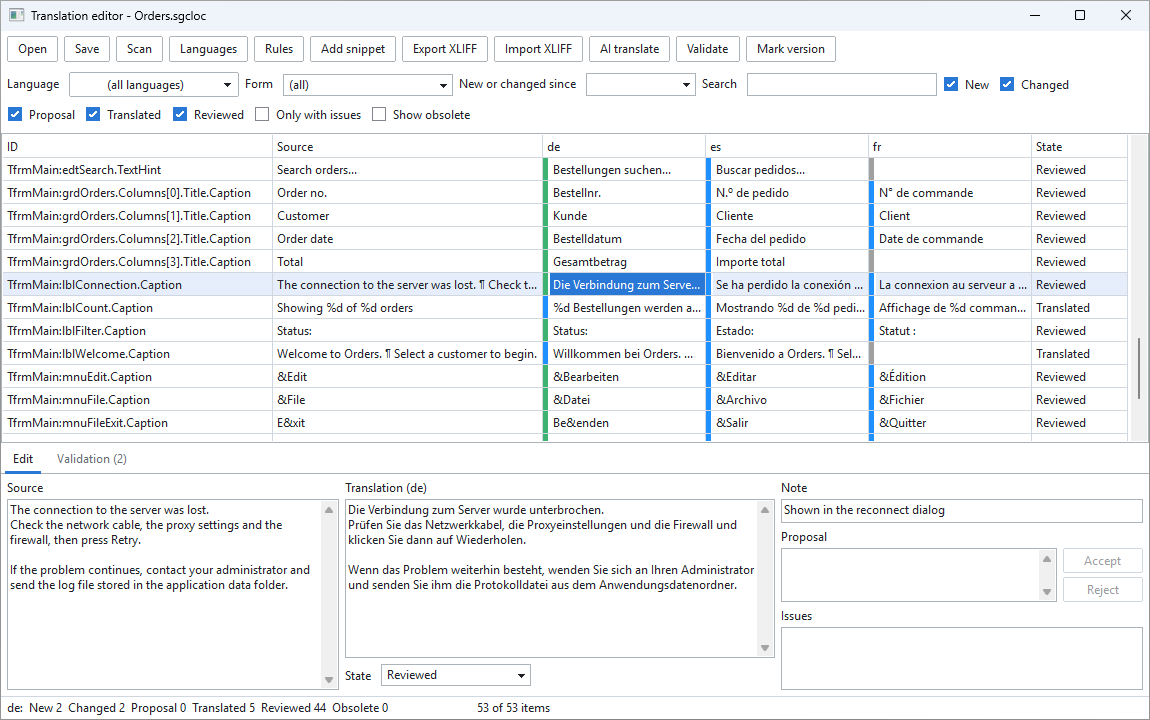
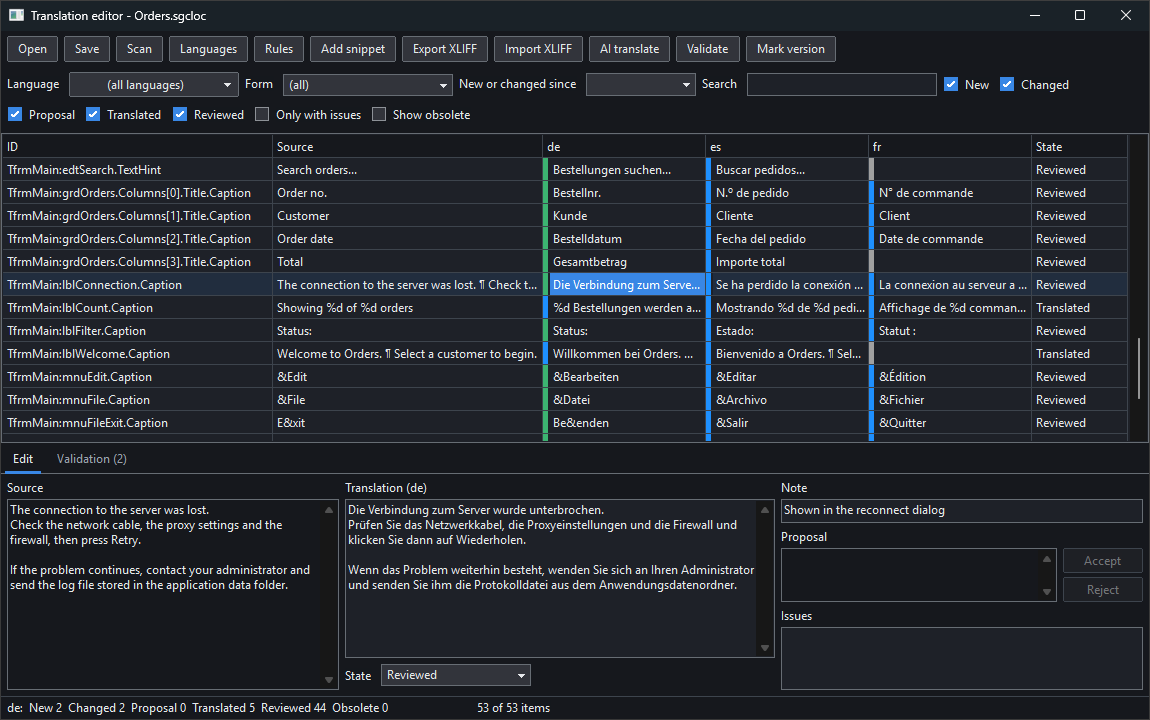
The sgcLocalization translation editor with a project open: source texts with German, Spanish and French columns, item states and the edit panel

From the First Scan to the Next Release

sgcLocalization covers the whole job: collecting the texts, translating them, checking them, switching the language at runtime and keeping the translations up to date when the application changes.

Collect and translate

The texts of your application in one project, and one editor to translate them.

Translation editor listing the text properties found in a form, such as captions, hints and column titles, with one column per language

Collect and translate

It finds the texts, you decide what is translated

sgcLocalization reads your forms, frames and data modules through RTTI and lists every text property it finds: captions, hints, column titles, list items and the rest. Ignore rules keep out the properties that must never be translated, and the built-in defaults already cover the usual non-text properties. Text that is created in code is added explicitly as a snippet, with a context when the same word needs two translations and with plural variants when the text depends on a number.

  • Forms, frames and data modules are scanned through RTTI
  • Ignore rules, with built-in defaults for the usual non-text properties
  • sgcT for text created in code, with context and plural variants
  • One editor, at design time and as a standalone tool
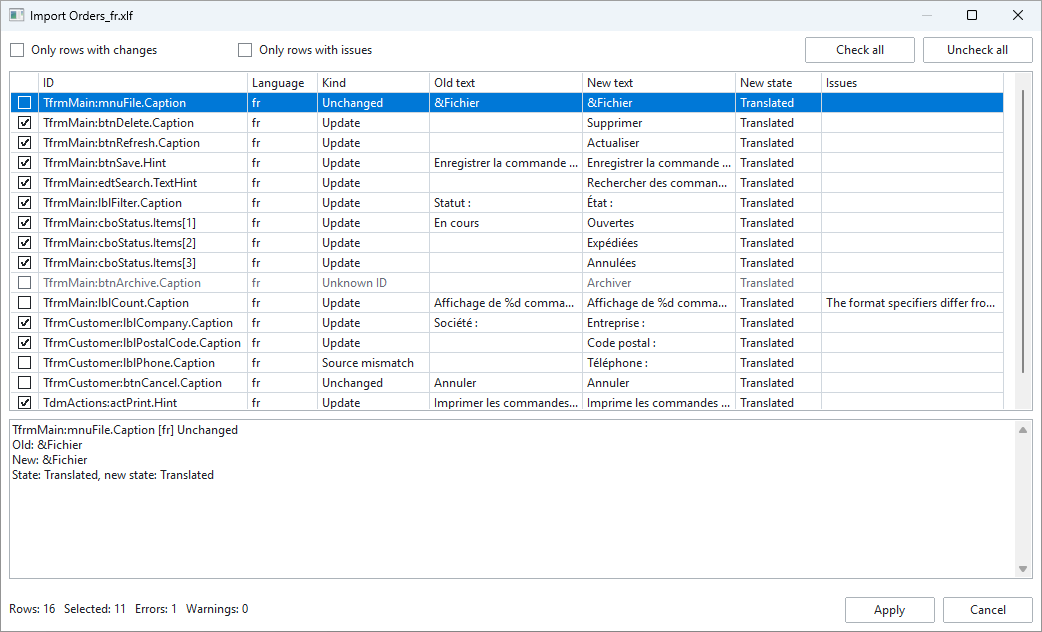
Import review dialog for a French XLIFF file: each row shows the old text, the new text, the kind of change and any issue, with a check box to accept it

Collect and translate

Work with professional translators through XLIFF

Export a language to an XLIFF 1.2 file, send it to your translator and import the file when it comes back. Nothing is written blindly: the import opens a review that shows, row by row, the old text, the new text and what kind of change it is. Rows with a problem, such as a format specifier that no longer matches the source, are marked, and you choose which rows are applied.

  • XLIFF 1.2 export and import
  • Every import is reviewed before it is applied
  • Unknown IDs and source mismatches are reported, not applied silently
  • The same validation as for manual translations
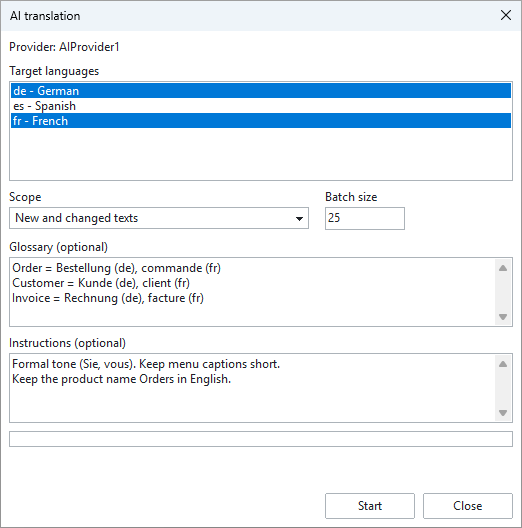
AI translation dialog: target languages, scope set to new and changed texts, batch size, an optional glossary and optional instructions

Collect and translate

AI translation that you approve

Let an AI service translate the new and changed texts into the languages you select, with your own glossary and instructions for tone and terminology. AI translations arrive as proposals first, next to the current text, and you accept or reject each one. The editor talks to the AI through the sgcUI AI provider. ChatGPT, Claude, Gemini, Ollama and more are available when sgcWebSockets is installed, and without it an event lets you call any service from your own code.

  • ChatGPT, Claude, Gemini, Ollama and more, through sgcWebSockets
  • An event to call any other service yourself
  • Glossary and instructions per run
  • Proposals first: nothing replaces a translation until you accept it

Keep the translations correct

Checks for every text, and a clear view of what changed since the last release.

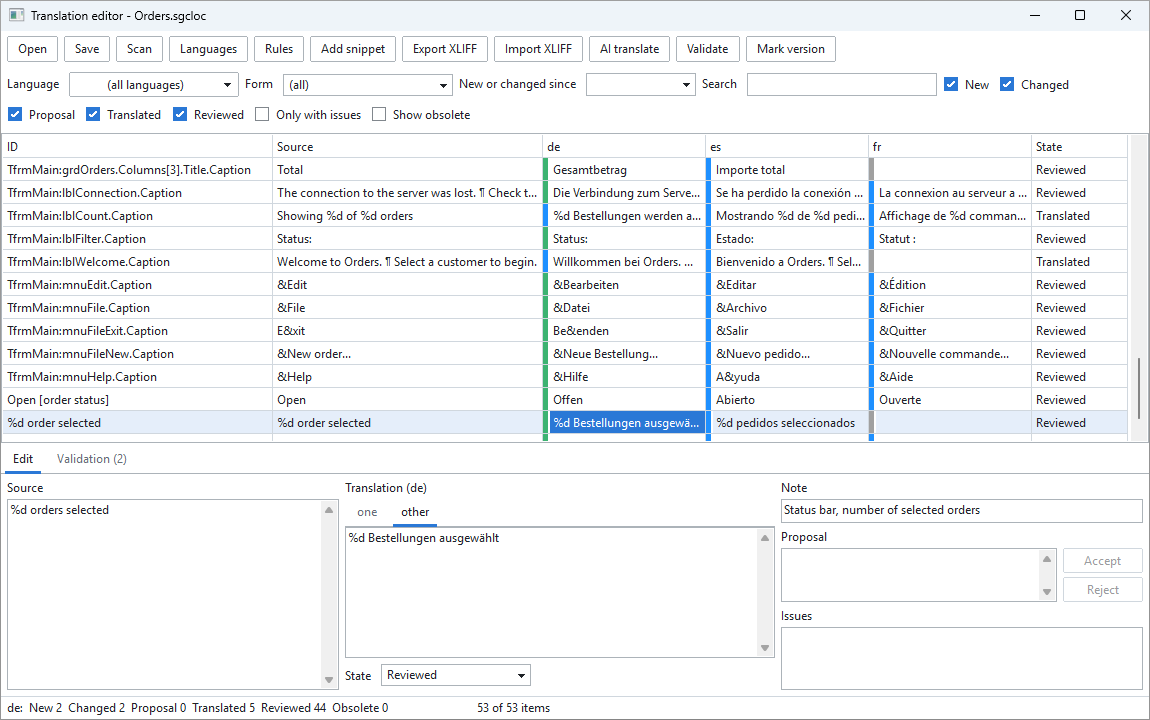
Translation editor with a plural text selected: the German translation has one tab for each plural form, one and other

Keep the translations correct

Validation and plural forms

A translation that drops a %d or an accelerator key breaks the application for the users of that language only, so it is easy to miss. sgcLocalization checks format specifiers, placeholders, accelerator keys, line breaks, leading and trailing whitespace, empty translations and plural forms. The same checks run on manual, imported and AI translations. Plural texts follow the CLDR rules of each language, so the editor asks for exactly the forms that language needs.

  • Format specifiers, placeholders and accelerator keys
  • Line breaks, leading and trailing whitespace, empty translations
  • Plural forms with CLDR rules
  • A filter that shows only the rows with issues

Incremental translation

Every item has a state: new, changed, proposal, translated, reviewed or obsolete. Mark a version when you release, and the "new or changed since" filter shows what was added or edited after it, so new text is never overlooked. Texts that were removed from the application are kept and reused as suggestions.

Switch at runtime

Call sgcSetLanguage('de') or drop the ready-to-use language combo on a form. The whole application changes at once, and forms that are created later are translated automatically. Right-to-left languages also switch the layout direction.

One project file

The translations live in one .sgcloc project file. It is JSON, so it is friendly to version control. The project can also be embedded in the form file.

An editor in your language

The translation editor itself is available in 12 languages and in light and dark themes. It is the same editor at design time and as a standalone tool, so a translator does not need the IDE.

The Code You Write

Forms are translated without code. You write one line to switch the language, and you wrap the texts that are created in code.

uses
  sgcLocalization_Engine;

procedure TfrmMain.ShowSelection(aCount: Integer);
begin
  // switch the whole application to German
  sgcSetLanguage('de');

  // a text created in code
  ShowMessage(sgcT('The order has been saved.'));

  // the same word with a context, when it needs its own translation
  lblState.Caption := sgcTC('order status', 'Open');

  // a plural: the form that matches aCount in the current language
  lblCount.Caption := Format(sgcTN('%d order selected',
    '%d orders selected', aCount), [aCount]);
end;

Where sgcLocalization Is Included

sgcLocalization is not sold separately and has no price of its own. It is included at no extra cost with every sgcUI edition and with every sgcUI product bought as a single package.

Every sgcUI edition

Standard, Professional and Enterprise all include sgcLocalization.

See sgcUI pricing →

Every single product

Buy one sgcUI product on its own, sgcGrid for example, and sgcLocalization comes with it.

See the single packages →

Trial

sgcLocalization ships inside the sgcUI installers, so the sgcUI trial is the way to try it.

Download the sgcUI trial →

Supported Frameworks and Platforms

Components in sgcLocalization

TsgcVCLLocalizer

The localizer component for VCL applications. It applies the active language to your forms.

TsgcVCLLanguageCombo

A ready-to-use combo for VCL that lists the languages of the project and switches the application when the user picks one.

TsgcFMXLocalizer

The same localizer for FireMonkey applications.

TsgcFMXLanguageCombo

The language combo for FireMonkey.

Translation editor

Opens at design time from the IDE and also runs as a standalone tool, in 12 languages and in light and dark themes.

sgcT, sgcTC and sgcTN

The functions for text created in code: a plain text, a text with a context and a plural.

TargetFrameworkPlatforms
Delphi 7 to 13VCLWindows
DelphiFireMonkeyWindows, macOS, iOS, Android and Linux, where FireMonkey runs
C++ BuilderVCL and FireMonkeyThe platforms of the framework
LazarusLCLWindows and Linux

Frequently Asked Questions

Nothing extra. sgcLocalization is included with every sgcUI edition and with every sgcUI product bought as a single package. It is not sold separately.

No. The text properties of forms, frames and data modules are found through RTTI, so the forms stay as they are. Only text that is created in code needs a change: wrap it in sgcT and add it to the project as a snippet.

Yes. sgcSetLanguage switches the whole application with one line, and the language combo does the same without code. Forms that are created later are translated automatically, and right-to-left languages switch the layout direction.

The editor uses the sgcUI AI provider. With sgcWebSockets installed it connects to ChatGPT, Claude, Gemini, Ollama and more. Without sgcWebSockets, an event hands you the request so you can call any service from your own code. In both cases the translations arrive as proposals that you accept or reject.

A new scan marks added texts as new and edited texts as changed, and the existing translations stay. The "new or changed since" filter lists what was touched after a version mark. Texts that were removed become obsolete, are kept in the project and are reused as suggestions.

In one .sgcloc project file in JSON format, which works well with version control, or embedded in the form file.

Delphi 7 to 13, C++ Builder and Lazarus, with VCL, FireMonkey and LCL, on Windows, macOS, iOS, Android and Linux where the framework runs.

sgcLocalization Help

Online help

sgcLocalization is documented in the sgcUI help: Delphi and C++ Builder.

PDF manuals

Delphi and C++ Builder, covering every sgcUI product.

Feature list

Every feature of sgcLocalization, grouped by task.

See all features →
3,000+Developers
20+Years
761+Components
30+API Integrations
5Platforms
30-Day Money-Back GuaranteeNot satisfied? Request a full refund within 30 days of purchase. See refund policy

Try sgcLocalization Today

The sgcUI trial includes sgcLocalization and every other sgcUI product.