Delphi, C++Builder & .NET Process screens

The sgcUI HMI Pack

Everything an operator panel needs, built into the sgcUI products you already use: an ISA-101 look for the whole suite, tank and process symbol gauges, P&ID stencils with live process states and flowing pipes, an ISA-18.2 alarm list and a NumPad for touch panels.

VCLFireMonkeyWinFormsWPFAvalonia
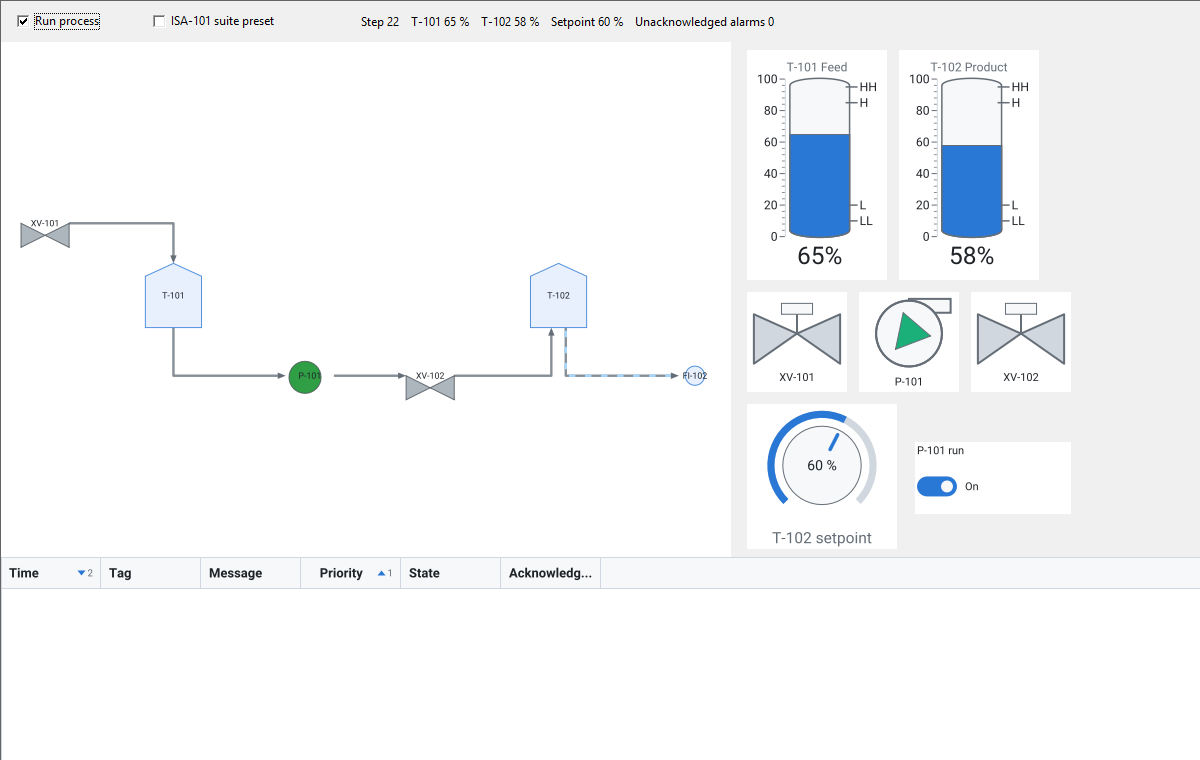
The sgcUI HMI demo: a tank farm P&ID with valves, a running pump and a flowing pipe, two tank gauges with HH, H, L and LL limits, valve and pump symbol gauges, a setpoint knob, a pump switch and the alarm list

Five Products, One Process Screen

The HMI pack is not a separate product. Each piece lives in the sgcUI product it extends, in the units, packages and NuGet packages you already use, and follows the edition of that product.

ISA-101 suite preset

One call to sgcUIApplyISA101 turns the gauges, charts, diagrams, grids, editors and every other sgcUI control grey and flat together. Normal states stay in shades of grey, and colour is kept for faults, exceeded limits and alarms.

Product: sgcUICore. Platforms: VCL, FireMonkey, WinForms, WPF and Avalonia. Edition: every edition, Community included.

sgcUI foundation →

Tank and process symbol gauges

The tank gauge draws a vertical vessel, a horizontal capsule, a cone bottom tank or a sphere, with the level, a scale and the HH, H, L and LL limits. The process symbol gauge shows a valve, pump, motor, fan, heat exchanger or sensor in its state: a running pump spins, a fault flashes and carries a mark, a valve in transit has a dashed outline.

Product: sgcGauges. Platforms: VCL, FireMonkey, WinForms, WPF and Avalonia. Edition: every edition, Community included.

sgcGauges →

Live data from your plant

The sgcGaugesWS bridge feeds the tank and process symbol gauges from MQTT, WebSocket or SSE, and its ValueMap turns plant codes such as RUNNING or a PLC bit into symbol states. The gauges also take their values from code or from a dataset, and there is no OPC UA or Modbus driver to install.

Product: sgcGauges, sgcGaugesWS bridge. Platforms: VCL, FireMonkey, WinForms, WPF and Avalonia. Edition: Registered, needs sgcWebSockets.

Tank and process symbol feeds →

P&ID stencils and animated pipes

The pid library adds 56 stencils in the style of ISA-5.1: valves, pumps, vessels, heat transfer equipment, instruments and piping. TsgcDiagramStatusBinding turns tag values into process states on the equipment and moving dashes along the pipes, as an overlay that never writes the document.

Product: sgcDiagram. Platforms: VCL, FireMonkey, WinForms, WPF and Avalonia. Edition: Registered.

sgcDiagram →

ISA-18.2 alarm list

TsgcGridAlarmModel keeps the alarms with their ISA-18.2 states and priorities 1 to 4, TsgcGridAlarmLink shows them in a grid, and the alarm menu offers Acknowledge, Acknowledge All, Shelve and Unshelve. Filters and JSON and CSV export are included, and the acknowledge log records every acknowledge, shelve and unshelve.

Product: sgcGrid. Platforms: VCL, FireMonkey, WinForms, WPF and Avalonia. Edition: every edition, Community included. The acknowledge log is Registered.

sgcGrid →

NumPad for touch panels

A touch panel has no keyboard. The NumPad types a number into the spin edit, the currency edit, the knob and slider gauges and a standard edit, with keys large enough for a finger or a glove. Dock one pad on the form, or attach a drop down pad to a control. The target needs no code.

Product: sgcEditors. Platforms: VCL, FireMonkey, WinForms, WPF and Avalonia. Edition: every edition, Community included.

sgcEditors →

Delphi 7 to Delphi 13 with VCL, FireMonkey from Delphi XE6, C++Builder, and .NET WinForms, WPF and Avalonia.
Build an HMI Screen

The pack shows the process, your application talks to the plant.

  1. Turn on the preset. Call sgcUIApplyISA101 once when the application starts, and every sgcUI control switches to the grey ISA-101 scheme.
  2. Draw the plant. Put a diagram view on the form, load the pid library and draw the tanks, pumps, valves and instruments as stencil nodes and the pipes as connectors. Give each node and pipe the tag it shows.
  3. Add the gauges. A tank gauge shows a level with its limits, a process symbol gauge shows the state of a valve, pump or motor in a larger size, and the input gauges, such as a knob or a toggle switch, take setpoints and commands.
  4. Add the alarm list. The application calls RaiseAlarm and ClearAlarm when its own limits are crossed, and the operator acknowledges and shelves the alarms in the grid.
  5. Add the NumPad to the setpoint controls, so an operator can type a value on a touch panel without a keyboard.
  6. Connect the live data. The status binding turns tag values into process states and pipe flow on the P&ID. The gauges take their values from code, from a dataset, or from MQTT, WebSocket or SSE through the sgcGaugesWS bridge, whose ValueMap turns plant codes such as RUNNING or a PLC bit into symbol states.

There is no OPC UA or Modbus driver. Your application brings the values from its own drivers, a database or the sgcGaugesWS bridge, and it decides when an alarm is raised: the alarm model keeps the alarms and their states, it does not watch limits on tags. No piece needs sgcHTML or sgcWebSockets, except the sgcGaugesWS bridge.

ISA-101, ISA-18.2 and ISA-5.1

The pack follows the ideas of three ISA standards. It gives an application a sound starting point, but conformance depends on the whole HMI: its style guide, its alarm philosophy and the way the plant is engineered.

StandardSubjectWhat the pack does
ISA-101Human machine interfaces for process automationThe preset applies the high performance approach: a grey background and muted equipment, so colour stands out only for abnormal states and alarms.
ISA-18.2Management of alarm systemsThe alarm model uses its alarm states (unacknowledged active, acknowledged active, unacknowledged return to normal, normal, shelved and suppressed), priorities 1 to 4 and the operator actions Acknowledge, Shelve and Unshelve. Rationalising the alarms and choosing their limits stay with the application.
ISA-5.1Instrumentation symbols and identificationThe P&ID stencils draw common equipment and instrument symbols in its style, including the instrument bubbles with their location lines. They are a practical set of symbols, not the complete standard.

The HMI Demo

A small tank farm, driven by a simulator

The HMI demo running its simulator: P&ID with live states and a flowing pipe, tank and symbol gauges, a setpoint knob and the alarm list

The Suite demo HMI builds a process screen from the pack: a P&ID whose pumps, valves and pipes follow the process, two tank gauges, three process symbol gauges, a setpoint knob with a NumPad, a pump switch and an ISA-18.2 alarm list with its menu, all driven by a deterministic simulator.

  • Switch the ISA-101 preset on and off while the process runs
  • Acknowledge and shelve the alarms from the alarm menu
  • Run sgcUIHMI --test result.txt for its 31 self checks, one PASS or FAIL line each
Platforms
Delphi VCL
Edition needed
The P&ID stencils and the status binding need the Registered edition of sgcDiagram, so sgcUI Enterprise, Registered or Trial.
Source
Demos\Suite\Delphi\HMI, project sgcUIHMI.dpr

sgcUI products inside

See also the other sgcUI suite demos.

Community and Registered

Every piece follows the edition of its product. The .NET Community packages leave out the same parts as the Delphi Community builds.

PieceProductCommunityRegistered
ISA-101 suite presetsgcUICore
Tank and process symbol gaugessgcGauges
Live data for the tank and process symbol gauges, with ValueMap (sgcGaugesWS bridge, needs sgcWebSockets)sgcGauges—
P&ID stencils, process states and animated pipessgcDiagram—
Alarm model, alarm link and alarm menu, with filters and JSON and CSV exportsgcGrid
Alarm acknowledge logsgcGrid—
NumPad for touch panelssgcEditors

In the sgcUI suite, sgcGrid and sgcEditors are in every edition, sgcGauges from Professional and sgcDiagram from Enterprise. Every product is also sold alone, for Delphi and for .NET. See the feature matrix and the pricing.

Read More

Best value: All-AccessEvery eSeGeCe product, Premium Support included, from €1,059/year.
See All-Access pricing

Build Your Process Screens with sgcUI

The All-Access trial includes every sgcUI product, so you can try every piece of the pack.