Avalonia Scheduler, Gantt and Kanban as Native Controls

sgcPlanner brings a calendar scheduler, a Gantt chart and a Kanban board to Avalonia 12 as native controls: TsgcAvaloniaScheduler, TsgcAvaloniaGantt and TsgcAvaloniaKanban. They run on Windows, Linux and macOS, bind to your view models in XAML and share one task list, so a card dropped on the board moves the bar in the Gantt and the event in the calendar. No WPF runtime in between, and the same controls exist for WinForms, WPF and Delphi.
A Planning Suite Inside Your Avalonia App

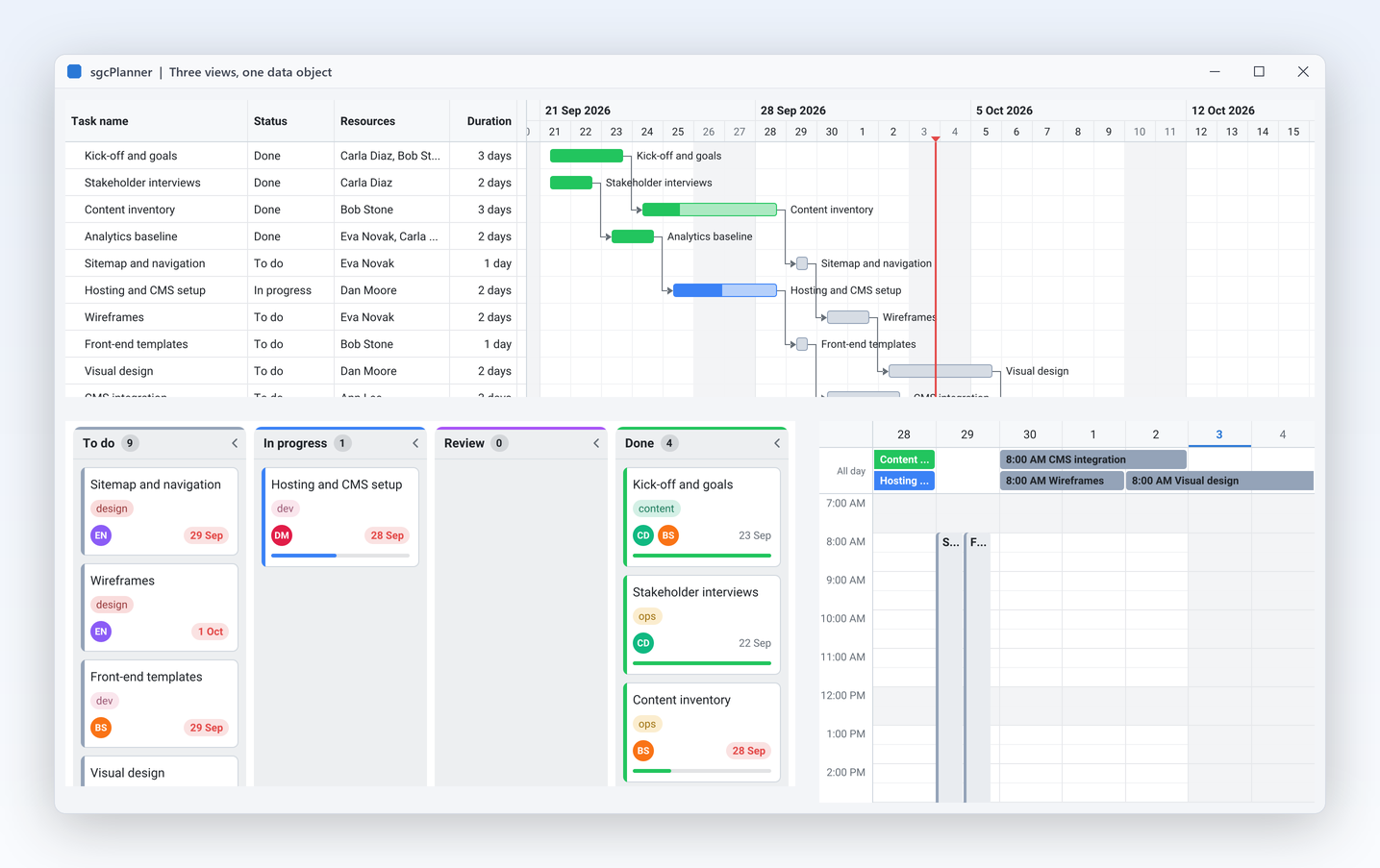
Three controls over one TsgcPlannerData object. Place one, two or all three in your windows.

ProjectPlanner demo: the same tasks on a Kanban board, a Gantt chart and a Scheduler
The ProjectPlanner demo: one project on a Kanban board, a Gantt chart and a scheduler. ProjectPlannerAvalonia shows the same project in an Avalonia window.

Calendar views

View switches TsgcAvaloniaScheduler between day, work week, week, month, agenda, the resource timeline and the year, twelve mini months where a double click on a day opens it in the day view. Options.GroupByResource gives each person a group of columns in the day views.

Drag to create and edit

A drag on an empty part of the time grid creates an event snapped to Options.SlotMinutes and raises OnItemCreate with the start, the finish and the resource. Events move and resize with the mouse, and with InplaceEdit F2 edits the title in place.

Recurrence

An item keeps an iCalendar rule such as FREQ=WEEKLY;BYDAY=TU in RecurrenceRule, and the data expands the series into occurrences for the visible period. Dragging an occurrence raises OnRecurrenceEdit, where you choose prsOccurrence, prsSeries or prsCancel. By default the drag moves that occurrence only.

Reminders and time zones

TsgcPlannerReminders reports the items whose ReminderMinutes are due, with Dismiss and Snooze. Every item can carry its own TimeZone, and Data.DisplayTimeZone shows the whole calendar in the zone the user picks.

Gantt chart

TsgcAvaloniaGantt has a task grid with columns, summaries, milestones, progress, dependencies with auto scheduling, the critical path and baselines. TimeScale.TierCount gives a three tier timescale, and ShowHistogram adds a resource load pane that paints overallocation in the critical colour.

Kanban board

TsgcAvaloniaKanban shows the items as cards in columns by status. A drop calls MoveItem on the data, which notifies every view once, so the Gantt and the scheduler repaint with the new status. Swimlanes and WIP limits are in the Registered edition.

Resources and capacity

Resources have a name, a colour and initials. New in sgcUI 2026.11, TsgcPlannerResource.Capacity scales the load in the histogram, moves the capacity line and marks the overallocation above it, and is saved in JSON and as MaxUnits in Microsoft Project files.

Undo and redo

Data.Undo takes back a drag or an edit in one step with Undo and Redo. CanUndo, CanRedo, UndoCaption and RedoCaption drive your buttons and their tooltips.

Import, export and print

The data loads and saves JSON and reads a DataTable. The Registered edition adds iCalendar and MS Project XML (MSPDI) import and export. Printing with a preview and headless PNG and SVG output are in every edition.

MVVM, Themes, Languages and Calendar Sync

The planner follows the conventions of an Avalonia application instead of asking you to adopt its own.

MVVM binding in XAML

ItemsSource, ResourcesSource and DependenciesSource take your own collections, TsgcAvaloniaPlannerItemFields maps the member names of your class, and SelectedItem binds two way. A drag in any view writes the new dates or status back to your objects. One xmlns:sgc="https://www.esegece.com/sgcui" prefix covers every sgcUI control.

Themes, Fluent included

The controls follow the Avalonia theme variant of your app, light or dark. New in sgcUI 2026.11, under the Fluent preset they take the colours of the Avalonia FluentTheme while they follow the host, with the corner radii and focus ring of Windows 11.

Right to left and accessibility

The controls honour a right to left FlowDirection, and the Gantt can mirror its timeline or keep it left to right with MirrorTimeline. Each control has an Avalonia automation peer and keyboard navigation, so screen readers announce the views, items and slots. Accessibility is on by default in every edition.

12 languages

New in sgcUI 2026.11, the end user texts come from embedded language packs for English, Spanish, German, French, Italian, Dutch, Polish, Portuguese (Brazil), Turkish, Japanese, Korean and Chinese. sgcUILang.SetLanguage takes a locale or "auto" for the current UI culture.

Outlook, Google and CalDAV sync

The optional esegece.sgcPlanner.sgcWebSockets bridge of the Registered edition keeps the data in two way sync with Outlook calendars of Microsoft 365 and Outlook.com through Microsoft Graph (TsgcPlannerGraphSync), with Google Calendar (TsgcPlannerGoogleSync) and with any CalDAV server such as Nextcloud, iCloud, Fastmail or Radicale (TsgcPlannerCalDAVSync). TsgcPlannerICalSubscription merges a read only iCalendar URL. The bridge uses sgcWebSockets.

Smart Paste

Ctrl+Shift+V on the scheduler turns a pasted text into a meeting. Lines such as "Name: value" are read by the built in parser, and AIProvider takes a TsgcUIAIEventProvider that calls the LLM of your choice for free text such as an e-mail. Smart Paste is in the Community edition too.

A Scheduler and a Gantt Bound to One View Model

Copied from a small Avalonia 12 app on net8.0 with FluentTheme and compiled bindings, with the using lines and the namespace left out. The app compiles with 0 warnings and 0 errors against the Registered and the Community build of sgcPlanner.

The view model: plain classes

Your own types, nothing to inherit. A daily stand-up is one item with a recurrence rule.

TTeamViewModel.cs
public class TMeeting
{
    public string Key { get; set; }
    public string Subject { get; set; }
    public DateTime Begin { get; set; }
    public DateTime End { get; set; }
    public string Owner { get; set; }
    public string Rule { get; set; }
}

public class TPerson
{
    public string Code { get; set; }
    public string Label { get; set; }
}

public class TTeamViewModel
{
    public ObservableCollection<TMeeting> Meetings { get; } = new ObservableCollection<TMeeting>();
    public ObservableCollection<TPerson> People { get; } = new ObservableCollection<TPerson>();

    public TTeamViewModel()
    {
        People.Add(new TPerson { Code = "ann", Label = "Ann" });
        People.Add(new TPerson { Code = "bob", Label = "Bob" });
        DateTime vMonday = DateTime.Today.AddDays(-(((int)DateTime.Today.DayOfWeek + 6) % 7));
        Meetings.Add(new TMeeting { Key = "m1", Subject = "Stand-up", Owner = "ann",
            Begin = vMonday.AddHours(9), End = vMonday.AddHours(9.25),
            Rule = "FREQ=DAILY;BYDAY=MO,TU,WE,TH,FR" });
        Meetings.Add(new TMeeting { Key = "m2", Subject = "Design review", Owner = "bob",
            Begin = vMonday.AddDays(2).AddHours(14), End = vMonday.AddDays(2).AddHours(15) });
    }
}

The window: two views over the same collections

The field maps tell the controls which member holds the id, the title, the dates, the owner and the rule.

MainWindow.axaml
<Window xmlns="https://github.com/avaloniaui"
        xmlns:x="http://schemas.microsoft.com/winfx/2006/xaml"
        xmlns:sgc="https://www.esegece.com/sgcui"
        xmlns:local="using:TeamCalendar"
        x:Class="TeamCalendar.MainWindow"
        x:DataType="local:TTeamViewModel"
        Title="Team calendar" Width="1100" Height="720">
  <TabControl>
    <TabItem Header="Calendar">
      <sgc:TsgcAvaloniaScheduler x:Name="scheduler" View="psvWorkWeek" InplaceEdit="True"
                                 ItemsSource="{Binding Meetings}" ResourcesSource="{Binding People}">
        <sgc:TsgcAvaloniaScheduler.ItemFields>
          <sgc:TsgcAvaloniaPlannerItemFields IdField="Key" TitleField="Subject" StartField="Begin"
                                             FinishField="End" ResourcesField="Owner"
                                             RecurrenceField="Rule"/>
        </sgc:TsgcAvaloniaScheduler.ItemFields>
        <sgc:TsgcAvaloniaScheduler.ResourceFields>
          <sgc:TsgcAvaloniaPlannerResourceFields IdField="Code" NameField="Label"/>
        </sgc:TsgcAvaloniaScheduler.ResourceFields>
      </sgc:TsgcAvaloniaScheduler>
    </TabItem>
    <TabItem Header="Gantt">
      <sgc:TsgcAvaloniaGantt x:Name="gantt" ShowHistogram="True" ShowToday="True"
                             ItemsSource="{Binding Meetings}" ResourcesSource="{Binding People}">
        <sgc:TsgcAvaloniaGantt.ItemFields>
          <sgc:TsgcAvaloniaPlannerItemFields IdField="Key" TitleField="Subject" StartField="Begin"
                                             FinishField="End" ResourcesField="Owner"/>
        </sgc:TsgcAvaloniaGantt.ItemFields>
        <sgc:TsgcAvaloniaGantt.ResourceFields>
          <sgc:TsgcAvaloniaPlannerResourceFields IdField="Code" NameField="Label"/>
        </sgc:TsgcAvaloniaGantt.ResourceFields>
      </sgc:TsgcAvaloniaGantt>
    </TabItem>
  </TabControl>
</Window>

The code behind: options and the create event

Group the work week by person, snap new events to 15 minutes, name the event a drag creates and give the Gantt a three tier timescale.

MainWindow.axaml.cs
public partial class MainWindow : Window
{
    public MainWindow()
    {
        InitializeComponent();
        scheduler.Options.GroupByResource = true;
        scheduler.Options.SlotMinutes = 15;
        // a drag on an empty slot creates a meeting: name it here
        scheduler.OnItemCreate = DoItemCreate;
        // three tier timescale over the Gantt bars
        gantt.TimeScale.TierCount = 3;
    }

    private void DoItemCreate(object aSender, DateTime aStart, DateTime aFinish,
        string aResourceId, ref string aTitle, ref bool aAccept)
    {
        aTitle = "New meeting";
    }
}

The project references Avalonia.Desktop and Avalonia.Themes.Fluent 12.1.4 and esegece.sgcPlanner.Avalonia, or esegece.sgcPlanner.Avalonia.Community for the free edition, where the stand-up shows once because recurrence is a Registered feature. The application adds new FluentTheme() to its styles and sets DataContext = new TTeamViewModel() on the window.

Where It Runs

One planner model, the same views in every host.

Host Controls Targets
Avalonia 12TsgcAvaloniaScheduler, TsgcAvaloniaGantt, TsgcAvaloniaKanbannet8.0, net9.0, net10.0 on Windows, Linux and macOS
WinForms and WPFTsgcWinFormsScheduler, Gantt and Kanban, and the WPF twins.NET, in the same licence as Avalonia
Delphi and C++BuilderTsgcVCLScheduler, TsgcFMXScheduler and their Gantt and Kanban twinsVCL and FireMonkey, in the sgcPlanner Delphi edition
HeadlessTsgcPlannerRendererPNG and SVG output without a window, on Windows, Linux and macOS

The Avalonia controls are drawn with SkiaSharp on the sgcUICore Avalonia control base. The demos TeamSchedulerAvalonia and ProjectPlannerAvalonia need the .NET SDK 8.0 or newer and run on Windows, Linux or macOS.

Three Ways to Get a Scheduler on Avalonia

As read on 2026-10-20, see the Avalonia Pro and WinForms and WPF to Avalonia guides for the sources.

  A WPF suite on Avalonia XPF Avalonia Pro sgcPlanner for Avalonia
What it isa WPF scheduler running on XPF, which its vendor calls "a binary-compatible WPF runtime"the premium Avalonia componentsnative Avalonia 12 controls
Scheduler, Gantt, Kanbanthose of the WPF suite, with the conditions of the XPF third party libraries notes, for example Win32 API shims for DevExpress controlsnot listed on the Avalonia Pro pageTsgcAvaloniaScheduler, TsgcAvaloniaGantt, TsgcAvaloniaKanban
LicenceXPF per application, from EUR 9,500 (Internal) and EUR 29,500 (Business), plus the licence of the WPF suiteEUR 899 per seat per yearper developer: sgcPlanner .NET €249, or sgcUI .NET Enterprise €699, with no per application fee
Source code full source for premium controls in Enterprisefull C# source code in every Registered licence
Free tier Community, non-commercial use only for new signups since 2026-04-07Community NuGet packages, also for commercial use under EUR 1,000,000 revenue and up to five developers

To be fair to the other routes: XPF aims to run an existing WPF application on macOS and Linux largely as it is, and sgcPlanner does not do that. Avalonia Pro gives you premium components and vendor tooling such as Hot Reload and DevTools, which sgcUI does not ship. sgcPlanner runs next to Avalonia Pro controls in the same window.

Community or Registered

Both editions have the same three controls. The Registered edition adds the advanced planning features and the source code.

Community, free

esegece.sgcPlanner.Avalonia.Community on NuGet, free in commercial and non-commercial projects for individuals and organisations under EUR 1,000,000 annual gross revenue and with no more than five developers. Day, work week, week, month and agenda views, Gantt and Kanban with drag, summaries, milestones, progress, grouping by resource, DataTable and JSON data, Smart Paste, printing and headless PNG and SVG output.

Registered

esegece.sgcPlanner.Avalonia, in the sgcPlanner .NET single package €249 and in sgcUI .NET Enterprise €699 per developer. Adds recurrence, the resource timeline, dependencies with auto scheduling, the critical path, baselines, Kanban swimlanes and WIP limits, iCalendar and MS Project XML, the calendar sync bridge, full C# source code and free binary redistribution.

Two Avalonia Demos with a Self Check

Both run with dotnet run, and dotnet run -- --test result.txt writes one PASS or FAIL line per check and exits with the number of failed checks.

TeamSchedulerAvalonia

Three weeks of team meetings for five people: every view, in place title editing, undo and redo, reminders with Dismiss and Snooze, per item time zones, recurring stand-ups and syncs, drag to create, grouping by resource and Smart Paste.

ProjectPlannerAvalonia

A website relaunch project shown at once in a Gantt chart, a Kanban board and a week, all bound to the same data: drag a card from To do to Done and the Gantt bar and the calendar event turn green. With the three tier timescale, the resource histogram and undo.

See the sgcUI demos or read about every feature on the sgcPlanner product page.

Avalonia Scheduler Questions

Is the scheduler a native Avalonia control or a WPF control on a compatibility layer?

It is a native Avalonia control. TsgcAvaloniaScheduler, TsgcAvaloniaGantt and TsgcAvaloniaKanban are built on Avalonia and Avalonia.Skia 12 and drawn with SkiaSharp, in the esegece.sgcPlanner.Avalonia package for net8.0, net9.0 and net10.0. There is no WPF runtime in between, and the controls run on Windows, Linux and macOS.

Can I bind the scheduler to my own view model in XAML?

Yes. ItemsSource, ResourcesSource and DependenciesSource take any IEnumerable, for example an ObservableCollection of your own class, and TsgcAvaloniaPlannerItemFields maps your member names to the id, title, start, finish, resources, status, recurrence and the other item fields. SelectedItem binds two way, and a drag or an edit in the control writes the new values back to your objects. Compiled bindings with x:DataType work.

Is there a free edition of the Avalonia scheduler?

Yes. esegece.sgcPlanner.Avalonia.Community is free for individuals and organisations under EUR 1,000,000 annual gross revenue and with no more than five developers. It has the day, work week, week, month and agenda views, the Gantt and the Kanban board. Recurrence, the resource timeline, dependencies with auto scheduling, the critical path, baselines, Kanban swimlanes and WIP limits, and iCalendar and MS Project XML exchange need the Registered edition.

Can the Avalonia scheduler sync with Outlook, Google Calendar or CalDAV?

Yes, through the optional esegece.sgcPlanner.sgcWebSockets bridge package of the Registered edition, which uses sgcWebSockets. TsgcPlannerGraphSync keeps the data in two way sync with an Outlook calendar of Microsoft 365 or Outlook.com through Microsoft Graph, TsgcPlannerGoogleSync with a Google calendar and TsgcPlannerCalDAVSync with a CalDAV calendar such as Nextcloud, iCloud, Fastmail or Radicale. TsgcPlannerICalSubscription merges a read only iCalendar URL. The bridge works on the data object, so it serves the Avalonia controls as well as the WinForms and WPF ones.

Which sgcUI edition includes sgcPlanner for Avalonia?

sgcPlanner .NET is included in the sgcUI .NET Enterprise edition and is also sold as a single package. Both licences cover WinForms, WPF and Avalonia, with full C# source code and free binary redistribution.

Best value: All-AccessEvery eSeGeCe product, Premium Support included, from €1,059/year.
See All-Access pricing

Add a Scheduler to Your Avalonia App

Start with the free Community package from NuGet, or the Registered package for recurrence, the timeline, calendar sync and full source code, and open the TeamSchedulerAvalonia demo next to your app.