Delphi, C++Builder & .NET Live screens

The sgcUI Realtime UI Pack

Everything a screen that follows a live system needs, built into the sgcUI products you already use: who is online, toasts and a notification inbox with an unread badge, an activity feed with an audit trail, and a live log viewer. A server feeds them over WebSocket, MQTT or server-sent events, or your code drives them directly.

VCLFireMonkeyWinFormsWPFAvalonia
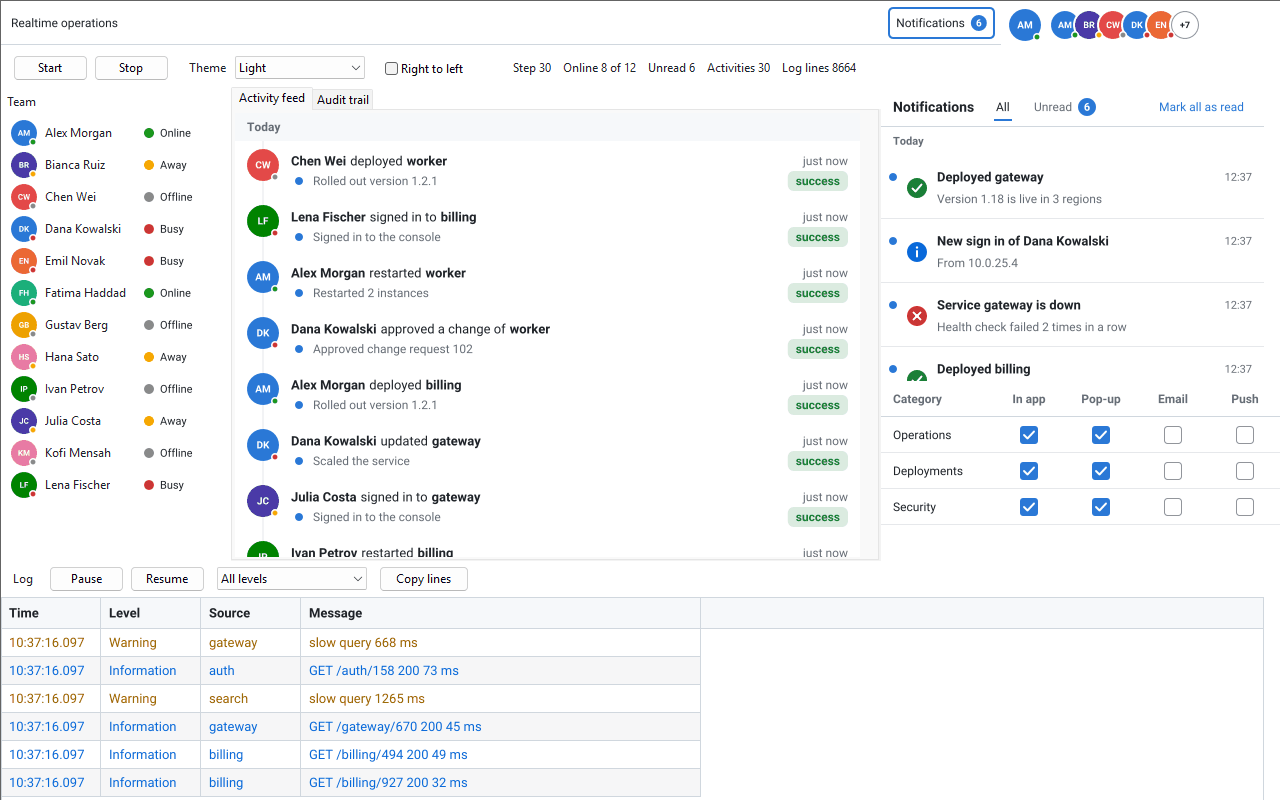
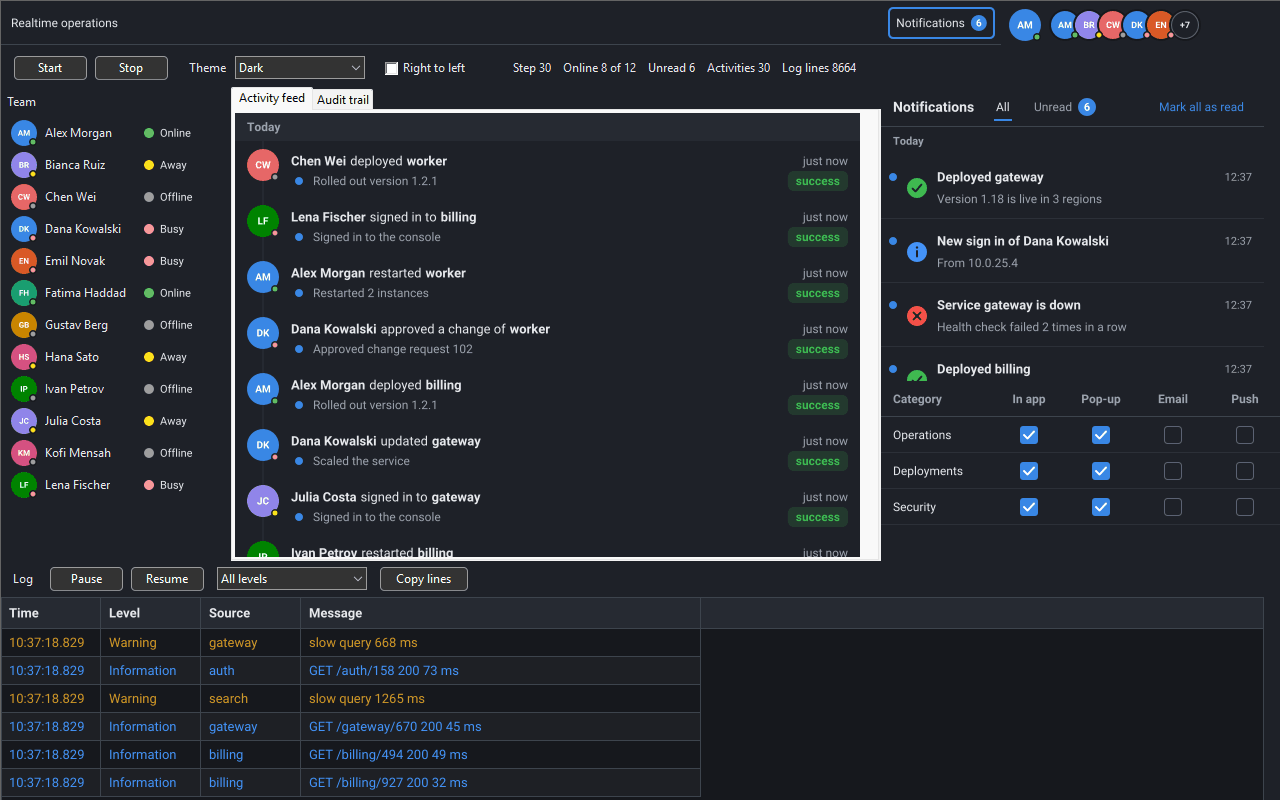
The sgcUI Realtime demo: a team roster with presence indicators, the activity feed, the notification inbox above the notification preferences, a bell with the unread count, the team avatars and a live log grid

Five Products, One Live Screen

The Realtime UI pack is not a separate product. Each piece lives in the sgcUI product it fits, in the units, packages and NuGet packages you already use, and follows the edition of that product. Every piece needs only sgcUICore and the product that holds it, and none needs sgcHTML.

Presence and avatars

Who is online, away, busy or offline, with avatars, an avatar group and a presence indicator.

Product: sgcUICore.

Presence →

Notifications

A notification model with toasts, an inbox, preferences per category and channel, and an unread badge on the toolbar.

Products: sgcNavigation and sgcToolbar.

Notifications →

Activity feed and audit trail

Who did what to which object, as a feed, as an audit table and as dashboard tiles.

Product: sgcDashboard.

Activity →

Live log viewer

A grid that follows the newest log lines, with pause, filters and export.

Product: sgcGrid.

Live logs →

Live sources

WebSocket, MQTT and server-sent events connections of sgcWebSockets that feed every model.

Product: sgcUICore, sgcUICoreWS bridge.

Live data →

Delphi 7 to Delphi 13 with VCL, FireMonkey from Delphi XE6, C++Builder, and .NET WinForms, WPF and Avalonia. Read the Realtime UI pack help topic.

Presence and Avatars

Show who is online, in every sgcUI product.

TsgcUIPresenceModel keeps the users and their status (online, away, busy or offline) with a status text. The avatar controls follow the model, so a change of status repaints every avatar and indicator of that user at once.

  • The presence model takes its changes from AddOrUpdate and SetStatus in code, or from one live message per change.
  • An avatar, an avatar group with a "+N" chip for the users that do not fit, and a presence indicator with the status dot and the status text.
  • The activity feed of sgcDashboard reads the same model, so every actor shows its avatar and status.
Product
sgcUICore, shared by every sgcUI product
Delphi and C++Builder
TsgcVCLAvatar, TsgcVCLAvatarGroup, TsgcVCLPresenceIndicator and their TsgcFMX twins
Edition
Every edition, Community included, the live presence messages too

Help: Presence and Avatars and Presence Indicator.

Toasts, Inbox, Preferences and Badges

A notification center for desktop applications.

TsgcNotificationModel holds the notifications with their title, severity, category and read state, and keeps the unread count. The toast manager, the inbox, the preferences and the badge link all follow it.

  • Toasts: a toast for every new unread notification, which pauses while the pointer is over it.
  • Notification inbox: the notifications grouped by day, all or unread only, with Mark all read.
  • Notification preferences: one row per category and one column per channel, with their editor. Switching the pop-up channel of a category off stops its toasts, and the inbox still lists them.
  • Unread badge: TsgcToolbarBadgeLink of sgcToolbar shows the unread count on a toolbar or ribbon item, 99+ above 99.
Products
sgcNavigation (model, toasts, inbox and preferences) and sgcToolbar (badge link)
Delphi and C++Builder
TsgcVCLToastManager, TsgcVCLNotificationInbox, TsgcVCLNotificationPrefsEditor and their TsgcFMX twins
Edition
Every edition, Community included. The live notification messages and a ribbon as the badge target are Registered.

Help: Notifications, Toasts, Notification Inbox, Notification Preferences, Notification Live Messages and TsgcToolbarBadgeLink.

Activity Feed and Audit Trail

Who did what, and what changed.

TsgcDashboardActivityModel records each activity as an actor, a verb and an object, with the fields that changed. The activity feed and the audit trail are two views of the same model.

  • Activity feed: the newest activity first, with relative times and the avatar of each actor from the presence model.
  • Audit trail: a table whose rows expand to the changed fields.
  • Both are standalone controls and also activity and audit tiles for a dashboard.
Product
sgcDashboard
Delphi and C++Builder
TsgcVCLActivityFeed, TsgcVCLAuditTrail, TsgcVCLDashboardActivityTile, TsgcVCLDashboardAuditTile and their TsgcFMX twins
Edition
Every edition, Community included. The live activity messages are Registered.

Help: Activity Feed, Live Activity Messages, Activity Tile and Audit Tile.

A Live Log Viewer on sgcGrid

Follow thousands of log lines without freezing the screen.

TsgcGridLogModel keeps the log lines with a time, a level from trace to fatal, a source and a message, and TsgcGridLogLink shows them in an sgcGrid in virtual mode. The log model is thread safe, so a worker thread can append lines directly.

  • Follow tail: scrolling up stops following and scrolling back to the end resumes it, and Pause stops the view while the user reads.
  • Lines coloured by level, filters by level, source and text, highlighting rules and export.
  • A burst of log lines from a socket thread costs one visit to the main thread.
Product
sgcGrid
Delphi and C++Builder
TsgcGridLogModel and TsgcGridLogLink with a TsgcVCLGrid or a TsgcFMXGrid
Edition
Every edition, Community included. The live log messages are Registered.

Help: Log Viewer, TsgcGridLogModel and TsgcGridLogLink.

Live Sources over WebSocket, MQTT and SSE

The live sources of the sgcUICoreWS bridge take the JSON messages a server sends over an sgcWebSockets connection and hand them to the models. The controls follow at once, with no code of yours.

SourcesgcWebSockets clientEvent it readsSelects the messages by
TsgcUILiveSource_WebSocketTsgcWebSocketClientOnMessage, every text messageA filter on a member of the message
TsgcUILiveSource_MQTTTsgcWSPClient_MQTTOnMQTTPublish, every publishAn MQTT topic filter
TsgcUILiveSource_SSETsgcHTTP1ClientOnSSEMessage, the event streamThe SSE event type
  • The source never connects, subscribes or sends. The URL, the credentials, TLS and the reconnection belong to the client, and the hook survives a reconnect by the WatchDog.
  • One source feeds several models through its bindings, so one connection can drive a whole screen. A binding can unwrap an application envelope, and your own handler of the client event still fires.
  • The models are always called in the main thread. Messages that arrive in a socket thread are queued and applied in one visit to the main thread, in arrival order.
  • The bridge is inbound only. When the user reads or dismisses a notification, the application sends its own frame through the same client.

The four message shapes

There is no new protocol. Each model reads the live message of its feed: one JSON object per change, with a type member that names the feed and an op member.

FeedtypeopModel
Presencepresence, optionalupsert, remove, snapshot, clearTsgcUIPresenceModel
Notificationsnotification, requiredadd, update, remove, read, unread, snapshotTsgcNotificationModel
Activityactivity, requiredadd, update, remove, snapshotTsgcDashboardActivityModel
Loglog, optionalappend, batch, clearTsgcGridLogModel
messages.json
{"type":"presence","op":"upsert","user":{"id":"u7","presence":"away","statusText":"Lunch"}}
{"type":"notification","op":"add","notification":{"id":"n2","title":"Build 812 passed","severity":"success"}}
{"type":"activity","op":"add","item":{"id":"a20","actorId":"u7","verb":"updated","objectName":"Invoice INV-17"}}
{"type":"log","op":"append","entry":{"level":"warning","source":"api","message":"Slow query"}}
Delphi, one MQTT topic per feed
oSource := TsgcUILiveSource_MQTT.Create(Self);
oSource.Client := MQTT;
// one binding per model, selected by its topic
oBinding := oSource.Bindings.Add;
oBinding.Target := PresenceModel;
oBinding.Topic := 'ops/presence';
oBinding := oSource.Bindings.Add;
oBinding.Target := NotificationModel;
oBinding.Topic := 'ops/notifications';
oBinding := oSource.Bindings.Add;
oBinding.Target := ActivityModel;
oBinding.Topic := 'ops/activity';
oBinding := oSource.Bindings.Add;
oBinding.Target := LogModel;
oBinding.Topic := 'ops/log/+';
// the source never subscribes: subscribe in OnMQTTConnect of the client
MQTT.Subscribe('ops/#');

The live sources are Registered only and need sgcWebSockets, like every sgcWebSockets bridge of sgcUI. Without a server, or in a Community build, the application calls the API of each model instead: AddOrUpdate and SetStatus of the presence model, Add or Post of the notification model, Add of the activity model and Append of the log model.

Read the Live Sources help topic

The Realtime Demo

An operations console for a team of twelve, driven by a simulator

The Realtime demo for Delphi VCL in the dark theme: the team roster, the activity feed, the notification inbox and preferences, the bell badge, the avatar group and the live log grid

The Suite demo Realtime builds an operations console from the pack. The toolbar carries a bell whose badge is the unread count, the avatar of the current user and the avatar group of the team. A roster lists every member with a presence indicator, one tab holds the activity feed and one the audit trail, the notification inbox sits above the preferences editor, a log grid follows the newest lines and toasts appear at the bottom right.

  • Switch light, dark and high contrast, or mirror the window right to left, while it runs
  • A deterministic simulator builds every change as the live message of its model, so the demo needs no server and no sgcWebSockets
  • Run it with --test result.txt for its self checks, one numbered PASS or FAIL line each
Platforms
Delphi VCL (Delphi 7 to 13) and FireMonkey (Delphi 13), C++Builder, .NET WinForms, WPF and Avalonia
Edition needed
sgcUI Professional, Enterprise, All-Access or Trial, the editions that include sgcDashboard. A Registered build applies each change as a live message, a Community build through the model API.
Source
Demos\Suite\Delphi\Realtime (sgcUIRealtime.dpr), Demos\Suite\Delphi\RealtimeFMX (sgcUIRealtimeFMX.dpr), Demos\Suite\CBuilder\Realtime and demos\Suite\Realtime in the .NET folder

sgcUI products inside

See also the other sgcUI suite demos.

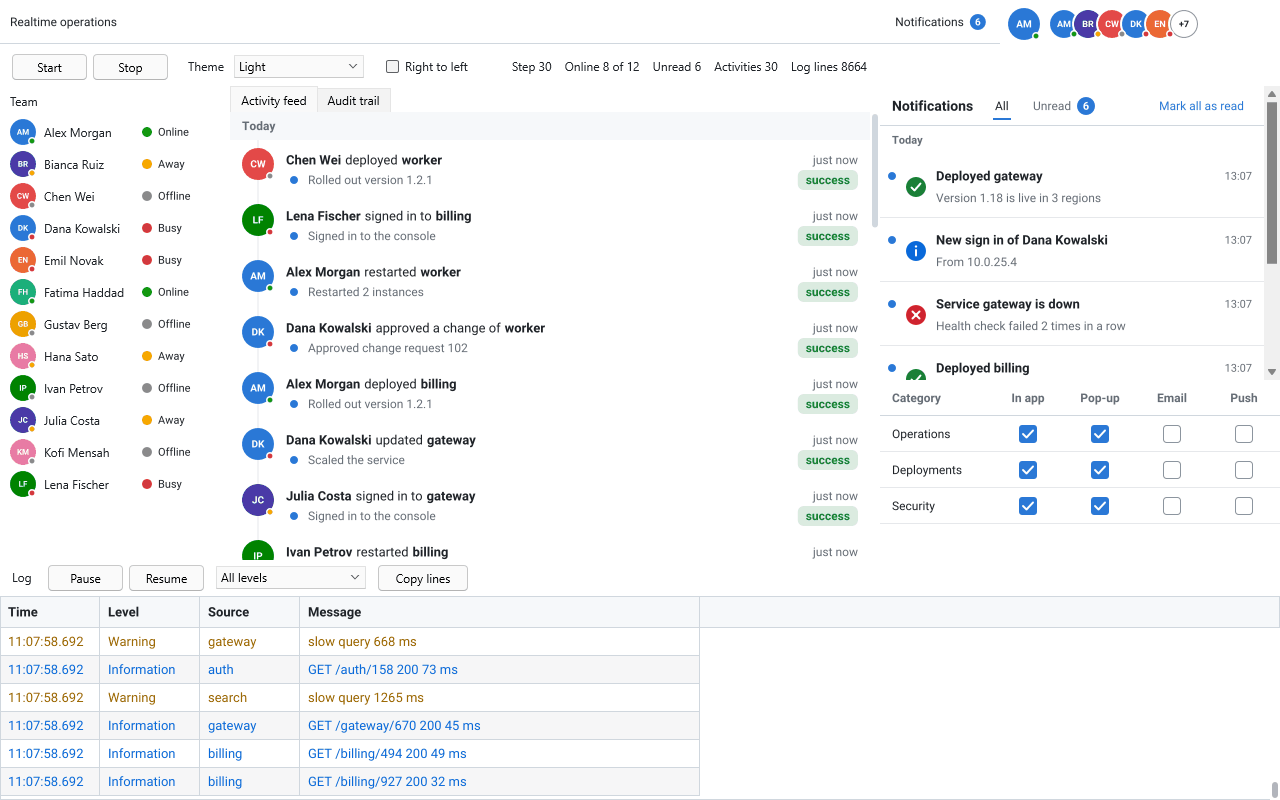
The Realtime demo for Delphi FireMonkey in the light theme
FireMonkey, light theme
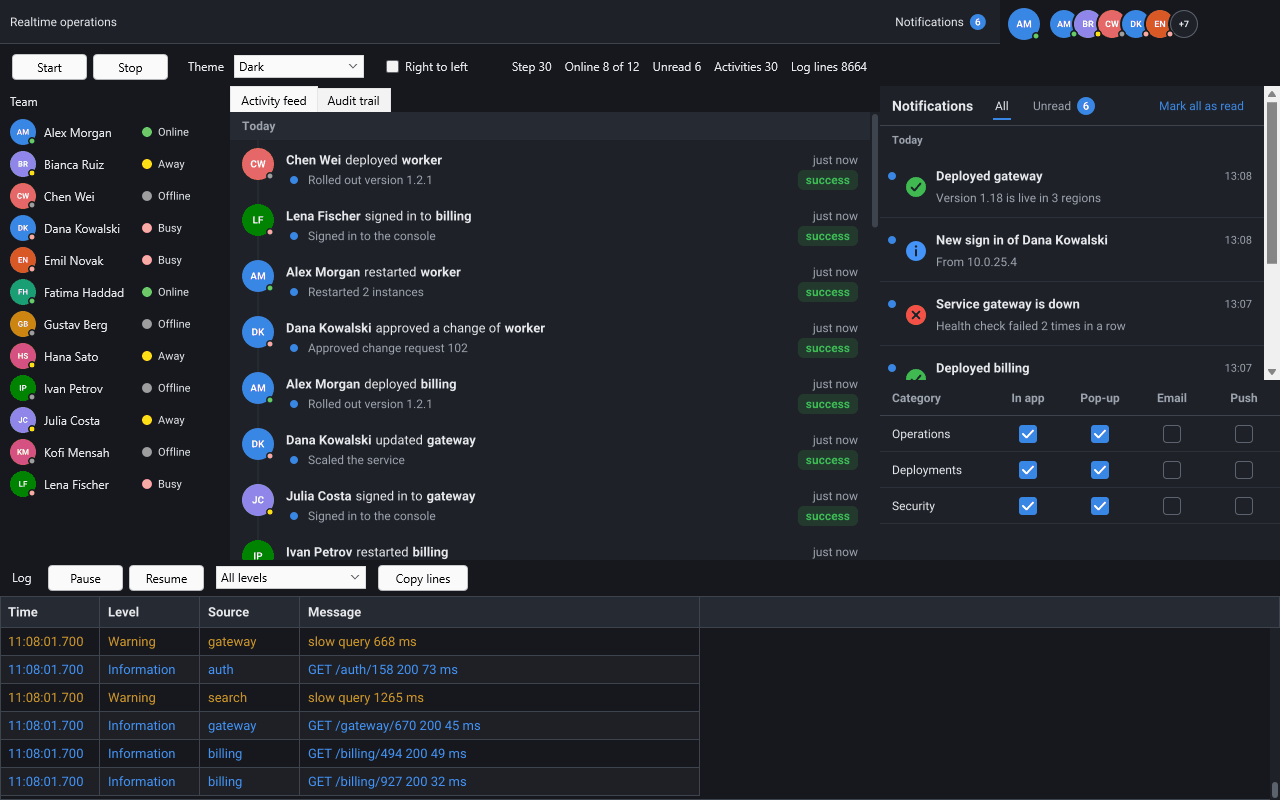
The Realtime demo for Delphi FireMonkey in the dark theme
FireMonkey, dark theme

The Same Pack in WinForms, WPF and Avalonia

The models, the controls and the live sources have the same names and read the same JSON messages in .NET, in the NuGet packages of each product.

  • Models: TsgcUIPresenceModel (namespace esegece.sgcUICore), TsgcNotificationModel and TsgcNotificationPreferences (esegece.sgcNavigation), TsgcToolbarBadgeLink (esegece.sgcToolbar), TsgcDashboardActivityModel (esegece.sgcDashboard) and TsgcGridLogModel with TsgcGridLogLink (esegece.sgcGrid).
  • Controls: TsgcWinFormsAvatar, TsgcWinFormsToastManager, TsgcWinFormsNotificationInbox, TsgcWinFormsActivityFeed, TsgcWinFormsAuditTrail and the other controls, each with its TsgcWpf and TsgcAvalonia twin.
  • Live sources: TsgcUILiveSource_WebSocket, TsgcUILiveSource_MQTT and TsgcUILiveSource_SSE in the package esegece.sgcUICore.sgcWebSockets, Registered only.
  • The free Community packages on NuGet, such as esegece.sgcNavigation.Community and esegece.sgcGrid.Community, leave out the same parts as the Delphi Community builds.
  • The .NET demo has WinForms, WPF and Avalonia hosts over one shared project with the models, the simulator and the self test.

Help: .NET Packages and Realtime UI Pack.

Community and Registered

Every piece follows the edition of its product. The .NET Community packages leave out the same parts as the Delphi Community builds.

PieceProductCommunityRegistered
Presence model with its live messages, avatars, avatar group and presence indicatorsgcUICore
Notification model, toasts, inbox and preferencessgcNavigation
Live notification messagessgcNavigation—
Badge link with a toolbarsgcToolbar
Badge link with a ribbonsgcToolbar—
Activity model, activity feed, audit trail and both tilessgcDashboard
Live activity messagessgcDashboard—
Log model and log linksgcGrid
Live log messagessgcGrid—
Live sources over WebSocket, MQTT and SSE (sgcUICoreWS bridge, needs sgcWebSockets)sgcUICore—

In the sgcUI suite, sgcNavigation, sgcToolbar and sgcGrid are in every edition and sgcDashboard from Professional. sgcUICore comes with every product, and every product is also sold alone, for Delphi and for .NET. See the feature matrix, the Editions help topic and the pricing.

Frequently Asked Questions

No. Each piece lives in the sgcUI product it fits: presence and avatars in sgcUICore, notifications in sgcNavigation, the unread badge in sgcToolbar, the activity feed and audit trail in sgcDashboard, and the log viewer in sgcGrid. You get them with those products, in the same units, packages and NuGet packages.

Only for the live sources of the sgcUICoreWS bridge. The models and the controls need only sgcUICore and their own product, and an application without a server drives them from code. None of the pieces needs sgcHTML.

Any server that sends one JSON object per change over WebSocket, through an MQTT broker or as server-sent events. The four message shapes are documented and the sources define no protocol of their own. A binding can also unwrap the envelope of an existing application protocol.

The bridge is inbound only. When the user reads or dismisses a notification, the application sends its own frame through the same sgcWebSockets client. The Live Sources help topic has an example.

No. Messages that arrive in a socket thread are queued and applied in one visit to the main thread, so a burst of 1,000 log lines costs one visit. The log model is also thread safe, so a worker thread can append to it directly. On Delphi 7 to 2009 keep the default notification of the client, which notifies in the main thread.

The models and the controls of every piece, and the live presence messages. The live messages of the notification, activity and log models, a ribbon as the badge target and the live sources are Registered only.

Product pages: sgcNavigation, sgcToolbar, sgcDashboard, sgcGrid, sgcWebSockets and the sgcUI suite.

Best value: All-AccessEvery eSeGeCe product, Premium Support included, from €1,059/year.
See All-Access pricing

Build Your Live Screens with sgcUI

The All-Access trial includes every sgcUI product, so you can try every piece of the pack.