Delphi 7 to 13 Free edition

sgcUI Community for Delphi

A live data grid, navigation, toolbars and form editors for VCL and FireMonkey, free. Build the shell and the data screens of a modern Delphi application with themes, localization and six ready showcase applications to start from.

Free for individuals and organizations under EUR 1M annual gross revenue with no more than 5 developers.

VCLFireMonkeysgcGridsgcNavigationsgcToolbarsgcEditors
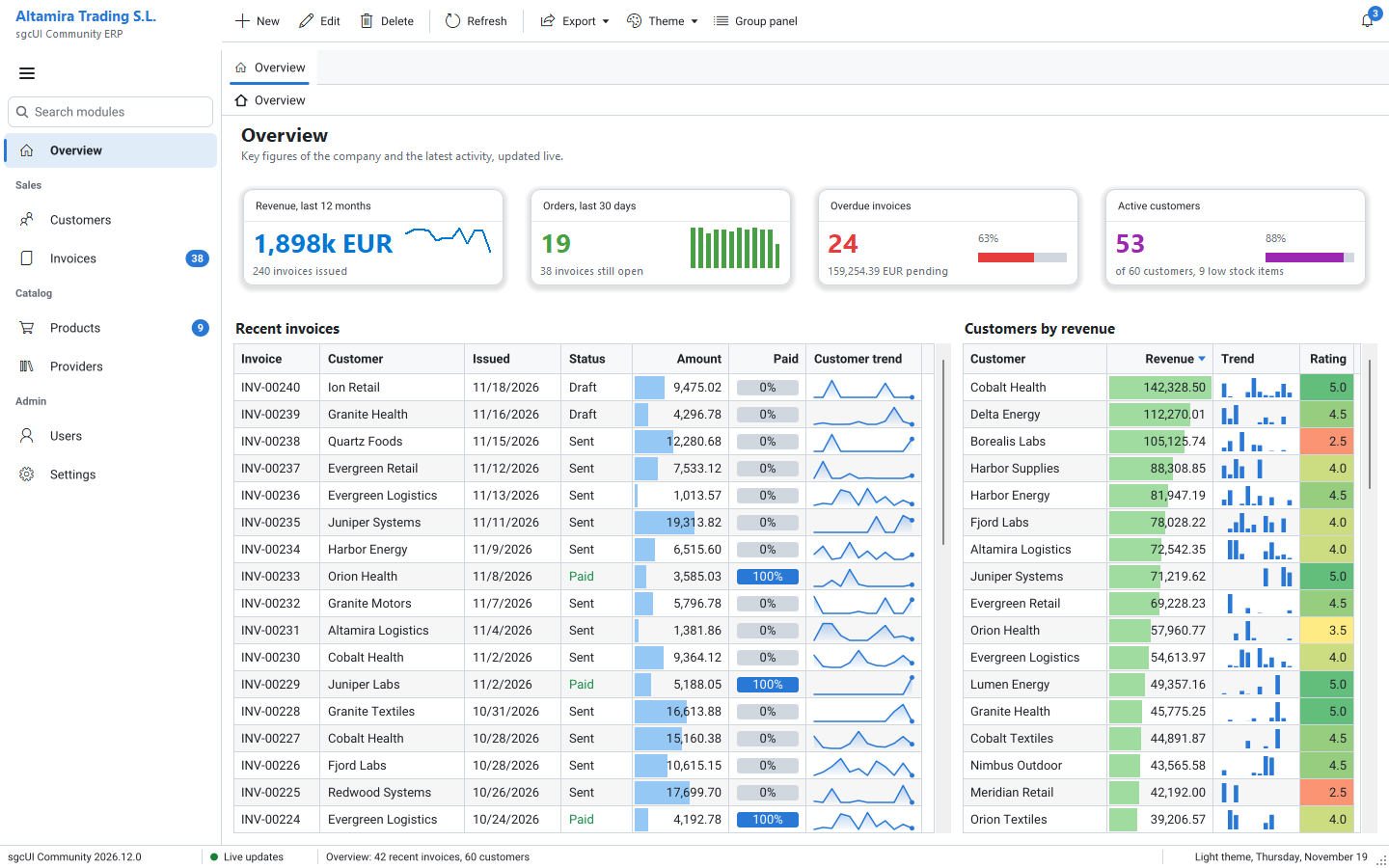
The sgcUI Community ERP showcase in the light theme: KPI cards, a recent invoices grid with data bars, progress cells and sparklines, a customers by revenue grid with a heat map column, a navigation bar with badges, a toolbar and a status bar
4 Products sgcGrid, sgcNavigation, sgcToolbar and sgcEditors
7 to 13 Delphi versions Compiled packages with design-time packages
6 Showcase applications Only in Community, VCL and FireMonkey
2 UI frameworks VCL, and FireMonkey from Delphi XE6

Download sgcUI Community for Delphi

One free installer, sgcUI_Community.exe. It installs the compiled packages of sgcGrid, sgcNavigation, sgcToolbar, sgcEditors and sgcLocalization for Delphi 7 to 13, registers the design-time packages in the Delphi versions you select, and adds the six showcase applications and the product demos.

sgcUI Community for Delphi

VCL for Win32 and Win64, FireMonkey for Windows, macOS, iOS, Android and Linux64 (with FMXLinux). Compiled packages only: no source code and no C++Builder in this edition.

Download sgcUI_Community.exe

Direct link: https://download.esegece.com/sgcUI_Community.exe

All sgcUI downloads, the trial and the .NET Community packages →

Four Products, Ready on the Palette

One installer, sgcUI_Community.exe, adds sgcGrid, sgcNavigation, sgcToolbar and sgcEditors to the IDE, with sgcUICore and sgcLocalization, as compiled packages (dcu, dcp and bpl) with their design-time packages and their demos.

sgcGrid

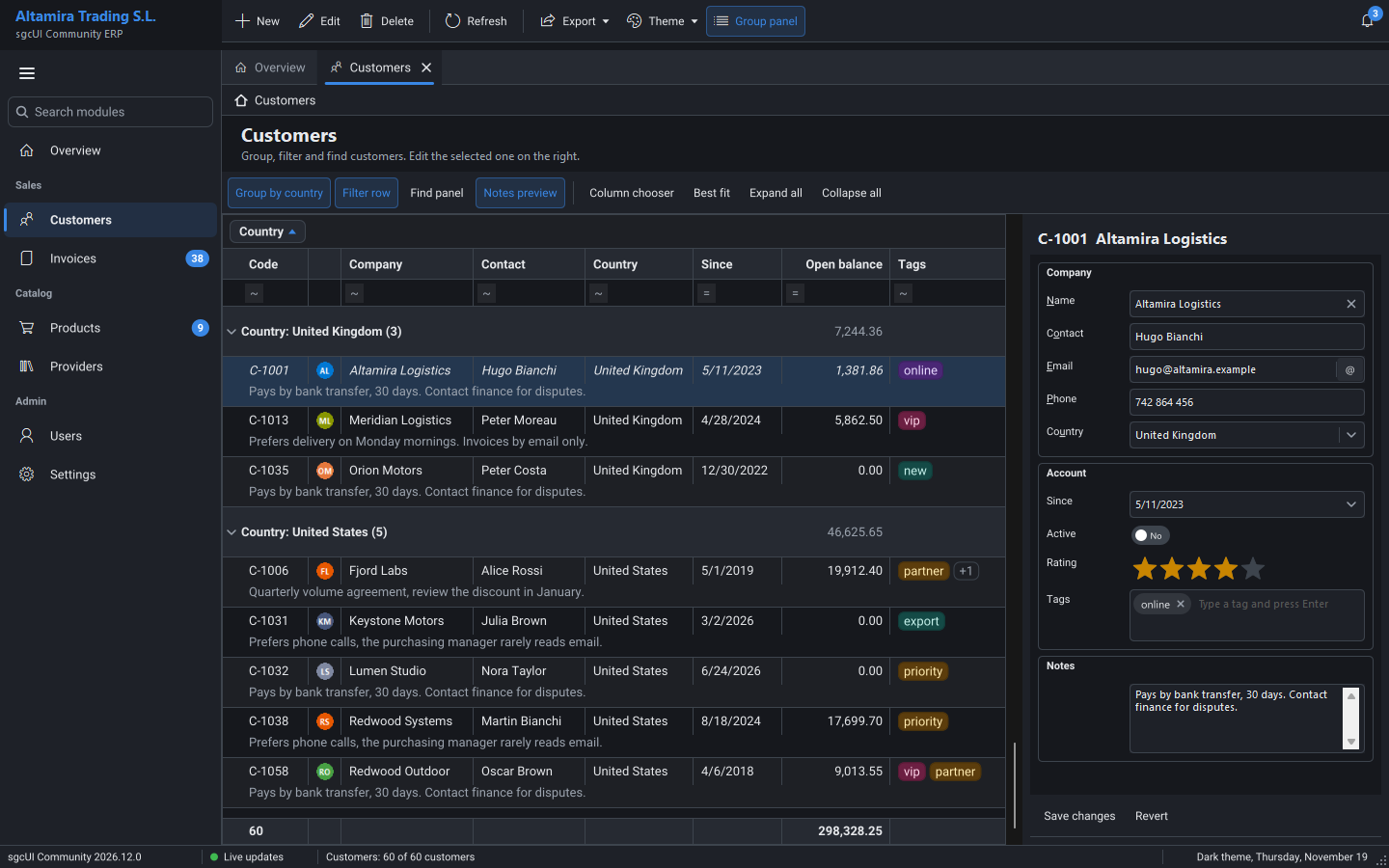
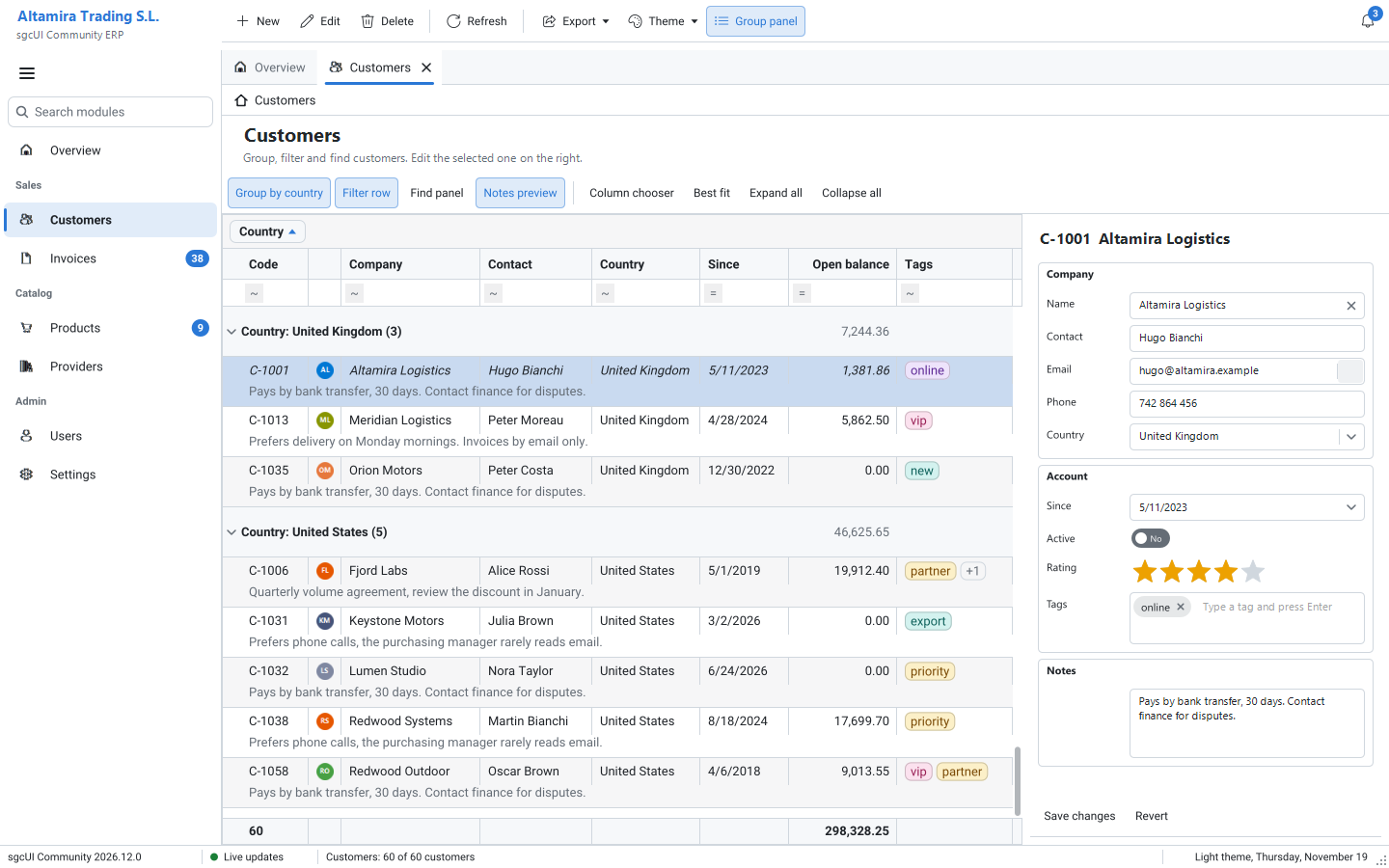
A live data grid. Rows are updated by key from any thread and changed cells flash. Format rules, virtual mode, the filter row, the find panel, column filters and the filter builder, grouping with the group panel, group and footer summaries, bands, frozen columns, pinned rows, cell merging and preview rows are all there.

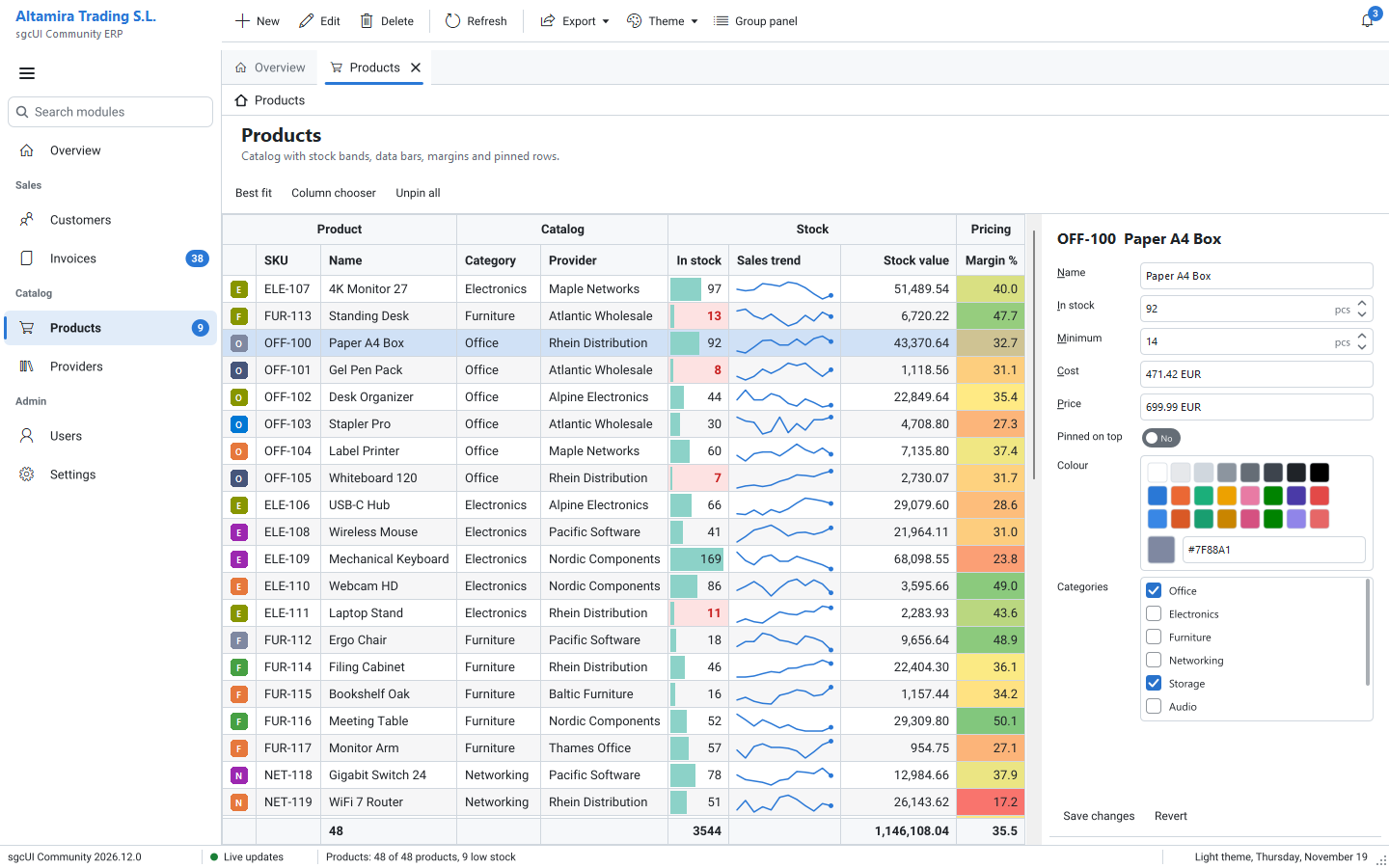
Cells show images, progress bars, sparklines, data bars and colour scales. The column chooser, best fit and saved layouts, multi selection with copy, the read only DataSet source, the ISA-18.2 alarm list, printing with print preview and kinetic scrolling are included too.

sgcGrid →

sgcNavigation

The navigation bar in sidebar, accordion and tree modes, with search, badges, glyphs and a collapsed icon rail. Tabs with close buttons, list and new tab buttons and scrolling, a breadcrumb linked to the bar, the tabbed form and the notebook.

Also the task dialog, message and input boxes, the busy overlay, the splash screen, toasts, the notification inbox and the notification preferences editor.

sgcNavigation →

sgcToolbar

The toolbar and the status bar with every item kind: buttons, toggles, radio groups, dropdown menus, images and glyphs, with keyboard support. The status bar shows text, progress and indicator panels, and toolbar badges show counts on the buttons.

sgcToolbar →

sgcEditors

The month calendar, the date, time, date time and date range pickers, the spin edit with units, the half star rating, check and radio groups, the colour picker with swatches and hex, the token edit with validation, button, search, mask, currency and lookup edits, and the memo.

For touch screens and settings pages: the NumPad, the on-screen keyboard, the toggle switch, the IP address and time span edits, the font picker, the checked and dual list boxes, the layout control with JSON, the property grid for one object and the validation support.

sgcEditors →

sgcUICore

The foundation the four products share: the themes that restyle every control at once, avatars, avatar groups and presence indicators, the validator and the validation summary, the spell checker, printing and the print preview, accessibility and the ISA-101 preset.

sgcUI foundation →

sgcLocalization

Translate your own Delphi application. The localizer finds the texts of your forms, frames and data modules, one translation editor inside the IDE offers XLIFF and AI proposals, and the language combo switches the language at run time, right to left languages included.

sgcLocalization →
Six Applications to Start From

Six showcase applications ship only with the Community edition, in Demos\Community, for VCL and FireMonkey. They use only the Community features, so everything you see runs with the free packages. The demos of the four products are installed too.

ERP

A business application with seven modules: an overview with KPI cards, invoices with data bars and sparklines, customers grouped by country with an edit panel, and a product catalog with banded headers and footer totals.

Markets

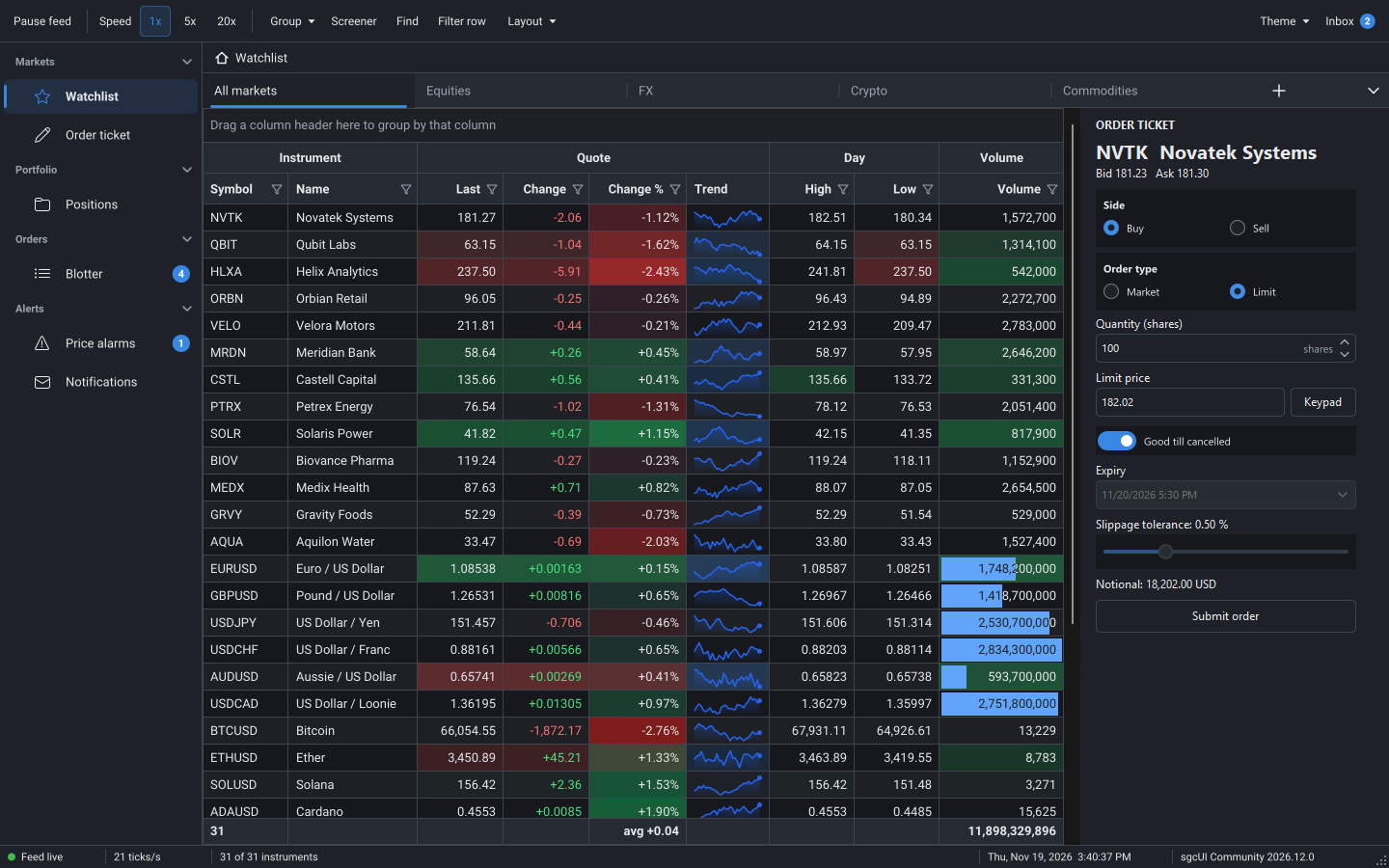
A trading desk with a live watchlist of 31 instruments that a background thread updates by key, flashing prices, a change heat map, trend sparklines and an order ticket.

Realtime

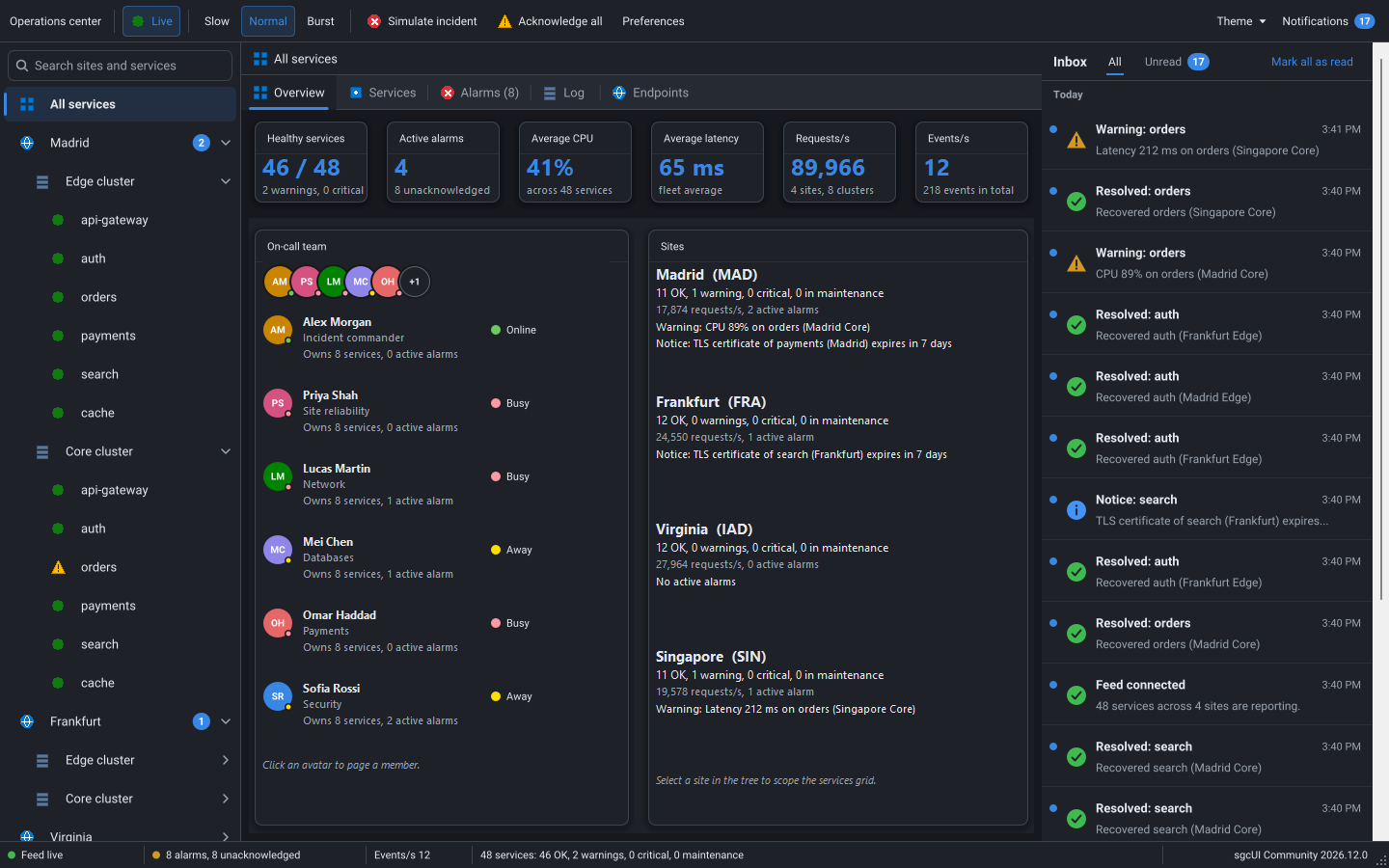
An operations console with a tree of sites and services, alarm badges, KPI cards, the on call team with presence avatars and a notification inbox filled by the live feed.

HMI

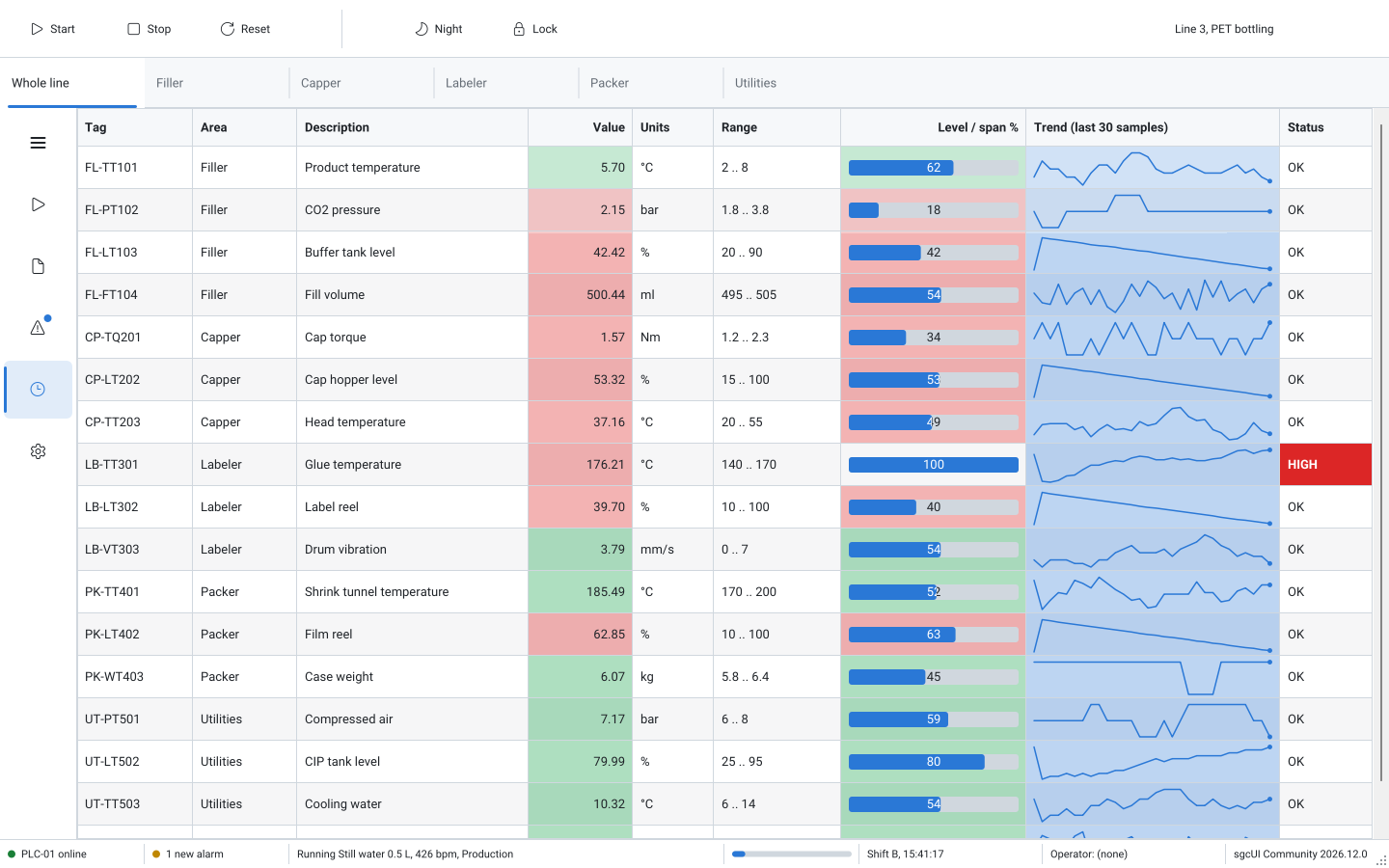
A touch operator panel for a bottling line, with a live tag grid, level bars and sparklines under large touch toolbar buttons and line area tabs.

RightToLeft

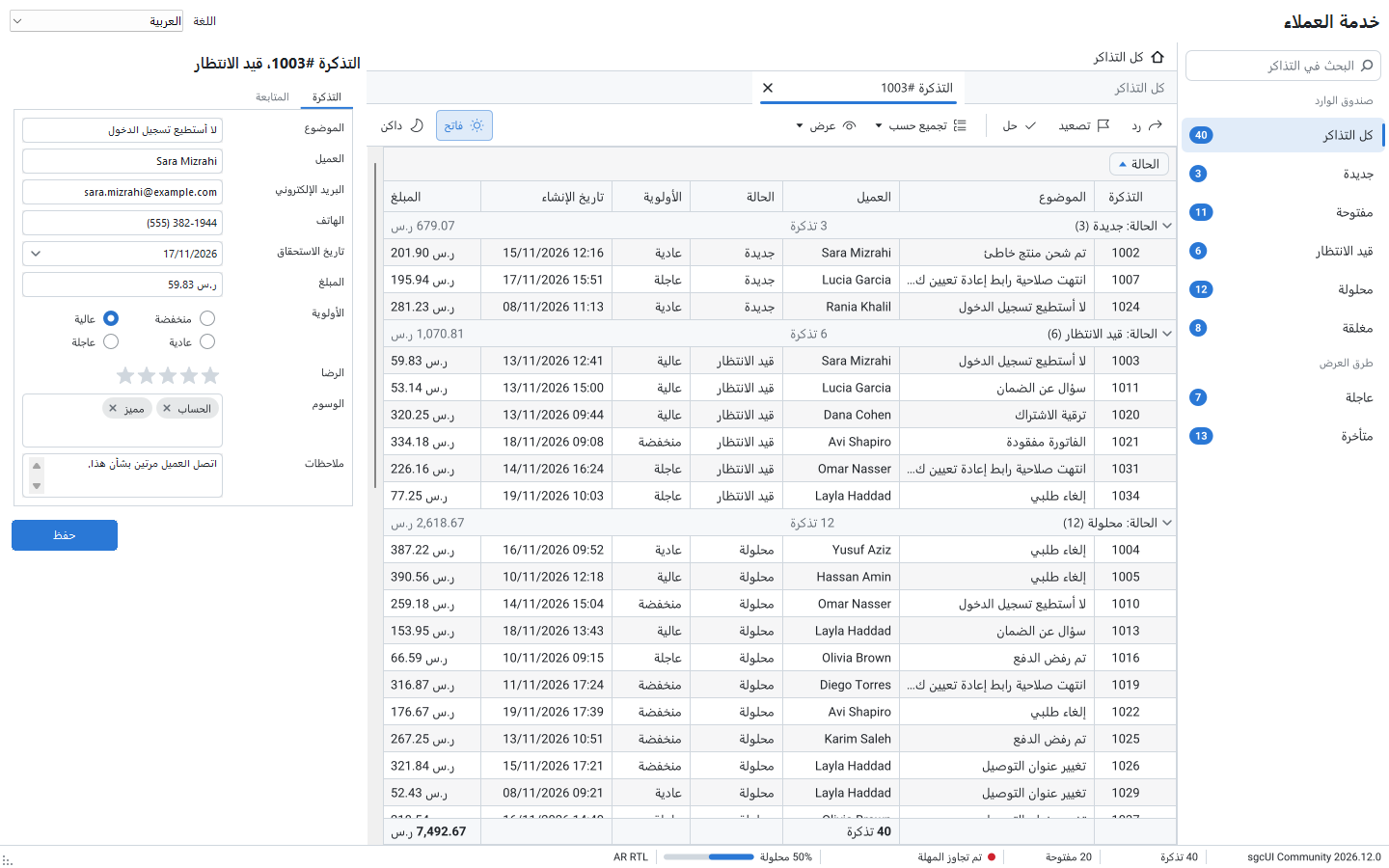
A customer service desk in English, Spanish, Arabic and Hebrew. Switch the language at run time and the whole form mirrors, from the navigation bar to the editors.

ThemeGallery

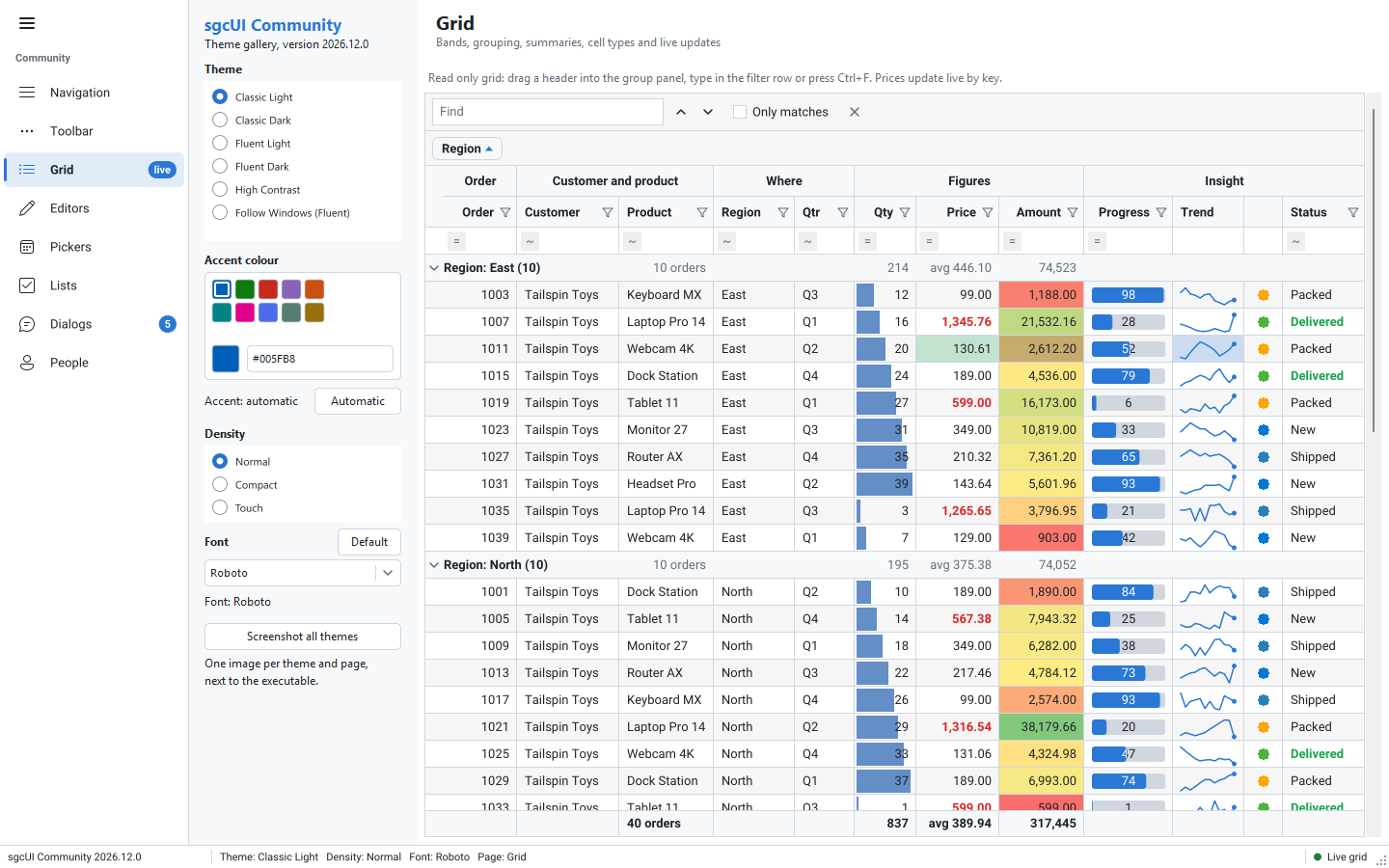
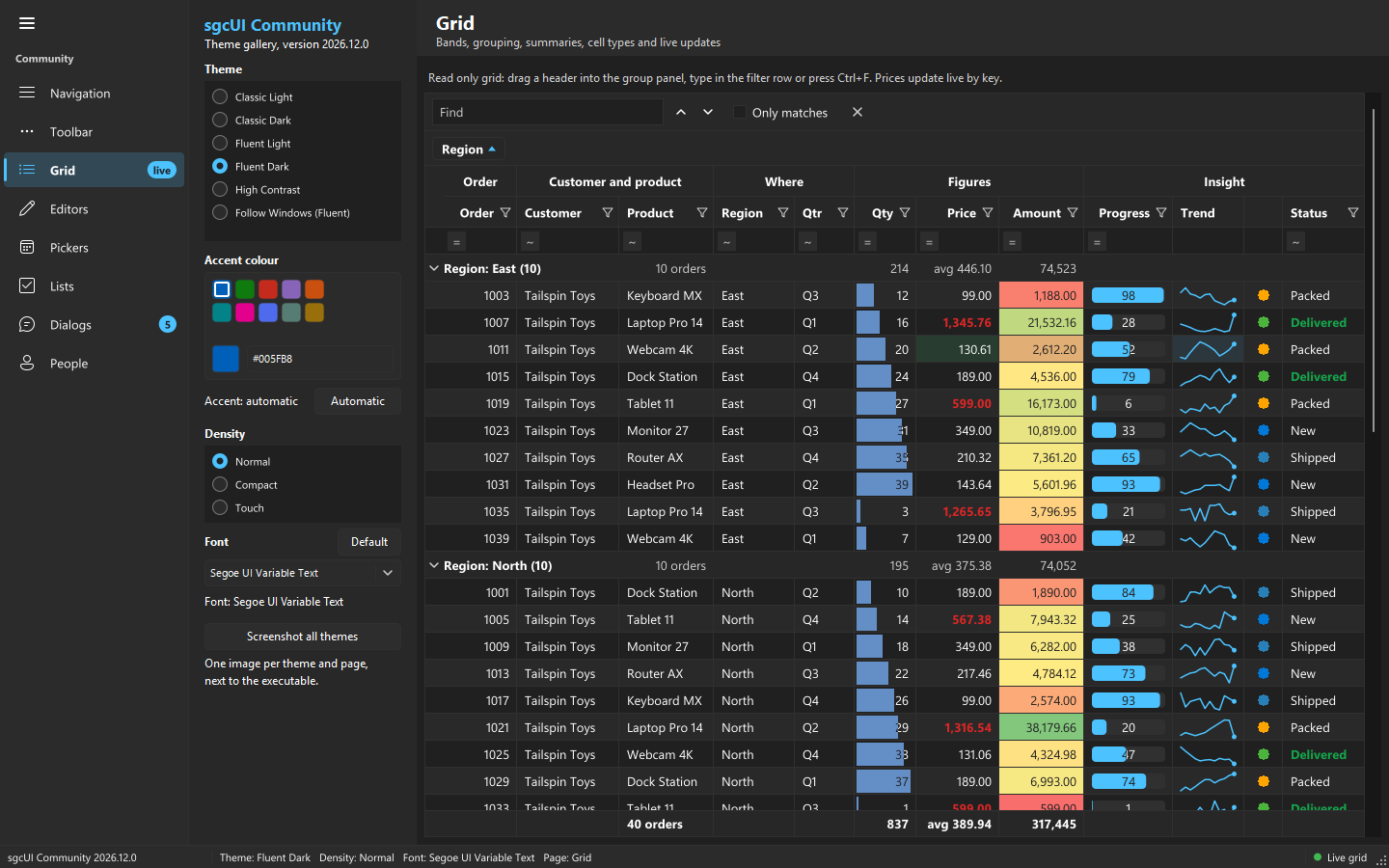
Every Community control under every theme. One click in the settings panel restyles the whole application, with live theme, accent, density and font settings.

Built Only with Community Controls

Every screen below comes from the Community showcase applications. Click a screenshot to see it full size.

Delphi 7 to Delphi 13, VCL and FireMonkey

The installer registers the design-time packages in every supported IDE, so the controls are on the palette as soon as it finishes.

IDE versions

Compiled packages for Delphi 7 to Delphi 13. VCL in every version, FireMonkey from Delphi XE6. The Community edition is for Delphi only: it has no C++Builder packages and no source code.

Delphi 13 targets

The Delphi 13 libraries ship for these platforms:

Win32Win64WinARM64ECmacOS x64macOS ARM64iOS deviceiOS Simulator ARM64Android 32 bitAndroid 64 bitLinux64

Linux64

On Linux64 the sgcUI FireMonkey controls run with FMXLinux installed in Delphi 13.

sgcUI on Linux64 with FMXLinux →

What Community Includes

Every sgcUI edition is built from the same source. The edition only decides which units and features a build includes. These tables list, per product, what the Community edition has and what needs a Registered licence.

sgcGrid

FeatureCommunityRegistered
Live updates by key from any thread, flash on change, format rules, virtual mode
Filter row, find panel, column filters and the filter builder
Grouping, group panel, group and footer summaries
Bands, image, progress and sparkline cells, data bars, colour scales, cell merging, preview rows
Frozen columns, pinned rows, column chooser, best fit, saved layouts, multi selection and copy
Read only DataSet source
ISA-18.2 alarm model, alarm link and alarm menu
Printing and print preview
In-place editing, clipboard paste, undo and redo, inserting and deleting rows, the sgcEditors cell editors, DataSet editing—
Tree rows and master detail rows—
Excel mode, XLSX export and import, computed columns—
Server mode and the card view—
Alarm acknowledge log—
PDF export (needs sgcPDF)—
sgcWebSockets bridges, the AI query included (needs sgcWebSockets)—

sgcNavigation

FeatureCommunityRegistered
Navigation bar: sidebar, accordion and tree modes, search, badges, collapsed icon rail
Tabs with close buttons, list and new tab buttons, scrolling
Breadcrumb linked to a navigation bar, tabbed form, notebook
Task dialog, message and input boxes, busy overlay, splash screen
Toasts, notification inbox and notification preferences
Action links of the items—
Command palette—
Tab drag reorder, pinned tabs, tear-off and the saved tab layout—
Breadcrumb edit mode—
Docking manager—
Live messages of the notification model—

sgcToolbar

FeatureCommunityRegistered
Toolbar with buttons, toggles, radio groups, dropdown menus, images and keyboard support
Status bar with text, progress and indicator panels
Toolbar badges
Overflow menu—
Action links of the items—
Ribbon and ribbon form—

sgcEditors

FeatureCommunityRegistered
Month calendar, date, time, date time and date range pickers
Spin edit with units, half star rating, check and radio groups
Button, search, mask, currency and lookup edits, memo
NumPad and on-screen keyboard, docked and drop down
Toggle switch, IP address edit, time span edit, font picker, checked and dual list boxes
Layout control with JSON, validation support
Colour pickerSwatches and hexSwatches and hex, plus the HSV square and the alpha bar
Token editTokens with validationTokens with validation, plus the auto-complete list
Range sliderOne thumbTwo thumbs
Property gridOne object at a timeSeveral objects at once
Data-aware editors—
Data form—

General differences

ItemCommunityRegistered
DeliveryCompiled packages (dcu, dcp and bpl) with design-time packagesFull source code
C++Builder—
ProductssgcGrid, sgcNavigation, sgcToolbar and sgcEditors, with sgcUICore and sgcLocalizationThe products of your edition or single licence, up to all 19 sgcUI products
sgcWebSockets bridges—
Showcase applications in Demos\CommunityThe Suite demos and the product demos
1 year of updates—
Who may use itIndividuals and organizations under EUR 1M annual gross revenue with no more than 5 developersAny individual or organization

See the feature matrix of every sgcUI product and the pricing of the Registered editions.

Free for Small Teams

Use the Community edition in commercial and non-commercial projects, as long as your organization stays under both thresholds.

sgcUI Community Edition Licence

Free for individuals and organizations under EUR 1M annual gross revenue with no more than 5 developers.

The sgcUI Community Edition for Delphi may be used free of charge in both commercial and non-commercial projects by any individual or organization whose total annual gross revenue is less than EUR 1,000,000 (one million euros) and whose development team consists of no more than five (5) developers. Any organization that meets or exceeds either threshold must purchase a Commercial licence to continue using the sgcUI Community Edition.

The Community Edition contains sgcGrid, sgcNavigation, sgcToolbar and sgcEditors, with sgcUICore and sgcLocalization, as compiled packages for Delphi, without source code and without C++Builder. The features that the Community Edition leaves out, and the other sgcUI products, are not part of the Community Edition and require a Commercial licence.

  • Revenue under EUR 1,000,000 a year and no more than five developers: use it free, in commercial projects too.
  • Meet or exceed either threshold: buy a Commercial licence to continue. sgcUI Standard includes sgcGrid, sgcNavigation, sgcToolbar and sgcEditors with full source code, and each product is also sold alone.
  • Need a feature that Community leaves out, C++Builder or another sgcUI product: that needs a Commercial licence too.

See sgcUI pricing

Frequently Asked Questions

Yes. The licence allows commercial and non-commercial projects, free of charge, for any individual or organization with a total annual gross revenue under EUR 1,000,000 and a development team of no more than five developers.

An organization that meets or exceeds either threshold, EUR 1,000,000 of annual gross revenue or more than five developers, must purchase a Commercial licence to continue using the Community edition. See the pricing.

No. It installs compiled packages (dcu, dcp and bpl) for Delphi with their design-time packages. The source code and the C++Builder packages come with the Registered editions.

Delphi 7 to Delphi 13, with VCL in every version and FireMonkey from Delphi XE6. The Delphi 13 libraries ship for Win32, Win64, WinARM64EC, macOS x64 and ARM64, iOS device and Simulator ARM64, Android 32 and 64 bit, and Linux64.

Every sgcUI edition is built from the same source, and the edition only decides which units and features a build includes. Community leaves out the features listed in the comparison tables, such as in-place editing in sgcGrid, the docking manager in sgcNavigation and the Ribbon in sgcToolbar.

The installer puts the six showcase applications, ERP, Markets, Realtime, HMI, RightToLeft and ThemeGallery, in Demos\Community, for VCL and FireMonkey, next to the demos of the four products.

Best value: All-AccessEvery eSeGeCe product, Premium Support included, from €1,059/year.
See All-Access pricing

Start Building with sgcUI Community

One free installer adds sgcGrid, sgcNavigation, sgcToolbar and sgcEditors to Delphi 7 to 13. Building for .NET? See sgcUI Community for .NET.