One application. Five languages.
Switched while it runs.
sgcLocalization translates your own Delphi, C++Builder and Lazarus applications. Every form, every message, every plural, with one editor and one line of code to change the language.
- English
- Deutsch
- Español
- Français
- Italiano
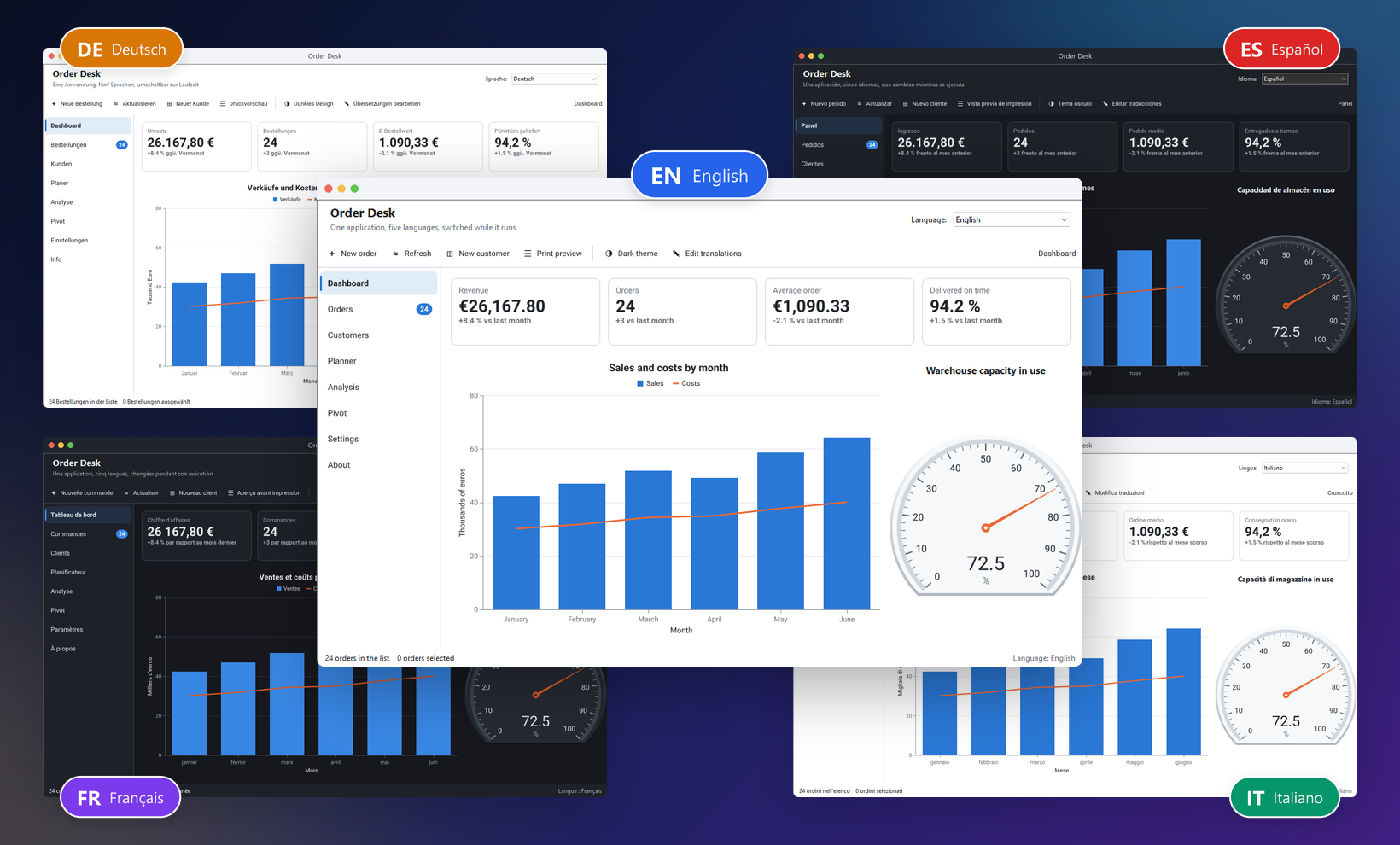
The picture above is one executable. The same dashboard, the same data, in English, German, Spanish, French and Italian, and the user changes the language from a combo box while the application runs. No restart and no second build.
That application was translated with sgcLocalization, a new product of the sgcUI suite. It works with VCL, FireMonkey and LCL, from Delphi 7 to Delphi 13, in C++Builder and in Lazarus, and it is included with every sgcUI edition and with every single product.
sgcLocalization in one minute: scan, translate and switch a real application. Also on YouTube.
Switch the Language with One Line
This is all the code the language change needs:
uses
  sgcLocalization_Engine;

procedure TfrmMain.btnGermanClick(Sender: TObject);
begin
  sgcSetLanguage('de');
end;
If you prefer no code at all, drop the ready-to-use language combo on the form (TsgcVCLLanguageCombo or TsgcFMXLanguageCombo). It lists the languages of your project and switches when the user picks one.
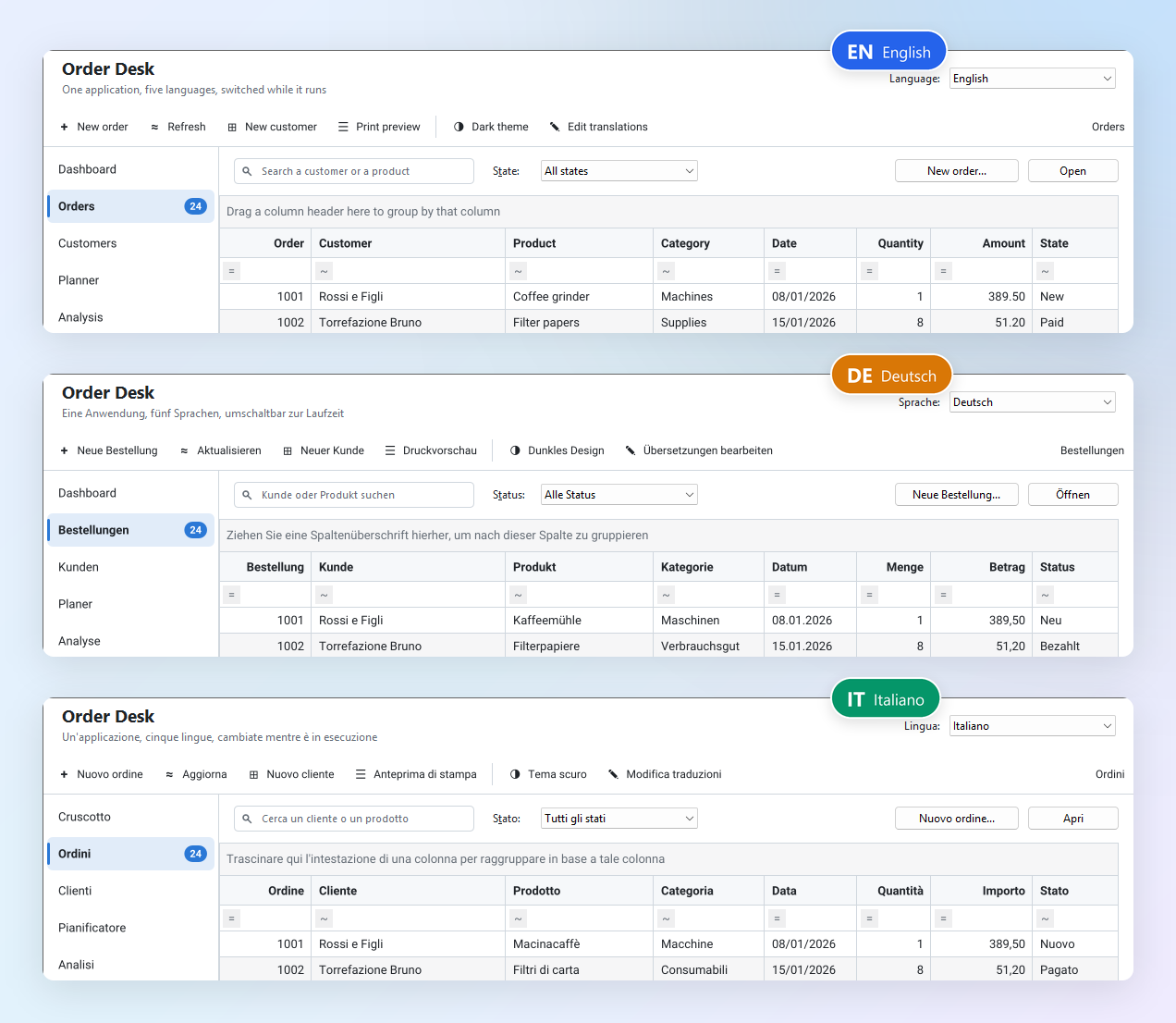
The switch does more than replace captions:
- Forms created later are translated automatically. A dialog opened ten minutes after the switch appears in the right language.
- Values changed by code are kept. A label your code has filled with a customer name is not overwritten by a translation.
- Selections survive. Combo boxes and lists keep the selected item while their items change language.
- Right-to-left languages flip the layout, so an Arabic or Hebrew user gets a mirrored form.
To start in the language of the user's system, set one property:
sgcVCLLocalizer1.Language := 'auto';How Little Work It Takes
The localizer (TsgcVCLLocalizer for VCL, TsgcFMXLocalizer for FireMonkey) finds every text property through RTTI. You do not mark properties, you do not rename components and you do not change your forms.
Built-in ignore rules skip what is never text: component names, field names, SQL, file names, format strings, and the non-text properties of the sgcUI controls themselves. You can add your own rules. A form that mixes standard controls and sgcUI controls scans cleanly, so the list you translate contains texts and nothing else.
Texts in Code: Snippets
Not every text lives in a form. Messages, status lines and captions built in code are snippets. Wrap the text in sgcT and it becomes translatable:
if MessageDlg(sgcT('Save changes?'), mtConfirmation,
  [mbYes, mbNo], 0) = mrYes then
  SaveOrder;
The same word can need two translations. In English "Open" is both a command and the state of an order. sgcTC adds a context, so each meaning gets its own translation:
btnOpen.Caption := sgcTC('command', 'Open');
lblState.Caption := sgcTC('order status', 'Open');
Plurals use sgcTN. You write the singular and the plural of the source language, and the translation supplies as many forms as the target language needs:
lblSelected.Caption := sgcTN('%d order selected', '%d orders selected',
  Count, [Count]);
The plural rules come from CLDR, so they are right for every language. Polish, for example, gets four forms, and the editor asks the translator for each one of them.
One Translation Editor
All the translations are edited in one place. Right click the localizer at design time to open the editor inside the IDE, or use the standalone tool outside it.
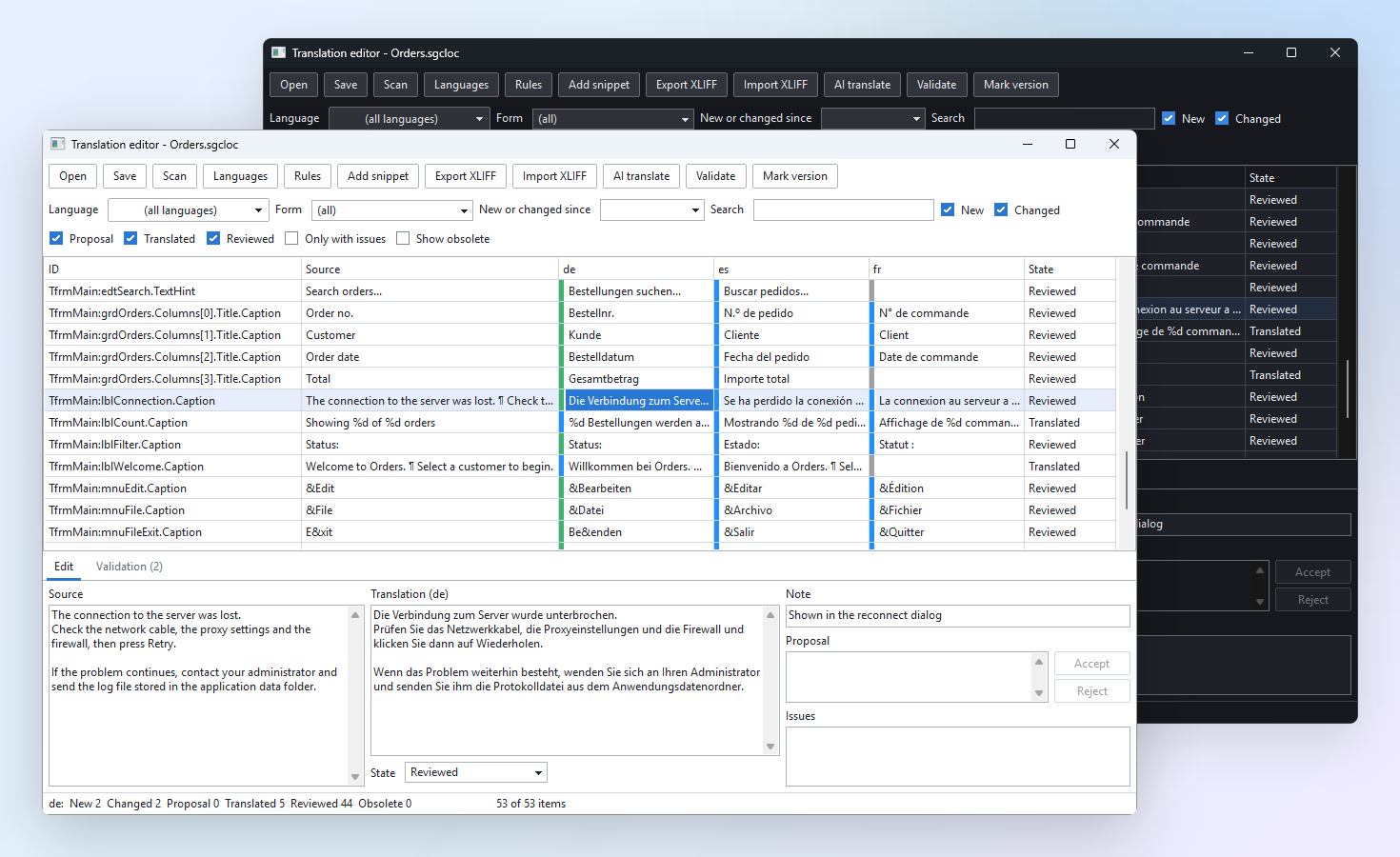
- Item states. Every text is new, changed, proposal, translated, reviewed or obsolete, and you filter by state.
- Filters and multi-select. Filter by language, form or search text, select many rows and change them together.
- Version marks. Mark a release, and the "new or changed since" filter shows exactly what the next release has to translate. Nothing is missed.
- Your translator's language. The editor itself comes in 12 languages, with light and dark themes.
Validation That Catches the Usual Mistakes
A translation that drops a %d or an accelerator key is easy to write and hard to spot. sgcLocalization checks every translation, whether it was typed, imported or proposed by AI:
- format specifiers and placeholders,
- accelerator keys,
- line breaks, leading and trailing whitespace,
- empty translations and plural forms.
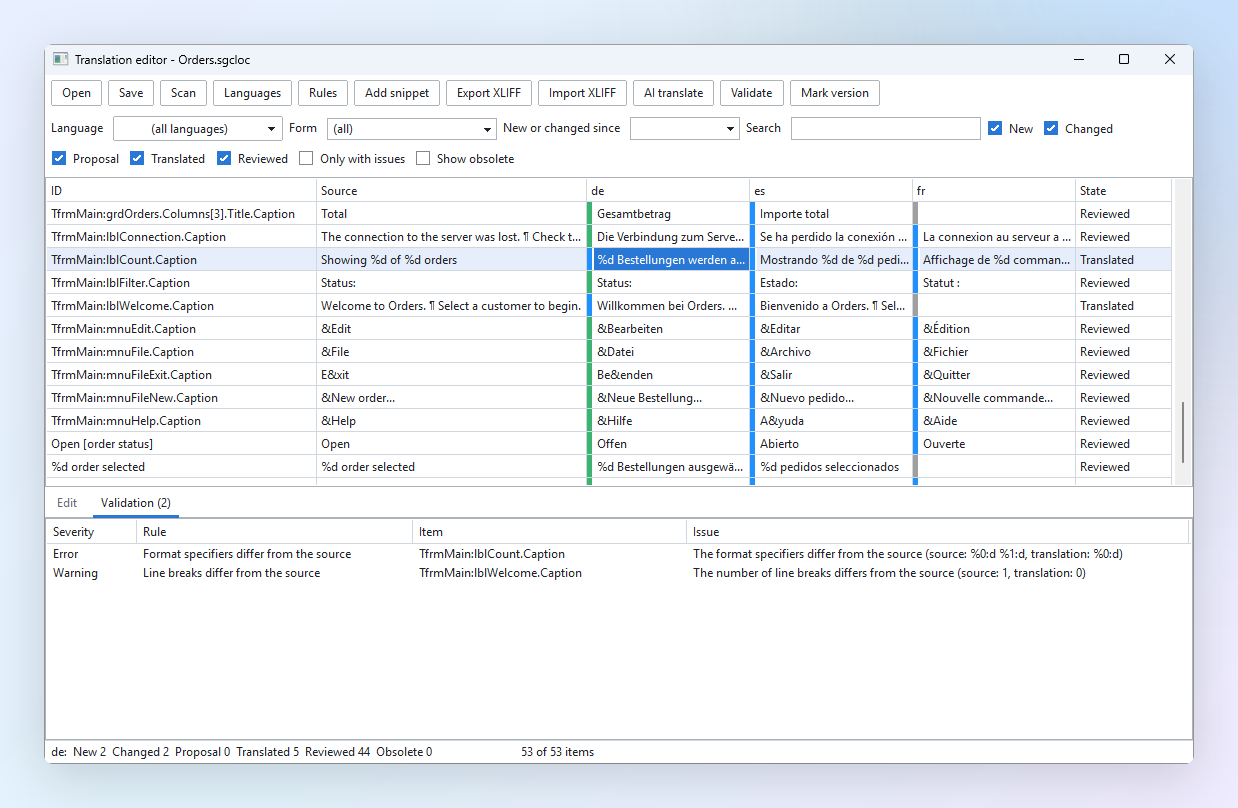
An item with an error cannot be set to reviewed, so a broken text does not slip into a release as finished work.
AI Translation, as Proposals
The editor can translate with AI services such as ChatGPT, Claude, Gemini and Ollama. Choose the target languages, give it a glossary and instructions about tone, and start.
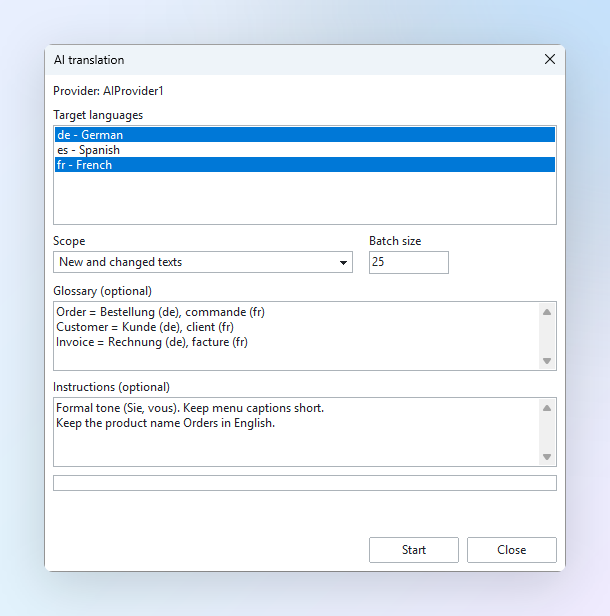
The results arrive as proposals. You accept or reject each one, and a proposal never overwrites a text that is already translated. The same validation runs on them.
XLIFF for Professional Translators
Translation agencies work with XLIFF. sgcLocalization exports XLIFF 1.2 for a language, and imports the file when it comes back.
An import never writes directly into your project. It opens a review list with every change: the old text, the new text, the kind of change and any issue found. Only the rows you tick are applied.
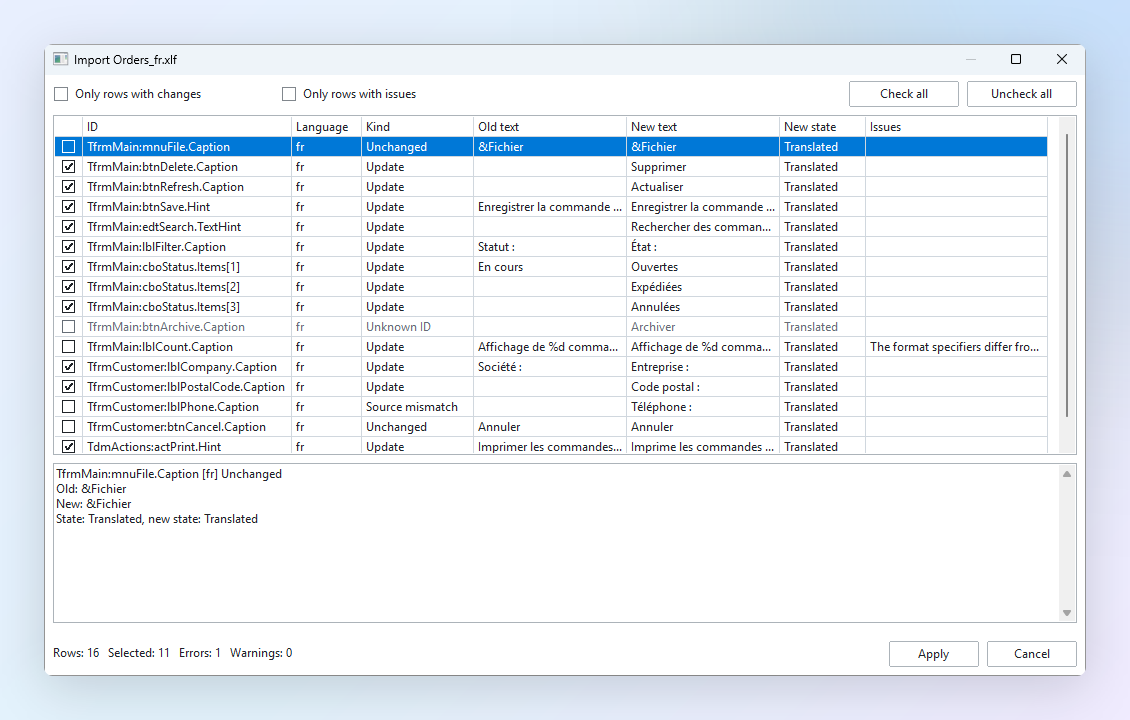
One Project File
The translations of an application live in one project file with the extension .sgcloc. It is JSON, so it is friendly to version control: a changed translation is a small diff you can read in a code review. If you prefer a single executable with nothing beside it, the project can be embedded in the form file instead.
See It in a Real Application
The showcase demo is Order Desk, a complete business application: a dashboard, orders, customers, a planner, pivot analysis, a wizard and a print preview. It is translated into English, German, Spanish, French and Italian, and it comes in VCL, FireMonkey and Lazarus versions.
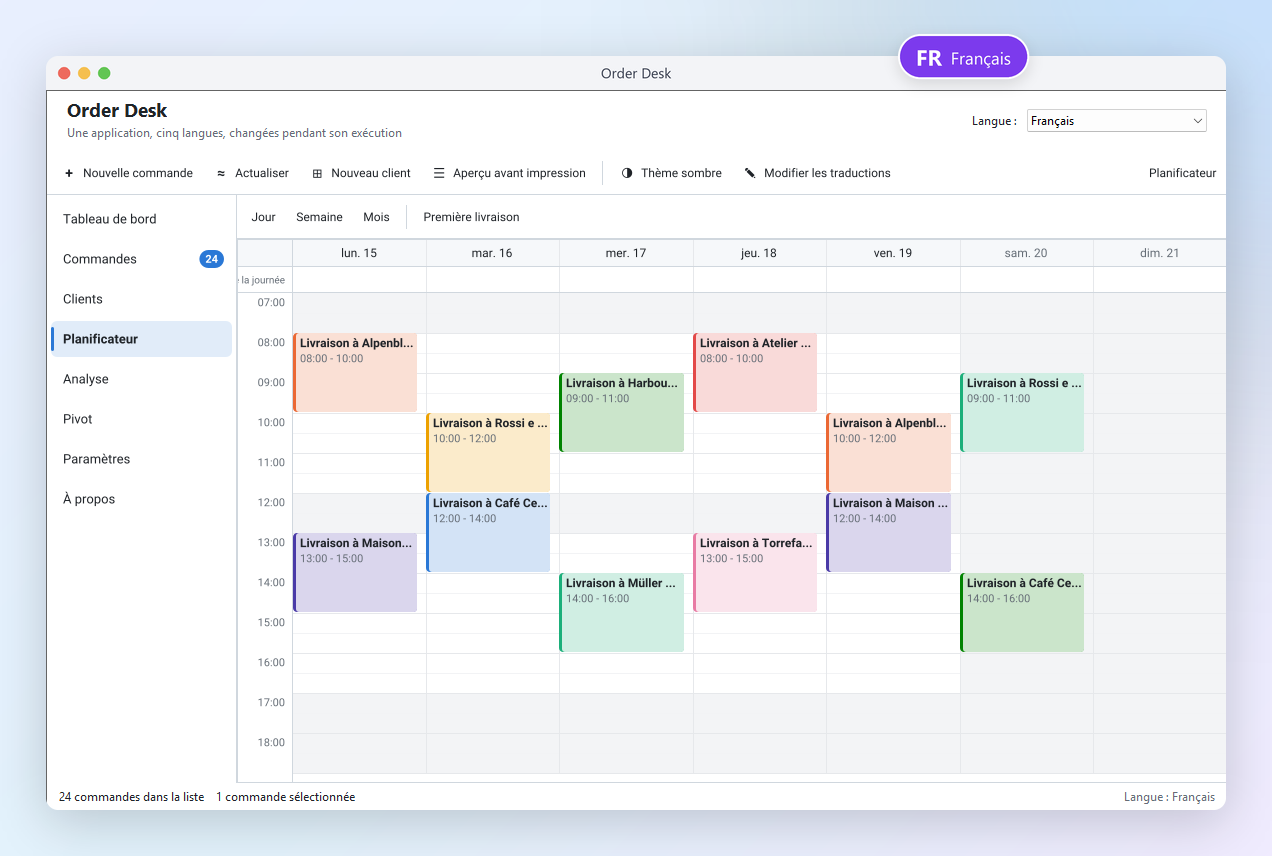
The demo folder also has three quick starts, the standalone translation editor tool, and a Getting Started guide that takes you from an empty form to a translated application.
Included with sgcUI
sgcLocalization ships with sgcUI 2026.12.0. It is not sold separately: it is included with every sgcUI edition and with every single product, and it is selected by default in the installer.
Your Application, in Your Customer's Language
Download sgcUI, open the Order Desk demo and change the language while it runs. Then drop a localizer on your own main form.
Questions or feedback? Get in touch, you will get a reply from the people who wrote the code.