Keep your reports.
Change your report engine.
sgcReports now imports FastReport, QuickReport and ReportBuilder reports, and adds the features buyers check first: parameters, real tables, report templates, a searchable preview and electronic invoices. Twelve new features in one release.
- VCL
- FireMonkey
- C++ Builder
- WinForms
- WPF
- Avalonia
The twelve new features in under four minutes. Also on YouTube.
Most teams that would like to leave their report engine never do, for one reason: hundreds of existing reports that nobody wants to draw again. sgcReports 2026.11 removes that reason. It reads your FastReport, QuickReport and ReportBuilder files and converts them, and it closes the gaps that a team checks before it switches: report parameters, a real table item, report templates with inheritance, a preview with search and thumbnails, and PDF output for electronic invoices.
Everything below works the same way in Delphi and C++ Builder, with VCL and FireMonkey, and in .NET with WinForms, WPF and Avalonia. Every code sample on this page was compiled and run against the 2026.11 sources.
- 01Report importerFastReport, QuickReport and ReportBuilder files, converted.
- 02Report parametersTyped values the preview asks for, also over HTTP.
- 03Table itemMerged cells, repeated header rows, totals.
- 04New item kindsCheck boxes, SVG, sparklines and gauges.
- 05Templates and inheritanceOne letterhead for every report.
- 06A better previewSearch, thumbnails and an export menu.
- 07Bookmarks and linksA PDF outline, hyperlinks and anchors.
- 08E-invoice PDFFactur-X, ZUGFeRD and XRechnung in PDF/A-3.
- 09Expression library68 functions and 10 aggregates.
- 10HighlightsConditional styles without a script.
- 11Progress and cancelFor big reports, on screen and on the server.
- 12Every platformThe same API in Delphi and .NET.
Part 1 · Remove the switching cost
Import FastReport, QuickReport and ReportBuilder Reports
The new TsgcReportImporter reads a FastReport .fr3 file, a QuickReport form (a .dfm with a TQuickRep) or a ReportBuilder .rtm template, as text or binary, and turns it into an sgcReports report definition. Pages, bands, items, styles and data sources come across, the expressions are translated to the sgcReports syntax, and QuickReport and ReportBuilder check boxes become the new check box item.
What makes it safe to use on a real project is the other half of the result. The importer lists every object, property, expression, script and data source it could not map, with the path inside the report and the reason, so you know exactly what to finish by hand. Nothing is dropped in silence.
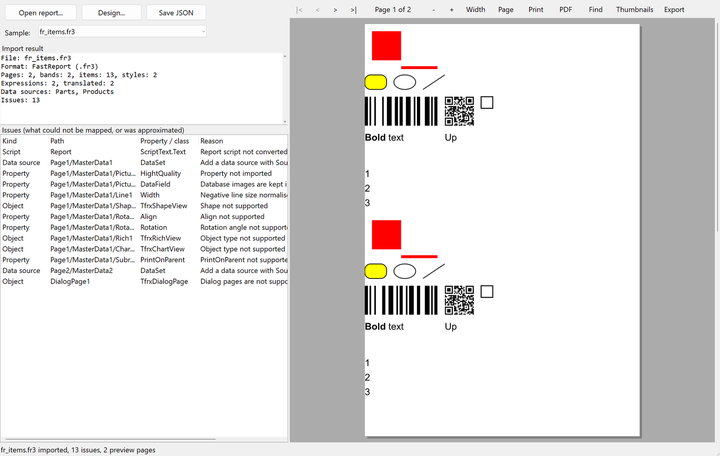
The designers have an Import command, so a report can be brought in, checked in the preview and saved as JSON without writing code. From code it is four lines plus the cleanup:
  oImporter := TsgcReportImporter.Create;
  try
    oImporter.ImportFromFile(oReport, 'fr_items.fr3');
    for i := 0 to oImporter.ImportResult.Issues.Count - 1 do
      Writeln(oImporter.ImportResult.Issues[i].Reason);
  finally
    oImporter.Free;
  end;
And the same in C#:
    var oImporter = new TsgcReportImporter();
    oImporter.ImportFromFile(oReport, "fr_items.fr3");
    foreach (var oIssue in oImporter.ImportResult.Issues)
      Console.WriteLine(oIssue.Reason);
Scripts, rich text, charts and crosstabs of the source report are not converted. They appear in the issue list, so you can rebuild them with the sgcReports equivalents. The new ReportImport demo, for Delphi, C++ Builder and .NET, imports sample files of all three formats.
Report Parameters, Asked For by the Preview
A report can now declare its parameters: text, integer, number, date, date and time, or yes or no, each with a default value or a default expression, a required flag, multiple values, and a list of allowed values that is fixed or read from a data source. Expressions and scripts read them as :Name.
You do not write a form for them. The VCL and FireMonkey previews and designers ask for the parameters before the report is prepared, and so do the .NET previews. The HTML viewer shows a typed parameter form, and the HTTP endpoint reads ?param.Name=value from the query string and answers 400 for a value that does not fit, instead of returning a broken report.
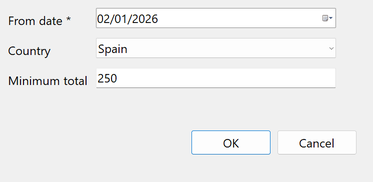
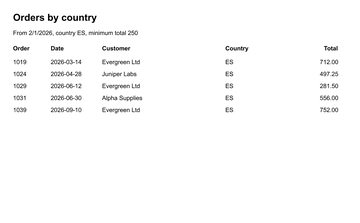
In a JSON definition the parameters sit next to the pages:
"parameters": [
  { "name": "FromDate", "dataType": "rpdtDate", "required": true,
    "defaultExpression": "EncodeDate(2026, 1, 1)" },
  { "name": "MinTotal", "dataType": "rpdtFloat", "defaultValue": "0" }
]
A service that prepares the report without a user sets the values in code, and no prompt is shown:
  oEngine.Report := oReport;
  oEngine.SetParameterValue('FromDate', VarFromDateTime(EncodeDate(2026, 3, 1)));
  oEngine.SetParameterValue('MinTotal', 100.0);
A Real Table Item
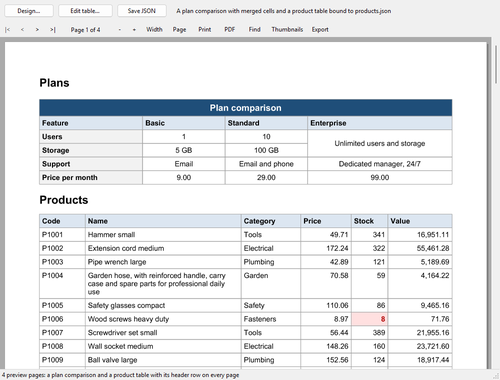
Lining up text items by hand to fake a table is over. The new table item has fixed, percent and automatic column widths, cells that span rows and columns, header rows that repeat on every page, data rows that come from their own data source, footer rows with totals, and rows that grow with their content. Cells have styles, Highlights and hyperlinks.
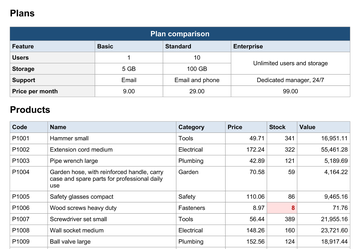
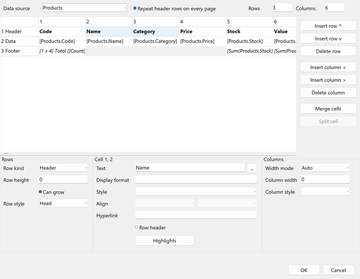
The exports keep the structure. A table becomes a tagged table in an accessible PDF, with header cells and their scope and the spans, so a screen reader reads it as a table. It becomes an HTML table, a Word table with its header rows repeated, and merged cells in XLSX. In code, the fluent builder writes it in a few lines:
  oTable := oBuilder.Page('Main').Paper(rpsA4).Margins(15).ReportTitle(14)
    .CanGrow.Table(0, 0, 180, 'Products');
  oTable.Column(25).Column(0, rtwmAuto).Column(30)
    .HeaderRow(['Products', '', '']).RowStyle('Title').Cell(0, 0).Span(1, 3)
    .HeaderRow(['Code', 'Name', 'Price']).RowStyle('Head')
    .DataRow(['[Products.Code]', '[Products.Name]', '[Products.Price]'])
    .Cell(1, 2).Format('#,##0.00');
  oTable.Table.RepeatHeaderRows := True;
Check Boxes, SVG, Sparklines and Gauges
Four new things to draw on a page:
- Check box item, checked by a Boolean expression, with a check, cross or square mark. It stays vector in the PDF and becomes a TRUE or FALSE value in XLSX and CSV.
- SVG pictures in image items, printed as vector graphics in the PDF, as SVG in HTML and as sharp images in Word, so a logo stays crisp at any zoom.
- Sparkline item, drawn by sgcCharts: line, area, column or win and loss, one per row.
- Gauge item, drawn by sgcGauges, radial or linear with colored ranges, through the new sgcReportsGauges bridge.
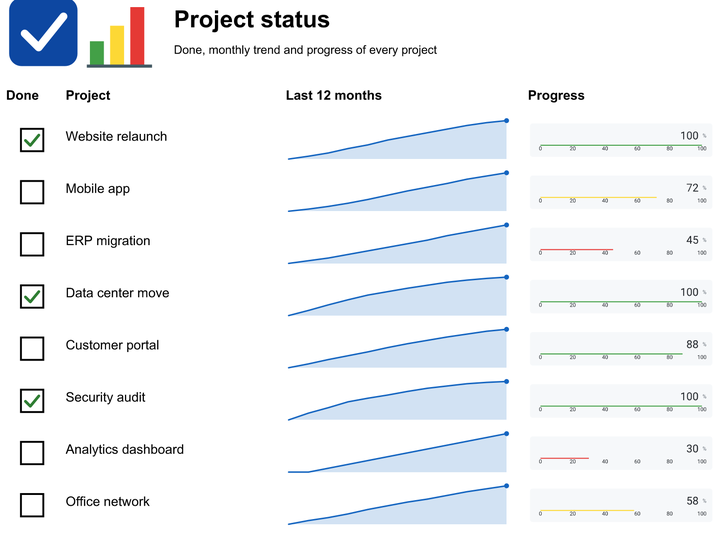
The settings of custom items now accept expressions, evaluated for every printed band, which is how each row draws its own sparkline and gauge:
  oBand := oPage.MasterData('Projects', 14);
  oBand.CheckBox('Projects.Done', 4, 4, 6, 6).Name('DoneBox');
  oBand.Item.CheckBox.CheckStyle := rcsCheck;
  oBand.Custom('Sparkline', 75, 1, 60, 12, ['values=[Projects.Trend]',
    'kind=area', 'markers=last,high']).Name('Trend');
  oBand.Custom('Gauge', 140, 2, 50, 10, ['value=[Projects.Progress]',
    'gaugeKind=linear', 'unit=%']).Name('ProgressGauge');
Report Templates and Inheritance
Every company has a letterhead, and every invoice, statement and delivery note repeats it. With the new InheritsFrom property, "inheritsFrom" in the JSON, a report definition starts from a base definition and stores only its differences. Pages, bands, items and styles are merged by name. A child can override a property, add an item, place a band first with "$first" or drop an inherited item with "$remove". Change the logo in the base report, and every report that inherits it follows.
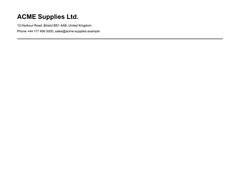
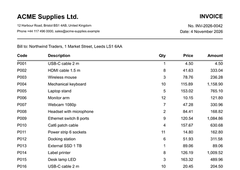
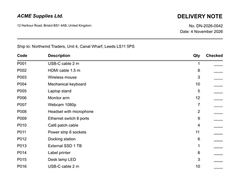
The whole delivery note above is a few lines of differences. Here it removes the contact block of the letterhead:
"inheritsFrom": "letterhead.json",
"pages": [ { "name": "Page1", "bands": [
  { "name": "PageHeader", "items": [
    { "name": "Contact", "$remove": true }
  ] }
] } ]
oDef.BaseFolder := ExtractFilePath(ExpandFileName('letterhead.json'));
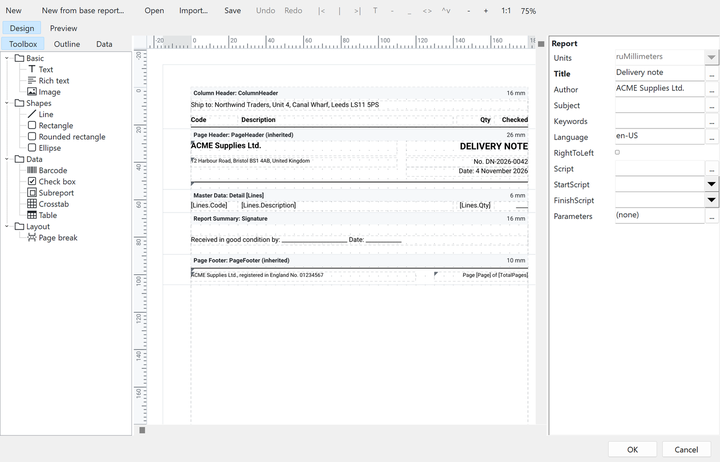
oDef.LoadFromFile(oReport, 'child.json');The base is found under BaseFolder, or your OnResolveBase handler loads it from a database or a resource. Chains go up to eight levels, and Flat writes the merged definition when you need one file. The VCL, FireMonkey and HTML designers mark inherited objects, edit them as overrides and create a new report from a base report. In the VCL designer, an overridden property shows in bold.
A Preview with Search, Thumbnails and an Export Menu
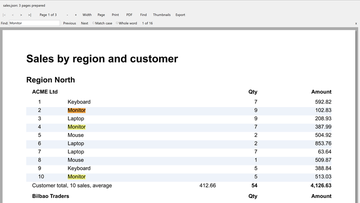
The previews have a find bar (Ctrl+F, F3, match case and whole word) that highlights every match on the page, a pane of page thumbnails, and an Export menu for PDF, XLSX, CSV, PNG, HTML and Word, with an OnExport event to take over the save. This is in the VCL and FireMonkey previews and in the WinForms, WPF and Avalonia previews, and the FireMonkey PDF viewer gets text search too.
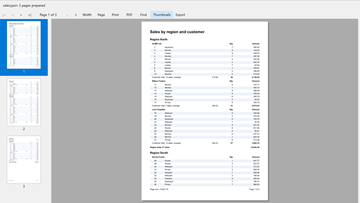
  oPreview.ShowThumbnails := True;
  oPreview.ExportFormats := [rpxPDF, rpxXLSX];
  if oPreview.SearchText('Total', False, True) then
    Writeln(oPreview.SearchResults, ' match(es)');
Part 2 · Close the gaps
PDF Bookmarks, Hyperlinks and Anchors
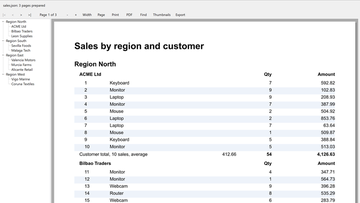
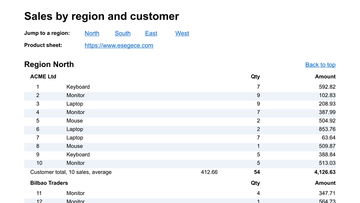
Set the new Bookmark expression on a band or an item, and the PDF export writes the bookmarks as the document outline, nested by group, while the VCL and FireMonkey previews show them in an outline pane (ShowOutline). The new Hyperlink property opens a web or mailto address, or jumps to an Anchor in the same report with #name, and the links are kept in the PDF, HTML, Word and XLSX exports.
E-Invoice PDF: Factur-X, ZUGFeRD and XRechnung
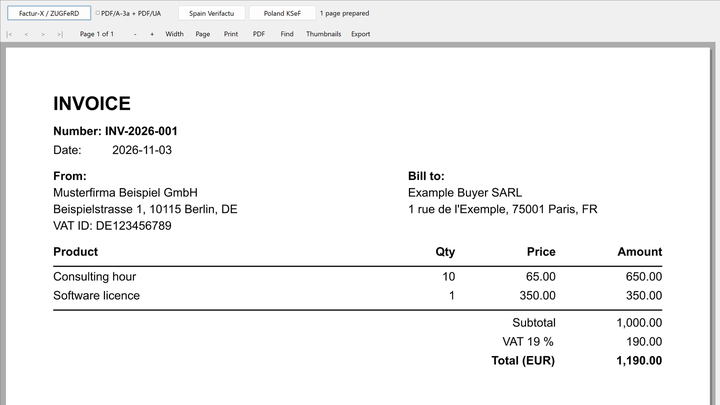
The PDF export embeds the e-invoice XML of your application as a PDF/A-3 associated file through the new EInvoice property, for Factur-X, ZUGFeRD and XRechnung, also as PDF/A-3a with PDF/UA. The invoice that people read and the data that machines read travel in one file. sgcReports does not write the XML itself: your application supplies it.
An Expression Library of 68 Functions and 10 Aggregates
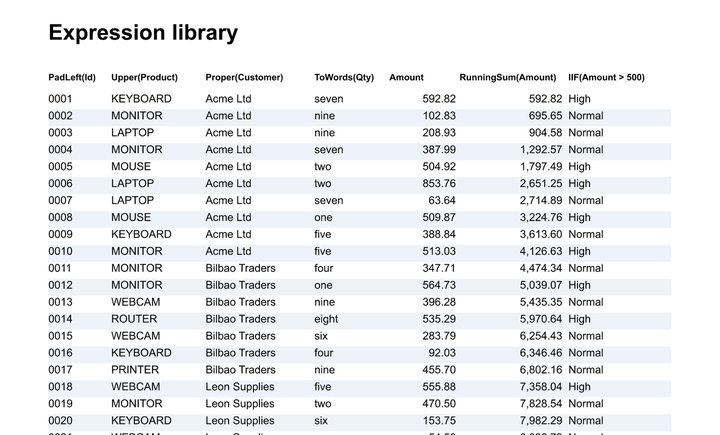
The expression library grows to 68 functions and 10 aggregates. New are date arithmetic, padding and formatting, Choose, ToWords to write an amount in words in the 12 sgcUI languages, and the aggregates SumIf, CountIf, Previous, RunningSum and RunningCount. An aggregate follows the band it is printed in: a group footer gives the total of the group, a page footer the total of the page.
Highlights: Conditional Styles without a Script
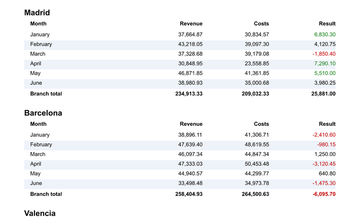
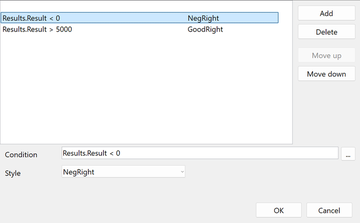
Highlights put a list of conditions and styles on an item. The first condition that is true replaces the style of the item, so negative totals print in red and good results in green without a line of script. They live in the JSON, in the fluent builder and in the VCL, FireMonkey and HTML designers.
Progress and Cancel for Big Reports
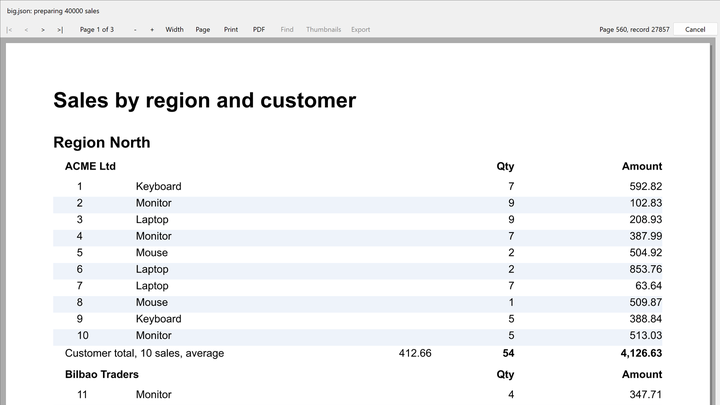
The engine has a new OnProgress event with the page and record counts and a Cancel method. The previews show the progress while a report is prepared, with a Cancel button that Esc also presses, and the HTTP endpoint has new MaxPages and Timeout limits, so one runaway report cannot hold a server.
Every Platform, the Same API
Each feature on this page ships for Delphi and C++ Builder, with the VCL and FireMonkey previews and designers, and for .NET with WinForms, WPF and Avalonia, with the same class and property names. Reports defined in JSON move between the two worlds unchanged, and the engine still runs headless in services and Linux64 daemons.
Five new demos come with this release, for Delphi, C++ Builder and .NET: ReportImport, ReportParameters, ReportTables, ReportVisualItems and ReportInheritance, next to the ReportEInvoice demo.
Also New in sgcReports 2026.11
- A native report designer for VCL and FireMonkey with a toolbox, outline, inspector, rulers, guides, snapping, undo and redo, keyboard editing and screen reader support.
- Scripting with a Pascal subset, edited and checked in the VCL and FireMonkey designers.
- DOCX export (fixed and flow modes) and HTML export (paged and continuous), also through the HTTP routes.
- Custom items, a native crosstab, and chart and pivot grid items through the sgcReportsCharts and sgcReportsPivotGrid bridges.
- Watermarks, and a FireMonkey preview that runs on macOS, iOS and Android.
The report importer and the sparkline and gauge items need a registered edition. sgcReports is included in sgcUI Enterprise and in All-Access, and it is also sold on its own.
Try sgcReports 2026.11
Import one of your own FastReport, QuickReport or ReportBuilder files and see what comes across.
Questions or feedback? Get in touch, you will get a reply from the people who wrote the code.