A spreadsheet.
Inside your application.
sgcSpreadsheet is the new Excel style spreadsheet control of sgcUI. Your users type values and formulas, work across several sheets and draw charts from their cells. Your code fills the workbook, adds its own functions and reads and writes XLSX files that Excel opens.
- VCL
- FireMonkey
- C++ Builder
- WinForms
- WPF
- Avalonia
Sooner or later a business application needs a sheet. Users plan a budget, price a quote, calculate costs or check the numbers a customer sent in an Excel file, and they expect formulas, several sheets and charts while they do it. A plain grid is not enough for any of that.
sgcSpreadsheet is an Excel style spreadsheet control built on sgcGrid and on a formula engine shared in sgcUICore. It keeps a real workbook with sheets, defined names and dynamic arrays, it recalculates only the cells a change affects, and it loads and saves XLSX. The same engine drives the VCL and FireMonkey controls for Delphi and C++ Builder and the WinForms, WPF and Avalonia controls for .NET.
sgcSpreadsheet in Action
Formulas, spilling arrays, several sheets, live charts and XLSX files on every platform. Also on YouTube.
Formulas Your Users Already Know
People who work with numbers think in Excel formulas. In sgcSpreadsheet a text that starts with = is a formula, and the engine computes 211 worksheet functions: math, statistics, text, date and time, lookup, logical, information and dynamic array functions. The engine lives in sgcUICore, so sgcGrid formulas give the same results.
=SUM(B2:B13)=XLOOKUP(C2,…)=Sheet2!A1.=SORT(A2:A20)↓#SPILL! and A1# references.B2 → B14 → D3=SUM(Sales)*(1+Rate)'007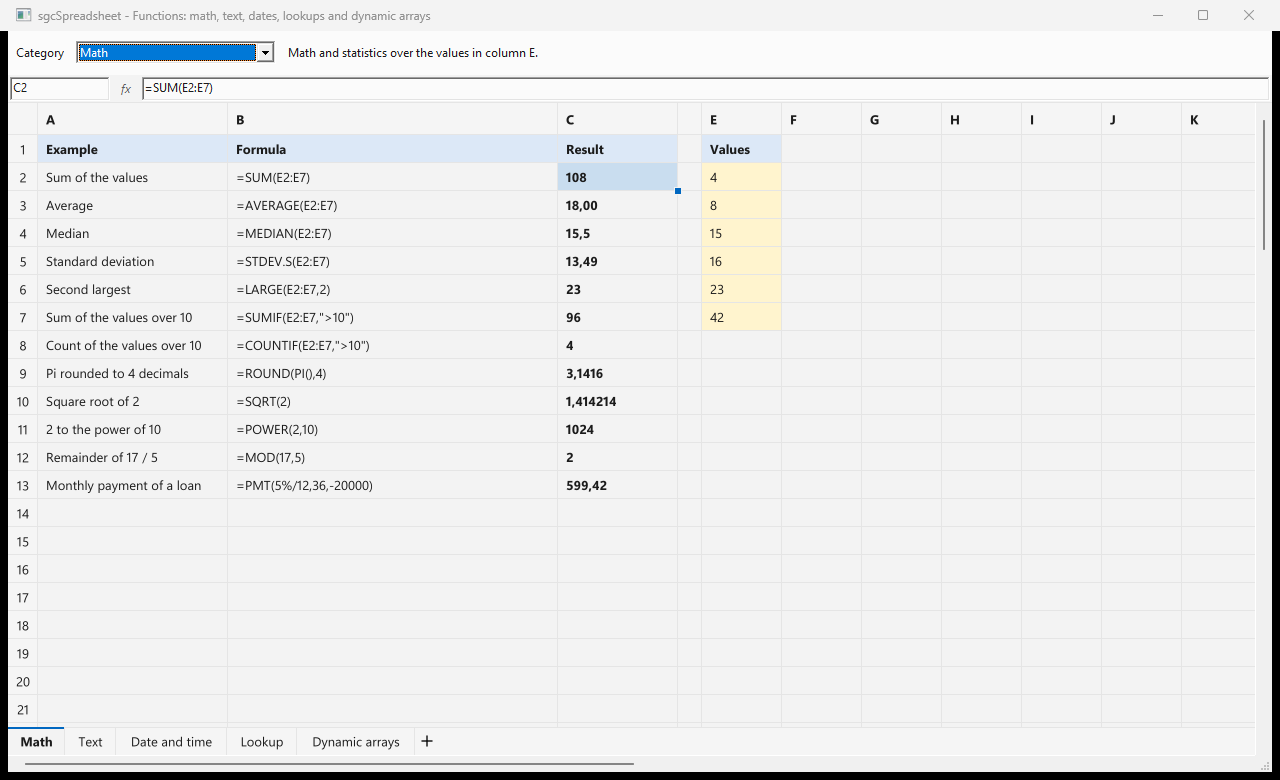
Sheets, Names and Spilling Arrays
A spreadsheet is a workbook with one or more sheets. The tabs under the grid switch the sheet and the + tab adds one, and a renamed sheet is renamed in every formula that refers to it. From code, AddSheet, ActiveSheet and SheetCount manage the sheets, and Grid.Sheets.Names keeps the defined names of the workbook.
The method below fills a price list, names its ranges, and builds a summary sheet that reads it. SORT returns the whole list of products, which spills into the cells below, and A1# refers to that spilled range however long the list grows. XLOOKUP finds a price and the VAT name adds the tax.
uses
  sgcSpreadsheet_VCL;

procedure TForm1.BuildPriceList;
var
  vSummary: Integer;
begin
  // Sheet1: a price list, row and column are 0-based, (0, 0) is A1
  sgcVCLSpreadsheet1.SetCellInput(0, 0, 'Product');
  sgcVCLSpreadsheet1.SetCellInput(0, 1, 'Price');
  sgcVCLSpreadsheet1.SetCellInput(1, 0, 'Monitor');
  sgcVCLSpreadsheet1.SetCellInput(1, 1, '219');
  sgcVCLSpreadsheet1.SetCellInput(2, 0, 'Keyboard');
  sgcVCLSpreadsheet1.SetCellInput(2, 1, '49');
  sgcVCLSpreadsheet1.SetCellInput(3, 0, 'Mouse');
  sgcVCLSpreadsheet1.SetCellInput(3, 1, '25');
  // defined names: formulas use them instead of cell addresses
  sgcVCLSpreadsheet1.Grid.Sheets.Names.Add('Products', '=Sheet1!$A$2:$A$4');
  sgcVCLSpreadsheet1.Grid.Sheets.Names.Add('Prices', '=Sheet1!$B$2:$B$4');
  sgcVCLSpreadsheet1.Grid.Sheets.Names.Add('VAT', '0.21');
  // a second sheet that reads the first one
  vSummary := sgcVCLSpreadsheet1.AddSheet('Summary');
  sgcVCLSpreadsheet1.ActiveSheet := vSummary;
  // a dynamic array: the sorted names spill into A1:A3
  sgcVCLSpreadsheet1.SetCellInput(0, 0, '=SORT(Products)');
  // A1# is the whole spilled range, however long the list grows
  sgcVCLSpreadsheet1.SetCellInput(0, 2, 'Items');
  sgcVCLSpreadsheet1.SetCellInput(0, 3, '=ROWS(A1#)');
  // XLOOKUP finds the price of a product, VAT included
  sgcVCLSpreadsheet1.SetCellInput(1, 2, 'Monitor');
  sgcVCLSpreadsheet1.SetCellInput(1, 3, '=XLOOKUP(C2,Products,Prices)*(1+VAT)');
  // every sheet, formula and name goes to a file that Excel opens
  sgcVCLSpreadsheet1.SaveToXLSX('prices.xlsx');
end;
The summary shows the three products in order, 3 items, and 264.99 for the monitor. Change a price on the first sheet and only the cells that depend on it recalculate. FreezePanes(1, 0) keeps a header row in place while the rest of the sheet scrolls, and the formula bars TsgcVCLSpreadsheetFormulaBar and TsgcFMXSpreadsheetFormulaBar give your users a name box and the formula of the current cell.
Your Own Functions
Engineering, finance and laboratory applications need their own calculations. The formula engine has a function registry, and a function registered there works in every formula of the spreadsheet, of sgcGrid and of a TsgcCalcEvaluator, exactly like a built in one. The handler is a plain function, registered from the initialization section of a unit.
unit MyFunctions;

interface

implementation

uses
  sgcUICore_Calc;

{ =MARKUP(price, [rate]): the price plus a margin, 20% by default }
function DoMarkup(aCall: TsgcCalcCall): Variant;
var
  vPrice, vRate: Double;
  vError: string;
begin
  vError := aCall.Number(0, vPrice);
  vRate := 0.2;
  if (vError = '') and (aCall.Count > 1) then
    vError := aCall.Number(1, vRate);
  if vError <> '' then
    Result := vError
  else
    Result := vPrice * (1 + vRate);
end;

initialization
  // MARKUP takes 1 or 2 arguments
  sgcCalcRegisterFunction('MARKUP', DoMarkup, 1, 2);

end.
Add the unit to the project and your users can type =MARKUP(B2). With dynamic arrays the engine calls the function for each element of an array argument, so =MARKUP(B2:B4, 0.3) spills one result per price and =SUM(MARKUP(B2:B4)) works with no extra code. A function that needs the cells of a range is registered with the cfRanges flag and walks them with an iterator.
Charts from Cell Ranges
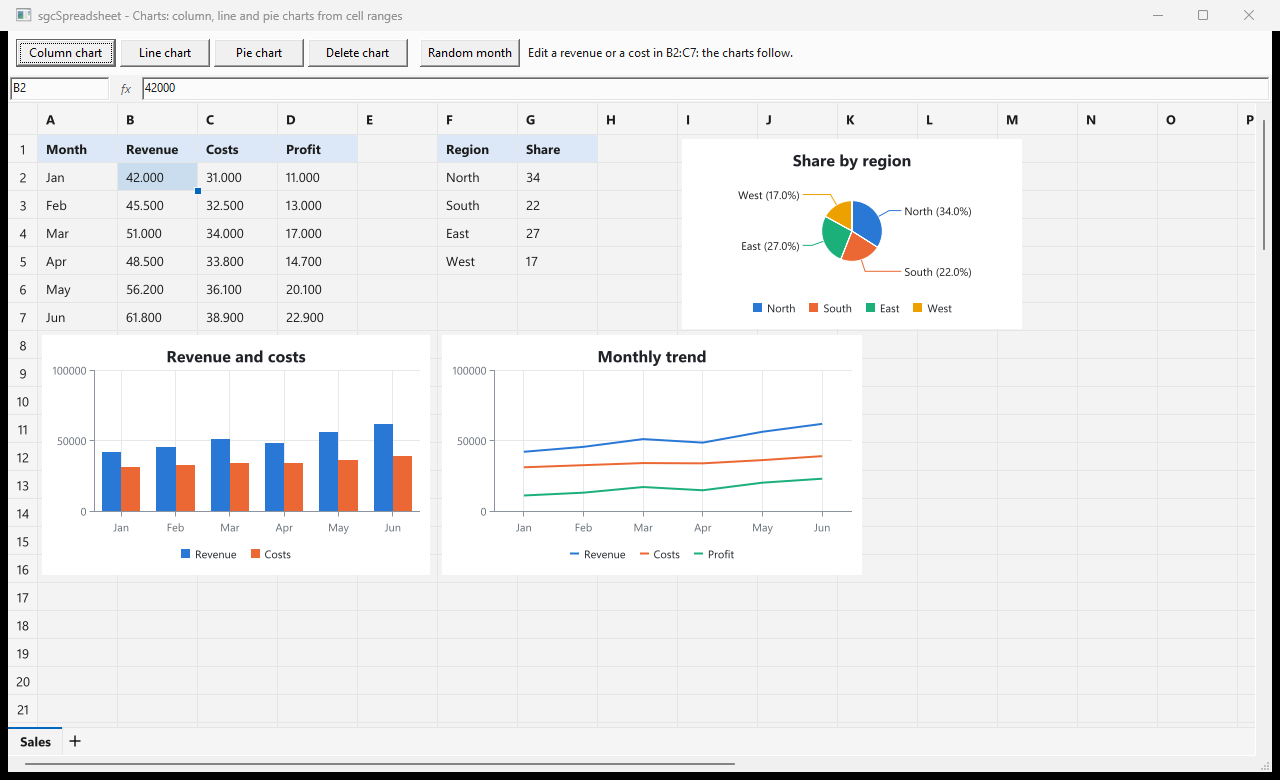
A chart shows the values of a range of cells and floats over the sheet, like a chart in Excel. It is drawn by sgcCharts, and when a cell of the range changes, or a formula of the range gives a new value, the chart follows. Users move and resize charts with the mouse, and each sheet has its own charts.
- 7 chart types: column, bar, line, area, pie, doughnut and scatter.
AddChartwith a range such as'A1:D10'or'Sheet1!A1:D10', with the series names and categories read from the header row and column.TsgcSpreadsheetChartsholds the charts of each sheet, andSaveToXLSXwrites them as charts that Excel opens.
XLSX In, XLSX Out
Customers send XLSX files and expect XLSX files back. LoadFromXLSX reads every sheet of a workbook and SaveToXLSX writes every sheet, from a file name or a stream, so a file round trips between your application and Excel.
- Values, formulas and cell formats.
- Defined names and dynamic arrays.
- Frozen panes and column widths.
- Charts, saved as charts that Excel opens.
VCL, FireMonkey and .NET
Delphi and C++ Builder get TsgcVCLSpreadsheet for VCL and TsgcFMXSpreadsheet for FireMonkey, each with its formula bar. For .NET there are TsgcWinFormsSpreadsheet, TsgcWpfSpreadsheet and TsgcAvaloniaSpreadsheet, also with formula bars, in the NuGet packages esegece.sgcSpreadsheet, esegece.sgcSpreadsheet.WinForms, esegece.sgcSpreadsheet.Wpf and esegece.sgcSpreadsheet.Avalonia. The .NET controls use the same names as the Delphi ones, and a custom function can be a lambda.
using esegece.sgcSpreadsheet;
using esegece.sgcUICore;

// once at startup, before the first formula is parsed
sgcUICore_Calc.sgcCalcRegisterFunction("MARKUP", aCall =>
{
    double vPrice;
    double vRate = 0.2;
    string vError = aCall.Number(0, out vPrice);
    if ((vError.Length == 0) && (aCall.Count > 1))
        vError = aCall.Number(1, out vRate);
    if (vError.Length > 0)
        return vError;
    return vPrice * (1 + vRate);
}, 1, 2);

// sheet is a TsgcWinFormsSpreadsheet: open a workbook made in Excel
sheet.LoadFromXLSX("prices.xlsx");
sheet.ActiveSheet = 0;
// the custom function spills over the whole price column
sheet.SetCellInput(0, 2, "=MARKUP(B2:B4, 0.3)");
// a column chart of the range, drawn by sgcCharts
TsgcSpreadsheetChart chart = sheet.AddChart(TsgcSpreadsheetChartType.sctColumn, "A1:B4");
chart.Title = "Prices";
sheet.SaveToXLSX("prices-markup.xlsx");
Run the Demos
The Delphi and C++ Builder demos install with the sgcUI trial, and the .NET demos ship with the Registered .NET download.
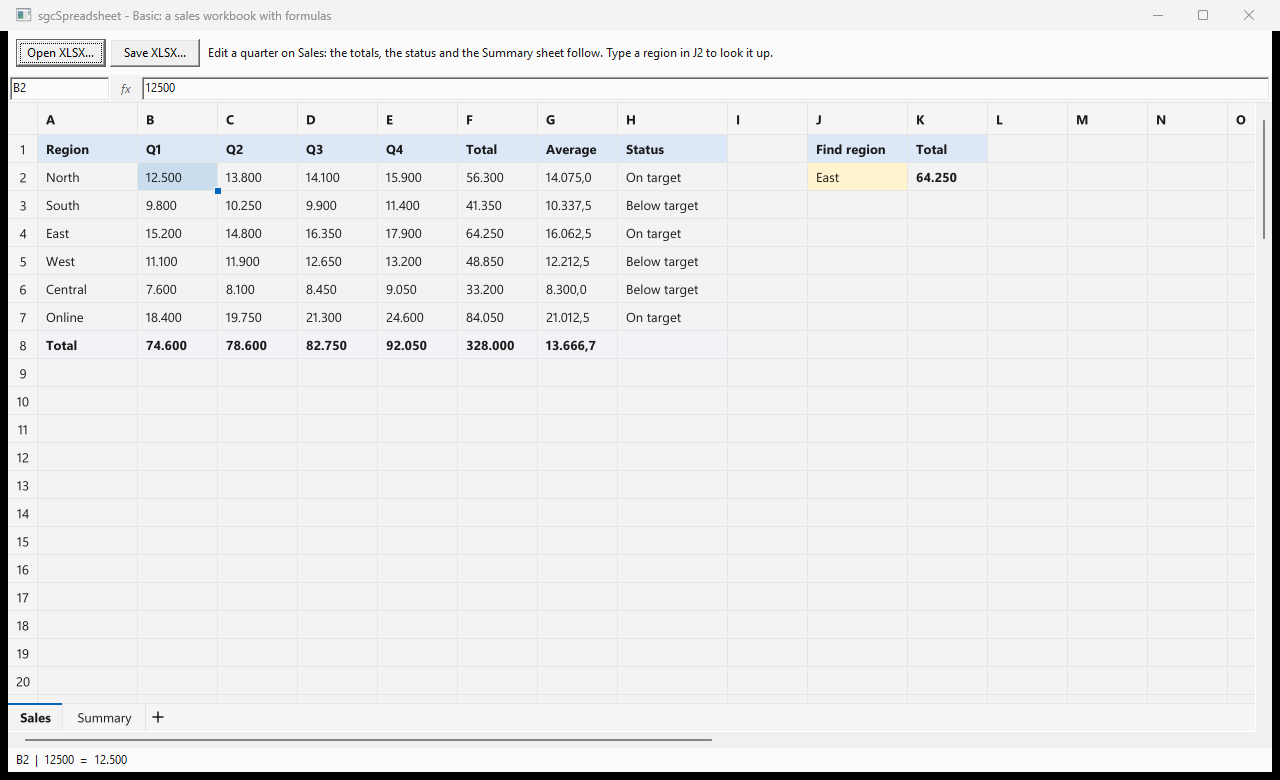
- Basic: a sales workbook built in code with SUM, AVERAGE, IF and XLOOKUP, a summary sheet that reads it, a frozen header row, the formula bar, and Open and Save as XLSX.
- Functions: math, text, date and time, lookup and dynamic array functions, one sheet per category, with each formula next to its result.
- Charts: column, line and pie charts from cell ranges. Edit a revenue or a cost and the charts follow.
- CustomFunction, BasicFMX and ChartsFMX: functions registered by the application, and the Basic and Charts demos on FireMonkey. Basic and Charts also ship as C++ Builder projects.
- .NET: SpreadsheetBasic for WinForms, SpreadsheetBasicWpf, SpreadsheetBasicAvalonia, SpreadsheetFunctions, SpreadsheetCharts and SpreadsheetCustomFunction.
Where sgcSpreadsheet Is Included
sgcSpreadsheet is included in sgcUI Enterprise and in the All-Access bundle, and it is sold on its own as a single package for Delphi and C++ Builder and for .NET. Installing sgcSpreadsheet installs sgcGrid and sgcCharts too, so the grid and the charts always work. There is no free Community edition. See the pricing page for the details.
Give Your Users a Spreadsheet
sgcSpreadsheet is part of sgcUI for Delphi and C++ Builder, on VCL and FireMonkey, and for .NET on WinForms, WPF and Avalonia.
Questions or feedback? Get in touch, you will get a reply from the people who wrote the code.