The .NET Reporting Tool for C#
sgcReports is a .NET reporting tool and C# report generator: build reports in code, show them in WinForms, WPF and Avalonia, export PDF and Excel.
Grouped lists, invoices, tables and catalogs, prepared once by the report engine and shown in a preview or written to PDF, Excel, CSV and images.
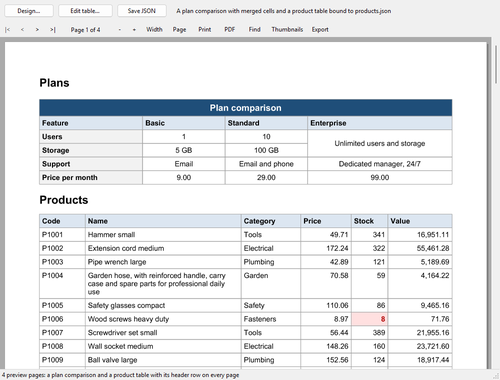
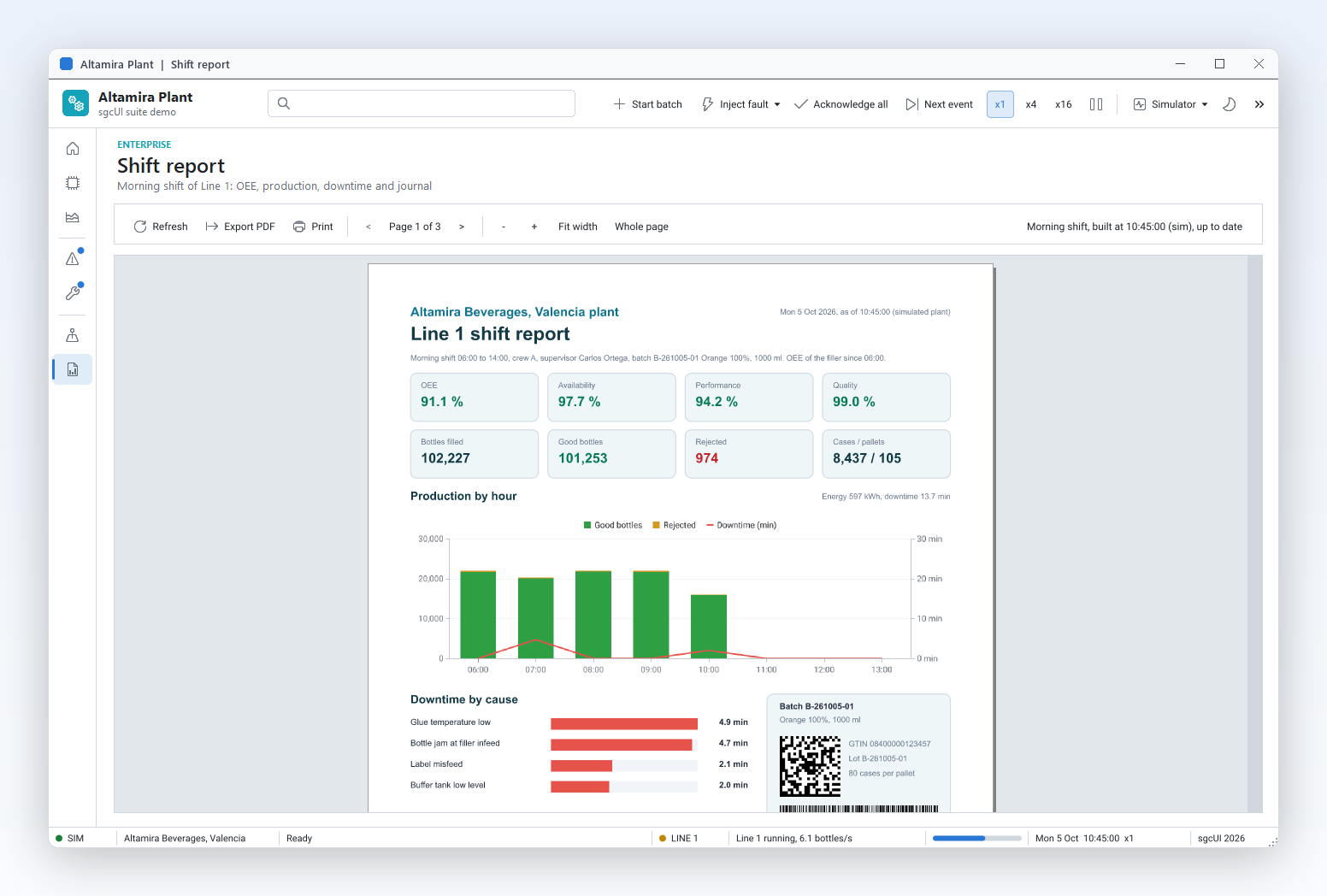
The ReportTables demo in .NET WinForms: the preview with page navigation, zoom, print, PDF, find, thumbnails and export, plus buttons for the designer and the table editor.
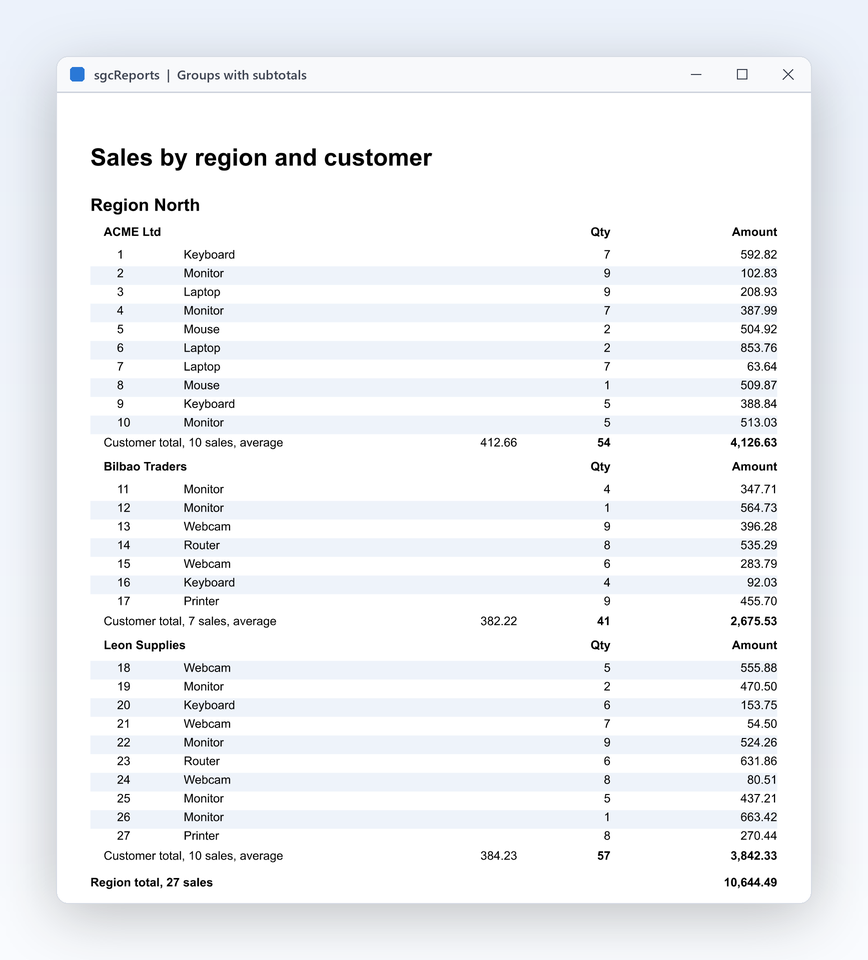
A grouped report with a header per group, subtotals and page numbers.
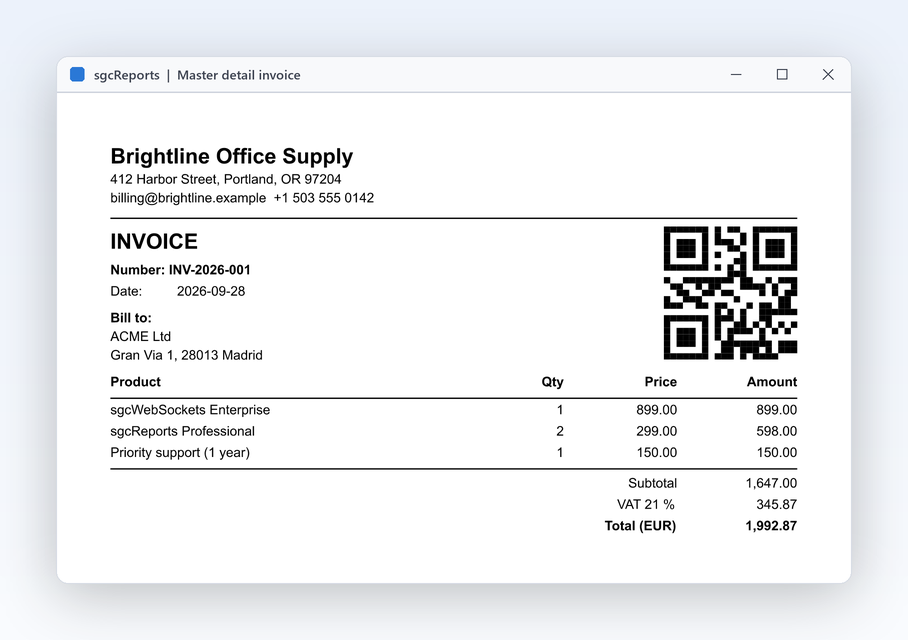
An invoice from master and detail data, with its lines, the totals and a QR code.
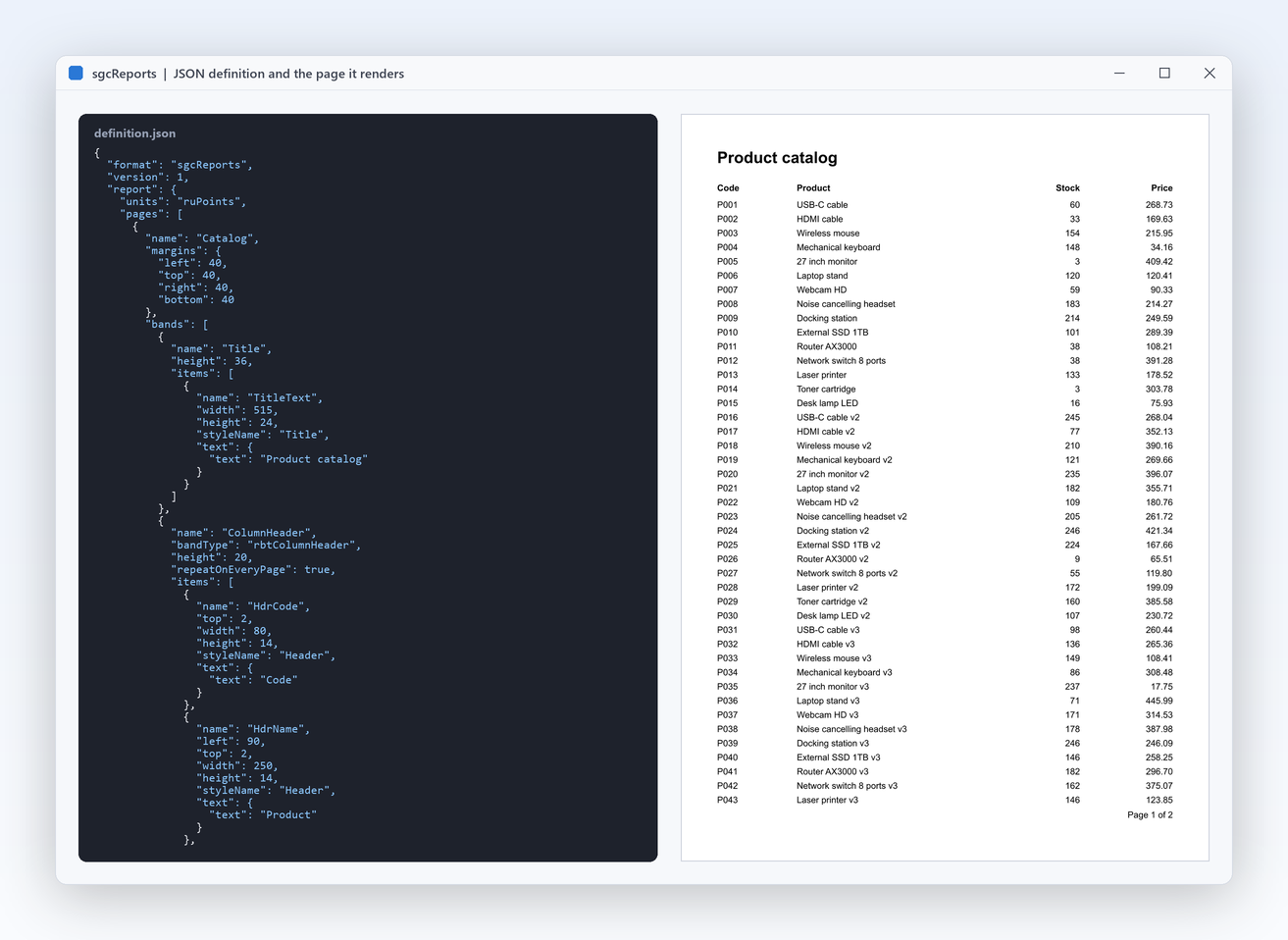
A JSON report definition and the page it renders. Change a layout without recompiling your application.
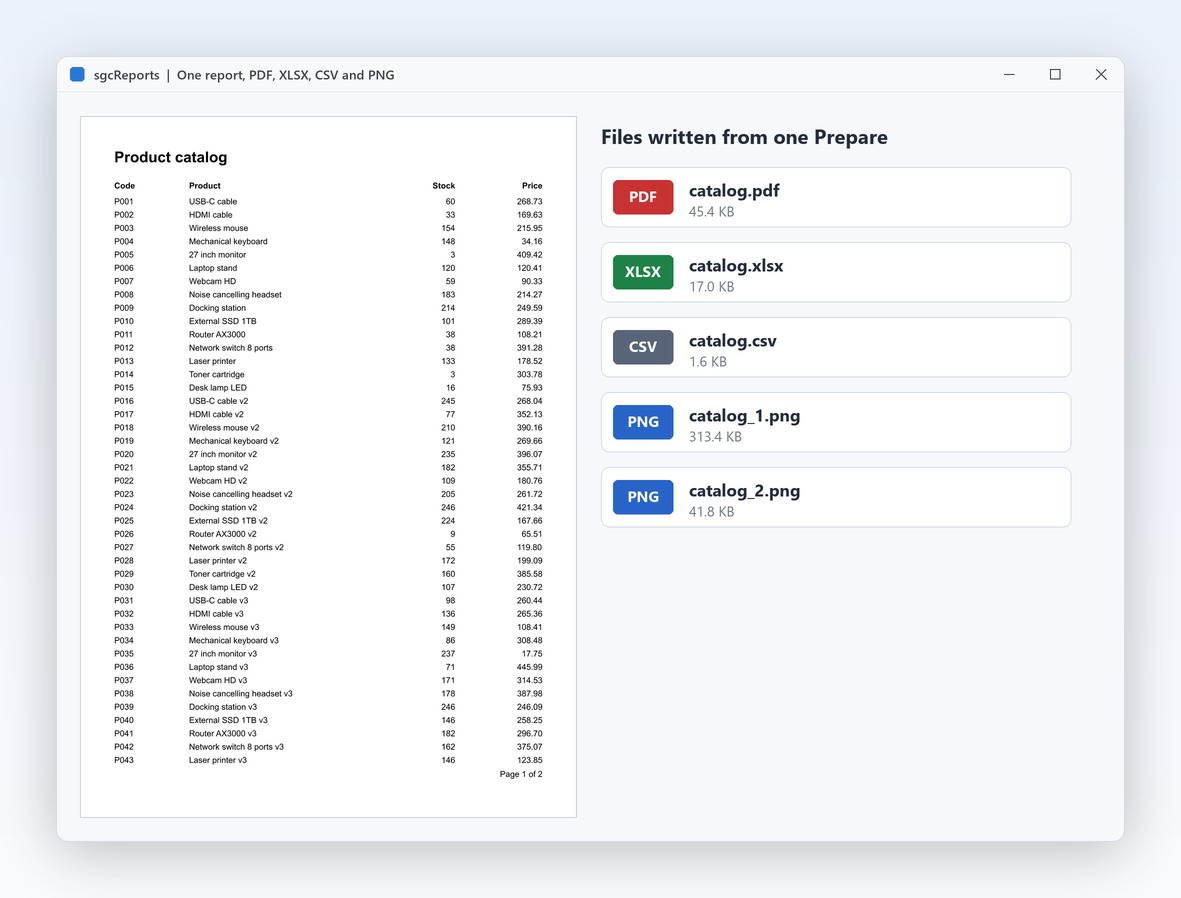
One prepared report, written to PDF, an Excel workbook, a CSV file and one PNG per page.
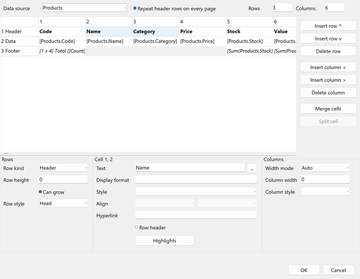
The table editor of the report designer: header, data and footer rows, merged cells, styles and highlights.
Give the report its data with a TsgcReportDataTableSource over a DataTable, describe the layout with the fluent TsgcReportBuilder, and save it. The builder creates and owns its own report and report engine. Every type is in the esegece.sgcReports namespace, with the same class names as the Delphi edition.
using esegece.sgcReports;
public static class SalesReport
{
// aSales: a TsgcReportDataTableSource named "Sales" over a DataTable
// with the columns Region, Customer and Amount, sorted by Region
public static TsgcReportBuilder Build(TsgcReportDataSource aSales)
{
TsgcReportBuilder oBuilder = new TsgcReportBuilder();
oBuilder.Title("Sales by region").Units(TsgcReportUnits.ruMillimeters)
.Style("Group").Font("Arial", 11).Bold().BackColor(0xEEEEEE).EndStyle()
.Page().Paper(TsgcReportPaperSize.rpsA4).Margins(15)
.ReportTitle(14)
.Text("Sales by region", 0, 0, 180, 10).Bold().EndBand()
// one header per region, one line per sale, a total per region
.GroupHeader("Sales.Region", 9).Style("Group")
.Text("Region: [Sales.Region]", 0, 1, 180, 7).EndBand()
.MasterData("Sales", 6)
.Text("[Sales.Customer]", 2, 0, 120, 6)
.Text("[Sales.Amount]", 130, 0, 50, 6).AlignRight().Format("#,0.00").EndBand()
.GroupFooter(9)
.Text("Region total [FormatFloat('#,0.00', Sum(Sales.Amount))]", 80, 1, 100, 6)
.AlignRight().Bold().EndBand()
.EndPage().Data(aSales);
return oBuilder;
}
}
Fill a DataTable from your database or your objects, hand it to the data source and save the report. PDF output is tagged PDF/UA by default, and the same prepared pages go to Excel and CSV.
using System.Data;
using esegece.sgcReports;
DataTable oTable = new DataTable("Sales");
oTable.Columns.Add("Region", typeof(string));
oTable.Columns.Add("Customer", typeof(string));
oTable.Columns.Add("Amount", typeof(double));
oTable.Rows.Add("East", "Acme Corp", 1450.00);
oTable.Rows.Add("East", "Blue Harbor", 600.00);
oTable.Rows.Add("North", "Nordic Labs", 2100.75);
using (TsgcReportDataTableSource oSales = new TsgcReportDataTableSource())
{
oSales.SourceName = "Sales";
oSales.DataTable = oTable;
using (TsgcReportBuilder oBuilder = SalesReport.Build(oSales))
{
// tagged PDF/UA by default, the same pages as an Excel workbook and a CSV file
oBuilder.SaveToPDF("sales.pdf");
oBuilder.SaveToXLSX("sales.xlsx");
oBuilder.SaveToCSV("sales.csv");
// PDF/A-3 on request, for archiving
oBuilder.PDFExport.PDFA = TsgcReportPDFAMode.rpaA3b;
oBuilder.SaveToPDF("sales-archive.pdf");
// keep the layout as a JSON report definition
sgcReports_Definition.sgcReportSaveToJSONFile(oBuilder.Report, "sales.json");
}
}
The builder also adds page headers and footers, column headers, detail bands, tables, check boxes, barcodes, report parameters and bookmarks. See the TsgcReportBuilder help topic and the getting started guide.
Each UI package has a report preview and a ready-made end-user report designer, so your users can open, change and save report layouts inside your application. The designers have a toolbar, Design and Preview tabs, the Toolbox, Outline and Data trees, a property inspector, rulers, undo and redo, and a script editor. The three hosts share one platform neutral designer model.
The esegece.sgcReports.WinForms package: the report preview control, TsgcWinFormsReportDesigner (a UserControl), the modal TsgcWinFormsReportDesignerForm and sgcReports_Designer_WinForms.sgcShowReportDesigner.
The esegece.sgcReports.Wpf package: TsgcWpfReportPreview with page navigation, zoom, printing and PDF saving, TsgcWpfReportDesigner (a DockPanel) and the modal TsgcWpfReportDesignerWindow.
The esegece.sgcReports.Avalonia package: TsgcAvaloniaReportPreview with page navigation, zoom and PDF saving, TsgcAvaloniaReportDesigner and sgcShowReportDesignerAsync with asynchronous file pickers.
The previews have a find bar, page thumbnails, the PDF outline, an Export menu with eleven formats, a Cancel button while a long report is prepared and a prompt for the report parameters. The previews are in every edition, the designer classes are in the Registered edition. The designers also import ReportBuilder .rtm templates as new reports. See the .NET designer help.
using System.Data;
using System.Windows.Forms;
using esegece.sgcReports;
public class SalesForm : Form
{
TsgcReportDataTableSource FSales;
TsgcReportBuilder FBuilder;
TsgcReportPreviewVCL FPreview;
public SalesForm(DataTable aSales)
{
Width = 1000;
Height = 760;
FSales = new TsgcReportDataTableSource();
FSales.SourceName = "Sales";
FSales.DataTable = aSales;
FBuilder = SalesReport.Build(FSales);
// the preview: page navigation, zoom, find, thumbnails, print and export
FPreview = new TsgcReportPreviewVCL();
FPreview.Dock = DockStyle.Fill;
Controls.Add(FPreview);
Button oDesign = new Button();
oDesign.Text = "Design...";
oDesign.Dock = DockStyle.Top;
oDesign.Click += (s, e) =>
{
// the end-user designer (Registered edition) as a modal window
if (sgcReports_Designer_WinForms.sgcShowReportDesigner(FBuilder.Engine, FSales))
{
sgcReports_Definition.sgcReportSaveToJSONFile(FBuilder.Engine.Report, "sales.json");
FPreview.Prepare();
}
};
Controls.Add(oDesign);
FPreview.Engine = FBuilder.Engine;
FPreview.Prepare();
}
}
using System.Windows;
using esegece.sgcReports;
public class DesignerWindow : Window
{
public DesignerWindow(TsgcReportEngine aEngine, TsgcReportDataSource aSales)
{
Title = "Report designer";
TsgcWpfReportDesigner oDesigner = new TsgcWpfReportDesigner();
Content = oDesigner;
oDesigner.Engine = aEngine;
oDesigner.AddDataSource(aSales);
oDesigner.LoadFromFile("sales.json");
Closed += (s, e) => oDesigner.Dispose();
}
}
public class PreviewWindow : Window
{
public PreviewWindow(TsgcReportEngine aEngine)
{
TsgcWpfReportPreview oPreview = new TsgcWpfReportPreview();
Content = oPreview;
oPreview.Engine = aEngine;
oPreview.Prepare();
}
}
sgcReports is a banded C# report generator: pages hold bands, bands hold items, and the engine prints each band at the right time for your data.
Report title and summary, page header and footer, column header, group header and footer, master data and detail data bands, each with its own height, style and items.
A group header starts a new group each time its expression changes, and a group footer prints subtotals with aggregate functions such as Sum and Count.
Link a detail source to its master with MasterSource, MasterFields and DetailFields, as an invoice links its lines to the invoice.
Fields and functions in square brackets inside text items, such as [Sales.Customer] or [FormatFloat('#,0.00', Sum(Sales.Amount))], plus highlights that change the style of an item when a condition is true.
Table items with header, data and footer rows, merged cells and rows that grow with their text, and crosstab tables with several measures and totals.
Typed report parameters with a prompt, a small script language stored in the report, and reports that inherit from a base layout such as a letterhead.
Data comes from a TsgcReportDataTableSource over a DataTable, or from a TsgcReportJSONSource over a JSON array of objects. Rich text, watermarks, barcodes, check boxes and bookmarks are in every edition. Chart, sparkline, gauge and pivot table items come with the Registered sgcCharts, sgcGauges and sgcPivotGrid bridge packages. See the sgcReports feature matrix.
The engine prepares the pages once, and each export writes them in its own format. PDF output uses the sgcPDF engine, so sgcPDF is required in every configuration.
| Format | Details | .NET Community (free) |
|---|---|---|
| PDF/UA | Tagged PDF/UA-1 by default, with a reading order, alternative text for images and marked headings. PDF/UA-2 on request. | ✓ |
| PDF/A | PDF/A-3 (rpaA3b, rpaA3a) for archives and e-invoices with the invoice XML embedded, and PDF/A-4. | ✓ |
| XLSX and CSV | Excel workbooks and CSV files from the same prepared pages. | ✓ |
| PNG, SVG, ODS, HTML and text | One image per page, OpenDocument spreadsheets, HTML and plain text. | ✓ |
| DOCX, ODT and RTF | Word documents, OpenDocument text and Rich Text Format. | − |
| Signed PDF | The sgcSign bridge package signs the PDF exports (PAdES). | ✓ |
The engine and the exports need no UI, so the same report runs in a Windows service, a web API or a Linux daemon. Load a JSON report definition saved by your code or by the designer, attach the data and write the file.
using System.Data;
using esegece.sgcReports;
public static class ReportJob
{
public static void Run(DataTable aSales, string aFileName)
{
using (TsgcReport oReport = new TsgcReport())
using (TsgcReportEngine oEngine = new TsgcReportEngine())
using (TsgcReportDataTableSource oSales = new TsgcReportDataTableSource())
using (TsgcReportPDFExport oPDF = new TsgcReportPDFExport())
{
// the layout comes from a JSON definition, the data from your code
sgcReports_Definition.sgcReportLoadFromJSONFile(oReport, "sales.json");
oSales.SourceName = "Sales";
oSales.DataTable = aSales;
oEngine.Report = oReport;
oEngine.AddDataSource(oSales);
TsgcReportPreparedPages oPages = oEngine.Prepare();
oPDF.SaveToFile(oPages, aFileName);
}
}
}
TsgcReportHTTPEndpoint serves registered reports (RegisterReport) as PDF, XLSX, CSV, HTML and other files, and the esegece.sgcReports.HTML and esegece.sgcReports.AspNetCore packages host its routes in ASP.NET Core.
A server prepares concurrent reports with one engine and one set of data sources per thread. The .NET demos include a LinuxDaemon and an HTTPServer project.
esegece.sgcReports holds the builder, the data sources, the engine and the exports. Add the package of your UI framework for the preview and the designer, and the HTML and ASP.NET Core packages to serve reports on the web.
dotnet add package esegece.sgcReports
dotnet add package esegece.sgcReports.WinForms
dotnet add package esegece.sgcReports.Wpf
dotnet add package esegece.sgcReports.Avalonia
dotnet add package esegece.sgcReports.AspNetCore
For the free Community edition, use the same package ids with the .Community suffix, for example dotnet add package esegece.sgcReports.Community. The full list of packages is on the sgcReports download page, and the .NET overview explains the components. The .NET demos are Invoice, Groups, JSONDefinition, PDFUA, Exports, Fluent, HTTPServer, LinuxDaemon, DatabaseSQL and MobileMAUI.
The free Community packages include the engine, the exports and the previews. The Registered edition adds the end-user designers, the DOCX, ODT and RTF exports and the chart, gauge and pivot table bridges.
| Feature | .NET Community (free) | Registered |
|---|---|---|
| Fluent builder, report model and JSON definitions | ✓ | ✓ |
| Bands, groups, master detail and expressions | ✓ | ✓ |
| PDF/UA and PDF/A-3 export | ✓ | ✓ |
| XLSX, CSV, PNG, ODS, SVG, HTML and plain text export | ✓ | ✓ |
| WinForms, WPF and Avalonia previews | ✓ | ✓ |
| Headless engine for services and Linux | ✓ | ✓ |
| End-user report designer for WinForms, WPF and Avalonia | − | ✓ |
| DOCX, ODT and RTF export | − | ✓ |
| Chart, sparkline, gauge and pivot table items | − | ✓ |
The .Community packages are free for individuals and organizations under EUR 1M annual gross revenue with no more than 5 developers. Organizations at or above either threshold need a Registered license.
Every feature and the commercial license. Single, Team and Site licenses, each with full source code, 1 year of updates and a 50% to 70% renewal discount.
sgcReports .NET pricing →€199
Single, Team and Site licenses available.
Yes. sgcReports has a report preview and an end-user report designer for WinForms (esegece.sgcReports.WinForms), WPF (esegece.sgcReports.Wpf) and Avalonia (esegece.sgcReports.Avalonia). The previews show the pages with navigation, zoom, find, thumbnails and export. The engine and the exports are in the core esegece.sgcReports package and work without any UI.
Add the esegece.sgcReports NuGet package (or esegece.sgcReports.Community), wrap your DataTable in a TsgcReportDataTableSource, describe pages, bands and items with the fluent TsgcReportBuilder and call SaveToPDF, SaveToXLSX or SaveToCSV, as in the create a report sample. You can also load the layout from a JSON report definition.
Yes, with the Registered edition. TsgcWinFormsReportDesigner, TsgcWpfReportDesigner and TsgcAvaloniaReportDesigner are designers you place in your own window, and sgcShowReportDesigner opens one as a modal window. Users drag items and fields onto bands, edit properties, tables and scripts, preview the result and save the layout as a JSON definition that your server can run headless.
Yes. SaveToPDF writes tagged PDF/UA by default, PDFExport.PDFA switches to PDF/A-3, and SaveToXLSX writes an Excel workbook from the same prepared pages. CSV, PNG, SVG, ODS, HTML and plain text are in every edition, and DOCX, ODT and RTF in the Registered edition.
Yes. The headless engine and the exports run on Windows and on Linux, in services and daemons, and the .NET demos include a LinuxDaemon project. For the web, the esegece.sgcReports.AspNetCore package integrates the report endpoint with ASP.NET Core, which serves reports as PDF, XLSX, CSV, HTML and other files.
Yes. Every sgcReports NuGet package also ships as a free Community edition with the .Community suffix, with the engine, the exports and the previews. It is free for individuals and organizations under EUR 1M annual gross revenue with no more than 5 developers. The end-user designers and the DOCX, ODT and RTF exports need a Registered license, see sgcReports pricing.