C# for .NET NuGet No native DLL

The C# PDF Library for .NET: Create, View and Sign PDF Files

sgcPDF is a C# PDF library in fully managed code: create PDF files in C#, show them in WinForms, WPF and Avalonia viewers, and sign them, with no native DLL to deploy.

Create PDF and HTML to PDF in C# WinForms, WPF and Avalonia viewers PAdES signatures, PDF/A and PDF/UA PDF to PNG on Windows, Linux and macOS

See pricing →   .NET downloads and demos →

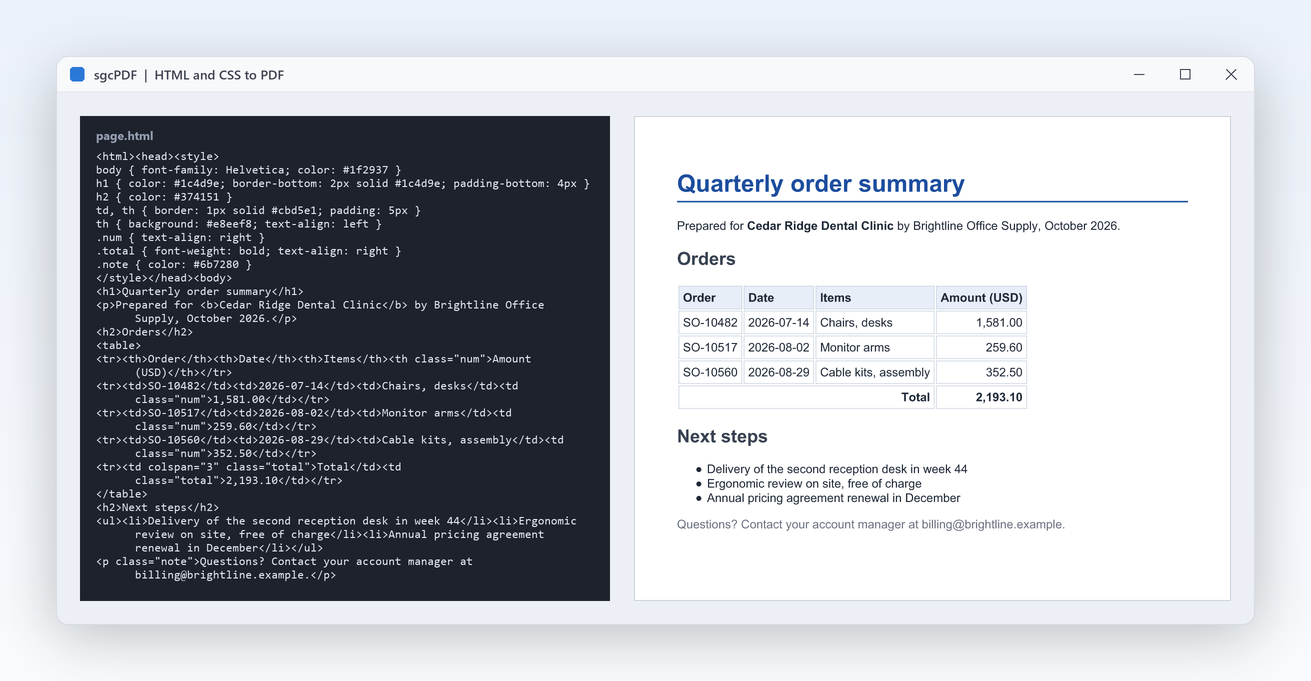
sgcPDF converting an HTML page with CSS into a PDF: the HTML source on the left and the rendered quarterly order summary with headings, an orders table, a total and a bullet list on the right

What sgcPDF Produces and Shows

Documents generated in code, pages rendered to images, forms, redaction and barcodes, all from the same managed .NET PDF library.

How to Create a PDF in C#

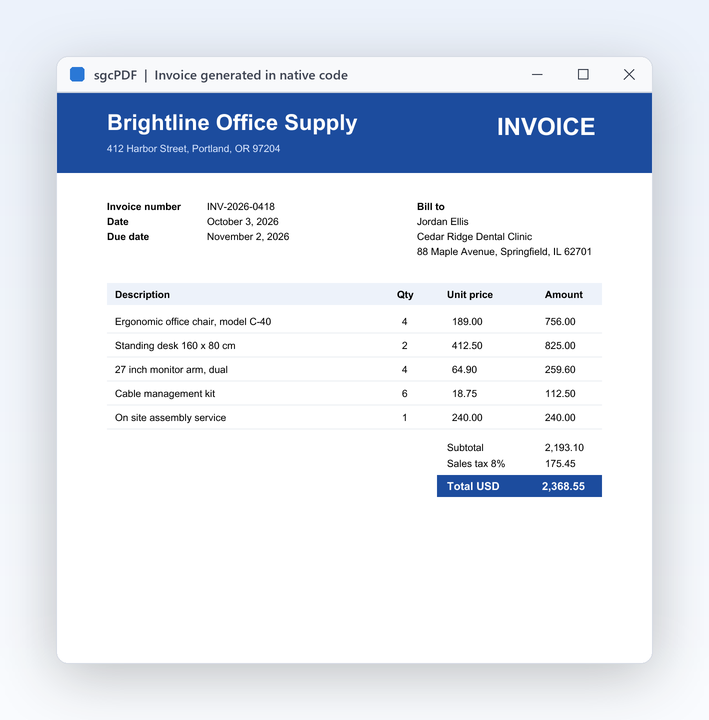
As a C# PDF generator for invoices, reports and tickets, sgcPDF needs four steps: create a TsgcPDFDocument, add a page with AddPage, draw on it and call SaveToFile. Coordinates are in PDF points (1/72 inch) with the origin at the bottom left corner of the page. Every type is in the esegece.sgcPDF namespace.

Program.cs
using System;
using esegece.sgcPDF;

class Program
{
    static void Main()
    {
        using (TsgcPDFDocument oDoc = new TsgcPDFDocument())
        {
            oDoc.Info.Title = "Invoice 2026-001";
            // A4 portrait: 595 x 842 points, origin at the bottom left corner
            TsgcPDFPage oPage = oDoc.AddPage(595, 842);
            oPage.DrawText("Invoice 2026-001", 50, 780, TsgcPDFStandardFont.sfHelveticaBold, 24);
            oPage.DrawLine(50, 770, 545, 770, 1.0);
            oPage.DrawText("Created in C# with sgcPDF.", 50, 740, TsgcPDFStandardFont.sfHelvetica, 12);
            oDoc.SaveToFile("invoice.pdf");
        }
    }
}

Content

Text in the 14 standard PDF fonts or in embedded and subset TrueType and OpenType fonts, Unicode and right to left text, images (JPEG, PNG with alpha, BMP, TIFF), lines, curves, gradients and transparency, tables that continue across pages, annotations, bookmarks and layers.

Edit existing files

TsgcPDFEditor adds watermarks, headers, footers and page numbers, inserts blank pages, and extracts, deletes, rotates and moves pages. Merge files with sgcPDF_Editor.sgcPDFMergeFiles. Incremental save appends a revision and keeps earlier signatures valid.

Extract

ExtractTextW returns the text of a page, TsgcPDFTextExtractor gives text fragments with positions, and TsgcPDFImageExtractor lists and saves the images of a PDF.

HTML to PDF in C#

TsgcPDFHTMLRenderer turns HTML with CSS into a paginated PDF: headings, paragraphs, inline styles, lists, tables, images, links, page breaks, headers, footers and page numbers.

using (TsgcPDFHTMLRenderer oHTML = new TsgcPDFHTMLRenderer())
{
    oHTML.PageWidth = 595;
    oHTML.PageHeight = 842;
    oHTML.FooterText = "Page {page} of {pages}";
    oHTML.HTMLToPDFFile(
        "<html><head><style>h1 { color: #003366 }</style></head><body>" +
        "<h1>Invoice 2026-001</h1>" +
        "<table><tr><th>Item</th><th>Amount</th></tr>" +
        "<tr><td>Consulting</td><td>299.00</td></tr></table>" +
        "</body></html>", "invoice-html.pdf");
}

// merge the two files into one
sgcPDF_Editor.sgcPDFMergeFiles(new string[] { "invoice.pdf", "invoice-html.pdf" }, "merged.pdf");

Generate barcodes and QR codes in C#

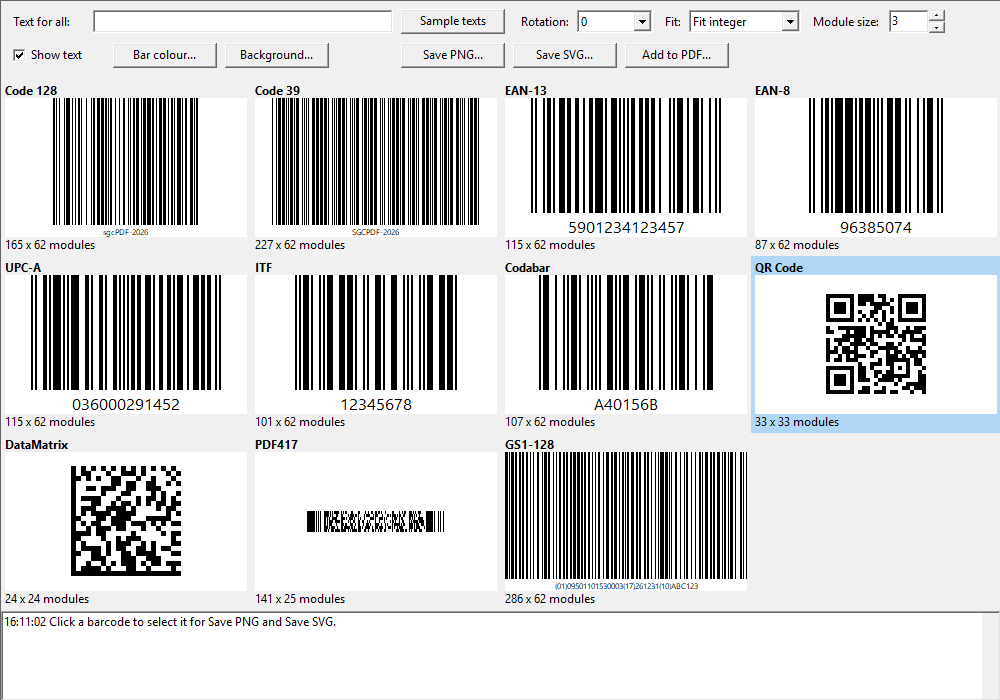
Code 128, Code 39, EAN-13, EAN-8, UPC-A, ITF, Codabar, GS1-128, QR Code, DataMatrix (ECC200) and PDF417 are drawn as vectors on a PDF page. TsgcPDFBarcodeControl (WinForms), TsgcWpfPDFBarcodeControl and TsgcAvaloniaPDFBarcodeControl show them on screen and save them to PNG or SVG.

// Code 128 barcode in a 250 x 60 point box, black on white
TsgcPDFBarcodeSymbol oSymbol = new TsgcPDFBarcodeSymbol();
oSymbol.Symbology = TsgcPDFBarcodeType.bcCode128;
oSymbol.Text = "TKT-2026-001";
oSymbol.DrawToPDF(oPage, 50, 680, 250, 60, 0x000000, 0xFFFFFF);

// QR Code in a 120 x 120 point box
oSymbol.Symbology = TsgcPDFBarcodeType.bcQRCode;
oSymbol.QRErrorLevel = TsgcPDFQRErrorLevel.qrecQ;
oSymbol.Text = "https://www.esegece.com";
oSymbol.DrawToPDF(oPage, 50, 540, 120, 120, 0x000000, 0xFFFFFF);
C# PDF Viewer for WinForms, WPF and Avalonia

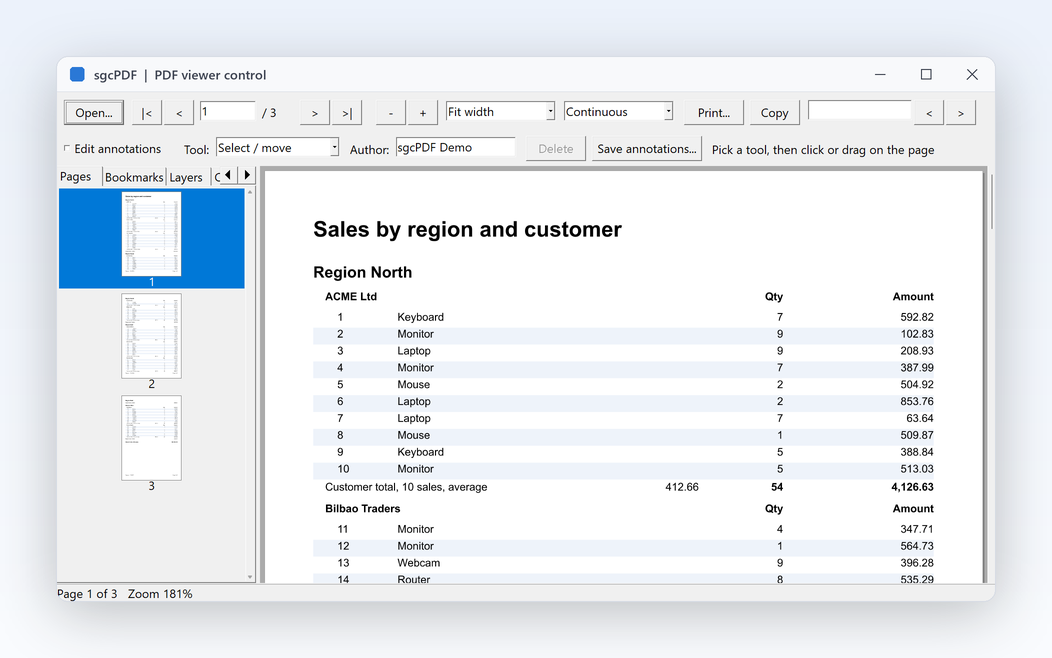
Three native viewer controls, each with a thumbnail view and an outline (bookmarks) view. Pages are drawn by the C# renderers of sgcPDF, so there is no native PDF engine to ship with your application.

WinForms PDF viewer

TsgcPDFViewerControl, TsgcPDFThumbnailView and TsgcPDFOutlineView in esegece.sgcPDF.WinForms, for .NET Framework 4.7.2 and .NET 8 on Windows. Interactive annotations and comment replies, form filling, page boxes and a measure tool.

WPF PDF viewer

TsgcWpfPDFViewer, TsgcWpfPDFThumbnailView and TsgcWpfPDFOutlineView in esegece.sgcPDF.Wpf, for .NET Framework 4.7.2 and .NET 8, 9 and 10 on Windows. Dependency properties you can bind, and pages rendered on a background thread so the UI stays responsive with large files.

Avalonia PDF viewer

TsgcAvaloniaPDFViewer, TsgcAvaloniaPDFThumbnailView and TsgcAvaloniaPDFOutlineView in esegece.sgcPDF.Avalonia, for .NET 8, 9 and 10 on Windows, Linux and macOS, with the features of the WPF viewer plus pinch zoom.

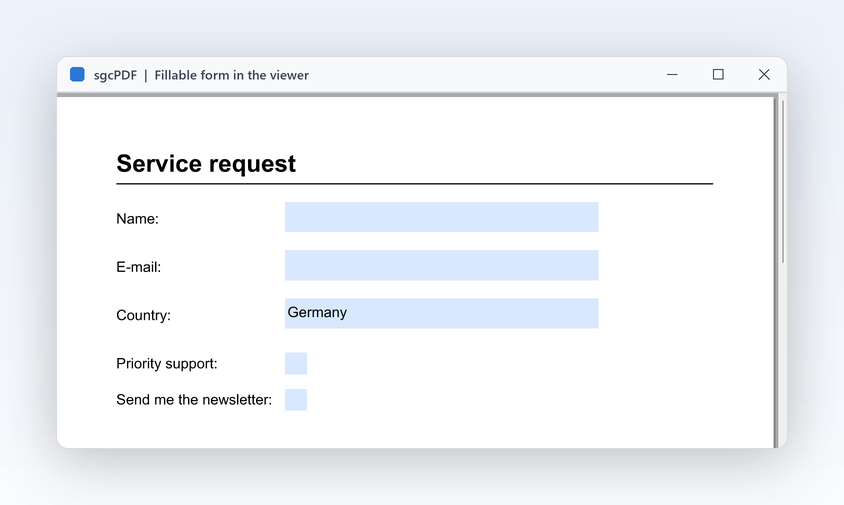
All three viewers offer continuous, single page and two page layouts, fit width, fit page and custom zoom, marquee zoom, text selection and copy, search with highlighted matches, links, annotation editing with sticky notes, highlights, shapes, ink and stamps, and form filling. See the PDF viewer page for the full feature list.

MainForm.cs
using System.Windows.Forms;
using esegece.sgcPDF;

public class MainForm : Form
{
    TsgcPDFThumbnailView FThumbnails;
    TsgcPDFViewerControl FViewer;

    public MainForm()
    {
        Width = 1100;
        Height = 800;
        // page thumbnails on the left
        FThumbnails = new TsgcPDFThumbnailView();
        FThumbnails.Parent = this;
        FThumbnails.Dock = DockStyle.Left;
        FThumbnails.Width = 160;
        // the viewer fills the rest of the form
        FViewer = new TsgcPDFViewerControl();
        FViewer.Parent = this;
        FViewer.Dock = DockStyle.Fill;
        FViewer.BringToFront();
        FViewer.ZoomMode = TsgcPDFViewerZoomMode.zmFitWidth;
        FThumbnails.Viewer = FViewer;
        FViewer.LoadFromFile("invoice.pdf");
    }
}
ViewerWindow.xaml
<Window x:Class="MyApp.ViewerWindow"
        xmlns="http://schemas.microsoft.com/winfx/2006/xaml/presentation"
        xmlns:x="http://schemas.microsoft.com/winfx/2006/xaml"
        xmlns:sgc="https://www.esegece.com/sgcui"
        Title="PDF Viewer" Width="1100" Height="800">
  <DockPanel>
    <sgc:TsgcWpfPDFThumbnailView DockPanel.Dock="Left" Width="160"
                                 Viewer="{Binding ElementName=Viewer}" ThumbnailWidth="120" />
    <sgc:TsgcWpfPDFViewer x:Name="Viewer" Source="invoice.pdf"
                          ZoomMode="zmFitWidth" ViewMode="pvmContinuous" />
  </DockPanel>
</Window>

From code behind, Viewer.LoadFromFile, Viewer.FindText and Viewer.PrintDialog open, search and print the document. Every sgcUI product uses the XAML namespace https://www.esegece.com/sgcui.

Convert a PDF Page to an Image in C#

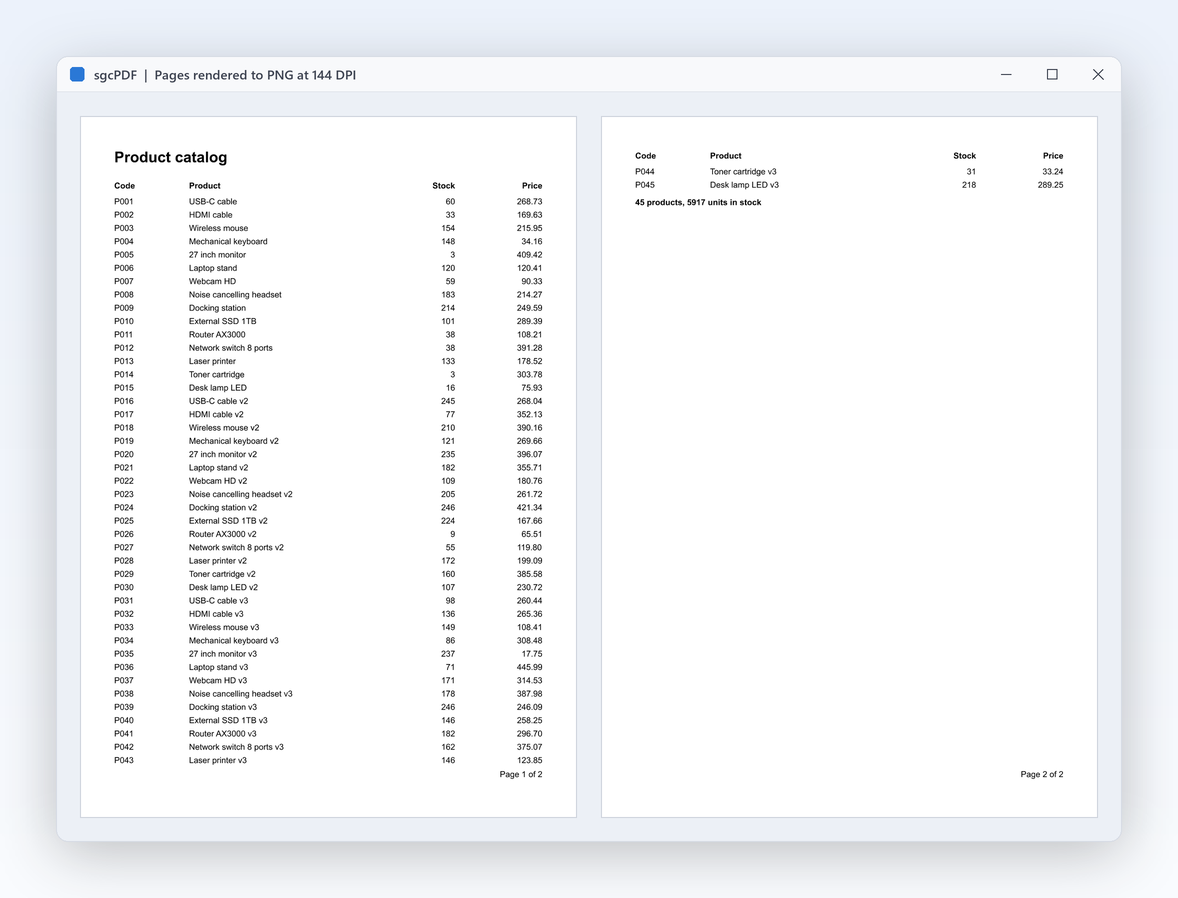
TsgcPDFRendererRaster renders a page to PNG or BMP in managed code. It works on every platform .NET runs on, so a web API or a background service on a Linux server can create thumbnails and previews. On Windows, the WinForms package adds the GDI renderer and page export to images.

using (TsgcPDFDocument oDoc = new TsgcPDFDocument())
{
    oDoc.LoadFromFile("invoice.pdf");
    TsgcPDFPage oPage = oDoc.GetPage(0);
    // 144 DPI: a PDF point is 1/72 inch
    int vWidth = (int)Math.Round(oPage.Width * 144 / 72);
    int vHeight = (int)Math.Round(oPage.Height * 144 / 72);
    TsgcPDFRendererRaster oRenderer = new TsgcPDFRendererRaster();
    oRenderer.RenderPageToPNG(oDoc.Parser, oPage.PageDict, vWidth, vHeight, "page1.png");
}

Sign a PDF in C#

TsgcPDFSignatureHandler signs a PDF with a PFX certificate and a visible signature field, and TsgcPDFSignatureVerifier checks the signatures of a file. In .NET, signatures use System.Security.Cryptography. Signing with the Windows certificate store needs Windows.

using (TsgcPDFSignatureHandler oSigner = new TsgcPDFSignatureHandler())
{
    oSigner.LoadCertificateFromPFX("signer.pfx", "password");
    oSigner.Reason = "Contract approval";
    oSigner.Location = "Barcelona";
    // visible signature field on page 1: name, page, left, bottom, right, top
    oSigner.SetField("Signature1", 0, 50, 50, 300, 120);
    oSigner.SignDocument("contract.pdf", "contract-signed.pdf");
}

PAdES B-B to B-LTA

The optional esegece.sgcPDF.sgcSign package adds TsgcPDFPAdESSigner, which signs to PAdES B-B, B-T, B-LT and B-LTA with any key provider of sgcSign .NET, licensed separately.

Handwritten signatures

TsgcPDFSignaturePad (WinForms), TsgcWpfPDFSignaturePad, which reads the pen pressure from the stylus, and TsgcAvaloniaPDFSignaturePad record a signature with the mouse, a finger or a pen.

PDF/A, PDF/UA, Encryption and Redaction

The esegece.sgcPDF package covers archiving, accessibility and security, with a compiled .NET demo for each of them.

PDF/A

PDF/A-1b, PDF/A-2b and PDF/A-3b output with embedded TrueType fonts, PDF/A-4, and TsgcPDFAValidator to check a file. Embedded files with PDF/A-3 relationships carry Factur-X e-invoices.

PDF/UA and tagged PDF

Tagged PDF with a structure tree and alternate text for figures, PDF/UA-1 output (also as PDF/A-2a) and PDF/UA-2, so screen readers follow the document.

Encryption

Password protection with RC4-128, AES-128 or AES-256 and permissions, or encryption for one or more recipient certificates.

Redaction

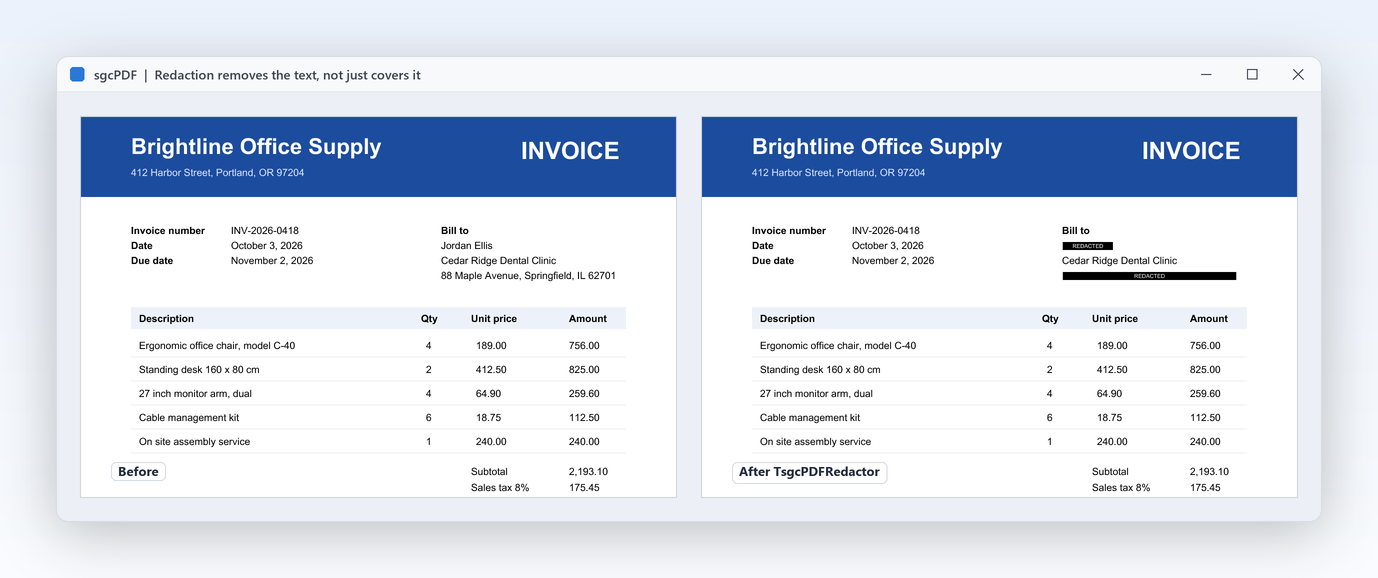
TsgcPDFRedactor removes text and areas from the content, so the redacted data is gone from the file, not hidden under a box.

Forms

Create AcroForms with text fields, combo boxes, check boxes and buttons, fill them from code, and export and import their data.

Prepress

Page boxes, imposition with crop marks, spot colours, overprint preview and a PDF/X output intent. See the prepress features.

Install the C# PDF Library from NuGet

Only esegece.sgcPDF is required. Add the WinForms, WPF or Avalonia package for the viewer controls of your UI framework, and the sgcSign package for PAdES signatures. In Visual Studio, use Manage NuGet Packages and search for esegece.sgcPDF.

dotnet add package esegece.sgcPDF
dotnet add package esegece.sgcPDF.WinForms
dotnet add package esegece.sgcPDF.Wpf
dotnet add package esegece.sgcPDF.Avalonia
dotnet add package esegece.sgcPDF.sgcSign

For the free Community edition, use the same package ids with the .Community suffix, for example dotnet add package esegece.sgcPDF.Community. Reference only one of the two editions in a project. See the installation guide for .NET and the .NET API differences.

.NET Versions and Platforms

The core package runs wherever .NET runs, including Windows, Linux and macOS. The netstandard2.0 target also reaches .NET Framework 4.6.2 and later and Mono. The only third party dependencies are System.Security.Cryptography.Pkcs and, on netstandard2.0 and net472, System.Memory.

PackageTarget frameworksOperating systems
esegece.sgcPDFnetstandard2.0, net472, net6.0, net8.0, net9.0, net10.0Windows, Linux, macOS
esegece.sgcPDF.WinFormsnet472, net8.0-windowsWindows
esegece.sgcPDF.Wpfnet472, net8.0-windows, net9.0-windows, net10.0-windowsWindows
esegece.sgcPDF.Avalonianet8.0, net9.0, net10.0, with Avalonia 12.0.0 or newerWindows, Linux, macOS
esegece.sgcPDF.sgcSignnetstandard2.0, net472, net6.0, net8.0, net9.0, net10.0Depends on esegece.sgcSign

The .NET demos include 26 Windows Forms demos for creation, barcodes, forms, encryption, signatures, PDF/A, tagged PDF, text extraction and the viewer, plus WPF and Avalonia demos of the viewer, the signature pad, the image editor and the barcode control. Read about the .NET demos.

Community and Registered Editions

Both editions have the same features. They differ in licensing, not capability.

Community, free

The .Community packages are free for commercial and non-commercial use by individuals and organizations under EUR 1M annual gross revenue with no more than 5 developers. They show a brief startup notice. Organizations at or above either threshold need a Registered license.

esegece.sgcPDF.Community on NuGet →

Registered

Removes the startup notice and carries the commercial license. Single, Team and Site licenses, each with full source code, 1 year of updates and a 50% to 70% renewal discount.

sgcPDF .NET pricing →

sgcPDF .NET

€249

Single, Team and Site licenses available.

  • NuGet: esegece.sgcPDF and the WinForms, WPF, Avalonia and sgcSign packages
  • .NET Standard 2.0, .NET Framework 4.7.2, .NET 6, .NET 8, .NET 9, .NET 10
  • Full source code
  • 1 year of updates

C# PDF Questions

Add the esegece.sgcPDF NuGet package (or esegece.sgcPDF.Community), create a TsgcPDFDocument, add a page with AddPage, draw text, lines, images, tables and barcodes on it and call SaveToFile, as in the create a PDF sample. To convert HTML with CSS, call HTMLToPDFFile of TsgcPDFHTMLRenderer.

The best choice is the library that covers what your application does. sgcPDF covers the whole PDF lifecycle in one managed .NET library: create, edit, merge, extract, view in WinForms, WPF and Avalonia, render to images, encrypt, sign, redact and validate PDF/A, with no native DLL and with full C# source code in every license. The free Community packages have the same features, so you can test sgcPDF with your own documents before you decide.

Yes. TsgcWpfPDFViewer in the esegece.sgcPDF.Wpf package is a WPF control whose pages are rendered by the managed sgcPDF renderer on a background thread. Nothing native is deployed. It runs on .NET Framework 4.7.2 and .NET 8, 9 and 10 on Windows. For WinForms use TsgcPDFViewerControl, and for Avalonia on Windows, Linux and macOS use TsgcAvaloniaPDFViewer.

Load the file into a TsgcPDFDocument and call RenderPageToPNG of TsgcPDFRendererRaster with the page and the size in pixels, as in the PDF to image sample. The raster renderer writes PNG or BMP and works on Windows, Linux and macOS, so it also runs on servers.

Yes. TsgcPDFSignatureHandler signs with a PFX certificate and a visible signature field, and TsgcPDFSignatureVerifier verifies signatures. For PAdES B-B, B-T, B-LT and B-LTA, add esegece.sgcPDF.sgcSign: TsgcPDFPAdESSigner works with any key provider of sgcSign .NET, which is licensed separately.

Yes. Every sgcPDF NuGet package also ships as a free Community edition with the .Community suffix and the same features. It is free for individuals and organizations under EUR 1M annual gross revenue with no more than 5 developers, and shows a brief startup notice. Larger organizations need a Registered license, see sgcPDF pricing.

The library targets .NET Standard 2.0, .NET Framework 4.7.2, .NET 6, .NET 8, .NET 9 and .NET 10. The WinForms viewer targets .NET Framework 4.7.2 and .NET 8 on Windows, the WPF viewer .NET Framework 4.7.2, .NET 8, .NET 9 and .NET 10 on Windows, and the Avalonia viewer .NET 8, .NET 9 and .NET 10.

Yes. The esegece.sgcPDF package runs wherever .NET runs, including Linux and macOS, and the Avalonia viewer runs on Windows, Linux and macOS. The WinForms and WPF packages are for Windows. Outside Windows, load TrueType fonts from files with AddTrueTypeFontFromFile.

Best value: All-AccessEvery eSeGeCe product, Premium Support included, from €1,059/year.
See All-Access pricing

Add PDF to Your .NET Application

Create, view, sign and archive PDF files from C#, with one managed library and no native DLL.