Meet sgcChat.
A chat inside your application.
An AI assistant that streams its answers as formatted Markdown, and a team chat with presence, typing, read receipts and reactions. Native controls for Delphi, C++ Builder and .NET.
- VCL
- FireMonkey
- WinForms
- WPF
- Avalonia
- Headless SVG and PNG
Today we release sgcUI 2026.11. It adds a new product, sgcChat, that puts an AI assistant chat and a team chat inside your own application, and it fills a list of smaller gaps across the suite: gauges that take user input, data binding that follows the dataset both ways, a dashboard published as a web page, Outlook recurring series in the planner, scripts in reports and more.
sgcChat is the sixteenth sgcUI product. It runs on VCL and FireMonkey for Delphi and C++ Builder, and on WinForms, WPF and Avalonia for .NET, and it is included in sgcUI Enterprise and All-Access. It is not sold as a separate package.
sgcChat: an AI Assistant in Your Application
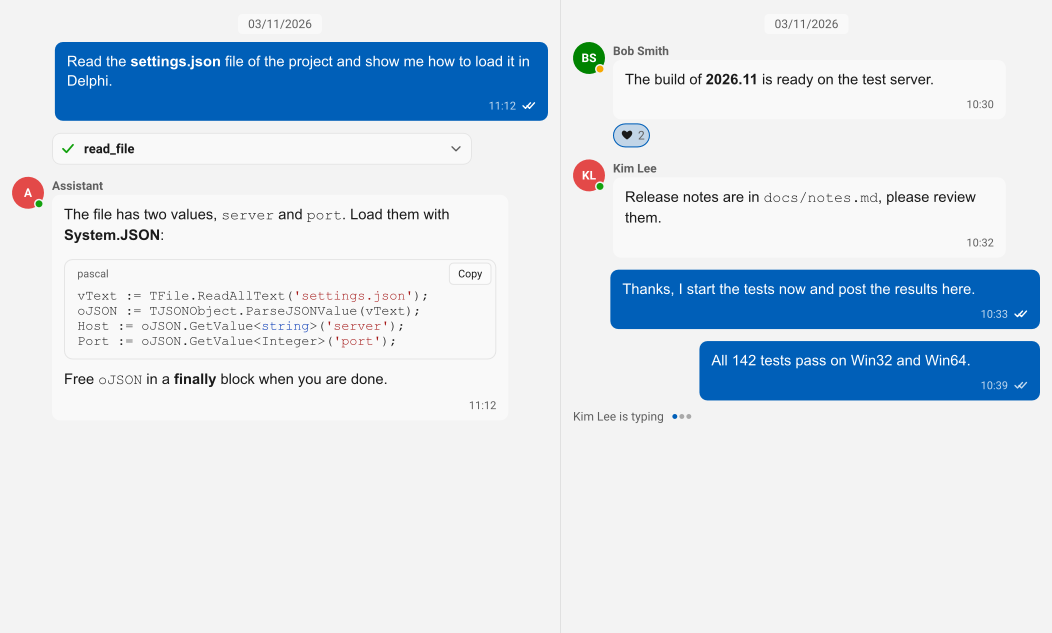
An AI answer arrives in small pieces, and users expect to read it while it is written. TsgcChatAI binds a conversation to a provider, sends the history and the system prompt, and shows each piece as formatted Markdown as soon as it arrives. The provider runs on a worker thread, so the window stays responsive, and the chat panel offers stop, regenerate, and edit and resend for every answer.
- Streaming Markdown with a caret while the answer is written.
- Tool call cards with the tool name, the arguments, the result and a running, done or error state.
- The conversation history saved to and loaded from JSON.
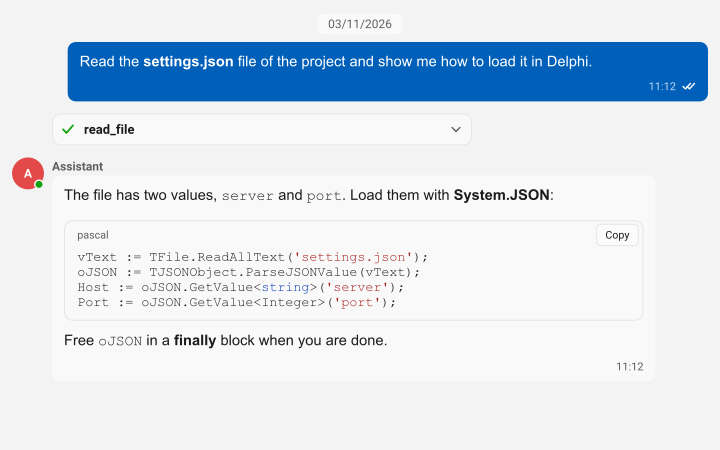
sgcChat does not tie you to one AI vendor. TsgcChatAIProvider_AIChat connects to TsgcAIChat of sgcWebSockets, which talks to OpenAI, Anthropic, Gemini, DeepSeek, Ollama, Grok and Mistral. TsgcChatAIProvider_UICore uses the AI provider layer that every sgcUI product shares, and TsgcChatAIEventProvider lets you stream from your own backend in an event. This is how a TsgcChatAI binding answers with OpenAI:
uses
  SysUtils, Classes,
  // sgcWebSockets
  sgcAI, sgcAI_Chat,
  // sgc
  sgcChat_AI, sgcChatWS_AI;

procedure UseOpenAI(aAI: TsgcChatAI; const aApiKey: string);
var
  oChat: TsgcAIChat;
  oProvider: TsgcChatAIProvider_AIChat;
begin
  oChat := TsgcAIChat.Create(aAI.Owner);
  oChat.Provider := aicpOpenAI;
  oChat.ChatOptions.ApiKey := aApiKey;
  oChat.ChatOptions.Model := 'gpt-4o-mini';

  oProvider := TsgcChatAIProvider_AIChat.Create(aAI.Owner);
  oProvider.Chat := oChat;

  aAI.Model := oChat.ChatOptions.Model;
  aAI.Provider := oProvider;
end;
Change Provider to use Anthropic, Gemini, DeepSeek, Ollama, Grok or Mistral. The sgcChat help has the complete quick start.
Talking to Claude, OpenAI, Gemini and the other LLM providers requires sgcWebSockets, which is included in All-Access. TsgcChatAIProvider_AIChat is in the sgcChatWS bridge package (.NET: esegece.sgcChat.sgcWebSockets). Without sgcWebSockets, TsgcChatAIEventProvider lets your own code call any AI service.
sgcChat: a Team Chat on Your Own Server
Support desks, field teams and internal tools need a chat that their users already know how to use. The chat view groups the messages of each author with an avatar and a name, shows who is online, away or busy, shows who is typing, and marks each message as sent, delivered or read. Users reply to a message, react to it, edit or delete their own messages and send attachments with image thumbnails and file chips.
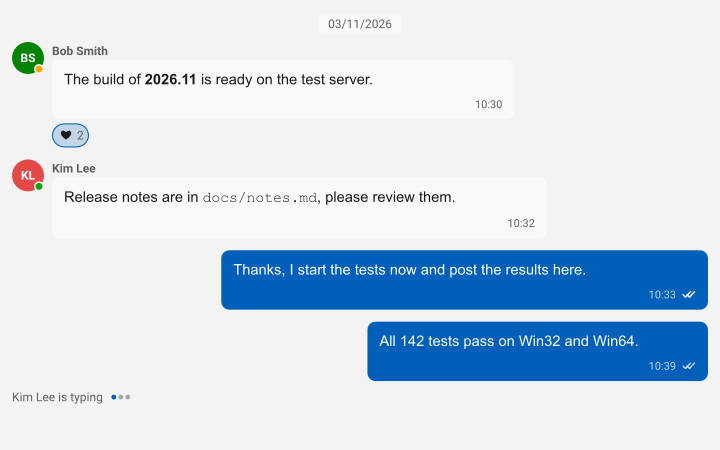
The chat does not depend on one server. TsgcChatEventTransport hands every message, typing change, receipt and reaction to your code as a documented JSON frame. With sgcWebSockets, TsgcChatTransport_WebSocket connects a client and TsgcChatServer_WebSocket relays the messages between the clients of a channel, keeps the presence of each user and sends the last messages to users who join later. The relay runs in a service or a console program:
function CreateRelay(aOwner: TComponent; aPort: Integer)
  : TsgcChatServer_WebSocket;
var
  oServer: TsgcWebSocketServer;
begin
  oServer := TsgcWebSocketServer.Create(aOwner);
  oServer.Port := aPort;
  // the relay needs no main thread
  oServer.NotifyEvents := neNoSync;

  Result := TsgcChatServer_WebSocket.Create(aOwner);
  Result.Server := oServer;
  // the last 100 messages of every channel go to late joiners
  Result.HistoryCount := 100;

  oServer.Active := True;
end;
Both Delphi samples above are copied unchanged from the sgcChat help samples, which were compiled with Delphi 13 (Win32) against the sgcUI and sgcWebSockets sources.
The WebSocket team chat requires sgcWebSockets, which is included in All-Access. TsgcChatTransport_WebSocket and TsgcChatServer_WebSocket are in the sgcChatWS bridge package (.NET: esegece.sgcChat.sgcWebSockets). Without sgcWebSockets, TsgcChatEventTransport connects the chat to any backend.
sgcChat: a Native Markdown Viewer
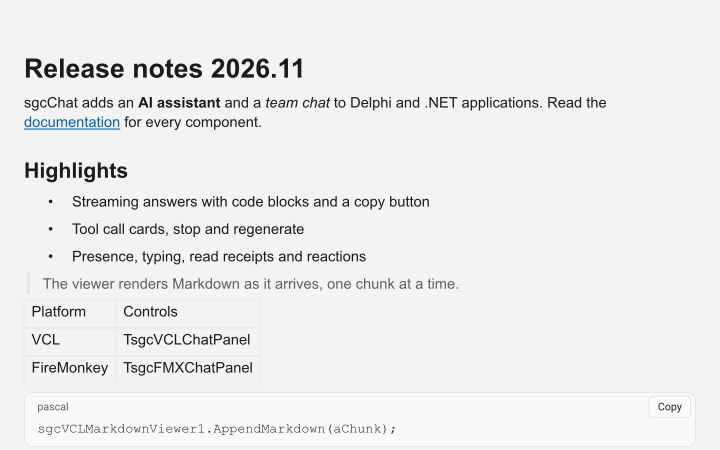
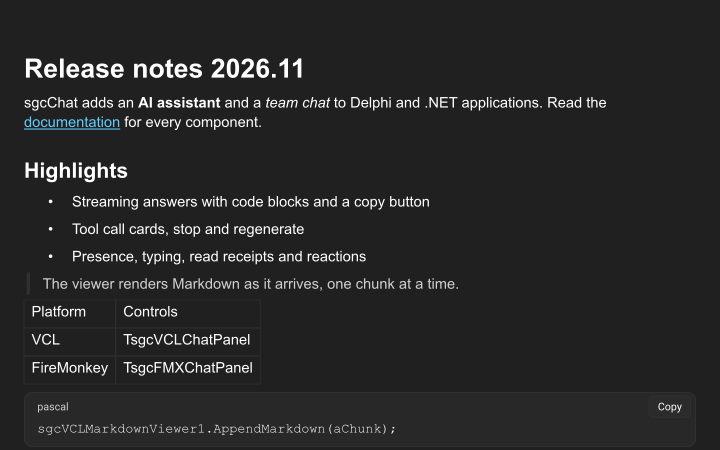
The engine behind the chat bubbles is also a control of its own. TsgcVCLMarkdownViewer and TsgcFMXMarkdownViewer show headings, emphasis, quotes, lists, task lists, tables, links and images, and highlight the code blocks of Pascal, C#, C++, JavaScript, Python, JSON, SQL and other languages. AppendMarkdown adds text as it arrives, and users select and copy the text or a whole code block with its copy button. Use it for release notes, help pages and messages written in Markdown.
sgcChat Fits the Rest of the Suite
The chat follows the light, dark and Fluent themes of sgcUI. A conversation in Arabic or Hebrew is mirrored, and the texts of the controls are translated into the 12 sgcUI languages. On Windows, the chat view is a list of messages for screen readers, with the author and the time of each message. The conversation model, the Markdown document and the view do not depend on VCL or FireMonkey, so a service can render a conversation or a Markdown document to SVG or PNG without a window, on Linux64 too.
The components are TsgcVCLChatPanel, TsgcVCLChatView, TsgcVCLChatInput and TsgcVCLMarkdownViewer, the same set with the TsgcFMX prefix for FireMonkey, and the same controls for WinForms, WPF and Avalonia, such as TsgcWinFormsChatPanel, TsgcWpfChatPanel and TsgcAvaloniaChatPanel. The demos cover an AI assistant, a team chat client with its relay server, and the Markdown viewer, for VCL, FireMonkey, C++ Builder, WinForms, WPF and Avalonia.
sgcChat is sold as part of sgcUI Enterprise and the All-Access bundle, which also includes sgcWebSockets for the AI provider and the WebSocket bridge. See the sgcChat page and the feature matrix.
Across the Suite: Input, Data and Output
The rest of the release fills smaller gaps across the products: controls that take user input, data binding that follows the dataset both ways, and more ways to get a screen out of the application.
sgcGauges: Input Gauges and Skins
Four input gauges, TsgcVCLKnobGauge, TsgcVCLSliderGauge, TsgcVCLToggleSwitchGauge and TsgcVCLPushButtonGauge (TsgcFMX on FireMonkey, and the same names in WinForms, WPF and Avalonia), let the user set a value with the mouse, touch, the wheel or the keyboard. OnUserChange fires only for changes made by the user, and screen readers see them as a slider, a toggle switch and a button. sgcGauges now has sixteen gauge types, counting the tank and process symbol gauges of the HMI pack below.
Skin gives every gauge a new look: Classic, Modern, Industrial, ISA101, Dark or a skin of your own registered with sgcGaugesRegisterSkin. TsgcGaugeDataLink shows a dataset field on any gauge and writes the changes of an input gauge back to the field. See the sgcGauges features and the input gauges help.
Live and Two Way Data Binding
The products follow a Delphi TDataSet, or a DataTable in .NET, while it changes, and the editing products write the changes of the user back:
- sgcPlanner:
TsgcPlannerSource_DataSetreports each write withOnWriteBack, can refuse one inOnBeforeWriteBack, and puts the planner back to the data when a write is refused or fails.Throttlegroups fast changes andFollowCursorselects the item of the current record. - sgcDiagram:
TsgcDiagramDataBindingfollows the node and link datasets by Id, stores the position and size of the nodes, and withWriteBackwrites the nodes and links that users add, move, edit or delete back to the data. - sgcPivotGrid and sgcDashboard: the pivot DataSet source and the dashboard data source follow a dataset with a
Throttlethat groups fast changes into one refresh.
sgcDiagram, sgcPivotGrid, sgcGauges and sgcDashboard have the same binding in .NET. The sgcUI feature matrix lists what each edition includes.
sgcPlanner: Outlook Series, Google Reminders and Capacity
TsgcPlannerGraphSync now brings Outlook recurring series in as one recurring item with its RRULE, changed occurrences as modified occurrences and cancelled ones as exceptions, and sends series made in the planner back to Outlook. TsgcPlannerGoogleSync sends reminders changed in the planner to Google Calendar when an event is updated, and reads back the ones changed in Google. A Capacity per resource (1 for one full time person, 0.5 for half time, 3 for a team of three) drives the capacity line of the load histogram, and it is read and written as MaxUnits in Microsoft Project XML. See the sgcPlanner features.
sgcDashboard: Publish to Web and the Map Tile Everywhere
SaveToHTML writes a dashboard as one self contained HTML page. Each tile is drawn as SVG by the same code that prints it, on a CSS grid that follows the breakpoints of the dashboard, and every tile has a heading and a text alternative for screen readers. Without a refresh URL the page has no script at all. In .NET the map tile now exists for WPF and Avalonia too, and maps appear in the dashboard print, PDF and HTML output. Read the publish to web help and the sgcDashboard features.
sgcMaps: Draw the Map on Any Canvas
DrawTo on TsgcVCLMap, TsgcFMXMap and the WinForms SgcMapControl draws the current view, with its tiles loaded, into a rectangle of any sgcUI canvas, and the WPF and Avalonia maps render on any sgcUI canvas too. That is how a map in a dashboard tile reaches the print, the PDF and the HTML page. See the sgcMaps features.
sgcWizard: Transitions and a Summary Page
Transition animates the change of page with a slide, a fade or both, mirrored in right to left layouts, and ReduceMotion follows the Windows animation setting. With ShowSummary the wizard adds a last page that lists the fields and the values the user entered on every visited page, with passwords masked and an Edit link that goes back to each page. See the sgcWizard features and the summary page help.
sgcReports: Scripting and the FireMonkey Preview on Every Platform
TsgcReport.Script holds procedures in a small Pascal like language, stored in the report definition and the JSON. The report runs a script when it starts and when it finishes, and each band and each item before and after it prints, so a script can hide a band or change the text, the font colour or the height of an item for the current print. The designers of VCL, FireMonkey, WinForms, WPF and Avalonia edit the script with a Check button that shows the line and column of an error. The FireMonkey preview runs on Windows, macOS, iOS and Android, with touch pan and pinch zoom, and on iOS and Android Print and Save PDF open the share sheet of the system. See the sgcReports features and the scripting help.
sgcPDF for .NET: Edit Annotations and Fill Forms in WPF and Avalonia
The WPF and Avalonia viewers now do what the WinForms viewer does: users create, move, resize, edit and delete annotations with the mouse (AnnotationEditing and AnnotationTool), and with FormFilling they fill text fields, check boxes, radio buttons, combo boxes and list boxes, with Tab moving through the fields in their tab order. See the sgcPDF features.
Accessibility Checked on Every Platform
The UI Automation tree of every product demo, the tree that screen readers such as Narrator and NVDA read, was checked with a UI Automation client on VCL, FireMonkey, WinForms, WPF and Avalonia, and the issues found were fixed. The VCL editors now announce the label of the field instead of its value, a flat navigation bar is a list rather than a tree, the WinForms and WPF status bars no longer take the keyboard focus, the cells of the Avalonia grid no longer repeat their column name, and the chart points and other drawn items of the Avalonia controls report their position on screen.
Visual Studio Smart Tags and XAML
The smart tags of all 69 WinForms toolbox components were tested on a design surface: every property, collection editor, data source list, action and verb. In WPF and Avalonia, the tiles of sgcDashboard and the skins of sgcGauges are declared in XAML under the same sgc prefix as the columns, fields and series of the other products.
sgcEditors: Layout Control and Data Forms
The new layout control, TsgcVCLLayoutControl and TsgcFMXLayoutControl (and the same names in WinForms, WPF and Avalonia), arranges the controls of a form in groups, tabbed groups and columns, with the captions aligned to one width, splitters the user can drag and right to left layouts. SaveLayout and LoadLayout keep the arrangement the user made as JSON. The layout control is in every edition, Community included. Delphi Community has no design time package for sgcEditors, so there it is created in code.
The data form builds on it. TsgcVCLDataForm and TsgcFMXDataForm generate a complete edit form from a TDataSet, or from the published properties of a class with BindObject, and the WinForms, WPF and Avalonia data forms take a DataTable, a list or an object. Each field gets an sgcEditors control, the rules of the sgcUICore validator and a place in a group or a tab, and a navigator browses, adds, edits, deletes and posts the records. Smart Paste fills the whole record from a pasted text through the AI layer the editors already use, and marks the fields it filled. The data form is in the Registered edition, on VCL, FireMonkey, C++Builder, WinForms, WPF and Avalonia:
uses
  Forms, Controls, DB,
  sgcUICore_AI, sgcEditors_DataForm, sgcEditors_VCL_DataForm;

function CreateCustomerForm(aOwner: TForm; aSource: TDataSource;
  aProvider: TsgcUIAIProvider): TsgcVCLDataForm;
var
  oField: TsgcDataFormField;
begin
  Result := TsgcVCLDataForm.Create(aOwner);
  Result.Parent := aOwner;
  Result.Align := alClient;
  // an open dataset: one field, one editor and one rule per TField
  Result.DataSource := aSource;
  oField := Result.Fields.FindField('EMAIL');
  oField.Kind := edfEmail;
  oField.Required := True;
  oField.Group := 'Contact';
  Result.Fields.FindField('PHONE').Group := 'Contact';
  Result.RebuildEditors;
  // the Smart Paste button of the navigator fills every field from the
  // clipboard; without a provider a local parser reads "Name: value" lines
  Result.Provider := aProvider;
end;
See the sgcEditors features and the data form help.
sgcUI HMI Pack: Tanks, P&ID, Alarms and a NumPad
The HMI pack brings process screens to sgcUI: operator panels, tank farms, pumping stations and other plant displays. It is not a new product. Each piece lives in the product it extends and follows its edition, on VCL and FireMonkey, C++Builder, and WinForms, WPF and Avalonia in .NET. Call sgcUIApplyISA101 once and every sgcUI control switches to the grey ISA-101 scheme, where colour is kept for abnormal states and alarms.
- sgcGauges: a tank and vessel gauge,
TsgcVCLTankGauge, in four shapes with HH, H, L and LL limits and hysteresis, and a process symbol gauge,TsgcVCLSymbolGauge, that draws a valve, pump, motor, fan, heat exchanger or sensor as off, on, fault, open, closed or in transit, with pumps and fans that spin while they run. The sgcGaugesWS bridge feeds both from MQTT, WebSocket or SSE, andValueMapturns plant codes such asRUNNINGinto symbol states. - sgcDiagram: 56 P&ID stencils in the style of ISA-5.1 for pumps, valves, vessels, heat transfer equipment, piping and instruments, and process states and animated pipes through the rules of
TsgcDiagramStatusBinding. - sgcGrid: an ISA-18.2 alarm list.
TsgcGridAlarmModelkeeps the alarms with priorities 1 to 4 and six states, with Acknowledge, Shelve, filters and JSON and CSV export.TsgcGridAlarmLinkshows them in a grid with priority colours and blinking rows, and the alarm menu gives the operator the commands. - sgcEditors:
TsgcVCLNumPad, a NumPad for touch panels, docked on the form or as a drop-down, that types into the spin and currency edits, a standard edit and the knob and slider gauges.
The application stays in charge of the plant: it brings the values from its own drivers, a database or the gauge bridge, and it decides when an alarm is raised. There is no OPC UA or Modbus driver. The tank and process symbol gauges, the alarm list and the NumPad are in every edition, Community included, while the P&ID stencils, the process states and animated pipes, the gauge feeds and the alarm acknowledge log are Registered. The HMI suite demo puts the pieces together on a small tank farm driven by a simulator. Read the sgcUI HMI Pack page and the HMI pack help.
sgcUI Realtime UI Pack: Presence, Notifications, Activity Feeds and Live Logs
The Realtime UI pack gives sgcUI the pieces of a live screen for Delphi, C++Builder and .NET. It is not a new product. Each piece lives in the product it extends. sgcUICore adds a presence model with avatars, an avatar group and a presence indicator. sgcNavigation adds a notification center with toasts, an inbox grouped by day and preferences per category and channel, while TsgcToolbarBadgeLink of sgcToolbar shows the unread count on a toolbar or ribbon item. sgcDashboard adds an activity feed and an audit trail, as standalone controls and as dashboard tiles, and sgcGrid adds a live log viewer with levels, filters, a follow tail, pause and export.
Every model takes one JSON message per change. In the Registered edition, the WebSocket, MQTT and SSE live sources of the sgcUICoreWS bridge feed them from sgcWebSockets with no code. Each control comes with the edition of its product. Without a server, or in a Community build, the application updates the models through their API. Read the sgcUI Realtime UI Pack page.
Getting Started Guides for Every Product
Every sgcUI product now ships five QuickStart demos for Delphi (VCL) and a Getting Started guide, in HTML next to the demos and as a PDF. The demos go from the first form to a small complete application, and the guide explains each step. Start with the sgcGrid guide, the sgcCharts guide or the sgcChat guide.
All 16 guides are listed in the guides section of the sgcUI quick start.
Try sgcChat and sgcUI 2026.11
One trial for Delphi and one for C++ Builder install all 16 sgcUI products.
Questions or feedback? Get in touch, you will get a reply from the people who wrote the code.