WPF, XAML and C# sgcUI for .NET

WPF UI Controls for C# and XAML

Charts, date pickers, wizards, a ribbon, docking and a PDF viewer for your WPF app, in Fluent light and dark.

Charts, gauges and dashboards.NET Framework 4.7.2, .NET 8, 9, 10One XAML namespace, MVVM bindingFree Community packages
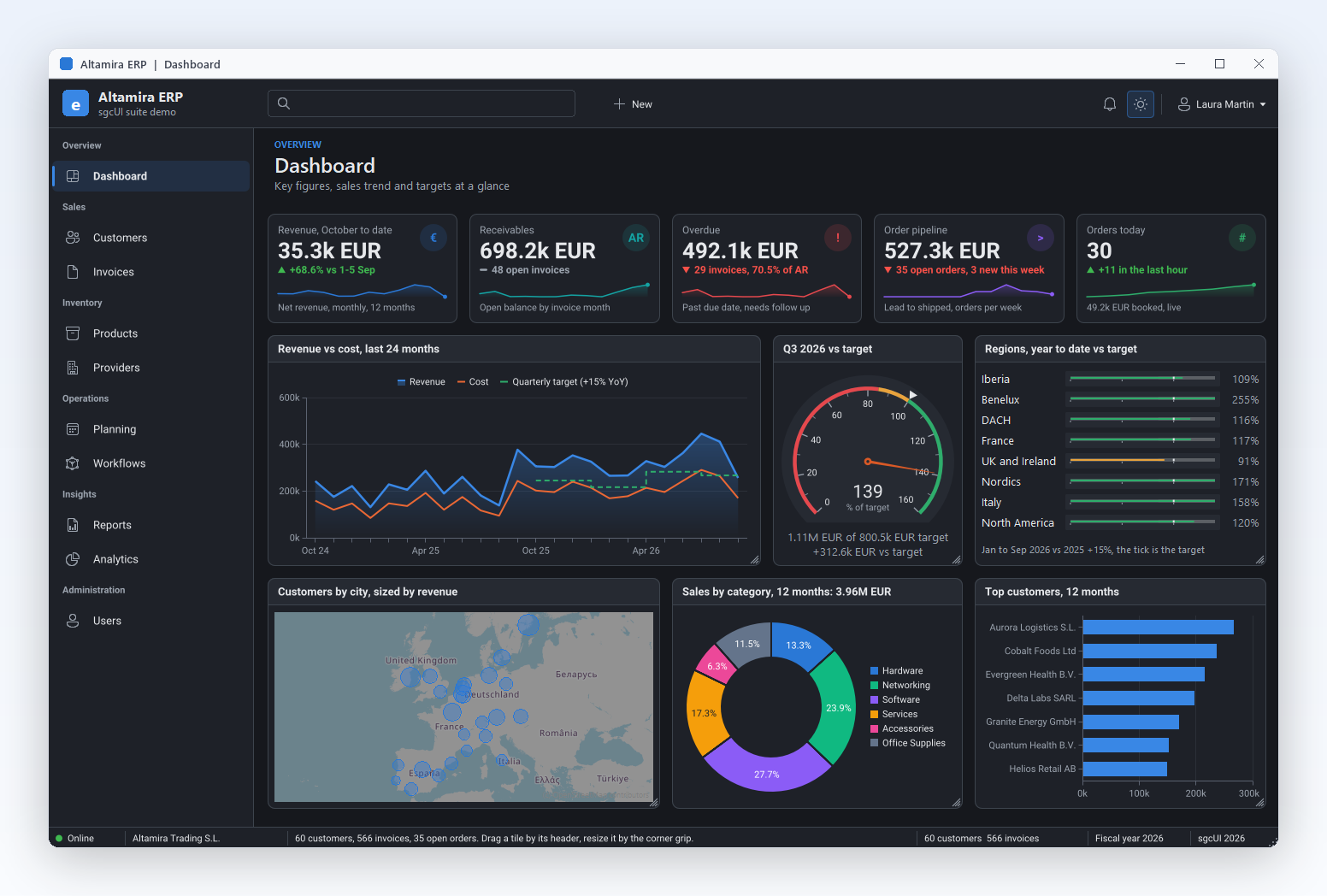
Altamira ERP dashboard built with sgcUI controls in the dark theme: KPI cards with sparklines, a revenue and cost chart, a target gauge, regional progress bars, a customer map, a donut chart and a bar chart

sgcUI Controls on Screen

Every sgcUI control paints through sgcUICore, the shared canvas and theme runtime, so a chart, a wizard or a planner looks the same in a WPF window as in the other hosts of the suite.

One Toolbox for Every WPF Screen

sgcUI for .NET is a managed C# port with the same class names as the Delphi suite. The WPF controls carry the TsgcWpf prefix, ship in one NuGet package per product and share the XAML namespace https://www.esegece.com/sgcui.

WPF Chart Control

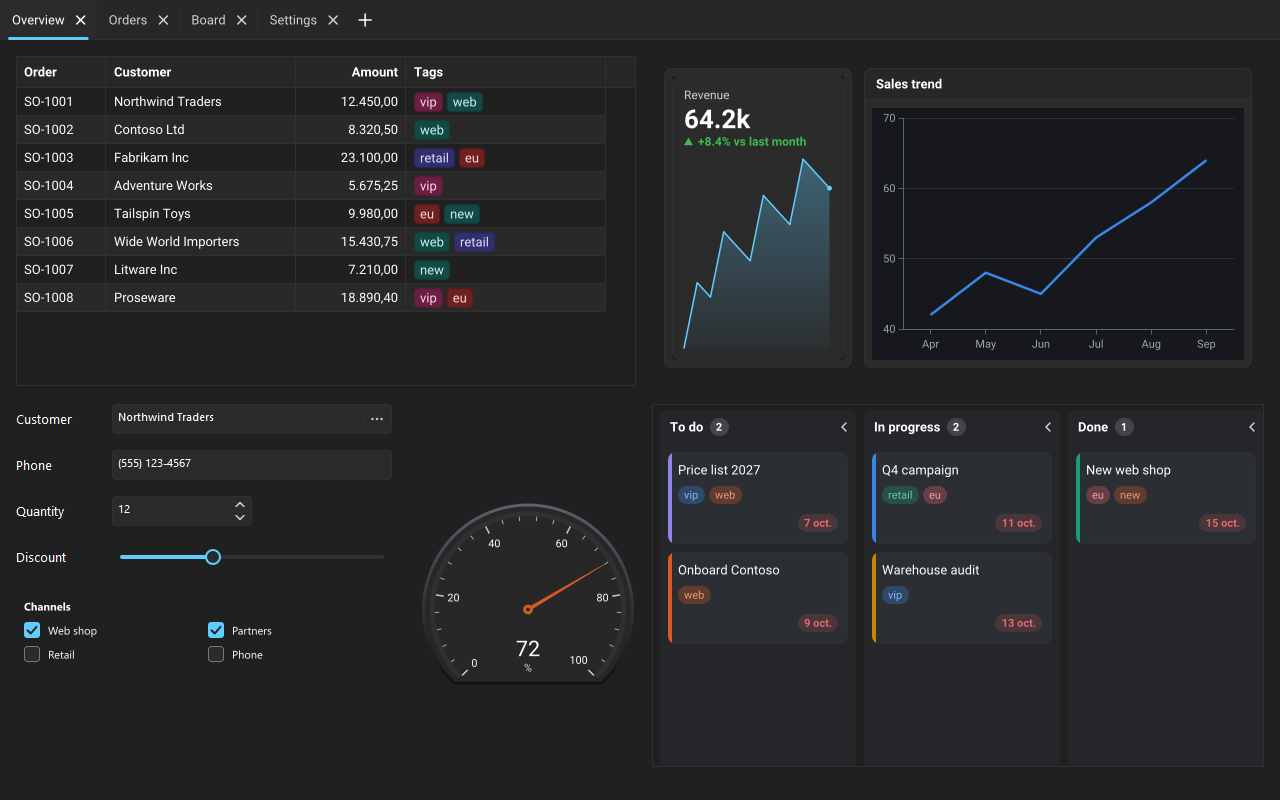
TsgcWpfChart from sgcCharts paints a TsgcChart model with twenty-one series types, from line, bar and candlestick to pie, radar and treemap. Series are declared in XAML and bound to collections of your view model, in every edition, and the chart is safe to feed from a background thread. SaveToPNG and SaveToSVG export what the user sees. See the XAML sample.

WPF Date Picker

sgcEditors adds TsgcWpfDatePicker, TsgcWpfTimePicker, TsgcWpfDateTimePicker and TsgcWpfMonthCalendar, next to masked, currency, lookup and token edits. The calendar takes real booking rules, the editors keep native text entry with IME and clipboard, and form validation is part of every edition, the free Community package included.

WPF Wizard Control

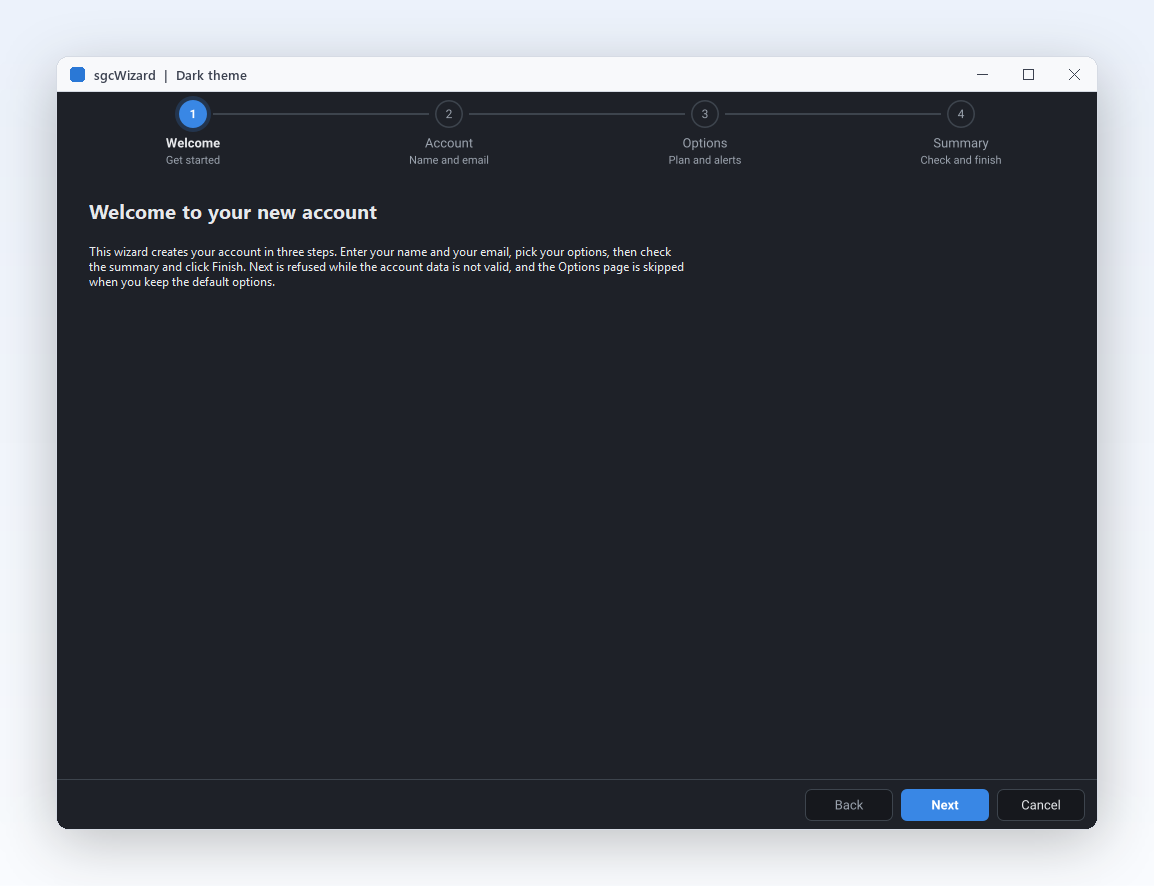
TsgcWpfWizard from sgcWizard takes one TsgcWpfWizardPage per step as children in XAML, and the Caption and Description of each page become the step shown in the stepper. A page can refuse Next until its data is valid, and TsgcWpfStepper shows progress on its own. Every feature is in the free .NET Community package.

WPF Dashboard

TsgcWpfDashboard from sgcDashboard lays out tiles on a 12 column grid that flows with the window size and scales with the monitor DPI. Tiles hold KPI cards (TsgcWpfKPICard), charts, grids, gauges, maps and pivots, and the user drags and resizes them into a layout you save and restore.

WPF Notification and Toasts

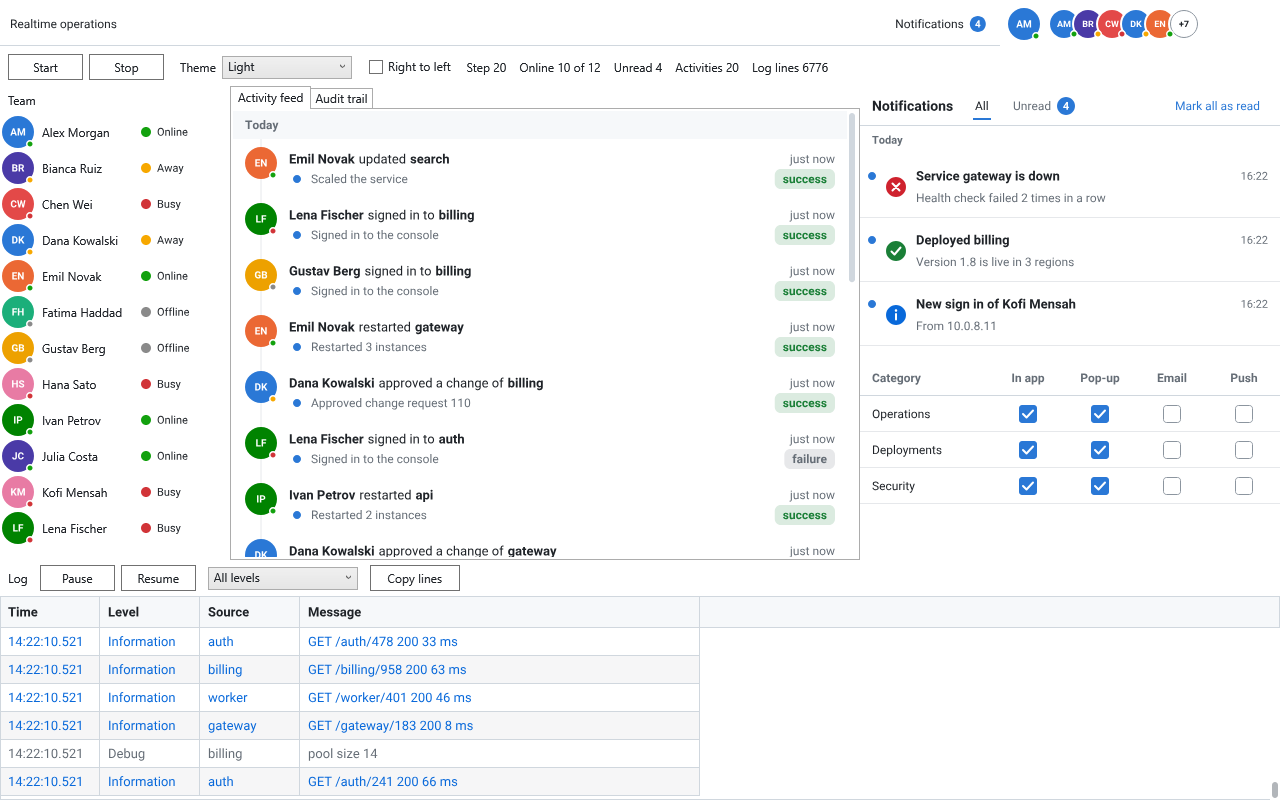
TsgcWpfToastManager from sgcNavigation stacks short cards at a corner of the window, each with a severity glyph, a title, up to three lines of text and up to two action buttons, and closes them after a countdown. TsgcWpfNotificationInbox lists the notifications with an unread count, and TsgcWpfNotificationPrefsEditor lets the user pick the channels per category. The Delphi side is described in notifications for Delphi.

WPF Ribbon and Toolbar

sgcToolbar brings TsgcWpfRibbon with tabs, galleries, KeyTips and a backstage, and TsgcWpfRibbonWindow for a ribbon form. TsgcWpfToolbar and TsgcWpfStatusBar complete the shell; the status bar panels update from any thread, and the commands bind to ICommand and are declared in XAML.

WPF PDF Viewer

The esegece.sgcPDF.Wpf package of sgcPDF adds TsgcWpfPDFViewer, TsgcWpfPDFThumbnailView and TsgcWpfPDFOutlineView for a complete reading pane, plus the TsgcWpfPDFBarcodeControl barcode control. Behind them is the sgcPDF library for .NET, which also creates, edits and signs documents.

WPF Docking

TsgcWpfDockManager from sgcNavigation turns a window into an IDE style workspace: tool panels on the sides, tabbed documents in the centre, drop guides, auto hide and floating windows. It runs on the same TsgcDockManagerModel as the WinForms, Avalonia and Delphi dock managers, so the JSON layout is shared. See docking on Avalonia for a full walk through.

WPF Map Control

TsgcWpfMap from sgcMaps draws the map itself, with no browser control and no JavaScript. It shows markers, routes and offline tiles, and the same engine renders maps to PNG files from a console or a service.

WPF Scheduler

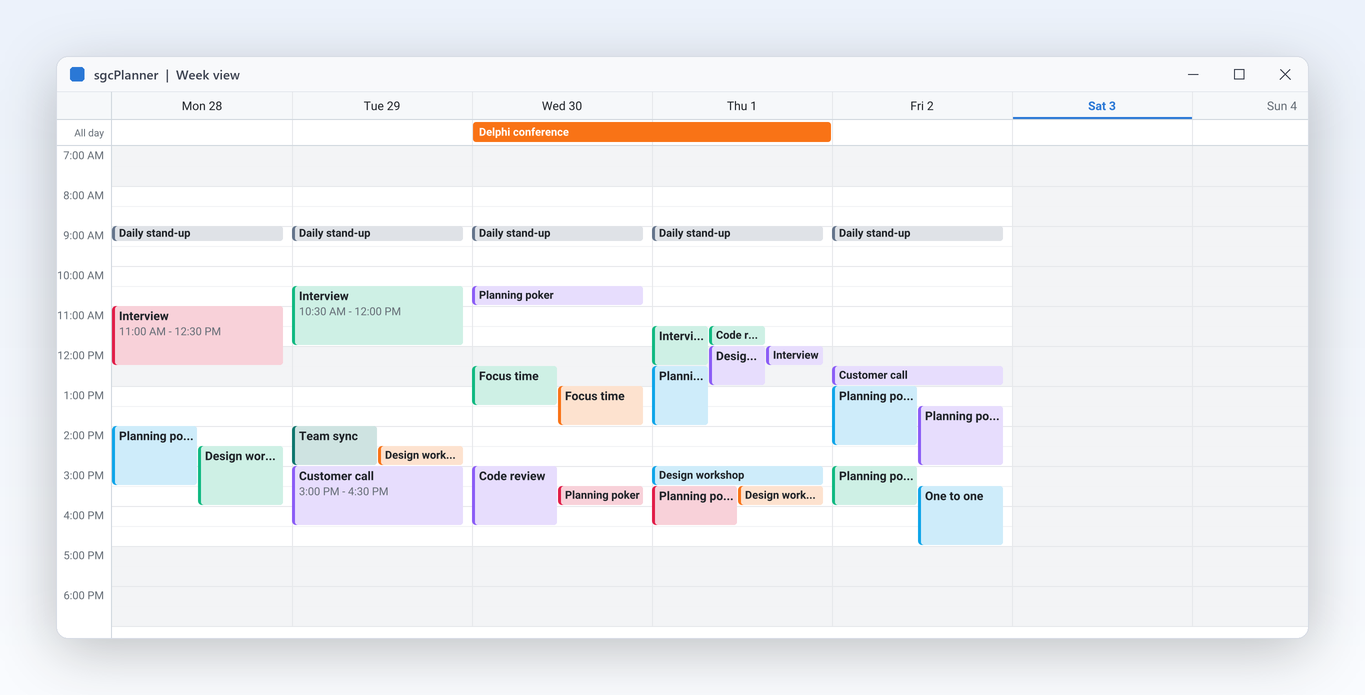
sgcPlanner shows one plan three ways: TsgcWpfScheduler as a calendar, TsgcWpfGantt as a Gantt chart and TsgcWpfKanban as a board, all bound to one data object through ItemsSource. Move a card to Done and the Gantt bar and the calendar follow. Plans load and save as JSON, iCalendar and Microsoft Project XML.

WPF Rich Text Editor

TsgcWpfRichEdit from sgcRichEdit edits documents with styles, lists, tables, images and links. It reads and writes JSON, HTML, Markdown and RTF, and exports DOCX, PDF and PNG pages from one document model shared with the WinForms and Avalonia editors.

WPF Gauges

sgcGauges has sixteen gauge types, twelve of them in the .NET Community package: radial, linear, digital, LED, tank and more, with TsgcWpfRadialGauge, TsgcWpfLinearGauge and TsgcWpfKnobGauge among them. Input gauges such as knobs, sliders and switches take the mouse, the wheel and the keyboard, and every gauge renders to PNG and SVG without a window.

WPF Spreadsheet

TsgcWpfSpreadsheet from sgcSpreadsheet types values and formulas the way Excel does and computes 211 worksheet functions with dynamic arrays that spill. It keeps several sheets with defined names and frozen panes, draws charts from cell ranges, and loads and saves XLSX files. TsgcWpfSpreadsheetFormulaBar adds the formula bar.

Looking for a grid? TsgcWpfGrid has its own page: the WPF DataGrid control with live updates, grouping, filters and Excel export. Pivot tables (TsgcWpfPivotGrid), diagrams (TsgcWpfDiagramView), report previews and chat views complete the suite, see the table below.

Modern UI and Fluent Theme for WPF

The sgcUI controls paint themselves in light, dark or high contrast, with a theme preset that sets their colours, corners and line widths. Fluent is one of the three built in presets.

  • Presets: Classic (the default), Fluent and ISA101. A preset is a pair of definitions, one for light and one for dark, with the colours, corner radii, line widths, window corner and accent the sgcUI controls paint with. You can register a preset of your own, with its own font.
  • Dark mode: each control has a Theme property. Left at its default, the control follows the application theme, which you pin with sgcUIApplication.SetTheme.
  • Follow WPF: on .NET 9 and later the controls follow Application.ThemeMode, so Light, Dark and System switch them, and they repaint when the theme or the accent colour of Windows changes. On .NET Framework 4.7.2 and .NET 8 the host reports light, so pin the theme to dark when you want it.
  • Sharp at any DPI: corners and line widths are defined at 100% scaling and grow with the DPI of the monitor. High contrast replaces the colours of every preset and keeps its shapes.
  • Standard WPF controls: the presets apply to the sgcUI controls. sgcUIApplyThemeToWindow of sgcUICore_Theme_Wpf sets the background and the font colour of a window and its child controls, so the rest of the window matches the theme.

Help: Application Theme, Theme Presets and High DPI.

A Live WPF Chart in XAML

Add the Community package of sgcCharts to a net8.0-windows WPF project, declare the chart and a series in XAML, and bind the series to an ObservableCollection.

dotnet add package esegece.sgcCharts.Wpf.Community
MainWindow.xaml
<Window x:Class="LiveChart.MainWindow"
        xmlns="http://schemas.microsoft.com/winfx/2006/xaml/presentation"
        xmlns:x="http://schemas.microsoft.com/winfx/2006/xaml"
        xmlns:sgc="https://www.esegece.com/sgcui"
        Title="Live chart" Width="900" Height="480">
  <sgc:TsgcWpfChart Theme="utDark">
    <!-- one line series bound to the view model, X and Y read from each item -->
    <sgc:TsgcWpfChartSeries ItemsSource="{Binding Samples}" SeriesKind="cskLine"
                            Title="Temperature" XMember="Index" YMember="Value" />
  </sgc:TsgcWpfChart>
</Window>
MainWindow.xaml.cs
using System;
using System.Collections.ObjectModel;
using System.Windows;
using System.Windows.Threading;

namespace LiveChart
{
    public class TSample
    {
        public int Index { get; set; }
        public double Value { get; set; }
    }

    public partial class MainWindow : Window
    {
        private readonly DispatcherTimer FTimer = new DispatcherTimer();
        private readonly Random FRandom = new Random();
        private int FIndex;

        public ObservableCollection<TSample> Samples { get; } = new ObservableCollection<TSample>();

        public MainWindow()
        {
            InitializeComponent();
            DataContext = this;
            FTimer.Interval = TimeSpan.FromMilliseconds(250);
            FTimer.Tick += (sender, e) => AddSample();
            FTimer.Start();
        }

        private void AddSample()
        {
            // WPF collection views take adds and removes on the UI thread
            Samples.Add(new TSample { Index = FIndex++, Value = 20 + FRandom.NextDouble() * 5 });
            if (Samples.Count > 200)
                Samples.RemoveAt(0);
        }
    }
}

Each add or remove of the collection updates the series, and the chart repaints at most Chart.MaxFPS times a second. Items that implement INotifyPropertyChanged may also change their values from a worker thread. The same xmlns:sgc declaration gives the controls of every sgcUI product in the same file. See the sgcUI quick start.

Every sgcUI Product on WPF

The WPF packages target net472, net8.0-windows, net9.0-windows and net10.0-windows. Each one brings its core and rendering packages as dependencies, so one package reference is enough. A project references either the Community or the Registered packages, never both.

ProductMain WPF controlsFree Community packageRegistered package
sgcGridTsgcWpfGrid, TsgcWpfFilterBuilderesegece.sgcGrid.Wpf.Communityesegece.sgcGrid.Wpf
sgcChartsTsgcWpfChart, TsgcWpfSparklineesegece.sgcCharts.Wpf.Communityesegece.sgcCharts.Wpf
sgcDashboardTsgcWpfDashboard, TsgcWpfKPICardesegece.sgcDashboard.Wpf.Communityesegece.sgcDashboard.Wpf
sgcGaugesTsgcWpfRadialGauge, TsgcWpfLinearGaugeesegece.sgcGauges.Wpf.Communityesegece.sgcGauges.Wpf
sgcEditorsTsgcWpfDatePicker, TsgcWpfLookupEditesegece.sgcEditors.Wpf.Communityesegece.sgcEditors.Wpf
sgcWizardTsgcWpfWizard, TsgcWpfStepperesegece.sgcWizard.Wpf.Communityesegece.sgcWizard.Wpf
sgcNavigationTsgcWpfNavigationBar, TsgcWpfDockManager, TsgcWpfToastManageresegece.sgcNavigation.Wpf.Communityesegece.sgcNavigation.Wpf
sgcToolbarTsgcWpfRibbon, TsgcWpfToolbar, TsgcWpfStatusBaresegece.sgcToolbar.Wpf.Communityesegece.sgcToolbar.Wpf
sgcPlannerTsgcWpfScheduler, TsgcWpfGantt, TsgcWpfKanbanesegece.sgcPlanner.Wpf.Communityesegece.sgcPlanner.Wpf
sgcMapsTsgcWpfMapesegece.sgcMaps.Wpf.Communityesegece.sgcMaps.Wpf
sgcPivotGridTsgcWpfPivotGrid, TsgcWpfPivotFieldListesegece.sgcPivotGrid.Wpf.Communityesegece.sgcPivotGrid.Wpf
sgcDiagramTsgcWpfDiagramView, TsgcWpfDiagramPaletteesegece.sgcDiagram.Wpf.Communityesegece.sgcDiagram.Wpf
sgcPDFTsgcWpfPDFViewer, TsgcWpfPDFThumbnailViewesegece.sgcPDF.Wpf.Communityesegece.sgcPDF.Wpf
sgcReportsTsgcWpfReportPreview, TsgcWpfReportDesigneresegece.sgcReports.Wpf.Communityesegece.sgcReports.Wpf
sgcRichEditTsgcWpfRichEdit–esegece.sgcRichEdit.Wpf
sgcSpreadsheetTsgcWpfSpreadsheet, TsgcWpfSpreadsheetFormulaBar–esegece.sgcSpreadsheet.Wpf
sgcChatTsgcWpfChatView, TsgcWpfChatPanel–esegece.sgcChat.Wpf

The Community packages are on nuget.org, free for individuals and organizations under EUR 1M annual gross revenue with no more than 5 developers. The Registered packages come from your account, with every feature and the full C# source code. sgcUI .NET Standard covers sgcGrid, sgcNavigation, sgcToolbar and sgcEditors from €380, Professional adds sgcCharts, sgcDashboard and sgcGauges, and Enterprise includes every product. See download and .NET pricing.

Frequently Asked Questions

Yes. sgcEditors has TsgcWpfDatePicker, TsgcWpfTimePicker, TsgcWpfDateTimePicker and TsgcWpfMonthCalendar in the esegece.sgcEditors.Wpf package. They are drawn by sgcUICore in light, dark and high contrast, with the Fluent preset if you select it, and they keep native text entry with IME and the clipboard. The free esegece.sgcEditors.Wpf.Community package includes them, and sgcUI .NET Standard includes sgcEditors.

Add the esegece.sgcWizard.Wpf package, or its Community twin, to a WPF project. In XAML, declare a TsgcWpfWizard with one TsgcWpfWizardPage per step and set the Caption and Description of each page. Assign the wizard events in the code behind: they are delegates, not WPF routed events, so they are not set as XAML attributes. Every wizard feature is in the free Community package.

TsgcWpfChart from sgcCharts. It draws into a persistent bitmap, throttled to Chart.MaxFPS, and it is safe to feed with data from a background thread. Bind a TsgcWpfChartSeries to an ObservableCollection and each add or remove updates the series; in WPF those collection changes go on the UI thread, while item property changes may come from any thread. The sample above adds a point four times a second.

Yes. Every sgcUI control paints in light, dark or high contrast, with the Classic, Fluent or ISA101 preset. On .NET 9 and later the controls follow Application.ThemeMode and repaint when it or the Windows theme changes. On .NET Framework 4.7.2 and .NET 8 the WPF host reports light, so you pick dark with the Theme property of a control or with sgcUIApplication.SetTheme for the whole application.

Yes, for fourteen products: sgcGrid, sgcCharts, sgcDashboard, sgcGauges, sgcEditors, sgcWizard, sgcNavigation, sgcToolbar, sgcPlanner, sgcMaps, sgcPivotGrid, sgcDiagram, sgcPDF and sgcReports each have a .Wpf.Community package on nuget.org. They are free for individuals and organizations under EUR 1M annual gross revenue with no more than 5 developers. sgcRichEdit, sgcSpreadsheet and sgcChat come as Registered packages only.

The WPF packages target .NET Framework 4.7.2 (net472) and .NET 8, 9 and 10 (net8.0-windows, net9.0-windows, net10.0-windows). The same products ship WinForms and Avalonia 12 controls with the same class names, so a model or view model you write for WPF carries over; see the Avalonia controls and the WinForms and WPF to Avalonia kit.

Also available for Delphi and C++Builder: the Delphi VCL components and the Delphi FireMonkey components, with the same names and models. Related: the WPF DataGrid and the sgcUI suite.

Best value: All-AccessEvery eSeGeCe product, Premium Support included, from €1,059/year.
See All-Access pricing

Build Your Next WPF Screen with sgcUI

Start with the free Community packages from NuGet, or buy sgcUI .NET for every feature and the full C# source code.