WPF, XAML & C# sgcGrid for .NET

sgcGrid, the WPF DataGrid for Live Data

A WPF DataGrid control that binds your view model in XAML and keeps up with data that never sits still.

Live updates from any thread
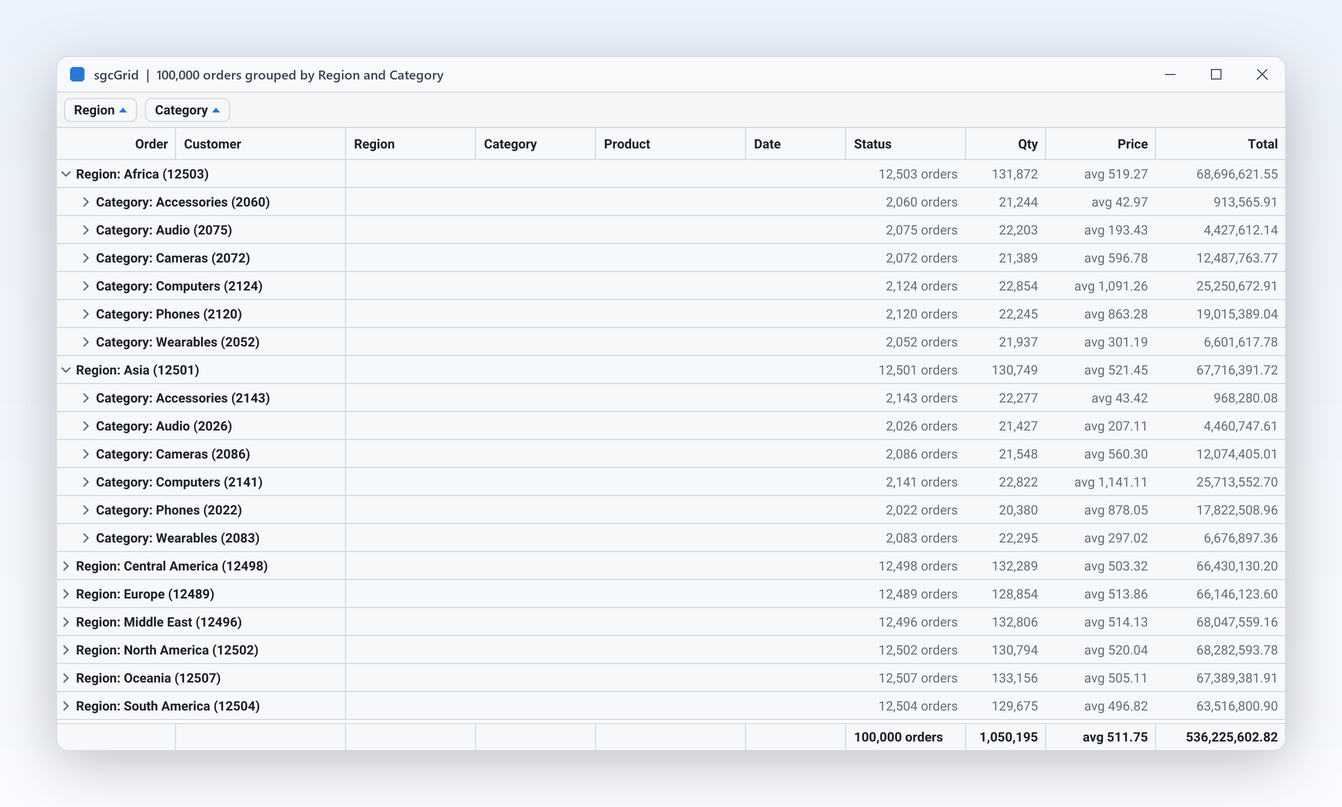
Grouping with totals
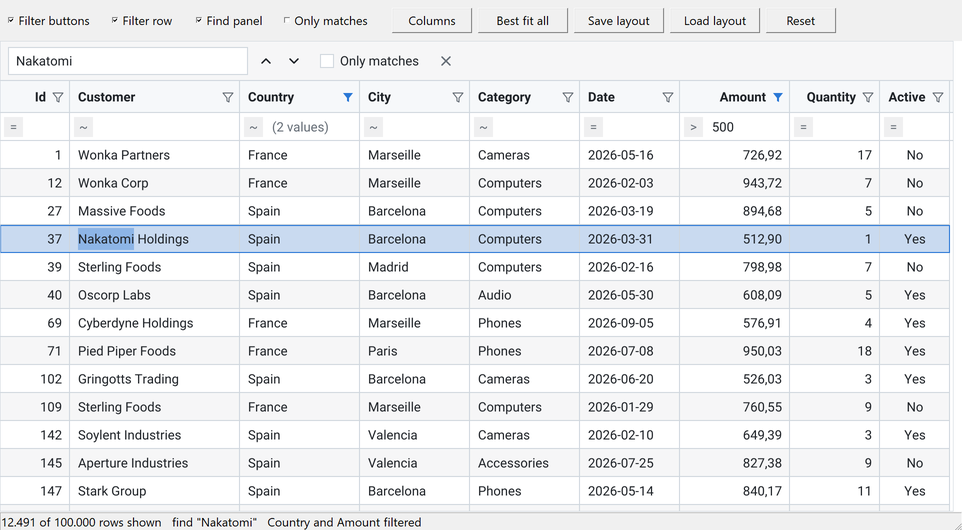
Filter row and find panel
Excel export

See the XAML and C# → · See pricing →

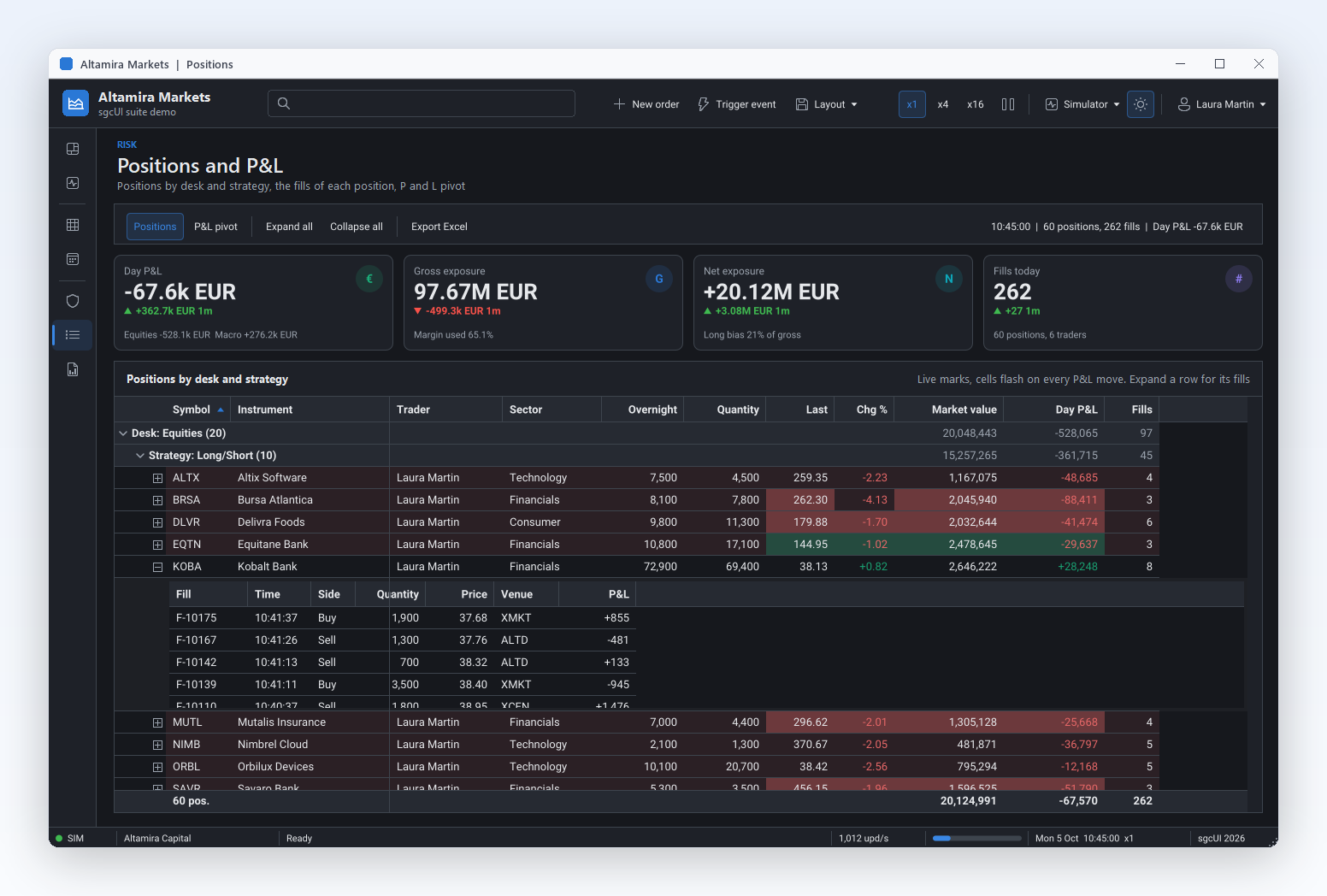
Data grid in the dark theme grouping trading positions by desk and strategy, with an expanded band of fills, tinted P&L cells and live totals, sgcGrid in the Altamira Markets demo

What sgcGrid Adds to a WPF DataGrid

This C# data grid updates rows by key from any thread, flashes the cells that change, and groups, totals, filters and exports the same rows. TsgcWpfGrid lives in the esegece.sgcGrid.Wpf package. It is a managed C# port of the sgcGrid engine, not a wrapper, and it paints with the .NET port of sgcUICore, so the grid looks the same on WPF, WinForms, Avalonia and in headless PNG and SVG output.

.NET Framework 4.7.2, .NET 8, 9, 10ItemsSource and MVVMFree Community package on NuGetFull C# source code
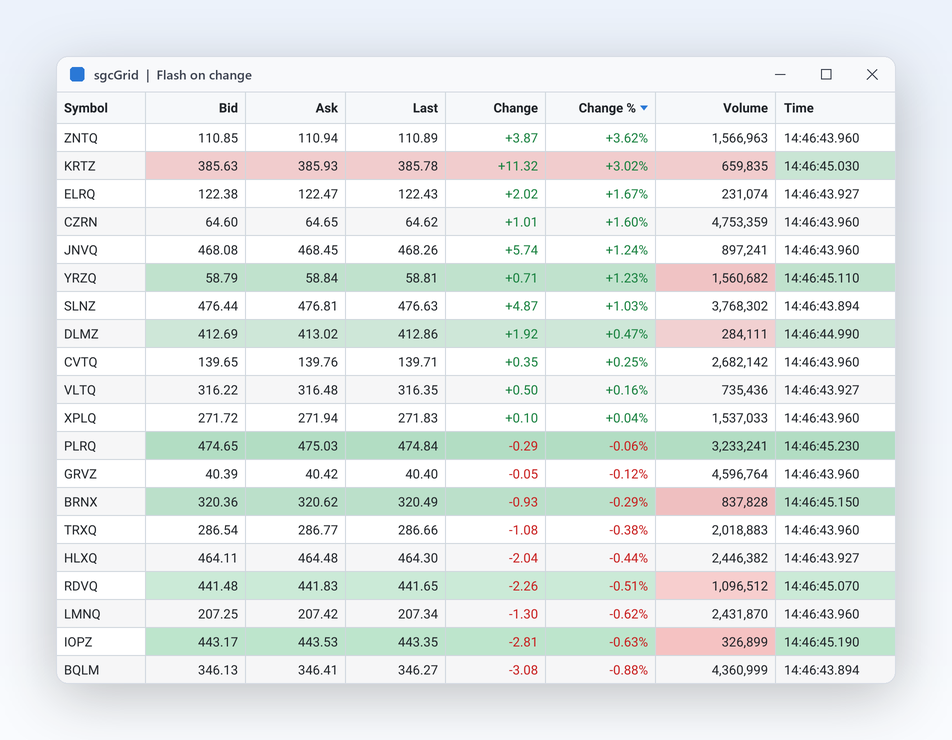
Live quote grid where the bid, ask and volume cells that just changed are tinted green or red and fade out, sgcGrid flash on change

Built for data that changes

  • The row store TsgcGridData is keyed and thread safe: a worker thread appends, updates and deletes rows by key with AppendRow, UpdateRow and DeleteRow
  • The grid paints only the visible rows and columns and repaints at most MaxFPS times per second, however fast the data changes
  • FlashChanges tints each changed cell green or red and fades it out
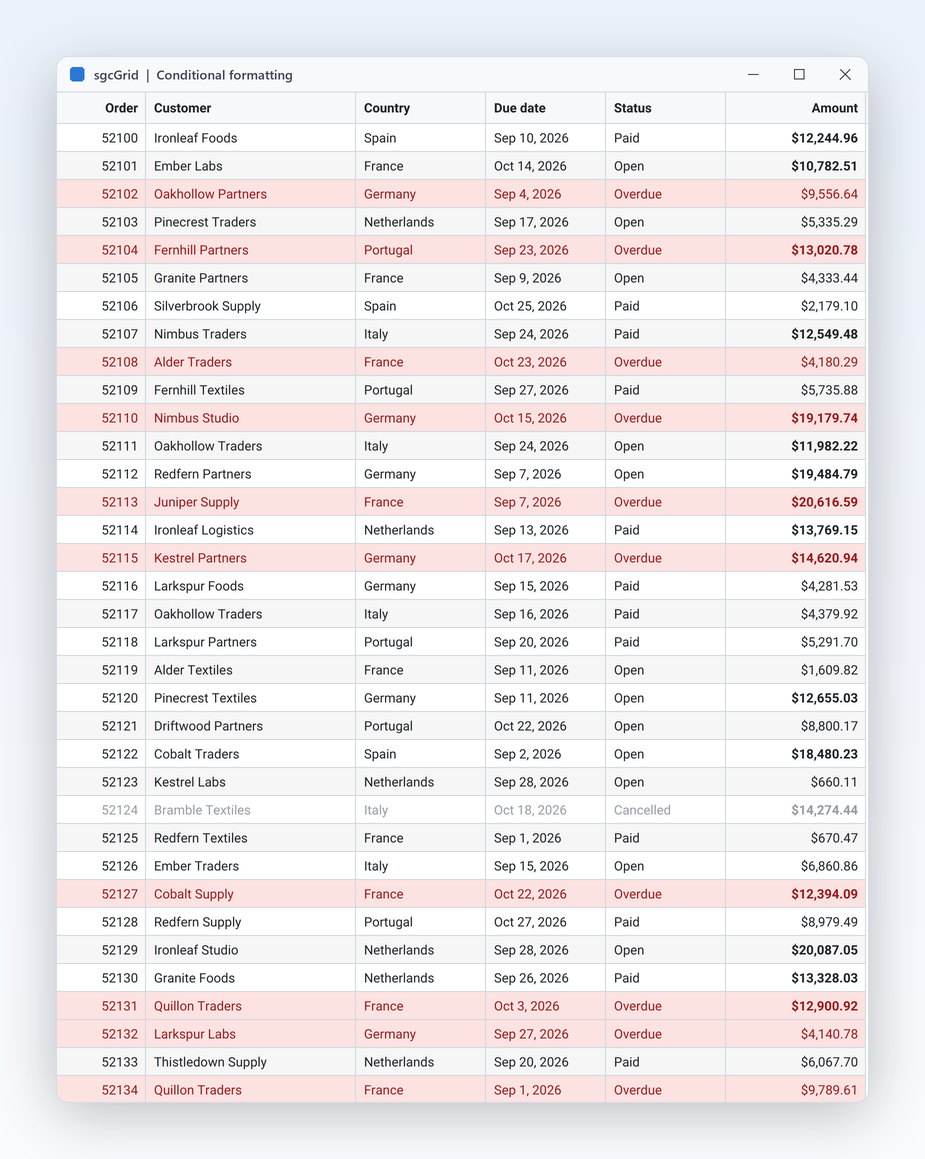
  • FormatRules colour a cell or, with ApplyToRow, the whole row, for example every row with a negative change
  • With ItemsSource, changes of the collection and of the items update only the rows involved, and changes raised on a worker thread are applied on the UI thread

Grouping and summaries

Group by one or more columns from code with GroupBy, or let users drag a header to the group panel. Sum, Count, Average, Min and Max appear on every group row and in the footer, and FrozenColumns keeps the key columns in view.

Filtering and find

A filter button on every header, a filter row, a find panel that highlights the matches, the filter builder, the column chooser and best fit. On WPF these options are dependency properties, so you set them in XAML, bind them and style them.

Excel export

SaveToXLSX writes the view as an Excel workbook with no Excel installation and no external library, with the column widths and the frozen columns as a frozen pane. JSON and CSV export are in every edition. Excel export is Registered.

Virtual and server mode

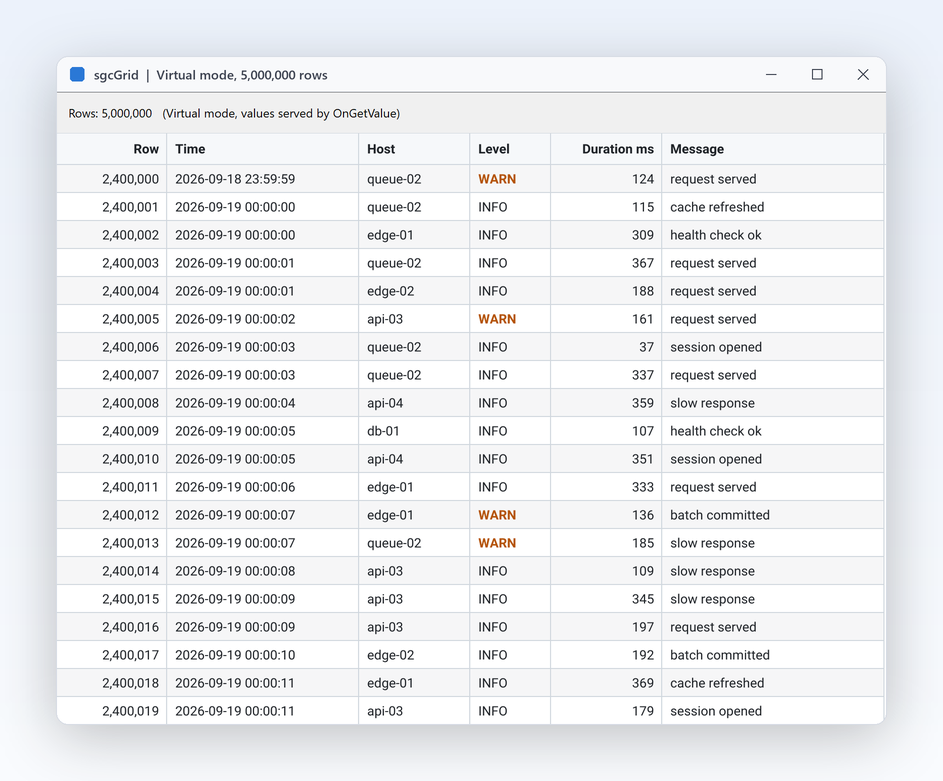
Virtual mode serves the values on demand through OnGetValue, for millions of rows that are never loaded. Server mode pages a database: TsgcGridServerProvider_Queryable reads any IQueryable, an Entity Framework Core set for example (Registered).

Tree and detail rows

Show rows as a tree built from a key and a parent field, or open a detail band under a master row with its child rows from a second source. Tree rows and master detail are in the Registered edition.

Theming

Light and dark themes, an accent colour, and the Classic, Fluent and ISA101 presets. With Theme left at utDefault, the grid follows the light or dark theme of WPF and its accent colour while the application runs.

The Grid Your Users Will See

The screenshots come from the sgcGrid and sgcUI demos. The WPF grid draws with the same canvas, fonts and themes, and it draws its own scroll bars.

Bind the WPF DataGrid to Your View Model

Two ways to fill the grid: bind ItemsSource to a collection of your view model, or write keyed rows from code, from any thread.

1. Add the package

Create a net8.0-windows WPF project with <UseWPF>true</UseWPF>, or a .NET Framework 4.7.2 project, and add the free Community package from nuget.org. The core and rendering packages come with it as dependencies.

dotnet add package esegece.sgcGrid.Wpf.Community

The Registered package is esegece.sgcGrid.Wpf. It is downloaded from your account, not from nuget.org: add its folder as a package source once. A project references either the Community or the Registered packages, never both.

2. Declare the grid and its columns in XAML

Map the one sgcUI XAML namespace, xmlns:sgc="https://www.esegece.com/sgcui". Columns is the content property of TsgcWpfGrid, so the TsgcWpfGridColumn elements inside the grid become its columns, in order. Declared columns win: AutoGenerateColumns adds none.

<Window x:Class="OrdersApp.OrdersWindow"
        xmlns="http://schemas.microsoft.com/winfx/2006/xaml/presentation"
        xmlns:x="http://schemas.microsoft.com/winfx/2006/xaml"
        xmlns:local="clr-namespace:OrdersApp"
        xmlns:sgc="https://www.esegece.com/sgcui"
        Title="Orders" Width="900" Height="500">
    <Window.DataContext>
        <local:OrdersViewModel />
    </Window.DataContext>
    <sgc:TsgcWpfGrid x:Name="grdOrders" ItemsSource="{Binding Orders}" KeyMember="Id"
                     RowHeight="26" ShowGroupPanel="True" ShowFooter="True" ShowFilterRow="True">
        <sgc:TsgcWpfGridColumn FieldName="Id" Caption="Order" DataType="gdtInteger" Width="70" />
        <sgc:TsgcWpfGridColumn FieldName="Region" Width="120" />
        <sgc:TsgcWpfGridColumn FieldName="Customer" Width="180" />
        <sgc:TsgcWpfGridColumn FieldName="Date" DataType="gdtDateTime" DisplayFormat="yyyy-mm-dd" Width="100" />
        <sgc:TsgcWpfGridColumn FieldName="Total" DataType="gdtCurrency" DisplayFormat="#,##0.00"
                               SummaryType="gsuSum" />
        <sgc:TsgcWpfGridColumn FieldName="Shipped" DataType="gdtBoolean" Width="70" Alignment="gaCenter" />
    </sgc:TsgcWpfGrid>
</Window>

3. The view model and the code behind

Any IEnumerable works. Each item is a row, each column reads the member named by its FieldName, and an item that raises PropertyChanged updates its row only. The grid reads the collection through its collection view, so the SortDescriptions, the Filter and the PropertyGroupDescription entries of a CollectionViewSource apply too.

using System;
using System.Collections.ObjectModel;
using System.ComponentModel;
using System.Windows;

namespace OrdersApp
{
    public class Order : INotifyPropertyChanged
    {
        private decimal FTotal;
        public event PropertyChangedEventHandler PropertyChanged;

        public int Id { get; set; }
        public string Region { get; set; }
        public string Customer { get; set; }
        public DateTime Date { get; set; }
        public bool Shipped { get; set; }

        public decimal Total
        {
            get { return FTotal; }
            set
            {
                FTotal = value;
                if (PropertyChanged != null)
                    PropertyChanged(this, new PropertyChangedEventArgs(nameof(Total)));
            }
        }
    }

    public class OrdersViewModel
    {
        public ObservableCollection<Order> Orders { get; } = new ObservableCollection<Order>();

        public OrdersViewModel()
        {
            Orders.Add(new Order { Id = 1001, Region = "North", Customer = "Ana", Date = new DateTime(2026, 10, 1), Total = 250m, Shipped = true });
            Orders.Add(new Order { Id = 1002, Region = "South", Customer = "Ben", Date = new DateTime(2026, 10, 3), Total = 99.9m });
            Orders.Add(new Order { Id = 1003, Region = "North", Customer = "Ana", Date = new DateTime(2026, 10, 7), Total = 1200m });
        }
    }

    public partial class OrdersWindow : Window
    {
        public OrdersWindow()
        {
            InitializeComponent();
            // group rows by region, then by customer; sums show on every group row
            grdOrders.GroupBy("Region", "Customer");
        }
    }
}

4. Live rows by key, from a worker thread

For a feed, skip the collection and write rows straight into the row store. Every row has a key, and UpdateRow changes the named fields of that row. The XAML is one line, <sgc:TsgcWpfGrid x:Name="grdQuotes" RowHeight="26" FlashChanges="True" />.

using System;
using System.Threading;
using System.Threading.Tasks;
using System.Windows;
using esegece.sgcGrid;
using esegece.sgcUICore;

namespace QuotesApp
{
    public partial class QuotesWindow : Window
    {
        private readonly CancellationTokenSource FCancel = new CancellationTokenSource();

        public QuotesWindow()
        {
            InitializeComponent();
            // the columns: field name, caption and data type
            grdQuotes.Columns.Add("symbol", "Symbol");
            grdQuotes.Columns.Add("price", "Price", TsgcGridDataType.gdtFloat).DisplayFormat = "#,##0.00";
            grdQuotes.Columns.Add("change", "Change", TsgcGridDataType.gdtFloat).DisplayFormat = "+0.00;-0.00;0.00";
            // rows with a negative change are tinted red
            grdQuotes.FormatRules.Add("change", TsgcGridFormatOperator.gfoLess, "0", 0x30E53935).ApplyToRow = true;
            grdQuotes.Theme = TsgcUITheme.utDark;
            // one row per key, the values follow the column order
            grdQuotes.Data.AppendRow("MSFT", "MSFT", 412.5, 0.0);
            grdQuotes.Data.AppendRow("AAPL", "AAPL", 228.1, 0.0);

            TsgcGridData oData = grdQuotes.Data;
            Task.Run(() => DoFeed(oData, FCancel.Token));
            Closed += (s, e) => FCancel.Cancel();
        }

        // runs on a worker thread: TsgcGridData is thread safe
        private static void DoFeed(TsgcGridData aData, CancellationToken aToken)
        {
            Random oRandom = new Random();
            while (!aToken.IsCancellationRequested)
            {
                double vChange = Math.Round(oRandom.NextDouble() * 4 - 2, 2);
                aData.UpdateRow("MSFT", new[] { "price", "change" }, new object[] { 412.5 + vChange, vChange });
                Thread.Sleep(100);
            }
        }
    }
}

The changed cells flash and fade, and the repaints stay paced by MaxFPS. The step by step version is the WPF quick start, and the binding rules are in ItemsSource and MVVM binding and Columns in XAML.
Large Data, Selection and WPF Themes

Rows you never load

Virtual mode (Virtual, VirtualRowCount, OnGetValue) serves the values on demand, so millions of rows never have to be loaded. In server mode a provider reads one page of rows at a time, and the database evaluates the sort, the filters, the find text, the summaries, the grouping and the row count. TsgcGridServerProvider_AdoNet runs the same SQL on any ADO.NET connection.

Selection that follows the item

SelectedItem binds TwoWay by default, and the selection follows its item when the rows are sorted, filtered or reloaded. IsSynchronizedWithCurrentItem keeps the selected row and the current item of the collection view in step, as on a ListBox.

Follows the WPF theme

On .NET 9 and later, Application.ThemeMode Light, Dark or System decides between the light and dark grid. With the Fluent preset, sgcUIApplication.ThemePreset = sgcUICore_Theme.CS_UI_THEME_FLUENT, the WPF Fluent theme also gives the grid its colours. On .NET Framework 4.7.2 and .NET 8 the WPF host theme is light, and Theme switches the grid to dark.

The .NET demos include LiveTickerWpf, GroupingWpf, SpreadsheetWpf and ServerModeAndCardsWpf. A saved layout is the same JSON on the WPF, WinForms, Avalonia, VCL and FireMonkey grids.

Free to Start, Full Source When You Buy

Prices from the sgcGrid pricing page. Every license includes the full C# source code and 1 year of updates.

Community, free

esegece.sgcGrid.Wpf.Community on nuget.org, for individuals and organizations under EUR 1M annual gross revenue with no more than 5 developers. Live updates, flashing, format rules, themes, sorting, filters, grouping, summaries, virtual mode, ItemsSource binding, JSON and CSV and printing are included.

Get the NuGet package →

sgcGrid .NET

€199 / developer for WinForms, WPF and Avalonia. Adds in-place editing, paste, undo and redo, tree rows, master detail, Excel export and Excel mode, server mode, the card view and the PDF export.

Buy sgcGrid .NET → Team and Site →

sgcUI .NET Standard

sgcGrid with sgcNavigation, sgcToolbar and sgcEditors, from €380 per developer, with free binary redistribution.

See the sgcUI .NET editions →

One Grid for WPF, WinForms and Avalonia

The C# classes keep the same names on every host, so code that fills Columns, Data and FormatRules moves between them.

HostControlTargetsBinding
WPFTsgcWpfGridnet472, net8.0-windows, net9.0-windows, net10.0-windowsItemsSource, collection views, XAML columns
WinFormsTsgcWinFormsGridnet472, net8.0-windows, net9.0-windows, net10.0-windowsDataSource and DataMember
Avalonia 12TsgcAvaloniaGridnet8.0, net9.0, net10.0 on Windows, Linux and macOSItemsSource, XAML columns
HeadlessTsgcGridRenderernetstandard2.0 and up, Linux servers includedPNG and SVG output

Building for Linux and macOS as well? Read the Avalonia DataGrid page, or move a WinForms or WPF app to Avalonia. sgcGrid is also available for Delphi and C++Builder, on VCL and FireMonkey: see the sgcGrid product page.

WPF DataGrid Questions

Look for a grid that paints only what is visible and does not need every row in memory. sgcGrid paints only the visible rows and columns and repaints at most MaxFPS times per second. Virtual mode serves the values on demand through OnGetValue, and server mode reads one page of rows at a time from IQueryable or ADO.NET while the database sorts, filters, groups and counts. Virtual mode is in every edition; server mode is Registered.

Yes, in every edition, Community included. Group from code with GroupBy, by dragging a header to the group panel (ShowGroupPanel), or through the PropertyGroupDescription entries of a WPF collection view. Set SummaryType on a column to gsuSum, gsuCount, gsuAverage, gsuMin or gsuMax: the summary shows on every group row and, with ShowFooter, in the footer over all rows.

Yes, in the Registered edition. SaveToXLSX(fileName, sheetName) or its Stream overload writes the view as an .xlsx workbook with no Excel installation and no external library: the visible columns in their order, a bold header row, the column widths, and the frozen columns as a frozen pane. Sorting and filtering apply, so the workbook holds the rows the user sees. JSON and CSV export are in every edition.

Yes. The row store TsgcGridData is keyed and thread safe, so a worker thread can call AppendRow, UpdateRow and DeleteRow while the grid paints at a paced frame rate. With ItemsSource, changes raised on a worker thread are applied on the UI thread. In the Registered edition, the sgcWebSockets bridge also feeds the grid from WebSocket, MQTT and SSE connections.

Yes. One sgcGrid .NET license covers TsgcWinFormsGrid for WinForms, TsgcWpfGrid for WPF and TsgcAvaloniaGrid for Avalonia 12 on Windows, Linux and macOS, each with its own Community and Registered NuGet package. The three grids share the C# model and the layout JSON. Delphi and C++Builder developers get TsgcVCLGrid and TsgcFMXGrid under a Delphi license.

.NET Framework 4.7.2 and .NET 8, 9 and 10. The esegece.sgcGrid.Wpf package targets net472, net8.0-windows, net9.0-windows and net10.0-windows, and it brings the sgcEditors WPF controls that the grid uses as cell editors.

Best value: All-AccessEvery eSeGeCe product, Premium Support included, from €1,059/year.
See All-Access pricing

Put a Live Data Grid in Your WPF App

Start with the free Community package from NuGet, or buy sgcGrid .NET for every feature and the full C# source code.