Delphi FireMonkey Components from sgcUI
sgcUI is a suite of Delphi FireMonkey components: one FMX code base for Windows, macOS, iOS, Android and, with FMXLinux, Linux64.
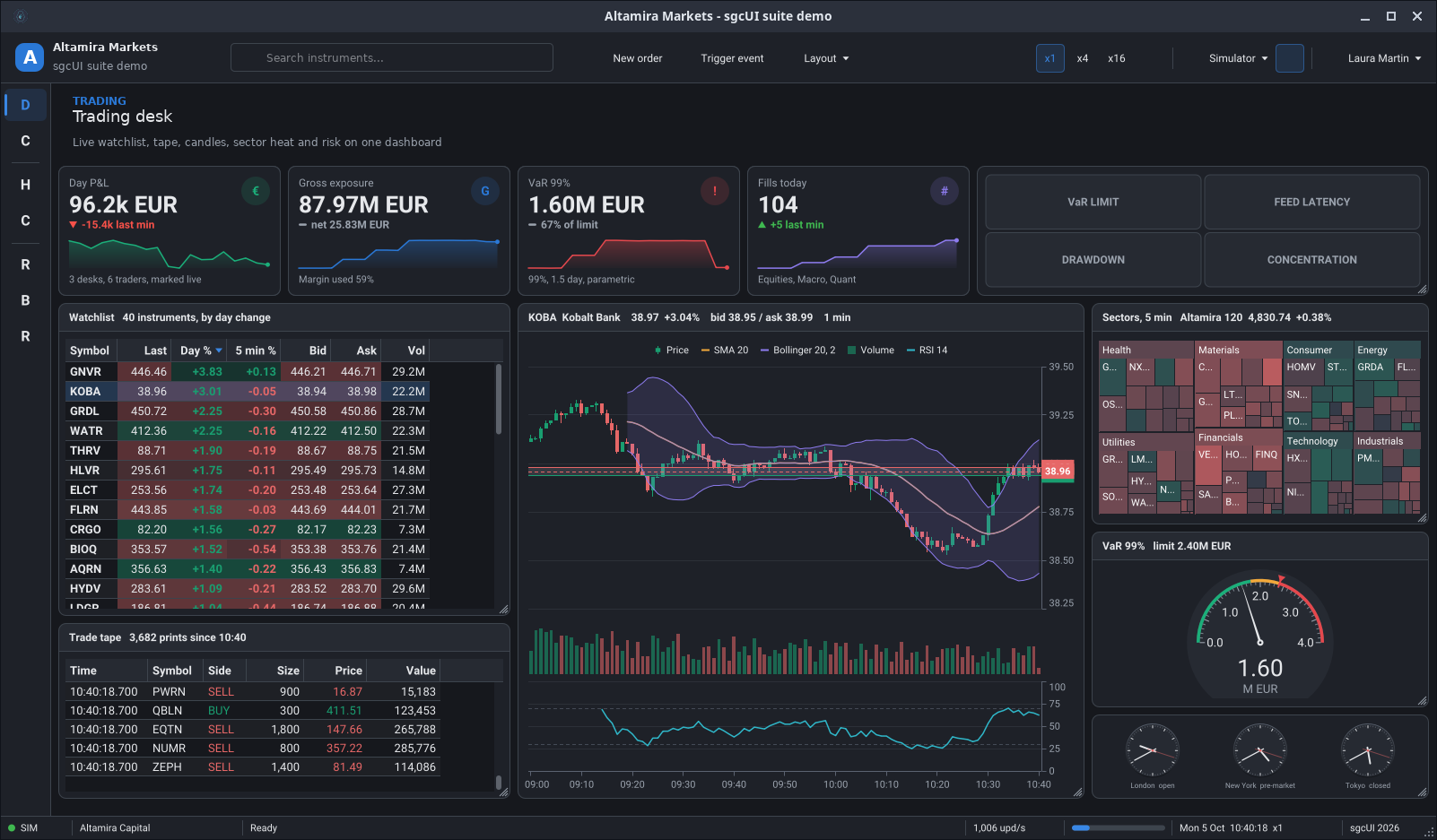
These are the sgcUI FireMonkey demos. Most of them were captured on a Linux desktop through FMXLinux, from the same forms and the same code that build for Windows, macOS, iOS and Android, so what you see here is what your users get on every platform.
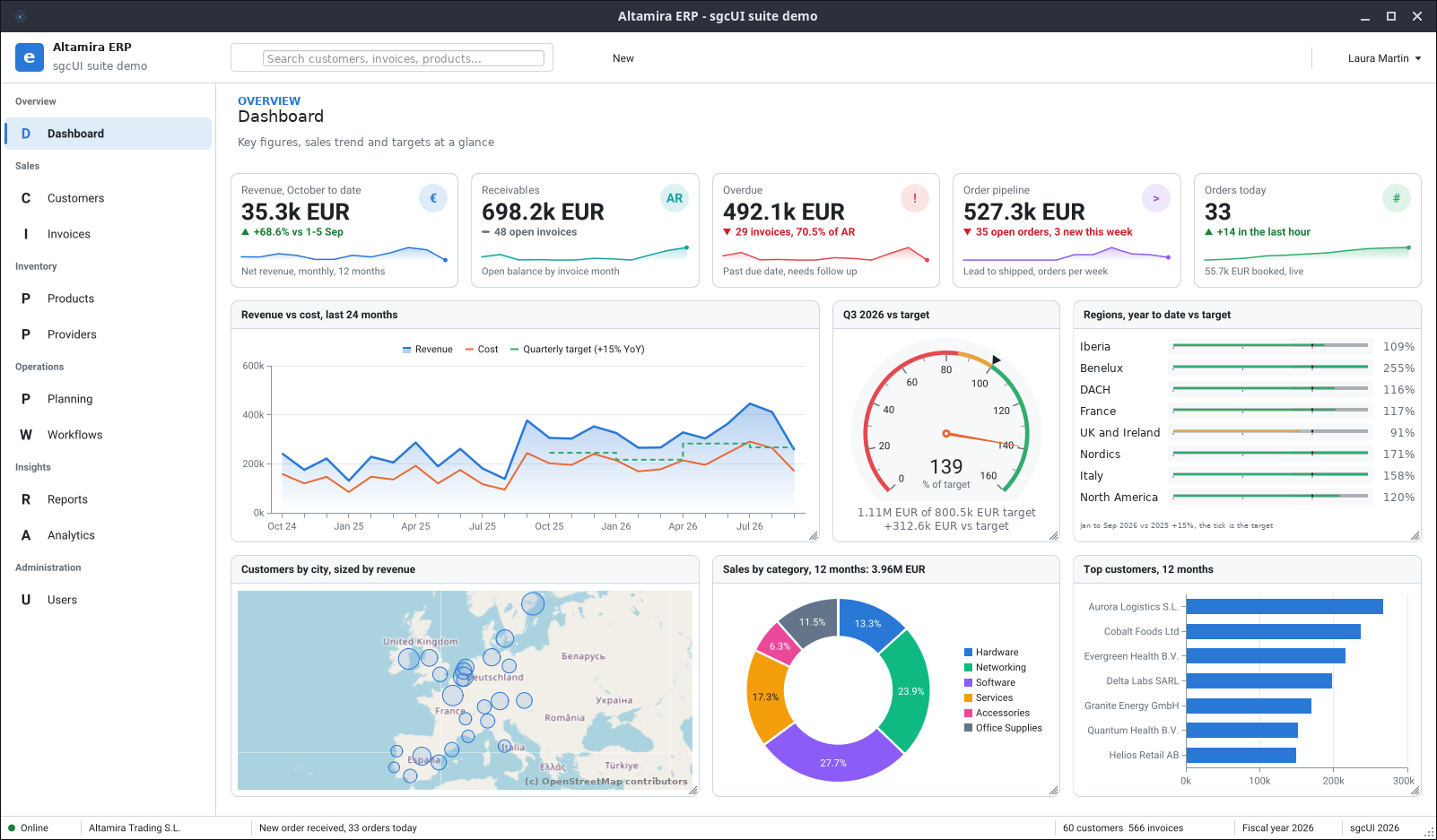
Altamira ERP on FireMonkey: KPI cards, a revenue chart, a target gauge and a customer map.
sgcDashboard →
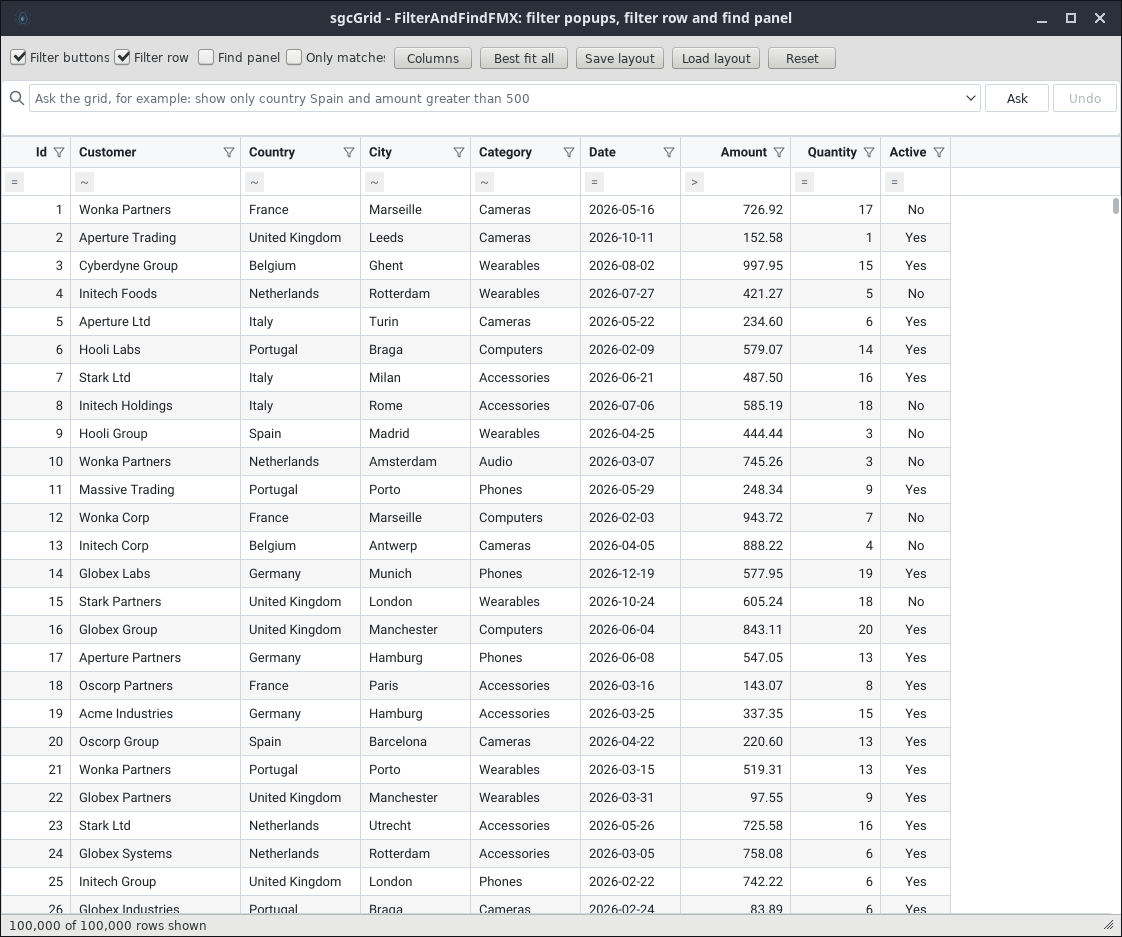
The FMX grid with 100,000 rows, header filters, a filter row and a query bar.
sgcGrid →
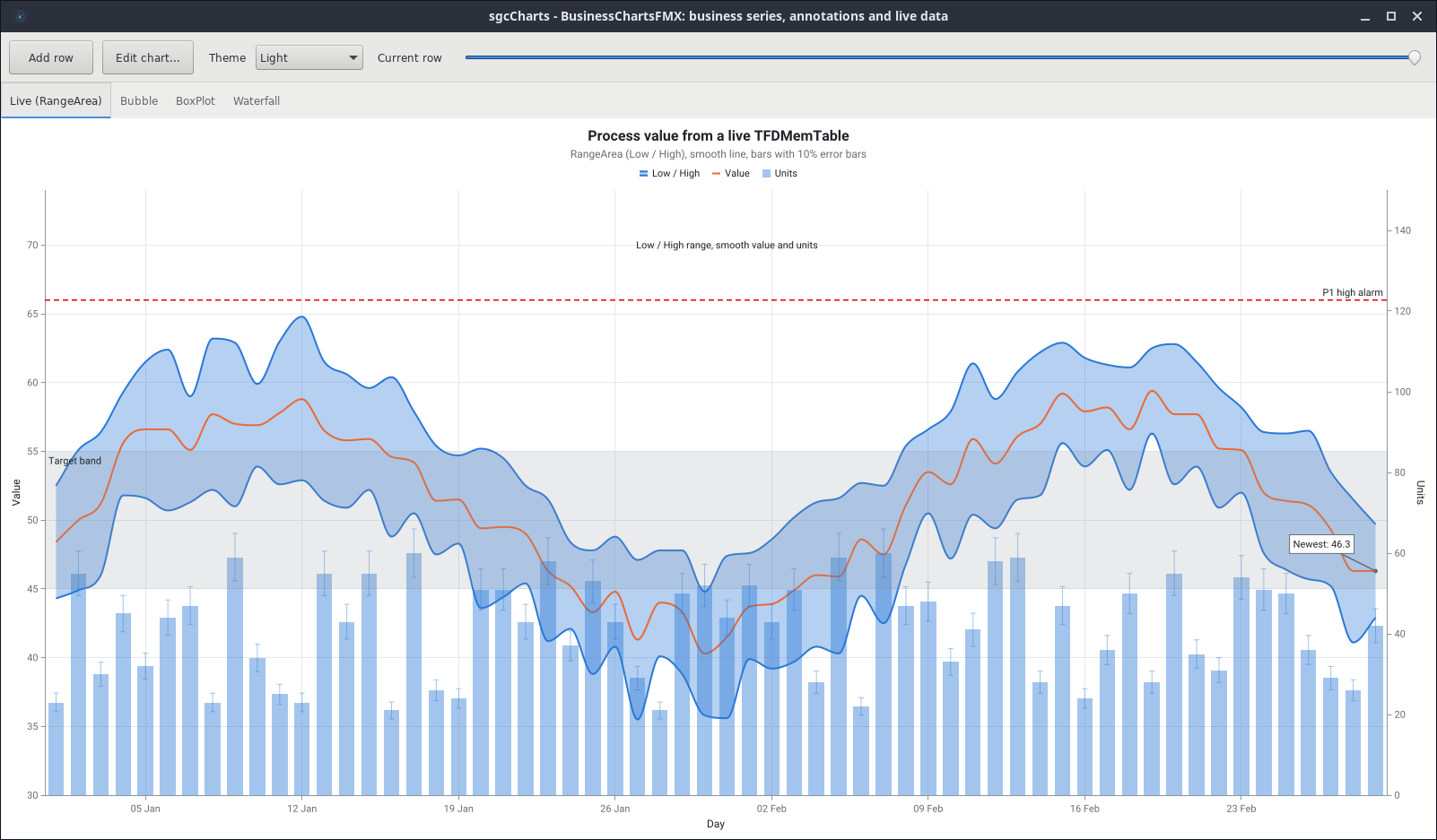
An FMX chart with a range area, a smooth line, error bars and a target band, fed by a live dataset.
sgcCharts →
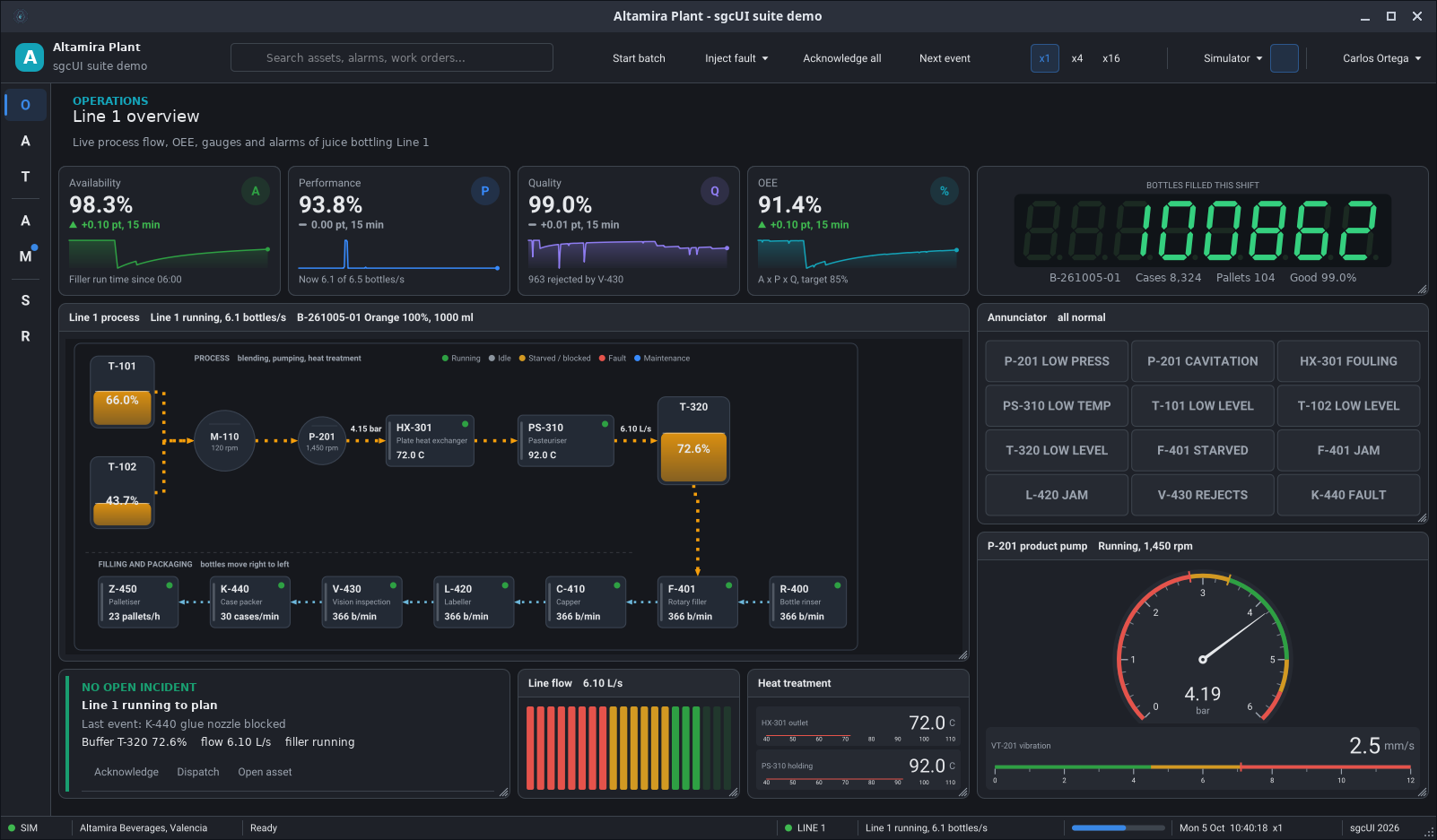
Factory HMI: process flow, OEE cards, an LED counter, an annunciator and a pump gauge.
sgcGauges →
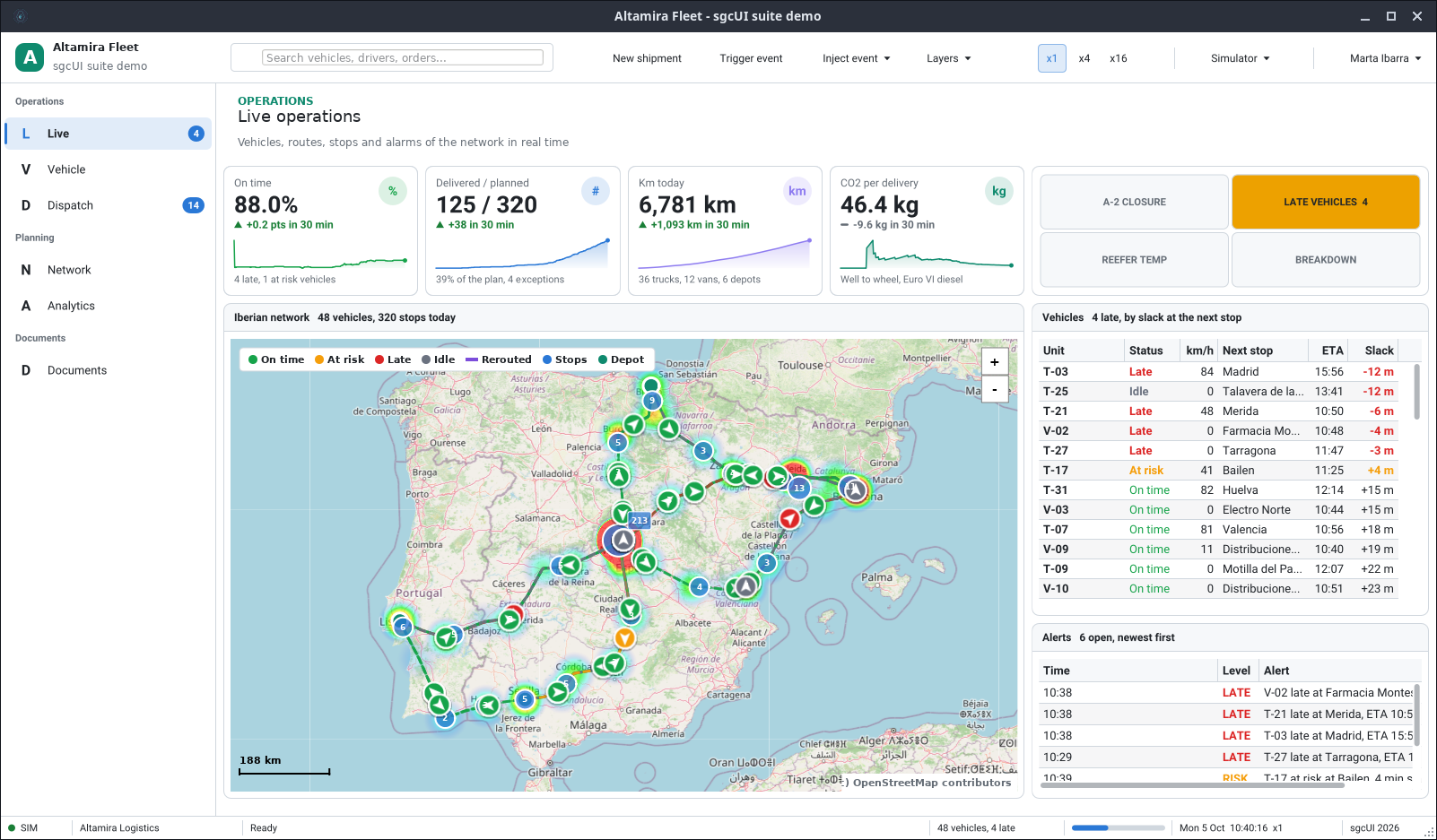
Live fleet operations: vehicles and routes on a map, a vehicles grid and alerts.
sgcMaps →
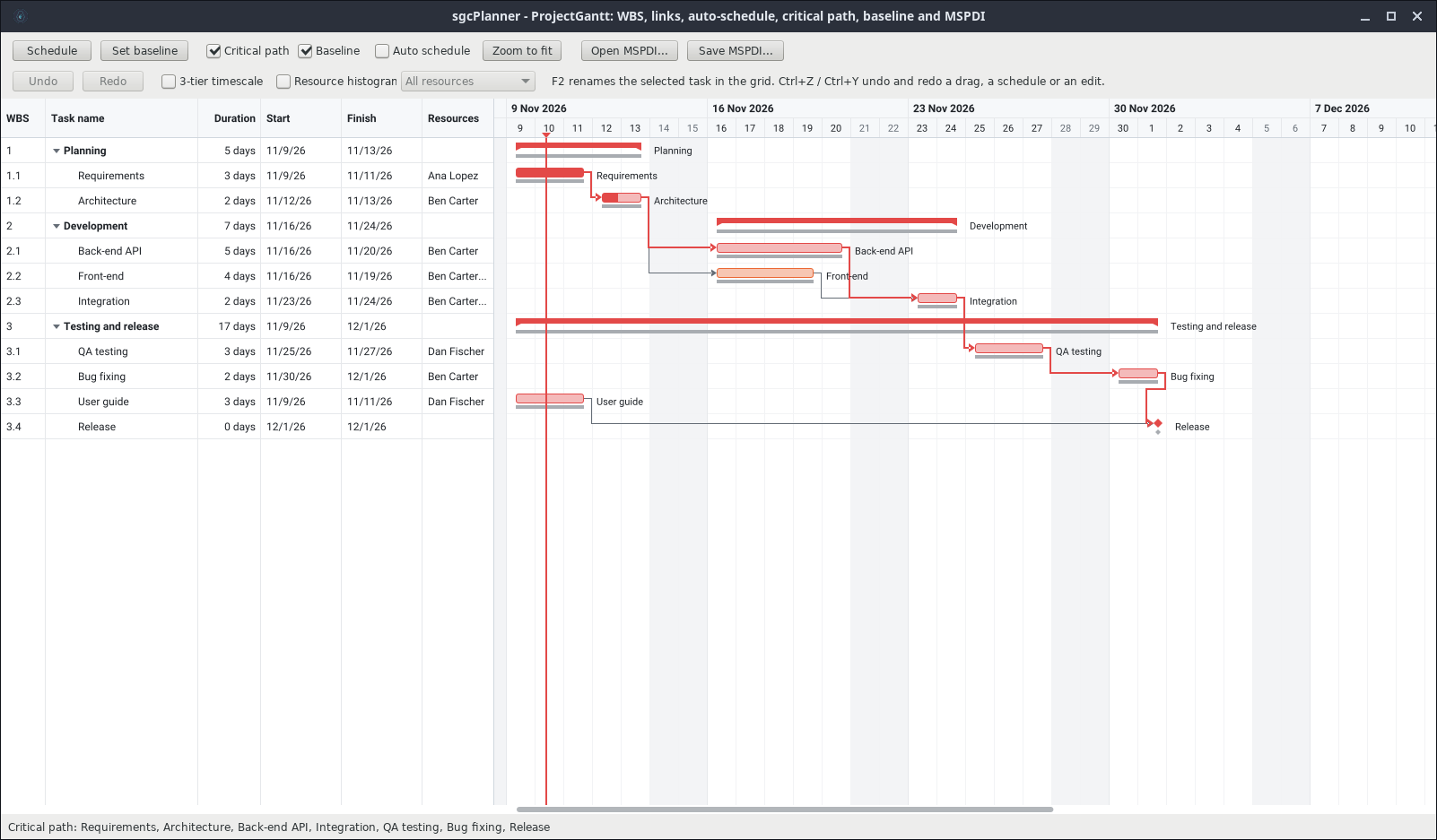
An FMX Gantt chart with task links, a baseline and the critical path.
sgcPlanner →
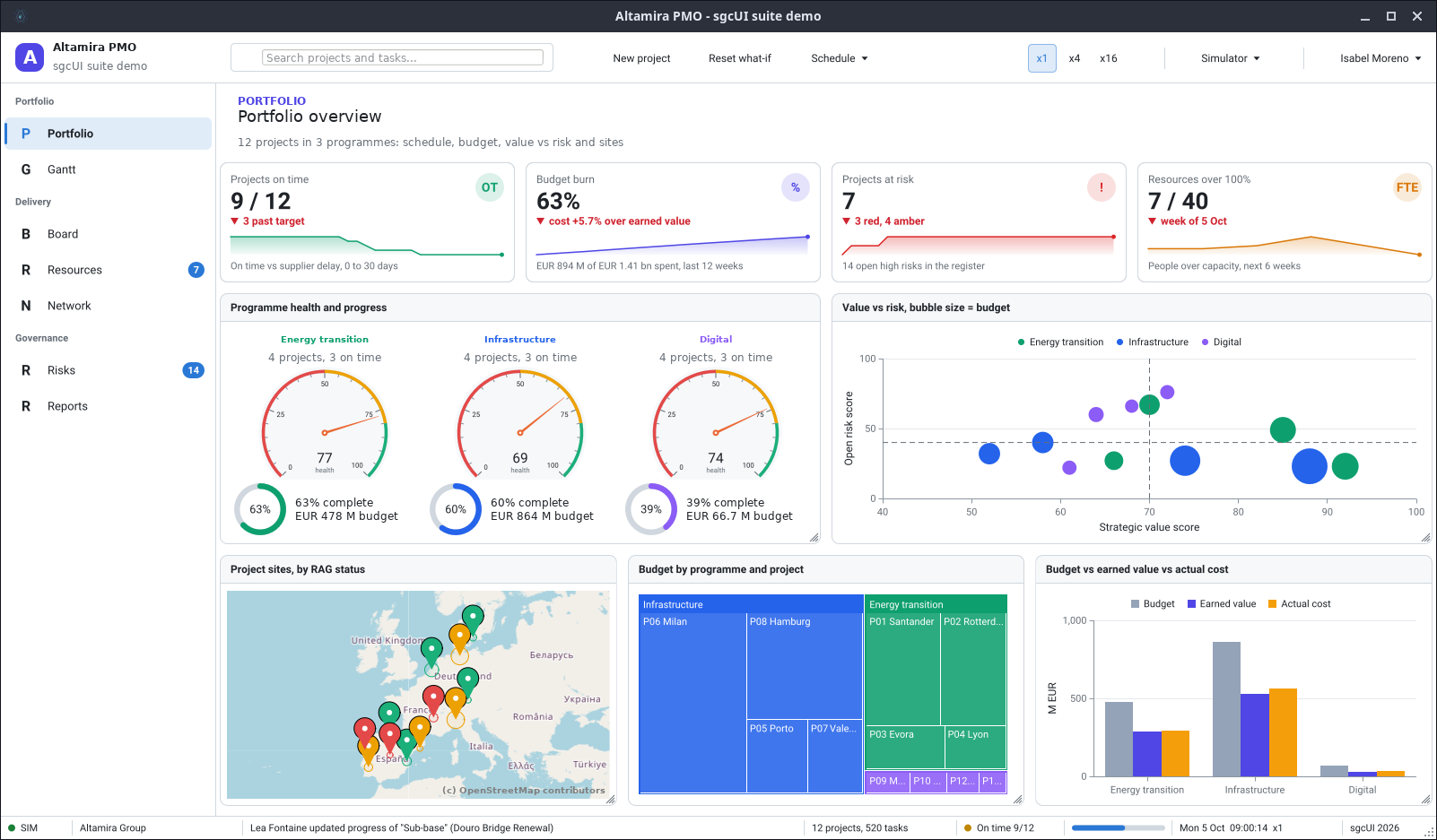
Project portfolio: health gauges, a bubble chart, a site map and a budget treemap.
sgcUI demos →
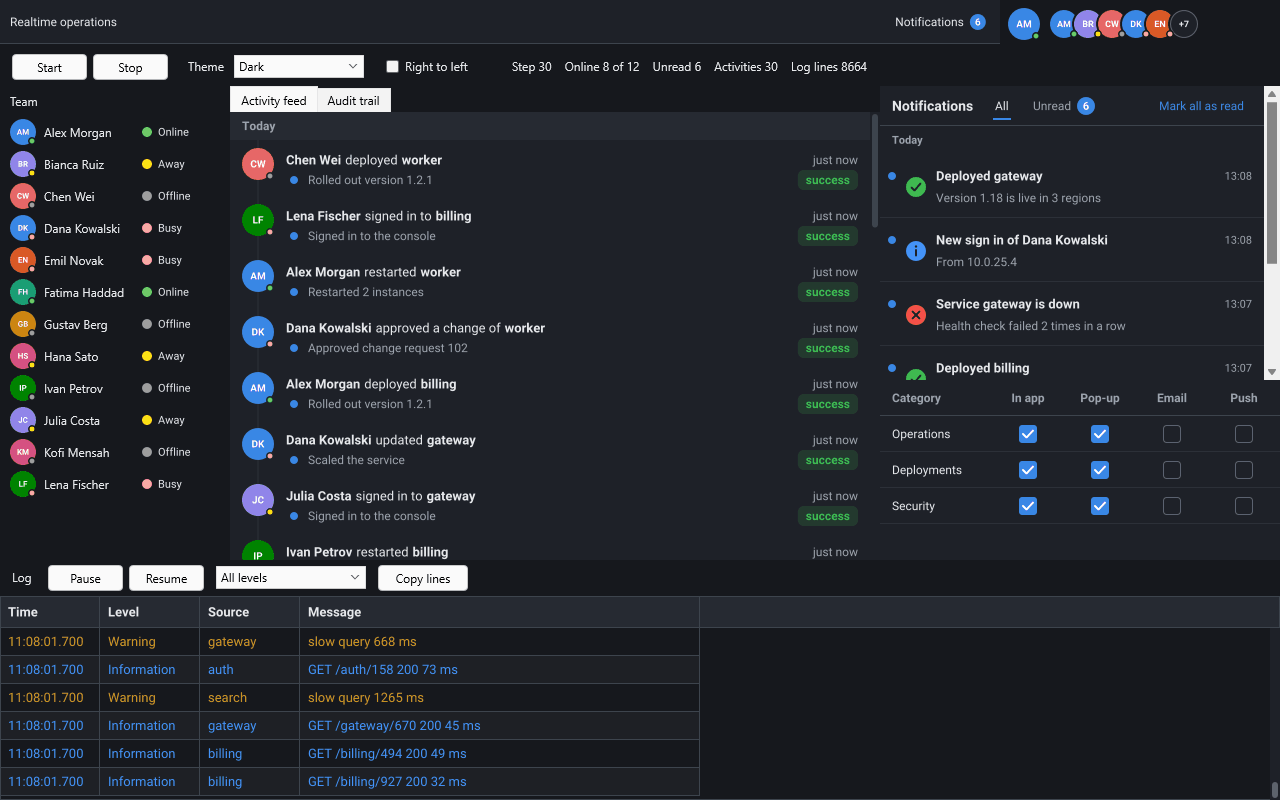
The Realtime demo on FireMonkey: presence, an activity feed, a notification inbox and a live log.
Notifications →
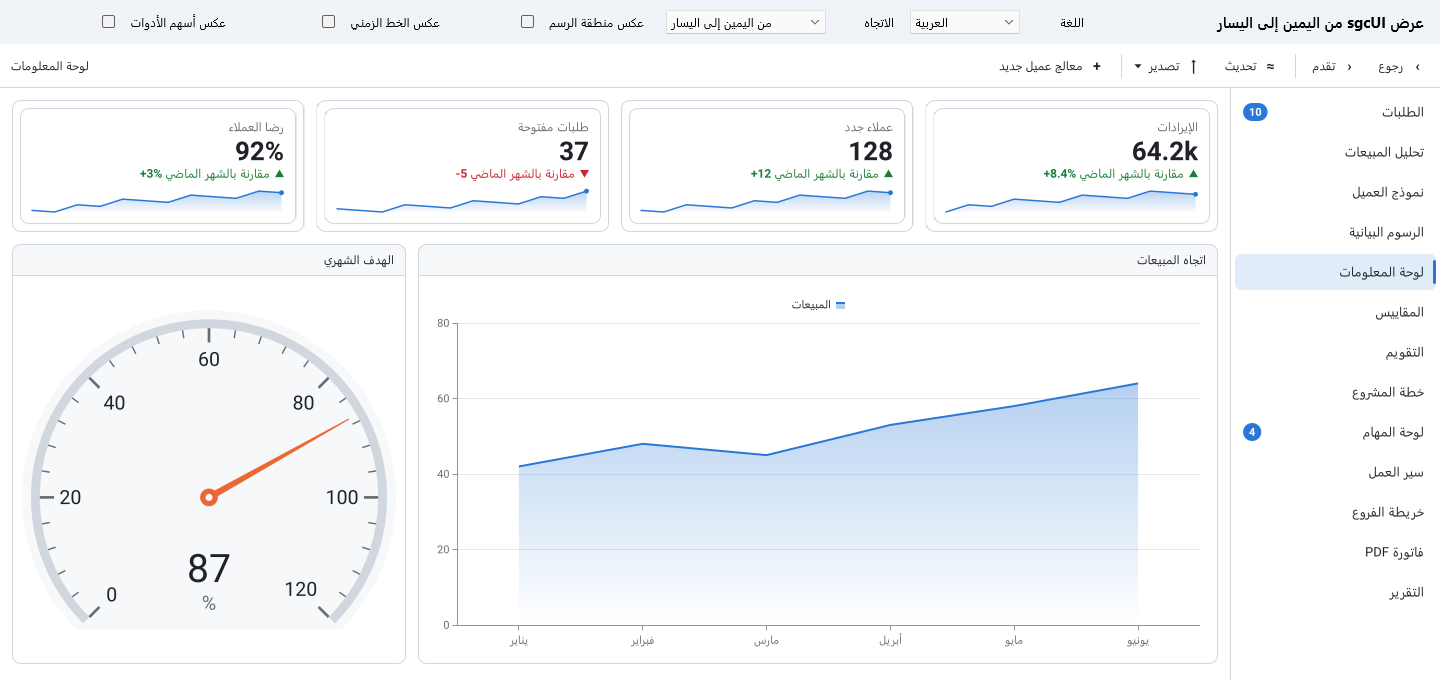
Arabic on FireMonkey: the layout flows from the right and the numbers stay readable.
Right to left →The sgcUI FireMonkey controls are ordinary FMX components. Drop them on a FireMonkey form, set them in the Object Inspector, handle their events in Pascal and build for the platform you target.
The same FireMonkey forms and the same sgcUI controls build for Windows, macOS, iOS and Android, and for Linux64 desktops with FMXLinux.
Every control is drawn by sgcUICore, the shared canvas, rasterizer and theme runtime, so a grid on a Mac looks and behaves like the grid on a Windows desktop.
The grid scrolls with a pan of the finger, the map pans, pinches to zoom and rotates with two fingers, and a tap on a navigation row works like a click.
A FireMonkey control renders in device pixels at the scale FireMonkey reports for its form, and renders again when that scale changes.
The controls can follow the light or dark choice of Windows, and of macOS, iOS and Android from Delphi 10.4, with the Classic, Fluent and ISA-101 presets.
Grids and charts take updates from any thread and coalesce them into timed repaints, so a fast feed stays smooth on a laptop or a tablet.
FireMonkey controls carry the TsgcFMX prefix. Each product ships its own FireMonkey runtime and design-time packages, and each one is sold alone or inside an sgcUI edition.
| Product | What it adds to a FireMonkey form | Main FMX components |
|---|---|---|
| sgcGrid | The FMX grid: live rows updated by key, header filters, a filter row, grouping and summaries, with drawn scroll bars and touch panning. | TsgcFMXGrid, TsgcFMXFilterBuilder |
| sgcPivotGrid | Pivot tables with a drag and drop field list, aggregations and drill down. | TsgcFMXPivotGrid, TsgcFMXPivotFieldList |
| sgcCharts | The FMX chart: 21 series types, from line and candlestick to Sankey and sunburst, plus a sparkline control. | TsgcFMXChart, TsgcFMXSparkline |
| sgcDashboard | Tile layouts and KPI cards with drag, resize and saved layouts. | TsgcFMXDashboard, TsgcFMXDashboardTile, TsgcFMXKPICard |
| sgcGauges | Radial, linear, digital and LED gauges, plus knob, slider and switch inputs that work with touch. | TsgcFMXRadialGauge, TsgcFMXLinearGauge |
| sgcPlanner | Scheduler, Gantt chart and Kanban board on one shared data model. | TsgcFMXScheduler, TsgcFMXGantt, TsgcFMXKanban |
| sgcDiagram | A diagram editor with a shape palette and connectors, and layouts that draw your records. | TsgcFMXDiagramView, TsgcFMXDiagramPalette |
| sgcMaps | A map control that draws itself, with markers, routes and offline tiles, and pinch to zoom. | TsgcFMXMap |
| sgcEditors | Fifteen input controls, among them date pickers and currency, masked and lookup edits, plus a data form. | TsgcFMXDatePicker, TsgcFMXCurrencyEdit, TsgcFMXDataForm |
| sgcNavigation | Sidebar, tabs, breadcrumb and toasts, plus a Delphi notification component with an inbox. | TsgcFMXNavigationBar, TsgcFMXNavigationTabs, TsgcFMXNotificationInbox |
| sgcToolbar | Toolbar, status bar and ribbon, with panels you can update from worker threads. | TsgcFMXToolbar, TsgcFMXStatusBar, TsgcFMXRibbon |
| sgcWizard | Multi page wizards and a stepper that check each page before the next step. | TsgcFMXWizard, TsgcFMXStepper |
| sgcRichEdit | A rich text editor with styles, lists, tables, images and links, and data-aware controls. | TsgcFMXRichEdit, TsgcFMXDBRichEdit |
| sgcSpreadsheet | An Excel style spreadsheet with a formula bar and 211 worksheet functions, built on sgcGrid. | TsgcFMXSpreadsheet, TsgcFMXSpreadsheetFormulaBar |
| sgcChat | Chat views for an AI assistant or a team, with a Markdown viewer. | TsgcFMXChatView, TsgcFMXChatPanel, TsgcFMXMarkdownViewer |
| sgcReports | A report designer and a report preview; the FireMonkey preview runs on Windows, macOS, iOS and Android. | TsgcReportPreviewFMX, TsgcFMXReportDesigner |
| sgcPDF | A PDF viewer and a signature pad for FireMonkey, on a PDF library written in Object Pascal with no DLLs. | TsgcPDFViewerFMX, TsgcPDFSignaturePadFMX |
| sgcLocalization | Translate your FireMonkey application and switch the language at run time. Included with every sgcUI edition. | TsgcFMXLocalizer, TsgcFMXLanguageCombo |
See the sgcUI suite, the feature matrix and all Delphi components by eSeGeCe.
TsgcFMXGrid needs Delphi XE6 or later. Drop it on a FireMonkey form from the SGC Grid palette page, or create it in code as below.
uses
System.Classes, FMX.Forms, FMX.Types,
sgcUICore_Theme, sgcGrid_Columns, sgcGrid_Data, sgcGrid_FMX;
procedure CreateGrid(aForm: TForm);
var
oGrid: TsgcFMXGrid;
begin
oGrid := TsgcFMXGrid.Create(aForm);
oGrid.Parent := aForm;
oGrid.Align := TAlignLayout.Client;
oGrid.Theme := utDark;
// the columns: field name, caption and data type
oGrid.Columns.Add('Symbol', 'Symbol');
oGrid.Columns.Add('Price', 'Price', gdtFloat).DisplayFormat := '0.00';
oGrid.Columns.Add('Volume', 'Volume', gdtInteger);
// one row per key, the values in column order
oGrid.Data.AppendRow('MSFT', ['MSFT', 412.5, 1200]);
oGrid.Data.AppendRow('AAPL', ['AAPL', 228.1, 3400]);
// later: update one field of a row by its key
oGrid.Data.UpdateRow('MSFT', ['Price'], [413.1]);
end;
The grid has the same columns, data and events as the VCL grid, so the column and row code is the same one you write for TsgcVCLGrid. FireMonkey has no native scroll bars on a raster control, so the grid draws its own; the mouse wheel and a pan gesture on touch screens scroll it. See the sgcUI quick start.
Every sgcUI product ships a framework neutral runtime package, a FireMonkey runtime package from Delphi XE6 and a FireMonkey design-time package. Pick the target platform in the IDE and build.
FireMonkey applications for Windows from Delphi XE6 to Delphi 13, next to your VCL applications.
The FireMonkey packages build for macOS from Delphi 10.3.
The FireMonkey packages build for iOS and Android from Delphi 10.4, with touch input in the grid, the map, the navigation bar and the input gauges.
With the FMXLinux add-on from GetIt, the sgcUI FireMonkey controls run in real Linux64 desktop applications. FMXLinux is available to RAD Studio and Delphi Enterprise and Architect customers with an active subscription, and it needs an sgcUI edition with source code.
Tested with Delphi 13 and FMXLinux 1.84 on Ubuntu 24.04. On Linux64, printing to a printer, screen reader support and the custom window title bar are not available. Read sgcUI on Linux64 with FMXLinux, or try the compiled Linux64 demos with no Delphi installed.
One call themes every sgcUI control of the application, on every FireMonkey platform.
sgcUISetApplicationThemeFollow(utfSystem) switches the controls between light and dark when the user changes the setting, on Windows, and on macOS, iOS and Android from Delphi 10.4.uses
sgcUICore_Theme;
procedure FollowSystemTheme;
begin
// corners, line widths and the font from the Fluent preset
sgcUISetApplicationThemePreset(CS_UI_THEME_FLUENT);
// light or dark from the operating system
sgcUISetApplicationThemeFollow(utfSystem);
end;
Help: Application Theme, Theme Presets and High DPI.
sgcUI ships FireMonkey controls with the TsgcFMX prefix and VCL controls with the TsgcVCL prefix. A FireMonkey control has the properties, methods and events of its VCL twin, so what you learn on one framework carries over to the other.
The data models, formatting, import and export units compile without VCL or FireMonkey, so the code that fills a grid or a chart is the same in both.
Keep existing Windows forms on the VCL with the Delphi VCL components, from Delphi 7 to 13, and add FireMonkey screens where you need other platforms.
The same components as a C# port for WinForms, WPF and Avalonia, with the same class names.
| IDE | Framework | Targets |
|---|---|---|
| Delphi XE6 to 13 | FireMonkey | Windows, macOS, iOS and Android, as each Delphi version supports them |
| Delphi 10.3 and later | FireMonkey | macOS |
| Delphi 10.4 and later | FireMonkey | iOS and Android |
| Delphi 13 with FMXLinux | FireMonkey | Linux64 desktop applications, with the sgcUI source code |
| C++Builder | VCL and FireMonkey | Windows, through generated .hpp headers and static libraries |
One Delphi trial installs all 19 sgcUI products, VCL and FireMonkey, into the IDEs you pick. See download and pricing.
FireMonkey (FMX) is the cross platform UI framework of Delphi and C++Builder. FireMonkey components are the controls you drop on an FMX form and program in Pascal, and the same form builds for Windows, macOS, iOS and Android. sgcUI adds the controls a business application needs, such as a data grid, charts, dashboards, gauges, a planner, maps and rich text, as FireMonkey components with the TsgcFMX prefix.
Yes. The sgcUI FireMonkey packages build for macOS from Delphi 10.3 and for iOS and Android from Delphi 10.4. On Linux64 the controls run in desktop applications through the FMXLinux add-on, tested with Delphi 13 and FMXLinux 1.84 on Ubuntu 24.04; FMXLinux is available to RAD Studio and Delphi Enterprise and Architect customers with an active subscription, and the sgcUI source code is compiled into your application.
Yes. TsgcFMXGrid from sgcGrid is a FireMonkey grid for Delphi XE6 and later, with the same columns, data and events as the VCL grid, drawn scroll bars and touch panning. Rows update by key from any thread, and the FilterAndFindFMX demo shows 100,000 rows with header filters and a filter row. The free Delphi Community edition includes sgcGrid for VCL and FireMonkey as compiled packages.
Yes. TsgcFMXChart from sgcCharts paints a chart with any of its 21 series types, from line, bar and candlestick to Sankey and sunburst, and TsgcFMXSparkline draws a small trend line. For gauges and KPI tiles on the same form, see sgcGauges and sgcDashboard.
Mostly, yes. VCL and FireMonkey forms are separate frameworks, so a form uses either TsgcVCLGrid or TsgcFMXGrid. The two controls have the same properties, methods and events, and the data models, import and export units are framework neutral, so the code that adds columns, appends rows or builds a chart is the same on both. Within FireMonkey, one form and one code base serve Windows, macOS, iOS, Android and Linux64.
The sgcUI FireMonkey controls support Delphi XE6 to Delphi 13, for the platforms each Delphi version supports: macOS from Delphi 10.3, iOS and Android from Delphi 10.4, and Linux64 with Delphi 13 and FMXLinux. The installer compiles the packages for each IDE you pick and registers the FireMonkey design-time packages.
Yes. The trial installs all 19 sgcUI products, VCL and FireMonkey, into the Delphi versions you pick. To see the controls running on Linux first, download the compiled Linux64 demos, which need no Delphi, FMXLinux or licence.
Related: Delphi VCL components, sgcGrid, notifications for Delphi, the sgcUI suite and every Delphi component by eSeGeCe.