Delphi & C++ Builder VCL and FireMonkey

sgcGrid, a Data-Aware DBGrid Replacement for Delphi

sgcGrid is a data-aware Delphi grid that binds to the TDataSet your DBGrid already uses, then groups, totals, filters and exports the same rows.

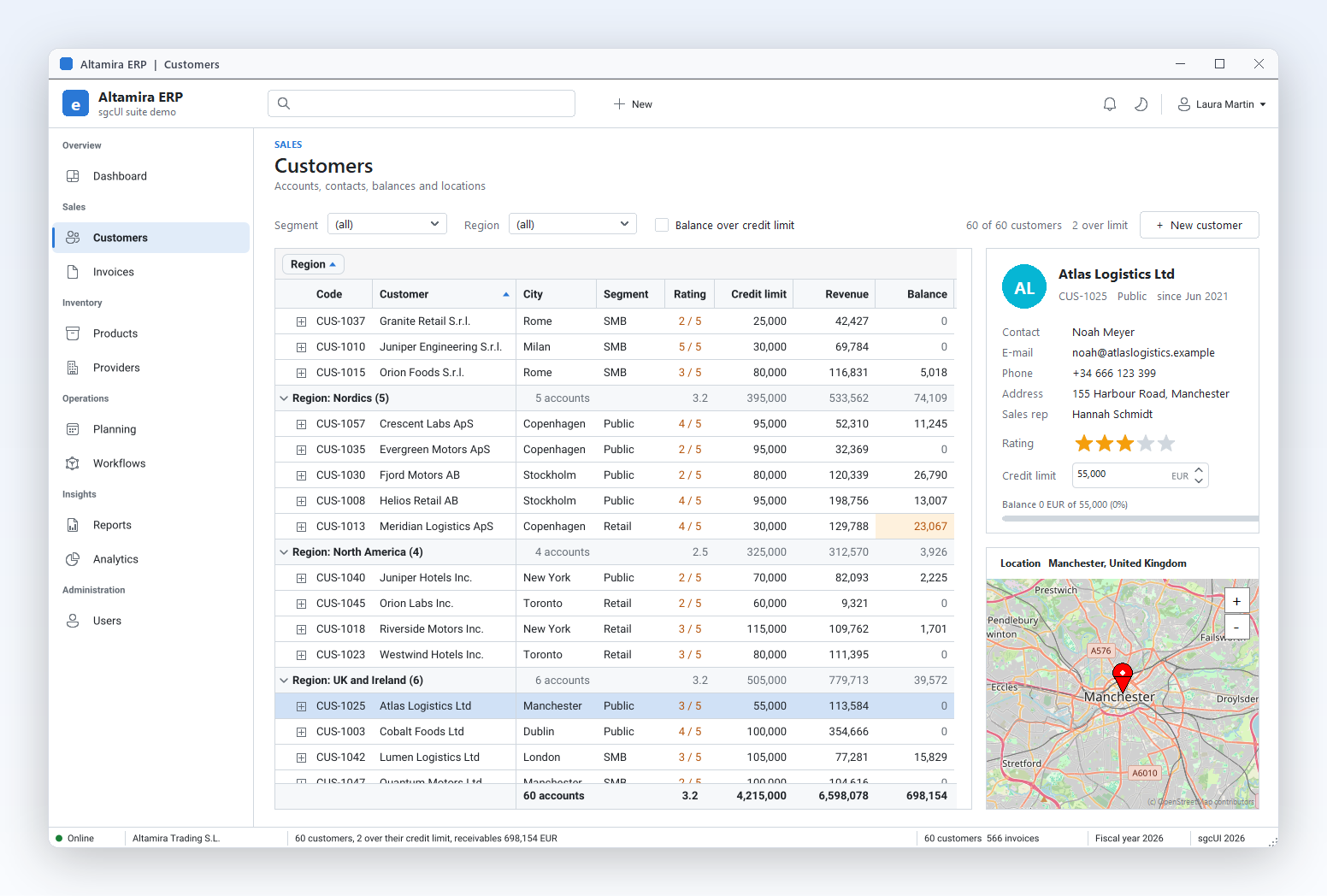
Grouping with totals
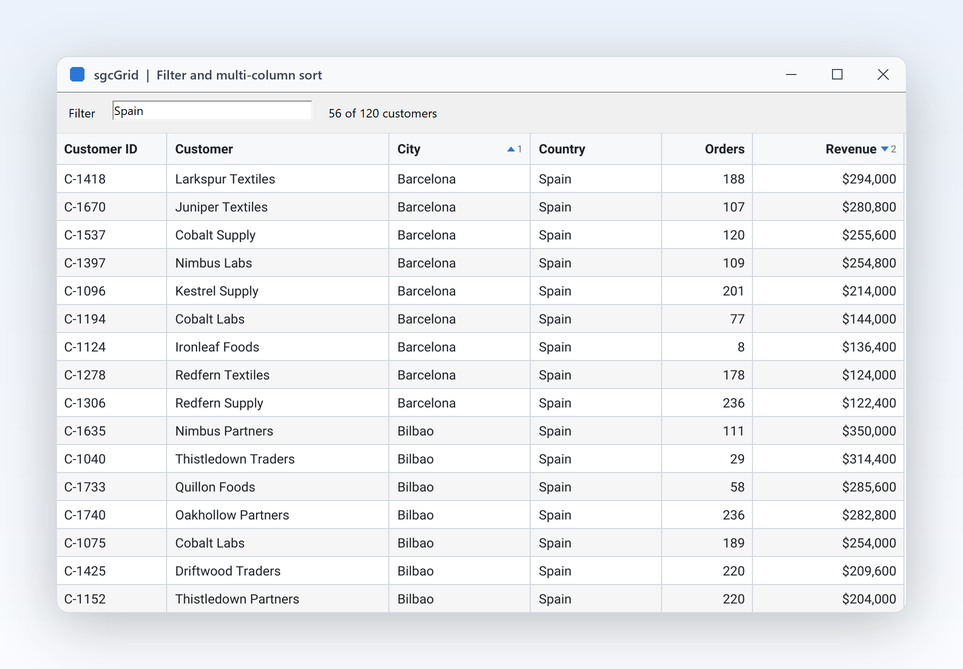
Filter row and find panel
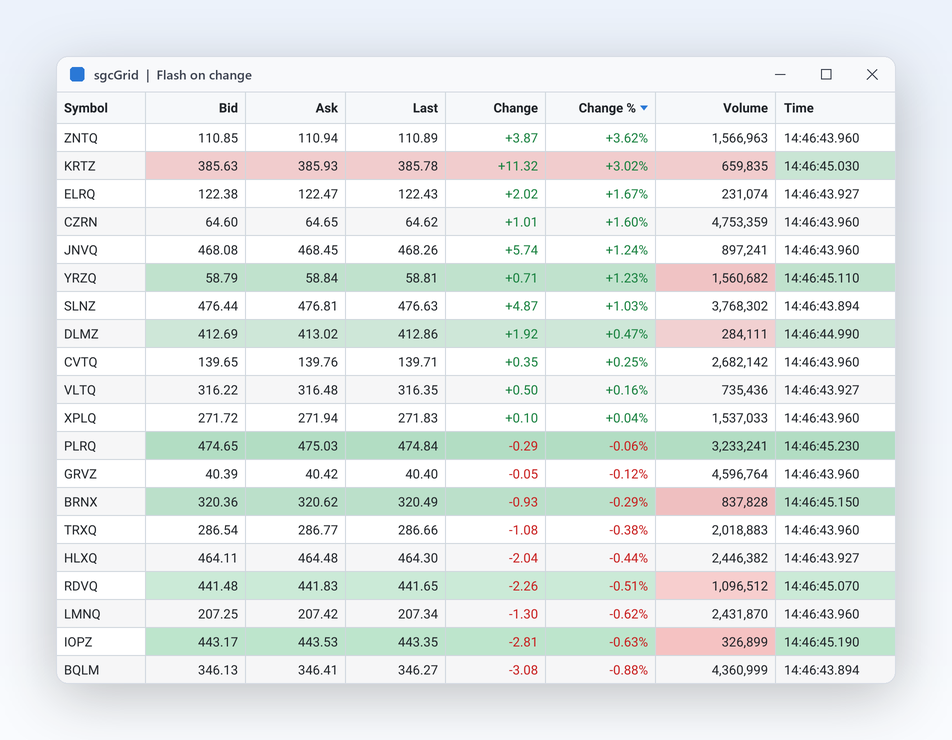
Changed rows update in place
Excel export
Any TDataSetDelphi 7 to 13FireMonkey from XE6Free Delphi Community edition

Migrate from TDBGrid → · See pricing →

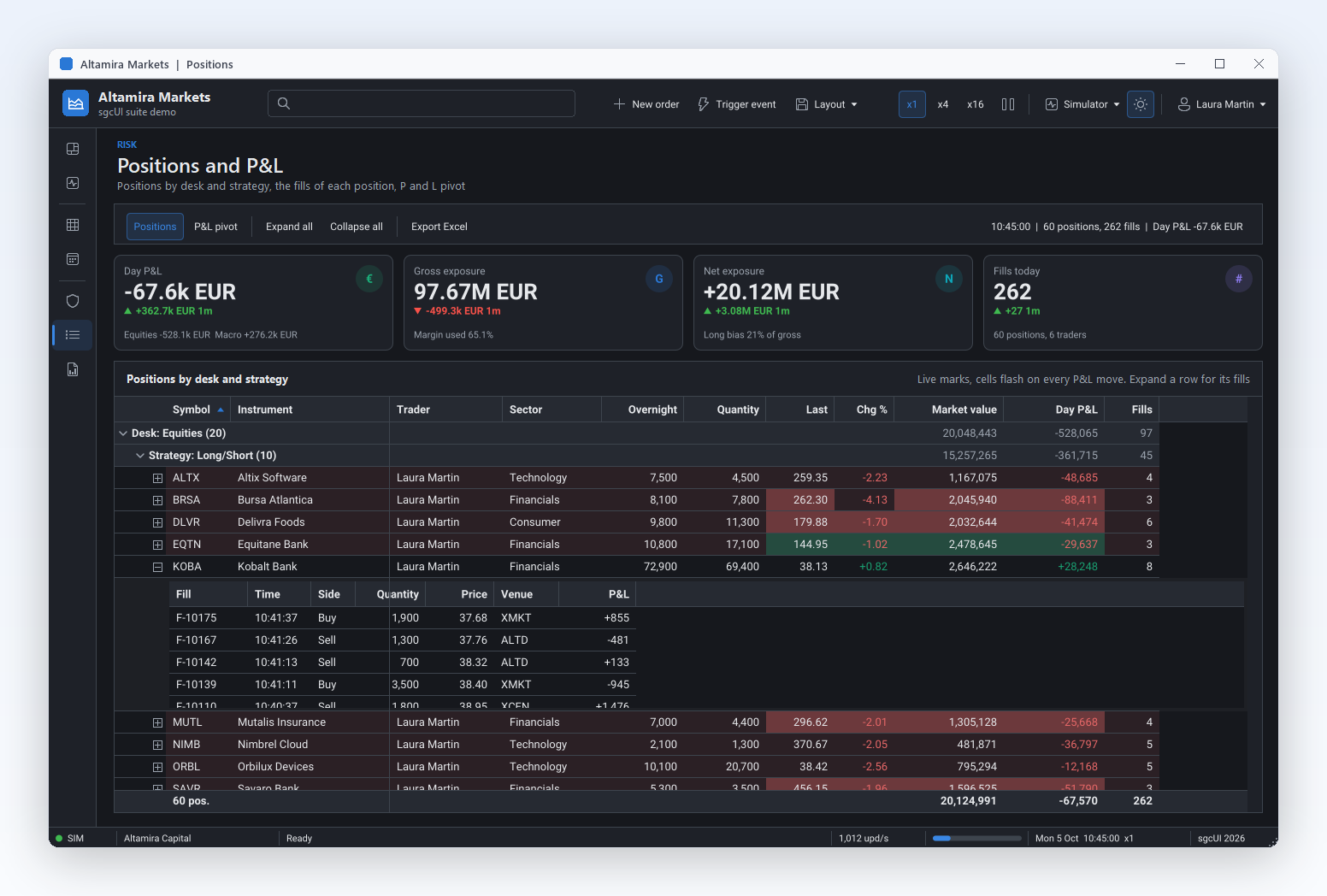
Delphi data grid grouping customers by region with summaries in every group row and totals in the footer, beside a contact card and a location map, sgcGrid in the Altamira ERP demo

Bind sgcGrid to a TDataSet, TFDQuery or TClientDataSet

Your database code keeps working. Only the grid and the link between the grid and the dataset change.

sgcGrid binds to a FireDAC TFDQuery, a TClientDataSet or any other dataset. On top of what TDBGrid shows, it groups and totals rows, filters with a filter row, column filters and a find panel, exports to Excel and updates changed rows in place, on VCL and on FireMonkey.

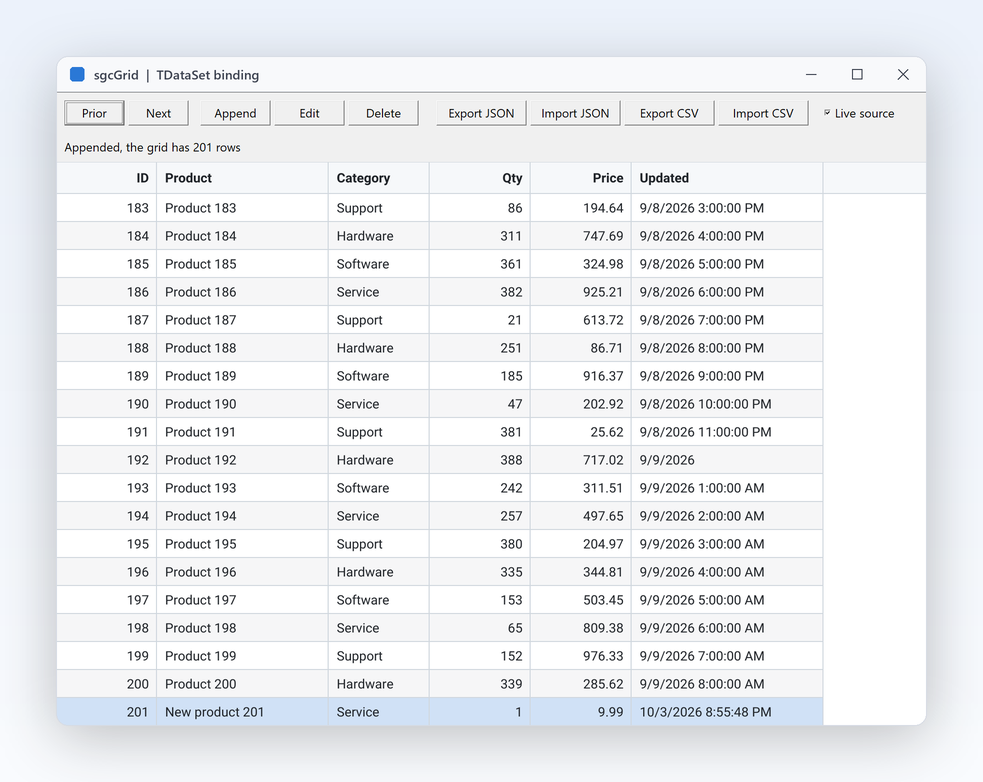
A TDBGrid reads its dataset through a TDataSource. In sgcGrid, a TsgcGridSource_DataSet takes the place of the TDataSource: set its Grid and DataSet, make it Active, and the rows appear. The dataset can be a FireDAC query, a TClientDataSet or any other TDataSet descendant.

  • With a KeyField the grid is synchronised rather than reloaded: changed rows are updated in place and flash, new keys are appended and missing keys deleted.
  • LiveUpdates makes the grid follow every Post, Delete and Refresh of the dataset.
  • AutoColumns creates the columns from the fields when the grid has none. Designed columns are kept and matched by FieldName.
  • The dataset is walked with DisableControls and its current record is restored. Closing the dataset keeps the rows.
  • Lookup fields fill the drop down list of their column, and BooleanFields shows a flag stored as text or a number, such as S and N, as a check box.
Delphi, a FireDAC query in sgcGrid
uses
  SysUtils, Classes, DB, FireDAC.Comp.Client,
  sgcUICore_Canvas, sgcUICore_Theme, sgcUICore_Table, sgcGrid_Columns,
  sgcGrid_Data, sgcGrid_Format, sgcGrid_Render, sgcGrid_IO,
  sgcGrid_Source_DataSet, sgcGrid_XLSX, sgcGrid_VCL;

procedure TOrdersForm.FormCreate(Sender: TObject);
begin
  // the query that fed the TDBGrid stays as it is
  qryOrders.Open;

  // TsgcGridSource_DataSet takes the place of the TDataSource
  FSource := TsgcGridSource_DataSet.Create(Self);
  FSource.Grid := sgcVCLGrid1;
  FSource.DataSet := qryOrders;
  FSource.KeyField := 'ID';      // changed rows update in place
  FSource.AutoColumns := True;   // columns from the fields
  FSource.LiveUpdates := True;   // follow Post, Delete and Refresh
  FSource.Active := True;
end;

The source is a component, so the same binding can live in the form file and be set in the Object Inspector:

frmMain.dfm
object SourceDB: TsgcGridSource_DataSet
  DataSet = cdsProducts
  Grid = GridDB
  KeyField = 'ID'
end

The same source binds a FireMonkey TsgcFMXGrid with the same code. Binding, grouping, summaries and filtering are part of every edition, the free Delphi Community edition included.

Read the DataSet Binding help topic
Group, Total, Filter and Export the Same Rows

The rows come from the dataset; grouping, summaries, filters and export run in the grid.

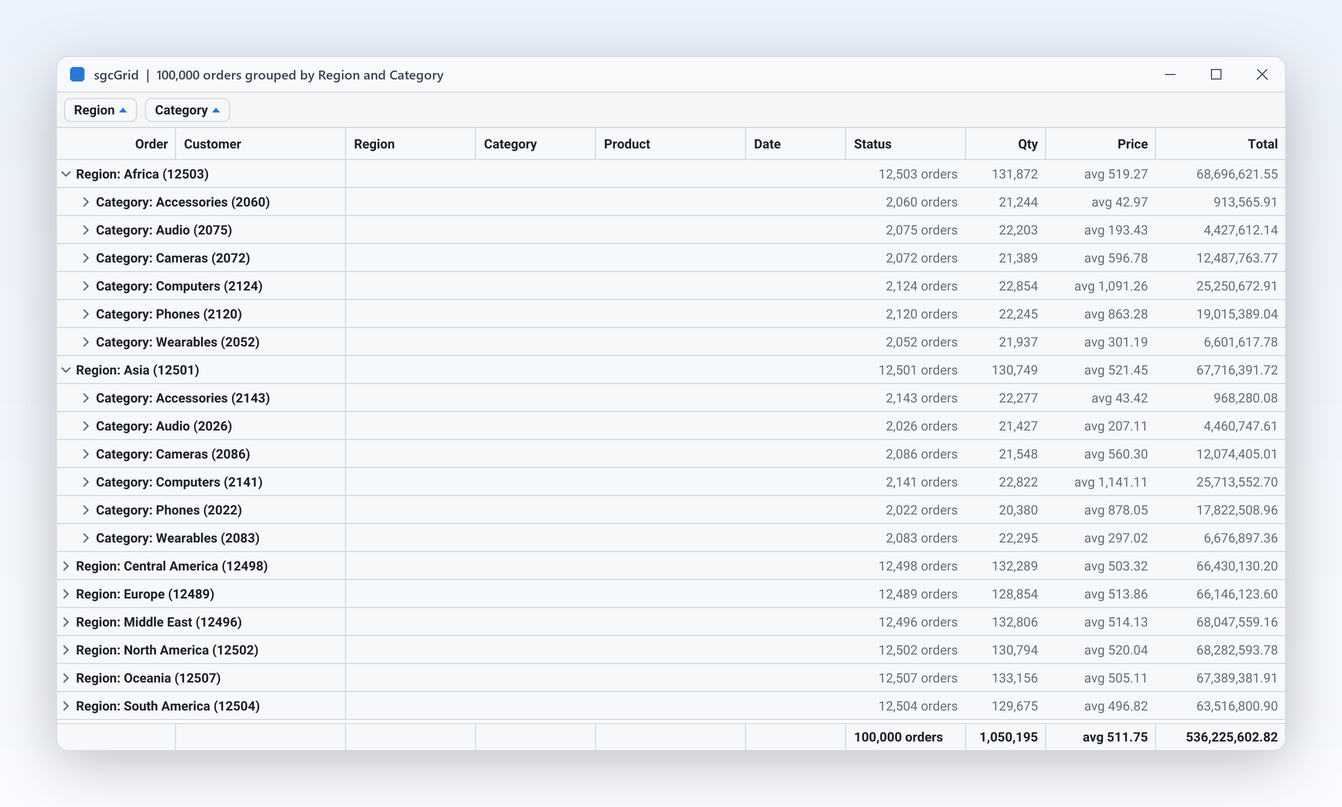
sgcGrid with 100,000 orders grouped by Region then Category, group panel chips and footer totals

What a DBGrid user gains

  • Grouping by one or more columns, from code with GroupBy or by dragging a header to the group panel
  • Sum, count, average, minimum and maximum in the footer and in every group row, with SummaryType
  • A filter row, an Excel style filter on every column and a find panel that highlights the matches
  • A header click sorts by itself, and OnApplySort passes the sort as field names, for example for the IndexFieldNames of a FireDAC query
  • SaveToXLSX writes an Excel workbook with no external library, groups as a collapsible outline and group totals as SUBTOTAL formulas (Registered edition)
  • Bands, best fit, column chooser, and the column layout saved and loaded as JSON
Delphi, grouping, totals, filters and Excel
procedure TOrdersForm.SetupGrid;
begin
  // group by region; users drag more columns to the group panel
  sgcVCLGrid1.ShowGroupPanel := True;
  sgcVCLGrid1.GroupBy(['Region']);
  // totals in the footer and in every group row
  sgcVCLGrid1.Columns.FindByField('Amount').SummaryType := gsuSum;
  sgcVCLGrid1.Columns.FindByField('ID').SummaryType := gsuCount;
  sgcVCLGrid1.ShowFooter := True;
  // a filter row under the header and the find panel
  sgcVCLGrid1.ShowFilterRow := True;
  sgcVCLGrid1.ShowFindPanel := True;
end;

procedure TOrdersForm.btnExcelClick(Sender: TObject);
begin
  // Registered edition: the sheet keeps the groups and the totals
  sgcVCLGrid1.SaveToXLSX('orders.xlsx', 'Orders');
end;

TDBGrid and sgcGrid Compared

The stock VCL TDBGrid shows and edits a dataset. This table lists what each grid does out of the box, without extra code.

FeatureTDBGridsgcGridsgcGrid edition
Bind a TDataSetThrough a TDataSourceTsgcGridSource_DataSet with DataSet, Grid and KeyFieldAll
Designed columnsColumns of TColumnColumns matched by FieldName, or AutoColumnsAll
Changed rows updated in place, with a flashNoYes, by KeyFieldAll
Sort by a header clickCode in OnTitleClickBuilt in, with OnApplySort for the datasetAll
Grouping and group panelNoGroupBy, ShowGroupPanelAll
Footer and group summariesNoSummaryType gsuSum, gsuCount, gsuAverage, gsuMin, gsuMaxAll
Filter row and column filtersNoShowFilterRow, ShowFilterButtonsAll
Find panelNoShowFindPanel, FindOnlyMatchesAll
Bands, best fit and saved layoutsNoBands, BestFitColumns, SaveLayoutToFile, AutoSaveLayoutAll
Colours per cell without drawing codeCode in OnDrawColumnCellFormatRules, OnGetCellStyle, and OnCustomDrawCell for custom paintingAll
Multi-row selectiondgMultiSelect, SelectedRowsSelectionMode gsmMultiRow, GetSelectedKeysAll
Edit and post to the datasetYes, with dgEditingWriteBack posts every edit to its record, SyncCursor keeps the current record in stepRegistered
Excel exportNoSaveToXLSX, to a file or a streamRegistered
Tables too large to loadNoServer mode with TsgcGridServerProvider_DataSet, one page at a timeRegistered
FireMonkeyNo, VCL onlyTsgcFMXGrid on Windows, macOS, iOS and AndroidAll
.NETNoWinForms, WPF and Avalonia gridsAll

See the full sgcGrid feature matrix, the benchmarks and the sgcGrid comparison.

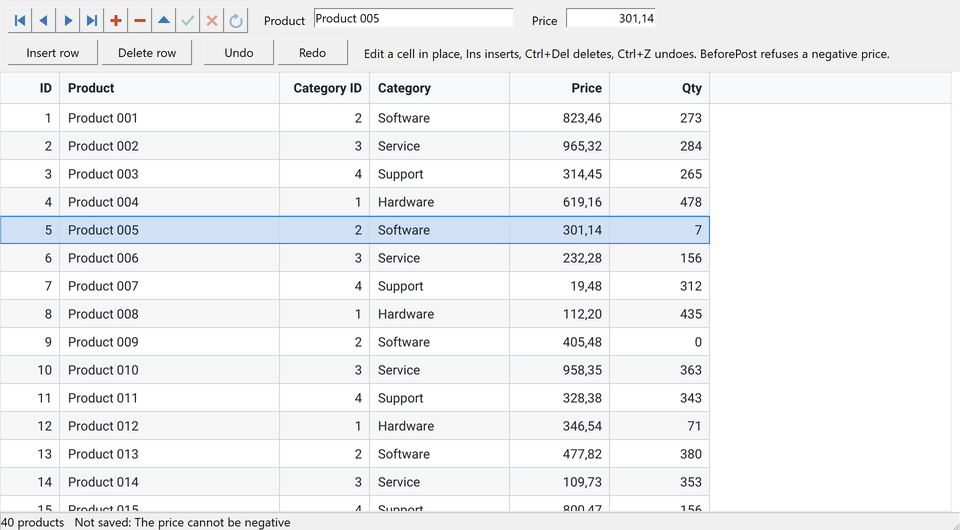
DataSetEditing demo: a TDBNavigator and two TDBEdits on the same records as the grid, with a category lookup column

Edit the dataset through the grid

With WriteBack on, the source writes every grid edit to the record of its row. It locates the record by KeyField and posts the value. When the post fails, for example in a BeforePost check, the record is cancelled and the cell keeps its old value.

  • SyncCursor keeps the current record and the focused row together, so a TDBNavigator and TDBEdit controls on the same dataset follow the grid, and the grid follows them
  • AllowInsert: Ins appends and posts a record, and OnNewRecord of the dataset fills the defaults
  • ApplyFilter makes the dataset keep only the rows the grid shows, so DB-aware controls and reports on it see the filtered rows

WriteBack, SyncCursor, insert, delete, paste and undo are part of the Registered edition. The trial includes them for evaluation.

Read the DataSet Editing help topic

How to Replace TDBGrid in Delphi

Three steps: import the columns at design time, replace the properties and events, delete the DB grid. The data stays in the same TDataSet.

  1. Save the form, then drop a TsgcVCLGrid next to the TDBGrid.
  2. Right click the grid, choose Import columns from DB grid... and pick the TDBGrid in the list.
  3. Keep the four options checked: create a TsgcGridSource_DataSet linked to the dataset of the DataSource, copy the bounds (Parent, Align, Anchors, TabOrder and more), copy the event handlers, and clear the columns of the grid first.
  4. Read the report. It lists every imported column and every event that needs porting by hand.
  5. Check the result, then delete the TDBGrid, and its TDataSource when nothing else uses it.

The import copies FieldName, Title.Caption to Caption, Width (converted to DIPs with the PixelsPerInch of the form), Visible, Alignment, ReadOnly to Editable and PickList. From code, sgcGridImportDBGrid in the unit sgcGrid_Import_VCL does the same at run time.

TDBGridsgcGrid
TDBGridTsgcVCLGrid (unit sgcGrid_VCL)
DataSourceTsgcGridSource_DataSet: DataSet, Grid, KeyField, then Active := True (unit sgcGrid_Source_DataSet)
Columns, TColumn.FieldNameColumns, Columns[i].FieldName
ReadOnly, Options dgEditingReadOnly of the grid and WriteBack of the source (Registered)
dgRowSelectSelectionMode := gsmRow
dgMultiSelect, SelectedRowsSelectionMode := gsmMultiRow, SelectedRows, GetSelectedKeys
dgIndicatorRowHeader := [grhIndicator], also grhNumbers and grhCheckBox
dgColLines, dgRowLinesGridLinesV, GridLinesH
OnDrawColumnCellOnCustomDrawCell; for colours only, OnGetCellStyle or FormatRules
OnTitleClickOnHeaderClick; the grid sorts by itself
OnColEnter, OnColExitOnSelectionChange, with SelectedCol

The TDBGrid migration kit has the full member map, before and after code from the MigrateFromDBGrid demo, which compiles with Delphi 7 and Delphi 13 (Win32 and Win64), and the known differences. Other kits are on the sgcUI migration page.

VCL, FireMonkey and Delphi Versions

One grid model drives the VCL and the FireMonkey grid, so a VCL form and a FireMonkey form share the binding code.

TargetComponentPlatforms
Delphi 7 to 13, VCLTsgcVCLGridWin32, and Win64 from XE2
Delphi XE6 to 13, FireMonkeyTsgcFMXGridWindows, macOS, iOS and Android
C++ Builder 2007 to 13TsgcVCLGrid, TsgcFMXGridGenerated .hpp headers and static libraries
.NET Framework 4.7.2, .NET 8, 9 and 10TsgcWinFormsGrid, WPF and Avalonia gridsWinForms, WPF, Avalonia

The import of TDBGrid columns runs in the VCL form designer. FireMonkey forms bind the dataset with the same TsgcGridSource_DataSet.

Community and Registered

In every edition

DataSet binding with designed columns matched by FieldName, lookup fields, cell, row and multi-row selection, row header, custom draw, Ctrl+C, group panel, footer and group summaries, filter row, Excel style column filter, find panel, bands, best fit, and JSON layout save and load. The free Delphi Community edition ships sgcGrid.

Registered edition

Two way editing into the dataset (WriteBack), cursor sync (SyncCursor), insert, delete, paste and undo, Excel export, the card view and server mode for very large tables. sgcGrid is sold alone with Single, Team and Site licenses and full source code, and is included in sgcUI Standard, Professional, Enterprise and All-Access.

See sgcGrid pricing or download the trial, which includes every Registered feature for evaluation.

Frequently Asked Questions

Drop a TsgcVCLGrid next to the TDBGrid, right click it and choose Import columns from DB grid. The import copies the columns, creates a TsgcGridSource_DataSet linked to the same dataset, copies the bounds and the event handlers, and reports the events to port by hand. Then delete the TDBGrid. The migration kit maps every property and event.

TDBGrid is a VCL control. sgcGrid has a FireMonkey grid, TsgcFMXGrid, for Delphi XE6 to 13 on Windows, macOS, iOS and Android, and the same TsgcGridSource_DataSet binds it to any TDataSet with the same code as the VCL grid.

Yes. Call GroupBy with the field names, or let users drag a column header to the group panel. Set SummaryType on a column (sum, count, average, minimum or maximum) and turn on ShowFooter: the totals appear in the footer and in every group row. Grouping and summaries are part of every edition, Community included.

Bind the dataset to sgcGrid and call SaveToXLSX with a file name or a stream. The workbook needs no external library and keeps what the user sees: the visible columns in display order with their widths and number formats, the frozen header, groups as a collapsible outline and group totals as SUBTOTAL formulas. Excel export is part of the Registered edition; the Community edition exports JSON and CSV.

Yes. A TFDQuery or TFDTable is a TDataSet, so TsgcGridSource_DataSet binds it like a TClientDataSet. OnApplySort passes the sort of the grid in the form of FireDAC IndexFieldNames, for example Name;Date:D. For a table too large to load, server mode (Registered) with TsgcGridServerProvider_DataSet reads one page at a time and lets the database sort, filter, count and group with SQL, run by FireDAC or another query component.

Yes, in the Registered edition. With WriteBack the source posts every edit to the record of its row, located by KeyField, and SyncCursor keeps the current record and the focused row together, so a TDBNavigator and TDBEdit controls on the same dataset stay in step. In the Community edition the grid shows the dataset read only.

Best value: All-AccessEvery eSeGeCe product, Premium Support included, from €1,059/year.
See All-Access pricing

Move Your DBGrid Forms to sgcGrid

Download the trial and bind sgcGrid to the datasets your Delphi application already has.