SSH, SFTP and SCP for Delphi and .NET.
Post-quantum by default.
Three clients and two servers that put SSH inside your own applications. The hybrid key exchange mlkem768x25519-sha256 is offered first on both sides, and the cryptography runs as native code.
- ML-KEM-768 + X25519
- SFTP v3
- SCP
- Ed25519
- AES-GCM
SSH is the standard way to manage servers and to exchange files securely. sgcSSH brings it to your Delphi, C++Builder and .NET applications as ordinary components, on the client side and on the server side.
With sgcSSH you run a command on a Linux server and get its output as a string, open an interactive shell, forward a port, upload a folder over SFTP or SCP, or turn your own application into an SSH and SFTP server with a private folder for every user. Client and server both offer the hybrid post-quantum key exchange first, the one the latest SSH releases use by default.
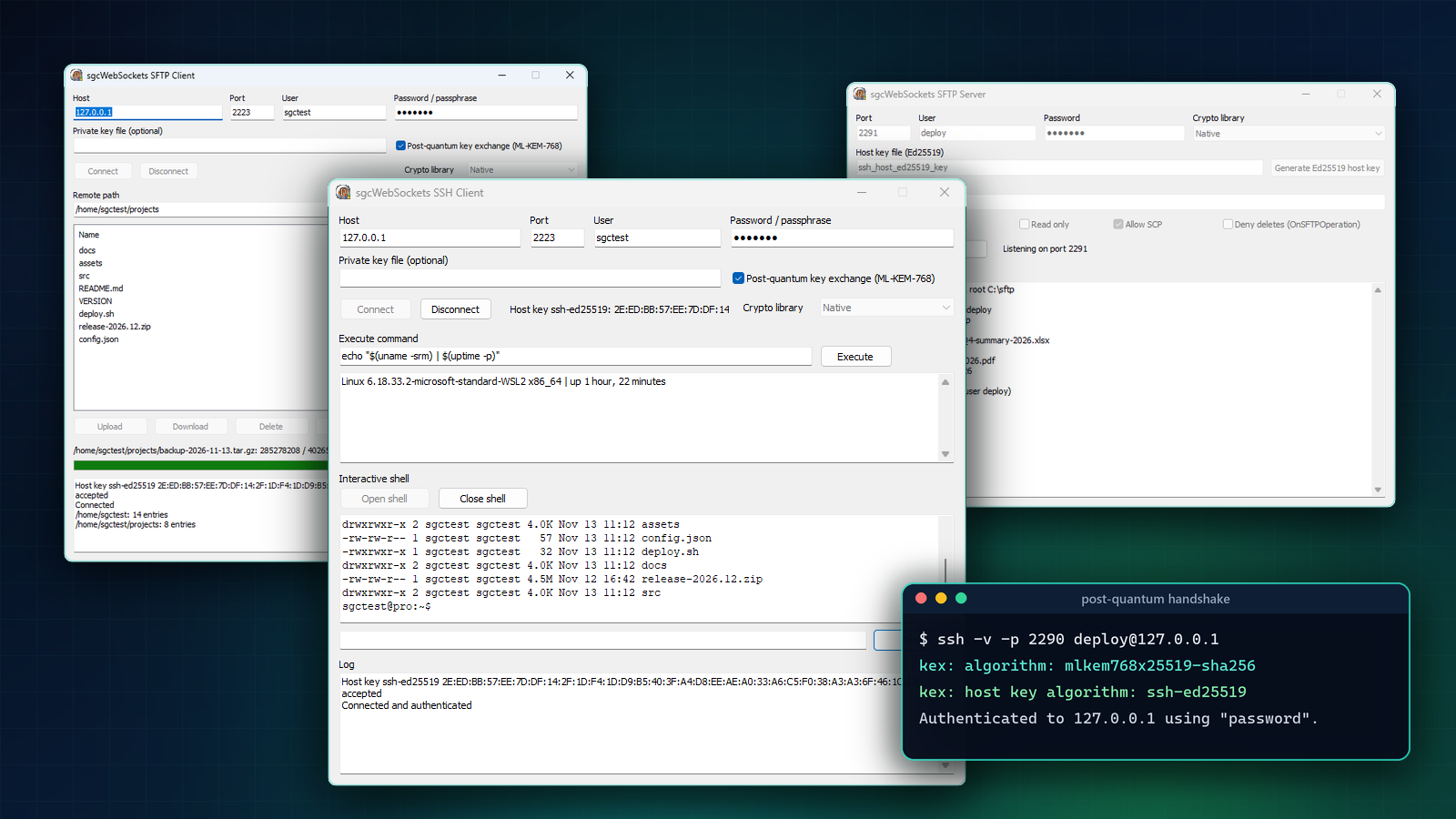
sgcSSH at a glance: the clients, the servers and the post-quantum key exchange. Also on YouTube.
Three Clients, Two Servers
Each one is a non-visual component on the SGC SSH palette page. You drop it on a form or create it in code, set the host and the credentials, wire the events, then connect or start listening. The .NET classes carry the same names.
Post-Quantum Key Exchange, On by Default
Traffic encrypted today can be attacked tomorrow. An attacker records the encrypted session now and decrypts it later, once a large enough quantum computer exists. This is called harvest now, decrypt later, and it matters for anything that has to stay private for years: credentials, contracts, customer files.
sgcSSH answers it with the hybrid key exchange mlkem768x25519-sha256. It combines ML-KEM-768 (FIPS 203), a post-quantum algorithm, with the classic X25519, so the session keys stay secret as long as one of the two is not broken. It is the default of the latest SSH releases.
- The client offers it first while
PostQuantumKexis True, which is the default. - The server offers it first to every client that connects.
- Nothing to configure. When the other side does not support it, the exchange falls back to curve25519, ECDH and Diffie-Hellman group14 and group16.
This is a standard ssh command line client connecting to the SSH server demo. The hybrid exchange is negotiated with default settings on both sides:
$ ssh -v -p 2290 deploy@127.0.0.1 "echo hello"
debug1: Remote protocol version 2.0, remote software version sgcSSH
debug1: kex: algorithm: mlkem768x25519-sha256
debug1: kex: host key algorithm: ssh-ed25519
debug1: kex: client->server cipher: aes128-ctr MAC: hmac-sha2-256 compression: none
Authenticated to 127.0.0.1 ([127.0.0.1]:2290) using "password".
hello
Native Cryptography, No DLL to Deploy
In Delphi, the CryptoLibrary property chooses where the classic algorithms (ECDH, Diffie-Hellman, AES, HMAC and the host key signatures) are computed:
sshcNativeuses the pure Object Pascal sgcCrypto units. There is no OpenSSL DLL to deploy, and the AES-GCM ciphers are preferred because they are the fastest native cipher. It is the default whenever the native cryptography is available in your license.sshcOpenSSLuses the OpenSSL 1.1.1 or 3.x DLLs, like the other TLS components of sgcWebSockets.
The hybrid ML-KEM-768 and X25519 exchange is native code of the library with both options. The .NET components are fully managed code with no OpenSSL at all, and on .NET 8 and later AES-GCM is hardware accelerated.
Uploading a file over SFTP with the post-quantum exchange and the native cryptography takes a handful of lines:
uses
  sgcSSH_Crypto, sgcSSH_Client;

procedure TForm1.UploadInvoices;
var
  SFTP: TsgcSFTPClient;
begin
  SFTP := TsgcSFTPClient.Create(nil);
  try
    SFTP.Host := 'files.example.com';
    SFTP.Authentication.Username := 'partner';
    SFTP.Authentication.Password := 'secret';
    SFTP.PostQuantumKex := True;      // the default: mlkem768x25519-sha256 first
    SFTP.CryptoLibrary := sshcNative; // sgcCrypto units, no OpenSSL DLL
    SFTP.Connect;
    SFTP.Put('C:\export\invoices.zip', '/upload/invoices.zip');
    Memo1.Lines.Add('Uploaded ' +
      IntToStr(SFTP.FileSize('/upload/invoices.zip')) + ' bytes');
    SFTP.Disconnect;
  finally
    SFTP.Free;
  end;
end;
The SSH Client: Commands, Shells and Tunnels
TsgcSSHClient signs in with a password or a private key, and OnSSHHostKey hands you the host key type and its fingerprint so you can check it against your known hosts and reject an unknown or changed key.
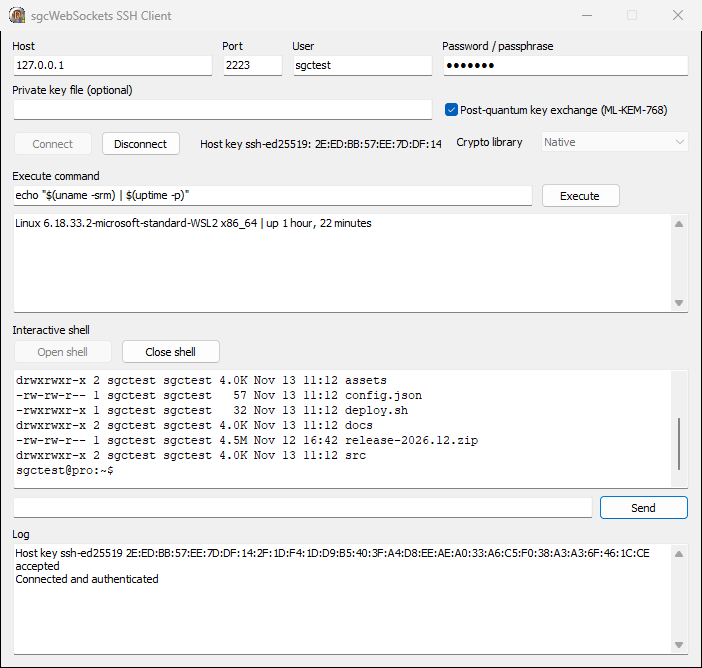
Executeruns a command and returns its output in one call, with a timeout.OpenChannel,RequestPTYandRequestShellopen an interactive terminal.SendChannelDatatypes into it,OnSSHChannelDatareturns what the server prints, andSendWindowChangeandSendSignalcover the rest of the terminal protocol.OpenDirectTCPIPforwards a local connection through the server, for example to reach a database behind a bastion host, andRequestForwardingasks the server to forward a remote port back to you.Rekeyrenews the session keys of a long running connection.
Running a maintenance command with a private key and a host key check:
procedure TForm1.CheckDisk;
var
  SSH: TsgcSSHClient;
begin
  SSH := TsgcSSHClient.Create(nil);
  try
    SSH.Host := 'build01.example.com';
    SSH.Authentication.Username := 'deploy';
    SSH.Authentication.PrivateKeyFile := 'C:\keys\id_ed25519.pem';
    SSH.OnSSHHostKey := DoHostKey;
    SSH.Connect;
    Memo1.Text := SSH.Execute('df -h /var');
    SSH.Disconnect;
  finally
    SSH.Free;
  end;
end;

procedure TForm1.DoHostKey(Sender: TObject; const aHostKeyType,
  aFingerprint: string; var aAction: TIdSSHHostKeyVerification);
begin
  if aFingerprint <> FKnownFingerprint then
    aAction := sshHostKeyReject;
end;
SFTP and SCP: Fast File Transfers
TsgcSFTPClient speaks SFTP v3 over the same SSH connection, with one method per job: RealPath resolves the home folder, ListDirectory returns names, sizes and dates, Put and Get upload and download a file, and Rename, Delete, MakeDirectory and RemoveDirectory cover the rest of a file manager. OnSFTPProgress reports the bytes transferred for a progress bar.
Transfers are fast because the client does not wait for each block. It keeps 16 requests in flight, so a 100 MB file takes about one second on a local network.
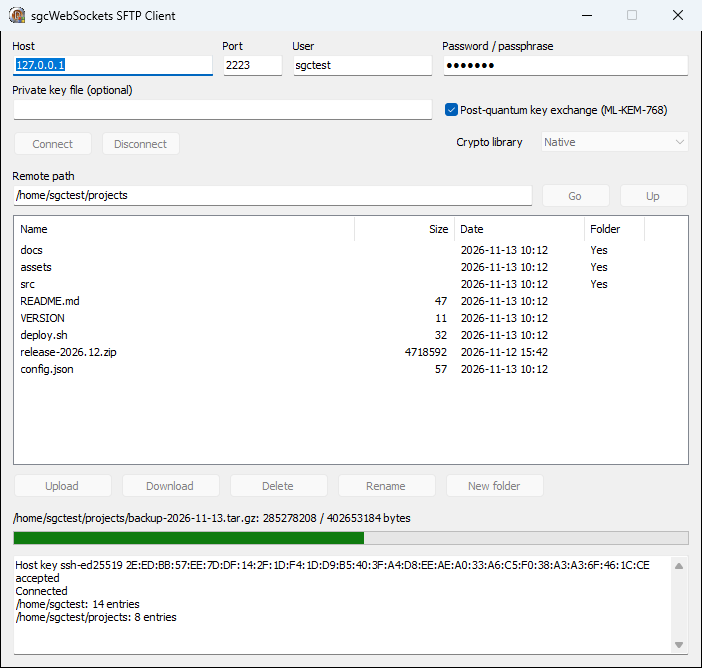
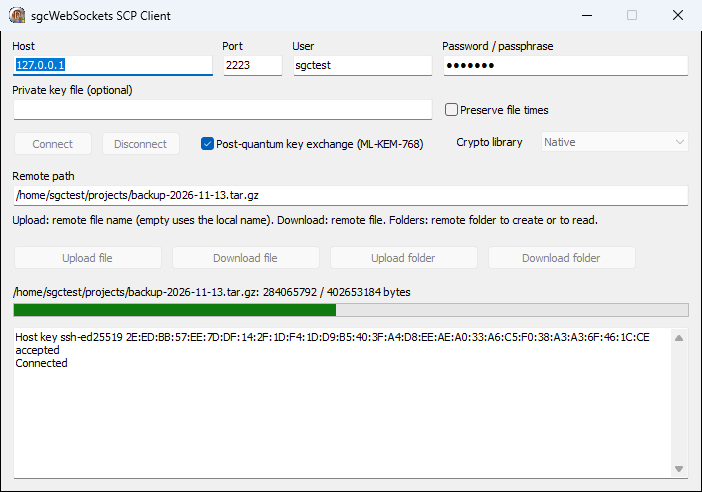
TsgcSCPClient copies files over SSH to any server that allows the scp command, with no separate file transfer service. Upload and Download copy one file, UploadFolder and DownloadFolder copy a whole folder tree, and PreserveTimes keeps the modification and access times on the other side.
Your Own SSH and SFTP Server
TsgcSSHServer listens on the port you choose and proves its identity with Ed25519, ECDSA or RSA host keys loaded from HostKeyFiles. GenerateHostKeyEd25519 creates one for you. OnSSHAuthPassword and OnSSHAuthPublicKey decide who gets in, the second one with the key type and its SHA256 fingerprint. OnSSHExec answers remote commands and OnSSHShell serves an interactive session. Any standard SSH client connects to it, including the ssh, sftp and scp command line tools.
Link a TsgcSFTPServer and the same server becomes a file server:
- A jail per user. Clients cannot leave
RootFolder, andOnSFTPUserRootgives every user a folder of its own. - Read only mode.
ReadOnlyrefuses uploads, deletes and renames. - Every operation under your control.
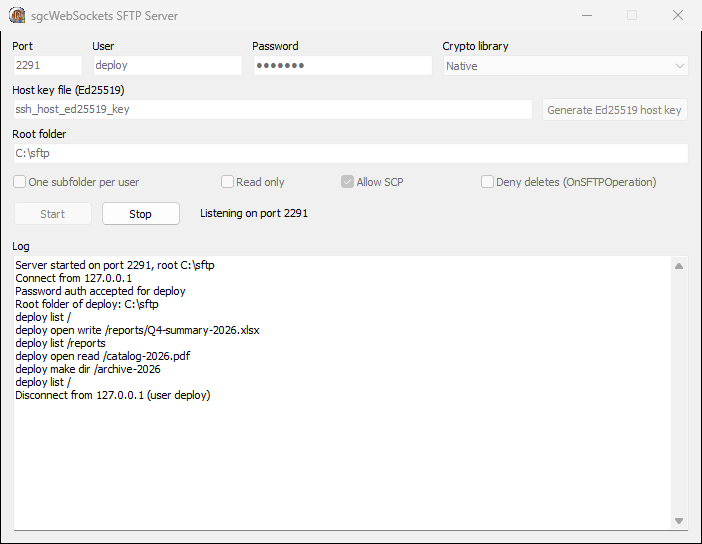
OnSFTPOperationfires for every open, remove, rename, folder change, attribute change and listing. SetaAcceptto False and the client gets a permission denied error. - SCP served too. With
SCPenabled, scp transfers are served from the same root folder. - Constant memory. Flow control keeps the memory of a large download constant, whatever the file size.
uses
  sgcSSH_Crypto, sgcSSH_Server, sgcSSH_SFTP_Server;

procedure TForm1.StartServer;
begin
  if not FileExists('hostkey_ed25519.pem') then
    TsgcSSHServer.GenerateHostKeyEd25519('hostkey_ed25519.pem');

  SFTP := TsgcSFTPServer.Create(Self);
  SFTP.RootFolder := 'D:\sftp';
  SFTP.OnSFTPUserRoot := DoUserRoot;
  SFTP.OnSFTPOperation := DoOperation;

  SSH := TsgcSSHServer.Create(Self);
  SSH.Port := 22;
  SSH.HostKeyFiles.Text := 'hostkey_ed25519.pem';
  SSH.CryptoLibrary := sshcNative;
  SSH.SFTPServer := SFTP;
  SSH.OnSSHAuthPassword := DoAuthPassword;
  SSH.Active := True;
end;

procedure TForm1.DoAuthPassword(Sender: TObject;
  aConnection: TsgcSSHServerConnection; const aUsername, aPassword: string;
  var aAccept: Boolean);
begin
  aAccept := CheckUser(aUsername, aPassword); // your own user store
end;

procedure TForm1.DoUserRoot(Sender: TObject; const aUsername: string;
  var aRootFolder: string);
begin
  aRootFolder := 'D:\sftp\' + aUsername; // every user in its own folder
  ForceDirectories(aRootFolder);
end;

procedure TForm1.DoOperation(Sender: TObject; const aUsername: string;
  aOperation: TsgcSFTPOperation; const aPath, aNewPath: string;
  var aAccept: Boolean);
begin
  if aOperation = sfoRemove then
    aAccept := False; // the client gets permission denied
end;
Here the standard sftp command line tool works with the SFTP server demo:
$ sftp -P 2291 -b batch.txt deploy@127.0.0.1
sftp> cd reports
sftp> put Q4-summary-2026.xlsx
sftp> ls -l
-rw-r--r--   1 deploy   deploy     150000 Nov 13 10:28 Q3-summary-2026.xlsx
-rw-r--r--   1 deploy   deploy     204800 Nov 13 10:28 Q4-summary-2026.xlsx
sftp> cd ..
sftp> get catalog-2026.pdf
sftp> mkdir archive-2026
On the server side, every one of those operations went through OnSFTPOperation, where the demo logs it:
Security Details
- Strict key exchange closes the prefix truncation attack known as Terrapin.
- server-sig-algs (RFC 8308) lets RSA user keys sign with rsa-sha2-512 or rsa-sha2-256 instead of SHA-1.
- Ciphers: AES-GCM and AES-CTR. MACs: HMAC-SHA2-256 and HMAC-SHA2-512, while the GCM ciphers carry their own authentication.
- Keys: Ed25519, ECDSA and RSA for host keys and user keys, loaded from PEM and PKCS#8 files. Encrypted private keys open with a passphrase.
- Your choice of algorithms. The client lists are in the
Algorithmsproperty. The Delphi client still offers diffie-hellman-group14-sha1 and ssh-rsa for old servers, and you remove them to refuse SHA-1 completely.
Delphi, C++Builder and .NET
The same five components are available on every platform sgcSSH supports:
- Delphi 7 to 13, for VCL, FireMonkey, console applications and services, on Windows Win32, Windows Win64 and Linux64.
- C++Builder, with the same components and events.
- .NET 8, .NET 9, .NET 10 and .NET Standard 2.0, in fully managed code, in the
esegece.sgcWebSocketsnamespace.
The .NET code reads the same way as the Delphi code:
using esegece.sgcWebSockets;

using (var sftp = new TsgcSFTPClient())
{
    sftp.Host = "files.example.com";
    sftp.Authentication.Username = "partner";
    sftp.Authentication.Password = "secret";
    sftp.Connect();
    sftp.Put(@"C:\export\invoices.zip", "/upload/invoices.zip");
    foreach (var item in sftp.ListDirectory("/upload"))
        Console.WriteLine($"{item.FileName}  {item.Size}");
    sftp.Disconnect();
}
Five demos in Demos\27.SSH show every component at work: 01.SSH_Client, 02.SFTP_Client, 03.SCP_Client, 04.SSH_Server and 05.SFTP_Server. The screenshots in this article come from them.
Editions
sgcSSH is included in sgcWebSockets Enterprise and sgcWebSockets All-Access. On .NET the components ship in the registered sgcWebSockets package, not in the free Community edition.
If you only need SSH and SFTP, the standalone sgcSSH pack is self-contained: it bundles the sgcWebSockets Core runtime together with the native cryptography the key exchange runs on, the sgcCustomIndy add-on that the Delphi components build on is always included in the order, and every license ships full source code.
SSH Inside Your Application, Ready for What Comes Next
Download the trial, run the SSH server demo and connect to it with any SSH client. Then drop a TsgcSFTPClient on your own form.
Questions or feedback? Get in touch, you will get a reply from the people who wrote the code.