sgcUI sgcChat is included in sgcUI Enterprise

sgcChat. An AI assistant. A team chat.

Put a chat inside your own application. sgcChat shows the answers of an AI assistant as they stream in, with Markdown, code blocks and tool calls, and connects your users to each other with presence, typing, read receipts and reactions. The same controls run on VCL, FireMonkey, WinForms, WPF and Avalonia, and the Markdown viewer also works on its own.

  • VCL
  • FireMonkey
  • WinForms
  • WPF
  • Avalonia
  • Delphi 7 to 13
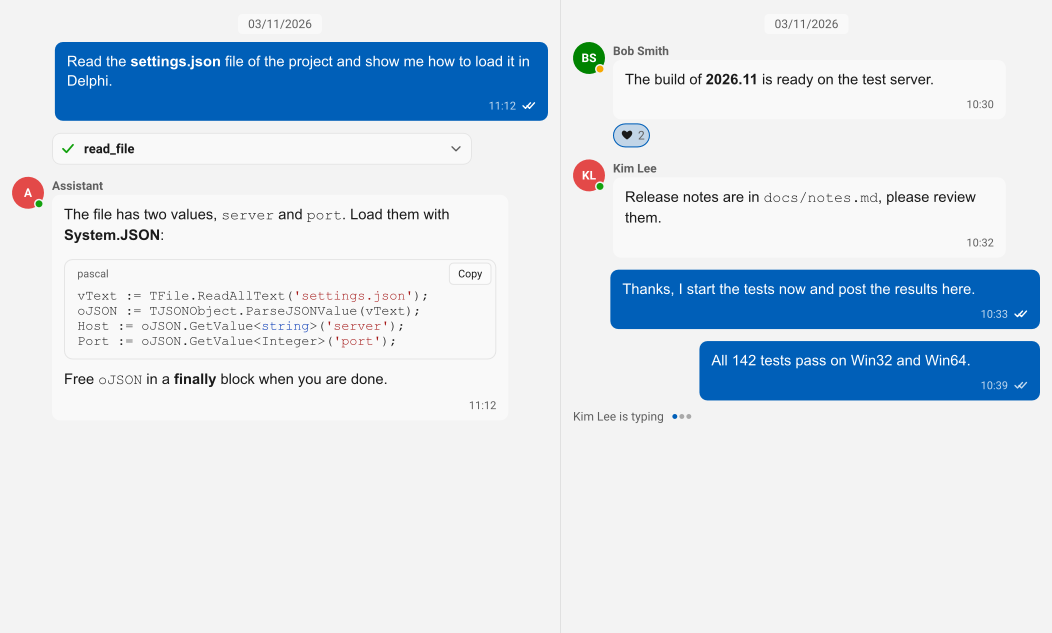
sgcChat with an AI assistant conversation next to a team chat
  • 7LLM providers through sgcWebSockets: OpenAI, Anthropic, Gemini, DeepSeek, Ollama, Grok and Mistral
  • 5UI frameworks: VCL, FireMonkey, WinForms, WPF and Avalonia
  • 3sgcUI themes it follows: light, dark and Fluent
  • 12languages for the control texts, with right to left conversations

Everything a chat needs.

An AI assistant that streams its answers, a team chat on your own server, a Markdown viewer and the same controls on every framework. sgcChat covers all of it in one product.

  • AI assistant

    Streaming answers, stop, regenerate, edit and resend, tool call cards.

  • Team chat

    Avatars, presence, typing, read receipts, reactions, replies and attachments.

  • Markdown viewer

    Headings, tables, task lists and highlighted code blocks with a copy button.

  • Every platform

    VCL, FireMonkey, WinForms, WPF and Avalonia, plus headless SVG and PNG output.

See it run.

Rendered by the sgcChat headless output. The demos install with the sgcUI trial for Delphi and C++ Builder, the .NET demos ship with the Registered .NET download.

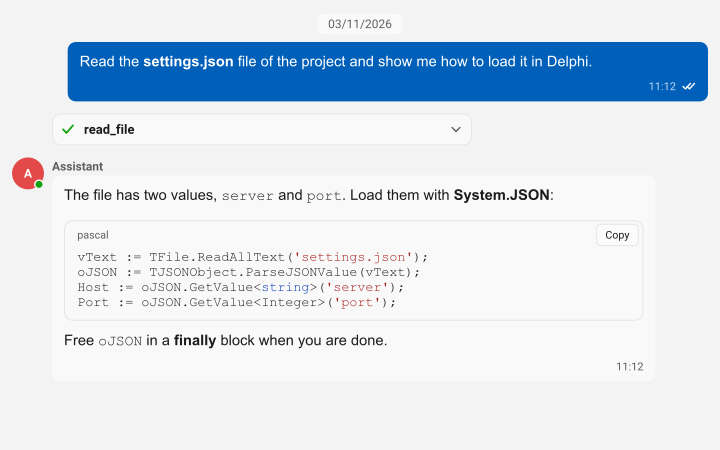
An AI assistant conversation with a tool call card and a highlighted Pascal code block
AI assistant

Streaming answers, stop and regenerate.

  • TsgcChatAI binds a conversation to a provider, sends the history and the system prompt, and shows each piece of the answer as formatted Markdown as soon as it arrives.
  • The provider runs on a worker thread, so the window stays responsive, and the chat panel offers stop, regenerate, and edit and resend for every answer.
  • Tool call cards show the tool name, the arguments, the result and a running, done or error state.
  • TsgcChatAIProvider_AIChat connects to TsgcAIChat of sgcWebSockets, and TsgcChatAIEventProvider streams from your own backend in an event. Talking to Claude, OpenAI, Gemini and the other LLM providers requires sgcWebSockets, which is included in All-Access.
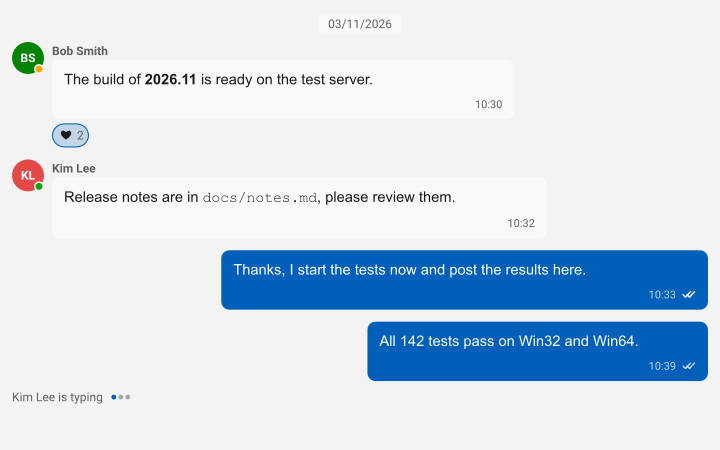
A team chat with avatars, presence, a reaction, read receipts and a typing indicator
Team chat

Presence, typing, receipts and reactions.

  • Avatars with initials or an image and a presence dot, a typing indicator and read receipts, also for group conversations.
  • Reactions, replies, edited and deleted messages, and attachments with image thumbnails and file chips.
  • TsgcChatTransport_WebSocket connects a client and TsgcChatServer_WebSocket relays the messages between the clients of a channel. The WebSocket team chat requires sgcWebSockets, which is included in All-Access. Without it, TsgcChatEventTransport connects the chat to any backend.
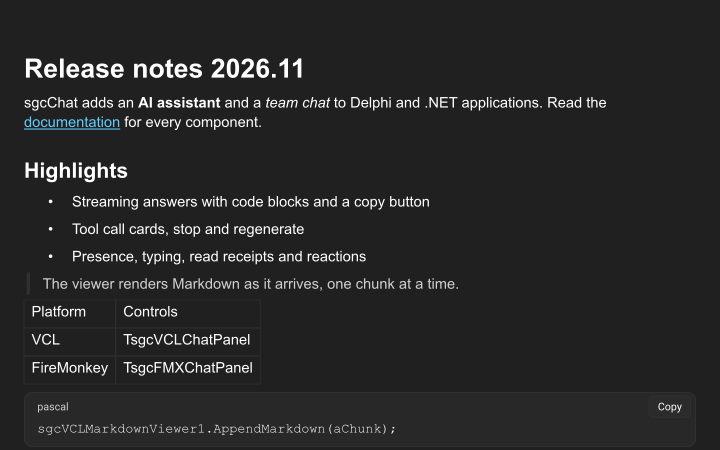
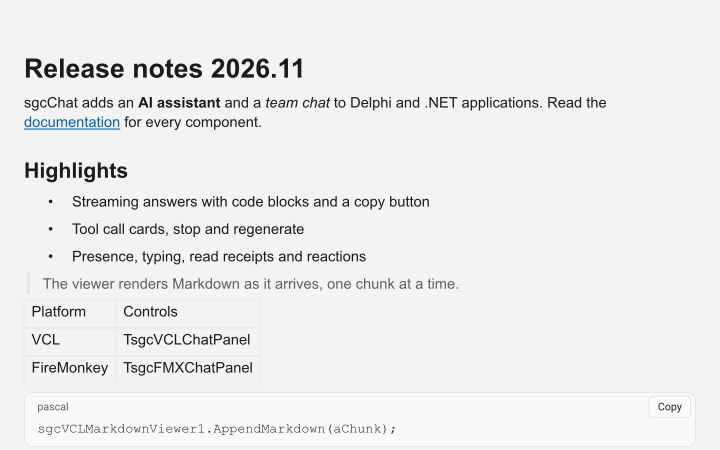
The Markdown viewer with headings, a list, a quote, a table and a code block
Markdown viewer

Markdown with code blocks and a copy button.

  • TsgcVCLMarkdownViewer and TsgcFMXMarkdownViewer show headings, emphasis, quotes, lists, task lists, tables, links and images.
  • Code blocks of Pascal, C#, C++, JavaScript, Python, JSON, SQL and other languages with syntax highlight and a copy button.
  • Streaming with AppendMarkdown and Flush, selection, Ctrl+C and an OnLinkClick event.
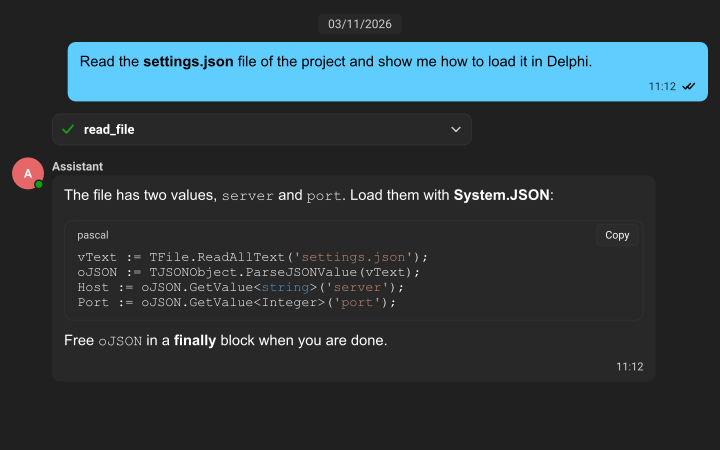
The same AI assistant conversation in the dark Fluent theme
Look and reach

Themes, right to left and 12 languages.

  • The chat follows the light, dark and Fluent themes of sgcUI, so it fits the rest of your application.
  • A conversation in Arabic or Hebrew is mirrored, and the control texts come in English, Spanish, German, French, Italian, Portuguese (Brazil), Dutch, Polish, Turkish, Japanese, Korean and Chinese.
  • UI Automation for the chat view, the Markdown viewer and the input. On Windows, the chat view is a list of messages for screen readers, with the author and the time of each message.

Connect the chat to an AI provider.

TsgcChatAIProvider_AIChat connects a TsgcChatAI binding to TsgcAIChat of sgcWebSockets. Change Provider to use Anthropic, Gemini, DeepSeek, Ollama, Grok or Mistral.

This code needs sgcWebSockets, which is included in All-Access. The team chat relay and the C# version
uses
  SysUtils, Classes,
  // sgcWebSockets
  sgcAI, sgcAI_Chat,
  // sgc
  sgcChat_AI, sgcChatWS_AI;

procedure UseOpenAI(aAI: TsgcChatAI; const aApiKey: string);
var
  oChat: TsgcAIChat;
  oProvider: TsgcChatAIProvider_AIChat;
begin
  oChat := TsgcAIChat.Create(aAI.Owner);
  oChat.Provider := aicpOpenAI;
  oChat.ChatOptions.ApiKey := aApiKey;
  oChat.ChatOptions.Model := 'gpt-6-luna';

  oProvider := TsgcChatAIProvider_AIChat.Create(aAI.Owner);
  oProvider.Chat := oChat;

  aAI.Model := oChat.ChatOptions.Model;
  aAI.Provider := oProvider;
end;

Part of sgcUI.

sgcChat is not sold as a separate package. Get it in sgcUI Enterprise next to every other sgcUI product, sharing one theme and runtime, or in the All-Access bundle. Each comes with source code.

Standard

sgcGrid, sgcNavigation, sgcToolbar and sgcEditors.

€380 / developer
See Standard

Professional

Standard plus sgcCharts, sgcDashboard and sgcGauges.

€529 / developer
See Professional
Includes sgcChat

Enterprise

All 16 sgcUI products.

€699 / developer
See Enterprise
Adds sgcWebSockets

All-Access

Every eSeGeCe product, sgcUI Enterprise and sgcWebSockets included, so the AI provider and the WebSocket bridge of sgcChat work out of the box.

€1,059 / developer
See All-Access

sgcChat requires sgcUICore and sgcRichEdit, which are included, and the installer adds sgcRichEdit and sgcPDF with it. There is no free Community edition. Talking to Claude, OpenAI, Gemini and the other LLM providers, and the WebSocket team chat, require sgcWebSockets, which is included in All-Access. Without it, TsgcChatAIEventProvider and TsgcChatEventTransport connect the chat to your own AI calls and your own backend.
Explore sgcUI

Put sgcChat in your own application today.

The sgcUI trial includes sgcChat, sgcRichEdit and every other sgcUI product. Run the AIAssistant, TeamChat and MarkdownViewer demos, or browse every feature first.

Latest from the blog

View all posts →

You are seeing the sgcChat view of eSeGeCe.

Show me another angle →
30-Day Money-Back GuaranteeNot satisfied? Request a full refund within 30 days of purchase. See refund policy