sgcUI sgcSpreadsheet is available right now

sgcSpreadsheet. A spreadsheet inside your application.

Give your users the spreadsheet they know from Excel. Values and formulas are typed as in Excel, 211 worksheet functions compute with dynamic arrays that spill, and several sheets keep defined names and frozen panes. Charts drawn from cell ranges follow the values, and workbooks load and save as XLSX files that Excel opens. An Excel style spreadsheet for Delphi, C++ Builder and .NET, with source code included.

  • VCL
  • FireMonkey
  • WinForms
  • WPF
  • Avalonia
  • Delphi 7 to 13
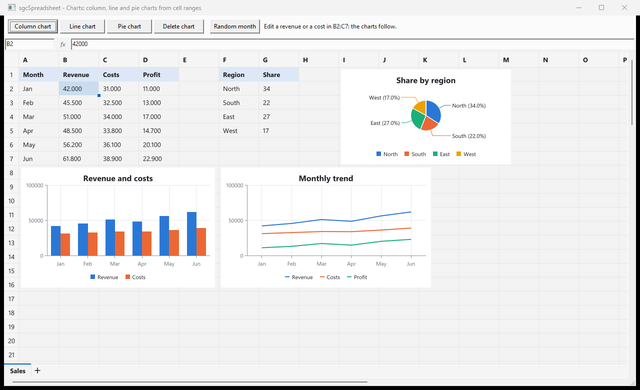
sgcSpreadsheet with a sales table and column, line and pie charts drawn from its cell ranges
  • 211worksheet functions with the names and arguments of Excel
  • 14dynamic array functions, such as SEQUENCE, SORT, FILTER and UNIQUE
  • 7chart types drawn from cell ranges by sgcCharts
  • 5UI frameworks: VCL, FireMonkey, WinForms, WPF and Avalonia

Everything a spreadsheet needs.

Typing as in Excel, a formula engine with the functions your users know, workbooks with several sheets, and charts and XLSX files for the results. sgcSpreadsheet covers all of it in one product.

  • Typed like Excel

    Values, formulas, booleans, dates and forced text with a leading apostrophe.

  • 211 functions

    Math, statistics, text, dates, lookups with XLOOKUP, logic and dynamic arrays.

  • Live charts

    7 chart types from cell ranges, updated when the cells change.

  • XLSX in and out

    Sheets, formulas, names, dynamic arrays, panes, column widths and charts.

See it run.

Captured from the sgcSpreadsheet demos. The Delphi demos install with the sgcUI trial, the .NET demos ship with the Registered .NET download.

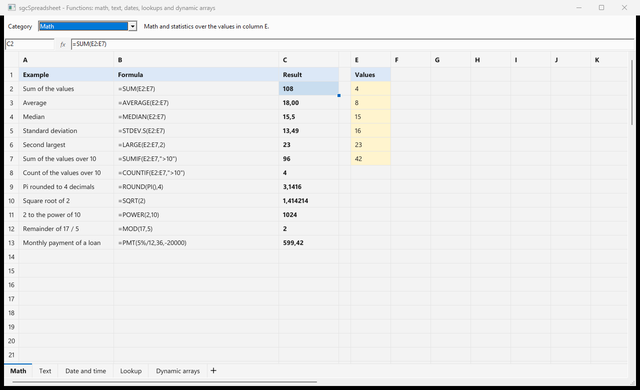
The Functions demo with math formulas and their results, one sheet per category
Formulas

The functions your users know from Excel.

  • 211 worksheet functions: math, statistics, financial, text, date and time, lookup with XLOOKUP, logical and information.
  • Dynamic arrays such as SEQUENCE, SORT, FILTER and UNIQUE spill into the cells next to them, with #SPILL! and A1# references as in Excel.
  • A dependency graph recalculates only the cells that depend on a change, and functions registered by your application work like the built in ones.
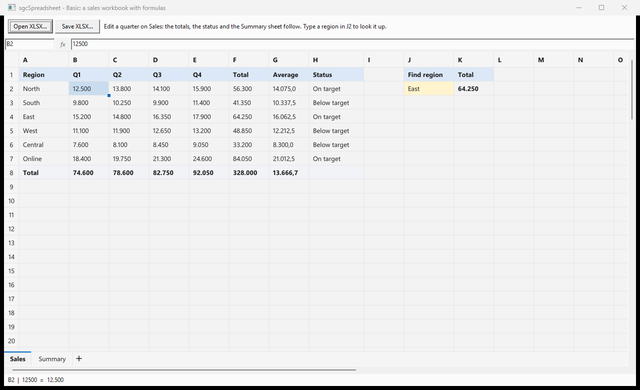
The Basic demo with a sales workbook and the formula bar
Workbooks and files

Several sheets, saved as XLSX.

  • Tabs under the grid switch the sheet, the + tab adds one, and a renamed sheet is renamed in every formula that refers to it.
  • Defined names, frozen panes, a formula bar with a name box, and forced text with a leading apostrophe.
  • LoadFromXLSX and SaveToXLSX keep formulas, formats, names, dynamic arrays, frozen panes, column widths and charts.
The Charts demo with column, line and pie charts over the sheet
Charts and .NET

Charts that follow the cells.

  • AddChart draws a chart of a range with sgcCharts in 7 types: column, bar, line, area, pie, doughnut and scatter.
  • Charts float over the sheet, move and resize with the mouse, update when the values change, and are saved to XLSX as charts Excel opens.
  • TsgcWinFormsSpreadsheet, TsgcWpfSpreadsheet and TsgcAvaloniaSpreadsheet use the same names as the Delphi controls.

Build a sheet in a few lines.

Write values and formulas, spill a dynamic array, freeze the header row, add a chart and save the workbook as XLSX. Rows and columns are 0-based, so (0, 0) is A1.

The C# version

uses
  sgcSpreadsheet_Charts, sgcSpreadsheet_VCL;

procedure TForm1.BuildBudget;
var
  oChart: TsgcSpreadsheetChart;
begin
  // row and column are 0-based: (0, 0) is A1
  sgcVCLSpreadsheet1.SetCellInput(0, 0, 'Month');
  sgcVCLSpreadsheet1.SetCellInput(0, 1, 'Revenue');
  sgcVCLSpreadsheet1.SetCellInput(1, 0, 'Jan');
  sgcVCLSpreadsheet1.SetCellInput(1, 1, '42000');
  sgcVCLSpreadsheet1.SetCellInput(2, 0, 'Feb');
  sgcVCLSpreadsheet1.SetCellInput(2, 1, '45500');
  sgcVCLSpreadsheet1.SetCellInput(3, 0, 'Total');
  sgcVCLSpreadsheet1.SetCellInput(3, 1, '=SUM(B2:B3)');
  // a dynamic array: the sorted revenues spill into D1:D2
  sgcVCLSpreadsheet1.SetCellInput(0, 3, '=SORT(B2:B3,1,-1)');
  // keep the header row visible while the sheet scrolls
  sgcVCLSpreadsheet1.FreezePanes(1, 0);
  // a column chart of the range, drawn by sgcCharts
  oChart := sgcVCLSpreadsheet1.AddChart(sctColumn, 'A1:B3');
  oChart.Title := 'Revenue';
  oChart.Legend := sclRight;
  sgcVCLSpreadsheet1.SaveToXLSX('budget.xlsx');
end;

Part of sgcUI.

Buy sgcSpreadsheet on its own, or get it in sgcUI Enterprise next to every other sgcUI product, sharing one theme and runtime. Each comes with source code.

On its own

sgcSpreadsheet

The spreadsheet on its own, with sgcGrid and sgcCharts installed, full source code and 1 year of updates.

€299 / developer
sgcSpreadsheet pricing

Standard

sgcGrid, sgcNavigation, sgcToolbar and sgcEditors.

€380 / developer
See Standard

Professional

Standard plus sgcCharts, sgcDashboard and sgcGauges.

€529 / developer
See Professional
Includes sgcSpreadsheet

Enterprise

All 17 sgcUI products.

€699 / developer
See Enterprise

sgcSpreadsheet runs on sgcGrid and draws its charts with sgcCharts, which are installed with it. For .NET, sgcSpreadsheet .NET ships the WinForms, WPF and Avalonia controls as Registered NuGet packages, and there is no free Community edition. sgcSpreadsheet is also in the All-Access bundle.

Explore sgcUI

Put sgcSpreadsheet in your own application today.

Download the trial and run the Basic, Functions and Charts demos, or browse every feature first.

Latest from the blog

View all posts →

You are seeing the sgcSpreadsheet view of eSeGeCe.

Show me another angle →
30-Day Money-Back GuaranteeNot satisfied? Request a full refund within 30 days of purchase. See refund policy